What Is an SEO Report? A Complete Guide to SEO Reporting (2026)
Learn what an SEO report is, what metrics to include, and how to build one that drives action. Step-by-step guide with free templates and tools.

Most businesses invest in SEO but can’t answer basic questions like “Which keywords are driving traffic?” or “Is our organic performance improving?” They publish content, build links, and tweak meta tags - but never build a system to track whether any of it works. Consider this: 96.55% of all content gets zero traffic from Google. The gap between doing SEO and measuring it is enormous - and without reporting, you have no way to know if you’re in the lucky 3.45% or not.
Understanding what is an SEO report - and how to build one that actually drives decisions - is the difference between running SEO on instinct and running it on evidence.
What Is an SEO Report?
An SEO report is a structured document that summarizes your website’s search engine optimization performance over a specific period. It pulls together data from multiple sources - Google Search Console, analytics platforms, rank trackers, and crawl tools - into a single view of what’s working and what isn’t.
A good SEO report answers three questions:
- Where are we now? Current organic traffic, rankings, and technical health.
- What changed? Trends compared to the previous period.
- What should we do next? Prioritized actions based on the data.
It’s not a data dump. The best SEO reports translate raw metrics into business context. “Organic traffic grew 12%” is data. “Organic traffic grew 12%, driven by three new blog posts targeting bottom-of-funnel keywords, generating 47 demo requests” is a report that gets people’s attention.
Why SEO Reports Matter
Accountability and Alignment
SEO is a long game. An Ahrefs study found that only 1.74% of newly published pages reach Google’s top 10 within one year - meaning most SEO work takes months before results appear. Without regular reporting, stakeholders lose patience because they can’t see progress. A monthly SEO report keeps everyone aligned on what’s happening, why, and what comes next.
It also protects you. When someone asks “What has SEO done for us lately?” - you have documented proof.
ROI Tracking
SEO often competes with paid channels for budget. Reports that tie organic traffic to conversions and revenue make the case for continued investment. According to BrightEdge research, organic search drives 53.3% of all trackable website traffic - more than paid search, social, and display combined. And HubSpot’s State of Marketing report found that website, blog, and SEO is the #1 ROI-generating channel for B2B companies. If you can show that organic search drives the majority of qualified leads at a fraction of the cost-per-acquisition of paid ads, the budget conversation gets much easier.
Spotting Problems Early
A well-structured SEO report surfaces problems before they become crises. Google launched four core updates and three spam updates in 2024 alone, any of which could shift your rankings overnight. A sudden drop in impressions, a spike in 404 errors, or declining Core Web Vitals scores all show up in the data before they hit your bottom line. For a deeper look at technical diagnostics, check out our guide on how to conduct a technical SEO site audit.
Key Metrics Every SEO Report Should Include
Not every metric belongs in every report. The table below covers the essential ones, organized by category, with what each metric actually tells you.
| Category | Metric | What It Tells You | Source |
|---|---|---|---|
| Traffic | Organic sessions | Total visits from search engines | GA4 |
| Traffic | Organic users (new vs. returning) | Audience growth and retention | GA4 |
| Visibility | Total impressions | How often your site appears in search results | GSC |
| Visibility | Average position | Overall ranking health | GSC |
| Engagement | Click-through rate (CTR) | How compelling your titles and descriptions are | GSC |
| Engagement | Bounce rate / Engagement rate | Whether visitors find what they need | GA4 |
| Keywords | Keyword rankings (tracked set) | Movement of your target keywords | Ahrefs / Semrush |
| Keywords | Keywords in top 3 / top 10 / top 100 | Distribution of ranking positions | Ahrefs / Semrush |
| Backlinks | Referring domains (new and lost) | Link building momentum | Ahrefs / Semrush |
| Technical | Core Web Vitals (LCP, INP, CLS) | Page experience health | GSC / PageSpeed Insights |
| Technical | Crawl errors and index coverage | Whether Google can access your pages | GSC |
| Conversions | Organic conversions / goal completions | Business impact of SEO | GA4 |
| Conversions | Organic revenue or lead value | ROI justification | GA4 / CRM |
Benchmark context matters. For example, Backlinko’s analysis of 4 million Google search results found that the #1 organic result gets a 27.6% CTR - 10x more than position #10. A FirstPageSage study (updated 2025) puts the spread even wider: 39.8% CTR for position 1 versus just 1.6% for position 10. Including benchmarks like these in your report helps stakeholders understand why a ranking improvement from #8 to #3 isn’t just a vanity win - it can multiply your traffic.
Pro tip: Don’t include every metric for every audience. Executives care about traffic, conversions, and revenue. Your SEO team needs the granular keyword and technical data. Tailor the report to the reader.
Types of SEO Reports
Different situations call for different report formats. Here are the four most common.
Monthly SEO Report
The workhorse of SEO reporting. Covers the past 30 days compared to the prior month and the same month last year. Includes traffic, rankings, backlinks, technical issues, and key actions taken.
Best for: Ongoing SEO management, client reporting, team alignment.
Quarterly SEO Report
A higher-level view that aggregates three months of data to show trends. Focuses on strategic progress - are we hitting our annual goals? How is organic share-of-voice changing?
Best for: Executive stakeholders, board presentations, budget planning.
Technical SEO Audit Report
A deep-dive into your site’s technical health - crawlability, indexation, site speed, structured data, and internal linking. This isn’t a recurring report; it’s triggered by specific needs (site launch, redesign, performance drop).
Best for: Development teams, migration planning, troubleshooting ranking drops. See our full technical SEO audit guide for the complete checklist.
Competitor SEO Report
Analyzes how your organic performance stacks up against specific competitors. Covers share-of-voice, keyword overlap, content gaps, and backlink comparison.
Best for: Strategy planning, identifying quick wins, executive buy-in.
How to Create an SEO Report Step by Step
Step 1: Define Your Audience and Goals
Before pulling any data, answer two questions:
- Who is reading this report? (CMO, client, development team, your own notes)
- What decisions should this report inform? (Budget allocation, content priorities, technical fixes)
These answers determine which metrics to include, how much detail to provide, and what language to use. A report for a developer needs different context than one for a VP of Marketing.
Step 2: Pull Your Data Sources
Gather data from your core tools:
- Google Search Console for impressions, clicks, CTR, average position, and index coverage. Note that GSC retains performance data for 16 months, so export your data regularly if you need longer historical comparisons.
- Google Analytics 4 for organic sessions, user behavior, and conversions
- Ahrefs or Semrush for keyword rankings, backlink profile, and competitor data
- Screaming Frog for technical crawl data (if including a technical section)
Step 3: Analyze Trends - Not Just Snapshots
Raw numbers mean nothing without context. For every metric, compare against:
- Previous period (month-over-month or week-over-week)
- Same period last year (to account for seasonality)
- Your target or benchmark (are you on track?)
Highlight what changed significantly and explain why. “Organic traffic dropped 8% month-over-month” raises alarm. “Organic traffic dropped 8% MoM due to a seasonal dip consistent with last year’s pattern” provides clarity.
Step 4: Highlight Wins and Losses
Every report should have a clear “wins” section and a “needs attention” section. Be specific:
- Win: “Our guide on AI SEO strategy moved from position 14 to position 6, driving 340 additional organic sessions.”
- Needs attention: “Core Web Vitals failed on 12 pages after last week’s CMS update. LCP degraded by 1.2 seconds on affected pages.”
Step 5: Provide Actionable Recommendations
End every section with what to do next. An SEO report that just says “rankings dropped” without suggesting a response is incomplete. Tie every insight to an action.
Step 6: Write an Executive Summary
Place a brief summary at the top - three to five bullet points covering the most important takeaways. Many stakeholders will only read this section, so make it count.
Best Free and Paid SEO Reporting Tools
| Tool | Cost | Best For | Key Features |
|---|---|---|---|
| Google Search Console | Free | Search performance data | Impressions, clicks, CTR, position, index coverage, Core Web Vitals |
| Google Analytics 4 | Free | Traffic and conversion tracking | Organic sessions, user behavior, goals, attribution |
| Google Looker Studio | Free | Dashboard creation | Connects to GSC, GA4, Sheets; auto-refresh; shareable dashboards |
| Ahrefs | From $29/mo (Trial) or $129/mo (Lite) | Keyword and backlink analysis | Rank tracking, site audit, backlink monitoring, competitor analysis |
| Semrush | From $139/mo (Pro) | All-in-one SEO reporting | Position tracking, site audit, automated PDF reports, competitive intel |
| Screaming Frog | Free (500 URLs) / $259/yr | Technical crawl data | Crawl errors, redirects, duplicate content, structured data validation |
| SE Ranking | From $65/mo | Budget-friendly reporting | Rank tracking, site audit, white-label reports |
For most teams, the free stack of GSC + GA4 + Looker Studio covers 80% of what you need. Add Ahrefs or Semrush when you need keyword tracking, backlink monitoring, or competitor data at scale.
SEO Report Template: What Sections to Include
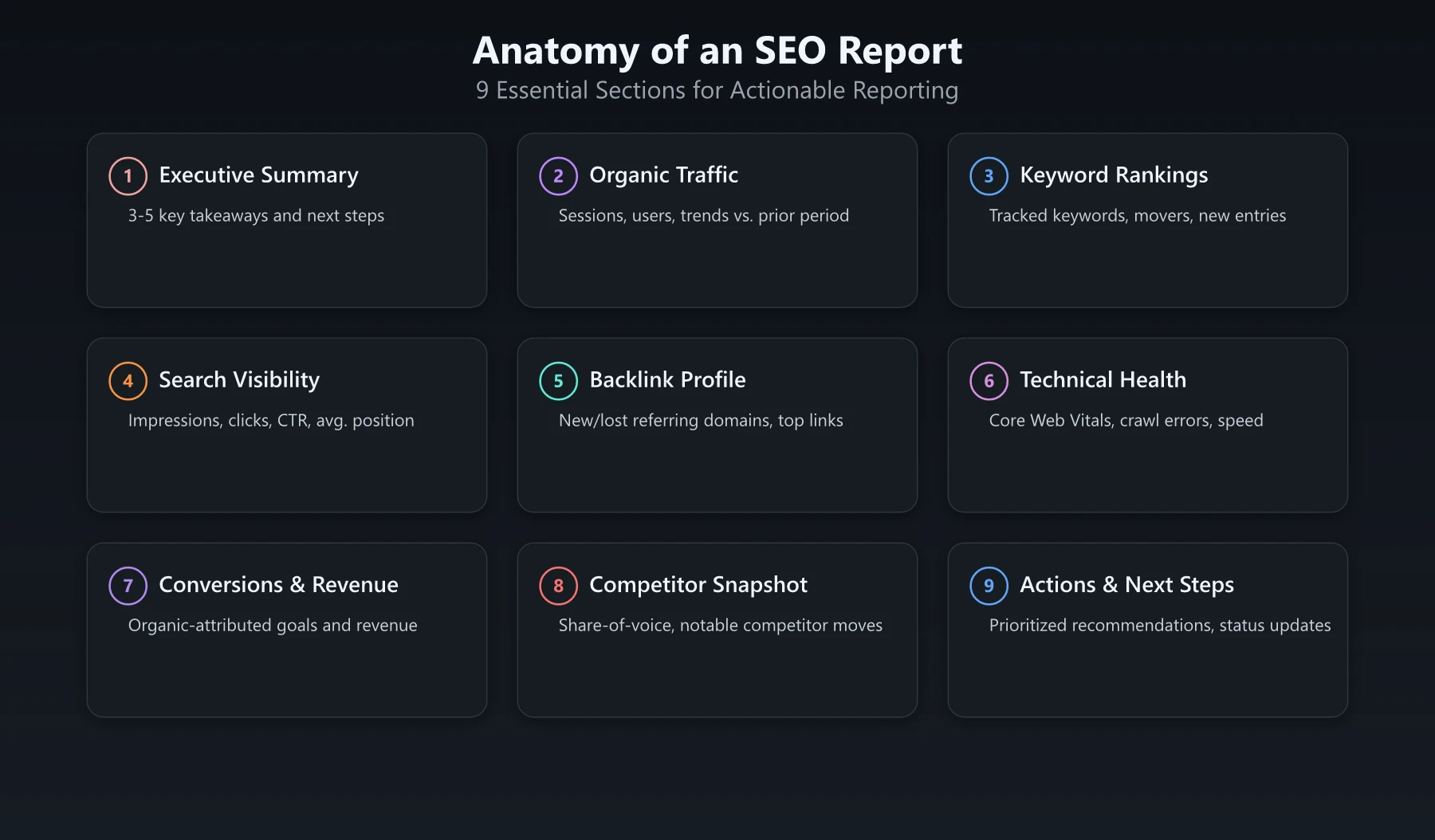
Here’s a practical template you can adapt for monthly reporting:
1. Executive Summary
Three to five bullet points covering the biggest wins, losses, and recommended next steps.
2. Organic Traffic Overview
- Sessions vs. previous month and year-over-year
- Top landing pages by organic traffic
- New vs. returning users
3. Keyword Rankings
- Movement of tracked keywords (grouped by priority)
- New keywords entering top 10 / top 3
- Keywords that dropped and potential causes
4. Search Visibility
- Total impressions and clicks from GSC
- Average CTR and position
- Top queries by clicks and impressions
5. Backlink Profile
- New and lost referring domains
- Top new links acquired
- Toxic or spammy links identified
6. Technical Health
- Core Web Vitals status
- Crawl errors and index coverage changes
- Any site speed regressions
7. Conversions and Revenue
- Organic-attributed conversions
- Revenue or lead value from organic traffic
- Conversion rate changes
8. Competitor Snapshot
- Share-of-voice comparison
- Notable competitor moves (new content, new links)
9. Actions and Next Steps
- Prioritized list of recommended actions
- Status update on last month’s action items
Common SEO Reporting Mistakes
Reporting metrics without context. Saying “we rank #4 for target keyword” means nothing if you were #3 last month and #15 the month before. Always show the trajectory.
Including too many metrics. A 20-page SEO report full of every available data point isn’t thorough - it’s unreadable. Focus on the metrics that connect to business outcomes. If a metric doesn’t help the reader make a decision, cut it.
Ignoring the “so what?” Every data point should be followed by an interpretation. Don’t just present charts - explain what they mean and what action they suggest.
Reporting only on vanity metrics. Impressions and rankings feel good, but conversions and revenue pay the bills. Make sure your SEO report connects traffic to business outcomes.
Setting the wrong reporting frequency. Weekly reports create noise for executive stakeholders. Quarterly reports are too slow for active campaigns. Match the frequency to the audience and the pace of work.
Not comparing year-over-year. Month-over-month comparisons miss seasonality entirely. If your organic traffic drops 15% from December to January, that might be completely normal. Year-over-year data tells the real story.
Conclusion: Build an SEO Report That Drives Action
Understanding what is an SEO report is just the starting point. The real value comes from building a report that your team actually reads and acts on.
Start with the free tools - Google Search Console, GA4, and Looker Studio. Use the template above to structure your first report. Focus on the metrics that matter to your specific audience, and always tie data to decisions.
The best SEO report isn’t the longest or the prettiest. It’s the one that answers “What should we do next?” with clarity and evidence. With organic search driving over half of all website traffic and Google rolling out multiple core updates every year, the businesses that report consistently are the ones that adapt fastest. Build that report consistently, and SEO stops being a black box and starts being a measurable growth channel.
Frequently Asked Questions
What is an SEO report?
An SEO report is a document that tracks and summarizes your website's search engine optimization performance, including metrics like organic traffic, keyword rankings, backlinks, and technical health.
How often should you create an SEO report?
Most teams create SEO reports monthly, with weekly check-ins for high-priority campaigns. Quarterly reports work well for executive stakeholders who need a broader view of trends.
What tools can I use to create an SEO report?
Google Search Console and Google Analytics are free essentials. For more advanced reports, tools like Ahrefs, Semrush, and Screaming Frog provide deeper keyword, backlink, and technical audit data.