How Do I Check My SEO Ranking? 7 Free and Paid Methods (2026)
Learn how to check your SEO ranking with free and paid tools. Step-by-step guide using Google Search Console, Ahrefs, Semrush, and manual methods.

Google processes more than 5 trillion searches per year - roughly 13.7 billion per day. Yet the #1 organic result captures 39.8% of all clicks, while position 10 gets just 1.6%. If you’re not tracking where you rank, you have no idea how much of that traffic you’re capturing - or leaving on the table.
So how do I check my SEO ranking - and am I even showing up? The frustrating part is that simply Googling your keyword doesn’t give you the real answer. Google personalizes results based on your location, search history, and device. What you see on your screen is not what your customers see on theirs.
There are better ways to get accurate ranking data. Here are seven methods - from free tools you can use in the next five minutes to professional-grade rank trackers that monitor your positions daily.
What “SEO Ranking” Actually Means
Before checking anything, get clear on what you’re measuring.
Your SEO ranking (or search engine ranking) is the position your page holds in Google’s organic search results for a specific keyword. Position 1 means you’re the first organic result. Position 11 means you’re at the top of page two.
Why does position matter so much? According to First Page Sage’s 2025 CTR study, the #1 organic result gets a 39.8% click-through rate, while position 10 gets just 1.6%. The top 3 results capture 68.7% of all clicks on the page. Backlinko’s analysis of 4 million Google search results found that the #1 result is 10x more likely to receive a click than the #10 result. If you’re not tracking where you stand, you’re flying blind.
Rankings are not static. They fluctuate based on algorithm updates, competitor activity, user behavior, and hundreds of other signals. The Semrush Sensor tracks daily Google volatility on a 0 - 10 scale, and scores between 2 and 5 are considered normal fluctuation - meaning some movement happens every single day. A page can rank #3 in the morning and #7 by evening.
That’s why a single snapshot matters less than ranking trends over time. The goal isn’t to obsess over daily positions - it’s to track whether your pages are moving up, staying flat, or declining.
How Do I Check My SEO Ranking? 7 Methods
Method 1: Google Search Console (Free - Most Reliable)
Google Search Console (GSC) is the single best free tool for checking your SEO rankings. The data comes directly from Google, so there’s no estimation or approximation involved.
How to check rankings in GSC:
- Go to Google Search Console and select your property
- Click Performance in the left sidebar
- Make sure Average position is toggled on (click the checkbox above the graph)
- Scroll down to the Queries tab to see every keyword your site ranks for
You’ll see four metrics for each keyword:
- Clicks - how many times users clicked through to your site
- Impressions - how many times your page appeared in search results
- CTR - click-through rate (clicks divided by impressions)
- Average Position - your average ranking for that keyword
Pro tip: Filter by page to see which keywords a specific URL ranks for. Click + New > Page > enter your URL. This shows you every query driving impressions to that page.
Limitations: GSC shows average position over a date range, not real-time rankings. Data has a 2-3 day delay, and Google retains only 16 months of performance data - anything older is permanently deleted. It also doesn’t show competitor rankings.
Method 2: Manual Google Search (Incognito Method)
The quickest way to check a ranking is to search for your keyword in Google yourself. But you need to do it correctly to avoid personalized results.
How to get unbiased results:
- Open a private or incognito browser window (Ctrl+Shift+N in Chrome)
- Go to google.com
- Type your target keyword and hit Enter
- Count your position in the organic results (skip ads, featured snippets, and “People also ask” boxes)
Why incognito isn’t perfect: Even in incognito mode, Google still personalizes results based on your IP address and geographic location. If you’re in Mumbai and your audience is in New York, you’ll see different results.
Workaround: Use a VPN to simulate your target location, or append &gl=us to the Google URL to force US results (&gl=uk for UK, &gl=in for India).
This method works for a quick spot-check on a few keywords. It does not scale for tracking dozens or hundreds of keywords over time.
Method 3: Ahrefs Rank Tracker (Paid)
Ahrefs is one of the most widely used SEO toolsets, and its Rank Tracker gives you automated, daily ranking updates for your target keywords.
What you get:
- Daily ranking data for every keyword you track
- Visibility score showing your overall search presence
- SERP features tracking (do you appear in featured snippets, image packs, or “People also ask”?)
- Competitor comparison - track up to 10 competitors alongside your site
- Mobile vs. desktop ranking splits
How to set it up:
- Go to Rank Tracker in the Ahrefs dashboard
- Add your domain
- Enter the keywords you want to track
- Select your target country and (optionally) city-level location
- Ahrefs begins tracking daily - results appear within 24 hours
Pricing: Ahrefs Lite starts at $129/month and includes 750 tracked keywords. The Standard plan ($249/month) bumps that to 2,000 keywords, and the Advanced plan ($449/month) supports 5,000.
Best for: Teams that need daily ranking data combined with backlink analysis, content gap research, and site auditing in one platform.
Method 4: Semrush Position Tracking (Paid)
Semrush is Ahrefs’ main competitor, and its Position Tracking tool is equally powerful for monitoring where your pages rank.
Key features:
- Daily ranking updates with historical trends
- Cannibalization detection - flags when multiple pages compete for the same keyword
- Local tracking - monitor rankings in specific cities or zip codes
- SERP feature tracking with visibility impact estimates
- Automated reports delivered via email
How to set it up:
- Navigate to Position Tracking under the SEO section
- Create a new project for your domain
- Add your target keywords (manually or import from a CSV)
- Choose your target device (mobile or desktop) and location
- Set a tracking frequency (daily is standard)
Pricing: Semrush Pro starts at $139/month and includes 500 tracked keywords across 5 projects. The Guru plan ($249/month) raises that to 1,500 keywords and adds historical data.
Best for: Agencies managing multiple client sites and teams that value the cannibalization detection and competitive intelligence features.
Method 5: Google Analytics + GSC Integration (Free)
You can connect Google Search Console to Google Analytics to see ranking data alongside your traffic, engagement, and conversion metrics in one dashboard.
How to connect them:
- Open Google Analytics
- Go to Admin > Product Links > Search Console Links
- Click Link and select your GSC property
- Complete the linking process
Once connected, go to Reports > Search Console > Queries in GA4. You’ll see your search queries with position data alongside sessions, engagement rate, and conversions.
Why this matters: Raw ranking data is meaningless without context. A keyword at position 5 that drives 200 conversions per month is more valuable than a keyword at position 1 that drives zero revenue. The GSC + GA4 integration lets you prioritize based on business impact, not just position.
Limitations: Same data delay as GSC (2-3 days). You won’t get daily rank tracking or competitor data.
Method 6: Free Rank Checker Tools
Several tools let you check rankings without a paid subscription. They’re useful for quick checks but limited compared to full platforms.
Ahrefs Free SERP Checker
Ahrefs SERP Checker lets you see the top 10 results for any keyword along with domain-level metrics like Domain Rating and backlink counts. You don’t need an account.
Google’s Rich Results Test
While not a rank checker, the Rich Results Test shows whether your structured data is eligible for enhanced SERP features - which directly affects how your ranking appears to users.
Limitations of free tools:
- No historical tracking (you only see today’s snapshot)
- Limited number of checks per day
- No automated monitoring or alerts
- Often limited to a single country or location
Free tools work for occasional spot-checks. If you’re checking rankings regularly for more than a handful of keywords, a paid tool will save time and give more reliable data.
Method 7: SERP API Tools for Developers
If you need ranking data at scale - hundreds of thousands of keywords across multiple locations - SERP APIs let you pull ranking data programmatically.
Popular SERP API providers:
| API Provider | Starting Price | Queries Included |
|---|---|---|
| SerpApi | $75/month | 5,000 searches |
| DataForSEO | Pay-as-you-go | ~$0.60 per 1,000 searches |
| ValueSERP | $50/month | 2,500 searches |
| Scale SERP | $79/month | 10,000 searches |
Use case example: You run an agency with 50 clients, each tracking 200 keywords across 3 locations. That’s 30,000 keyword-location combinations. A SERP API can pull this data nightly and feed it into a custom dashboard.
Best for: SEO agencies, SaaS products, and developers building custom rank tracking solutions. Not necessary for individual site owners.
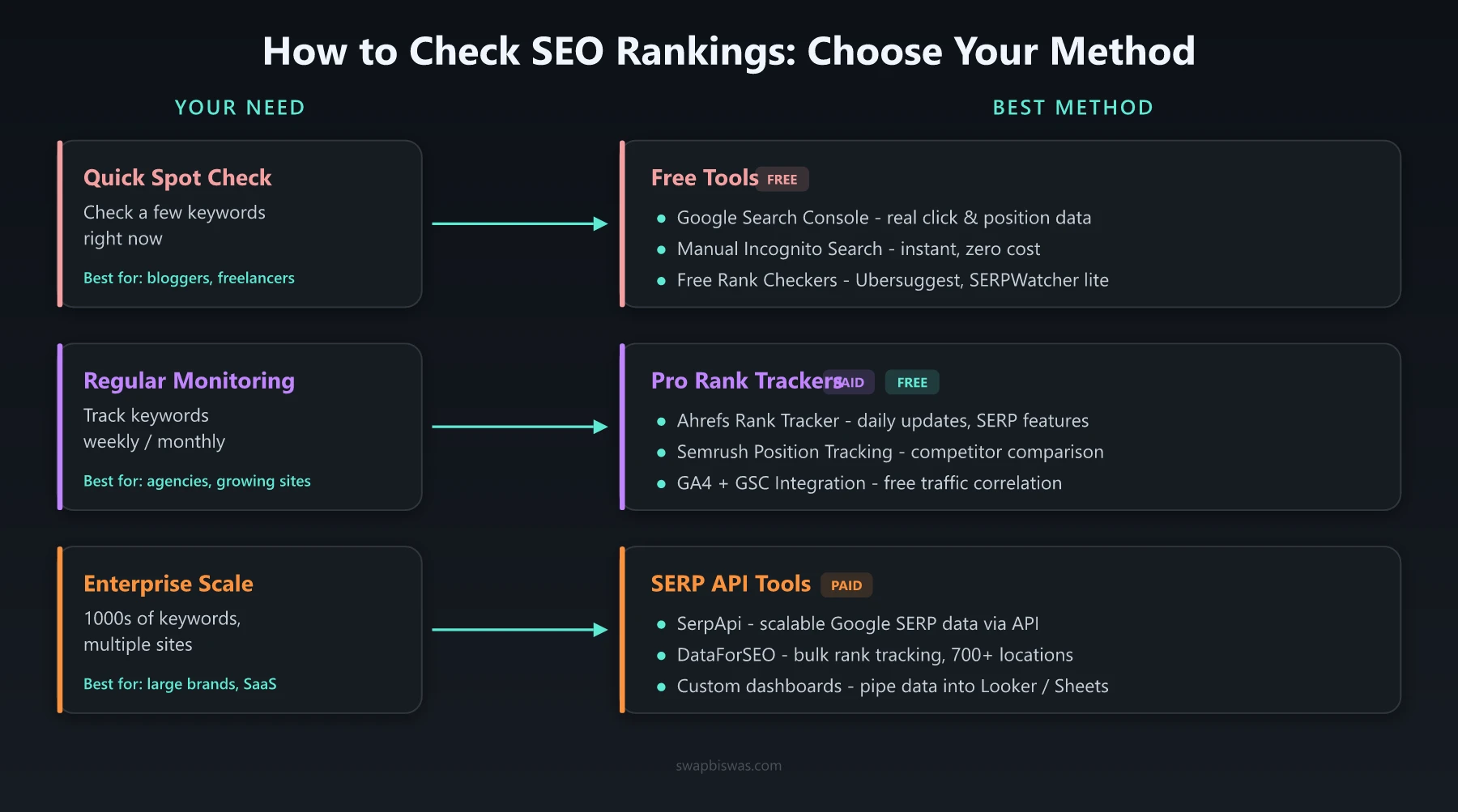
How Do I Check My SEO Ranking? Comparison of All 7 Methods
| Method | Cost | Accuracy | Real-Time | Historical Data | Competitor Data | Best For |
|---|---|---|---|---|---|---|
| Google Search Console | Free | High (direct from Google) | No (2-3 day delay) | Yes (16 months) | No | Every website owner |
| Manual Google Search | Free | Low (personalized) | Yes | No | No | Quick spot-checks |
| Ahrefs Rank Tracker | From $129/mo | High | Daily updates | Yes | Yes | SEO professionals |
| Semrush Position Tracking | From $139/mo | High | Daily updates | Yes (Guru+) | Yes | Agencies, large teams |
| GA4 + GSC Integration | Free | High | No (2-3 day delay) | Yes | No | Business-focused analysis |
| Free Rank Checkers | Free | Medium | Snapshot only | No | Limited | Occasional checks |
| SERP APIs | From $50/mo | High | On-demand | Build your own | Yes | Developers, agencies at scale |
Recommendation: Start with Google Search Console. Every site should have it set up. If you need daily tracking and competitor data, add Ahrefs or Semrush based on your budget and workflow preference.
What to Do After You Check Your Rankings
Checking your ranking is step one. The real value comes from acting on what you find. Here’s how to turn ranking data into SEO improvements.
Keywords Ranking on Page 2 (Positions 11-20)
These are your biggest opportunities. According to Backlinko’s CTR study, the top 3 Google results get 54.4% of all clicks - meaning pages stuck on page 2 receive almost no organic traffic. Getting from position 11 to the top 10 is the single biggest traffic jump you can make.
Actions to take:
- Improve content depth. Add sections that competing top-10 pages cover but yours doesn’t
- Build internal links. Link to the underperforming page from your highest-authority pages. Our guide on how to conduct a technical SEO site audit covers internal linking strategy in detail
- Earn backlinks. Pages on page 2 often lack the link authority to break into the top 10
Keywords Ranking in Positions 4-10
You’re on page 1 but below the fold. According to First Page Sage, position 4 gets a 7.2% CTR while position 3 gets 10.2% - so even moving up one spot can mean a 40%+ increase in clicks. Small improvements here drive significant CTR gains.
Actions to take:
- Optimize your title tag and meta description for higher click-through rates
- Add structured data (FAQ schema, how-to schema) to earn rich snippets
- Update the content with newer data, examples, or a more comprehensive answer
Keywords Ranking in Positions 1-3
Protect what you have. The top 3 positions capture 68.7% of all clicks - losing one of these spots means a major traffic hit. Monitor these positions weekly and watch for competitors gaining ground.
Actions to take:
- Keep content fresh. Update stats, screenshots, and recommendations at least every 6 months
- Monitor competitor content. If a competitor publishes a stronger page, improve yours before you lose the position
- Use an AI-assisted SEO strategy to identify content gaps before competitors fill them
Common Ranking Check Mistakes to Avoid
Checking your own ranking in a regular browser. Google personalizes results based on your search history, location, and browsing behavior. You might think you rank #2 when the rest of the world sees you at #8. Always use incognito mode or a dedicated rank tracker.
Obsessing over daily fluctuations. Rankings move every day. The Semrush Sensor regularly shows volatility scores of 2 - 5 on a normal day, and scores above 8 during major algorithm updates. A drop from position 3 to position 5 on a Tuesday doesn’t mean your SEO is failing. Look at trends over 30, 60, and 90-day windows instead.
Tracking vanity keywords instead of revenue keywords. Ranking #1 for a keyword nobody searches doesn’t help your business. Focus on keywords with real search volume and commercial intent. Check if Google reviews are improving your local visibility if you’re a local business - those rankings matter too.
Ignoring SERP features. If your keyword triggers a featured snippet, AI Overview, or “People also ask” box, being in position 1 doesn’t guarantee the most clicks. Track whether you appear in these features, not just your organic position.
Not connecting rankings to business outcomes. Position data without revenue data is incomplete. Connect GSC to Google Analytics so you can see which rankings actually drive conversions, not just traffic.
Start Checking Your SEO Rankings Today
If you’ve been wondering how do I check my SEO ranking, the answer is straightforward: start with Google Search Console. It’s free, the data comes directly from Google, and you can set it up in under 10 minutes.
For more serious tracking needs, tools like Ahrefs and Semrush give you daily updates, competitor monitoring, and historical trends that free tools can’t match.
The most important thing is to check consistently and act on what you find. Rankings alone don’t grow a business - the optimizations you make based on that data do.
Set up your tracking today, establish a weekly review cadence, and focus on the keywords that drive real business results.
Frequently Asked Questions
How do I check my SEO ranking for free?
Google Search Console is the best free tool to check your SEO rankings. It shows your average position for every keyword your site ranks for, along with clicks, impressions, and CTR data directly from Google.
Why does my ranking look different when I Google myself?
Google personalizes search results based on your location, search history, and device. Use an incognito window or a rank tracking tool for accurate, unbiased ranking data.
How often should I check my SEO rankings?
Check rankings weekly for active campaigns and monthly for general monitoring. Daily checks create noise since rankings naturally fluctuate. Focus on trends over 30-90 day periods.