How to Conduct a Technical SEO Site Audit: The Complete Step-by-Step Guide
A practical, step-by-step technical SEO audit checklist. From crawlability to Core Web Vitals - with free tools, real benchmarks, and actionable fixes for every issue.

Here’s a stat that should worry you: a Semrush study of 50,000+ domains found that 41% of websites have internal duplicate content and 12% have redirect chains or loops (Semrush Technical SEO Checklist). Meanwhile, roughly 70% of websites still haven’t implemented structured data.
Your content can be brilliant. Your backlinks can be strong. But if Google can’t properly crawl, understand, and index your pages, none of it matters.
A technical SEO audit finds and fixes these invisible problems. I run one on every site I work on -here’s exactly how to do it yourself, step by step, with free tools.
What Is a Technical SEO Audit?
A technical SEO audit evaluates the infrastructure of your website -the code, server configuration, site architecture, and performance factors that affect how search engines crawl, index, and rank your pages.
It’s different from a content audit (which evaluates page quality) or a backlink audit (which evaluates your link profile). A technical audit asks: Is your website set up in a way that allows search engines to do their job?
How often should you do one?
- Full audit: Every 3-6 months
- Quick checks: Monthly (Core Web Vitals, indexing status, crawl errors)
- After major changes: Always audit after a redesign, migration, CMS change, or major content restructure
Tools You’ll Need (Mostly Free)
| Tool | Cost | What It Does |
|---|---|---|
| Google Search Console | Free | Crawl stats, indexing status, Core Web Vitals, manual actions |
| Google PageSpeed Insights | Free | Performance scoring, Core Web Vitals, Lighthouse audit |
| Screaming Frog | Free (500 URLs) | Site crawling, redirect chains, broken links, duplicate content |
| Ahrefs Webmaster Tools | Free | Site audit (5,000 URLs), health score, issue prioritization |
| Rich Results Test | Free | Structured data validation |
| Lighthouse | Free | Mobile usability, performance, accessibility audit |
| XML Sitemaps Generator | Free | Sitemap creation and validation |
You can run a thorough audit with just the free tools above. Let’s get into the checklist.
The Complete Technical SEO Audit Checklist
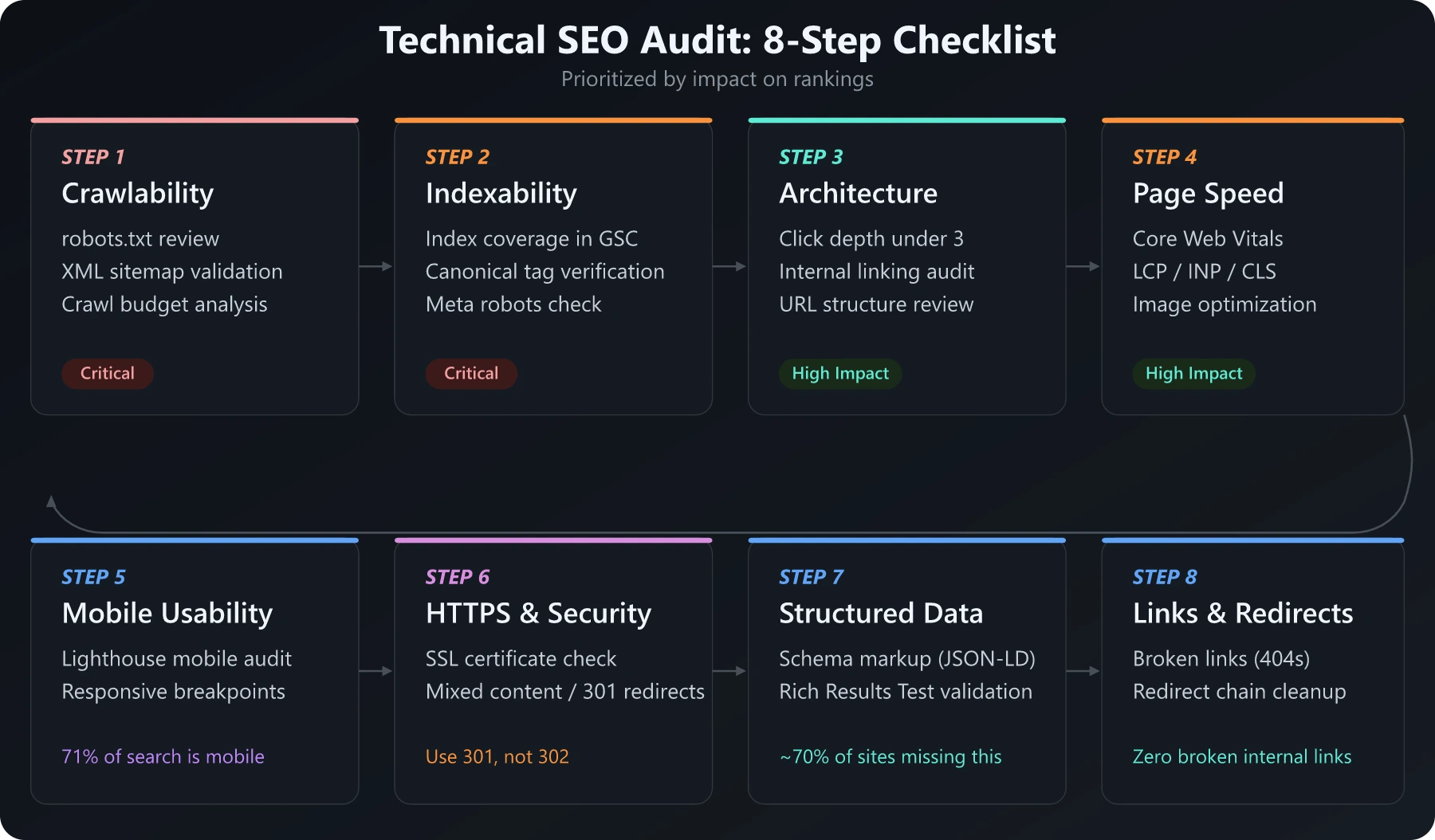
Step 1: Crawlability
What you’re checking: Can search engines find and crawl all your important pages?
1.1 Robots.txt
Check your robots.txt file at yoursite.com/robots.txt:
- Is it blocking important pages or directories unintentionally?
- Is the sitemap URL referenced?
- Are CSS/JS files being blocked? (This prevents Google from rendering your pages properly)
Common mistake: Blocking /wp-admin/ is fine, but blocking /wp-includes/ can prevent Google from loading CSS and JavaScript needed to render your pages.
1.2 XML Sitemap
Check your sitemap at yoursite.com/sitemap.xml:
- Does it exist and is it accessible?
- Are all important pages included?
- Are there pages with
noindextags that are also in the sitemap? (This sends mixed signals) - Is it submitted in Google Search Console?
- Are there any URLs returning 4xx or 5xx status codes?
Benchmark: Your sitemap should include every page you want indexed and nothing else. If your sitemap has 5,000 URLs but only 500 are getting traffic, you have a crawl budget problem.
1.3 Crawl Budget
Check Google Search Console → Settings → Crawl Stats:
- How many pages is Google crawling per day?
- What’s the average response time?
- Are there crawl errors or 5xx responses?
Why it matters: Google allocates a crawl budget to every site. If your site wastes that budget on redirect chains, duplicate pages, or low-value URLs, your important pages get crawled less frequently.
Ideal metrics:
- Response time: Under 200ms
- Crawl errors: Under 1% of total pages
- Pages crawled daily: Should cover your site at least once every 1-2 weeks
Step 2: Indexability
What you’re checking: Are your important pages actually in Google’s index?
2.1 Index Coverage
In Google Search Console → Pages:
- How many pages are indexed vs. excluded?
- What are the exclusion reasons? Common ones:
- “Crawled – currently not indexed” (Google found it but didn’t deem it worth indexing)
- “Discovered – currently not indexed” (Google knows it exists but hasn’t crawled it yet)
- “Duplicate without user-selected canonical”
- “Blocked by robots.txt”
Action: For every page you care about, search site:yoursite.com/page-url in Google. If it doesn’t appear, there’s an indexing problem.
2.2 Canonical Tags
- Does every page have a canonical tag?
- Do canonical tags point to the correct URL?
- Are there conflicting canonicals (page says one thing, sitemap says another)?
Common issue: Canonical tag misconfigurations are one of the most frequent technical SEO problems. Self-referencing canonicals are fine and recommended. But make sure paginated pages, filtered pages, and URL parameters all have proper canonicals. For international sites, hreflang implementation adds another layer of complexity - over 67% of domains using hreflang have issues (Ahrefs hreflang study).
2.3 Meta Robots Tags
Check for pages with noindex tags that shouldn’t have them:
- Are important pages accidentally set to
noindex? - Are there
nofollowtags preventing link equity from flowing to important pages?
How to check: Screaming Frog → Configuration → Spider → check “Respect Noindex” and “Respect Nofollow.” Then review the “Directives” tab after crawling.
Step 3: Site Architecture & Internal Linking
What you’re checking: Is your site structured in a way that makes it easy for search engines (and users) to navigate?
3.1 Click Depth
Every important page should be reachable within 3 clicks from the homepage.
- Screaming Frog → Crawl your site → Check “Crawl Depth” column
- Pages with a crawl depth of 4+ are less likely to be crawled frequently and may rank lower
3.2 Internal Linking
- Are there orphan pages (no internal links pointing to them)?
- Is link equity distributed effectively? (Your most important pages should have the most internal links)
- Are anchor texts descriptive and relevant?
How to check: Screaming Frog → Internal → Unique Inlinks. Sort ascending -pages with zero or very few internal links need attention.
Data point: Internal links are one of Google’s key ranking signals. Orphan pages with no internal links are significantly harder for search engines to discover and rank, regardless of content quality.
3.3 URL Structure
- Are URLs clean and descriptive? (
/blog/technical-seo-audit>/p=1234) - Are there URL parameters creating duplicate content?
- Is the URL structure flat enough? (
/category/subcategory/pageis fine;/a/b/c/d/e/pageis too deep)
Step 4: Page Speed & Core Web Vitals
What you’re checking: Is your site fast enough to rank and convert?
This matters more than ever. Google has confirmed Core Web Vitals are a ranking factor, and the data backs it up:
- Conversion rates drop by 4.42% for each additional second of load time (Tooltester, 2026)
- 53% of mobile users abandon sites that take longer than 3 seconds to load (Google Mobile Speed Research)
- Only 48% of mobile pages currently pass all three Core Web Vitals (NitroPack, 2026)
- Users are 24% less likely to abandon page loads when Core Web Vitals thresholds are met (Google)
4.1 Core Web Vitals
Check in Google Search Console → Core Web Vitals, or test individual pages at PageSpeed Insights.
| Metric | What It Measures | Good | Needs Improvement | Poor |
|---|---|---|---|---|
| LCP (Largest Contentful Paint) | Loading speed | ≤ 2.5s | 2.5s - 4.0s | > 4.0s |
| INP (Interaction to Next Paint) | Interactivity | ≤ 200ms | 200ms - 500ms | > 500ms |
| CLS (Cumulative Layout Shift) | Visual stability | ≤ 0.1 | 0.1 - 0.25 | > 0.25 |
4.2 Common Speed Issues & Fixes
| Issue | Impact | Fix |
|---|---|---|
| Unoptimized images | High | Convert to WebP, compress, lazy load below-the-fold images |
| Render-blocking JS/CSS | High | Defer non-critical scripts, inline critical CSS |
| No browser caching | Medium | Set cache-control headers (min 30 days for static assets) |
| Too many HTTP requests | Medium | Combine files, use CSS sprites, remove unnecessary plugins |
| No CDN | Medium | Use Cloudflare (free tier) or similar CDN |
| Large DOM size | Medium | Reduce nested elements, paginate long lists |
| No text compression | Low-Medium | Enable Gzip or Brotli compression |
Quick win: Image optimization alone can improve LCP by 30-50% on most sites. Convert all images to WebP format and implement lazy loading.
Step 5: Mobile Usability
What you’re checking: Does your site work properly on mobile devices?
Google completed mobile-first indexing for all sites in July 2024. Mobile now accounts for 71% of all Google search traffic (SQ Magazine, 2026). If your mobile experience is broken, your desktop rankings will suffer too.
5.1 Lighthouse Mobile Audit
Run your key pages through Lighthouse (built into Chrome DevTools, or via PageSpeed Insights). Google’s standalone Mobile-Friendly Test was retired in December 2023 - Lighthouse is now the recommended replacement.
5.2 Common Mobile Issues
- Text too small to read without zooming
- Clickable elements too close together
- Content wider than the screen (horizontal scrolling)
- Viewport not set properly
- Interstitials or pop-ups blocking content
5.3 Responsive Design Check
- Open Chrome DevTools (F12) → Toggle Device Toolbar
- Test at common breakpoints: 375px (phone), 768px (tablet), 1024px (small laptop)
- Check that navigation, images, tables, and forms all work at each size
Step 6: HTTPS & Security
What you’re checking: Is your site secure and properly configured?
6.1 SSL Certificate
- Is your site serving over HTTPS? (Check for the padlock icon)
- Is the SSL certificate valid and not expired?
- Are there mixed content warnings? (HTTP resources loaded on HTTPS pages)
How to check: Screaming Frog will flag mixed content issues. Or use Why No Padlock for a quick check.
6.2 HTTPS Redirects
- Does
http://redirect tohttps://? - Does
wwwredirect to non-www (or vice versa)? Pick one and stick with it. - Are these redirects 301 (permanent), not 302 (temporary)?
Step 7: Structured Data
What you’re checking: Are you giving search engines structured information about your content?
Structured data (schema markup) helps Google understand your content and can earn you rich results -review stars, FAQ dropdowns, recipe cards, etc.
7.1 Current Implementation
- Use Google’s Rich Results Test to check existing structured data
- Common schema types for marketing sites:
Article/BlogPostingfor blog contentOrganizationfor your company/brandPersonfor author pagesFAQPagefor FAQ sectionsHowTofor tutorial/guide contentBreadcrumbListfor navigation
The impact: Pages with structured data can earn rich results (review stars, FAQ dropdowns, etc.) which significantly improve click-through rates compared to standard blue links.
7.2 Implementation
Use JSON-LD format (Google’s preferred method). Here’s a basic Article schema:
{
  "@context": "https://schema.org",
  "@type": "Article",
  "headline": "Your Page Title",
  "description": "Your meta description",
  "author": {
    "@type": "Person",
    "name": "Your Name"
  },
  "datePublished": "2026-03-07",
  "publisher": {
    "@type": "Organization",
    "name": "Your Site Name"
  }
}
Step 8: Redirect Chains & Broken Links
What you’re checking: Are there broken links or inefficient redirect chains hurting your SEO?
8.1 Redirect Chains
A redirect chain is when URL A redirects to B, which redirects to C. Each hop loses a small amount of link equity and slows down crawling.
- Acceptable: 1 redirect (A → B)
- Problematic: 2+ redirects (A → B → C → D)
How to check: Screaming Frog → Reports → Redirect Chains. Fix by updating the original link to point directly to the final destination.
8.2 Broken Links (404s)
- Internal broken links waste crawl budget and hurt user experience
- External broken links reduce trust signals
How to check: Screaming Frog → Response Codes → filter for 4xx errors. Fix or remove broken links.
Benchmark: Aim for zero broken internal links. For external links, check quarterly and update or remove dead links.
After the Audit: Prioritizing Fixes
You’ll likely find dozens of issues. Don’t try to fix everything at once. Here’s how to prioritize:
Priority 1: Critical (Fix This Week)
- Pages that should be indexed but aren’t
- Broken pages (5xx errors) on important URLs
- Security issues (mixed content, expired SSL)
noindextags on important pages
Priority 2: High Impact (Fix This Month)
- Core Web Vitals failures on key landing pages
- Redirect chains on high-traffic pages
- Missing canonical tags causing duplicate content
- Orphan pages with no internal links
Priority 3: Optimization (Ongoing)
- Image optimization across the site
- Structured data implementation
- Internal linking improvements
- URL structure cleanup
Priority 4: Nice to Have (When You Have Time)
- Minor mobile usability tweaks
- Compressing already-fast resources further
- Adding schema types beyond the basics
The Audit Template
Here’s a quick-reference checklist you can copy:
- Crawlability: robots.txt reviewed, sitemap validated, crawl budget checked
- Indexability: Index coverage reviewed, canonical tags verified, no accidental noindex
- Architecture: Click depth under 3, no orphan pages, clean URL structure
- Speed: Core Web Vitals passing, images optimized, render-blocking resources deferred
- Mobile: Mobile-friendly test passing, responsive at all breakpoints
- Security: HTTPS configured, no mixed content, proper redirects
- Structured data: Schema implemented, validated with Rich Results Test
- Links: No broken internal links, no redirect chains over 2 hops
How Long Does a Technical SEO Audit Take?
For a site with under 1,000 pages:
| Task | Time |
|---|---|
| Crawl + initial analysis | 1-2 hours |
| Reviewing GSC data | 30 minutes |
| Core Web Vitals analysis | 30 minutes |
| Documenting issues + prioritizing | 1 hour |
| Total | 3-4 hours |
For larger sites (10K+ pages), expect 1-2 days for a thorough audit.
Start Your Audit Today
You don’t need expensive tools or an SEO agency to run a technical audit. Google Search Console and Screaming Frog’s free version will catch 90% of the issues.
The hardest part isn’t finding the issues -it’s fixing them consistently. Set a quarterly reminder, run the audit, and work through the priority list. That discipline alone puts you ahead of the majority of sites that have critical technical issues they don’t even know about.
Your content deserves to be found. Make sure your technical foundation isn’t the thing holding it back.
And remember - roughly 70% of websites still haven’t implemented schema markup, and only 48% of mobile sites pass all three Core Web Vitals (HTTP Archive, 2025). The bar is low. A proper technical audit puts you ahead of most of the internet.