Marketing Automation Workflows: 12 Ready-to-Use Templates for 2026
Copy these 12 proven marketing automation workflows for lead nurturing, onboarding, re-engagement, and more. Includes trigger logic, email sequences, and timing.
Automated emails generate 37% of all email-generated sales despite making up just 2% of total email volume (Omnisend). That ratio - 2% of emails driving 37% of revenue - is the core argument for building marketing automation workflows. The right workflow turns repetitive tasks into revenue machines that run without manual intervention.
Here are 12 marketing automation workflows you can copy, customize, and deploy today.
What Makes a Great Marketing Automation Workflow
Every effective workflow has five components:
- Trigger - The event or condition that starts the workflow (form submission, purchase, inactivity)
- Action - What happens (send email, add tag, update score, notify team)
- Delay - Time between actions (hours, days, weeks)
- Condition - Branching logic (if clicked, go to path A; if not, path B)
- Goal - What defines success (conversion, engagement, handoff to sales)
Build workflows that are specific enough to feel personal but broad enough to scale. A workflow that triggers for 5 people per month is not worth the setup time.
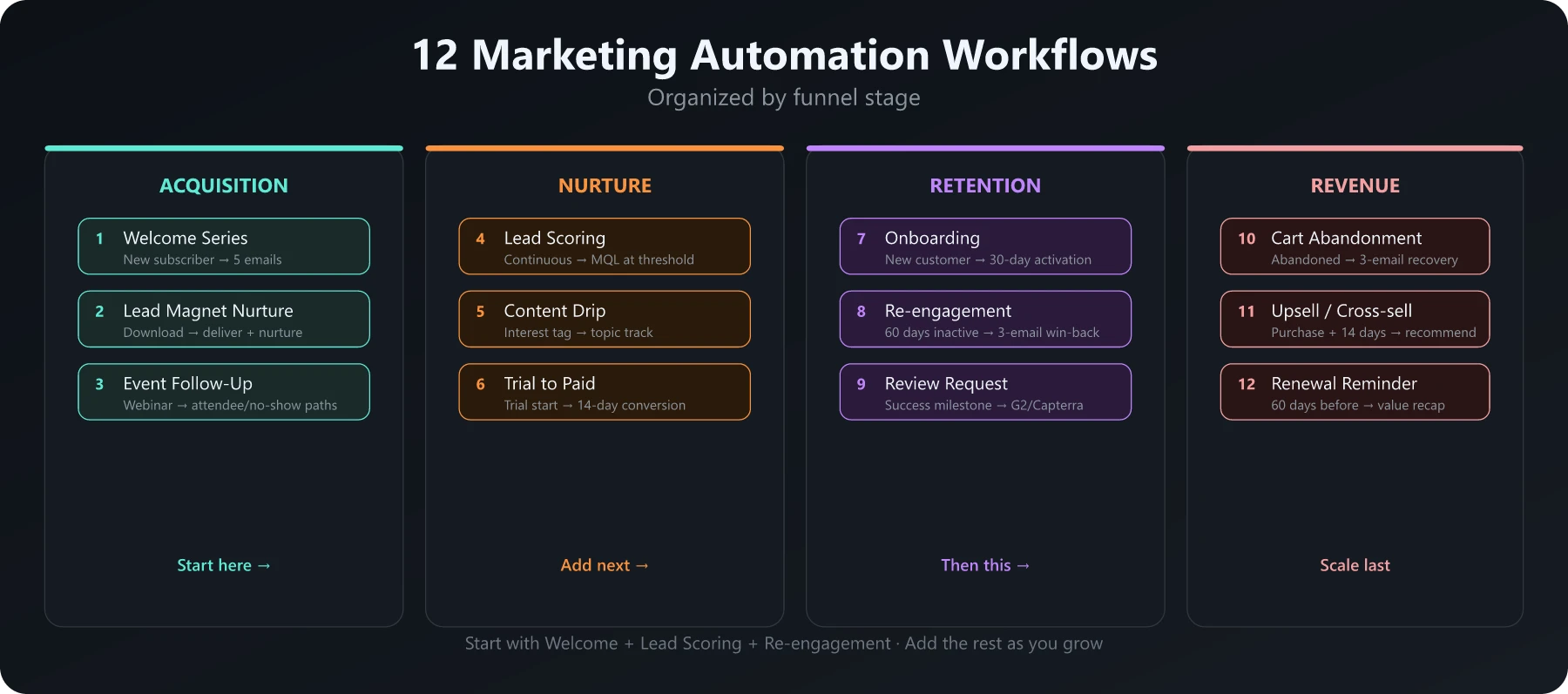
Acquisition Workflows
1. Welcome Series
Trigger: New email subscriber or account signup
Sequence:
- Email 1 (Immediate): Welcome + deliver the promised value (lead magnet, access link, or first tip)
- Email 2 (Day 2): Your best piece of content on their topic of interest
- Email 3 (Day 5): Social proof - customer story or testimonial
- Email 4 (Day 8): Educational content that positions your expertise
- Email 5 (Day 12): Soft CTA - “Here is how we can help”
Goal: Email 5 click or website visit within 14 days.
Pro tip: Tag subscribers by the lead magnet they downloaded and personalize the entire sequence to that topic. A “SEO guide” subscriber should get different content than an “email marketing” subscriber. Your ICP and buyer personas should inform which segments get which sequences.
2. Lead Magnet Delivery + Nurture
Trigger: Form submission for a gated content asset (ebook, template, checklist)
Sequence:
- Email 1 (Immediate): Deliver the asset with a clear download link
- Email 2 (Day 3): “Did you get a chance to read it?” + one key takeaway from the asset
- Email 3 (Day 7): Related content that goes deeper on the topic
- Email 4 (Day 14): Case study showing results from applying the framework
- Email 5 (Day 21): CTA - demo, trial, or consultation
Goal: Demo request or trial signup.
Branch logic: If the lead opens all emails but does not click the CTA, send an alternative CTA (free tool, assessment, or community invite).
3. Webinar/Event Follow-Up
Trigger: Webinar registration or attendance (split into two paths)
For attendees:
- Email 1 (1 hour after): Recording link + slide deck + key resources
- Email 2 (Day 2): Summary of top 3 takeaways with action steps
- Email 3 (Day 5): Related content or next step CTA
For no-shows:
- Email 1 (1 hour after): “Sorry we missed you” + recording link
- Email 2 (Day 3): One key insight from the session
- Email 3 (Day 7): Invite to next event or alternative CTA
Pro tip: Webinar attendees are high-intent. If they stay for more than 75% of the session, add bonus lead score points and fast-track them to a sales touchpoint.
Nurture Workflows
4. Lead Scoring and Qualification
Trigger: Continuous - runs as leads accumulate score points
Score model:
| Action | Points |
|---|---|
| Opens email | +2 |
| Clicks email link | +5 |
| Visits pricing page | +20 |
| Downloads case study | +15 |
| Attends webinar | +15 |
| Job title matches ICP | +25 |
| Company size matches ICP | +20 |
| No activity for 30 days | -10 |
| Unsubscribes from list | -50 |
Workflow actions:
- Score reaches 50: Tag as “engaged lead”
- Score reaches 75: Tag as MQL, notify sales
- Score reaches 100: Create sales task + high priority alert
- Score drops below 20: Move to re-engagement workflow
Pro tip: Review scoring thresholds quarterly with sales. If they reject more than 30% of MQLs, your threshold is too low or your scoring criteria need adjustment. Build this into your marketing automation strategy.
5. Content Drip by Interest/Topic
Trigger: Lead is tagged with a specific interest (based on content downloaded, pages visited, or form selection)
Create separate drip tracks for each topic your audience cares about. For a marketing platform:
“Email Marketing” track (6 emails over 4 weeks):
- Beginner’s guide to email marketing
- Subject line best practices
- Segmentation strategies
- Automation workflow templates
- Deliverability optimization
- Advanced: A/B testing frameworks
“SEO” track (6 emails over 4 weeks):
- SEO fundamentals checklist
- Keyword research walkthrough
- On-page optimization guide
- Link building strategies
- Technical SEO basics
- Advanced: Content cluster strategy
Pro tip: Allow leads to be in multiple tracks simultaneously, but set a frequency cap of 3-4 emails per week across all workflows to prevent fatigue.
6. Free Trial to Paid Conversion
Trigger: User starts a free trial
Sequence:
- Day 0: Welcome + “complete these 3 steps to get started” (activation focus)
- Day 1: Tip - how to accomplish the #1 use case
- Day 3: Check-in - “Have you tried [key feature]?”
- Day 5: Case study of a similar company’s results
- Day 7: Mid-trial check - usage-based email (if active, share advanced tips; if inactive, offer help)
- Day 10: ROI calculator or comparison guide
- Day 12: “Your trial ends in 2 days” + limited-time offer
- Day 14: Trial expiration + final CTA
Branch logic: If the user converts before trial ends, immediately stop the sequence and move to the onboarding workflow.
Retention Workflows
7. Customer Onboarding Sequence
Trigger: New paid customer
Sequence:
- Day 0: Welcome to the team + account setup checklist
- Day 1: Quick start guide for the #1 use case
- Day 3: Video walkthrough of the most valuable feature
- Day 7: “How is your first week going?” survey (1 question)
- Day 14: Advanced tips based on their usage pattern
- Day 30: Success check-in + introduction to customer success manager
Goal: Complete 3 key setup actions within 14 days (activation milestone).
Nurtured leads produce a 20% increase in sales opportunities compared to non-nurtured leads (Demand Gen Report). The same principle applies post-purchase - onboarded customers retain better than abandoned ones.
8. Re-engagement (Inactive Users)
Trigger: No email opens, clicks, or logins for 60 days
Sequence:
- Email 1: “We have been working on something new” - share your best recent content or feature update
- Email 2 (Day 7): Value-first content addressing their original use case
- Email 3 (Day 14): “Should we stop sending?” - clear opt-out with a reason to stay
If no engagement after 3 emails: Move to suppressed list. Do not keep mailing inactive contacts - it destroys deliverability.
If they re-engage: Reset their activity score and route into a fresh nurture track based on what they clicked.
9. Review/Testimonial Request
Trigger: 30 days after purchase (or after a positive NPS/CSAT response)
Sequence:
- Email 1: “How would you rate your experience?” (1-click satisfaction survey)
- If positive (4-5 stars): Follow up with a request for a written review on G2, Capterra, or Google
- If neutral (3 stars): Route to customer success for a personal check-in
- If negative (1-2 stars): Alert support team immediately, pause all marketing emails
Pro tip: Time this after a success milestone, not just a calendar date. “You just completed your 100th project” is a better trigger than “it has been 30 days.”
Revenue Workflows
10. Cart Abandonment
Trigger: Item added to cart, checkout initiated, no purchase within 1 hour
Sequence:
- Email 1 (1 hour): “You left something behind” - show the cart items with a direct link back
- Email 2 (24 hours): Social proof - reviews or testimonials for the product in their cart
- Email 3 (48 hours): Urgency or incentive - limited stock, free shipping, or small discount
Goal: Purchase completion within 72 hours.
Pro tip: Do not lead with discounts. Many abandoned carts recover with a simple reminder. Save the discount for email 3, and only offer it to segments with high cart value.
11. Upsell/Cross-sell
Trigger: Purchase completed + 14-day delay (let them use and enjoy the initial purchase first)
Sequence:
- Email 1: “People who bought X also love Y” - relevant product or feature recommendation
- Email 2 (Day 7): Use case showing how the upsell enhances their current setup
- Email 3 (Day 14): Limited-time upgrade offer or bundle pricing
Branch logic: Different recommendations based on what they purchased. A customer who bought the starter plan gets feature-focused upsell content. A customer who bought a single product gets cross-sell content.
12. Renewal Reminder
Trigger: 60 days before subscription or contract renewal date
Sequence:
- Day -60: “Your renewal is coming up” - value recap showing their usage stats and ROI
- Day -30: Renewal details + any pricing changes or plan upgrades available
- Day -14: Personal outreach from account manager or customer success
- Day -7: Final reminder with one-click renewal link
- Day 0: If not renewed, escalate to retention team
Pro tip: The value recap email is critical. Show them concrete data: “You sent 45,000 emails, generated 1,200 leads, and influenced $380K in pipeline this year.” Numbers make renewal feel like a no-brainer.
Marketing Automation Workflow Best Practices
Test before scaling. Run every workflow with a small segment first. Check email rendering, link tracking, tag application, and branching logic before opening to your full list.
Set frequency caps. No contact should receive more than 3-4 automated emails per week across all workflows. Build suppression rules that prevent overlap.
Use UTM parameters. Tag every link with campaign, medium, and source parameters so you can track which workflows drive pipeline and revenue in your analytics. ChatGPT prompts for marketing can help you quickly draft and iterate on the email copy within these workflows.
Document everything. Create a workflow map showing all active workflows, their triggers, and how they interconnect. This prevents conflicts and makes debugging easier.
Review monthly. Check open rates, click rates, and conversion rates for every active workflow. Pause or rebuild anything with open rates below 20% or unsubscribe rates above 1%.
Tools for Building Marketing Automation Workflows
| Platform | Best For | Workflow Builder | Starting Price |
|---|---|---|---|
| ActiveCampaign | Complex branching logic | Visual drag-and-drop | $15/mo (annual) |
| HubSpot | All-in-one CRM + automation | Visual with CRM integration | $890/mo (Professional) |
| Klaviyo | Ecommerce workflows | Event-driven visual builder | $20/mo |
| Brevo | Budget automation | Simple visual builder | $9/mo |
| Customer.io | Product-triggered workflows | Code-friendly + visual | $100/mo |
Pricing sources: ActiveCampaign, HubSpot, Brevo
For a deeper comparison of B2B marketing automation and B2C marketing automation platforms, check our dedicated guides. And for tips on making your email workflows more interactive, see our email interactivity guide.
Start With Three Workflows
You do not need all 12 marketing automation workflows running on day one. Start with these three - they cover the highest-impact moments in most funnels:
- Welcome series - Your first impression sets the tone
- Lead scoring + qualification - Stop wasting sales time on unqualified leads
- Re-engagement - Recover inactive contacts before they are gone
Build those three, measure for 30 days, optimize based on data, then add the next wave. A marketing automation workflow that is tested and refined beats a dozen workflows launched and forgotten.
Frequently Asked Questions
What is a marketing automation workflow?
A marketing automation workflow is a series of automated actions triggered by specific user behaviors or conditions. It typically includes triggers (what starts it), actions (emails, tags, scores), delays, and branching logic.
How many marketing automation workflows do I need?
Start with 3-5 core workflows: welcome series, lead nurture, re-engagement, post-purchase, and cart abandonment. Add more as you identify specific conversion gaps in your funnel.
What tools are best for building marketing automation workflows?
Popular tools include ActiveCampaign (best automation builder), HubSpot (best all-in-one), Klaviyo (best for ecommerce), and Brevo (best budget option). Choose based on your use case and budget.