You Don't Need 15,384 Marketing Tools. You Need 5.
15,384 martech tools exist and most teams use a fraction of what they pay for. Here's a 5-tool marketing stack that covers 90% of what you actually need.

The martech landscape hit 15,384 products in 2025 - a 100x increase since 2011. Companies now run an average of 106 SaaS applications - down from 130 in 2022 but still far more than anyone can master, according to BetterCloud’s 2025 State of SaaS report. More tools, less results.
You don’t need 15,384 marketing tools. You don’t even need 15. You need 5 - and the discipline to delete everything else.
The Real Cost of Too Many Marketing Tools
The problem isn’t that marketing tools are bad. It’s that you keep buying more without retiring the old ones.
You’re Paying for Software Nobody Uses
Across all departments - not just marketing - organizations waste an average of $21 million annually on unused SaaS licenses, a 14.2% increase year-over-year, according to Zylo’s 2025 SaaS Management Index. Total SaaS spend now averages $4,830 per employee per year.
Even if your company isn’t enterprise-scale, the pattern is the same. A $49/month tool here, a $99/month tool there, a “free trial” that auto-renewed six months ago. It adds up to thousands per year that could go toward actual marketing spend - ads, content, events - instead of software seats nobody logs into.
Your Data Lives Everywhere Except Where You Need It
When your stack grows past 5-7 tools, integration breaks down fast. Your email tool doesn’t talk to your CRM, your analytics platform doesn’t see your social data, and your ad performance lives in a completely separate dashboard.
The result: you spend more time exporting CSVs, copying data between tabs, and reconciling conflicting numbers than you spend actually making decisions. Data silos don’t just waste time - they produce bad decisions based on incomplete information.
More Tools, Less Results
Here’s the most damning stat: 54.9% of CMOs report disappointment in martech’s payoff, according to The CMO Survey (Fall 2024). That number is rising, not falling - up more than 6 percentage points from Spring 2024.
Marketing technology scores just 4.8 on a 1-7 scale for impact on company performance. Despite spending more on tools every year, marketers are getting less value from them.
The issue isn’t the tools themselves - it’s the sprawl. When you have 15 tools doing overlapping jobs, nobody masters any of them, and the team spends more time managing software than doing marketing.
Why Marketers Keep Buying Marketing Tools They Don’t Need
Before the fix, it helps to understand the disease.
The “New Tool” Dopamine Hit
Every new tool promises to solve the problem the last tool couldn’t. Better dashboards, AI-powered insights, one-click automation - the demo always looks incredible.
Three weeks later, it’s another tab you never open.
Feature Overlap Is Invisible
Most marketers don’t realize that their email platform already does landing pages, their CMS already handles forms, and their analytics tool already tracks conversions. They buy standalone tools for capabilities they already have because nobody audits what’s already in the stack.
Nobody Owns the Stack
In many organizations, marketing, sales, customer success, and individual team members all buy their own tools independently. Nobody has a complete picture of what the company pays for, what overlaps, and what’s gone unused for months. The result is a bloated stack where every team has “their” tools and nobody is accountable for the total spend.
The 5-Tool Marketing Stack
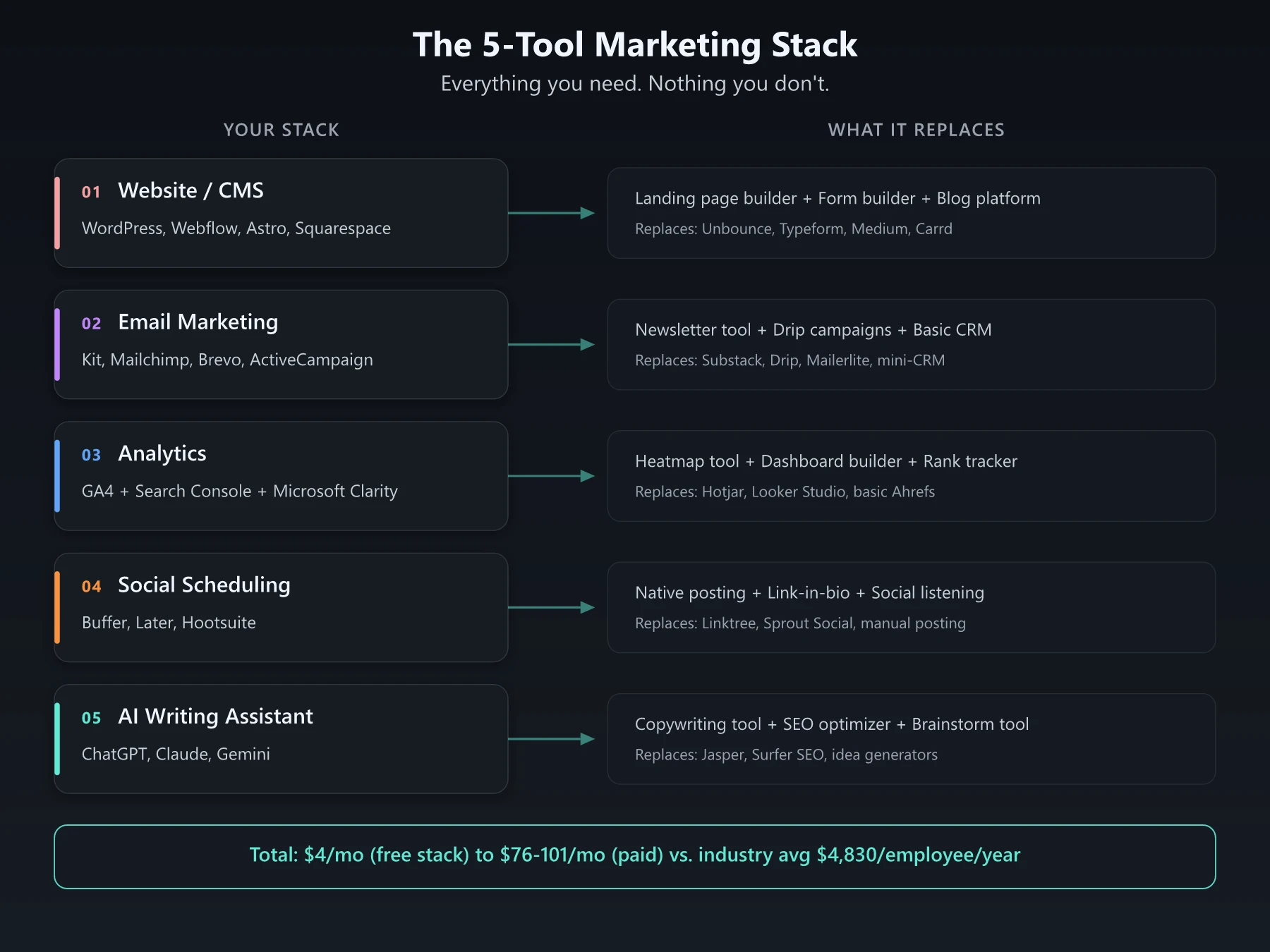
Here’s the stack that covers 90% of what most marketing teams need - not 27 tools, not 15, just five.
Tool 1: Website and CMS
What it replaces: Separate landing page builder, form builder, blog platform, portfolio site
Your website is your marketing foundation. Pick a platform that handles your site, blog, landing pages, and forms in one place. Don’t pay for a separate landing page tool when your CMS already does it.
Options by budget:
| Platform | Best For | Monthly Cost |
|---|---|---|
| WordPress + Elementor | Most businesses | $4-12/mo hosting |
| Webflow | Design-focused teams | $14-39/mo |
| Astro / Next.js | Developer-led teams | Free (hosting $0-20/mo) |
| Squarespace | Solopreneurs | $16-33/mo |
Tool 2: Email Marketing
What it replaces: Separate newsletter tool, drip campaign tool, CRM for small teams, marketing automation platform
Email is the one channel you fully own - no algorithm changes, no platform risk. Your email tool should handle newsletters, automated sequences, basic segmentation, and simple landing pages. For most teams under 10,000 subscribers, you don’t need a full marketing automation suite.
Options by budget:
| Platform | Best For | Monthly Cost |
|---|---|---|
| Kit (ConvertKit) | Creators, solopreneurs | Free up to 10K subs |
| Mailchimp | Small businesses | Free up to 250 contacts, then $13/mo |
| Brevo (Sendinblue) | Budget-conscious teams | Free up to 300 emails/day |
| ActiveCampaign | Teams needing automation | $15/mo |
For a deeper look at email strategy, check out our guide on increasing email interactivity.
Tool 3: Analytics
What it replaces: Separate rank tracker (for basics), heatmap tool (Clarity is free), dashboard tool, reporting platform
You need to know what’s working. Google Analytics 4 plus Google Search Console covers most of what marketers need to measure - traffic, conversions, keyword performance, and user behavior.
Add Microsoft Clarity (free) for heatmaps and session recordings. That’s your analytics stack.
If you want to understand how to read the data these tools produce, our heatmap reading guide and SEO reporting guide cover the fundamentals.
Options by budget:
| Platform | Best For | Monthly Cost |
|---|---|---|
| GA4 + Search Console + Clarity | Everyone | Free |
| Plausible / Fathom | Privacy-focused sites | $9-14/mo |
| Mixpanel | Product analytics | Free up to 20M events |
Tool 4: Social Media Scheduling
What it replaces: Posting natively on each platform, separate link-in-bio tool, social listening tool (for basics)
Manual posting across 3-4 platforms is a time sink that scales terribly. A scheduler lets you batch-create content, maintain consistency, and post at optimal times without logging into each platform daily.
Options by budget:
| Platform | Best For | Monthly Cost |
|---|---|---|
| Buffer | Solopreneurs, small teams | Free (3 channels), $6/mo/channel |
| Later | Visual brands (Instagram-first) | $25/mo ($16.67 annual) |
| Hootsuite | Larger teams | $99/mo |
Tool 5: AI Writing Assistant
What it replaces: Separate copywriting tool, SEO content optimizer, brainstorming tool, translation tool, first-draft generator
This is the biggest change since 2023. A single AI assistant now handles what used to require 3-5 separate tools - writing first drafts, generating social copy, brainstorming campaign ideas, repurposing content across formats, and even basic image generation.
Options by budget:
| Platform | Best For | Monthly Cost |
|---|---|---|
| ChatGPT | General-purpose, plugins | Free / $20/mo (Plus) |
| Claude | Long documents, analysis | Free / $20/mo (Pro) |
| Gemini | Google Workspace integration | Free / $20/mo |
Want to get more from your AI tool? Our ChatGPT prompts for marketing guide has templates that work.
What This Stack Costs
| Tool | Free Option | Paid Option |
|---|---|---|
| Website/CMS | WordPress ($4 hosting) | Webflow ($14-39) |
| Kit (free to 10K subs) | ActiveCampaign ($15) | |
| Analytics | GA4 + GSC + Clarity | Plausible ($9) |
| Social Scheduling | Buffer (free, 3 channels) | Buffer ($18 for 3 paid channels) |
| AI Assistant | ChatGPT/Claude/Gemini (free) | ChatGPT Plus ($20) |
| Total | $4/mo | $76-101/mo |
Compare that to the average company spending $4,830 per employee per year on SaaS across all departments. Even at the high end, a focused 5-tool marketing stack runs about $100/month.
The “But What About…” Objections
”I need a CRM”
If you have fewer than 100 active deals, a spreadsheet or your email tool’s built-in contact management works fine. HubSpot offers a free CRM if you need something more structured. Don’t buy Salesforce because you might need it someday.
”I need SEO tools”
Google Search Console is free and gives you real ranking data straight from Google. For keyword research, Ahrefs’ free tools cover the basics.
You only need a paid SEO suite ($129+/mo) when you’re managing 50+ keyword targets or running competitive analysis at scale. Our guide to checking SEO rankings covers mostly free methods.
”I need design tools”
Canva’s free tier handles 90% of social graphics, presentations, and simple brand assets. AI image generators handle the rest. You need Adobe Creative Suite only if design is a core part of your product or service.
”I need marketing automation”
Most of what people call “marketing automation” is just email sequences with timing logic - and your email tool already does that. True multi-channel automation with lead scoring and behavioral triggers makes sense only when you have 10,000+ contacts and a sales team that needs qualified handoffs. For everyone else, it’s overengineering.
How to Audit Your Marketing Stack This Weekend
You don’t need a consultant or a 6-month project. Do this in a few hours.
Step 1: List Every Tool You Pay For
Check your credit card statements, team expense reports, and company subscriptions. Write down every marketing-related tool, what it costs, and who uses it. You will find tools nobody remembers buying.
Step 2: Tag Each Tool
For every tool on the list, tag it with one of three labels:
- DAILY - Someone on the team uses this every day or every week
- MONTHLY - Used a few times a month for specific tasks
- GHOST - Nobody has logged in for 30+ days
Step 3: Consolidate Overlaps
List what each tool does. You’ll find overlap everywhere - your CMS has a form builder but you’re also paying for Typeform, your email tool has landing pages but you’re also paying for Unbounce.
For each overlap, keep the tool that’s already integrated with the rest of your stack. Delete the standalone.
Step 4: Delete the Ghosts
Cancel every GHOST tool today - not next month. If nobody has used it in 30 days, nobody will miss it. If they do, you can always resubscribe.
Step 5: Set a Rule
Before any new tool purchase, answer one question: “Which existing tool does this replace?” If the answer is “none - it’s additive,” the default answer is no. Your stack should stay at 5-7 tools unless there’s a compelling reason to add.
You Don’t Need More Marketing Tools. You Need Fewer.
The best marketing teams don’t have the most tools. They have the fewest tools that they actually know how to use deeply.
Mastering 5 marketing tools beats surface-level usage of 25. A marketer who knows every feature of GA4, every automation in their email platform, and every prompt pattern in their AI tool will outperform someone juggling 15 dashboards they barely understand.
The 15,384 tools in the martech landscape exist because vendors need to sell software, not because you need to buy it. Your marketing stack should be a scalpel, not a Swiss Army knife with 47 blades you never unfold.
Start with 5 and master them. Add a sixth only when one of the five genuinely can’t do what you need - that’s the only marketing tools strategy that actually drives results.
Frequently Asked Questions
How many marketing tools does the average company use?
The average company uses 106 SaaS applications according to BetterCloud's 2025 State of SaaS report, down from a peak of 130 in 2022. However, most teams only actively use a fraction of those tools on a daily basis.
What is martech stack bloat?
Martech stack bloat is when a company accumulates more marketing tools than it can effectively use. The CMO Survey found that 54.9% of CMOs are disappointed in martech's payoff, and organizations waste an average of $21 million annually on unused SaaS licenses.
What tools do you actually need for marketing?
Most marketing teams can cover 90% of their needs with five core tools: a website/CMS platform, an email marketing tool, an analytics suite, a social media scheduler, and an AI writing assistant. Everything else is a nice-to-have, not a must-have.