What Is Cross Network in Google Analytics? GA4 Channel Grouping Explained
Learn what Cross Network means in Google Analytics 4, why it appears in your reports, and how to use it to measure Google Ads Performance Max and cross-channel campaigns.

71% of advertisers now use Performance Max - up from 60% in 2024 - and with over 14 million websites running GA4, a channel called “Cross Network” is showing up in more reports than ever. You open your GA4 traffic acquisition report and spot it sitting alongside Paid Search, Organic, and Direct - but Google Analytics does not make it obvious what it actually means or where this traffic comes from.
Since Universal Analytics stopped processing data on July 1, 2023, GA4 is now the default for every website. If you are wondering what is cross network in Google Analytics, the short answer is this: it represents traffic from Google Ads campaigns that run across multiple Google properties at the same time. Performance Max is the primary driver. But there is more to it than that, and understanding this channel grouping is key to accurate campaign reporting.
What Is Cross Network in Google Analytics 4?
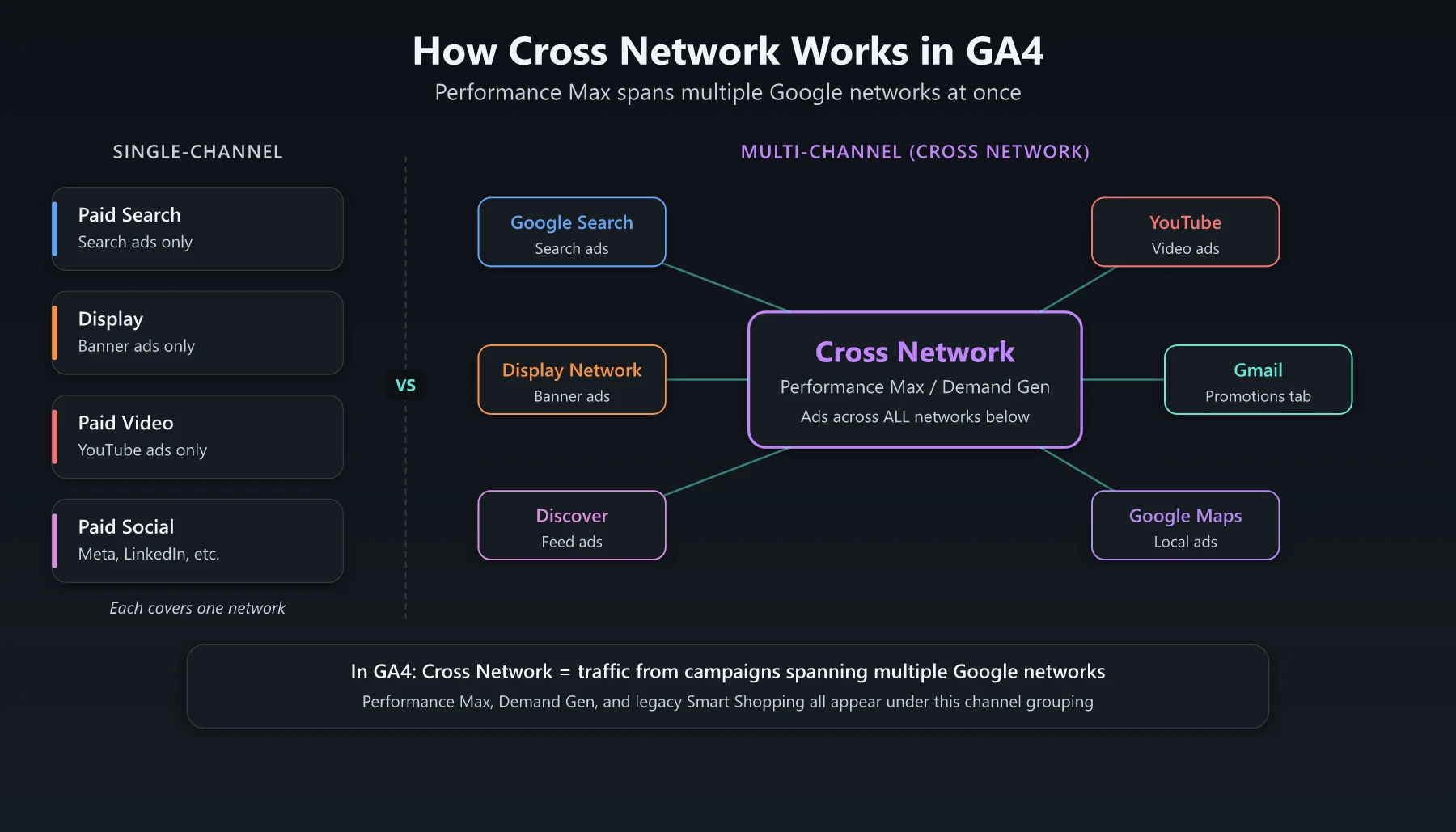
Cross Network is one of GA4’s default channel groupings. Google defines it as traffic that comes from campaigns serving ads across multiple Google-owned channels simultaneously. Unlike Paid Search (which only captures search ads) or Display (which only captures banner ads), Cross Network groups together traffic from campaigns that span several networks in a single campaign type.
The technical rule is straightforward. GA4 assigns traffic to the Cross Network channel when the campaign type contains the value Cross-network. This happens automatically when Google Ads passes campaign metadata to GA4 through auto-tagging.
Cross Network is not a campaign you create. It is a classification that GA4 applies based on the type of Google Ads campaign sending the traffic.
Why Cross Network Appears in Your GA4 Reports
Three campaign types trigger the Cross Network classification:
Performance Max Campaigns
Performance Max is the main reason you see Cross Network traffic. These campaigns serve ads across Search, Display, YouTube, Gmail, Discover, and Maps from a single campaign (Google Ads Help). Because the traffic cannot be neatly categorized into one network, GA4 groups it all under Cross Network.
The scale here is significant. Google generated $264.5 billion in advertising revenue in 2024 (Alphabet Annual Report), and a growing share of that spend flows through AI-driven campaign types like Performance Max. According to Google, advertisers who adopt Performance Max see an average of 27% more conversions or value at a similar CPA or ROAS (Google Ads, source: Google Data, Oct - Nov 2023).
Google launched Performance Max as a goal-based campaign type that uses machine learning to allocate budget across channels automatically. When a user clicks a Performance Max ad - whether it appeared on YouTube, in Gmail, or on a search results page - GA4 records the session source as google and the medium as cpc, but the channel grouping becomes Cross Network instead of Paid Search or Display.
Smart Shopping Campaigns (Legacy)
If you ran Smart Shopping campaigns before Google migrated them to Performance Max, historical data from those campaigns also appears under Cross Network. Smart Shopping combined standard Shopping ads with display remarketing across Google’s networks.
Google began offering self-service upgrades in April 2022 and automatically migrated all remaining Smart Shopping campaigns to Performance Max between July and September 2022 (Google Ads Developer Blog). Early testing showed advertisers who upgraded saw an average increase of 12% in conversion value at the same or better ROAS (Google Ads Blog).
You may still see legacy Smart Shopping data in GA4 if your reporting range extends back before mid-2022.
Demand Gen Campaigns
Demand Gen campaigns (formerly Discovery campaigns) serve ads across YouTube, Gmail, and the Discover feed. Because these campaigns also span multiple Google properties, their traffic lands in the Cross Network channel grouping in GA4.
Cross Network vs Other GA4 Channel Groupings
Understanding how Cross Network fits alongside other paid channels helps you avoid double-counting or misattributing your Google Ads traffic.
| Channel Grouping | Traffic Source | Campaign Types | Networks Covered |
|---|---|---|---|
| Paid Search | Google Ads search clicks | Search campaigns, Shopping campaigns | Google Search, Search Partners |
| Display | Google Ads display clicks | Display campaigns | Google Display Network |
| Paid Video | Google Ads video clicks | Video campaigns | YouTube |
| Paid Social | Social platform ad clicks | Meta, LinkedIn, etc. | Social networks |
| Cross Network | Google Ads multi-network clicks | Performance Max, Demand Gen, Smart Shopping (legacy) | Search + Display + YouTube + Gmail + Discover + Maps |
The critical difference: Paid Search, Display, and Paid Video each represent a single network. Cross Network represents traffic that could have come from any of those networks - but GA4 cannot tell you which one within its default reports.
This is what makes Cross Network both useful and frustrating. It accurately reflects how Performance Max works (budget flows across networks dynamically), but it removes the channel-level granularity marketers are used to.
How to Analyze Cross Network Traffic in GA4
Here is how to find and evaluate your Cross Network data step by step.
Step 1: Open the Traffic Acquisition Report
Navigate to Reports > Acquisition > Traffic acquisition in GA4. The default dimension is “Session default channel group.” You will see Cross Network listed here if you are running Performance Max, Demand Gen, or legacy Smart Shopping campaigns.
Step 2: Add Secondary Dimensions
Click the + button next to the primary dimension and add:
- Session source/medium - Confirms the traffic is from
google / cpc - Session campaign - Shows which specific Performance Max or Demand Gen campaign drove the traffic
- Landing page - Reveals which pages Cross Network visitors are arriving on
Step 3: Compare Cross Network Against Other Paid Channels
Use the comparison feature or build an Exploration report to compare:
- Conversion rate across Cross Network vs Paid Search vs Display
- Engagement rate (sessions with engagement / total sessions)
- Average engagement time per session
- Revenue or key events attributed to Cross Network
This comparison tells you whether Performance Max traffic is converting at a similar rate to your single-network campaigns. If Cross Network shows a significantly lower conversion rate, it might indicate that the display and video portions of your Performance Max campaigns are diluting performance.
For context, Google’s own data shows that Performance Max delivers 27% more conversions on average compared to running campaigns without it (Google Ads). If your Cross Network performance is significantly below that benchmark, asset quality or audience signals may need attention.
Step 4: Check the Conversion Paths Report
Navigate to Advertising > Attribution > Conversion paths. Filter by the Cross Network channel to see where it typically appears in the customer journey. Cross Network traffic often shows up in early and mid-funnel touchpoints because Performance Max serves heavily on YouTube and Display for prospecting.
How to Get More Granular Data From Cross Network Campaigns
The biggest complaint about Cross Network is the lack of transparency. You cannot see which Google network (Search, YouTube, Display) drove each click. Here are three ways to get closer to that data.
Use Google Ads Reports Directly
Google Ads provides network-level breakdowns that GA4 does not. Inside your Performance Max campaign:
- Go to Campaigns > select your PMax campaign
- Click Insights to see which channels are driving results
- Check the Listing groups report for Shopping performance
- Review Asset group performance to see which creative formats perform best
Google Ads reporting gives you directional data about network allocation, though Google still limits full transparency into Performance Max channel splits.
Apply UTM Parameters Strategically
For Demand Gen campaigns, you can set custom UTM parameters at the campaign level. Adding a utm_content or utm_term parameter that identifies the campaign type helps you segment Cross Network traffic in GA4 Explorations.
Important note: Do not add manual UTM tags to Performance Max campaigns. Auto-tagging handles the attribution, and manual tags can conflict with Google’s tracking. Stick to auto-tagging for PMax and use Google Ads reports for network-level insights.
Build Custom Channel Groupings
GA4 allows you to create custom channel groupings with rules that override the defaults. While you cannot split Cross Network by Google sub-network (because that data is not passed to GA4), you can create custom groupings that combine Cross Network with your other paid channels for a unified “Total Google Ads” view.
This is useful when you want to evaluate overall Google Ads performance without the artificial split between Paid Search, Display, and Cross Network. If you are running a technical SEO audit alongside paid campaigns, having a clean total paid view helps you measure the incremental impact of organic improvements.
Common Mistakes With Cross Network Data
Ignoring Cross Network in ROAS Calculations
Some marketers calculate ROAS only on Paid Search and Display, forgetting that Cross Network contains a significant portion of their Google Ads spend. If you run Performance Max campaigns, your GA4 ROAS picture is incomplete without Cross Network.
Comparing Cross Network Directly to Paid Search
Cross Network blends prospecting (Display, YouTube) with high-intent (Search) traffic. Comparing its conversion rate directly against pure Paid Search is misleading. A better approach: compare total Google Ads performance (Paid Search + Display + Cross Network) period over period.
Not Connecting GA4 to Google Ads
If GA4 and Google Ads are not linked, campaign metadata may not pass correctly, and Cross Network traffic could end up misclassified. Verify your Google Ads linking is active in GA4’s admin settings.
As AI-driven campaign types like Performance Max become standard practice, marketers building an AI-powered SEO and advertising strategy need to understand how automated campaigns are reflected in analytics. Cross Network reporting is a direct consequence of Google shifting toward AI-managed ad placement.
What Cross Network Means for Your Marketing Strategy
Cross Network traffic is only going to grow. Google is investing heavily in AI-driven campaign types that distribute ads across properties automatically. With $264.5 billion in ad revenue in 2024 (Alphabet Annual Report) and Performance Max now used by 71% of surveyed advertisers (Fluency, 2026), cross-network campaigns are becoming the norm rather than the exception. Performance Max is already the default recommendation for most Google Ads advertisers, and marketing automation workflows increasingly feed leads generated by these cross-channel campaigns.
Here is what to do about it:
- Accept the opacity. Google is unlikely to expose full network-level breakdowns for Performance Max in GA4. Plan your reporting around this limitation.
- Use Google Ads and GA4 together. Neither tool gives you the full picture alone. Cross-reference GA4’s Cross Network data with Google Ads Insights for a complete view.
- Track incrementality, not just attribution. Run geo-based lift tests or holdout experiments to measure whether your Performance Max campaigns are driving truly incremental conversions or cannibalizing organic and branded search traffic.
- Monitor Cross Network’s share of total paid traffic. If Cross Network grows rapidly as a percentage of total Google Ads sessions, check whether overall efficiency (revenue per ad dollar) is improving or declining.
Conclusion
Understanding what is cross network in Google Analytics comes down to one core concept: it is GA4’s label for traffic from Google Ads campaigns that serve ads across multiple properties simultaneously. Performance Max is the primary driver, with Demand Gen and legacy Smart Shopping also contributing.
The channel grouping exists because these campaign types do not fit neatly into Paid Search, Display, or Paid Video. Instead of guessing which network a click came from, GA4 groups them all under Cross Network.
To work with this data effectively, use GA4 for session-level analysis and conversion attribution, but rely on Google Ads reports for network-level performance details. Link both platforms, build custom Explorations, and track Cross Network alongside your other paid channels rather than in isolation.
Cross Network is not a bug in your reports. It is the natural result of how modern Google Ads campaigns work. The sooner your reporting framework accounts for it, the more accurate your performance analysis becomes.
Frequently Asked Questions
What is cross network in Google Analytics?
Cross Network is a default channel grouping in GA4 that captures traffic from Google Ads campaigns that serve ads across multiple Google properties simultaneously, such as Performance Max and Smart Shopping campaigns.
Is cross network traffic the same as paid search?
No. Paid Search only captures traffic from search ads. Cross Network captures traffic from campaigns like Performance Max that span Search, Display, YouTube, Gmail, Discover, and Maps simultaneously.
Can I break down cross network traffic by specific channel?
Not directly in GA4's default reports. However, you can use Google Ads reports to see which network (Search, Display, YouTube, etc.) drove specific conversions within your Performance Max campaigns.