How to Implement Marketing Automation: A 6-Phase Playbook
How to implement marketing automation without the six-month delay. A 6-phase playbook with data, workflows, and tooling decisions for your first 90 days.
Marketing automation has crossed the line from optional to default. The HubSpot 2026 State of Marketing report found that 80% of marketers use AI for content creation and that 61% of marketers believe that marketing is experiencing its biggest disruption in 20 years due to AI. The teams pulling ahead are not the ones with the most tools. They are the ones who actually implemented them well.
This guide walks through how to implement marketing automation in a way that ships value in 30 days and reaches full coverage in a quarter. It covers the six implementation phases, the most common stall points, and the deliverables that separate a working system from a polished demo.
What “Implementing” Marketing Automation Really Means
Implementation is not buying a license. It is the work of getting clean data into a platform, building the workflows that match your funnel, syncing the right fields back to a CRM, and training a team to run it without constant rework.
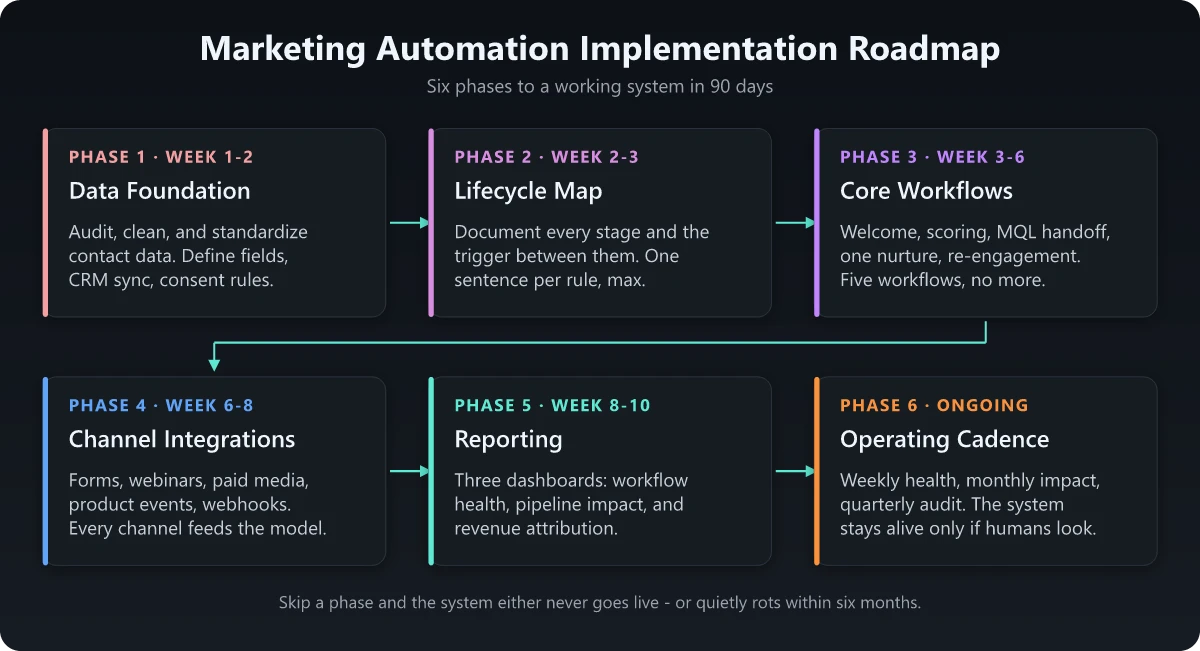
A real implementation has six layers, in this order:
- Data foundation - the lists, fields, and CRM sync that every workflow depends on
- Lifecycle map - the stages a contact moves through and the trigger between each
- Core workflows - welcome, nurture, scoring, sales handoff, re-engagement
- Channel integrations - forms, ads, webinars, product events, paid media
- Reporting - dashboards that connect campaigns to pipeline and revenue
- Operating cadence - the weekly review that keeps the system from rotting
Skip the data foundation and you will rebuild every workflow when the field naming breaks. Skip the operating cadence and the workflows you launched in month two will be silently broken by month six.
The 6-Phase Implementation Playbook
The playbook below assumes a B2B SaaS context with an existing CRM. The same structure works for B2C, with channel emphasis shifted toward SMS, push, and lifecycle email. For B2C-specific sequencing, see B2C marketing automation. For B2B nuances, see B2B marketing automation.
Phase 1: Data Foundation (Week 1-2)
Before a single email goes out, lock down the data model. This is the work that prevents the largest share of post-launch firefighting.
- Audit existing contact data. Pull a sample of 1,000 contacts. How many have a missing first name, fake email, or wrong country? That is the floor of your problem.
- Define required fields. A working B2B model needs at minimum: email, first name, company, country, lifecycle stage, lead source, MQL date, and consent.
- Standardize field formats. Country as a picklist (not a free-text “USA / United States / U.S.”). Job title normalized into a function-level field.
- Set up CRM sync. Decide which platform is the source of truth for each field. The CRM usually owns account data; automation usually owns marketing-engagement data.
- Document consent and suppression. GDPR, CAN-SPAM, and CASL all require it. Build the suppression list before the first send.
A clean data foundation is the difference between a workflow that converts and one that quietly fires at the wrong half of your list. For a refresher on getting the audience definition right, see ICP vs buyer persona.
Phase 2: Lifecycle Map (Week 2-3)
A lifecycle map answers one question: when does a contact move from stage A to stage B, and what action triggers it?
| Stage | Definition | Trigger to next stage |
|---|---|---|
| Subscriber | Opted in, no other engagement | Visited a key page or downloaded gated content |
| Lead | Engaged with content | Crossed scoring threshold (e.g., 50 points) |
| MQL | Marketing qualified | Sales accepts within 5 business days |
| SAL | Sales accepted | Sales completes discovery |
| SQL | Sales qualified | Opportunity created |
| Customer | Closed-won | Activated in product |
| Champion | Repeat advocate | Renewal or expansion |
Document the trigger in plain English first. Configure it in the platform second. If you cannot describe the rule in one sentence, the rule is too complex.
Phase 3: Core Workflows (Week 3-6)
Ship five workflows in this exact order. Most teams over-build and under-launch. Resist the urge.
- Welcome series (3 emails). Sets expectations, introduces top resources, drops a soft CTA.
- Lead scoring (behavioral + demographic). Start with 10 rules total. Score visits to pricing pages 25, demo requests 50, free email domains -10.
- MQL handoff to sales. A workflow that creates a CRM task for the AE within 5 minutes of MQL trigger. SLA: contact within 24 hours.
- Single nurture track for your top topical cluster. Five emails, weekly cadence, exit on engagement.
- Re-engagement for contacts inactive 90+ days. Two emails, then suppress.
That is enough to prove ROI. Add more after the first reporting cycle, not before. For 12 ready-to-build templates, see marketing automation workflows.
Phase 4: Channel Integrations (Week 6-8)
Once core workflows are live, wire in the channels that feed them.
- Forms. Replace every static form on the site with the platform’s form. Map every field to the data model.
- Webinars. Sync registration, attendance, and post-event behavior. Webinar attendance is one of the highest-intent signals you have.
- Paid media. Sync custom audiences from CRM. Suppress current customers from acquisition spend.
- Product analytics. If you are SaaS, pipe key in-app events (signup, activation, upgrade) into the marketing platform. This is what turns a marketing tool into a lifecycle tool.
- Webhooks. Anything not natively integrated should send a webhook on the events that matter.
Phase 5: Reporting (Week 8-10)
Marketing automation that you cannot measure is marketing automation that gets cut in the next budget cycle. Build three dashboards before you call the implementation done.
- Workflow health dashboard. Open rate, click rate, unsubscribe rate, deliverability, list growth - by workflow.
- Pipeline impact dashboard. MQLs by source, SQL conversion rate, opportunities sourced and influenced, average days from MQL to opportunity.
- Revenue dashboard. Pipeline created, closed-won attributed (sourced + influenced), CAC, payback period on the platform itself.
Tie every dashboard to a meeting cadence: workflow weekly, pipeline biweekly, revenue monthly with the leadership team.
Phase 6: Operating Cadence (Ongoing)
The implementation is not done at launch. It is done when the team has a sustainable rhythm to keep it healthy.
- Weekly: review workflow health, fix anything broken, test one new email subject or CTA.
- Monthly: review pipeline impact, retire underperforming nurtures, add one new workflow.
- Quarterly: audit data hygiene, review scoring weights, update lifecycle definitions, prune dead segments.
Without this cadence, the workflows you launched in week six will be silently broken by month six. The platform is alive only if a human looks at it on a fixed schedule.
Common Implementation Pitfalls
Six pitfalls account for most failed implementations. Knowing them in advance is the cheapest insurance you can buy.
| Pitfall | Symptom | Fix |
|---|---|---|
| Too many fields, too early | Forms are 10+ fields long, conversion craters | Cut to 4 fields. Enrich the rest from third-party data |
| Scoring rules nobody owns | MQL volume spikes or drops with no explanation | Assign a single owner. Review weights monthly |
| Sales not in the loop | Reps say “marketing leads suck” within a quarter | Joint MQL definition workshop. Sales sets the bar, marketing meets it |
| Building 20 workflows in month 1 | Everything is half-finished, nothing converts | Ship 5. Optimize. Then add |
| No suppression strategy | Customers receive sales acquisition emails | Suppression list as a required field on every send |
| Reporting only on opens | Leadership stops trusting the numbers | Tie every campaign to pipeline or revenue, not opens |
Choosing the Right Platform
Tooling matters less than people assume. Most platforms in the same tier converge on capability; the real delta is in what your team will actually adopt and admin. Pick based on team capacity and CRM stack first, features second.
| Tier | Tools | Best for |
|---|---|---|
| Lightweight | Mailchimp, Klaviyo, Brevo | SMB, ecommerce, single-product teams |
| Mid-market | HubSpot, ActiveCampaign, Customer.io | B2B SMB to mid-market with one main CRM |
| Enterprise | Marketo Engage, Salesforce Marketing Cloud, Marketing Cloud Account Engagement (formerly Pardot) | Multi-product, multi-CRM, complex governance |
| Modern PLG | Customer.io, Iterable, Braze | SaaS with rich product event data |
For a deeper view of how the platform fits into a wider strategy, see marketing automation strategy.
A Realistic 90-Day Timeline
The default mistake is to plan for a 6-month implementation and then ship at month 9. A focused team can hit a real working system in 90 days.
- Days 1-15: data foundation and lifecycle map
- Days 15-45: five core workflows live, sales handoff working end-to-end
- Days 45-75: channel integrations, paid media sync, product event pipeline
- Days 75-90: three dashboards, first monthly leadership review, retro
The teams that hit this timeline have one thing in common: they treat sales as a co-implementer, not a downstream customer. The MQL definition, scoring weights, and SLA are set together in the first two weeks. Everything else flows from that.
The Bottom Line
Implementing marketing automation is mostly a sequencing problem. Get the data foundation right, ship five workflows, wire the channels, build the reporting, and protect the operating cadence. Skip a step and the system either never goes live or quietly rots.
The teams that do this well are not the ones with the most expensive platform. They are the ones whose marketing-ops owner can answer two questions on demand: which workflow drove the most pipeline last month, and which one is broken right now. Build for those two answers and the rest of the implementation falls into place.
For the strategy that should sit on top of this implementation, see marketing automation strategy, and for ready-to-build sequences, see marketing automation workflows.
Frequently Asked Questions
How long does it take to implement marketing automation?
A focused implementation reaches a working welcome series, lead scoring, and one nurture in 30 to 45 days. Full coverage across acquisition, lifecycle, and revenue attribution typically takes 90 to 120 days. The variable that breaks timelines is data, not tooling.
What is the right team size to implement marketing automation?
A minimum viable team is one marketing operations owner, one campaign builder, and one stakeholder from sales who controls CRM hygiene. Larger SaaS teams add a data engineer and a content lead. Skipping the sales stakeholder is the single most common reason implementations stall.
Should I implement marketing automation before I have a CRM?
No. Marketing automation amplifies whatever data and process you already have. If your CRM is messy, automation will send the wrong message to the wrong list at scale. Fix CRM hygiene first, even if it delays the automation rollout by a quarter.
What is the difference between marketing automation and a CRM?
A CRM stores customer and account records and runs sales workflows. Marketing automation runs campaigns against those records: emails, scoring, journeys, forms, and lifecycle triggers. Most modern stacks tie the two together so a behavior in automation updates a field in the CRM and vice versa.
How do I measure marketing automation success?
Track three layers: workflow health (deliverability, open and click rates, list growth), pipeline impact (MQLs, SQLs, opportunities sourced or influenced), and revenue (pipeline created, closed-won attributed, payback period on the platform spend).