Resend Pricing: Free, Pro and Scale by Monthly Email Volume
Resend pricing on 23 November 2026: Free 3,000 emails, Pro from $20, Scale from $90, the cheapest tier at each monthly volume, and what counts against your quota.

At 70,000 emails a month, Resend’s $35 Pro tier costs less than its $20 Pro tier. The $20 tier includes 50,000 emails and bills the other 20,000 at $0.90 per 1,000, which comes to $38, and it only sends them at all if someone has switched overages on. Resend pricing works that way all the way up the price list: the list price is the least you pay, and the bill depends on where your volume lands and on what Resend counts as an email.
I would pick a Resend tier from its counting rules first and the list price second. Received emails count against the quota, every CC and BCC recipient counts, and on a paid plan sending stops at the quota unless an admin has turned on pay-as-you-go. Every Resend price and limit below is from Resend’s own pricing page and documentation, each linked where it is used, read on 23 November 2026; the worked bills are my arithmetic from those prices. Prices are in US dollars and change, so check the page before you upgrade.
Resend Pricing at a Glance (23 November 2026)
| Plan | Monthly price | Included | Overage per 1,000 | Daily limit |
|---|---|---|---|---|
| Free | $0 | 3,000 emails, 1,000 marketing contacts | Not available | 100 emails |
| Pro | $20 | 50,000 emails | $0.90 | None |
| Pro | $35 | 100,000 emails | $0.90 | None |
| Scale | $90 to $1,150 | 100,000 to 2,500,000 emails | $0.90 down to $0.46 | None |
| Enterprise | Custom | Custom | Custom | None |
| Pro Marketing | $40 to $650 | 5,000 to 150,000 contacts | Not listed | None |
Source: Resend’s pricing page in plain text, the text version Resend publishes of its pricing page. Pro is sold at two volumes, so below I call them Pro 50k ($20) and Pro 100k ($35). The transactional rows price emails sent and received; the marketing row prices contacts, with unlimited broadcast sending to them.
Is Resend Free?
Yes: the Free plan costs $0 for 3,000 transactional emails a month, with a cap of 100 a day, and marketing email to up to 1,000 contacts. There is no free trial of the paid plans; the pricing FAQ answers “No, but we provide a free-forever plan.”
What the Free plan includes, per the pricing page:
| Free plan item | Limit |
|---|---|
| Transactional emails | 3,000 a month, 100 a day, sent and received combined |
| Marketing email | Up to 1,000 contacts |
| Verified domains | 3 |
| Inboxes | 3, with no way to add more on Free |
| Webhook endpoints | 1 |
| Automation runs | 10,000 a month, with no overage |
| AI credits | 5 a month |
| Data retention | 30 days |
| Single sign-on | Not included |
The domain count is new. Resend’s changelog entry of 25 August 2026, More Domains on the Free Tier, says the free tier “has included a single verified domain” since Resend began and now includes three. A guide written before that date may still say one.
The daily cap follows the clock in UTC: Resend describes it as “a UTC calendar day” that “resets at midnight UTC”, not a rolling 24-hour window. From India, that reset falls at 5:30 am IST.
Resend Transactional Pricing: Every Tier
The full transactional price list, from Resend’s pricing knowledge-base article. The last column is my arithmetic: the plan price divided by its included emails, so it is the rate you pay only if you use the whole quota.
| Tier | Monthly price | Emails a month | Overage per 1,000 | Cost per 1,000 at full use |
|---|---|---|---|---|
| Free | $0 | 3,000 | Not available | $0 |
| Pro 50k | $20 | 50,000 | $0.90 | $0.40 |
| Pro 100k | $35 | 100,000 | $0.90 | $0.35 |
| Scale 100k | $90 | 100,000 | $0.90 | $0.90 |
| Scale 200k | $160 | 200,000 | $0.80 | $0.80 |
| Scale 500k | $350 | 500,000 | $0.70 | $0.70 |
| Scale 1M | $650 | 1,000,000 | $0.65 | $0.65 |
| Scale 1.5M | $825 | 1,500,000 | $0.52 | $0.55 |
| Scale 2.5M | $1,150 | 2,500,000 | $0.46 | $0.46 |
| Enterprise | Custom | Custom | Custom | Custom |
Read down the last column and Pro 100k, fully used, works out to $0.35 per 1,000 emails, below the $0.46 of the largest Scale tier. The same article says that for teams sending 1 million or more emails a month, Resend offers custom Enterprise plans with volume-based pricing.
The Cheapest Resend Tier for Your Monthly Volume
Overage is what makes a smaller tier cheaper or dearer than the next one up. The FAQ on Resend’s pricing page says overages “are billed in buckets of 1,000 emails at your plan’s overage rate”. Each row below compares every self-serve tier at that volume and keeps the cheapest, with overage switched on.
| Emails a month | Cheapest route | Monthly bill | Cost per 1,000 | Next-best route |
|---|---|---|---|---|
| 3,000 | Free (100 a day at most) | $0 | $0 | Pro 50k, $20 |
| 40,000 | Pro 50k | $20 | $0.50 | Pro 100k, $35 |
| 60,000 | Pro 50k + 10 x $0.90 | $29 | $0.48 | Pro 100k, $35 |
| 70,000 | Pro 100k | $35 | $0.50 | Pro 50k + 20 x $0.90, $38 |
| 100,000 | Pro 100k | $35 | $0.35 | Pro 50k + 50 x $0.90, $65 |
| 150,000 | Pro 100k + 50 x $0.90 | $80 | $0.53 | Pro 50k + 100 x $0.90, $110 |
| 200,000 | Pro 100k + 100 x $0.90 | $125 | $0.63 | Pro 50k + 150 x $0.90, $155 |
| 300,000 | Pro 100k + 200 x $0.90 | $215 | $0.72 | Scale 200k + 100 x $0.80, $240 |
| 450,000 | Pro 100k + 350 x $0.90, or Scale 500k | $350 | $0.78 | Tie |
| 500,000 | Scale 500k | $350 | $0.70 | Pro 100k + 400 x $0.90, $395 |
| 750,000 | Scale 500k + 250 x $0.70 | $525 | $0.70 | Scale 200k + 550 x $0.80, $600 |
| 1,000,000 | Scale 1M | $650 | $0.65 | Scale 500k + 500 x $0.70, $700 |
All of it is my arithmetic from the published prices, before any tax, with cost per 1,000 rounded to the cent.
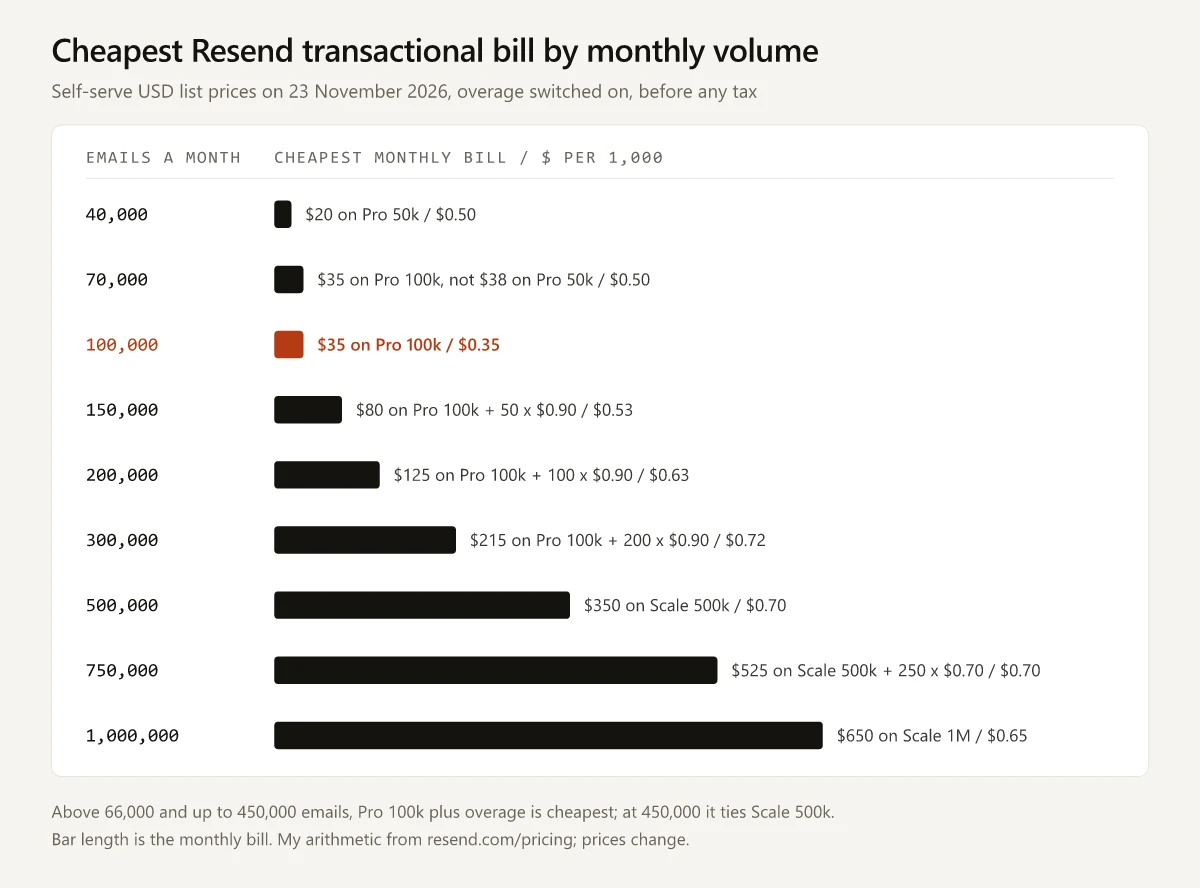
The crossovers in the table:
- Pro 50k gives way to Pro 100k just above 66,000 emails. At 66,000 the smaller tier costs $34.40 (16 buckets at $0.90); one more email starts a 17th bucket and the bill becomes $35.30, so Pro 100k is cheaper above 66,000.
- Pro 100k plus overage costs less than every Scale tier up to 450,000 emails. At 450,000 it costs $35 plus 350 buckets at $0.90, which is $350, the same as Scale 500k. Above that, Scale 500k wins.
- Pro 100k stays inside the default overage cap up to 500,000 emails, because the cap is 5x the monthly quota by default and 450,000 is 4.5x.
- Scale 500k plus overage at $0.70 costs less than Scale 1M up to 928,000 emails: at 928,000 it is $350 plus 428 buckets at $0.70, which is $649.60, against $650. Above that, Scale 1M wins.
The second crossover runs against a line in Resend’s own docs, which say overages “can be more expensive per email than upgrading your plan”. That holds from Pro 50k to Pro 100k above 66,000 emails. From Pro 100k to Scale, the price list says the opposite until 450,000, so a move to Scale below that volume buys Scale’s features, covered further down.
What Counts Against Your Resend Quota
The tier you need depends on how Resend counts, and the counting rules are spread over the pricing FAQ and the account quotas and limits page. Together:
| Activity | Counts against the transactional quota? | Where Resend says so |
|---|---|---|
| An email sent through the /emails API | Yes, one per recipient | Pricing FAQ |
| Each To, CC or BCC recipient on one send | Yes, each counts “as separate emails” | Quota docs |
| An email received (inbound) | Yes, “as 1 email against your daily and monthly limits” | Quota docs |
| Email sent or received through an inbox | Yes; inboxes have no separate allowance | Pricing page |
| A newsletter sent through the /emails API | Yes, one per recipient | Pricing FAQ |
| A broadcast sent through the /broadcasts API or the dashboard | No; broadcasts count against contacts | Pricing FAQ |
| An automation run (the run itself) | No; runs have a separate allowance of 10,000 a month | Pricing page |
| AI credits | No; “separate from the email and contact quotas” | Plain-text pricing page |
Resend’s pages do not say how emails sent by an automation’s Send Email step count against the quota.
Two worked counts, my arithmetic from those rules:
- An order confirmation sent to a customer, copied to an operations address and blind-copied to an archive address is 3 emails against the quota, not one.
- A Free account whose support address receives 60 emails in a UTC day has 40 sends left for that day.
If your app copies an internal address on every send, or receives replies through Resend, size the tier on sent plus copied plus received.
What Happens When You Hit the Resend Limit
On every plan, a send that hits the quota is refused rather than delayed. Resend’s usage limits reference lists the 429 error types daily_quota_exceeded and monthly_quota_exceeded, and the quota docs add that “Resend doesn’t queue or retry that email”. Your code has to send it again after the reset or the upgrade.
Paid plans add pay-as-you-go overage, with these rules from the quota docs:
| Overage rule | What the docs say |
|---|---|
| Default state | Off “until a team admin turns on Transactional pay-as-you-go on the Usage page” |
| While off | ”sending stops at your monthly quota until the next billing cycle” |
| Cap once on | Default 400%, “so you can send up to 5x your monthly quota in a billing cycle” |
| Adjusting the cap | A team admin can set it “from 100% to 1,000% in steps of 100%“ |
| At the cap | ”sending is paused until the next billing cycle” |
Resend’s pages name the switch differently: the pricing FAQ says to enable it in team settings under “Transactional Overages”, while the quota docs call it “Transactional pay-as-you-go” on the Usage page. Look for either label.
Other limits can stop sending on any plan:
- Rate limit: the usage limits reference sets the default at 10 requests per second per team, across all API keys. The pricing FAQ says upgrading does not raise it, and the Batch Email API sends up to 100 emails in one request, counted as one request.
- Bounce rate: the quota docs require under 4%, or sending may be paused.
- Spam rate: the quota docs require under 0.08%, with the same consequence.
- Contacts: past your marketing plan’s contact limit, the usage limits reference says broadcasts are blocked with a 403 error until you upgrade or remove contacts.
Resend Marketing Pricing by Contacts
Marketing email has its own price list, priced by contacts rather than by emails. The pricing FAQ says marketing plans “are not limited by the number of emails you can send, but only by the number of contacts you have”, and broadcasts go only to existing contacts.
| Plan | Monthly price | Contacts | Price per 1,000 contacts |
|---|---|---|---|
| Free | $0 | 1,000 | $0 |
| Pro Marketing | $40 | 5,000 | $8 |
| Pro Marketing | $80 | 10,000 | $8 |
| Pro Marketing | $120 | 15,000 | $8 |
| Pro Marketing | $180 | 25,000 | $7.20 |
| Pro Marketing | $250 | 50,000 | $5 |
| Pro Marketing | $450 | 100,000 | $4.50 |
| Pro Marketing | $650 | 150,000 | $4.33 |
| Enterprise | Custom | Custom | Custom |
The last column is my division. Pro Marketing adds marketing analytics and unlimited segments over the Free plan’s 3 segments, per the pricing page.
Resend’s guide to choosing a sending feature files newsletters under marketing email, but the pricing FAQ allows either route and spells out the cost: “Every recipient of an /emails API send counts as one email against your transactional quota; broadcasts count against your contacts instead.” A weekly newsletter to 5,000 subscribers is about 20,000 emails in a four-send month. If your transactional plan has 20,000 spare emails, that newsletter adds nothing to the bill; if not, a paid plan with overage on bills the extra 20,000 at $0.90 per 1,000 ($18, my arithmetic), against $40 for the 5,000-contact Pro Marketing tier. The /emails route also needs your own visible unsubscribe link plus List-Unsubscribe and List-Unsubscribe-Post headers; Broadcasts add the unsubscribe link for you when the message includes Resend’s unsubscribe placeholder.
Mailchimp and Kit also price by list size: see Mailchimp’s contact tiers in rupees and Kit’s prices from 1,000 to 105,000 subscribers.
Resend Add-Ons: Domains, Dedicated IPs, SSO, Inboxes and Automations
| Add-on | Price | Available on | Condition in Resend’s pricing text |
|---|---|---|---|
| Domains | $20 a month for 100 more | Pro and Scale | Added or removed at any time from the dashboard |
| Dedicated IPs | $30 a month | Scale | ”customers exceeding 3,000 emails sent per day” |
| Single sign-on | $150 a month | Scale (included on Enterprise) | Sign in with your identity provider |
| Extra inboxes | $1 per inbox a month | Paid plans | Beyond the 3 included; pay-as-you-go must be turned on |
| Automation runs | $0.0015 per run | Paid plans | Beyond the 10,000 included each month |
Included domains are 3 on Free, 10 on Pro and 1,000 on Scale. Resend’s domains add-on guide says the add-on applies immediately with a prorated charge on the next invoice, and that it “does not change your monthly email quota, your contact limit, or your rate limit”. The inbox switch has its own catch in the quota docs: turning pay-as-you-go for inboxes off “stops new inboxes from being created, but existing inboxes keep working and keep being billed until you delete them.”
Pro 100k vs Scale 100k: What the Extra $55 Buys
At 100,000 emails a month, Pro costs $35 and Scale costs $90, with the same email allowance and the same $0.90 overage. The difference is features, all from the pricing page’s plan comparison:
| Feature | Pro 100k ($35) | Scale 100k ($90) |
|---|---|---|
| Included domains | 10 | 1,000 |
| Webhook endpoints | 5 | 10 |
| AI credits a month | 100 | 500 |
| Dedicated IPs | No | $30 add-on |
| Single sign-on | No | $150 add-on |
| Slack support channel | No | Yes |
| Urgent response SLA | No | Yes |
| Daily limit, retention, API rate limit | None, 30 days, 10 requests a second | None, 30 days, 10 requests a second |
If the only reason to move is domains, Pro 100k plus the $20 domains add-on gives 110 domains for $55 a month (my arithmetic). The dedicated IP case needs more reading. Resend’s dedicated IP article lists the request requirements as more than 3,000 emails sent per day and “an active Transactional Scale or Marketing Pro subscription”, so its pages differ from the pricing page’s Scale-only line. The same article warns that “sending less than 90,000 emails a month may not be enough to keep the IPs warm.”
Billing, Discounts and Paying From India
The billing rules on Resend’s plain-text pricing page:
- Self-serve plans are “billed monthly only. There are no annual plans and no discount for paying annually.” Annual commitments go through Resend’s enterprise sales.
- Registered nonprofits can apply for 50% off paid plans; the nonprofits page lists who is eligible. The pricing FAQ says “We do not offer education pricing.”
- Payment: “We accept all major credit cards.”
On 23 November 2026, the pricing page I fetched from India listed prices in US dollars only, with no rupee sign, no INR and no tax line anywhere in its text. It does not say what tax, if any, is added at checkout. How a dollar-listed tool can add tax when you pay from India is worked through in my Replit price check for India. If you need email billed in rupees, MSG91’s email plans, priced per email sent, are listed in rupees and stated as exclusive of 18% GST.
Which Resend Plan to Pick
| If you send | Start with | Why, from the tables above |
|---|---|---|
| Under 100 emails a day, sent plus received | Free | 3,000 a month at $0, with 3 domains |
| Up to 66,000 a month | Pro 50k with overage on | $20 plus $0.90 per 1,000 above 50,000 stays under $35 |
| Over 66,000 to 450,000 a month | Pro 100k with overage on | Cheaper than any Scale tier below 450,000 (tied at 450,000), inside the default 5x cap |
| Over 450,000 to 928,000 a month | Scale 500k with overage on | $350 plus $0.70 per 1,000 above 500,000 stays under Scale 1M’s $650 |
| Over 928,000 a month | Scale 1M and up | At full use the price per 1,000 is $0.65 or less |
| Over 3,000 a day and you want your own IP | Scale plus the $30 dedicated IP | The pricing page lists dedicated IPs on Scale |
| Newsletters to a list | Broadcasts on a marketing plan, or spare transactional quota | Broadcasts count contacts, not emails |
| As a registered nonprofit | Any paid plan after applying | 50% off paid plans |
Resend Pricing Comes Down to What Counts
Resend pricing turns on two rules from its docs: received and copied emails count against the quota, and a paid plan stops sending at the quota unless pay-as-you-go is on. Before you choose a tier, add a month of sent emails times recipients to every received email, then read that total against the volume table above. Turn on transactional pay-as-you-go if a refused send would cost you more than a $0.90 bucket, and set the cap to match. Recheck the pricing page before you upgrade, because Resend changed the free tier as recently as August 2026.
Frequently Asked Questions
Is Resend free?
Yes. Resend's Free plan costs $0 for 3,000 transactional emails a month, capped at 100 a day, plus marketing email to up to 1,000 contacts. Resend offers no free trial of its paid plans; its pricing FAQ calls Free a free-forever plan.
What is the Resend free tier daily limit?
100 emails a day, counting both sent and received emails. Resend's quota docs say the day is a UTC calendar day that resets at midnight UTC, not a rolling 24-hour window.
Does Resend charge per email or per contact?
Both, on separate price lists. Transactional plans are priced by emails sent and received each month (Pro from $20 for 50,000), and marketing plans by contacts (Pro Marketing from $40 for 5,000). Broadcasts do not count against the transactional quota.
Does Resend have annual billing?
Not on self-serve plans. Resend's plain-text pricing page says self-serve plans are billed monthly only, with no annual plans and no discount for paying annually; annual commitments go through its Enterprise sales team.
What happens when you go over your Resend limit?
The API refuses the send with a 429 error and Resend does not queue or retry it. On a paid plan, a team admin can turn on transactional pay-as-you-go, which bills extra emails in buckets of 1,000 at the plan's overage rate, up to a default cap of 5x the monthly quota.