Google Keyword Planner Without Campaign: What Google Says
Yes, you can use Google Keyword Planner without a campaign, but not without billing details, and Google's own pages disagree on the campaign step. What each says.
If you typed “google keyword planner without campaign” into a search box, you asked two questions at once, and Google answers them differently. Can you get into Keyword Planner without building a campaign? Google’s sign-up guide says yes. Can you get in without handing over billing details? Google’s Keyword Planner Help page says no.
The guides I read lead with “yes” and “free”, and reach the payment form a few steps later. My reading of Google’s own pages is narrower: you can skip the campaign but not the billing form, and Google’s own pages disagree on the campaign step, so the “yes” rests on the sign-up guide alone. Everything Google says below is quoted from its Help Center and product pages as they read on 4 November 2026. None of it comes from a test account, and Google can relabel these screens at any time, so where a screen and a page disagree, trust the screen.
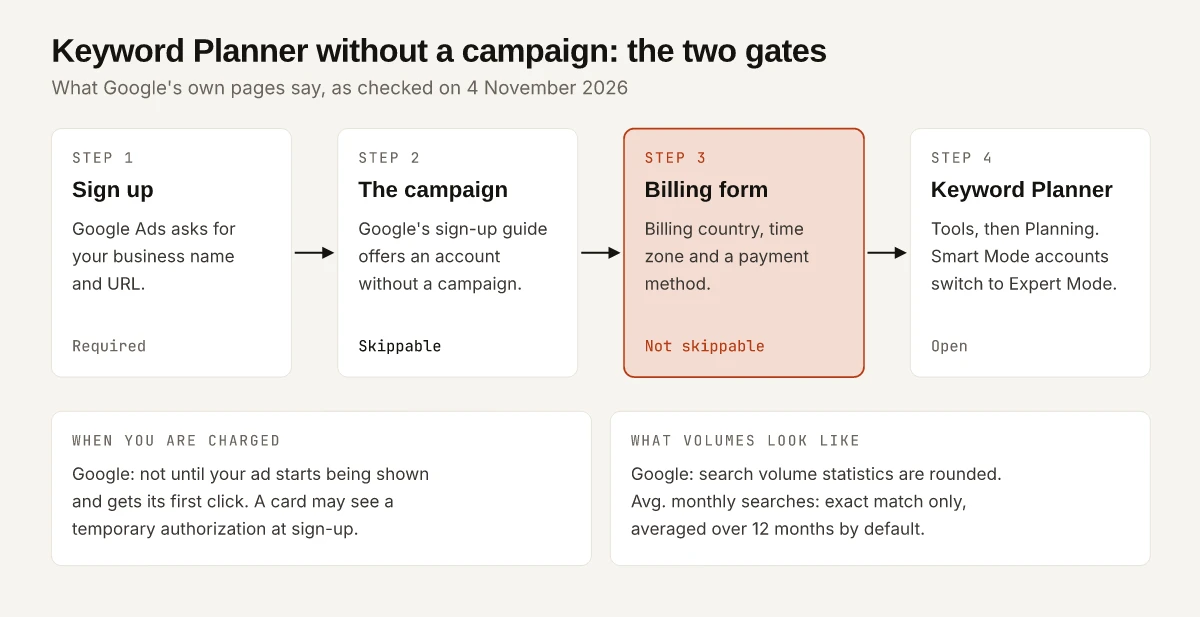
Yes, you can open Keyword Planner without creating a campaign: Google’s sign-up guide offers an account with no campaign in it, though its product page still says to create one. You cannot skip the billing form, which Google requires before keyword ideas load. Google says you won’t be charged until an ad is shown and clicked.
Can You Use Keyword Planner Without a Campaign?
Yes on Google’s Help Center, and no on Google’s own Keyword Planner product page, which still tells readers to create a campaign. Here is each Google page in its own words, as of November 2026:
| Google page | What it says about a campaign |
|---|---|
| Create a Google Ads account: how to sign up (Help Center) | “We recommend that you create your account before creating a campaign. While creating your account, you can skip all recommendations to create a campaign.” |
| Same page, business information step | ”At this stage, you also have the option to create an account without a campaign.” |
| Use Keyword Planner (Help Center) | Names billing information as the requirement for access. No campaign is mentioned. |
| Keyword Planner product page, India edition (FAQ) | “To access Keyword Planner, you first need to complete your Google Ads Account setup and create a campaign.” |
| Same FAQ | ”Anyone with a Google Ads account can access the Keyword Planner tool after they create a campaign.” |
I weight the sign-up guide above the product FAQ, because the sign-up guide is the page that walks through the sign-up screens one field at a time. The global edition of the product page (ads.google.com/home/tools/keyword-planner/ now redirects to business.google.com/en-all) carries the same “create a campaign” answer, so the disagreement is not a regional quirk.
The same FAQ adds a condition that holds either way: “If your account is using Smart Mode, you’ll need to switch it to Expert Mode.” Keyword Planner then sits under Tools, in the Planning section.
The Billing Form Is the Half You Cannot Skip
Google’s Use Keyword Planner page has one line under “To access Keyword Planner”: “You must complete your account setup by entering your billing information to access basic features like ‘Get ideas for new keywords’.” The India-English edition of the same page repeats it in its FAQ: “You must enter your billing information and complete your account setup to access basic features like keyword suggestions.”
Rank Math’s walkthrough agrees: Google “will require you to add a payment method to finish setting up your account”, even if you never plan to advertise. W3era’s guide lists payment details as a sign-up step too, though the same page later promises “No need for campaign setup or payment details.”
What the billing step asks for, per Google’s sign-up guide and its billing setup page:
| Field | What Google says | Why it matters if you only want Keyword Planner |
|---|---|---|
| Billing country | It “determines the billing options that are available for your location and currency” | Pick the country of your billing address; it decides which payment methods appear |
| Time zone | ”Your reports, statistics and billing are all affected by the time zone that you select, so choose carefully” | Set it to where you work; the account keeps it |
| Account type | Defaults to Organisation on the sign-up guide and Business on the billing page; switch to Individual “if appropriate, for tax purposes in your country” | Choose what matches the person or business on the payment method |
| Payment method | Card, PayPal or bank account details, depending on country | The field Google’s Keyword Planner page makes a condition of keyword ideas |
Two more lines on Google’s pages matter for anyone who wants the tool and no ads. A debit or credit card “might have a temporary authorisation” that Google says is “typically removed within a week”, with the exact amount shown during sign-up. And Google “may also request that you make a small prepayment for verification purposes”, which it says “is fully refundable if you request a refund or close your account”.
Is Google Keyword Planner Free?
As Google words it, yes: the tool has no fee, and charges start only once an ad is shown and clicked. Google’s India product page describes Keyword Planner as “a free resource to help advertisers build keyword lists for search campaigns”. The billing setup page adds the line that matters for anyone not running ads: “Remember, you won’t be charged until your ad starts being shown and gets its first click.”
Read literally, an account with no campaign has nothing to be charged for: no ad is shown and none is clicked. The card authorization and the possible verification prepayment above are the two money movements the Google pages I read describe before any ad runs.
Keyword Planner also estimates what clicks would cost, and as the Google Ads cost guide for India notes, that estimate sits behind this same billing step.
What Guides Say vs What Google’s Pages Say
Two guides that appeared in search results for this question in November 2026, set against Google’s wording:
| Claim | What the guide says | What Google’s pages say |
|---|---|---|
| No campaign needed | W3era (published 29 September 2023) quotes Google as saying “Setting up a campaign or ad is not mandatory to use keyword planner”, with no link to where Google said it | The sign-up guide agrees; the product page FAQ says to create a campaign |
| It costs nothing | Rank Math (updated 10 July 2025): “you don’t need to spend a dime to access it”; W3era: “there won’t be any charges if you don’t run any ads” | Not charged until an ad is shown and clicked; a card authorization and a refundable verification prepayment can still happen |
| A $10 charge | Rank Math: leaving automatic payments on “may trigger an initial $10 charge, depending on your region”, so it advises switching to manual payments | The sign-up and billing setup pages give no $10 figure; they say the authorization amount is shown during sign-up |
| Volumes are ranges | W3era: Keyword Planner “doesn’t show precise monthly search numbers, it provides average ranges” | Google’s forecasts page says “Your search volume statistics are rounded” and describes no volume ranges |
| Where the skip link is | Rank Math’s walkthrough names a link labelled “Set up an account only” | Google’s guide describes “the option to create an account without a campaign” and does not name the link |
The “Set up an account only” label comes from Rank Math’s screenshots, not from Google’s text, and the label can change between sign-up redesigns. Look for any option that creates the account without a campaign.
Google Keyword Planner Without Campaign Setup: The Steps Google Lists
In the order Google’s sign-up guide and Keyword Planner page describe them:
- Start the Google Ads sign-up and add your business information (name and URL).
- Take the option to create an account without a campaign, which Google’s guide places at the business-information stage, before campaign goals and budget.
- Complete billing: billing country, time zone, optional promotional code, payment profile and account type, payment method, then Submit.
- Switch to Expert Mode if the account opened in Smart Mode.
- Open Tools, then Planning, then Keyword Planner.
- Pick a starting point. “Discover new keywords” takes words or a website; “Get search volume and forecasts” takes a pasted list or a CSV upload with one column headed “Keyword”.
Limits on Google’s Use Keyword Planner page that catch people in step 6:
- Each keyword must be 80 characters or fewer and 10 words at most.
- “Keywords with very low search volumes, or keywords that are considered sensitive aren’t discoverable or forecastable”; you get an error and a prompt to try other keywords.
- Health and finance keywords often return nothing, because of Google’s personalised advertising and data privacy policies.
Google Keyword Planner Without Campaign: The Volume Column Is Rounded
Google’s current Help pages describe the volume column as rounded, not exact. On About Keyword Planner forecasts, Google says:
- “Your search volume statistics are rounded”, so volumes for several locations together “might not add up as you’d expect”.
- Historical stats like average monthly searches “are only shown for exact matches”, whichever match type you give the keyword.
- Average monthly searches cover “a keyword and its close variants” for the months, location and network you selected, averaged over 12 months by default.
- Forecasts take bid, budget and seasonality into account; search volume statistics do not.
W3era’s “average ranges” line in the table above goes further than Google does: none of the Google pages cited in this post describes volume ranges, so if your account shows a range instead of a number, treat it as what your screen shows rather than a rule Google documents.
The working rule: two keywords with similar rounded volumes cannot be ranked against each other with Keyword Planner’s volume column alone. Use one of the tools under Rounded Volumes below to break the tie.
What the Other Keyword Planner Columns Measure
The volume column gets the attention, but Google’s definitions of the other columns on About Keyword Planner forecasts matter just as much for an SEO reading:
| Column | Google’s definition | How to read it for SEO |
|---|---|---|
| Competition | ”The number of advertisers that showed on each keyword relative to all keywords across Google”, shown as low, medium or high for your location and network | Advertiser demand. It says nothing about how hard the organic results are to beat |
| Top-of-page bid (low range) | “an approximation of the 20th percentile” of historical top-of-page bids | A floor for paid interest, from the last 30 days |
| Top-of-page bid (high range) | “an approximation of the 80th percentile” | The upper end of paid interest; may be missing where bid history is limited |
| Avg. monthly searches | Searches for the keyword and its close variants, exact match only | Rounded, so totals across several locations may not add up |
| Organic impression share | The share of searches for a keyword where “a listing from your website showed up” in web search | Your own organic visibility for that keyword, in Google’s calculation |
Google says the bid ranges “show bid information from the last 30 days”, so a seasonal keyword can look cheap or expensive depending on the month you check it.
Rounded Volumes? Use the Tool That Fits the Decision
A rounded volume column does not settle every keyword decision. Each decision below has a tool that answers it better:
| The decision you are making | Use | What it gives you |
|---|---|---|
| Which queries my existing pages already earn | Search Console’s Performance report | The queries your pages appeared for, with impressions and clicks; it shows the words but not the search volume |
| Which existing pages are close to page one | Search Console, filtered by position | The page-two queries worth a rewrite; the selection is in how to find striking distance keywords |
| Which of two phrases with similar volumes is bigger | Google Trends compare view | Relative interest on a 0 to 100 scale; Google says search terms with low volume show as 0 |
| What a paid campaign on these keywords would get | Keyword Planner’s forecasts | Clicks, impressions and cost for a bid and budget you choose; Google refreshes them daily from the last 7 to 10 days |
| Which market to research first | Search Console’s Countries tab | Where your pages already earn clicks, before any keyword tool’s country dropdown |
| Which URL should own which phrase | A keyword map built from your own pages | One query per URL, the job of an SEO keyword map for a site that already has posts |
Google Trends will not give you a monthly search count. It divides each data point by the total searches for its place and time and rescales the result to 0 to 100, so it ranks phrases against each other and says nothing about absolute size.
Before You Fill In the Billing Form
Google keyword planner without campaign setup is real on Google’s own sign-up guide, even though its Keyword Planner product page still says to create a campaign. The billing form is the step none of Google’s pages lets you skip, and the volumes behind it are rounded, not exact. If what you need is a ranking of phrases you already have pages for, Search Console and Trends answer it without a payment profile. If you need ad cost estimates or a forecast, fill in the billing form, skip the campaign, and read the Competition column as advertiser demand.
Frequently Asked Questions
Can you use Google Keyword Planner without a campaign?
Google's Ads Help Center says yes: its sign-up guide says you can skip all recommendations to create a campaign and create an account without one. Google's Keyword Planner product page still says you need to create a campaign first, so the two Google pages disagree.
Do you need billing information to use Keyword Planner?
Yes. Google's Keyword Planner Help page says you must complete your account setup by entering your billing information to reach basic features such as keyword ideas. None of the Google pages cited here describes a way around the billing form.
Is Google Keyword Planner free?
Google's India product page calls it a free resource, and Google's billing setup page says you won't be charged until your ad starts being shown and gets its first click. A card can still carry a temporary authorization at sign-up, which Google says is typically removed within a week.
Are Keyword Planner search volumes exact?
No. Google's About Keyword Planner forecasts page says your search volume statistics are rounded, that average monthly searches are shown for exact matches only, and that they cover a keyword and its close variants, averaged over 12 months by default.