Cancel LinkedIn Premium: Steps by How You Paid (2026)
How to cancel LinkedIn Premium by how you paid, from LinkedIn Help on 25 October 2026: the desktop steps, the Apple and Google Play routes, and when access ends.
If you cancel a paid LinkedIn Premium subscription, LinkedIn Help says “your plan will remain active until the end of your current billing cycle”, while a free trial ends the moment you cancel it, under the trial rules I set out with the free Premium routes. To cancel LinkedIn Premium that you bought from LinkedIn itself, start on a desktop browser: click the Me icon at the top of your LinkedIn homepage and select Premium features.
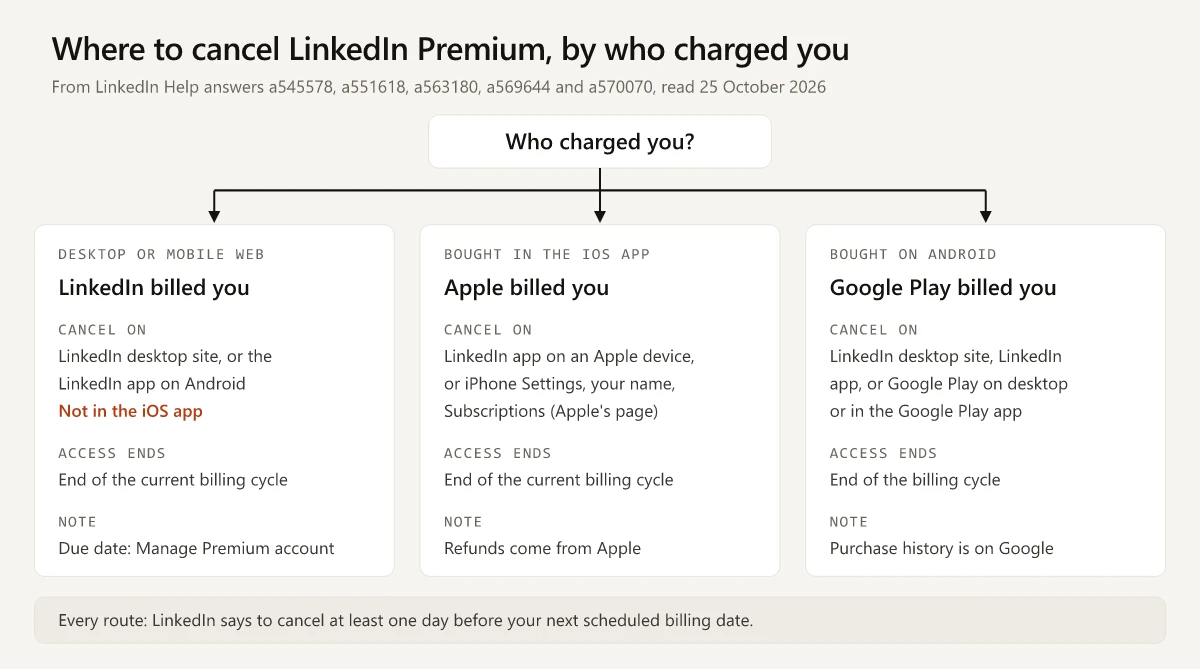
That path only works for plans LinkedIn billed. LinkedIn’s Help pages split cancellation three ways, by who took the money: LinkedIn, Apple or Google Play. A plan LinkedIn billed cannot be cancelled in the iPhone app even if you bought it on an iPhone, and a plan Apple billed is cancelled on an Apple device. I would settle who charged you before opening any settings page, and the table below is built around that one question.
LinkedIn moves its billing screens; every label below is from LinkedIn Help as read on 25 October 2026.
How to Cancel LinkedIn Premium
For a plan bought directly from LinkedIn, the cancel page gives these desktop steps (“Direct purchase on LinkedIn”, Desktop tab):
- Click the Me icon at the top of your LinkedIn homepage.
- Select Premium features from the dropdown.
- Click Manage subscription on the left pane under Plan Details. You’ll be redirected to LinkedIn Admin Center.
- Click Purchases on the left pane.
- Select your Active subscription.
- Click Cancel subscription under Actions.
- Click Confirm cancel to cancel your subscription.
The Google Play page, last updated 2 years ago, still words step 3 as “Click Subscription details on the left pane under Resources”; both labels lead to LinkedIn Admin Center, then Purchases.
Two details on the cancel page change how you use those steps:
- A shortcut. The page has a Cancel Premium button above the steps for members who “purchased Premium directly from LinkedIn”; it needs you to sign in.
- No sign-in needed in two countries. “If you’re in Germany or the United States, some subscriptions can be canceled without signing in”, through LinkedIn’s Premium cancellation form. The cancel FAQ words it as “certain jurisdictions such as Germany and United States”.
If you bought through Apple or Google Play, skip these steps and use the row for your store below.
Where to Cancel LinkedIn Premium by How You Paid
Quoted cells are LinkedIn’s wording, read on 25 October 2026, unless they name another source; unquoted cells are my summary. The “Last updated” ages are as each page showed them that day. Each page is called by its Source-column name from here on.
| How you paid | Where to cancel | When Premium access ends | Deadline LinkedIn states | Refunds and billing help | Source |
|---|---|---|---|---|---|
| Directly from LinkedIn (desktop or mobile web) | “from the LinkedIn desktop website or through the LinkedIn mobile app on an Android device" | "your plan will remain active until the end of your current billing cycle" | "at least one day before your next scheduled billing date” | LinkedIn’s refund policy (updated “2 days ago”): Premium subscriptions “may be refundable within 7 days from the date the subscription is charged without Premium usage” | Cancel FAQ, a551618 (2 months ago); cancel page, a545578 (2 months ago) |
| Apple App Store (bought in the LinkedIn iOS app) | “using the LinkedIn mobile app on an Apple device" | "The subscription will be canceled at the end of the current billing cycle.” | The same one-day rule, which the cancel page and cancel FAQ set for every plan; the Apple page does not repeat it | ”All iOS refunds must be issued by Apple.” (refund policy page); LinkedIn “can’t provide any billing support for Apple App Store purchases” | Apple page, a563180 (11 months ago) |
| Google Play (bought on an Android device) | “LinkedIn desktop site, LinkedIn mobile app, Google Play desktop or the Google Play mobile app” | For any cancelled plan, LinkedIn says Premium features “will expire at the end of your billing cycle” (refund policy page); for Play purchases, Google says you keep access “for the time you’ve already paid” | The same one-day rule; the Google Play page does not repeat it | LinkedIn “can’t provide purchase history for your subscriptions through Google”; Google’s cancel page points to Google Play’s refund rules | Google Play page, a569644 (2 years ago) |
The one-day rule sits in the “Important to know” box at the top of the cancel page, before it splits by purchase method, so cancel at least a day before the renewal date whoever billed you.
How to Tell Who Billed You
LinkedIn’s pages point each group to its own records:
- Apple buyers are told to contact Apple for “payment inquiries and refund requests” or to review their Apple purchase history. A LinkedIn charge listed there was billed by Apple.
- Google Play buyers are sent to the Google order history page, since LinkedIn cannot show those purchases.
- For a plan LinkedIn billed, the Premium FAQ says “Billing due date information is available on the Manage Premium account page.”
The cancel page names only those three purchase routes. If the charge is in neither store’s history, start with the desktop steps above. A partner offer or a Company Page subscription is cancelled as described in its own section or guide.
Can You Cancel LinkedIn Premium on iPhone?
Yes, if Apple billed you: cancel in the LinkedIn app on an Apple device (the Apple page). If LinkedIn billed you, including a plan bought in an iPhone browser, the cancel page says “Cancellation must be done on desktop and not on the iOS app.”
Apple’s own cancel page (published 29 September 2026) gives a second route for an Apple-billed plan on an iPhone:
- In Settings, tap your name.
- Tap Subscriptions.
- Tap the subscription.
- Tap Cancel Subscription. Apple adds: “If there is no Cancel button or you see an expiration message in red text, the subscription is already canceled.”
The iOS Wording LinkedIn’s Pages Disagree On
The cancel page has a Mobile Browser tab next to Desktop. It opens with a note and then lists tap steps:
| Page | What it says about iPhone |
|---|---|
| Cancel page, Mobile Browser tab | ”If you purchased Premium on iOS through the mobile web, LinkedIn processes your payment. Cancellation must be done on desktop and not on the iOS app.” Then: “Tap your profile photo”, “Tap Premium features”, “Tap Manage your subscription”, “Tap Cancel subscription”. |
| Cancel FAQ | ”If you signed up directly through LinkedIn (desktop or mobile web), you can only cancel your LinkedIn Premium subscription from the LinkedIn desktop website or through the LinkedIn mobile app on an Android device.” |
| Apple page | A reworded note (“you’ll need to use LinkedIn on desktop, since cancellation isn’t available in the iOS app”), followed by the same taps, with no label saying which purchase they are for. |
The two pages leave the tap steps unlabelled. They could be mobile-browser steps, which the note does not forbid, since it rules out only the iOS app. They could also be in-app steps: the Google Play page uses the same words for its “on the LinkedIn mobile app” list. The cancel FAQ says “only” the desktop website or the Android app.
The safe reading, from the pages and not from a test of the flow:
- LinkedIn billed you and you only have an iPhone: open LinkedIn’s desktop site (a computer is the route all three pages name) and follow the seven steps.
- Apple billed you: use the LinkedIn app on the iPhone or Apple’s Settings route, and ask Apple, not LinkedIn, about refunds.
- Not sure: check Apple’s purchase history first, because it decides which of the two applies.
What Happens When You Cancel LinkedIn Premium
The cancel FAQ answers this directly. After you cancel, “you’ll return to a Basic (free) account and retain your profile, connections, and other data”. At the end of the billing cycle you lose:
- InMail Message credits you’ve accumulated, which “can’t be credited back”
- Additional insights on job postings
- Premium insights on LinkedIn Pages
- The full list from Who’s Viewed Your Profile and specific viewer details
- Access to LinkedIn Learning
- Unlimited people browsing (“you may encounter the commercial use limit”)
On a Basic account, LinkedIn shows a viewer count and the three most recent viewers over 90 days, as set out in my comparison of profile views and search appearances. If you browse in private mode, a Basic account also loses your own viewer history while that setting is on, which my notes on LinkedIn private mode on free and Premium accounts cover with the Help pages quoted.
The same FAQ covers price, payment details and the alternative to cancelling:
- If you cancel a promotion or a discontinued plan, the discount does not come back: “If you cancel a promotion or a plan that is no longer offered, you will lose your discounted price. You won’t be able to re-purchase it again.”
- Your card stays on file until the cycle ends. You “can delete your payment method at the end of your billing cycle”, and not while a paid subscription is active.
- LinkedIn offers downgrading instead of cancelling. It is “available on the LinkedIn desktop website only”, and the Premium FAQ limits it to Premium Business, Sales Navigator Core and Sales Navigator Advanced with a single active seat.
For a plan LinkedIn billed directly, if you would rather lose access now than at the cycle end, the Premium FAQ says “Members can schedule cancellation for the next billing date or contact LinkedIn customer support for immediate cancellation.”
Stop LinkedIn Premium Auto-Renewal Before the Billing Date
None of the LinkedIn Help pages I read on 25 October 2026 describes a renewal switch separate from cancelling, so cancelling is how you stop auto-renewal. What they say about renewal:
- Billing cycles are monthly, quarterly or annual, and “Your membership will be renewed at the end of each billing cycle.” The Premium FAQ adds that quarterly billing is being rolled out gradually and may not be available to you.
- The one-day deadline is in the table above, and the due date itself is on the Manage Premium account page.
- LinkedIn sends no email reminder for a phone purchase. Its auto-renewal page is mostly about trials, but its notes say: “If you purchased a subscription on your mobile device, you won’t receive an email reminder from LinkedIn prior to the auto-renewal of your subscription.” and “Apple and Google may provide their own renewal notices.”
- If a renewal payment fails, the same page says to “update outdated billing information within five days after your renewal date” to avoid being “automatically downgraded to a Basic (free) account”.
For an Apple- or Google-billed plan, the renewal belongs to the store. Google’s cancel page, linked in the table, says Play subscriptions are charged “at the beginning of each billing cycle” unless you unsubscribe, and that uninstalling an app does not cancel its subscription. If you are deciding whether to subscribe again later from India, the rupee prices I found for each place you can buy Premium are dated and sourced.
How to Cancel a LinkedIn Premium Company Page Subscription
Premium Company Page has its own Help page (“Last updated: 6 months ago”). “Only the admin who subscribed to Premium Company Page can cancel the subscription.” On desktop:
- Go to your Page super admin view.
- Click Premium features in the left menu.
- Click the Subscription details dropdown menu near the upper-right corner of the page.
- Click the Manage subscription button.
- Click Cancel subscription.
- Follow the prompts to complete cancellation.
Two cases the page covers:
- Bought as a bundle with individual Premium (the page describes a 20% discount for the combined purchase): “you cannot cancel these subscriptions together. In LinkedIn Admin Center, you must cancel either one of these subscriptions separately.”
- Removed as a Page admin: you can still cancel from LinkedIn Admin Center, through Settings & Privacy, then the Subscriptions & payments section, then Manage Premium account.
Cancel Where You Were Charged
The business that charged you owns the cancel button. To cancel LinkedIn Premium without paying for another cycle, find the charge in your Apple or Google purchase history, or on LinkedIn’s Manage Premium account page, and cancel at least a day before the date it shows.
Frequently Asked Questions
How do I cancel LinkedIn Premium?
If LinkedIn billed you, open LinkedIn on a desktop browser, click the Me icon, select Premium features, click Manage subscription, then in LinkedIn Admin Center click Purchases, select your active subscription, click Cancel subscription and Confirm cancel. If you paid through Apple or Google Play, the route depends on that store, so check who charged you first.
Can I cancel LinkedIn Premium on my iPhone?
Only if Apple billed you. LinkedIn Help says a plan bought through the Apple App Store can be cancelled in the LinkedIn app on an Apple device, and Apple's own page adds Settings, your name, Subscriptions. For a plan LinkedIn billed, including one bought in a mobile browser on an iPhone, LinkedIn says cancellation must be done on desktop and not in the iOS app.
What happens when I cancel LinkedIn Premium?
A paid plan stays active until the end of the current billing cycle, then the account returns to a Basic (free) account that keeps your profile, connections and data. At that point you lose Premium features such as accumulated InMail credits, the full Who's Viewed Your Profile list and LinkedIn Learning.
Will I get a refund if I cancel LinkedIn Premium?
Only in limited cases. LinkedIn's refund policy page says Premium subscriptions may be refundable within 7 days of the charge if you have not used Premium. Plans bought in the LinkedIn iOS app are refunded by Apple, not LinkedIn.
Does LinkedIn Premium cancel immediately?
A paid plan does not: LinkedIn Help says it remains active until the end of the current billing cycle. A free trial does end at once when cancelled. LinkedIn's Premium FAQ also says a member can contact customer support for immediate cancellation of a plan bought directly from LinkedIn.