LinkedIn Search Appearances vs Profile Views: What Counts
LinkedIn search appearances vs profile views: what each counts, the weekly Wednesday refresh, and the Help pages that disagree on units and on who can see them.
LinkedIn describes search appearances in people on one Help page and in times on another. The Search Appearances page says the feature “displays statistics on how many people found you through a search on LinkedIn”; the profile search appearances page calls the same number “the total number of times your profile appeared in LinkedIn search results”. Both pages read “Last updated: 6 months ago” on 2 October 2026. Which unit is right decides what you can do with LinkedIn search appearances vs profile views once the two numbers sit side by side.
I read search appearances as times shown. That is how LinkedIn captions the panel in its own sample screenshot (“How often your profile appeared across LinkedIn”), and how its page comparing appearances with views describes them (“How often your profile is shown”). Profile views count people. On that reading, each number should be compared with its own earlier weeks, and neither should be divided by the other: views over appearances looks like a click-through rate, but it divides people by times, and visits from anywhere by appearances in search.
What Is the Difference Between Search Appearances and Profile Views?
Search appearances count how often your profile showed up in LinkedIn search results, refreshed weekly on Wednesdays and reported without names. Profile views count people who visited your profile, wherever they found it, over the last 90 days on a free account. LinkedIn adds that Search appearances “does not show who clicked your profile”.
LinkedIn’s Help pages describe the four profile numbers like this, as of October 2026:
| Metric | What LinkedIn says it counts | Where it counts | Window and refresh | Free vs Premium |
|---|---|---|---|---|
| All appearances | ”the instances where your name and headline appear across LinkedIn” | Places such as search results, your posts in others’ feeds, your visible comments and network recommendations (People you may know, for example) | Shares a panel with Search appearances, so weekly on Wednesdays | Part of the Search Appearances feature, which Analytics for LinkedIn members lists for all members (see the Premium question below) |
| Search appearances | ”the total number of times your profile appeared in LinkedIn search results” on one page, “how many people found you through a search on LinkedIn” on another | Search results only | ”Data updates weekly on Wednesdays” | Listed for all members; aggregated: “Individual names are not shown” |
| Profile views | ”how many people have visited your profile” | Any visit, including selecting your name in a search suggestion, which LinkedIn says “is treated as a profile view” | Free: last 90 days. Premium: up to 365 days | Free: viewer count and the three most recent viewers. Premium: the full list |
| Profile engagement | ”Total impressions, Total clicks, Average viewing time, and Impressions per section” | Your own profile’s sections | No window in the text; the comparison page’s sample panel says “over the past 90 days” | The comparison page’s sample panel carries a Premium label |
LinkedIn’s comparison page adds a threshold in a note placed after its Premium analytics, without naming which analytics it covers: full analytics need three or more unique profile viewers in the past seven days.
Sources: LinkedIn Help on profile appearances vs profile views, profile search appearances, viewing your Search Appearances, Analytics for LinkedIn members, Who’s viewed your profile on basic and Premium accounts and Who’s viewed your profile visibility settings, read on 2 October 2026. The engagement block gets its own breakdown of the impressions on your experience number.
All Appearances vs Search Appearances
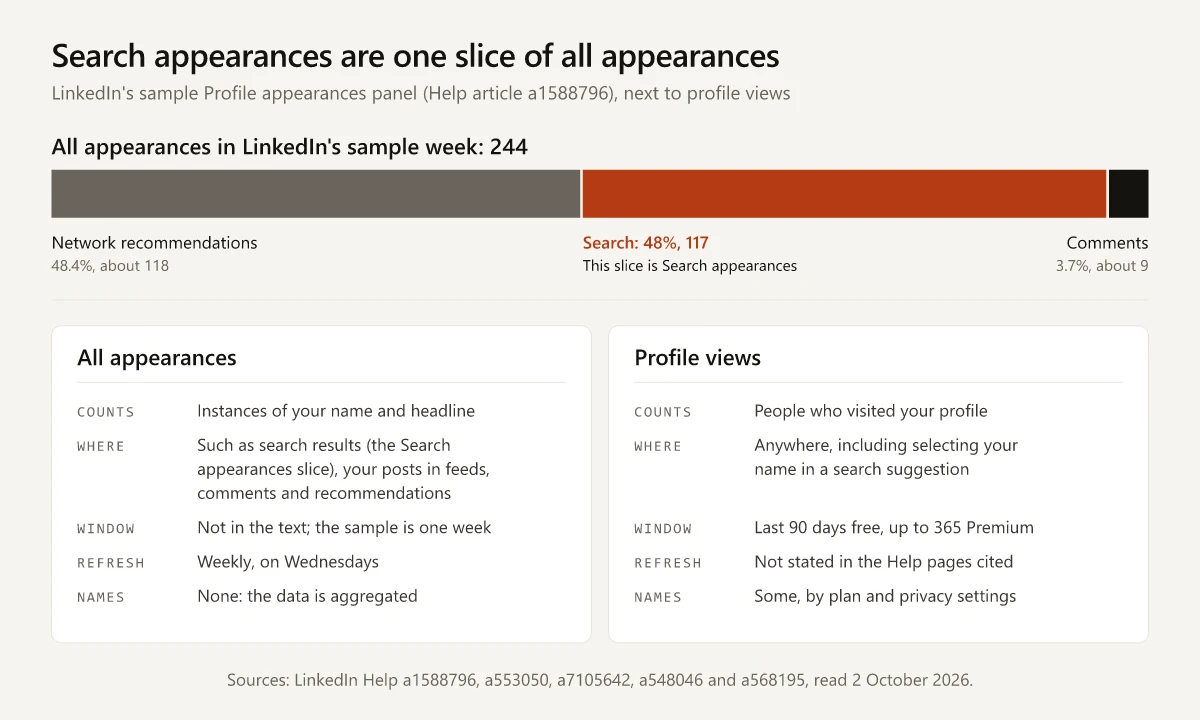
All appearances is the total of what LinkedIn’s comparison page calls profile appearances, and Search appearances is one slice of it. The comparison page gives these examples of where an appearance can happen:
- Search: “When you appear in search results”
- Posts: “When your posts appear in others’ feeds”
- Comments: “When your comments on the posts are visible to others”
- Network recommendations: “Anywhere LinkedIn recommends your profile”, such as People you may know
The sample screenshot on LinkedIn’s profile search appearances page shows how the two numbers fit together. Its panel covers “December 30 - January 6” and reports 244 all appearances and 117 search appearances, each with a change against the “past 7 days”. Its “Where you appeared” breakdown gives Network recommendations 48.4%, Search 48% and Comments 3.7%. The 117 search appearances are 48% of 244, the same share as the Search bar, and the other two shares come to about 118 and 9, so the three add back to 244.
The panel’s dropdown defaults to “Where you appeared” and switches to three aggregated views, listed on the Search Appearances page:
- Top companies your searchers worked at
- Top job titles of your searchers
- Job titles you were found for
“Job titles you were found for” is the only one of the three named for you rather than your searchers. The tip on the profile search appearances page describes the three only together, as “details about where your searches are coming from”.
Profile Views Divided by Search Appearances Is Not a Click-Through Rate
Dividing profile views by search appearances gives a number shaped like a click-through rate. It fails as one on each property a click-through rate depends on:
- Units. Profile views count “how many people have visited your profile”. Search appearances count times on one LinkedIn page and people on two others (the Search Appearances page and Analytics for LinkedIn members), so the ratio can divide people by times.
- Sources. LinkedIn’s post analytics, covered in my guide to LinkedIn post impressions and what counts as good, report “Profile viewers from this post”: “The total number of distinct members and Page admins who viewed your profile from your post” (LinkedIn Help on post analytics). Those visitors never needed a search.
- Search suggestions. Selecting a member’s name in search suggestions opens their mini profile, and LinkedIn’s visibility settings page says “This is treated as a profile view that may result in a notification being sent to the member whose profile you viewed”. Neither of LinkedIn’s two Search Appearances pages says whether that moment also counts as a search appearance.
- No view-to-appearance link. The appearances panel does not show who clicked, and the two numbers run on different windows: a weekly panel against the last 90 days of viewers on a free account. One documented insight sits on the views side: LinkedIn’s basic vs Premium page lists “Where they found your profile” among the viewer insights for Basic accounts. It starts from the visit, and nothing on that page ties it to an appearance count.
LinkedIn’s own illustration on its comparison page draws a path that never touches search: a member taps the name and headline on a feed post, and the full profile opens. That is an appearance turning into a view, and it adds nothing to Search appearances.
LinkedIn’s Help Pages Disagree on Units and Plans
LinkedIn’s own pages conflict on these points, and each one changes how you should read the panel:
| Question | One LinkedIn page | Another LinkedIn page | My reading |
|---|---|---|---|
| Is a search appearance a person or a time? | People: the Search Appearances page and Analytics for LinkedIn members | Times: the profile search appearances page | Times: LinkedIn’s sample panel is captioned “How often your profile appeared across LinkedIn” |
| Is any of this Premium-only? | ”All LinkedIn members have access to the following analytics”, a list that includes your profile search appearances (Analytics for LinkedIn members) | “This feature is currently available only for Premium Business subscribers”, in a box at the end of the comparison page’s “Enhanced analytics for Premium members” section | The box does not name the feature. With search appearances listed for all members, I read it as covering the Premium analytics above it; the Premium-labelled Profile engagement panel is pictured directly below the box |
| Do free accounts get viewer insights? | Basic accounts get “Number of profile viewers”, “Interesting views”, “Where viewers work”, “Where they found your profile” and “Their job titles” (the basic vs Premium page) | “Viewer insights are only available to LinkedIn’s Premium subscribers” (accessing Who’s viewed your profile) | Free accounts get those insights: the basic vs Premium table is the newer page (“Last updated: 1 month ago”, against “5 months ago” for the other, on 2 October 2026) |
LinkedIn’s 2024 notice removing creator mode has the same problem: later Help pages contradict its rows on the profile link and on Audio Events.
Why Search Appearances or Profile Views Show Zero or No Names
Plenty of profile views with almost no search appearances does not mean the panel is broken: the visitors may have arrived from a post, a comment or a recommendation instead of search results. For panels that come up blank, short or without names, LinkedIn documents these reasons, as of October 2026:
| What you see | What LinkedIn says | Source |
|---|---|---|
| Limited or empty analytics | Below three unique profile viewers in the past seven days, “you may see limited or empty analytics until viewer activity increases” | The comparison page, in a note placed after its Premium Business box |
| No visitor data at all | ”You won’t see visitor data if you haven’t had any profile views in the past 90 days” | Accessing Who’s viewed your profile |
| A date range that shifts | ”viewing timeframes may vary over time and as people view your profile. When possible, we try to display a minimum of three views over any timeframe” | Accessing Who’s viewed your profile |
| No viewer history on a free account | ”If you have a Basic (free) account, you must choose Your name and headline if you want to see the viewer history on your own Who’s Viewed Your Profile page” | The visibility settings page |
| Viewers listed as LinkedIn Member | ”You can’t view the names of members who’ve chosen to view your profile in private mode, even if you have a Premium account” | The visibility settings page |
| A blocked member still counted | ”If a member viewed your profile prior to any blocking, they’ll still appear in your profile viewer count” | The visibility settings page |
Where to Find Search Appearances and Profile Views
| To open | Desktop | Mobile |
|---|---|---|
| Search appearances and All appearances | Me icon, View profile, then Search Appearances in the Analytics section | Tap your profile picture, tap your photo again, then Search appearances in the Analytics section |
| Profile views (Who’s viewed your profile) | Me icon, View profile, then “[Number] profile views” in the Analytics section | Same route, then “[Number] profile views” |
| Both, on one page | Show all in the Analytics section opens Analytics & tools | Show all in the Analytics section |
The paths come from the Search Appearances page, LinkedIn’s Analytics & tools help, where Show all lets you “Check profile insights, such as profile viewers and profile appearances”, and the page on accessing Who’s viewed your profile, which also gives a tip for moving between the two numbers: “You can switch between Search appearances and Who viewed your profile by selecting the Search and Profile tabs at the top of the Analytics page.”
Reading LinkedIn Search Appearances vs Profile Views Week by Week
Record both numbers every Wednesday and read the direction of each. Search appearances data updates weekly, while the profile views number on a free account is a total for the last 90 days, and LinkedIn says that timeframe “may vary”. A one-week move in views can come from older visits leaving the window, so trust a direction in views only when it holds for two or more Wednesdays.
| Search appearances | Profile views (90-day total, Wednesday to Wednesday) | Reading | Open next |
|---|---|---|---|
| Up | Up | More searches surface you and more people visit | ”Job titles you were found for”, to check you are found for the roles you want |
| Up | Down | Search shows you more often, but fewer people visit | Your headline, which LinkedIn shows next to your name in every appearance |
| Down | Up | Visits are arriving from somewhere other than search | ”Where they found your profile”, in Who’s viewed your profile; then post analytics, where each post reports its own profile viewers |
| Down | Down | Less search exposure and fewer visits | ”Where you appeared”, then how much you posted and commented that week |
To keep one week comparable with the next:
- Record the printed date range with each number. LinkedIn’s sample panel shows a dated range and a change against the past 7 days, so the range is what makes two weeks comparable.
- Watch the Search share inside All appearances. If All appearances rises while Search appearances stays flat, the growth came from places other than search, such as feeds, comments or recommendations.
How to Increase Search Appearances on LinkedIn
Every step below is LinkedIn’s own advice, as of October 2026, and none of it comes with a promised number:
| What to do | LinkedIn’s wording | Source |
|---|---|---|
| Keep the profile current | ”Keep your profile updated with your latest experience and skills.” | Profile search appearances page |
| Put relevant keywords in the headline and summary | ”Add relevant keywords to your headline and summary.” | Profile search appearances page |
| Use standard job titles | ”Standard job titles may be boring, but they are what other members search for.” | Order of your profile in people search results |
| Add skills | ”Skills are among the most common queries performed by recruiters and hiring managers.” | Order of your profile in people search results |
| Connect with people you know professionally | ”Closer connections, such as a 2nd-degree connection compared to a 3rd-degree connection, improve the likelihood your profile may appear in searches.” | Order of your profile in people search results |
| Fill the recommended sections | Each added section raises profile completeness, which LinkedIn says helps “to increase profile search appearances”; all seven (Profile Photo, Location, Industry, Education, Position, Skills, Summary) earn an All-star profile | Profile level meter |
| Do not stuff keywords | ”Adding more keywords to your profile doesn’t automatically improve your appearance in search results”, and an over-optimized profile “may be impacted by spam detection systems” | People search relevance |
| Keep the name field to your name | ”The name fields of your account must reflect only your first and last name, with no extra information.” | Practices to avoid |
Measure the result in the panel rather than by searching for yourself. LinkedIn’s people search relevance page says “testing a query using a small number of accounts usually won’t represent how a profile appears across the millions of searches run on LinkedIn each day”. LinkedIn’s page on search order adds that a profile can “appear on the 2nd page for one member and on the 5th for another, even if they are searching for the exact same keywords”. The same caution applies to checking a Google ranking from your own browser.
The relevance page then points members to views: “a more helpful indicator of how visible your profile is can be the number of views your profile receives”. For overall visibility, LinkedIn suggests profile views over a self-search, and search appearances remain the specific check on search.
A Search Console Analogy for LinkedIn Profile Analytics
The comparison below is my own analogy. I read this site’s search performance in Google Search Console, and LinkedIn’s profile search appearances page defines its number in almost the same words Google uses for impressions. The parallels hold in places and break in others:
| LinkedIn profile number | Closest Search Console metric | Where the analogy breaks |
|---|---|---|
| Search appearances | Impressions: “How many times your site appeared in Search results” | Google publishes counting rules, such as “Scrolling away and back, or paging away and back, during a single query or session does not count as multiple impressions”; the LinkedIn Help pages cited here publish none |
| Profile views | Clicks: “The number of times a user clicked your site from Google Search results” | A profile view counts a person, and the visit can start outside search |
| Job titles you were found for | The Queries dimension, which “groups your data by the search query users typed” | LinkedIn’s label says job titles; neither Search Appearances page says whether these are the typed words |
| Profile engagement: Total impressions and Total clicks | Reads like impressions and clicks | The Search Appearances page lists both without defining them; they are separate from search appearances and profile views, so keep them out of the comparison |
Google’s definitions come from its Performance report help and its help on how impressions, position and clicks are counted.
This site’s own Search Console data separates visibility from visits the same way: 16 months of impressions turned into very few clicks, though most of that window falls inside a Search Console logging error on impressions that the linked post accounts for. Search Console also records a position with every impression, and even that figure needs reading per query; LinkedIn’s panel shows none.
Judging a Profile Edit With LinkedIn Search Appearances vs Profile Views
I rewrote my LinkedIn headline and banner on Friday 25 September 2026. Of the two, only the headline is part of an appearance, which LinkedIn defines as an instance where your name and headline appear. A banner change needs a different check: whether banner text clears the profile photo on desktop and phones. The new headline opens with “Senior Product Marketer, B2B SaaS & AI”. LinkedIn’s profile search appearances page suggests the check itself: “Monitor changes in your Search appearances data after profile updates to see if visibility improves.” The first Wednesday refresh after my edit was due on 30 September, but any week whose printed range includes 25 September mixes days before and after the edit, so under step 3 below the first full week to compare arrives on Wednesday 7 October at the earliest.
For any profile edit, the before-and-after check runs like this:
- Record Search appearances, All appearances, profile views and the printed date range every Wednesday, starting before the edit if you can. Neither Search Appearances page says how far back the panel lets you look.
- Change one thing at a time, so a move in Search appearances has one candidate cause.
- Leave out the week the edit landed in, and compare full weeks on either side of it.
- Open “Job titles you were found for” and check whether the titles in your new headline appear there.
- Read profile views as the 90-day total you recorded on the same Wednesday; on Premium, the weekly viewer trend graph listed in LinkedIn’s basic vs Premium comparison shows the weekly series directly.
LinkedIn search appearances vs profile views are two separate records: how often you were shown in search, refreshed every Wednesday, and how many people visited your profile by any route. Track each against its own earlier weeks and never divide one by the other. Start a dated log of both numbers this Wednesday.
Frequently Asked Questions
What are search appearances on LinkedIn?
Search appearances is LinkedIn's count of how often your profile showed up in LinkedIn search results. LinkedIn's Help pages word it two ways, as the total number of times your profile appeared and as how many people found you, and the data updates weekly on Wednesdays without naming the searchers.
What is the difference between all appearances and search appearances on LinkedIn?
All appearances counts every time your name and headline appeared across LinkedIn; LinkedIn's examples are search results, your posts in other members' feeds, your visible comments and network recommendations such as People you may know. Search appearances counts only the search results slice of that total.
How often do LinkedIn search appearances update?
Weekly. LinkedIn's Help page on profile search appearances says the data updates weekly on Wednesdays, so a headline you change on a Thursday cannot show up in the panel before the following Wednesday.
Why do I have profile views but zero search appearances on LinkedIn?
The two numbers count different things. Profile views count people who visited your profile wherever they found it, including from your posts, while search appearances count only appearances in search results. LinkedIn's comparison page also says full analytics need three or more unique profile viewers in the past seven days, in a note it places with its Premium analytics.
Which matters more, LinkedIn search appearances or profile views?
They answer different questions. LinkedIn's people search help says that because results are personalized, testing a query from a few accounts usually won't represent how a profile appears, and that the number of views your profile receives can be a more helpful indicator of how visible your profile is. Search appearances are the narrower check on whether people find you through search.