How to Cancel Shopify Subscription: Steps, Refunds and Data
How to cancel Shopify subscription charges, from Shopify Help on 23 November 2026: the Cancel plan steps, costs that outlive the plan and the refund windows.
The Shopify help page that tells you how to cancel is titled “Deactivating and reactivating your Shopify store”. The button on it reads Cancel plan, or Cancel trial if you are still in a trial. The store that results is “deactivated”, and a trial that ends with no plan chosen is “frozen” in one paragraph of Shopify’s free-trial page and “paused” in another. If you are working out how to cancel Shopify subscription charges without a renewal or surprise charge, the job is mostly knowing which of those words costs money.
I read Shopify’s help pages and its Terms of Service on 23 November 2026 for this guide; I do not run a Shopify store, so every step and label below is quoted from Shopify’s own pages. Pause and Build, the plan Shopify used to offer stores that wanted a break, now “isn’t available to new stores”. That leaves most owners three routes: Cancel plan, a cheaper plan that the cancel flow itself offers, or keep paying. Whichever you pick, the cost of cancelling sits in the charges that outlive the plan.
How to Cancel Shopify Subscription on Desktop
These steps are from Shopify’s help page on deactivating and reactivating your store, read on 23 November 2026:
- From your Shopify admin, go to Settings > Plan.
- Click Cancel plan if you are on a paid plan, or Cancel trial if the store is in its free trial.
- If Shopify shows options to downgrade or to start a new store, review them.
- Review your Shopify domains and pending charges, select Cancel my plan and uninstall all apps, then click Continue.
- Select a reason for the deactivation, add a comment if you want, and click Continue.
- Optionally tick Save payment details to reopen your store faster.
- Enter your password and click Cancel plan (or Cancel trial) to confirm.
Shopify then emails you to confirm the store is deactivated. Only the store owner can do this, after passing any two-step authentication challenge, and the same page says “For security reasons, Shopify Support can’t deactivate your store for you.”
Two other tasks get mixed up with this one. A shopper who wants to cancel an order should contact the store that sold it: Shopify’s Terms make the merchant responsible for refunds, returns and customer service. And the Shopify Subscriptions app lets a merchant sell products on a subscription; stopping a customer’s subscription there is a separate task from ending your own plan.
Shopify’s Words for Cancel, and What Each Costs
| Word on Shopify’s pages | Where it appears | What it means for your bill |
|---|---|---|
| Cancel plan | Button under Settings > Plan on a paid plan | Ends the subscription; the store deactivates at the end of the current billing cycle |
| Cancel trial | Same place, during a free trial | The same flow for a store still in its trial |
| Deactivated | The help page title and the confirmation email | No admin access; store information is kept for 2 years |
| Reactivate plan | Settings > Plan, after cancelling but before the cycle ends | Undoes the cancel, and you are not billed again for the cycle you already paid |
| Frozen | The free-trial and frozen-store help pages | A trial ended with no plan (pick a paid plan to reopen), or a bill went unpaid (pay the outstanding bills to reopen) |
| Pause and Build | The pause-store help page | A legacy plan with a reduced monthly fee, closed to new stores |
| Delete your data | The deactivate page | Permanent: a store whose data is deleted cannot be reactivated |
The “Reactivate plan” row comes from Shopify’s page on billing implications for paused or deactivated stores, which says a store reactivated mid-cycle “won’t be charged again for reactivating”. The “Frozen” row comes from Shopify’s free-trial and frozen-store help pages.
How to Cancel Shopify Subscription on Phone (iPhone or Android)
Shopify’s help page gives one set of mobile steps for the Shopify app:
- Log in to the Shopify app as the store owner.
- Open the app menu, then tap Settings.
- Tap Plan.
- Tap Cancel plan (or Cancel trial).
- Work through the same screens as on desktop: domains and pending charges, Cancel my plan and uninstall all apps, a reason, the optional saved payment details, then your password and a final Cancel plan.
On 23 November 2026 the Shopify app’s India App Store listing showed no in-app purchases, and Shopify’s help page puts the mobile cancel under Settings > Plan inside the app, so look there rather than in your Apple subscriptions.
Before You Click Cancel Plan: Charges That Outlive the Plan
Shopify’s deactivate page lists what still costs money after the plan ends. This table pairs each item with the step that page, or the help page it links to, gives you.
| Item | What Shopify’s help pages say happens | What to do before you cancel |
|---|---|---|
| App usage charges, transaction fees, shipping-label charges | Charged at cancellation | Check Settings > Billing > View current charges |
| Apps billed through Shopify | All uninstalled at cancellation; their Shopify billing stops when the store deactivates | Export any app data you need; the uninstall page warns some app data can’t be recovered |
| Apps that bill you outside Shopify | Uninstalling the app does not cancel its external charges | Cancel with the app developer directly |
| Domain bought through Shopify | Renewals “aren’t canceled when canceling your store”; a renewal before the close date can still be charged | Settings > Domains, open the domain, untick Auto-renew this domain every year, or transfer it |
| Domain bought from another registrar | Disconnects from the store | Turn off auto-renewal at your registrar |
| Shopify Payments payouts | Pending payouts keep processing; you can’t fix a failed payout without reactivating | Check your payout schedule first |
| Chargebacks | Can still be filed; you can’t submit evidence while deactivated | Reactivate the store to contest one |
| Gift cards, subscription orders, pre-orders | Obligations to customers may remain | Export the gift card CSV and settle open orders and refunds |
| A theme you bought | Licensed only to the store you bought it for | Download a backup of the theme |
| Store records | Guaranteed for 2 years; you can ask for customer personal data to be deleted sooner | Export CSVs of products, customers, orders, gift card codes, discount codes and financial data |
| Shopify Credit, Balance or Capital | Access may be restricted; Shopify Credit cards are locked | Check what you still need from them before you cancel |
Sources: the deactivate page, Shopify’s app charges page, its domain renewal page and its backup and duplication page, all read on 23 November 2026. A store in India can skip the payouts row: India is not on Shopify’s list of supported countries for Shopify Payments.
The domain row is where two Shopify documents read differently. Shopify’s Terms of Service (last updated 20 October 2026) say that once termination is confirmed, domains bought through Shopify “will no longer be automatically renewed”. The help pages warn that a renewal falling before the store’s close date can still be charged, and the domain renewal page says a renewal is charged 14 days before the end of the registration period. Turning off auto-renew yourself before you click Cancel plan covers both readings. A .de or .at domain is the exception: its auto-renew can only be stopped through a form sent to Shopify Support.
If you are moving the domain to another platform, the deactivate page adds that Shopify’s HSTS policy stays on the domain for 90 days after deactivation, so a host without HTTPS shows visitors a certificate error until then. My notes on what a permanent redirect and HSTS look like from the browser side show how a browser that has seen an HSTS header upgrades a request to HTTPS before it leaves the machine.
Pause and Build Is Closed: Cancel Plan Is Now the Break Option
Shopify’s pause-store help page calls Pause and Build “a legacy plan” and says it “isn’t available to new stores”; the billing page words it as “no longer available to new subscriptions”. The same pause page points everyone else to deactivation: “If your store isn’t on the Pause and Build plan and you want to take a break from selling, then you can deactivate your store and reactivate it when you’re ready to sell again.”
| Pause and Build (existing stores only) | Cancel plan (deactivate) | |
|---|---|---|
| Who can choose it | Only stores already on it | Any store owner; Plus stores go through Support |
| Storefront | Stays visible; checkout off on every channel | Taken offline, per section 14 of the Terms |
| Shopify admin | Access kept | Lost at the end of the billing cycle |
| Shopify’s fee | ”a reduced monthly fee”, with no figure on the help pages | Subscription ends with the current cycle |
| Apps | All stay active and keep billing until you uninstall them | All uninstalled at cancellation |
| Coming back | Settings > Plan > Pick a plan > Choose plan > Subscribe; no return to Pause and Build afterwards | Log in, choose a plan, click Subscribe |
If you want a few months off selling, deactivation is now the route Shopify itself describes. A store already on Pause and Build that wants to stop paying for good goes through the same Cancel plan steps.
Cancelling During the Free Trial or the Promotional Months
The free-trial page splits trial cancellations by one question: did you pick a paid plan?
| Situation | What happens |
|---|---|
| No plan picked | Shopify says “no action is required”, and the store is frozen when the trial ends. Cancel trial also works, since Shopify says you can deactivate a store at any time. |
| Paid plan picked during the trial | You “need to manually deactivate your store”, or Shopify charges the plan’s fee when the trial ends. |
| Apps installed during the trial | Their charges go on the first invoice after the trial. |
| Cancelled during promotional pricing | You “aren’t entitled to a refund for any charges incurred during this period”, and any outstanding balance is charged after cancellation. |
Shopify will not extend a trial or reset promotional pricing; the page says “It’s not possible to extend the duration of your free trial period.” What those promotional months cost in India, and the price after them, is in my Shopify price in India breakdown.
Does Shopify Refund When You Cancel?
Usually not, and three Shopify documents phrase it three ways, all read on 23 November 2026:
| Shopify document | Its wording |
|---|---|
| Terms of Service, section 5.10 | ”Shopify does not provide refunds.” |
| Deactivate help page | Shopify “maintains a strict no-refund policy for Shopify subscription plans” |
| Refund policy help page | Plans are “generally non-refundable”, and Support reviews eligible requests “on a case-by-case basis” |
The refund page is the only one that gives windows, counted from the invoice issue date:
| Subscription type | Window for a refund review |
|---|---|
| Monthly subscription | 7 days |
| First invoice after the trial | 30 days |
| Annual subscription | 30 days |
| SEPA Direct Debit payments | 14 days |
| Merchants located in Brazil | 90 days |
The page adds that “Meeting these time windows doesn’t guarantee a refund.” It also lists what is generally refused: the unused rest of a billing period after you cancel, downgrades (you get account credits instead), unused service, third-party app charges (ask the developer) and themes, which are final sale. For apps built by Shopify, refund requests may be considered if the app was uninstalled within 7 days of the start of its billing period.
My decision rule from those pages: if your last invoice is inside its window, cancel and contact Support about that invoice the same day; outside the window, plan on keeping the store until the cycle ends and expect nothing back.
What Happens After You Cancel
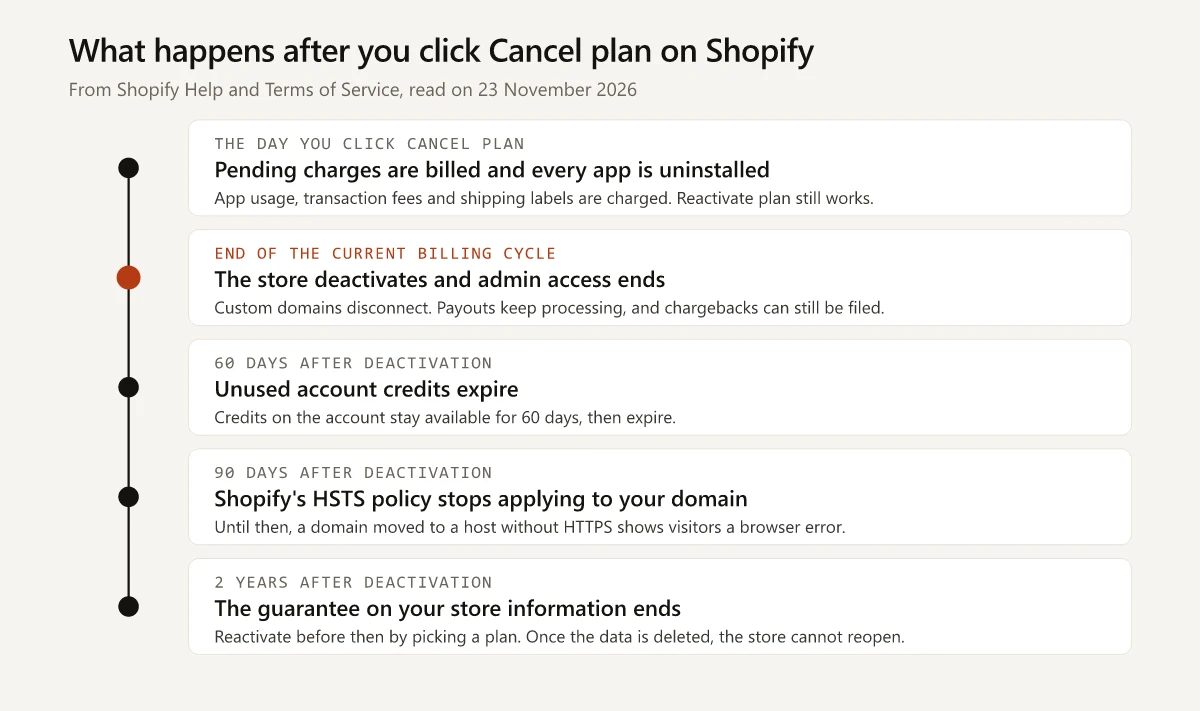
Shopify’s billing page gives a worked date: cancel today with a billing cycle that ends on November 25, and the store deactivates on November 25. Until that date you can still open Settings > Plan and click Reactivate plan. After it:
| What | What Shopify’s pages say |
|---|---|
| Credits | Any credits on the account “remain available for 60 days”, then expire. |
| Bills | You can view past bills without reactivating, and invoices can still arrive for chargebacks, externally billed apps or domains, and other stores you own. |
| Data | Store information is “guaranteed for 2 years”. You can ask Shopify Support to delete the store’s customer personal data sooner; Shopify deletes it within 14 days after the request is completed, and after that the store cannot be reopened. |
How to Reopen a Store You Cancelled
Within 2 years, log in as the store owner, follow the prompts to choose a plan, enter or confirm payment details and click Subscribe, per the deactivate page. Custom domains disconnected at deactivation need reconnecting under Settings > Domains > Connect existing domain.
A frozen store is different: you pay the outstanding bills first. The frozen-store page notes that “For stores billed in INR, open and pay each outstanding bill from Billing history.” It also tells owners of an active store who want to stop to “make sure that you cancel your subscription”. That is also the answer to stopping Shopify autopay: the recurring plan charge ends when you click Cancel plan, and the frozen-store page adds “After you cancel your subscription, your store automatically deactivates at the end of your current billing cycle.” Letting a bill fail is not a cancellation: the app charges page says Shopify reserves the right to terminate an account whose fees stay unpaid for 60 days after suspension.
Shopify Plus and Support: Who Can Cancel
Shopify Plus is the plan Shopify’s help page names as one you cannot cancel from the admin. The deactivate page says “You can’t cancel your Shopify Plus agreement from the Shopify admin”: contact your Customer Success Manager, or Shopify Plus Support if you have none. Near the renewal date an eligible Plus store can renew or downgrade from the admin, and that change takes effect on the renewal date.
For every other plan, contacting Shopify Support is not a way to cancel. Section 14 of the Terms says you may cancel “by contacting Shopify Support and then following the specific instructions indicated to you in Shopify’s response”, while the help page says Support “can’t deactivate your store for you”. Read together, Support explains the steps and the store owner clicks Cancel plan.
Cancelling also works store by store, not for your whole Shopify account. The billing page lists “Charges from another Shopify store that you might own” among the invoices that can arrive after deactivation, so an owner with two stores runs Cancel plan in each one.
Cancel One App Subscription Without Closing the Store
If the charge you want to stop is an app rather than Shopify’s plan, uninstall the app from the Apps page: Settings > Apps, open the app’s menu, Uninstall, then Uninstall again. On the phone app it sits under Settings, Store settings, Apps.
- Uninstalling “cancels future recurring charges”, but the current billing cycle can still be billed.
- Apps that bill outside Shopify need cancelling with the developer.
- Some apps leave code in your theme; check the app’s listing for extra uninstall steps.
If you are cancelling to move the store elsewhere, my breakdowns of Wix’s plans in rupees and Squarespace’s rupee plans and GST cover what those builders charge.
How to Cancel Shopify Subscription Without a Surprise Charge
With Pause and Build closed to new stores, cancelling Shopify cleanly comes down to one order of work: settle what outlives the plan, then click Cancel plan. Export your CSVs and theme, turn off domain auto-renew under Settings > Domains, cancel externally billed apps, check View current charges, and only then go to Settings > Plan. Expect one final invoice for pending app, transaction and shipping-label charges. If your last invoice is inside its refund window, contact Support the same day.
Frequently Asked Questions
How do I cancel my Shopify subscription and stop autopay?
Log in as the store owner, go to Settings, then Plan, and click Cancel plan (or Cancel trial during a free trial). Review your domains and pending charges, select Cancel my plan and uninstall all apps, pick a reason, enter your password and confirm. That is what stops the recurring plan charge: the store deactivates at the end of the current billing cycle, and pending charges go on one final invoice. Removing your card or mandate is not a cancellation.
Can I cancel my Shopify subscription on my phone?
Yes. In the Shopify app, log in as the store owner, open the menu, tap Settings, then Plan, then Cancel plan or Cancel trial, and follow the same review, reason and password screens as on desktop. Shopify's help page puts the mobile cancel under Settings > Plan inside the Shopify app, so you cancel there, not in your phone's app-store subscriptions.
How do I cancel my Shopify free trial?
If you never picked a paid plan, Shopify says no action is required: the trial ends and the store is frozen. If you picked a paid plan during the trial, you must cancel it yourself from Settings, then Plan, then Cancel trial, or Shopify charges you for that plan when the trial ends.
Does Shopify refund you when you cancel?
Usually not. Section 5.10 of Shopify's Terms of Service says Shopify does not provide refunds, and its refund help page calls plans generally non-refundable. Support reviews requests case by case only inside set windows from the invoice date: 7 days for a monthly bill, 30 days for an annual bill or the first invoice after a trial.
Is the Shopify Pause and Build plan still available?
Not for new stores. Shopify's help center says Pause and Build is no longer available to new subscriptions; stores already on it can keep it, but once they pick a new plan they cannot switch back. Shopify's suggested route for a break is to deactivate the store and reactivate it later, within 2 years.