How to Cancel Claude Subscription: Web, Apps and Refunds
How to cancel Claude subscription plans on the web, iPhone, Android or Team, plus who refunds you, how to delete your account and how to stop autopay in India.
The store that took your money decides how to cancel Claude subscription plans: Anthropic’s cancel article sends a plan bought on claude.ai or Claude Desktop to Settings > Billing, while a plan bought in Claude for iOS or Claude for Android is one where “your subscription and payment will be handled directly” on that device, which means Apple or Google Play holds the cancel button.
Where each cancel button sits, from Anthropic’s help pages and pricing FAQ as I read them on 23 November 2026:
- claude.ai or Claude Desktop: click your initials or name in the lower left corner, open Settings > Billing and click Cancel.
- Claude for iOS: open the side menu, tap the gear or your initials, tap Billing, then Manage subscription. Or cancel in iPhone Settings under your name > Subscriptions.
- Claude for Android: tap your initials in the top right corner, then Billing > Manage subscription. Or cancel in your Google Play subscriptions.
- Team or self-serve Enterprise: an Owner or Primary Owner cancels under Organization settings > Billing.
- Sales-assisted Enterprise: the pricing FAQ says to “Reach out to your Anthropic Contact or our Sales team.”
Whichever route applies, the pricing FAQ says: “To avoid the next charge, cancel at least 24 hours before your renewal date.”
I would settle who billed you before opening any settings screen, because two moves that look like cancelling leave the plan running. Uninstalling the Android app is one (see the Android section), and Anthropic’s refund article says of App Store plans that “Requesting a refund doesn’t cancel your subscription.” Menu labels move with app releases, so every label below is quoted from the vendor’s own page as fetched on 23 November 2026.
Find Which Store Billed You
Your receipt answers this faster than any settings page. Each billing channel leaves a different trace:
| Clue | Billed by Anthropic (web or desktop) | Billed by Apple (iOS app) | Billed by Google Play (Android app) |
|---|---|---|---|
| Receipt email | Subject line “Your receipt from Anthropic” | Apple says to search your email for “receipt from Apple” or “invoice from Apple” | A Google Play receipt with a GPA order number, “formatted GPA.xxxx-xxxx-xxxx-xxxxx” |
| How it was paid | ”we only accept credit or debit cards” | Options “determined by the Apple App Store” | Options determined by Google Play |
Sources: Anthropic’s paid plan billing FAQs, Apple’s refund request page and Anthropic’s refund article, all read on 23 November 2026.
Receipts from two different stores can mean two subscriptions, and Anthropic’s cancel article says each is cancelled “from the platform you signed up on.” Anthropic’s billing FAQ also notes a paid plan can look like Free when “You’ve logged in with a different email”, so sign in with every address you might have used before deciding a plan is gone.
How to Cancel Claude Subscription on the Web or Claude Desktop
For a plan bought on claude.ai or in Claude Desktop (Mac, Windows or Linux), the cancel article gives one path:
- Log in to Claude in a web browser, or open the desktop app.
- Click your initials or name in the lower left corner and select Settings from the menu.
- Go to Settings > Billing and click the Cancel button.
What the article says happens next:
- “Your cancellation will take effect at the end of your current billing period and you can continue using your paid plan until then.”
- If you cannot log in to the account that pays, for example because you lost the email account, the refund article says to contact Support from another email, “cc” the address tied to the locked account, and ask them to cancel the plan.
How to Cancel Claude on iPhone or iPad
A plan bought in Claude for iOS is billed by Apple. Anthropic’s steps inside the app:
- Open the side menu.
- Tap the gear or your initials at the bottom.
- Tap Billing, select Manage subscription and follow the prompts.
If the app is already off your phone, Anthropic points to Apple’s cancel page (published 29 September 2026), which gives the same steps for iPhone and iPad:
- In Settings, tap your name.
- Open Subscriptions and select the Claude subscription.
- Choose Cancel Subscription, which may sit further down the screen.
Apple’s page says how to tell a plan is already cancelled: “If there is no Cancel button or you see an expiration message in red text, the subscription is already canceled.”
How to Cancel Claude on Android
A plan bought in Claude for Android is billed through Google Play. Anthropic’s in-app path:
- Tap your initials in the top right corner of Claude for Android.
- Choose Billing from the menu, then Manage subscription, and follow the prompts.
Without the app, use Google Play’s cancel page:
- On your Android device, go to subscriptions in Google Play.
- Select the Claude subscription.
- Choose Cancel subscription and follow the instructions.
Uninstalling the app does not cancel it: Google’s page says “When you uninstall the app, your subscription won’t cancel.” A cancelled plan stays usable “for the time you’ve already paid.”
How to Cancel a Claude Team or Enterprise Plan
Only an admin can end a Team plan. Anthropic’s Team cancel article says “An Owner or Primary Owner can cancel Team plan access by navigating to Organization settings > Billing”, and the pricing FAQ gives self-serve Enterprise the same path.
| After a Team cancel | What Anthropic’s Team article says |
|---|---|
| Next charge | Your organization “won’t be charged for the next billing cycle” |
| Access | The team keeps Claude “until the end of the current billing cycle” |
| Removing members | No longer available in Organization settings > Members; contact Support, for example “before resubscribing at a lower seat count” |
| Monthly API credits | New credits stop; credits already claimed stay usable until they expire, and “can’t be refunded” |
If the goal is fewer seats rather than no plan, cancelling is the wrong tool: the Team seat changes and what each one costs are worked through with Anthropic’s billing examples.
What Cancelling Changes, by Billing Channel
This is the table I would want open while cancelling: who handles a refund, and what Anthropic’s pages say about access and data. Every cell comes from the Anthropic, Apple and Google pages linked in this post, read on 23 November 2026.
| Billed through | Who handles a refund | Access and data after the cancel |
|---|---|---|
| claude.ai or Claude Desktop | Anthropic, through Get help > Claude Refund Request | Chats, projects and files stay; see credits below |
| App Store (Claude for iOS) | “only Apple can review and issue a refund” | Account moves to the Free plan when the period ends; data stays |
| Google Play (Claude for Android) | Anthropic Support checks eligibility for an active subscription | Account moves to the Free plan when the period ends; data stays |
| Team or self-serve Enterprise | The Team cancel article lists no refund route | Access to the end of the cycle |
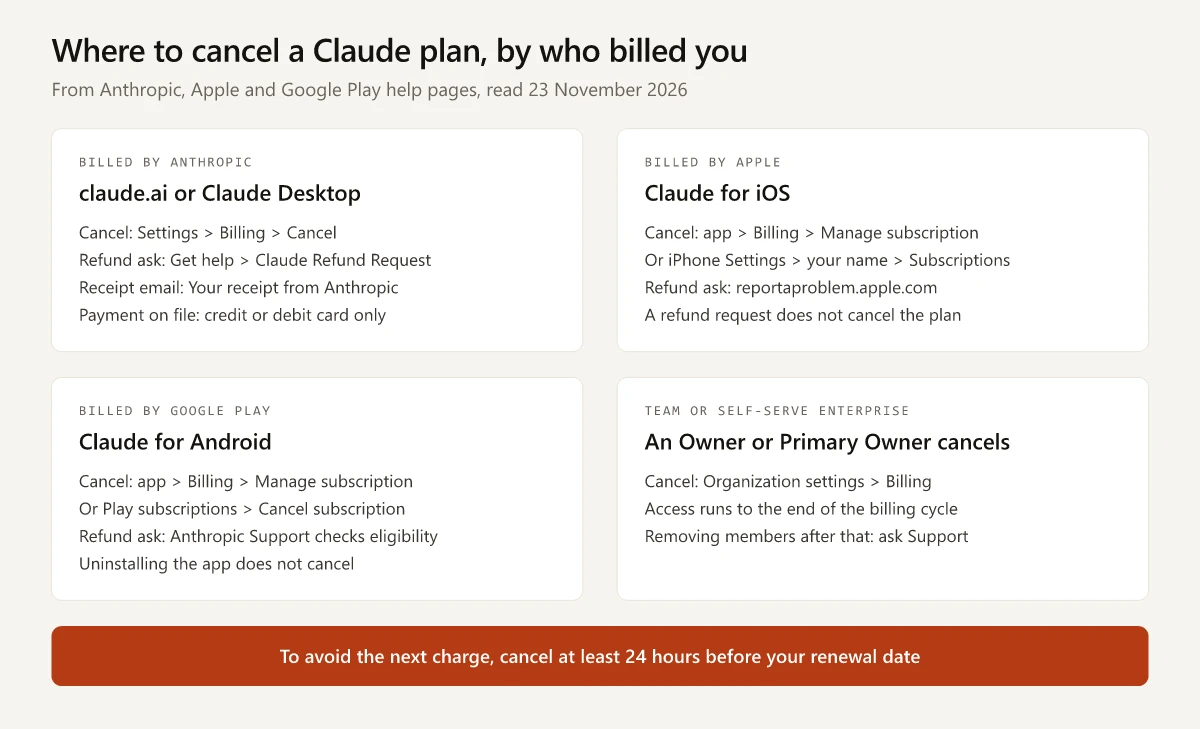 Billing > Cancel and ask for a refund through Get help > Claude Refund Request; billed by Apple through Claude for iOS, cancel in the app's Billing > Manage subscription or in iPhone Settings > your name > Subscriptions, ask for a refund at reportaproblem.apple.com, and a refund request does not cancel the plan; billed by Google Play through Claude for Android, cancel in the app or in Play subscriptions, Anthropic Support checks refund eligibility, and uninstalling the app does not cancel; Team or self-serve Enterprise, an Owner or Primary Owner cancels in Organization settings > Billing. A bar at the bottom reads: to avoid the next charge, cancel at least 24 hours before your renewal date" title="Where to cancel a Claude plan, by who billed you" width="1200" height="729" loading="lazy" decoding="async" />
What Happens After You Cancel Claude
Anthropic’s pricing FAQ says “Canceling doesn’t delete your data” and that “For Pro, Max, and Ultra, your account moves to the Free plan once the period ends.” What the Free plan leaves out, Claude Code included, is listed plan by plan in my breakdown of the Claude plans and Claude Code pricing.
The smaller effects, from the cancel article, the billing FAQ and Anthropic’s limit reset article:
- Usage credits you bought are not refunded when you cancel. The balance stays, but it can only be spent on an active paid plan.
- Monthly API credits on Max, Ultra and Team “aren’t purchased, so they can’t be refunded”; new ones stop, and the ones you hold expire at the end of each billing cycle.
- You can’t open Personal Finance after the paid plan ends, and “your banks stay linked until you unlink them.”
- There is no direct way to move your billing date. The billing FAQ’s route is to unsubscribe and then resubscribe on the date you want.
- An unused limit reset is lost if you downgrade or cancel first: Anthropic’s limit reset article says “If you downgrade or cancel before using your reset, it’s no longer available.” If a limit is the reason you are leaving, the ways back from a Claude usage limit are worth checking before you cancel.
- Monthly API credits live in the Claude Console: the billing FAQ says they appear under Settings > Billing in your linked Console organization and that “Usage is never charged to your Claude plan.” What changes when Claude Code runs on an API key covers that billing route. An API key also belongs to the Console, not the plan, and how to create a Claude API key and fund it with Console credits covers that side.
How to Get a Claude Refund
Cancelling and refunding are separate requests. Anthropic’s refund article opens with the rule: “Except as expressly provided in our Consumer Terms of Service, where required by law, or in cases of fraud, all payments are non-refundable.” For a payment that does qualify, the route again depends on who billed you.
Web or Claude Desktop Plans
- Log in and click your initials or name in the lower left corner.
- Select Get help to open a messenger on the right of the window.
- Click Send us a message.
- Click Accept, then Claude Refund Request.
- Select your refund reason.
- Follow the prompts to check your eligibility.
- If eligible, continue in the messenger to cancel and refund your plan.
App Store Plans
Apple processed the payment, so “our Support team can’t access or refund App Store charges.” The refund article’s Apple steps:
- Sign in at reportaproblem.apple.com with the Apple Account that bought the subscription.
- Choose “I’d like to”, then “Request a refund.”
- Pick a reason and click Next.
- Select the Claude subscription and click Submit.
Refunds are “granted at Apple’s discretion”, and Apple’s own page says to wait 24 to 48 hours for an update. A refund request leaves the subscription running, so cancel it as well.
Google Play Plans
- Active subscription: Anthropic’s Support team “will need to check your eligibility before assisting with a refund.”
- Inactive subscription: contact Support with the email on your Google Play account or the GPA order number from your receipt.
Other Rules in Anthropic’s Refund Article
| Situation | What the refund article says |
|---|---|
| EEA or UK customer | ”you may receive a refund within 14 days of purchase”, prorated by use; the option may appear in your Settings |
| Used usage credits | Used credits “are never refunded” |
| Upgrade in place from Pro, Max or Ultra to Team, bought direct | The individual plan is cancelled automatically, with a prorated refund about 24 hours after the Team payment |
| Same upgrade, bought on Google Play | Anthropic asks Google Play to cancel and refund unused time; “Refunds usually take one to two weeks” |
| Same upgrade, bought on the App Store | Not possible in place: cancel the iOS subscription first, then upgrade |
| A bank dispute is pending | Support “cannot process refunds during pending disputes” |
The 14-day window is the only purchase-to-refund window the article states, and it is limited to the EEA and the UK. Outside those regions, a web plan’s eligibility is checked in the messenger, an App Store refund is Apple’s call, and a Google Play plan goes to Support as above.
How to Delete Your Claude Account After Cancelling
Deleting the account is a separate, permanent step, and Anthropic’s delete article gives paid users an order to follow:
- Cancel your subscription from your Billing settings.
- “Wait until the end of your current subscription period.”
- Export anything you want to keep. Per Anthropic’s export article, go to Settings > Privacy on the web app or Claude Desktop and click Export data; exports cannot be run from the iOS or Android app. The emailed link expires 24 hours after it is created, “and it may work only once.”
- Delete the account once the subscription lapses.
The delete button by platform:
| Platform | Path |
|---|---|
| Web | Initials or name in the lower left > Settings > Account > Delete account |
| Claude for iOS | Settings > Profile (in the Account section) > Delete account > Delete |
| Claude for Android | Menu button (upper left) > your initials (lower left) > Profile > Delete Account under Account Actions > I Understand |
A Team or Enterprise member who only wants to close a personal account switches to the organization and opens Settings > Account > Close your personal account, per the same delete article.
What goes with it: “your conversations, projects, account information, or any remaining usage credits.” The export also leaves out “the original files you uploaded”, so save those separately.
Coming back later has limits. Anthropic’s new account article says a sign-up message about “an account that was active within the last 30 days” appears after repeated attempts to open new accounts on a deleted account’s email, and an account disabled for Usage Policy violations cannot be recreated on that email “regardless of waiting period.”
Cancel Claude Autopay in India
In India, what renews a Claude plan depends on the channel. A web plan renews against a card, because the billing FAQ says web subscriptions take “only” credit or debit cards. An app plan renews through Apple or Google, and the payment methods each store lists for India, UPI among them, are in the section on paying for Claude in India by card, UPI or store billing.
| Plan bought on | What stops the renewal | Note from the vendor page |
|---|---|---|
| claude.ai or Claude Desktop | Settings > Billing > Cancel | You “can’t remove a card while your subscription or an unpaid invoice is still using it”; depending on the account, a saved card “may be charged if your default card is declined”, so remove any card you don’t want used |
| Google Play | Cancel in the app or in Google Play subscriptions | Google’s page for UPI Autopay users in India: a cancelled subscription “may continue to show up as active on Payments Center” until the billing period ends, and the UPI Autopay method can’t be removed from your Google Account until then |
That Google note matters if you open Payments Center after cancelling and still see the plan as active: per Google, that can happen until the period you paid for runs out. The cancel itself happens in Claude’s Billing screen or in your store account, as in the steps above. If a UPI AutoPay mandate for the plan still shows in PhonePe after that, deleting it is a separate step, and PhonePe’s help-center path for it is in how to cancel AutoPay in PhonePe.
How to Cancel Claude Subscription Plans in the Right Order
Knowing how to cancel Claude subscription plans comes down to the receipt, so find the last one first: Anthropic means Settings > Billing, Apple means your iPhone’s Subscriptions screen, Google Play means Play’s subscriptions list. Cancel there at least 24 hours before renewal; a refund and account deletion are separate requests that come after.
Frequently Asked Questions
How do I cancel my Claude subscription?
If you subscribed on claude.ai or Claude Desktop, click your initials or name in the lower left corner, open Settings > Billing and click Cancel. If you subscribed in the iOS or Android app, open Billing > Manage subscription in that app, or cancel in your Apple or Google Play account. Anthropic says to cancel at least 24 hours before your renewal date to avoid the next charge.
Can I get a refund on my Claude subscription?
Anthropic's refund article says payments are non-refundable except as its Consumer Terms of Service provide, where law requires it, or in cases of fraud. For a web plan, start a Claude Refund Request from Get help; App Store charges can be refunded only by Apple, at reportaproblem.apple.com. In the EEA and the UK, the article says you may receive a refund within 14 days of purchase, prorated by use.
Does deleting the Claude app cancel my subscription?
Not on Google Play: its help page says that when you uninstall the app, your subscription won't cancel. Anthropic's cancel article sends anyone who has already removed the app, on iPhone or Android, to Apple's or Google Play's own cancel instructions instead.
What happens to my chats if I cancel Claude Pro?
They stay. Anthropic's pricing FAQ says canceling doesn't delete your data, and that Pro, Max and Ultra accounts move to the Free plan once the paid period ends, though some features aren't available on the Free plan.
How do I delete my Claude account?
On a paid plan, cancel first and wait until the subscription period ends, as Anthropic's delete article says. Export your data from Settings > Privacy on the web or desktop if you want to keep it, then go to Settings > Account and click Delete account. Deletion is permanent and removes any remaining usage credits.