How to Cancel Canva Subscription: Web, Apps and UPI Autopay
How to cancel a Canva subscription by who bills you: Billing on canva.com, Google Play, the App Store or UPI Autopay in India, plus the pause option and refunds.
Canva puts a pause button inside its cancel flow. Select Cancel plan in Billing, then Continue cancelation, and the next screen offers “I want to pause my subscription”: no charges for 3 months, after which the plan restarts on its own, per Canva’s pause article. If you mean to leave for good, continue past it. If you want to know how to cancel Canva subscription plans outright, the route depends on who took your money, and Canva’s own help gives these steps:
- Find who billed you: the charge on your statement or billing email reads Canva, Canvainvoice_id, APPLECanva or GOOGLE*Canva.
- Canva billed you (you paid on canva.com): profile > Settings > Billing > Cancel plan, on the web, desktop or in the Canva app, then follow the prompts.
- Google Play billed you: Play Store > profile icon > Payments & subscriptions > Subscriptions > Canva > Cancel subscription.
- Apple billed you: iPhone or iPad Settings > your name > Subscriptions > Canva > Cancel Subscription.
- You pay by UPI Autopay in India: cancel the plan in Billing as in step 2, then check the mandate in your UPI app or bank settings.
Step 5 is the one Canva’s cancel article leaves out; only its separate UPI Autopay article mentions the mandate. I would do both, Billing first, then open the UPI app and confirm the Canva mandate is no longer active.
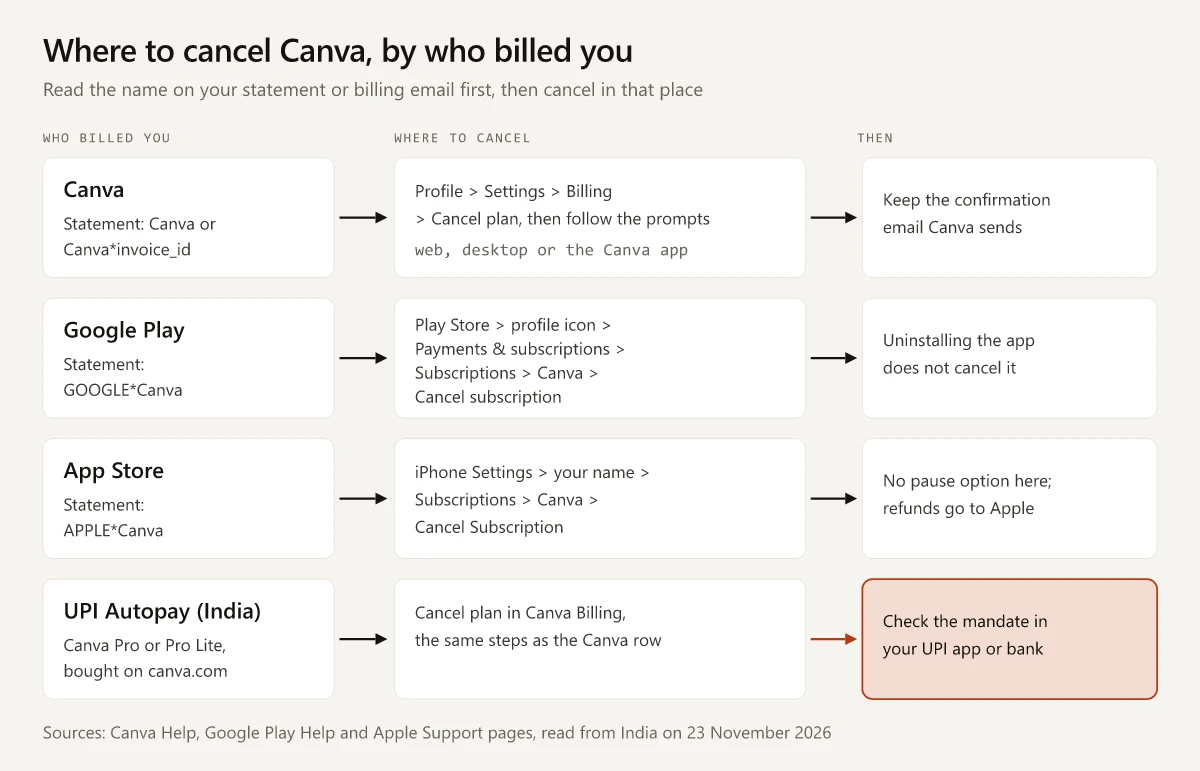
Where to Cancel Canva, by Who Billed You
Canva’s cancel article starts its steps with this line: “How you cancel depends on where you originally subscribed. Check your billing email or bank statement to confirm whether your charge came from Canva, Google, Apple, or PayPal.” Its upgrade article lists the names a charge can carry: Canva, Canvainvoice_id, APPLECanva and GOOGLE*Canva. The same article’s mobile steps show that a plan bought inside the Canva app goes through “an App Store or Google Play dialogue”, so Apple or Google bills it.
| Who billed you | Where you cancel | Pause instead? | Refund request goes to |
|---|---|---|---|
| Canva (card or PayPal, paid on canva.com in a desktop or mobile browser) | Settings > Billing > Cancel plan | Yes, inside the cancel flow | Canva, which says most subscriptions aren’t refundable |
| Google Play | Play Store > Payments & subscriptions > Subscriptions | Yes, through Google Play’s Pause payments | Canva first (Google says contacting the developer is often the quickest way), or Google Play’s refund request |
| Apple App Store | iPhone or iPad Settings > your name > Subscriptions | No: “Pausing a plan is not available from the iOS App Store” | Apple, at reportaproblem.apple.com |
| UPI Autopay, India (Pro or Pro Lite) | Settings > Billing > Cancel plan, then the mandate in your UPI app or bank | The UPI Autopay article has no pause rule | Canva; its refunds article lists no UPI processing time |
| Canva Teams or Business | Settings > Billing > Cancel plan, from inside the team that holds the plan | Yes, same flow | Canva |
The cancel article gives steps for three places: Canva, Google Play and the App Store. PayPal appears only as a charge source, and I read a PayPal payment made on canva.com as what the article calls subscribing “directly through Canva (desktop or web)”, which is its first set of steps. LinkedIn Premium works the same way, and my LinkedIn Premium cancellation guide shows how its iPhone and web routes differ.
How to Cancel Canva Subscription on the Web or Desktop
These are the desktop steps from Canva’s cancel article (India edition; its desktop steps match the US edition word for word). They are also how to cancel Canva Pro, Pro Lite, Teams or Business on the web:
- Make sure you are logged in to the right Canva account or team.
- From the homepage, select your account profile to open the menu.
- Select Settings.
- Select Billing.
- Under your plan, select Cancel plan.
- Follow the on-screen prompts to confirm your cancellation.
The prompts are where the pause offer appears. Canva says “You’ll receive a confirmation email when your plan is cancelled”, and its troubleshooting section treats a missing email as a sign the cancellation did not go through.
In the Canva App, on a Plan Canva Bills
The cancel article’s Mobile tab gives a parallel route: from the homepage tap Menu, tap your account profile, then Settings, tap Menu again, then Billing, and under your plan tap Cancel plan. The pause article’s mobile-browser steps name the control differently: on your plan, tap More actions, then Request cancelation. If you see a More actions menu where you expected a Cancel plan button, open it.
Changed Your Mind Before the Period Ends
Canva’s undo sits on the Billing page: go to Billing and select “Stay on Canva Teams, Canva Business, Canva Pro, or Canva Pro Lite”. The article adds: “This option is available only if you’ve requested cancellation and your subscription is still active.”
Cancel Canva on Android Through Google Play
If GOOGLE*Canva is on your statement, Canva cannot cancel the plan for you. Canva’s steps:
- On your Android device, open the Google Play Store.
- Tap your profile icon, then tap Payments & subscriptions.
- Tap Subscriptions.
- Find your Canva plan and tap Cancel subscription.
- Follow the prompts to confirm.
Google Play’s subscription help adds four points:
- “When you uninstall the app, your subscription won’t cancel.”
- After cancelling, “you’ll still be able to use your subscription for the time you’ve already paid.”
- If Canva is missing from the list, you may be signed in to a different Google account; Canva’s article gives the same tip.
- For UPI Autopay users in India, a subscription cancelled on Play “may continue to show up as active on Payments Center” until the billing period ends, and you can’t remove the UPI Autopay payment method from your Google account before then.
Cancel Canva on iPhone or iPad Through the App Store
If APPLE*Canva is on your statement, Apple holds the subscription. Canva’s steps match Apple’s cancel page for iPhone and iPad:
- Open Settings.
- Tap your name.
- Tap Subscriptions.
- Tap Canva.
- Tap Cancel Subscription, then confirm.
Apple notes that you may need to scroll to find the button, and “If there is no Cancel button or you see an expiry message in red text, the subscription has already been cancelled.” On a Mac, the same list is in the App Store: click your name at the bottom of the sidebar, then your name again, then Subscriptions. Canva’s pause article rules out pausing here; an App Store plan can only be cancelled.
Cancel Canva Pro Paid by UPI Autopay in India
On UPI Autopay, cancelling takes two places. Canva’s UPI Autopay article for India covers recurring payments for “Canva Pro or Canva Pro Lite only” and says “UPI Autopay isn’t available on Canva Business plan.” On cancelling, it says two things:
- “To cancel your autopay mandate, you can do so through your UPI app or bank’s settings.”
- “Once cancelled, your subscription won’t renew automatically at the next billing cycle.”
What Canva’s pages leave open, as read on 23 November 2026:
| Question | What the pages say |
|---|---|
| Does Cancel plan in Billing also revoke the UPI mandate? | Neither article says |
| Does revoking only the mandate show up in Canva Billing? | Neither article says |
| Does revoking the mandate change access for days already paid for? | The UPI Autopay article does not say |
With those gaps, my order for a UPI Autopay plan is:
- Cancel in Settings > Billing > Cancel plan, as in the web steps above.
- Wait for Canva’s confirmation email and keep it.
- Open your UPI app or bank settings, find the Canva mandate and check its status. If it still shows active, cancel it there, as the UPI Autopay article describes. If that mandate sits in PhonePe, PhonePe’s steps for deleting an AutoPay show where its AutoPay list is and why the merchant can disable the Delete option.
Billing goes first because its undo button only works from there. How the mandate gets set up, and what each plan costs on it, is in Canva Pro’s India prices and payment options.
Pause Canva Instead of Cancelling
Pausing keeps the plan and stops the payments for a while. The rules, from the cancel article and the pause article:
| Rule | What Canva’s help says |
|---|---|
| Plans | ”a Canva Pro, Canva Teams, or Canva Business plan” |
| Length | ”up to 3 months” in the cancel article; the web flow’s button reads “Pause for 3 months” |
| Annual plans | ”you can pause if you have less than two months until your plan renews” |
| When it starts | ”The pause begins once your current billing period ends” |
| During the pause | No charges; premium features are paused too; Affinity stays free with your Canva account |
| Restart | Automatic after three months, with email reminders before it resumes; you can resume earlier |
| App Store plans | Not available |
| Google Play plans | Play Store > Subscriptions > Canva > Manage > Pause payments, then choose how long |
The web steps: Billing > Cancel plan > Continue cancelation > select “I want to pause my subscription” > Continue cancelation > Pause for 3 months. Google Play’s own help says pause lengths there “can range from one week to three months”, depending on the app.
Two decision rules follow from those terms:
- On Canva Teams, pause rather than cancel if a team plan might come back, because cancelling Teams is permanent (next section).
- On an annual plan with more than two months to renewal, you can’t pause yet: cancel now to stop the renewal, or wait until you are inside the two-month window and pause then.
What Happens After You Cancel Canva
From the cancel article’s FAQ, when a paid plan ends:
- Future payments stop, and paid features last until the end of the current billing period.
- “All designs remain accessible on Canva Free.”
- Your Canva account stays active, and Affinity stays free with it.
For a Canva Teams or Business plan, team members lose paid features at the end of the period; designs, Brand Kit content and shared folders are retained on Canva Free; the team workspace moves to the free plan; and the team admin remains the account owner.
The Teams line is the one with no way back: “Cancelling Canva Teams is permanent. If you cancel, you won’t be able to resubscribe to Teams.” Canva suggests switching to Canva Business instead if you think you will want a team plan later. Canva’s free AI writing feature, Magic Write, has its own entry in my list of free AI tools for marketing.
Deleting your account is a separate act and does not cancel a plan. Canva’s delete account article says “Deleting your account doesn’t automatically cancel it”, so cancel the subscription first.
Canva Refunds After You Cancel
Canva’s refunds article opens with “In most cases, Canva subscriptions aren’t refundable, as outlined in our Terms of Use”, then says “we review every refund request.” If a refund is approved, the time depends on how you paid:
| Payment method | Processing time after approval |
|---|---|
| Credit card | 5-10 business days |
| PayPal | 3-5 business days |
| Other payment methods | Up to 20 business days |
| eBanx | Up to 30 business days |
For the app stores, the request goes elsewhere:
- Apple billed you: Canva says “you’ll need to request a refund directly from Apple”. Apple’s refund page sends you to reportaproblem.apple.com, where you choose “I’d like to”, then “Request a refund”, pick a reason and the subscription, and submit. Apple says to wait 24 to 48 hours for an update.
- Google Play billed you: Google Play’s refund policy page says the developer “can process refunds pursuant to its policies and applicable laws” and that “contacting the app developer directly is often the quickest way.”
Cancelling and a refund are separate requests. Cancel first, so the next renewal does not land while the refund question is open. If you are dropping Creative Cloud as well, Adobe ties its refund to the day you cancel, and the Adobe cancel steps and its 14-day rule show which plan types get money back.
Cancel a Canva Free Trial Before the First Charge
A trial uses the same Billing page. Canva’s upgrade article says:
- Your trial end date appears next to your current plan on the Billing page, and Canva emails a reminder before the trial ends.
- “If you started a free trial without providing payment details, your trial ends automatically and you won’t be charged.”
- “You can cancel your plan any time before renewal to avoid unexpected charges.”
The cancel article explains the early charge some people see: “Our billing system runs on UTC (Coordinated Universal Time). Depending on your time zone, a charge can appear a day earlier than expected.” Canva does not say at what hour the charge runs, so I would cancel at least a day before the end date Billing shows. A trial started through Google Play or the App Store is cancelled in that store, like any plan they bill.
Still Charged After Cancelling Canva?
The cancel article’s “I canceled my plan, but I’m still being charged” FAQ and one side note give these causes:
| Cause | Fix |
|---|---|
| You have more than one Canva account and cancelled only one | Search your inbox for Canva billing emails sent to another address |
| You subscribed through Google Play or the App Store | Cancel in that store; the Canva app cannot cancel it |
| The cancellation did not go through | No confirmation email means try cancelling again |
| Your bank kept charging a cancelled or expired card | Canva says “Some banks may keep recurring subscriptions active, even if the physical card is canceled or expired”; cancelling the card is therefore not enough, so cancel the plan itself |
If you could not find the plan to cancel in the first place, Canva’s “I can’t cancel my subscription” FAQ says you may be in the wrong team: profile icon > Teams, switch to the team with the subscription, then cancel.
If none of those fit, Canva asks you to contact support with your invoice ID number or a screenshot of the charge, and with the order number or receipt ID if Apple or Google billed you.
How to Cancel Canva Subscription: Pause, Cancel or Both
If you might come back, take the pause screen seriously, especially on Canva Teams, where cancelling is permanent. Then cancel where the money went: Billing for Canva, the Play Store for GOOGLECanva, iPhone Settings for APPLECanva. For UPI Autopay in India, Canva’s own pages split the job across two articles, so do both halves: Cancel plan in Billing first, then the mandate in your UPI app. Canva’s labels and rules here were read on 23 November 2026 and change, so check the help article on the day you cancel, starting from the name on your last charge.
Frequently Asked Questions
How do I cancel my Canva subscription on my phone?
It depends on who billed you. An App Store plan is cancelled in iPhone Settings > your name > Subscriptions > Canva > Cancel Subscription, and a Google Play plan in the Play Store under Payments & subscriptions > Subscriptions. A plan Canva billed is cancelled in the Canva app under Settings > Billing > Cancel plan; Canva's help says plans bought through Google Play or the App Store can't be cancelled inside the Canva app.
Can I get a refund if I cancel Canva Pro?
Usually not. Canva's refunds article says 'In most cases, Canva subscriptions aren't refundable', though Canva reviews every request. If Apple billed you, the refund request goes to Apple at reportaproblem.apple.com, not to Canva.
What happens to my designs if I cancel Canva Pro?
They stay. Canva's cancel article says all designs remain accessible on Canva Free and your account stays active, and you keep paid features until the end of the current billing period.
How do I stop Canva autopay in India?
Cancel the plan under Settings > Billing > Cancel plan on canva.com, then check the UPI Autopay mandate in your UPI app or bank settings. Canva's UPI Autopay article says that once the mandate is cancelled, the subscription won't renew automatically at the next billing cycle.
Can I pause Canva instead of cancelling?
Yes. Canva lets you pause a Canva Pro, Teams or Business plan for up to 3 months from inside the cancel flow. On an annual plan you can pause only when less than two months are left before renewal, and pausing is not available for plans bought through Apple's App Store.