How to Cancel Adobe Subscription: Steps and the 14-Day Rule
How to cancel Adobe subscription plans, from Adobe India's help pages read on 23 November 2026: the six account steps, what day 15 changes, and the app store routes.
Count the days since your initial order before you open your Adobe account. Up to day 14, cancelling any individual Creative Cloud plan you bought from Adobe gets your money back: Adobe’s India subscription terms say “If you cancel within 14 days of your initial order, you’ll be fully refunded.” From day 15, the same clicks do different things on different plan types, and on an annual plan billed monthly they add a lump-sum charge. So when you work out how to cancel Adobe subscription plans, the first step is a date, and the button comes after it.
The second fact to settle is who charged you. Adobe’s own cancel flow covers plans Adobe billed; a plan bought through Apple, Google Play or Microsoft is cancelled in that store. I would look up the order date and the billing store before going near a Cancel button, and the sections after the steps follow that order.
Every label and rule below comes from Adobe India’s help centre (the cancel page shows “Last updated on 15 October 2026”), Adobe’s India subscription terms, Apple Support, Google Play Help and Microsoft Support, all read on 23 November 2026. Adobe rewrites these pages, so check the labels on the day you cancel.
How to Cancel Adobe Subscription: The Six Steps
For a plan bought from Adobe, Adobe’s cancel help page lists these steps:
- Sign in to your Adobe account.
- In the Plans and payment window, select Manage plan for the plan you want to cancel.
- Select Cancel your plan.
- Check your plan details and then select Continue to cancel.
- Select the reason for cancellation, and then select Continue.
- Review the cancellation details and then select Confirm cancellation.
The page does not name single apps such as Acrobat, Photoshop, Lightroom or Adobe Express; its steps run plan by plan, so pick the plan in step 2. An app that came bundled with another company’s plan follows the where-you-paid table further down.
Then look for Adobe’s confirmation email, or check the plan’s status on your account page. The same help page adds two conditions:
- A failed or pending payment blocks the flow: “You can’t cancel your plan if we’re processing your payment or if there is a problem with the payment. Wait for 24 hours and try again.”
- Store purchases go elsewhere: “For subscriptions purchased through third-party providers such as Apple, Google, or Microsoft, follow their specific cancellation process.”
The terms give every individual plan a second route, “contacting Customer Support”, and Adobe’s India plans page prints “Purchase or cancel by phone: 1800 102 5567”.
Count the Days: What Cancelling Does by Plan Type
The day count starts at your initial order. Adobe’s India subscription terms give each individual plan type its own cancellation sentence; the cells in quotation marks are Adobe’s wording:
| Plan type (bought from Adobe) | Cancel within 14 days of the initial order | Cancel after 14 days | Paid access if you cancel after 14 days |
|---|---|---|---|
| Free trial on an annual plan | Before the trial ends, “your payment method won’t be charged” | Once the trial ends, Adobe charges “the rate stated at the time of purchase” and the plan’s own row applies | Not stated for trials |
| Month-to-month | ”you’ll be fully refunded" | "your payment is non-refundable" | "until the end of that month’s billing period” |
| Annual, billed monthly | ”you’ll be fully refunded" | "you’ll be charged a lump sum amount of 50% of your remaining contract obligation" | "until the end of that month’s billing period” |
| Annual, prepaid | ”you’ll be fully refunded" | "your payment is non-refundable" | "until the end of your contracted term” |
| Student and teacher, annual, paid monthly | ”you’ll be fully refunded" | "you’ll be charged a lump sum amount of 50% of your remaining contract obligation" | "until the end of that month’s billing period” |
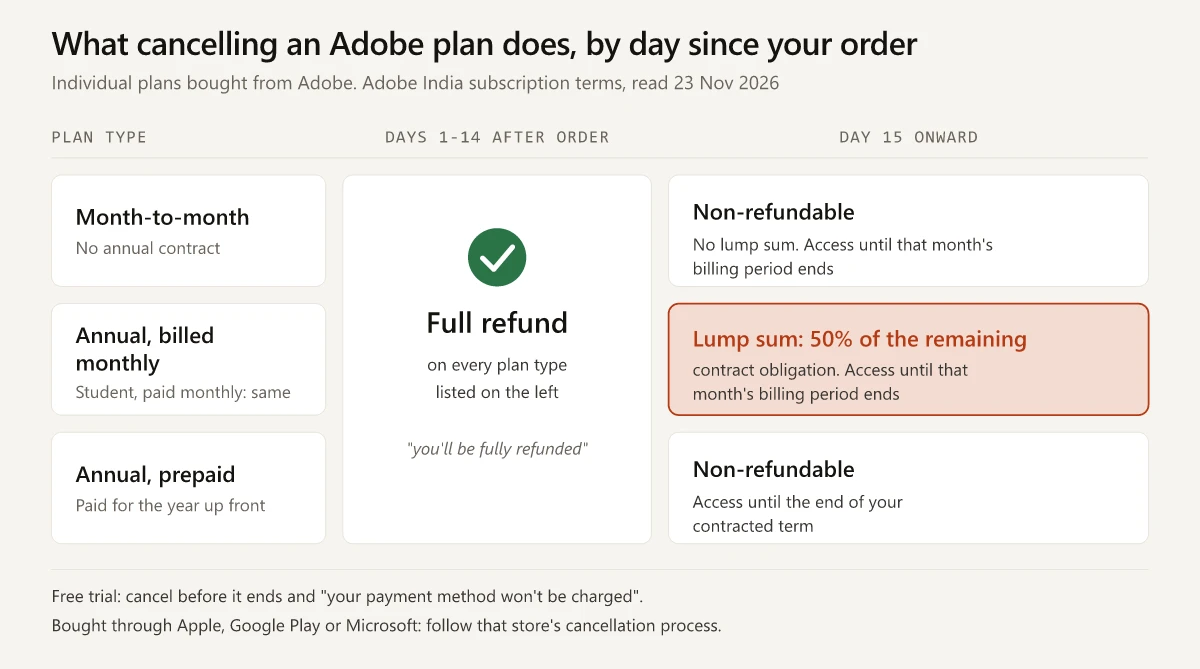
On an annual plan billed monthly, cancelling after day 14 triggers the 50% lump sum. What that comes to in rupees depends on how many monthly payments remain; the worked example is in my breakdown of Adobe Creative Cloud prices and renewals in India.
Details to check against your own plan:
- Adobe’s cancel page hedges where the terms do not: “For most plans, you get a full refund if you cancel within 14 days of your initial purchase.” Find your plan type’s row in the terms.
- The individual-plan terms tie the full refund to “your initial order” and print no separate refund window after a renewal. For a renewal charge, ask Customer Support rather than assuming the 14 days restart.
- Student plans follow the paid-monthly or prepaid row they were bought on. What the student plan costs after its first year is in my Adobe student plan guide for India.
Premiere’s plan panel prints a one-line cancellation rule beside each payment option, listed in my Premiere Pro price breakdown; for any single app, read the rule on its panel at checkout.
Where to Cancel Adobe Subscription by Where You Paid
The other half of the job is knowing who billed you. To find out, open the Plans page in your Adobe account. Adobe’s help page on third-party store payments says a Go to Google Store or Go to App Store button sits there only for store purchases: “The button appears only if you purchased a plan from Google Store.” Adobe adds that store plans “require you to manage payment through the original store” with “the same account that you used for your purchase.”
| Where you paid | Where to cancel | Source |
|---|---|---|
| Adobe (adobe.com or Adobe’s phone line) | The six steps above, or Customer Support | Adobe cancel page; India subscription terms |
| Apple App Store | On iPhone: Settings, tap your name, tap Subscriptions, tap the subscription, tap Cancel Subscription. Apple also lists a web route | Apple Support |
| Google Play | On Android: go to subscriptions on Google Play, select the subscription, tap Cancel subscription | Google Play Help |
| Microsoft | Go to Subscriptions with the Microsoft account you bought with, select Manage, then Cancel | Microsoft Support |
| A reseller | ”Customers who purchase indirectly through resellers should ask their reseller for terms or check the VIP programme guide, as appropriate.” | India subscription terms, Resellers |
| A teams licence | Teams plans: “You can cancel your subscription any time by contacting Customer Support.” Adobe’s contact page sends teams to Teams Admin Support | India subscription terms, Creative Cloud for Teams |
What the store pages add:
- Google Play: “When you uninstall the app, your subscription won’t cancel.” After cancelling, “you’ll still be able to use your subscription for the time that you’ve already paid.”
- Google Play with UPI AutoPay: a subscription cancelled on Play “may continue to show up as active on Payments Centre” until the end of the billing period, and the UPI AutoPay method cannot be removed from your Google Account before then.
- Apple: “If there is no Cancel button or you see an expiry message in red text, the subscription has already been cancelled.” For a trial, Apple says to cancel “at least 24 hours before the trial ends.”
- Refunds on store purchases: Adobe’s cancel page sends store purchases to the store’s own process, so for an App Store or Google Play plan read that store’s refund rules; Google’s cancel page links its own.
If no store button appears and you still cannot tell who charged you, Apple’s page gives a test: “To find out which company is billing you, check your bank or credit card statement.” The same billing-store split applies to LinkedIn Premium cancellations and to cancelling a Canva subscription, where a plan bought through Google Play or the App Store is cancelled in that store rather than in the Canva app.
Can You Turn Off Adobe Auto-Renewal Instead of Cancelling?
No: in India, cancelling is the only way to stop renewal. Adobe’s auto-renewal help page says “Currently, you cannot stop your plan from renewing automatically. To turn off auto-renewal, you’ll need to cancel your Adobe subscription.” The exception it names is an individual annual prepaid plan bought in Brazil or Vermont.
Stopping a card or a bank mandate is a separate act from cancelling. If the mandate is a UPI AutoPay held in PhonePe, its delete and pause steps are in cancelling AutoPay in PhonePe. Under “Annual Contract, billed monthly”, the terms say that if all payment methods fail, “we may suspend your subscription”, and “We will continue to attempt to charge your payment method(s) for the remainder of the term.” None of the Adobe pages I read on 23 November 2026 says a stopped payment cancels a plan, so cancel in your account (or through the store that billed you) first.
What Happens After You Cancel Adobe
Adobe’s help page on account access after cancellation (last updated 15 October 2026) sets out what stays and what goes; the top and bottom rows are from the cancel page:
| Item | After you cancel |
|---|---|
| Paid apps and services | Continue “until the end of your current billing period” |
| Your Adobe account | ”remains active”, with free membership benefits |
| Cloud storage | ”reduced to 5 GB”; if you are over, “you have 30 days to reduce your online usage”, after which “you could lose access to some or all of your files” |
| Files saved on your computer | ”you can continue to access those files on your device” |
| Files in free cloud storage | ”may be permanently deleted after a period of inactivity”, with an email notice first |
| Lightroom photos in the cloud | Adobe stores “your original images for one year after your membership lapses” |
| Lightroom Classic | Local photos stay usable; “Access to the Develop & Map modules and Lightroom for mobile will be unavailable” |
| Generative credits | ”will expire when you cancel your subscription” |
| Changing your mind | Reactivate “within the billing period” from your Adobe account, and billing continues as scheduled |
If a charge appears after you cancel, the cancel page says “this is usually the final charge for your current billing period.” The page does not say whether credits expire the moment you confirm or at the end of the paid period, so use any you need before you select Confirm cancellation.
A Checklist Before You Confirm Cancellation
- Find your initial order date (your purchase receipt or the plan details in your Adobe account) and count the days. Day 14 or earlier means a full refund on every paid individual plan bought from Adobe.
- Look for Go to App Store or Go to Google Store on your Plans page. If one is there, cancel in that store.
- Check your cloud storage. Above 5 GB, download what you need, because the 30-day clock starts after cancellation.
- Spend any generative credits you still want to use.
- Keep Adobe’s confirmation email until the billing period has ended.
How to Cancel Adobe Subscription at the Right Time
The six steps are the same on any day; the date you take them on decides whether money comes back. Inside 14 days of the initial order a paid plan bought from Adobe comes back in full; after that, your plan type’s row in the table above sets the cost. Find your order date before you sign in.
Frequently Asked Questions
How do I cancel an Adobe free trial?
Use the same cancel steps in your Adobe account before the trial ends. Adobe's India subscription terms say that if you cancel before the end of your free trial, your payment method won't be charged; once the trial ends, Adobe charges the rate stated at purchase and the plan's own cancellation rule applies.
Can I cancel an Adobe subscription without a fee?
Yes, within 14 days of your initial order: Adobe's India subscription terms give a full refund on every individual plan type in that window. After day 14, a month-to-month plan is charged no lump sum, but the month paid is non-refundable; a prepaid annual plan is non-refundable; and an annual plan billed monthly is charged a lump sum of 50% of the remaining contract obligation.
Why was I charged after cancelling my Adobe subscription?
Adobe's cancel help page says a charge seen after cancelling is usually the final charge for your current billing period. Paid access continues until that billing period ends.
How do I cancel an Adobe subscription on my iPhone?
In iPhone Settings you can cancel only a plan billed by Apple: tap your name, Subscriptions, the Adobe subscription, then Cancel Subscription. A plan bought from Adobe is cancelled in your Adobe account or through Adobe Customer Support.
How do I stop Adobe autopay or auto-renewal?
By cancelling the plan. Adobe's auto-renewal help page says you currently cannot stop a plan from renewing automatically and that turning off auto-renewal means cancelling your Adobe subscription; it names individual annual prepaid plans bought in Brazil or Vermont as the exception. Stopping the card or UPI mandate is not the same as cancelling: none of the Adobe pages read on 23 November 2026 says a stopped payment cancels a plan, so cancel in your Adobe account or the store that billed you first.