Microsoft Clarity Not Recording? Causes, Checks and Fixes
Microsoft Clarity not recording? Match the symptom to its cause and the check Microsoft documents: the /collect request, EEA consent, CSP, CSS and the daily cap.
Microsoft Clarity not recording shows up as a dashboard with no data, or as a recordings list with fewer sessions than the site’s traffic suggests. Find the row that matches what you see; every check in the third column comes from Microsoft’s own Clarity pages on Microsoft Learn, which I read on 4 November 2026.
| What you see | Likely cause | Check Microsoft documents | Fix |
|---|---|---|---|
| No data and no live users | Tracking code missing, or altered before it was pasted | POST requests to https://www.clarity.ms/collect in the Network tab (setup guide) | Copy the code straight into the <head>; Microsoft says to avoid text editors before pasting it |
| Data from a different page or site | The script belongs to another Clarity project | Compare the src of the script in your <head> with the project’s code (troubleshooting installation) | Remove the old script and paste the project’s own |
| Some pages or subdomains missing | Script not on those pages, or removed by a design change | Confirm the script is on every page you want tracked (same page) | Add it to each page and subdomain; recheck after a redesign |
| Your own visits never appear | Your IP address is on the project’s block list | Console message “Data from this session isn’t being collected by Microsoft Clarity due to your configured project settings.” (IP blocking) | Remove the address under Settings, IP blocking, if you did not mean to block it |
| Nothing loads on a site with a CSP | The Content Security Policy blocks Clarity | Errors in the browser’s developer console (CSP page) | Add Microsoft’s Clarity hosts to the policy |
| EEA, UK and Swiss visits split into one-page sessions | No consent signal, enforced since 31 October 2025 | clarity('metadata', ...) in the console, then read consentStatus (Consent Mode) | Send consentv2 from your banner, or use a CMP on Microsoft’s list |
| A URL has sessions but its recordings icon shows none | Too few sessions in the filter set to build a playback | Microsoft’s dashboard troubleshooting page | Expand the filters |
| Fewer recordings than sessions | Recordings might not be available for every session; a daily cap applies | 100,000 sessions per project per day (Clarity FAQ) | Widen filters before you assume data loss |
| Session count lower than another analytics tool | Bot detection excludes bot sessions | Excluded bot sessions are counted at the top of the dashboard (setup guide) | Compare against that count |
| Replay shows plain HTML with no styling | CSS that Clarity cannot fetch | Microsoft’s recordings troubleshooting page | Deploy the CSS publicly; allow the Clarity-Bot user agent |
| Blank boxes inside a replay | Third-party iframe or canvas element | FAQ: Clarity “can’t render inside third-party ‘iFrame’ or ‘canvas’ elements” | A documented limit, not an install fault |
| Heatmap with low page views or no clicks | Under 30 minutes since install, or filters | Microsoft’s heatmap troubleshooting page | Wait 30 minutes, clear filters, set Time frame to Today |
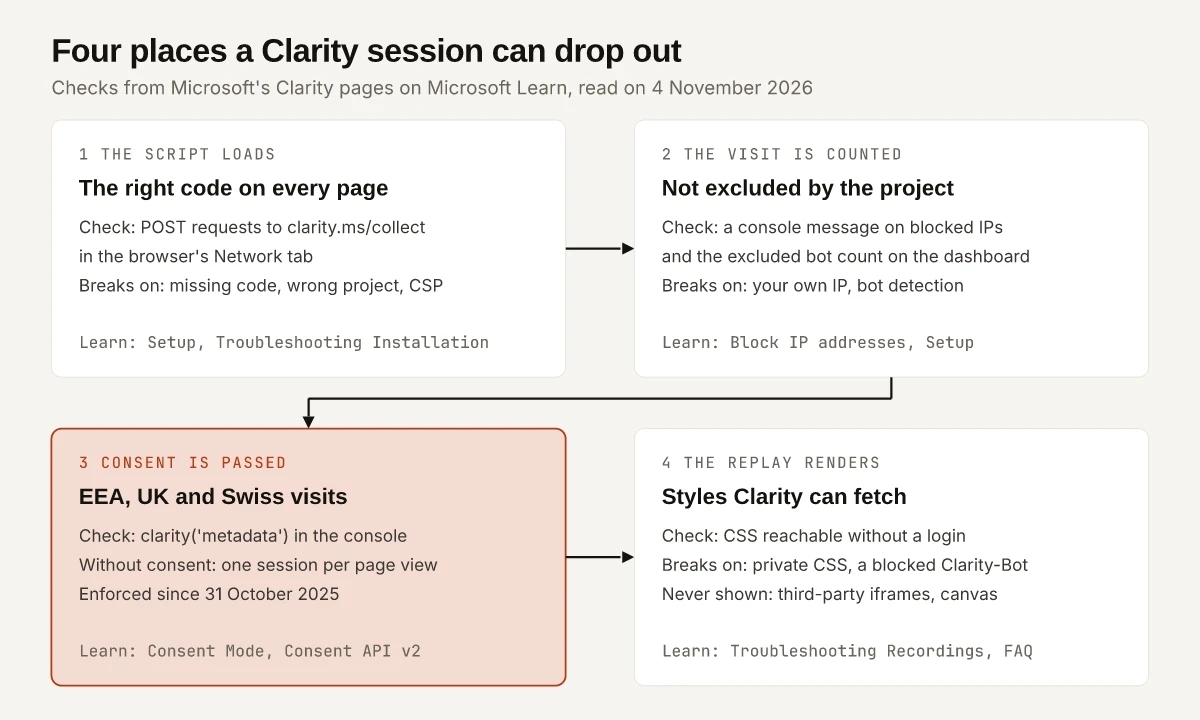
Microsoft documents every row, but the checks are spread across the 11 Clarity pages on Learn linked in this post, and a Q&A thread on the error text can sit for months without an answer from Microsoft. A March 2024 question on Microsoft Q&A about “This part of the recording is unavailable. Error while retrieving data” has one reply, from December 2024: “9 months and still no answer from Microsoft support”. My view is that you should find the stage where the data stopped before you change any dashboard setting, and each stage in the diagram below has its own check.
Microsoft Clarity Not Recording Anything: Check the Install
Microsoft’s setup guide gives two ways to verify an installation:
- Live users. Open the project. Once the script is added, Microsoft says you can view real-time data with the number of current live users, and select Watch now to see them.
- The collect request. Right-click your page, select Inspect, open the Network tab and select the
collectfile. You should see POST requests tohttps://www.clarity.ms/collectwhile you interact with the site.
If no collect request appears, Microsoft’s troubleshooting installation page says to revisit Setup, then “Refresh the page after a few minutes” and check again. The same page covers the wrong-project case: go to Setup, Installation methods, Install manually, copy the code, and compare it with the script in your site’s <head>, checking the src in particular.
The timing lines on Microsoft’s pages do not all say the same thing, which matters when a new install looks empty:
| Microsoft page | What it says about timing |
|---|---|
| FAQ, Setup | ”It takes a few hours to view data in the dashboard.” |
| FAQ, Session recordings | ”Recordings appear instantly as soon as you add the tracking code.” |
| FAQ, Heatmaps | ”The user clicks are shown on heat maps within 30 minutes.” |
| Heatmap troubleshooting | ”After installing the code, wait for 30 minutes before Clarity generates a heatmap.” |
Treat the collect request as the install test, since it reports on the page you have open, and give dashboard totals the few hours the FAQ allows. Two more install notes from the Clarity FAQ: a project spans several sites or subdomains only “if you included the tracking code from your project on all of them”, and on Shopify, “Design changes might cause the Clarity script to be removed.”
Microsoft Clarity Not Recording EEA, UK and Swiss Visitors
Since 31 October 2025, Clarity has required a consent signal for visits from the European Economic Area, the UK and Switzerland, and its Consent Mode page says Consent Mode “is enabled by default for all users originating from” those regions. The FAQ says Clarity uses IP address-based geolocation to decide who they are. Without the signal, this is what Microsoft’s pages say you lose:
- Consent API v2 page: “If consent is not granted, Clarity assigns a unique ID per page view and does not use cookies to persist session data.”
- FAQ: if a user visits page A and then page B, “Clarity treats these as two separate sessions”, and functions “like funnel tracking and session recordings, might be impacted.”
- Setup guide, with cookies off: “Recordings aren’t linked together into multi-page sessions.”
The FAQ adds the case that needs no work: if no users visit from the EEA, the UK or Switzerland, “there is no impact on your Clarity experience and no need to send an explicit consent signal.”
Read the Consent State in the Console
Microsoft’s verification step is to open the developer tools on your site, go to the Console tab and run:
clarity('metadata', (d, upgrade, consent) => {
  console.log('consentStatus:', consent);
}, false, true, true);
Before the visitor answers the banner, Consent Mode should print analytics_storage: "DENIED" and ad_storage: "DENIED"; after “accept all”, both read "GRANTED". Microsoft’s second test: clear cookies, decline consent, confirm the /collect calls still run, and check that no _clck or _clsk cookie was set.
Send the Signal Clarity Reads
The Consent API v2 page calls consentv2 “the latest and recommended method” and says the older Consent API “is planned for deprecation”. Its syntax:
window.clarity('consentv2', {
  ad_Storage: "granted",
  analytics_Storage: "granted"
});
The two pages spell the keys differently: the API page writes ad_Storage and analytics_Storage with lowercase values, while the console readout prints analytics_storage and ad_storage in lowercase with values in capitals. Use the API page’s spelling in the call, since that page defines the parameters. Your other routes, as Microsoft’s pages stood on 4 November 2026:
| Route | Status on Microsoft Learn |
|---|---|
| A supported CMP | The CMP page lists 17 under “Available now”, including Cookiebot, CookieYes and Usercentrics, with OneTrust under “Coming soon”; you “must enable Clarity Consent Mode” first |
| Google Consent Mode | The FAQ says support “is coming soon” |
| A custom banner | Call consentv2 from the banner’s event listener |
| Several Clarity projects | The FAQ says each project “requires separate consent signal handling” |
The Consent Mode page still says Clarity “currently integrates with CookieYes, with additional CMP support coming soon”, so check the CMP page for the current list. While Google Consent Mode support is still listed as coming soon, a CMP that is not on Microsoft’s list passes consent through the Consent API, which the Consent Mode page names for “a CMP not listed above” and links to the consentv2 page. On this site, a consent bridge reads the CMP’s ad and analytics storage choices and passes them to Clarity’s consentv2 call, as my comparison of Google Analytics alternatives describes.
Clarity Blocked by a Content Security Policy or an IP Block
Microsoft’s CSP page says “Clarity should usually work if your website doesn’t have a CSP”, and that with one, browsers block Clarity resources until you allow them. Its suggested change goes in default-src:
default-src 'self' https://*.clarity.ms https://c.bing.com 'unsafe-inline';If you list hosts one by one instead, the page names https://www.clarity.ms, https://c.bing.com and the lettered hosts a.clarity.ms through z.clarity.ms, because Clarity balances load between environments. Microsoft’s example also carries 'unsafe-inline', so follow the page’s own tip before you paste it: “Consult your website manager while making changes to your CSP.” A blocked Clarity shows up as errors in the developer console.
An IP block is the opposite case: the script runs and Clarity drops the data on purpose. From Microsoft’s IP blocking page:
| Rule | What Microsoft says |
|---|---|
| Effect | Blocked visitors do not count in the dashboard, and no sessions from them are recorded |
| Address type | ”Clarity only supports IPv4 addresses”, with no IPv6 or dynamic addresses such as a VPN |
| Phones | Mobile devices generally have no stable IP, so they cannot be used for blocking |
| Timing | ”Wait about 15 minutes for the changes to come into effect.” |
| Who can change it | Project administrators only |
| How to confirm | The console message quoted in the table at the top of this post |
Does Clarity Record Every Session?
No: Microsoft’s Clarity FAQ says “Clarity tracks all sessions, but recordings might not be available for all sessions”, and that it records up to 100,000 sessions per project per day. The same FAQ lists “No sampling” among Clarity’s features, which it defines as “tracking only a portion of your site’s traffic”, so the gap Microsoft describes is in recordings, not in tracking. The gaps it does document:
- A thin filter set. The dashboard troubleshooting page says some sessions “can’t be visualized as the data received is insufficient to display a full playback experience”, and that this is common when few sessions sit in a filter set. Expanding the filters is its fix.
- Bot sessions. The setup guide says Clarity detects bot traffic by default and “excludes it from total session count and analytics”, with the excluded number shown at the top of the dashboard.
- No consent signal. The consent section above: without it, a two-page visit from the EEA becomes two sessions.
- Live view. The FAQ caps live viewing at “a maximum of 100 live sessions”.
Microsoft Clarity Not Showing CSS in Replays
A Clarity replay is rebuilt from the page’s content (the FAQ says it records “the DOM content” rather than video), so Clarity has to fetch your stylesheets and fonts itself. Microsoft’s recordings troubleshooting page lists the trouble spots:
| Trouble spot | Microsoft’s solution |
|---|---|
| Styling sits in a non-public environment (localhost, an intranet) | “Deploy your CSS publicly.” |
| The site blocks Clarity by IP, geolocation, domain or referrer | Allow public and cross-origin access, and allow requests with the user agent Clarity-Bot |
| A temporary stylesheet or font | Make the CSS permanent, or keep it available for longer |
| A resource served with the wrong type | Serve stylesheets and fonts with the right content header |
The two troubleshooting pages disagree on caching. The recordings page says “Clarity supports resource versioning”, so a replay uses the stylesheet as it was when the session was recorded. The heatmap troubleshooting page says “Clarity doesn’t support resource versioning”, so a changed file at the same URL can render with the old cached copy. Microsoft’s recordings page recommends a new URL or file name for each updated stylesheet, which avoids the problem under either reading. To clear a cached file, the heatmap page says to email clarityMS@microsoft.com with a link to an affected recording or heatmap and the resource URL.
Blank Areas, Gray Images and Empty Click Maps
These come from how Clarity captures a page, so some are limits rather than faults:
- Blank boxes: the FAQ says Clarity “can’t render inside third-party ‘iFrame’ or ‘canvas’ elements”; for heatmaps, it captures clicks on first-party iframes only, “but not on third-party iFrames.”
- Gray images or videos: the FAQ says Clarity does not capture changes to continuously changing elements while the user is inactive, and they return to full colour when the user is active again.
- A click map with no clicks from a recording: the recordings troubleshooting page says heatmaps opened from a recording add two filters, the recording’s visited URL and its device type. Remove or adjust them.
- Low page views on a heatmap: the heatmap page lists the checks: script on every page, still installed after a redesign, 30 minutes since install, the correct URL, cleared filters, and the Time frame set to Today.
Once the clicks arrive, the colours still need reading; my guide to reading click and scroll heatmaps covers that part, and my five-tool marketing stack shows where Clarity sits beside GA4 and Search Console.
What to Send Microsoft If Clarity Is Still Missing Data
If you still see Microsoft Clarity not recording after the four checks in the diagram, contact Microsoft with the evidence those checks produced. Microsoft’s pages give three routes:
- The troubleshooting installation page: “Contact us if the issue persists”.
- The recordings troubleshooting page: email clarityMS@microsoft.com with a link to the recording or heatmap that does not render, and optionally the resource URLs you can see failing.
- The FAQ: in-app feedback through the smiley face button.
Include whether POST requests to /collect appear, what the consentStatus readout prints, and any console message about CSP or project settings. Those three lines tell support which stage stopped the data, which a screenshot of an empty dashboard cannot. Start with the collect request.
Frequently Asked Questions
Why is Clarity not recording sessions?
The causes Microsoft documents are a tracking code that is missing from the page or belongs to another project, a Content Security Policy that blocks Clarity, an IP block on your own address, and a missing consent signal for visitors from the EEA, the UK and Switzerland. Microsoft's setup guide says to confirm the install by looking for POST requests to https://www.clarity.ms/collect in the browser's Network tab.
How do I check if Microsoft Clarity is installed?
Open your site, right-click, choose Inspect and look in the Network tab for POST requests to https://www.clarity.ms/collect while you use the page. Microsoft's setup guide gives that check and the live-users count in your Clarity project as the two ways to verify an installation.
Does Microsoft Clarity record every session?
No. Microsoft's Clarity FAQ says Clarity tracks all sessions, but recordings might not be available for all of them, and that it records up to 100,000 sessions per project per day.
Why does my Clarity recording show no CSS?
Clarity needs access to your stylesheets and fonts to render a replay, so CSS on a non-public server, or a site that blocks Clarity by IP, geolocation or referrer, gives a page without styling. Microsoft's recordings troubleshooting page says to deploy the CSS publicly and allow requests with the user agent Clarity-Bot.
How long does Microsoft Clarity take to show data?
Microsoft's FAQ says recordings appear instantly once the tracking code is added, and also that it takes a few hours to view data in the dashboard. Its heatmap troubleshooting page says to wait 30 minutes after installing the code before Clarity generates a heatmap.