Claude Skills Not Showing Up? Fixes by Surface and Version
Fix Claude skills not showing up or not working: find where the skill is missing (the app, the / menu, /skills, a cloud session) and the version each fix needs.
Agensi’s troubleshooting guide for Claude Code skills, dated 3 May 2026, still tells you to “end your current session and start a new one” when a new skill will not load, while Anthropic’s skills documentation, read on 10 October 2026, says Claude Code “picks up the change within the current session, without a restart.” Advice for Claude skills not showing up outlives the version it was true for: Anthropic’s changelog dates the no-restart behaviour to version 2.1.0, released on 7 January 2026, nearly four months before that guide’s date.
Every row on this page was checked on 10 October 2026 against the Anthropic page it cites, with a minimum version wherever the docs give one. The page sets Anthropic’s docs against older fixes that no longer match them, and I reproduced none of the failures. The skills page alone carried 24 distinct Claude Code version numbers, from v2.1.196 to v2.1.290, and the changelog’s newest entry was v2.1.296, dated 9 October.
I read every fix for a missing skill as written for one version of Claude Code. Check the version your session runs before you rule a fix in or out: claude --version in a terminal, or /status in the VS Code panel or the desktop Code tab, which each run their own copy of Claude Code. My standalone CLI reported v2.1.283 on 10 October 2026.
Why Are Claude Skills Not Showing Up?
A Claude skill fails to show up when it never loaded, a setting hides it, or it lives where the current surface does not read. Find which of five places is missing it: the Claude app’s Skills list, the / menu, /skills, the listing of names and descriptions Claude reads, or a cloud session.
| Where it is missing | Documented causes | Fix | Minimum Claude Code version | Main Anthropic source |
|---|---|---|---|---|
| Skills list in the Claude app (Customize > Skills) | Code execution is off, so the section is hidden or greyed out; or the skill exists only as a folder on your machine | Turn on Code execution and file creation; upload a local skill as a ZIP | None: it is an app setting | Use skills in Claude |
The / menu in Claude Code | The skill never loaded, or user-invocable: false or an "off" override hides it from you | Store it as <name>/SKILL.md; run /reload-skills if the skills folder is new; set an off state back to on in /skills; remove user-invocable: false | /reload-skills: v2.1.152. /add-dir for a nested folder: v2.1.257 | Debug your configuration |
The /skills dialog | The same loading causes; bundled skills are not listed there; account skills appear only after a sync | Look in /context for bundled skills; sign in with your claude.ai account for synced ones | Account sync: v2.1.273. /skills in the VS Code panel: v2.1.280 | Skills synced from claude.ai |
| The listing Claude reads | disable-model-invocation: true, a user-only or name-only state, or a description dropped from an over-budget listing | Set a user-only or name-only state back to on in /skills; remove disable-model-invocation: true if Claude should pick the skill; raise skillListingBudgetFraction or trim descriptions | /context reports the listing after the budget from v2.1.196 | Skill descriptions are cut short |
| A cloud session, Cowork or a routine | Those sessions do not read ~/.claude/skills/ on your machine | Enable the skill on your claude.ai account; for a cloud session or a routine, you can instead commit it to the repo’s .claude/skills/ | None stated | Skills in Cowork and cloud sessions |
Anthropic’s metadata dates the last change to the help article at 22 September 2026 and to the skills page at 9 October 2026.
If your search was “Claude skills not working”, split it the same way: a skill that never loaded belongs to rows two and three, and one that loaded but Claude never picks belongs to row four. Writing a description that triggers is covered in what a Claude skill is and how it loads.
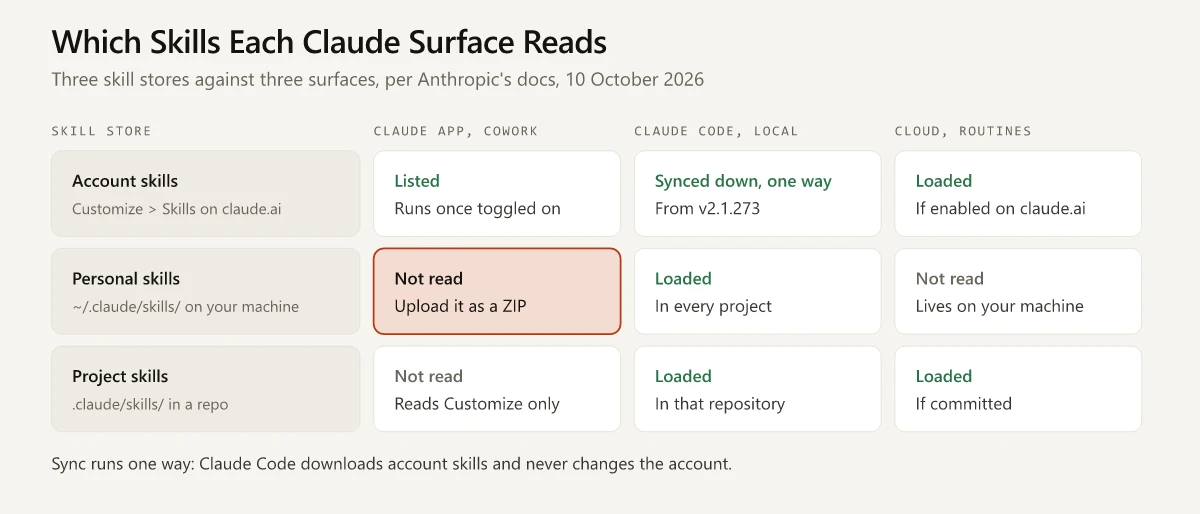
The top and bottom rows come down to where a skill is stored. This matrix sets three skill stores (your account, your home folder and a repo) against the surfaces that read them:
Older Fixes That No Longer Match Anthropic’s Docs
Each row names its page and that page’s date, and wording in quotation marks is verbatim.
| Older fix or report | Source and date | Anthropic’s docs on 10 October 2026 | Changed in |
|---|---|---|---|
| ”end your current session and start a new one” after installing a skill | Agensi’s troubleshooting guide, 3 May 2026, last modified on 26 Aug 2026 per its metadata | Changes under an existing skills folder load without a restart; a skills folder created mid-session needs /reload-skills | Hot-reload: v2.1.0, 7 Jan 2026, before the guide’s date. /reload-skills: v2.1.152, 27 May 2026. Slash-menu fix: v2.1.216, 20 Jul 2026 |
| With malformed frontmatter, Claude Code “might ignore the skill entirely” | The same Agensi guide | ”the skill still loads with no fields set”, so /name works and Claude has no description to match | v2.1.186, 22 Jun 2026 |
| The listing “defaults to 15,000 characters” and “there’s no warning when you go over” | Jesse Vincent, 17 Dec 2025, on Claude Code 2.0.70 | The budget “scales at 1% of the model’s context window”, every skill name stays listed, and an overflow is written to the debug log | Budget tied to the context window: v2.1.32, 5 Feb 2026 |
| Organization skills “do not appear in Claude Code CLI” | GitHub issue #40320, 28 Mar 2026, on 2.1.86 | Per the help article’s Use skills in Claude Code section, account skills, including those “an owner provisioned for your organization”, load in a terminal session signed in with the same account | v2.1.273 in the docs; listed under v2.1.275, 17 Sep 2026, in the changelog |
| Upload the ZIP from a Features page in Settings; the folder name “must match the name field in the frontmatter exactly” | mcp.directory, labelled “Updated May 2026” | Code execution sits in Settings > Capabilities and uploads in Customize > Skills. The name match is an upload rule; Claude Code takes the command from the folder name or from name | Lookup fix for a name that differs from its folder: v2.1.290, 5 Oct 2026 |
What the table leaves out:
- A restart is still the documented step after
/loginmid-session, after editing.claude/commands/or.claude/agents/inside a folder added with--add-dir, and after renaming a skill that used a reserved name. - The restart advice kept some basis after v2.1.0. The changelog entry for v2.1.216, dated 20 July 2026, reads “Fixed skills and commands changed during a session not appearing in the slash menu until restart.”
- Two Anthropic pages give different budget figures. The v2.1.32 changelog entry says “2% of context”, while the skills page and the
skillListingBudgetFractionsetting say 1%, and no changelog entry names that setting. Run/doctorfor the cost of your own listing. - Nicolas Dao’s skill field guide, bylined 18 June 2026 and by its own text verified against Claude Code v2.1.207 on 13 July 2026, had already flagged the 15,000 figure as out of date.
- One older fix is neither confirmed nor replaced. On 2 November 2025, Scott Spence traced skills missing from Claude’s list to a code formatter that had wrapped
descriptiononto several lines, and fixed it by keeping the description on a single line. The skills page says nothing about multi-line descriptions. It does give a parse check,claude plugin validate .claude/skills, which needs v2.1.233 (14 August 2026), so run that before you reformat anything.
Claude Code Skills Not Showing Up in the / Menu or /skills
Run /skills and look for the skill. Anthropic’s Debug your configuration page says the dialog shows “Available skills from project, user, and plugin sources.” If yours is absent, work down the loading causes:
| Symptom | Documented cause | Fix | Minimum version |
|---|---|---|---|
| A new skill never appears | The file is .claude/skills/name.md, not a folder | Move it to .claude/skills/name/SKILL.md | None stated |
| Skills in a folder you just created do not load | A top-level skills folder that did not exist at session start is not watched yet | Run /reload-skills, and again after each later change there | v2.1.152 |
A skill under a subfolder’s .claude/skills/ is missing | Nested skills load once Claude reads or edits a file in that subfolder | Run /add-dir with the subfolder’s path | v2.1.257 |
| Skills from a second folder never load | The permissions.additionalDirectories setting “grants file access only” | Launch with --add-dir, or run /add-dir | --add-dir: v2.1.32 |
| A worktree session has no project skills | Parent folders are searched up to the worktree root and no further | Update: the main checkout’s skills then load when the worktree has no .claude/skills at its root | v2.1.277 |
| A skill that came with a plugin is missing | Plugin skills load wherever the plugin is enabled, under /plugin-name:skill-name | Check that the plugin is enabled (/plugin in a terminal, Manage plugins in VS Code and the desktop app), run /reload-plugins if it changed since the session started, and type the namespaced name | /reload-plugins: v2.1.98, or v2.1.260 in the desktop app and -p runs |
/name runs a different skill, or edits to a project skill seem to do nothing | Two skills share a name: enterprise wins over personal, and personal over project | Rename one copy, or edit the one that runs | None stated |
A skill installed with the npx skills CLI is missing | Run from inside an agent session, the CLI may install only to .agents/skills/, a folder Anthropic’s location table does not list | Reinstall with the agent flag covered in the Claude marketing skills guide | None stated |
| One folder is skipped | It is named synced or anthropic-skills, names reserved for account skills | Rename the folder | anthropic-skills refused from v2.1.282 |
A SKILL.md saved with a UTF-8 BOM is ignored | A bug the changelog lists as fixed | Update, or save the file without a BOM | v2.1.239 |
| Every custom skill is missing | The session started with --safe-mode, --bare or --disable-slash-commands, per the CLI flags table | Start a normal session | None stated |
A bundled skill is not in /skills | The dialog leaves bundled skills out | Read the skills section of /context | None stated |
| Personal skills load in one setup and not in another | On Windows ~/.claude resolves to %USERPROFILE%\.claude, and CLAUDE_CONFIG_DIR moves every ~/.claude path, per the .claude directory reference | Save the skill under the home folder that session reads | None stated |
On Windows, a WSL session in the desktop Code tab runs inside the Linux distribution with what Anthropic’s Claude Code Desktop in WSL page calls “native Linux paths”. A WSL install keeps ~/.claude, and the personal skills folder under it, inside the distribution and separate from the Windows one; my comparison of native Windows, Git Bash and WSL 2 lists where each side keeps its files.
Custom command files have their own table of causes in my Claude Code commands cheat sheet.
Claude Skills Not Found: What a Missing Name Looks Like
Typing the name of a skill that did not load gets a different reply depending on where you type it, per Anthropic’s errors reference:
Where you typed /name | What happens |
|---|---|
| An interactive terminal session | Unknown command: /name, with the closest command name suggested when one is close |
The VS Code panel, the desktop Code tab, -p runs, cloud sessions and routines | The text goes to Claude “as a normal message”, with a note that the command did not run |
Outside cloud sessions and routines, the second row needs v2.1.274 or later; cloud sessions and routines have behaved that way since v2.1.273. I run Claude Code in the VS Code panel, so a mistyped or unloaded skill name in my setup falls in that row. The panel also offers a subset of commands and skills, one of the differences between the extension and the CLI.
Account Skills Missing From Claude Code
Skills you enable on your claude.ai account are listed in /skills under claude.ai sync. When that group is missing, the sync section of the skills page gives these causes:
- The version is below v2.1.273.
- The session is not signed in through
/login: it uses an API key,ANTHROPIC_AUTH_TOKEN,CLAUDE_CODE_OAUTH_TOKENor anapiKeyHelperscript. - The session does not fetch feature flags, as on Amazon Bedrock or with
CLAUDE_CODE_DISABLE_NONESSENTIAL_TRAFFICset. - It runs in bare mode, or was started with
--safe-mode. - Managed settings lock skills to plugin sources, or
--setting-sourcesleaves outuser. syncClaudeAiSkillsis set tofalse.- You signed in with
/loginduring the session and have not restarted. - The skill is switched off on claude.ai.
The changelog adds one more: v2.1.296, released on 9 October 2026, fixes synced skills “never finishing their install” when several sessions share a config directory.
A change made on claude.ai takes time to arrive: the docs put the checks at about every 10 minutes while you or Claude work in the session and about every 40 minutes while it is idle. The 40-minute idle interval arrived in v2.1.293, released on 7 October 2026; the changelog says it replaced a check every 10 minutes.
A synced skill that shares its name with another command is listed, and runs, under /anthropic-skills:<name>. From v2.1.269 through v2.1.280, the / menu and /skills listed every synced skill under that full name; v2.1.281 restored the short name.
Personal Skills That Disappeared
If folders you created in ~/.claude/skills/ are gone, the skills page sends you to ~/.claude/skills/.trash/:
- “Before v2.1.280, a file named
manifest.jsonin~/.claude/skills/caused Claude Code to move the skill folders that file listed” into a timestamped folder there, “and those skills stopped loading.” The changelog entry for v2.1.280, dated 22 September 2026, lists the fix. - Synced skills go to the same trash when you set
syncClaudeAiSkillstofalseor your organization turns Skills off on claude.ai. - To restore a skill, move its folder back into
~/.claude/skills/before the retention sweep deletes it, “by default 30 days after they were moved to the trash.”
Claude Skill Not Triggering: Name-Only and User-Only States
When a skill sits in the / menu and Claude never picks it, check the listing Claude reads before you rewrite the description. What that listing holds depends on a state set from /skills and on two frontmatter fields in the skill’s own SKILL.md, per the visibility section of the skills page:
| State or field | Where it is set | In your / menu | Listed to Claude |
|---|---|---|---|
| on (the default) | skillOverrides | Yes | Name and description |
| name-only | skillOverrides | Yes | Name only |
user-only (user-invocable-only) | skillOverrides | Yes | Hidden |
| off | skillOverrides | Hidden | Hidden |
disable-model-invocation: true | SKILL.md frontmatter | Yes | Hidden |
user-invocable: false | SKILL.md frontmatter | Hidden, and typing /name does not run it | Name and description |
To read or change a state:
- In a terminal, run
/skills, highlight the skill, pressSpaceto cycle the states andEscto save. The choice is written toskillOverridesin.claude/settings.local.json. The changelog listsskillOverridesas working from v2.1.129, released on 6 May 2026. - In the VS Code panel, typing
/skillsopens the Slash commands dialog, where each row shows its visibility, such as On or Name only, and a click changes it. Anthropic’s VS Code page puts that at v2.1.280 or later. - Plugin skills cannot be cycled, and neither can a skill whose frontmatter sets
disable-model-invocation: trueor one pinned in managed settings. - On the Debug your configuration page, a “user-only” label “means Claude won’t trigger it on its own.”
If the state is on and Claude still skips the skill, the Skill not triggering checks and the listing budget come next:
- Ask Claude
What skills are available?and confirm the skill is in the answer. - Compare the description with the words in your request, then rephrase.
- Check the listing budget. The listing “always contains every skill name”, but over budget it drops descriptions “starting with the skills you invoke least.”
/doctorestimates the listing’s context cost, the Skills row in/contextshows its size after the budget is applied, andclaude --debuglogs a warning when it overflows. - Free some budget: raise
skillListingBudgetFraction(the docs’ example is0.02for 2%), set rarely used skills to name-only, or trimdescriptionandwhen_to_use, which are cut at 1,536 characters per skill whatever the budget./skill-doctor, on v2.1.252 or later, reports what each skill costs in context and how often it is used. - After a
/compactthe listing is gone, because compaction does not re-inject it. Type the skill’s/nameyourself. The compact vs clear breakdown covers that case, including this repo’s count of 18 project skills in the listing out of 20. - If Claude invokes no skill at all, look for
Skillamong the deny rules in/permissions.
Claude Skills Not Showing Up in the Claude App
The Claude app has no terminal to check. Anthropic’s Use skills in Claude help article has a Troubleshooting section with eight headings:
| Heading in the article | Cause it gives | What to do |
|---|---|---|
| Skills section not visible | Code execution is off | Settings > Capabilities on Free, Pro and Max; Organization settings > Plugins & skills, Policy tab, on Team and Enterprise |
| Claude isn’t using a skill | The toggle is off, or the description and instructions are unclear | Turn it on in Customize > Skills; name the skill in your request |
| Can’t create or upload a skill | An owner turned off User-created skills, or a custom role lacks the Create skills capability | Ask the organization owner |
| Skills greyed out | Code execution is disabled for the organization or for you | The owner, or Settings > Capabilities |
| Upload errors | The ZIP exceeds size limits, the folder name differs from the skill name, the skill file is missing, or the name or description holds invalid characters | Correct the folder and upload again |
| Group doesn’t appear when I try to share a skill | The group lacks the “Share resources with this group” setting | Ask the organization owner |
| Share button not visible | The sharing toggles are off, or a custom role lacks the Share skills with groups capability | The owner turns on at least one sharing toggle in Organization settings > Skills; the article’s Share a skill section puts those toggles under Plugins & skills, Policy tab |
| ”Publish to org” button not visible | Publishing is off, or the skill is not one you created | Ask the organization owner |
The same article and the Claude Code docs add other reasons a skill is not available in the app:
- A skill a colleague shared sits in the recipient’s list “grayed out until they enable it.” Turn it on under Shared with you.
- Organization skills are installed from the directory instead of being enabled from the list.
- On Enterprise plans with skill scanning on, a third-party skill you upload or edit is checked before it can run, and the article says most scans finish “in about one to two minutes.”
- An upload fails with a hard error when
SKILL.mdcarries frontmatter fields outside the six that claude.ai accepts. The message starts “Unexpected key(s) in SKILL.md frontmatter”. - A custom style from before the 2026 migration is now a skill that arrives switched off, and the Claude styles migration guide covers turning it on.
Local Skills Missing From the Desktop Customize Panel
The GitHub reports on this share a pattern: skill folders in ~/.claude/skills/ work in the desktop app’s Code tab, and all or most of them are absent from Customize > Skills. Anthropic’s docs describe Customize as configuration that syncs through your claude.ai account, and none of the three pages quoted below says the panel lists folders from ~/.claude/skills/.
Anthropic’s Documentation on the Panel
- The desktop docs say Customize manages connectors, skills and plugins, and that the Cowork tab sources them “from this Customize configuration, which syncs through your claude.ai account, not from the CLI’s
~/.claudedirectory.” - The same page says “Local sessions load your personal skills from
~/.claude/skills/”, and that you browse them by typing/or by clicking + and choosing Slash commands. - The skills page says a personal skill reaches the account when “you upload it to claude.ai”, and that the upload accepts six frontmatter fields.
- The word personal has two meanings across these pages. On Team and Enterprise plans, the help article’s Personal skills section of Customize > Skills holds “Skills you’ve created or uploaded yourself”, while the Claude Code docs use personal for folders under
~/.claude/skills/.
So the documented place to confirm a local skill in a desktop Code session is the / menu, and the documented way to get it into Customize is an upload.
User Reports on GitHub
| Issue | Opened | Report | Status on 10 October 2026 |
|---|---|---|---|
| #31597 | 6 Mar 2026 | Skills in ~/.claude/skills/ “appear in the / slash menu and trigger correctly” while the panel “doesn’t list them” | Closed as not planned by the inactivity bot on 21 May 2026, locked on 11 Jul 2026 |
| #64466 | 1 Jun 2026 | The panel’s Personal skills list shows a small subset of the folder, and the subset changes between opens | Closed as not planned by the inactivity bot on 1 Sep 2026 |
| #77503 | 14 Jul 2026 | Repeats the report and asks for a re-triage | Closed as a duplicate of #64466 on 25 Aug 2026 |
A commenter on #31597 who analysed the v2.1.96 binary wrote on 8 April 2026 that the panel appears to query plugin skills and built-in plugin skills and to skip the skills folders. That is a community finding, and none of the Anthropic pages cited here confirms it. None of these threads held a fix or an explanation of the panel from Anthropic when I read them for the table above, and the eight comments on #31597 come from four users and GitHub’s automation account.
Claude Skills Not Loading in Cloud Sessions, Cowork and Routines
The skills page says Cowork sessions and cloud sessions, routines included, “don’t read ~/.claude/skills/ on your machine.” The matrix near the top shows what they read instead: account skills, which Cowork syncs at session start, plus project skills committed to the repository in a cloud session. The details come from the skills page, the desktop docs and the cloud environments table:
- A routine that invokes a skill stored only on your machine gets a report that the skill was not found.
- The fix for Cowork is to enable the skill for your claude.ai account. For a cloud session or a routine, you can do that or commit the skill to the repository’s
.claude/skills/. - Plugins declared in the repository’s
.claude/settings.json, and plugins enabled only in your user settings, do not load in cloud sessions, so their skills do not either. - The changelog entry for v2.1.287, dated 1 October 2026, fixes “repositories added mid-session in cloud and SDK sessions not loading their skills and plugins”.
- Desktop scheduled tasks run on your machine, “so they do load
~/.claude/skills/.” - An SSH session in the desktop app reads
~/.claude/skills/from the remote host’s home directory.
Which of these skills reach a thread in Claude’s redesigned projects is covered in Claude projects vs skills.
Minimum Claude Code Version for Each Fix
Release dates are from the Claude Code changelog, and a row that starts with Fix is a changelog entry for a bug. A row applies to the copy of Claude Code your session runs: the VS Code extension and the desktop Code tab each carry their own, with its own version number.
| Claude Code version | Released | What changes for a missing skill |
|---|---|---|
| v2.1.0 | 7 Jan 2026 | Skills created or edited in an existing skills folder load without a restart |
| v2.1.32 | 5 Feb 2026 | The listing budget scales with the model’s context window; skills in an --add-dir folder load |
| v2.1.98 | 9 Apr 2026 | /reload-plugins picks up plugin skills without a restart |
| v2.1.129 | 6 May 2026 | The skillOverrides setting works: the off, user-only and name-only states take effect |
| v2.1.152 | 27 May 2026 | /reload-skills re-scans skill folders |
| v2.1.186 | 22 Jun 2026 | Malformed frontmatter loads the skill body with empty metadata |
| v2.1.196 | 29 Jun 2026 | The Skills row in /context reports the listing after the budget is applied |
| v2.1.216 | 20 Jul 2026 | Fix: skills changed during a session reach the / menu without a restart |
| v2.1.233 | 14 Aug 2026 | claude plugin validate checks a bare skills folder |
| v2.1.239 | 21 Aug 2026 | Fix: a SKILL.md that starts with a UTF-8 BOM is no longer ignored |
| v2.1.252 | 31 Aug 2026 | The minimum the docs give for /skill-doctor; the changelog lists the command under v2.1.261, 4 Sep 2026 |
| v2.1.257 | 1 Sep 2026 | /add-dir loads a nested .claude/skills/ |
| v2.1.260 | 3 Sep 2026 | /reload-plugins runs in the desktop app, the Agent SDK and -p runs |
| v2.1.273 | 15 Sep 2026 | The minimum the docs give for account skill sync in a terminal session; the changelog lists the sync under v2.1.275, 17 Sep 2026 |
| v2.1.274 | 17 Sep 2026 | Outside an interactive terminal, an unmatched /name goes to Claude as a normal message; cloud sessions and routines did so from v2.1.273 |
| v2.1.277 | 18 Sep 2026 | A worktree with no .claude/skills at its root loads the main checkout’s project skills |
| v2.1.280 | 22 Sep 2026 | Fix: manifest.json stops sending personal skills to .trash. /skills and /status open in the VS Code panel |
| v2.1.281 | 23 Sep 2026 | Synced skills are listed by their short name when no other command uses it |
| v2.1.282 | 24 Sep 2026 | A skill folder or command file named anthropic-skills no longer loads |
| v2.1.287 | 1 Oct 2026 | Fix: repositories added mid-session in cloud sessions load their skills |
| v2.1.290 | 5 Oct 2026 | Fix: a skill is found by its name when its folder has a different name |
| v2.1.293 | 7 Oct 2026 | Sync checks drop from about every 10 minutes to about every 40 while no session is in use |
| v2.1.296 | 9 Oct 2026 | Fix: synced skills finish installing when several sessions share a config directory |
The last four rows are newer than the v2.1.283 my standalone CLI reported, and I tested none of the rows for this page. claude update updates the standalone CLI. The VS Code panel runs the extension’s bundled copy, so its version is the extension’s own, which the Extensions view shows. The desktop app updates the Code tab’s copy, and its docs say “updating one doesn’t update the other.”
File Checks to Run on a Claude Skills Folder
The file-level causes can be checked with a few shell commands. I ran these against the 20 third-party skill folders committed in this site’s repo, part of the Claude Code setup behind this site, on 10 October 2026:
# 1. every skill is <name>/SKILL.md, with no loose name.md files
ls .claude/skills/*/SKILL.md | wc -l
ls .claude/skills/*.md 2>/dev/null | wc -l

# 2. frontmatter opens on line 1 (tr strips Windows line endings)
for f in .claude/skills/*/SKILL.md; do
  head -n 1 "$f" | tr -d '\r' | grep -qx -- '---' || echo "not on line 1: $f"
done

# 3. hidden from Claude, or hidden from the / menu
grep -liE "^disable-model-invocation: *(true|yes|on|1)" .claude/skills/*/SKILL.md
grep -liE "^user-invocable: *(false|no|off|0)" .claude/skills/*/SKILL.md

# 4. committed, so a clone or a cloud session gets it
git ls-files .claude/skills | wc -l

# 5. no UTF-8 BOM at the start of a SKILL.md
for f in .claude/skills/*/SKILL.md; do
  [ "$(head -c 3 "$f" | xxd -p)" = "efbbbf" ] && echo "BOM: $f"
done

# 6. no folder with a reserved name
ls .claude/skills | grep -iE "^(synced$|anthropic-skills)"| Check | Documented cause it rules out | Result |
|---|---|---|
A SKILL.md inside each skill folder | A skill saved as name.md | 20 of 20, and no loose .md files |
--- on line 1 | Frontmatter is read only when it opens the file | 20 of 20 |
disable-model-invocation: true | Hidden from Claude’s listing | 2 of 20 |
user-invocable: false | Hidden from the / menu | 0 of 20 |
| Files tracked by git | A clone or cloud session gets only committed skills | 24 files across the 20 folders |
| File starts with a UTF-8 BOM | Ignored before v2.1.239 | 0 of 20 |
Folder named synced or anthropic-skills | Reserved names | 0 of 20 |
| Frontmatter parses with a YAML library | Malformed YAML loads with no fields set | 20 of 20 |
| Description longer than the 1,536-character listing cap | Cut short in the listing | 0 of 20; the longest runs 661 characters |
Rows one to seven come from the commands above. The YAML and length rows come from a short Node script built on the js-yaml library, a stand-in for Claude Code’s own parser and no substitute for the validator.
The two flagged skills set disable-model-invocation in their own frontmatter, which matches the count of 18 in the listing. Every other file check passes, so for a missing skill in this repo I would look next at what a file check cannot see: the listing budget, a skillOverrides state and the session type.
Anthropic’s validator reference says claude plugin validate “doesn’t follow symlinks inside the directory you name” and skips a linked entry with a warning. Where each entry in .claude/skills/ is a link into another folder, as it is in my working copy, run the validator on the folder the links point to.
Claude Skills Not Showing Up: Match the Fix to Your Version
The fixes on this page will age the way the older ones did: the changelog entries dated 1, 5 and 9 October 2026 fix three more ways a skill can go missing. So treat any fix, these included, as tied to a place and a version.
Find the row for the place your skill is missing from, read the version your session runs (claude --version in a terminal, /status in the VS Code panel or the desktop Code tab) and compare it with the version table. Run claude update when the CLI is below the row you need.
In Claude Code, start with /skills and check whether the skill is listed before you read its label.
Frequently Asked Questions
Why are my Claude Code skills not showing up?
Anthropic's docs list a skill saved as .claude/skills/name.md instead of name/SKILL.md, a skills folder created after the session started (run /reload-skills), and a nested folder Claude has not touched yet. Run /skills to see what loaded; bundled skills appear in /context instead.
Do I need to restart Claude Code after adding a skill?
Not for a skill added to an existing skills folder: as of October 2026, Anthropic's docs say Claude Code picks up the change without a restart. Run /reload-skills if you created the skills folder mid-session, and restart after /login so account skills start syncing.
Why is my Claude skill not working or not triggering?
Claude chooses from a listing of skill names and descriptions. A skill with disable-model-invocation: true or a user-only state is hidden from that listing, a name-only skill has no description to match, and descriptions drop out when the listing exceeds its budget. Typing /skill-name runs it directly.
What do name-only and user-only mean in Claude Code skills?
They are visibility states set in the /skills dialog and saved under skillOverrides in .claude/settings.local.json. Name-only lists the skill to Claude without its description. User-only, the dialog's label for user-invocable-only, hides it from Claude while you can still type /name.
Why are Claude skills not available or greyed out in the Claude app?
Skills in the Claude app need code execution. Anthropic's help article says to enable it in Settings > Capabilities on Free, Pro and Max, or in Organization settings on Team and Enterprise. A skill a colleague shared with you also stays off until you turn it on in Customize > Skills.