Vercel Google Indexing: Previews, vercel.app and Protection
Vercel Google indexing depends on platform defaults: previews send noindex, the vercel.app alias can duplicate your site, and protection can lock Googlebot out.
“Vercel adds an X-Robots-Tag: noindex HTTP response header to every Preview Deployment automatically.” That line from Vercel’s knowledge base, published 3 November 2025, covers the part of Vercel Google indexing that needs no work from you: preview URLs stay out of Google by default. The same page carries the exception: “Vercel omits X-Robots-Tag: noindex when a custom domain is assigned to a non-production branch.”
That header lives at the platform level, outside your framework code, and so do the production vercel.app alias, Deployment Protection, the firewall and the automatic redirects. Each decides what Googlebot receives before anyone reads your HTML. When a page on a Vercel site is missing from Google, I check what the platform sends before I look at how the page renders: one curl -sI rules most of these in or out, and a browser that is logged in to Vercel hides the noindex header, the login wall and the duplicate host.
Every Vercel default below comes from Vercel’s documentation and changelog as they read on 30 September 2026, and every live result comes from curl against this site’s production domain on the same day. For checks that apply on any host, such as the Page indexing report and canonical tags, use the indexation step of my SEO audit checklist.
Vercel Google Indexing Checklist
Google indexes a Vercel production domain like any other host once these checks pass:
curl -sIa production URL: expect 200 and nox-robots-tagline.- Open it in a private window: no Vercel login screen.
curl -sIthe production vercel.app alias: expect a 308 to your domain, or, if you keep it reachable, an absolute canonical to your domain in its HTML (curl -s).- Search the page source for a robots meta tag set to noindex.
curl -sIany public branch domain: it sends no noindex unless you add one.- Keep custom firewall challenge rules off pages Google should crawl.
- In URL Inspection, confirm “Indexing allowed?” and a Google-selected canonical on your domain.
Vercel Indexing Controls and What Googlebot Receives
Defaults are as of September 2026, and each one is cited in the section that covers it.
| Control | Vercel default | What Googlebot receives | One-line check |
|---|---|---|---|
| Preview deployments | X-Robots-Tag: noindex on every preview and every outdated production deployment | Standard Protection (the default): a login wall, so no page at all. Protection off: 200 plus the header, so the URL is dropped | curl -sI a preview URL; expect x-robots-tag: noindex |
| Branch with a custom domain | No noindex header | Standard Protection: a login wall, unless you add a Deployment Protection Exception for that domain. Unprotected: 200 and an indexable copy of the site | curl -sI the branch domain; a 200 with no x-robots-tag line means indexable |
| Production vercel.app alias | Serves your production pages | 200 and a duplicate host, until you redirect it | curl -sI https://<project>.vercel.app/; expect 308, or an absolute canonical to your domain in the HTML |
| Deployment Protection | Standard for new projects (previews and generated URLs locked, production domains public), unless the team default is All Deployments | Standard: your page. All Deployments with Vercel Authentication: a Vercel login redirect | Open a production URL in a private window |
| Robots meta tag | None from Vercel; your framework, layout or CMS sets it | 200 with noindex in the HTML: not rendered, not indexed | URL Inspection, “Indexing allowed?” |
| Automatic redirects | 308 on a missing trailing slash when trailingSlash: true | 308 plus Location; the source URL reports as “Page with redirect” | curl -sI a URL without its trailing slash |
| Firewall | Attack Mode and the bot ruleset off; both pass verified bots when on | Your page, unless a custom challenge or deny rule matches | URL Inspection live test on a URL the rule covers |
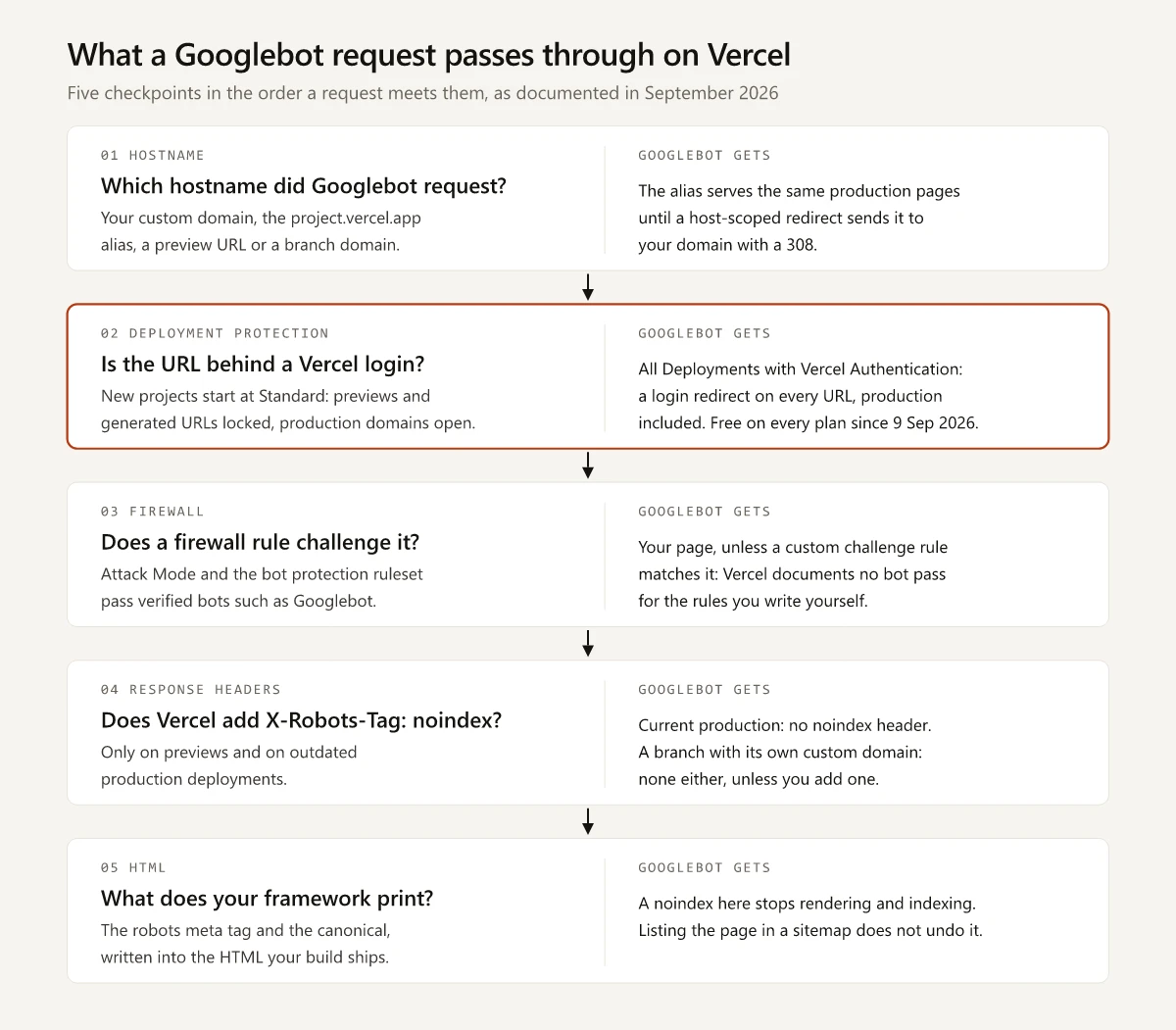
The middle two cards follow Vercel’s firewall concepts page, which puts Deployment Protection after the platform-wide firewall and before the WAF rules you configure.
Is Vercel Good for SEO?
For indexing, yes. A Vercel production domain returns your framework’s HTML with no noindex header, and Vercel’s documented bot defenses let Googlebot through, so the host does not hold a site back on its own.
What Vercel leaves to you is the table above plus rendering, which decides what that HTML contains; I covered what a crawler receives from a client-side React app separately.
In a Vercel and MERJ study of over 100,000 Googlebot fetches across nextjs.org and two supplemental sites in April 2024, published 31 July 2024, “Google renders all 200 status HTML pages, regardless of JS content”, while “Pages with other 3xx, 4xx, and 5xx errors were not rendered.” A login redirect is a 3xx response.
That is a vendor measuring mainly its own framework’s site, so treat it as evidence that Google renders a well-built Next.js site on Vercel; URL Inspection on your own pages is the proof for yours.
Preview Deployments Send Noindex, Except on a Branch Domain
Where the header appears, per the KB and Vercel’s response headers reference, which lists x-robots-tag as “Present only on” previews and outdated production deployments:
| Deployment | Sends x-robots-tag: noindex? | Vercel’s wording |
|---|---|---|
| Preview from a non-production branch | Yes | ”Every deployment from a non-production branch carries X-Robots-Tag: noindex by default.” |
| Previous production deployment | Yes, once a newer one is promoted | ”the previous production deployment starts returning noindex” |
| Current production, on its production domains | No | Not in the “Present only on” list |
| Preview branch with its own custom domain | No | ”If you want a custom-domain preview to stay out of search results, add the noindex header yourself.” |
The same reference says you can stop the header on a preview by “Assigning a production domain to it” or “Disabling it manually using vercel.json”.
Google handles the header and the meta tag the same way. Its noindex documentation says the two methods “have the same effect”, and once Googlebot “extracts the tag or header, Google will drop that page entirely from Google Search results, regardless of whether other sites link to it.” A preview link pasted into a pull request or a public thread does not make the preview indexable.
The branch-domain exception needs a manual fix. The KB recommends setting the header in the framework first, with a Next.js example that returns it only when VERCEL_ENV is preview. For a stack that cannot set response headers, it scopes a vercel.json rule to the host:
{
  "headers": [
    {
      "source": "/(.*)",
      "has": [{ "type": "host", "value": "staging.example.com" }],
      "headers": [{ "key": "X-Robots-Tag", "value": "noindex" }]
    }
  ]
}
To keep a whole project out of search, drop the has condition so the header applies on every host, or set Deployment Protection to All Deployments if nobody outside the team needs the site.
- The header does not make a preview private. The KB answers “Does noindex make a Preview Deployment private?” with “No.” and adds “Anyone with the URL can still open it.” Deployment Protection is the access control.
- A robots.txt block cancels it. Google warns that if a page is blocked by robots.txt, “the crawler will never see the noindex rule, and the page can still appear in search results”.
The Vercel Production Alias Is a Second Hostname
- Vercel’s redirects documentation, updated on 18 September 2026, names the duplicate: “If both your-project.vercel.app and your custom domain serve the same production pages, choose the custom domain as the preferred URL.” It adds that duplicate URLs “don’t automatically incur a search penalty, but they can split signals and make search engines choose a different canonical URL.”
- Vercel calls that host “the production vercel.app hostname”. As a production domain it stays public under Standard Protection, and the response headers reference gives it no
x-robots-tag. - The per-deployment URLs and the generated
<project>-<scope>.vercel.appURL are different hosts: Standard Protection locks them, as the protection section below covers.
The same page documents a fix for each goal, and Google’s canonicalization guide says how much weight each carries:
| Goal | What Vercel documents | How Google weighs it |
|---|---|---|
| Send people and crawlers to your domain | A permanent, hostname-scoped redirect that returns 308 | Redirects are “A strong signal that the target of the redirect should become canonical” |
| Keep both hostnames reachable | An absolute rel="canonical" pointing at the matching page on your domain | rel=“canonical” is “A strong signal that the specified URL should become canonical” |
| Keep the alias out of search | A host-scoped X-Robots-Tag: noindex | Vercel notes that “Google doesn’t recommend noindex to select a canonical URL” |
Vercel’s redirect for the alias, from the same page:
{
  "$schema": "https://openapi.vercel.sh/vercel.json",
  "redirects": [
    {
      "source": "/:path*",
      "has": [{ "type": "host", "value": "your-project\\.vercel\\.app" }],
      "destination": "https://www.example.com/:path*",
      "permanent": true
    }
  ]
}
Matching the exact hostname matters: Vercel says it “avoids redirecting the destination back to itself or redirecting every preview URL.” The no-redeploy route the page documents for the alias, a firewall rule, “creates a temporary 307 redirect”, so use the config file for a permanent move.
My vercel.json has no host rule. Every page built from the shared layout carries an absolute canonical to swapbiswas.com, written at build time, so if the production vercel.app alias serves a copy, that copy still names swapbiswas.com as canonical.
Search Console will not show the alias under your own property.
- A Domain property needs “DNS record verification”, per Google’s property setup help, and vercel.app is not your DNS to edit. The same page lists “Many possible methods” for a URL-prefix property, and one for
https://<project>.vercel.app/can be verified because the alias serves the HTML that would carry a verification tag. Once the 308 is in place, that property has nothing left to report. - Inspect one of your own URLs in URL Inspection and read “Google-selected canonical”. If it names the vercel.app URL, Google picked the alias.
- Run a
site:search on the alias host as a rough second check. Google’s site: operator page says an indexed URL can show up there, “however it’s not guaranteed”.
When vercel.app Is Your Only Domain
- The production vercel.app hostname sends no noindex header and stays public under Standard Protection, so Google can index it like a custom domain.
- Add a URL-prefix property for it and verify with the HTML tag method, which Google’s verification help says needs “the ability to edit the HTML source code of your site’s homepage”. Submit your sitemap in that property.
- Request indexing in URL Inspection is capped. Google’s help says “There is a daily limit to how many index requests you can submit” and points to a sitemap “If you want many pages indexed”, so the sitemap does the bulk of the work.
Deployment Protection Can Put a Login in Front of Googlebot
A team default of All Deployments is the setting to watch at launch: a project created under it sits behind a login until someone changes the scope, and the owner is the person least likely to notice.
The protection scopes in Vercel’s Deployment Protection docs, last updated 15 September 2026:
| Scope | What it protects | How a project gets it |
|---|---|---|
| Standard Protection | ”all deployments except production domains” | New projects start here |
| All Deployments | ”all URLs, including production domains” | Chosen per project, or set as the team default |
| None | Nothing | Chosen per project, or set as the team default |
The same page says that when you enable Standard Protection, “the production generated deployment URL becomes restricted”, so of the vercel.app hosts, only the production hostname stays open.
The 2026 changelog entries behind those defaults:
- 13 January 2026: Vercel added team-wide defaults, a choice of “All Deployments, Standard Protection, or None” for new projects, with Standard as the starting point.
- 9 September 2026: Vercel made production protection free: “Vercel Authentication can now protect all deployments in a project, including production, at no additional cost on every plan.” It previously needed the $150-per-month Advanced Deployment Protection add-on. The entry pitches it for “sites that aren’t yet ready to launch” and lets a team make it the default, so that “every new project starts with Vercel Authentication enabled for all deployments.”
- The same entry made Deployment Protection Exceptions free on every plan. An exception is how you “make a specific preview domain public”, so a branch domain opened this way needs the manual noindex from the previews section.
An owner misses a login wall like this because Vercel Authentication sends visitors to “a Vercel login redirect”, and “If already logged into Vercel, Vercel will authenticate them automatically.” Your browser loads the site. Googlebot has no Vercel account, so it gets the redirect.
- Google lists a login as one way to keep a page out of search. Its Page indexing help says you can “require some kind of login for the page” or “use a noindex directive”.
- The same help page names “a required login” among the causes when indexed pages drop “without a corresponding increase in errors”.
- The check takes seconds: open a production URL in a private window, or
curl -sIit, and expect a 200. - Standard Protection on previews costs nothing in search, since previews carry noindex anyway.
Framework Noindex: Vercel Does Not Add It, Your Layout Might
A May 2025 thread on the Vercel Community forum, “Issue with website indexing on Google”, shows the symptom. A Vercel staff reply found that “most of the pages (40) have noindex set to them”, the site owner answered that the pages were in the sitemap, and the next reply stated the rule: “even if these are part of the sitemap, if the page/request returns a noindex response then Google will ignore the page from indexing.” No later post says where the noindex came from, and that is the question the rest of this section answers.
Vercel’s documented indexing default is a response header, so a noindex inside the HTML comes from your own code or from a framework or CMS default. Where to look:
- Layout inheritance: the Next.js metadata docs say metadata from nested segments is “shallowly merged”, and a field set in a layout carries through to pages that do not set it, so a
robotsvalue in the root layout reaches every route that does not override it. - Environment checks: Vercel’s own fix for branch domains puts noindex behind a
VERCEL_ENVtest, and a wrong condition there ships noindex to production. - Client-side fixes: removing the tag with JavaScript after load does not help. The same Vercel and MERJ study found that “Pages with noindex meta tags in the initial HTML response were not rendered, regardless of JS content”, and that “Client-side removal of noindex tags is not effective for SEO purposes”.
On this site, the blog category archives take their noindex from a noindex prop on the shared layout, so it arrives as a meta tag and the response carries no x-robots-tag header. A header-only check would call those archives indexable. Run both commands:
curl -sI https://example.com/page/ | grep -i x-robots-tag
curl -s https://example.com/page/ | grep -io '<meta[^>]*robots[^>]*>'
In the Page indexing report the result shows as “URL marked ‘noindex’”, and Google’s help tells you to search “the page source or response headers” for the word noindex.
Redirects, Firewall Rules and Log Retention
Automatic 308 Redirects
- On 30 September 2026,
https://swapbiswas.com/blogreturned308 Permanent RedirectwithLocation: /blog/, the work of thetrailingSlash: trueline. Vercel’s vercel.json reference says a path without the slash “will respond with a 308 status code and redirect to the path with a trailing slash”. - The rest of this site’s redirects, and how Google reads a 308, are in my curl-based 301 redirect SEO teardown.
- The source URLs land in the Page indexing report as “Page with redirect”, which Google describes as “a non-canonical URL that redirects to another page. As such, this URL will not be indexed.” Expect those rows; linking the slashed form everywhere keeps them from growing.
Attack Mode, Bot Protection and Custom Rules
Vercel’s opt-in challenge features, Attack Mode and the bot protection ruleset, both let Googlebot through:
- Attack Mode: “Search engine crawlers like Googlebot are automatically allowed through Attack Mode without being challenged.”
- The bot protection managed ruleset, per Vercel’s bot management docs: “It automatically excludes verified bots, such as Google’s crawler, from evaluation.” The ruleset “is inactive by default”, and Vercel verifies bots by IP ranges, reverse DNS and cryptographic signatures.
Custom WAF rules carry no such pass in the documentation:
- The firewall concepts page describes the challenge action this way: “Only human visitors using a web browser can pass the challenge and access protected resources, while non-browser clients (bots, scripts, etc.) cannot.”
- The custom rules page mentions no exemption for verified bots, so treat a site-wide challenge rule as one Googlebot will hit.
- Scope challenge rules to paths crawlers never need, such as login and API routes. After adding one, run the URL Inspection live test on a URL it covers and read “Page fetch”.
Runtime Logs Keep One Hour on Hobby
Vercel keeps runtime logs for an hour on Hobby, so the lasting record that Googlebot came is the URL Inspection “Last crawl” field; the plan-by-plan retention and the Crawl Stats fallback are in SEO log file analysis without a log file.
How This Site Is Set Up on Vercel
This site is Astro 5 static output, deployed on Vercel from the main branch, so every push to main is a production deploy. Its vercel.json sets two keys: the schema URL and trailingSlash: true. Live results from curl on 30 September 2026:
| Request | Response | What it shows |
|---|---|---|
https://swapbiswas.com/blog/ | 200, Server: Vercel, no x-robots-tag | Production sends no noindex header |
https://swapbiswas.com/robots.txt | 200, Allow: / and the sitemap index | Nothing is blocked, so Google can read every noindex |
Production deploys also announce changed URLs to IndexNow, gated on the same VERCEL_ENV variable Vercel’s KB uses for its preview example; whether Google supports IndexNow is its own question.
The full record of building the site, from first commit to indexed pages, is in how I built a personal website with Claude Code.
The Vercel Google Indexing Check I Run First
Rendering is the last layer I check for Vercel Google indexing. The platform comes first: each check in the list at the top takes seconds, and a failure at any one of them keeps a page out of the index however well it renders. Start with the curl command on your homepage.
Frequently Asked Questions
Is Vercel good for SEO?
For indexing, yes. A Vercel production domain serves your framework's HTML with no noindex header, and Vercel's Attack Mode and bot protection ruleset let Googlebot through. What still needs checking is your rendering, your production vercel.app alias and your Deployment Protection scope.
Are Vercel preview deployments indexed by Google?
Not by default. Vercel adds an X-Robots-Tag: noindex header to every preview deployment and to outdated production deployments, and Standard Protection, the default for new projects, also protects previews. A non-production branch with its own custom domain gets no noindex header unless you add one, so it needs one the moment it is made public.
How do I stop my vercel.app URL from being indexed?
Preview vercel.app URLs already send noindex. For the production vercel.app alias, Vercel documents a permanent, host-scoped redirect in vercel.json that returns a 308 to your custom domain, or an absolute canonical tag on every page.
Does Vercel Deployment Protection block Googlebot?
On the URLs it covers, yes. Standard Protection, the starting setting for new projects, leaves production domains public, while All Deployments with Vercel Authentication sends every visitor without Vercel access, Googlebot included, to a Vercel login redirect. Since 9 September 2026 that setting is free on every plan and can be the team default, so a new project can start behind a login.
Why is my Vercel site not indexed by Google?
Check the response before the rendering. Run curl -sI on a production URL and expect a 200 with no x-robots-tag line, search the page source for a robots meta tag, then use URL Inspection in Search Console to see whether indexing is allowed and which canonical Google selected.