Build a Personal Website With Claude Code, SEO Included
Build a personal website with Claude Code in 7 steps, from the brief to a Vercel deploy, plus the search layer my own site added after launch, dated by commit.
12 March 2026: first commit, “Portfolio site - swapbiswas.com (Astro 5)”. 30 September 2026, before today’s posts went live: 85 commits, 170 published blog posts and 9 free tools, with every push to main deployed to production on Vercel. Those two dates bracket the git history of how I build a personal website with Claude Code and keep it growing, and 6 of the 9 search pieces in the table below arrived after that first commit, the last on 16 September.
I am a product marketer, not a developer, and my view after six months is that getting a site live is the smaller half of the job. The half that decides whether anyone finds it is the search layer added after launch: per-post sitemap dates, one URL per page, a sitemap that leaves out noindexed pages and an audit you re-run. Claude Code can build that layer through the same brief, plan and review loop as the pages.
How to Build a Personal Website With Claude Code in 7 Steps
- Write the brief: the audience, the pages, and the one action each page should prompt.
- Pick a static framework: one that outputs HTML at build time, such as Astro.
- Ask for a plan first: give Claude Code the brief in plan mode, then approve the file list.
- Preview and check: review pages in
npm run dev, and have Claude Code runnpm run buildafter each change. - Commit and deploy: push to GitHub and import the repo into Vercel, so every push to
maindeploys. - Connect the domain: add it in Vercel and create the DNS record at your registrar.
- Get indexed: verify the domain in Search Console, submit the sitemap and request indexing for the homepage.
| Step | What Claude Code does | What you decide |
|---|---|---|
| 1. Brief | Interviews you and writes a spec file, if you ask it to | Audience, pages, what each page is for |
| 2. Framework | Runs the installer and sets up the project | Static HTML output, so every page reaches Google finished |
| 3. Plan and first build | Proposes the files, then writes them across the project | Whether the plan matches the brief |
| 4. Preview loop | Edits, runs the build, reads the errors and fixes them | What looks and reads right in the browser |
| 5. Git and deploy | Stages changes, writes the commit message, pushes when told | When a change goes live |
| 6. Domain | Explains the DNS record Vercel asks for | Which domain, and apex or www |
| 7. Indexing | Writes the sitemap config, redirect settings and build hooks | Search Console verification and what to submit |
The Search Layer, Dated by the Commit History
Counted with git log on 30 September 2026, before that day’s posts went live, the 85 commits split by month as 7 in March, 13 in April, 2 in May, 16 in June, 7 in July, 10 in August and 30 in September.
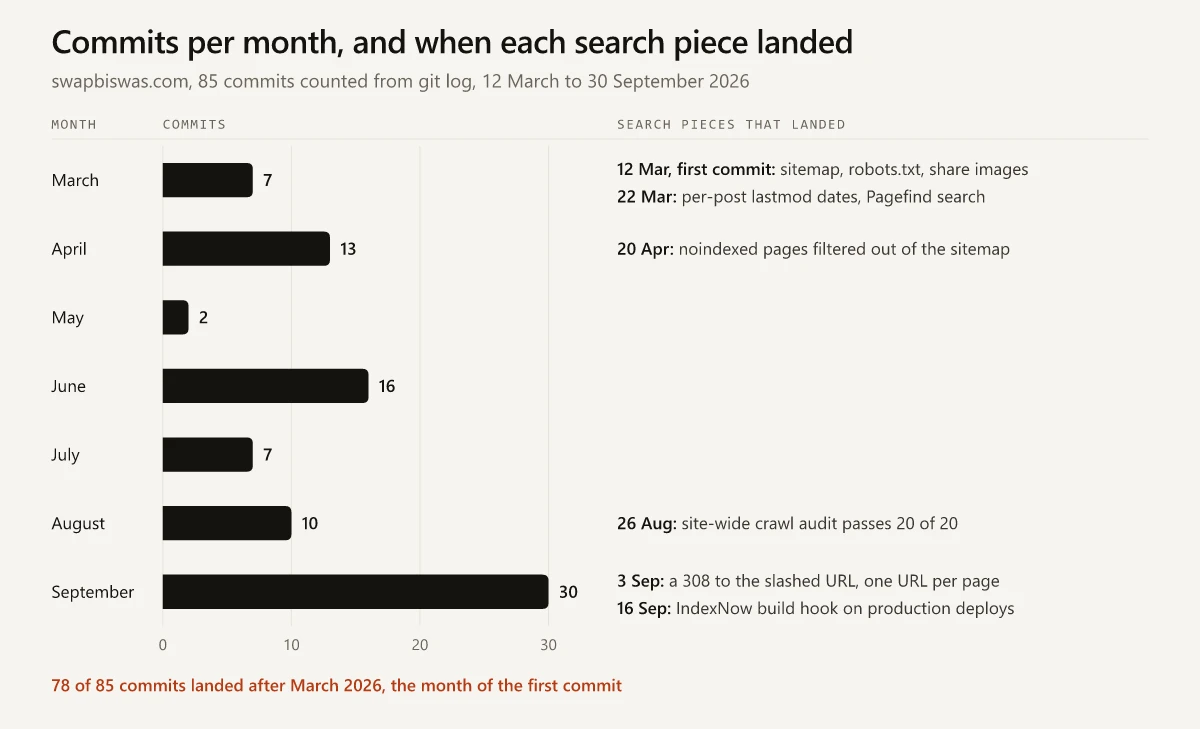
Each piece of the search layer has a landing date, and most of them live in a file you can point Claude Code at. The example brief in Step 1 asks for most of them up front:
| Piece | Where it lives | Landed | Search job |
|---|---|---|---|
| Static HTML for every page | Astro 5 default output, built into dist/ | In the first commit, 12 Mar 2026 | Crawlers get finished HTML in the first response |
| Sitemap and robots.txt | @astrojs/sitemap in astro.config.mjs; a Sitemap: line in public/robots.txt | In the first commit, 12 Mar 2026 | Lists every indexable URL in one file |
| Build-time share images | A build-time OG route, first with Satori and resvg (PNG), now src/pages/og/[...slug].webp.ts with sharp added on 16 Mar 2026 | In the first commit, 12 Mar 2026 | A card per post, so a link shared on LinkedIn or X carries an image |
| Per-post lastmod | A sitemap-lastmod build hook that copies each post’s updatedDate or publishDate into the sitemap | 22 Mar 2026 | Dates each post URL on its own |
| Pagefind search | npx pagefind --site dist, run after astro build | 22 Mar 2026 | Site search from static files, with no search server |
| Sitemap filter | A filter in the sitemap config | 20 Apr 2026 | Keeps noindexed category pages out of the sitemap |
| Crawl audit | A 20-check verifier script, not kept in the repo | 26 Aug 2026 | Checks every page in one run, where a browser check covers one page; 20 of 20 passed after fixes (running an SEO audit with Claude Code) |
| One URL per page | trailingSlash: true in vercel.json, trailingSlash: 'always' in astro.config.mjs | 3 Sep 2026 | Slashless URLs get a 308 to the slashed form (the 308 Vercel sends instead of a 301) |
| IndexNow hook | An indexnow-submit build hook that runs on production deploys only | 16 Sep 2026 | Announces new and edited URLs to Bing and the other IndexNow engines |
The per-post lastmod row is the one I would copy first. Astro’s sitemap integration sets lastmod only site-wide through its own option, because it “can’t analyze a given page’s source code”, and it points to its serialize option for per-page values (Astro sitemap integration docs). This site takes a third route: a build hook that writes each post’s frontmatter date into sitemap-0.xml once the build has finished. A prompt that asks Claude Code for the same hook:
Add an integration after @astrojs/sitemap in astro.config.mjs with an
astro:build:done hook. It reads updatedDate or publishDate from every post
in src/content/blog and writes a <lastmod> into the matching <loc> in
dist/sitemap-0.xml. Then run npm run build and show me three <url> entries.
Two rows began as fixes. The April commit that added the sitemap filter is titled “fixed noindex”, and the 3 September commit message records that every route had answered HTTP 200 both with and without the trailing slash until the 308 went in. Neither problem shows up when you click through the site in a browser. The duplicate URLs show up when you request the raw address: curl -sI against /blog/some-post should return a 308, and against /blog/some-post/ a 200.
Step 1: Write the Brief Before Claude Code Writes a File
My LinkedIn headline includes the line “I write the brief, then I build it”, and the order holds in Claude Code: it builds what the brief says, so a vague brief returns a plausible site for nobody in particular. Each part of the table answers a question Claude Code would otherwise guess at.
| Part of the brief | What to write |
|---|---|
| Audience | Who arrives, and from where |
| Pages and jobs | Every page, with the one action it should prompt |
| Stack | The output format, stated as a constraint |
| Search basics | The tags every page needs, the files the site needs once and the search layer from the table above |
| Look | Two or three reference sites or screenshots instead of adjectives |
| Out of scope | What not to build yet |
For the look row, the homepage concepts in my personal website examples gallery are each a complete build with a live preview, which gives Claude Code a layout to match instead of a mood to interpret.
If the brief is thin, let Claude fill the gaps by asking. Anthropic’s Claude Code best-practices guide says “For larger features, have Claude interview you first”, and its sample prompt tells Claude to keep going “until we’ve covered everything, then write a complete spec to SPEC.md”. The guide then says to “start a fresh session to execute it”, so the build begins with clean context and a written spec.
Here is an example brief for a marketer’s site, written for this post rather than copied from this site’s history:
Build a personal website for a B2B product marketer.
Audience: hiring managers and founders who find me on LinkedIn.
Pages: home, about, three case studies, blog, contact.
Home has one job: get a visitor into a case study.
Stack: Astro with static output. No client-side framework unless a page needs one.
Every page: unique title and meta description, one H1, canonical tag, alt text.
Site-wide: sitemap, robots.txt with a Sitemap line, a 404 page.
Sitemap: a lastmod on every post URL, taken from its updatedDate or
  publishDate; leave out noindexed pages.
URLs: one form per page, with a trailing slash; the slashless form and
  the other hostname redirect to it.
Share images: one generated per post at build time.
On production deploys only: announce new and edited URLs to IndexNow.
Look: match the layout of the two screenshots in refs/ (homepage
  concepts I picked); one accent color.
Out of scope for now: comments, logins, a CMS.
Step 2: Pick a Framework That Ships Static HTML
Decide the output before the framework. A personal site is pages and posts, and both should reach Google as finished HTML in the first response. A client-rendered React app sends a near-empty shell first, and I covered what that does to a vibe-coded site in search separately. Claude Code will build whichever stack the brief names, so name one.
Astro is the static-first option I know from running it:
- Astro’s docs state that “By default, Astro pages, routes, and API endpoints will be pre-rendered at build time as static pages” (Astro on-demand rendering docs).
- A new project starts with
npm create astro@latest, and Astro requires Node.js v22.12.0 or higher (Astro install guide).
This site runs Astro 5 (astro ^5.17.1 in package.json) with no server adapter, so every page is static HTML. The first version came out of a WordPress move I did in Claude Code from a portfolio template, written up in my WordPress to Astro migration write-up with a Netlify deploy; the site now deploys on Vercel.
Step 3: Ask Claude Code for a Plan, Then the First Build
I run Claude Code as the VS Code extension on Windows 11, with Git Bash and PowerShell available as shells. If you are choosing where to run it, the VS Code extension and the terminal CLI compared covers when each fits.
Start the first session in plan mode. The same Anthropic guide warns that “Letting Claude jump straight to coding can produce code that solves the wrong problem.”
- Terminal: press
Shift+Tabuntil the status bar shows plan mode on, and Claude “reads files and answers questions without making changes” until you approve a plan. - VS Code extension: click the mode indicator at the bottom of the prompt box and pick Plan, or type
/planin the prompt box on v2.1.280 or later (Claude Code in VS Code docs).
A first prompt that works from the spec:
Read SPEC.md and plan a static Astro site for it: the folder structure,
a shared layout, every page in the spec, and the search basics each page
needs. List every file you will create and every package you will install.
Read the file list against the brief before you approve it, then let Claude Code build. For later edits, the guide gives a rule of thumb for skipping plan mode: “If you could describe the diff in one sentence, skip the plan.”
Before the second session, give the project a memory. The guide recommends running /init to generate a starter CLAUDE.md from the project structure; run it if you want rules you write and edit yourself. This site has no CLAUDE.md at all, and its house rules live in auto memory. My breakdown of Claude Code memory covers the signs that a project needs a CLAUDE.md as well.
Step 4: Run the Preview Loop With a Check Claude Can Read
Anthropic’s guide puts the rule in one line: “Give Claude a check it can run: tests, a build, a screenshot to compare.” Without one, it says, “you become the verification loop”. On a static site the production build is that check, since it either passes or stops with an error Claude can read and fix.
| Command | What you get | Use it for |
|---|---|---|
npm run dev | A live preview at http://localhost:4321/ that updates as files in src/ change | Layout, copy and design passes |
npm run build | A pass or a fail, and the finished site in dist/ | Claude Code’s check after every change |
npm run preview | The built site, served locally | A last look before you push |
The commands and the port come from Astro’s develop-and-build guide, which adds that a preview does not reflect later code changes “until you run the build command again”.
Search is a feature the dev server cannot show on this site. The build script is astro build && npx pagefind --site dist, and Pagefind indexes the built files: its docs say it “runs after your static generator”, and that a dev server shows nothing yet “as Pagefind needs to index the output of your build” (Pagefind docs). Check search in npm run preview.
When an edit goes wrong, rewind it. Every prompt that starts a turn creates a checkpoint, and pressing Esc twice with an empty prompt, or running /rewind, opens a menu that restores the code, the conversation or both (Claude Code checkpointing docs). Checkpoints miss files changed by Bash commands, and the docs describe them as “quick, session-level recovery”, so commit working states to git as you go.
Step 5: Commit, Push and Let Vercel Deploy Main
Git turns every working state into one you can return to, and Claude Code runs the commands. The Claude Code quickstart uses “commit my changes with a descriptive message” as its example of a plain-English git prompt. Push the repository to GitHub, then import it into Vercel.
What happens next, per the vendors’ own docs:
- Astro’s Vercel guide says “Vercel will automatically detect Astro and configure the right settings”, and that changes to the production branch, commonly
main, “will result in a Production Deployment” while pushes to other branches create preview deployments (Astro on Vercel). - Vercel picks
mainas the production branch when it exists, andmasterif it does not (Vercel Git docs).
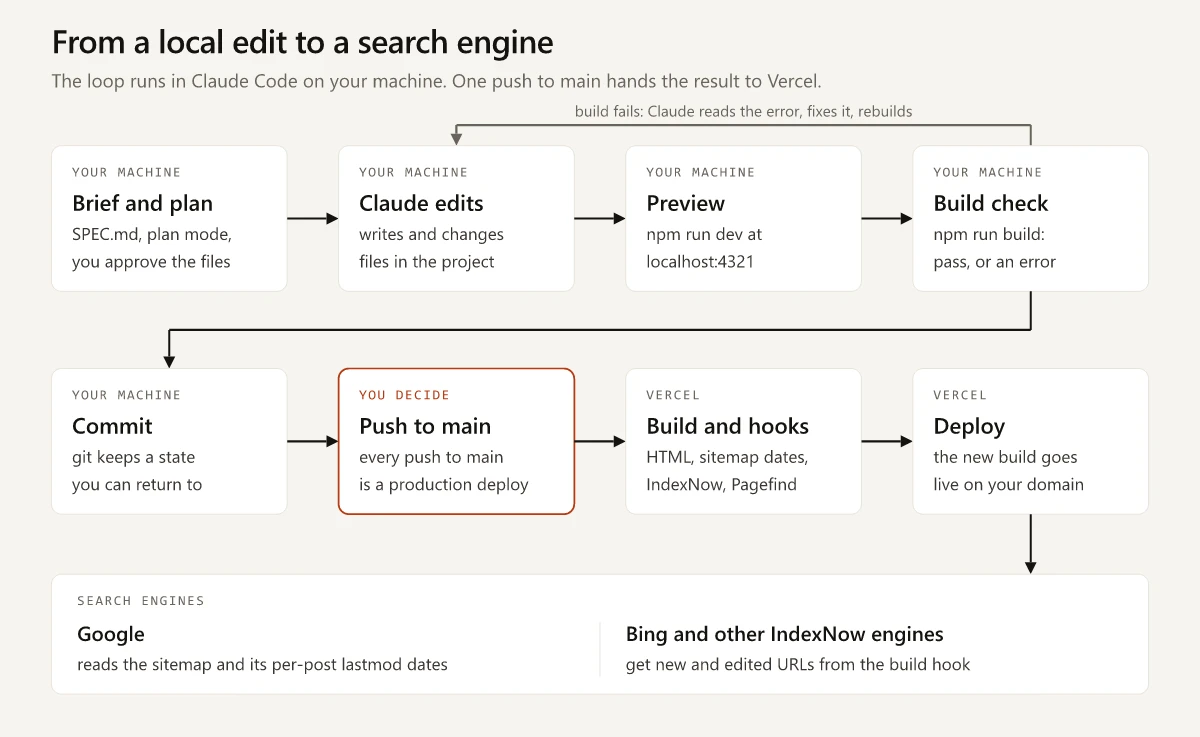
On this site the production branch is main, so every push to it is a production deploy, and the auto memory carries a rule that Claude Code never pushes to main without asking. Commits stay on my machine until then, and the push is the release. The Vercel settings that decide what Google can index, starting with preview deployments, are in my guide to Vercel and Google indexing.
Check that git tracks every config file Claude Code creates. This repo’s .gitignore ignores *.json apart from a short allowlist, so the commit that added vercel.json on 3 September 2026 also had to add a !vercel.json exception, or the file would have stayed local and never reached Vercel. git check-ignore -v vercel.json prints the ignore rule that matches a path (git-check-ignore docs).
Step 6: Connect Your Domain
Buy the domain from any registrar, or through Vercel, then add it to the project. Vercel puts the setting under Settings, then Domains, in the project sidebar, behind an Add Domain button, and its docs pair an apex domain with an A record and a subdomain with a CNAME record (Vercel custom domain docs). Pick one hostname as the real address and redirect the other to it; afterwards, curl -sI against the hostname you did not pick should return one permanent redirect to the one you did.
Step 7: Get the New Site Indexed
Google’s own guidance covers each job in the order you do it:
| Job | Where | Google’s guidance |
|---|---|---|
| Verify the domain | Search Console, as a Domain property, with a TXT record at your DNS provider | A manually added record “can take up to two or three days” to be served, and it has to stay in place after verification (Search Console verification help) |
| Submit the sitemap | Search Console’s Sitemaps report; Astro’s sitemap integration writes /sitemap-index.xml | Google “uses the <lastmod> value if it’s consistently and verifiably … accurate” and “ignores <priority> and <changefreq> values” (Google sitemap docs) |
| Request indexing for the homepage | URL Inspection tool | There is a quota, and “requesting a recrawl multiple times for the same URL won’t get it crawled any faster” (Google recrawl docs) |
| Wait, then check | Page indexing report | ”Crawling can take anywhere from a few days to a few weeks,” per the same recrawl page |
Bing and the other IndexNow engines can also be told about new and edited URLs on every deploy, a protocol Google does not take part in (whether Google supports IndexNow), so the sitemap stays Google’s signal.
Can Claude Code Build a Website on Its Own?
Yes: you can build a website with Claude Code end to end. It writes, builds and commits the whole site, and the accounts stay yours. The Claude Code overview says “Describe what you want in plain language. Claude Code plans the approach, writes the code across multiple files, and verifies it works.” The Vercel project, the registrar, the DNS records and the Search Console property all sit behind logins you hold, and those are the steps where your review matters most.
Anthropic’s quickstart lists what it needs: a Claude subscription (Pro, Max, Team or Enterprise), a Claude Console account, or access through a supported cloud provider. As of September 2026, Anthropic’s pricing page lists Pro at $20 a month, or $17 a month billed annually. Hosting can cost nothing, since Vercel’s Hobby plan is free and, per its own docs, restricted to “non-commercial, personal use only” (Vercel Hobby plan).
For a single page there is another route. Anthropic’s Claude Academy builds a portfolio page as an HTML artifact in the Claude app and deploys it through a Netlify connector (Create a custom webpage). A site you will keep adding posts, tools and fixes to belongs in a folder under git, and my Claude vs Claude Code comparison makes that case in full, plan prices included.
Build a Personal Website With Claude Code for the Months After Launch
The first commit on this site already carried a sitemap, a robots.txt with a Sitemap line and build-time share images; the rest of the search layer arrived between 22 March and 16 September. If you build a personal website with Claude Code this month, write the whole search layer into the brief so it ships with the pages instead of trailing them by months. One item needs no code and can start before the site exists: the Search Console TXT record, which the Step 7 table shows can take days to be served. Add it today.
Frequently Asked Questions
Can Claude Code build a website?
Yes. Claude Code writes the site as files in a project folder, runs the build and commits the changes to git. You write the brief and review each change, and the host, registrar and Search Console accounts stay in your name.
How much does it cost to build a website with Claude Code?
Claude Code needs a Claude subscription (Pro, Max, Team or Enterprise), a Claude Console account with pre-paid API credits, or access through a supported cloud provider. As of September 2026, Anthropic's pricing page lists Pro at $20 a month, or $17 a month billed annually. Vercel's Hobby plan hosts a site for free but is restricted to non-commercial, personal use, and the domain is a separate cost at your registrar.
Which framework should I use to build a portfolio website with Claude Code?
Pick one that outputs static HTML at build time, so every page reaches Google as finished HTML. Astro pre-renders pages at build time by default, and its docs say a static Astro site needs no extra configuration to deploy on Vercel.
How long does it take Google to index a new website?
Google's recrawl documentation says crawling can take anywhere from a few days to a few weeks. Verify the domain in Search Console, submit the sitemap and request indexing for the homepage once, because Google says repeat requests for the same URL do not get it crawled any faster.