Why Your Vibe-Coded Website May Never Rank on Google (2026)
Your vibe-coded website looks finished in the browser but renders blank to Googlebot. Here is why it never ranks on Google, and how to fix it quickly.
A founder showed me a website last month that looked genuinely impressive. Clean animations, sharp copy, a pricing table that slid in on scroll. He built the whole thing in an afternoon by describing it to an AI tool, and could not understand why, three months later, it had zero presence on Google. Not low rankings. Zero. It did not even appear for its own brand name.
Here is the uncomfortable truth about a lot of these projects: a vibe-coded website can look completely finished to you and be completely invisible to a search engine at the same time. The page works. The crawl does not. Those are two different things, and AI builders almost never warn you about the gap.
I run my own site on Astro for exactly this reason. Let me walk through what is happening under the hood, how to check your own site in two minutes, and how to fix it without throwing your work away.
What “Vibe Coding” Actually Produces
Vibe coding is building software by describing what you want in plain language and letting an AI tool write the code. You say “make me a landing page for a dog-walking app with a dark theme,” and tools like Lovable, Bolt, v0, Cursor, or Replit hand you a working app in seconds. It feels like magic because it mostly works, with no need to understand the code underneath.
The catch lives in a default almost nobody chooses on purpose. These tools overwhelmingly generate a React single-page application, because React dominates their training data and starter templates. It is the most-used front-end library in the world - 39.5% of developers reported using it in the 2024 Stack Overflow Developer Survey. So when you ask for “a website,” what you get is a React app that renders everything in the browser, and that one decision is the root of the ranking problem.
Why AI Tools Default to Client-Side React
React, in its plain form, is a client-side rendering library. The server sends a near-empty HTML file with a single empty container, usually something like <div id="root"></div>, plus a large JavaScript bundle. The browser downloads that bundle, runs it, and only then builds the page you see.
For a human this is fine, because your browser executes JavaScript instantly and the page appears complete. For a crawler it is a problem, because the first thing it receives is that empty shell. AI builders default to this because it is the simplest setup that looks correct on your screen, optimizing for “looks done in the preview” rather than “ranks in search.”
CSR vs SSR vs SSG: What the Crawler Actually Receives
The whole issue comes down to one question. When a search engine requests your page, what shows up in that first response, before any JavaScript runs? There are three common approaches.
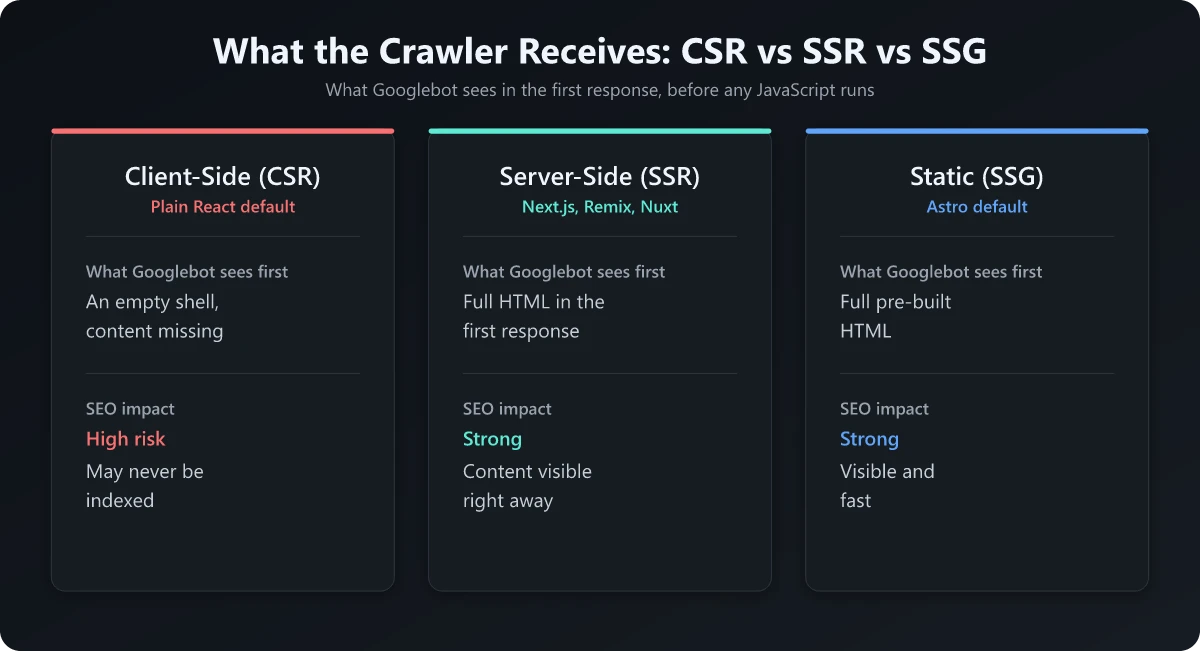
Client-side rendering (CSR) sends an empty HTML shell and a JavaScript bundle, and the content is assembled in the browser after the script runs. This is the default for plain React and for most vibe-coded sites.
Server-side rendering (SSR) runs the JavaScript on the server for each request and sends back fully formed HTML, so the content is already there in the first response. Next.js, Remix, Nuxt, and SvelteKit can all do this.
Static site generation (SSG) builds every page into plain HTML ahead of time, at deploy. There is no per-request work and no waiting on JavaScript. This is Astro’s default, and what my own site uses.
| Approach | What the browser sees | What Googlebot sees first | SEO impact |
|---|---|---|---|
| Client-side rendering (CSR) | Full page after JS runs | An empty shell, content missing | High risk: content may never be indexed |
| Server-side rendering (SSR) | Full page immediately | Full HTML in the first response | Strong: content visible right away |
| Static site generation (SSG) | Full page immediately | Full pre-built HTML | Strong: content visible and fast |
The pattern is clear. SSR and SSG put your content in the initial HTML, while CSR hides it behind a script the crawler has to run later, if it runs it at all.
What Googlebot Sees vs What You See
This trips up almost everyone, because it is invisible during normal use. When you visit your own site, your browser does all the work: it fetches the shell, runs the JavaScript, and paints the finished page.
Googlebot does not work in one pass like that. It fetches the raw HTML first, and for a client-side React app that raw HTML is the empty shell, with nothing to index except a script tag and an empty container.
The Two-Wave Problem
Google handles JavaScript rendering in two stages, often described as two-wave indexing.
In the first wave, Googlebot crawls and indexes whatever is in the raw HTML. For a server-rendered or static page, that is your full content. For a client-side app, that is the empty shell, so there is essentially nothing to index.
In the second wave, Google queues the page for rendering, runs the JavaScript, and sees the real content. The catch is that this wave is deferred and not guaranteed. Google often renders within seconds, but rendering is queued work, and for a new low-authority site it can be deprioritized long enough that your content does not reliably reach the index.
So your brand new vibe-coded website sits in a queue. Google has seen a blank page and has little reason to prioritize rendering it, so the content you are proud of never enters the index. This is the core of any honest JavaScript SEO conversation: the gap between what is crawled and what is rendered is where rankings quietly die.
Why “It Looks Done So It Feels Done” Is the Trap
This catches smart people off guard for psychological reasons, not technical ones. The site works. You can click through it, fill out the form, watch the animations, and every signal your eyes get says “shipped.” But “works in a browser” and “visible to a crawler” are separate properties, and a site can be flawless for humans and a blank page for search engines on the same day. That feeling of doneness is the trap, because it stops you from checking the one thing that decides whether anyone will ever find the site through search.
How to Check Your Site in Two Minutes
You do not need to guess. There are a few fast ways to see exactly what a crawler gets, and you should run them before you celebrate a launch. The most reliable uses Google Search Console.
- Paste a page URL into the URL Inspection bar in Google Search Console.
- Click Test Live URL to fetch the page as Googlebot would.
- Click View Tested Page, then open the HTML tab to read the rendered HTML and check the screenshot tab.
- If your main content, headings, and body text are not present in that rendered HTML, Google is not reliably seeing them.
A few faster, rougher checks you can run in seconds:
- Site search. Search
site:yourdomain.comon Google. If few or none of your pages appear, your content is likely not being indexed. - Unique sentence search. Copy a distinctive sentence from your page and search it in quotes. If Google cannot find your own exact text, it has not indexed that content.
- Disable JavaScript. Turn off JavaScript in your browser and reload. What remains is close to what a crawler gets on the first pass. If the page goes blank, that is your answer.
Server logs answer the other half of the question, which is whether Googlebot ever came back to render the page. On the hosts these projects deploy to, that file may not exist at all: Netlify keeps Log Drains on its Enterprise plan and Vercel holds runtime logs for about an hour on Hobby, so log file analysis without raw server access covers what to use instead.
These checks are the difference between assuming you rank and knowing you do. To run them across a whole site, my technical SEO site audit walks through the process, and the shorter SEO audit checklist is a good companion.
Is React Good for SEO?
This is the question I get most, and most React SEO advice buries the honest answer: React is not the villain here. Used correctly, it is perfectly capable of ranking. The frameworks built on top of it, like Next.js and Remix, exist partly to solve this exact problem by rendering HTML on the server or generating it statically, and plenty of large, well-ranked sites run on React.
The villain is client-side rendering with no fallback HTML. When the answer to “is React good for SEO” turns negative, it is almost always because the app ships an empty shell and leaves the content to the browser. The problem is not React, it is React that only renders in the browser. Fix where the rendering happens and React becomes a non-issue for search.
The JavaScript SEO Fix
Here is the good news: you almost never have to start over. The goal of any JavaScript SEO fix is simple: make sure your real content is present in the HTML of that first response, before any JavaScript runs. There are a few ways to get there, in rough order of how I would reach for them.
Option 1: Use a Framework That Renders HTML by Default
If rebuilding is still cheap, pick a framework that ships HTML out of the box.
- Next.js gives you SSR and SSG, and is the most common React choice for this.
- Astro is static-first and HTML-first, sending almost no JavaScript unless you ask for it. This is what I run.
- Remix server-renders by default.
- SvelteKit and Nuxt are the equivalent picks if you prefer Svelte or Vue.
I moved my own site off WordPress and onto Astro specifically because it generates real HTML at build time, and I wrote up the whole WordPress to Astro migration if you want the practical side. The point is not Astro specifically, it is choosing a stack where “search engines see my content” is the default, not an afterthought. If you build with Claude Code, write that stack choice into a project CLAUDE.md file, which loads in full at the start of every session.
Option 2: Add SSR, SSG, or Prerendering to the App You Have
If you like the site you built, you usually do not need to scrap it. Most modern setups let you add server-side rendering, static generation, or prerendering to the existing app.
And here is the part that fits the vibe-coding workflow perfectly: you can ask the AI tool that built the site to do this. A prompt as direct as “convert this app to use server-side rendering so the content is in the initial HTML” is often enough. You built it by describing what you wanted, and you can fix it the same way. If that tool is Claude Code, /plan and /diff are two of the Claude Code commands worth learning first for this job: the first has Claude present a plan before it edits anything, and the second shows the changes in your working tree, Claude’s edits included, before you ship.
Option 3: Prerender Static Snapshots for the Crawler
If neither of the above fits, prerendering generates static HTML snapshots of your pages and serves those to crawlers. It is the most patchwork option, but it does get real content into that first response when nothing else is practical.
Whichever route you take, the test is the same as before. Run URL Inspection again, view the rendered HTML, and confirm your content is there now.
Where This Fits in a Real SEO Strategy
Solving the rendering problem is the price of entry, not the finish line. It gets your content into the index so everything else can matter: useful content, structure, and authority over time. The same holds as AI search reshapes results, which I cover in AI and the future of SEO and the more tactical AI SEO strategy piece. Even angles like a structured llms.txt file assume one thing first: that your content is visible to crawlers at all.
The Honest Takeaway
A vibe-coded website is one of the most empowering things to come out of AI tooling. You can ship a real, working site in an afternoon with no engineering team, which is genuinely great.
But “works in my browser” is not the same as “found on Google,” and these tools rarely close that gap for you. Most default to client-side React, which hands Googlebot an empty shell and trusts a deferred second wave of rendering that may never arrive. Looking done and being indexable are separate facts, and only one of them shows up in your browser preview.
The fix is rarely a rebuild. Run the Search Console check, see what the crawler really gets, and if your content is missing, move to a stack that renders HTML by default or add server rendering to the app you have. You can even ask the same AI that built it to make the change.
So before you call any AI-built site finished, confirm one thing: that the version Googlebot sees is the same version you see. From there, my guides on how to check your SEO ranking and what an SEO report should tell you are the natural next steps.
Frequently Asked Questions
Do vibe-coded websites rank on Google?
They can, but most do not by default. AI coding tools usually ship a client-side React app, so the raw HTML Googlebot fetches first is nearly empty. If your content only appears after JavaScript runs, Google may index a blank page. Adding server-side rendering or static generation fixes it.
Is React bad for SEO?
React is not bad for SEO by itself. The problem is client-side rendering, where the browser builds the page with JavaScript and the initial HTML is empty. React used with server-side rendering or static generation, like in Next.js or Remix, can rank perfectly well.
How do I check if Google can see my site?
Use Google Search Console, run URL Inspection on a page, click Test Live URL, then View Tested Page and read the rendered HTML and screenshot tabs. If your main content is missing there, Google is not seeing it. You can also disable JavaScript in your browser to preview a crawler-like fetch.
What is the difference between client-side and server-side rendering for SEO?
Client-side rendering sends an empty shell plus JavaScript and builds the page in the browser, which crawlers may not execute promptly. Server-side rendering and static generation send fully formed HTML in the first response, so crawlers see your content immediately. The second approach is far safer for SEO.
Can I fix a vibe-coded site without rebuilding it?
Often yes. You can add server-side rendering, static generation, or prerendering to the existing app, or ask the AI tool that built it to migrate it to an SSR or SSG setup. A full rebuild is rarely required to make your content visible to search engines.