SEO Audit Checklist: The 2026 Step-by-Step Guide (Free)
A practical SEO audit checklist for 2026, covering crawlability, indexation, on-page, content, technical health, and backlinks - in the order I actually work them.

I once inherited a site that had quietly lost most of its organic traffic, and the team was convinced Google had penalized them. It had not. A developer had shipped a noindex tag sitewide during a staging push and nobody caught it for weeks. That is the whole reason I run audits in a fixed order: the issue that kills your traffic is rarely the one everyone is talking about. This SEO audit checklist is the exact sequence I work through, top to bottom, so the silent traffic-killers get caught first.
Most checklists you find online are a long flat list of items with no priority, which is useless when you are staring at a sick site and need to know what to fix first. So I have organized this one by leverage, not by category. We start where the biggest, most invisible damage hides, and we end with the polish.
The stakes are high because most pages never get found at all. Ahrefs studied its index and found that 96.55% of all pages get zero traffic from Google. A disciplined audit is how you keep your pages out of that 96.55%.
An SEO audit is a systematic review of everything that affects whether a page can be found, crawled, indexed, understood, and ranked. If you want the case for why this work earns its place on the roadmap, I made it here: why an SEO audit is important.
How to use this SEO audit checklist
Work it in order. The sequence is deliberate, because fixing a meta description on a page Google cannot even crawl is wasted effort.
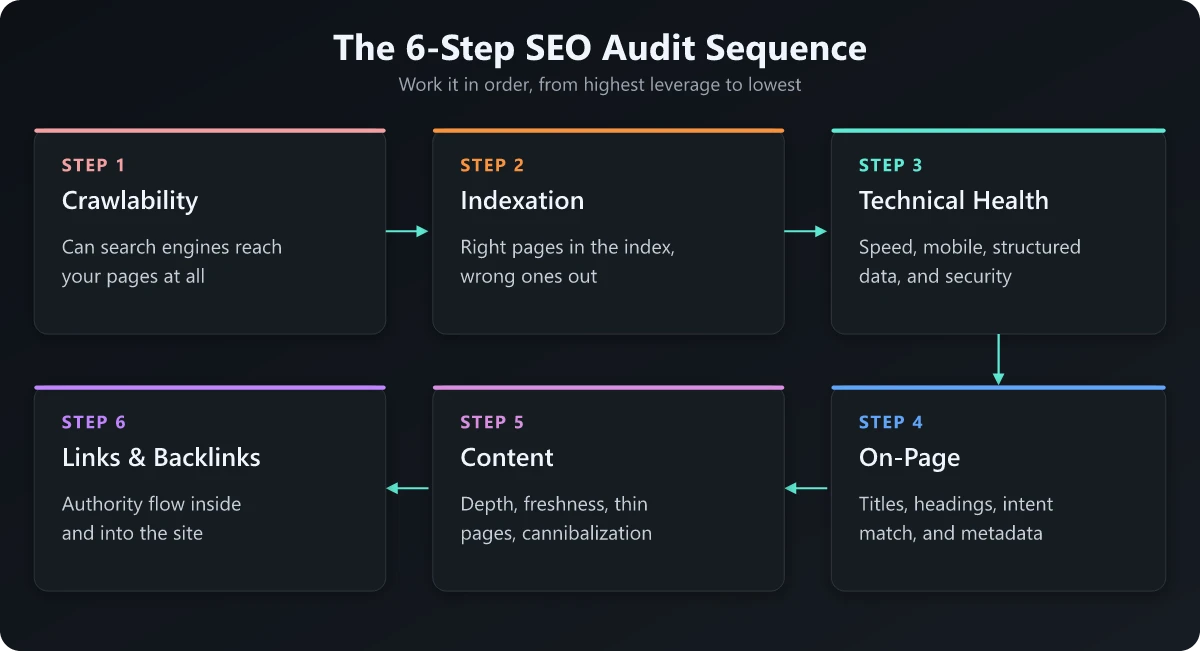
Here is the order of operations, from highest leverage to lowest:
- Crawlability - can search engines reach your pages at all
- Indexation - are the right pages in the index, and the wrong ones out
- Technical health - speed, mobile, structured data, security
- On-page - titles, headings, intent match, metadata
- Content - depth, freshness, cannibalization, thin pages
- Internal linking and backlinks - authority flow inside and into the site
A quick note on tooling before we start. You do not need an expensive stack. The free tier of the toolset below covers the vast majority of what matters.
| Audit layer | Free tool I default to | What it answers |
|---|---|---|
| Crawlability | Screaming Frog (free up to 500 URLs) | Can bots reach and follow my pages |
| Indexation | Google Search Console | Which pages Google actually indexed |
| Speed and vitals | PageSpeed Insights | Is the page fast and stable on real devices |
| On-page | Manual review plus a crawler | Do titles and content match intent |
| Backlinks | Ahrefs or Semrush free views | Who links to me, and is anything broken |
Step 1: Crawlability - can bots even reach your pages
This is where I always start, because nothing downstream matters if crawlers get blocked. I have seen a single misplaced line in a robots file wipe out an entire section’s visibility.
Check robots.txt and meta robots
Pull up your robots.txt file at the root domain and read it line by line. The classic disaster is a Disallow: / that survived from a staging environment. Then spot-check key templates for a noindex in the page source or HTTP header.
- robots.txt - confirm nothing important is disallowed
- Meta robots - check for stray noindex or nofollow on money pages
- XML sitemap - present, submitted in Search Console, and free of dead URLs
Look for crawl traps and broken links
Run a crawl and watch for explosions of near-identical URLs, usually caused by faceted navigation or session parameters. These burn crawl budget on large sites and bury the pages you care about. Flag every 4xx and 5xx response, and map your redirect chains so nothing hops more than once. Check the status code your host actually returns while you are there, because a permanent redirect can come back as a 308 rather than a 301 without anyone configuring it.
For the deep version of this layer, including log file analysis and crawl budget, follow my technical SEO site audit walkthrough. It picks up exactly where this section gets demanding. If your site sits on Vercel, Netlify or Cloudflare Pages, check first whether you can even get the log: I went through the plan tiers and retention windows for each host and the answer is often no.
Step 2: Indexation - the right pages in, the wrong pages out
Crawlable does not mean indexed. This step is where I catch the quiet traffic killers, and it is the single most underrated part of any audit.
Compare crawled, indexed, and intended
Open the Pages report in Search Console and read the “not indexed” reasons closely. “Crawled - currently not indexed” and “Discovered - currently not indexed” usually point at quality or duplication problems, not bugs. “Excluded by noindex tag” is the one I check first, because that is the exact failure from my opening story. On modern JavaScript-heavy builds, this report is also where you catch a site that renders entirely client-side and never gets indexed, because Google sees an empty shell instead of your content.
- Indexed count - roughly matches your number of valuable pages
- Noindex - applied only to pages you genuinely want hidden
- Canonicals - each page points to the version you want ranked
- Duplicates - parameter and pagination variants resolved cleanly
Canonical sanity check
Spot-check canonical tags on templates that mass-produce pages, like product listings or tag archives. A self-referencing canonical is usually correct. A canonical pointing at the homepage from every page is a common, traffic-leaking mistake I find more often than I would like.
Step 3: Technical health - speed, mobile, and security
Once Google can reach and index your pages, you make those pages fast, stable, and trustworthy. This is the layer most people start with, which is exactly backwards.
Core Web Vitals and mobile
Check your Core Web Vitals in Search Console and confirm the mobile experience holds up, because Google indexes the mobile version of your site. If your phone layout strips content or links that exist on desktop, that content effectively does not exist to Google.
Two focused companions live here if you need them: my mobile SEO checklist for phone-first ranking, and the technical audit linked above for the heavier diagnostics.
Security and structured data
Confirm HTTPS is enforced sitewide with no mixed-content warnings. Then validate your structured data with Google’s Rich Results Test. Schema will not magically lift rankings, but valid markup unlocks rich results, and broken markup quietly forfeits them.
- HTTPS - enforced, with HTTP redirecting to HTTPS
- Core Web Vitals - LCP, INP, and CLS in the good range on mobile
- Structured data - validates without errors on key templates
- Hreflang - correct and reciprocal if you run multiple languages
Step 4: On-page - titles, intent, and metadata
Now we are at the layer most people think of as “SEO.” Here I am checking whether each page actually answers the query a person typed.
Title tags and headings
Every indexable page needs a unique, descriptive title that leads with the primary keyword and reads like something a human would click. Run your crawler’s filter for missing, duplicate, and over-length titles. When it flags an over-length title, my before-and-after SEO title examples show what to cut first while keeping the keyword at the front. Then confirm each page has a single, sensible H1 and a logical heading structure beneath it. I tested whether the H1 should match the title tag on 147 URLs where the two are byte-identical by construction. And there is no ideal H2 count to hit: the one-H2-per-250-words rule you see repeated traces back to a Yoast readability heuristic, and Google documents no ideal heading count.
Search intent match
This is the judgment call no tool makes for you. Search your target keyword and look at what already ranks. If the top results are comparison posts and yours is a product page, you have an intent mismatch that no amount of metadata tweaking will fix. Match the format the SERP is rewarding, or change the keyword.
| On-page element | Common failure I find | The fix |
|---|---|---|
| Title tag | Duplicated across templates | Make each unique and intent-led |
| H1 | Missing or multiple per page | Exactly one, descriptive |
| Meta description | Auto-generated or empty | Write a compelling, accurate summary |
| Intent | Format does not match the SERP | Re-shape the page to the dominant result type |
Step 5: Content - depth, freshness, and cannibalization
A technically perfect page with shallow content still loses. This step is about whether the content earns the ranking. Grade that content against the stakes of the topic rather than one site-wide standard, because pages answering medical, financial or safety questions sit at the strict end of the YMYL spectrum and need named authors, primary sources and a dated review cycle long before your low-stakes pages do.
Find thin and cannibalizing pages
Look for pages that target the same keyword and compete with each other, splitting your authority. Consolidate them into one strong page and redirect the rest, then write down which URL owns which query so the overlap cannot grow back. That record is a keyword map, and I built a keyword map for a site that already had 147 posts from a Search Console export rather than a blank template. Then flag thin pages that exist only to “have a page” - they dilute site quality and rarely justify their place in the index. Thin is about missing answers rather than a low word count: when I correlated word count for SEO against Search Console position across 147 posts on one domain, length explained 0.5% of the variance.
- Thin content - improve substantially, consolidate, or remove
- Cannibalization - merge competing pages into one canonical winner
- Freshness - update pages where the information has aged out
- Coverage - fill obvious subtopic gaps the top results all cover
Tie content back to reporting
Audits are not one-and-done, so decide upfront how you will track whether your fixes worked. If you are unsure what to capture, my breakdown of what an SEO report should contain covers the metrics worth watching after an audit.
Step 6: Internal links and backlinks
Last, because it is the polish, not the foundation. But internal linking is the most overlooked lever on this entire list.
Internal linking
Before you commit a quarter to lifting page-two pages, measure what a lift is worth on your own property: the striking distance payoff curve is site-specific, and on some sites the 4-20 band pays almost nothing. Make sure your most important pages are not buried five clicks from the homepage. Strong, descriptive internal links from relevant pages pass authority and signal what matters. I treat orphan pages, the ones with no internal links pointing at them, as a priority fix.
Backlink health
Scan your backlink profile for broken inbound links pointing at dead URLs, then recover that equity with a redirect. You do not need to obsess over a “toxic links” cleanup for most sites. Focus on reclaiming links you already earned that are currently wasted. While you are in there, read the rel attribute on the links you placed yourself: I pulled the rel attribute each syndication platform stamps on your link back straight out of the rendered HTML, and most of them are nofollow, which Google has treated as a hint rather than a directive since March 2020.
When to bring in a specialist
You can run this entire SEO audit checklist yourself, and for most sites you should. The exception is when your diagnosis lands somewhere ambiguous - a penalty you cannot confirm, an indexation pattern that defies explanation, or a migration gone wrong. At that point, the cost of guessing exceeds the cost of an expert. If you are weighing that call, I broke down what an SEO audit actually costs and what changes the price.
The takeaway: work the SEO audit checklist in order
The reason this SEO audit checklist works is not the items on it. It is the order. By the time you reach titles and content, you already know Google can crawl, index, and trust your pages, so every later fix actually has a chance to move the needle.
Run it top to bottom. Resist the urge to start with the fun on-page tweaks, because the silent killers - a stray noindex, a broken canonical, an unreachable section - hide at the top of the list, and they are the ones quietly costing you the most. Once you have worked the audit, the natural next step is to watch the results, and you can start there with how to check your SEO ranking.
Frequently Asked Questions
What is an SEO audit checklist?
It is a structured, prioritized list of checks you run against a website to find what is blocking it from ranking. A good one moves from the highest-leverage issues, like crawlability and indexation, down to refinements like internal linking and content depth.
How long does a full SEO audit take?
For a small site, a focused pass takes a few hours. For a large site with thousands of URLs, the crawl alone can run overnight, and analysis plus write-up can take several days. The size and messiness of the site matter far more than the checklist itself.
What tools do I need to run an SEO audit?
At minimum: Google Search Console, a crawler such as Screaming Frog or Ahrefs Site Audit, and PageSpeed Insights or the Core Web Vitals report. Everything else is a nice-to-have, not a requirement.
How often should I run an SEO audit?
Run a full audit once or twice a year, and a lightweight check every month using Search Console. Always audit after a migration, a redesign, or a sharp, unexplained traffic drop.
Can I do an SEO audit myself?
Yes. Most of the highest-impact issues - noindex tags, broken canonicals, missing titles, thin content - are findable with free tools and a methodical process. You only need a specialist when the diagnosis points somewhere ambiguous.