Ecommerce SEO Checklist: Audit Your Store, Category to Cart
An ecommerce SEO checklist covering faceted navigation, product schema, thin category pages, crawl budget, and internal linking that actually moves rankings.

The single biggest drain on how search engines crawl online stores is not slow servers or weak backlinks. It is filters, and that is why the first item on any ecommerce SEO checklist should be faceted navigation. Google has stated that faceted navigation is “by far the most common source of overcrawl issues site owners report to us”, the kind of issue that quietly buries your best product pages under millions of useless filter URLs.
That is why a generic SEO guide does not cut it for a store. This ecommerce SEO checklist is built around the problems that only online stores have: filter sprawl, near-duplicate category pages, product schema, and the internal linking that ties a catalog together. Work through it from category to cart.
Why Your Ecommerce SEO Checklist Has to Be Store-Specific
A blog has a few hundred URLs. A mid-size store can generate millions, most of them automatically, most of them worthless to searchers.
Every color, size, price, and sort option in your filters can spawn a new URL. Google’s own example shows how one product, one color, and one size already produce a unique address, and “changing any parameter creates a new URL, leading to a potential explosion of URLs.”
The stakes are high because shoppers are unforgiving. Baymard Institute, which aggregates checkout research across 50 studies, puts the average documented online cart abandonment rate at 70.22%. You cannot afford to also lose the visitors who never arrive because your money pages were never crawled or indexed.
This ecommerce SEO checklist assumes your store already has products and traffic, and that the goal is to fix what is leaking. If you want the broader process behind any audit, pair this with my guide on how to conduct a technical SEO site audit.
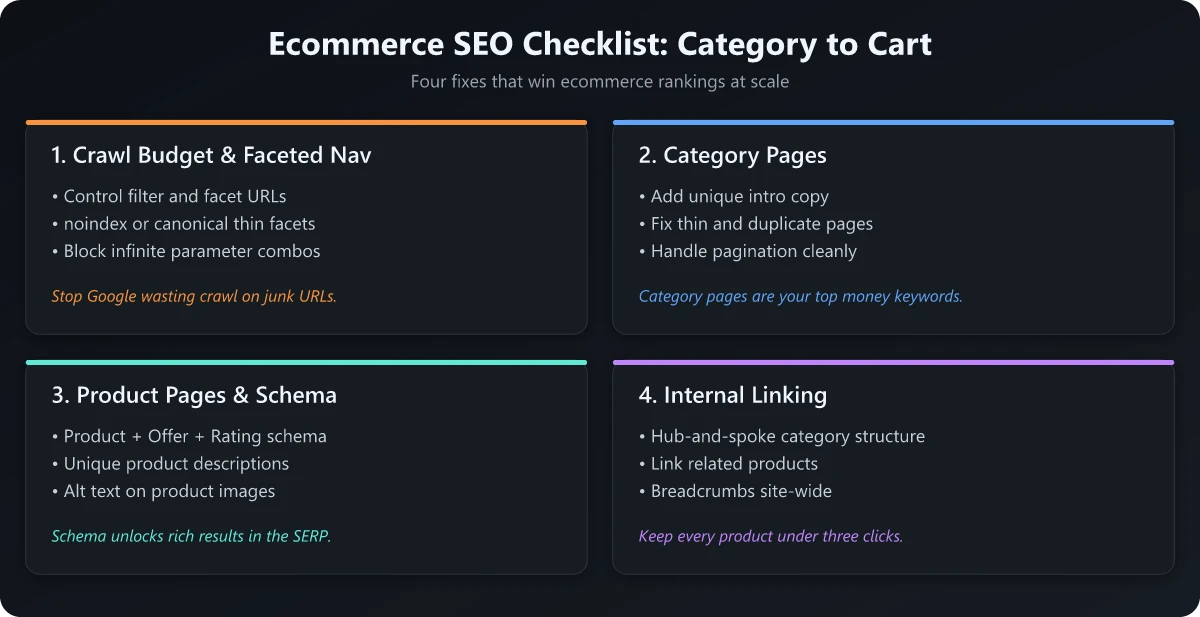
Crawl Budget and Faceted Navigation
Crawl budget is the time and resources a search engine spends on your site. On a store, faceted navigation is where most of it gets wasted.
Tame Your Filter URLs
The fix is deciding which filtered URLs deserve to be crawled and which do not, then enforcing that decision. Google recommends two clear approaches.
- Block what you do not need indexed. Use robots.txt to disallow crawling of filter URLs, or use URL fragments (the
#symbol) for filters, since search engines generally ignore them. - Optimize what you do need crawled. Use the standard
&separator, keep filter order consistent in the URL, and return a 404 for filter combinations with no results.
The rel="nofollow" attribute on filter links can also discourage crawling, but only if it is applied to every internal and external link pointing to that URL. Half-measures do not work here.
Watch for Crawl Traps
A crawl trap is a near-infinite URL space a bot can wander into. Sort orders, pagination combined with filters, and session IDs are common culprits.
Check your server logs for how often Googlebot hits parameter URLs versus real product and category pages. If the bot is spending most of its visits on ?color=, ?sort=, and ?page= combinations, your important pages are getting crawled less often than they should. Getting hold of those logs is the hard part on hosted platforms: Netlify keeps log drains behind its Enterprise plan and Vercel holds runtime logs for an hour on Hobby, so confirm you can export raw requests before you plan the analysis.
Category Pages: Thin and Duplicate Content
Category pages are the highest-value organic real estate on most stores, because they target broad, high-intent keywords like “running shoes” or “standing desks.” They are also the most likely to be thin or duplicated.
Fix Thin Category Pages
A thin category page has nothing but a templated grid of products and zero original context. Search engines struggle to rank it because there is nothing to read.
Add a short block of unique intro copy (100 to 200 words) that uses the target keyword naturally and helps the shopper choose. Place it above or below the product grid, not stuffed into a hidden accordion.
Kill Duplicate Category Variants
Duplicate category pages usually come from the same products being reachable through multiple paths: filtered views, sort orders, and pagination that all show near-identical content.
| Problem | Symptom | Fix |
|---|---|---|
| Filter variants | /shoes?color=black ranks against /shoes | Canonical filtered pages to the main category, or block them |
| Sort orders | ?sort=price duplicates the default view | Disallow sort parameters in robots.txt |
| Pagination | Page 2+ competes with page 1 | Let each paginated page self-canonicalize; keep them indexable but distinct |
| Duplicate categories | Same products in two menu paths | Pick one canonical path, internally link to it consistently |
Use rel="canonical" to consolidate signals, but treat it as a hint rather than a command. Google can ignore a canonical when the filtered page looks too different from the target, so pair it with consistent internal linking.
Product Pages: Optimization and Schema
Product pages are where intent converts. They are also where most stores leave easy wins on the table, because the UX and the markup are both weak.
The opportunity is real: Baymard’s 2026 benchmark of 155+ leading stores found that 62% of mobile and 52% of desktop ecommerce sites have “mediocre or worse” product page UX. Better product pages are not just an SEO play, they lift conversion too. Since most of that traffic is mobile, it is worth running through a dedicated mobile SEO checklist alongside this one.
On-Page Product Checklist
Each product page should earn its keyword and answer the shopper’s questions before they bounce to a competitor.
- Unique title and meta description with the product name plus a qualifier (brand, model, key attribute).
- Original product copy, not the manufacturer’s boilerplate that 50 other retailers also publish.
- Real specs and answers: dimensions, materials, shipping, returns, and the questions your support team gets most.
- User-generated content: reviews and Q&A add fresh, unique text and trust signals.
Add Product Structured Data the Right Way
Structured data is how you become eligible for rich results. When you add Product markup, Google says products can become eligible for merchant listing experiences including the shopping knowledge panel, Google Images, and popular product results.
One rule trips people up constantly: apply this markup to product pages, not category pages. Google explicitly recommends focusing markup on individual product pages, not on pages that list products or a category of products. Mark up price, availability, and aggregate rating, and validate every template with the Rich Results Test before shipping.
Internal Linking Across the Catalog
Internal linking is how authority and crawl priority flow through a store. Done well, it tells search engines which categories and products matter most.
Build Logical Link Paths
Your homepage should link to top categories, categories should link to subcategories and key products, and products should link back up and across to related items.
- Breadcrumbs on every page reinforce hierarchy and add structured data.
- Related and “frequently bought together” modules create contextual links between products.
- Hub content: buying guides and comparison posts that link down to the relevant category and product pages.
Find Orphan Products
An orphan page has no internal links pointing to it, so bots rarely find it and it almost never ranks. On large catalogs, discontinued-then-reactivated products and deep filter-only items are common orphans.
Crawl your store and cross-reference the crawl against your full product feed. Any product in the feed that the crawler never reached through links is an orphan that needs a path back into the site.
Putting the Ecommerce SEO Checklist Together
Run this ecommerce SEO checklist as a repeatable quarterly audit, not a one-time cleanup, because inventory changes faster than any static site.
| Layer | Priority check | Tool |
|---|---|---|
| Crawl budget | Block filter and sort URLs you do not need | robots.txt, log files |
| Category pages | Add unique copy, consolidate duplicates | Site crawler, Search Console |
| Product pages | Unique content plus valid Product schema | Rich Results Test |
| Internal links | Fix orphans, strengthen breadcrumbs | Crawler plus product feed |
To track whether the work is paying off, watch indexed pages, crawl stats, and category-level rankings over time. My guides on how to check your SEO ranking and what belongs in an SEO report cover how to turn those numbers into a story your team will actually read.
Related: why an SEO audit is important and how much an SEO audit costs if you are deciding whether to run this in-house or hire it out.
Start at the top of this ecommerce SEO checklist, fix the crawl budget leaks first, and work down to product schema and internal links. The stores that win organic search are not the ones with the most pages. They are the ones where every crawled page earns its place from category to cart.
Frequently Asked Questions
What is an ecommerce SEO checklist?
An ecommerce SEO checklist is a structured audit of the technical and on-page factors specific to online stores, such as faceted navigation, product and category schema, thin or duplicate category pages, crawl budget, and internal linking. It exists because stores generate far more URLs than a typical content site.
How do I stop faceted navigation from hurting my SEO?
Block filter URLs you do not want indexed with robots.txt or use URL fragments for filters, since search engines generally ignore them. Google has said faceted navigation is the most common source of overcrawl issues reported by site owners.
Should I add Product structured data to category pages?
No. Google recommends adding Product structured data to pages that focus on a single product, not to category or listing pages that show a group of products. Category pages are better served by clear on-page content and internal linking.
What causes thin content on ecommerce category pages?
Thin category pages usually have no unique copy, near-duplicate filtered variants, and identical templated text across hundreds of pages. Adding short, original intro copy and consolidating duplicate filter URLs fixes most of it.
How often should I run an ecommerce SEO audit?
Run a full audit quarterly and a lighter crawl check monthly. Stores change inventory constantly, so new thin pages, broken product URLs, and parameter bloat appear faster than on static sites.