Mobile SEO Checklist: 15 Fixes to Win Mobile-First Rankings
A practical mobile SEO checklist covering Core Web Vitals, responsive design, tap targets, and mobile-first indexing to win rankings where users search.

Mobile now drives 50.29% of all global web traffic, edging out desktop, according to Statcounter’s platform market share data. For most consumer and B2B sites, the real share leans even higher. That means the version of your site Google sees, scores, and ranks is the phone version, not the polished desktop layout you designed on a 27-inch monitor. This mobile SEO checklist fixes the gap.
This mobile SEO checklist gives you 15 concrete fixes grouped into four areas: indexing, speed, layout, and usability. It is deliberately narrow. For everything else under the hood, pair it with my full technical SEO site audit - this is the mobile-first subset of that larger audit, and it is one big reason an SEO audit is important in the first place.
Why this mobile SEO checklist is non-negotiable now
Google uses mobile-first indexing, which means it crawls and ranks your site using “the mobile version of a site’s content, crawled with the smartphone agent,” per Google Search Central documentation. Your desktop site is not the source of truth anymore. Your mobile site is.
The stakes are direct. If content, structured data, or links exist on desktop but are stripped from mobile, Google may never see them.
On top of indexing, Google has confirmed that “Core Web Vitals are used by our ranking systems,” as stated in its page experience guidance. Speed and stability are not vanity metrics. They feed ranking.
So this checklist solves two problems at once: making sure Google can fully read your mobile site, and making sure that site feels fast and usable to the person holding the phone.
Part 1: Mobile-first indexing and crawlability
Get this layer right first. No amount of speed tuning matters if Google indexes a broken mobile version.
1. Serve identical content on mobile and desktop
Your mobile pages must contain the same primary content, headings, and body copy as desktop. Collapsing text behind tabs or accordions is fine, but do not delete it.
2. Keep structured data on the mobile version
Schema markup must exist on mobile, not just desktop. Audit your mobile HTML for the same JSON-LD blocks, or you lose rich result eligibility.
3. Use the same meta robots tags
A noindex or nofollow that appears only on mobile will quietly deindex pages. Diff your mobile and desktop tags.
4. Don’t lazy-load primary content out of reach
Lazy-loading images below the fold is good. Lazy-loading your main article body so it only appears on scroll or interaction can hide it from the crawler. Make core content load without user action.
5. Allow Googlebot to fetch CSS, JS, and images
Blocking these resources in robots.txt prevents Google from rendering your mobile layout correctly. Confirm nothing critical is disallowed, then re-test the rendered page.
Part 2: Mobile Core Web Vitals
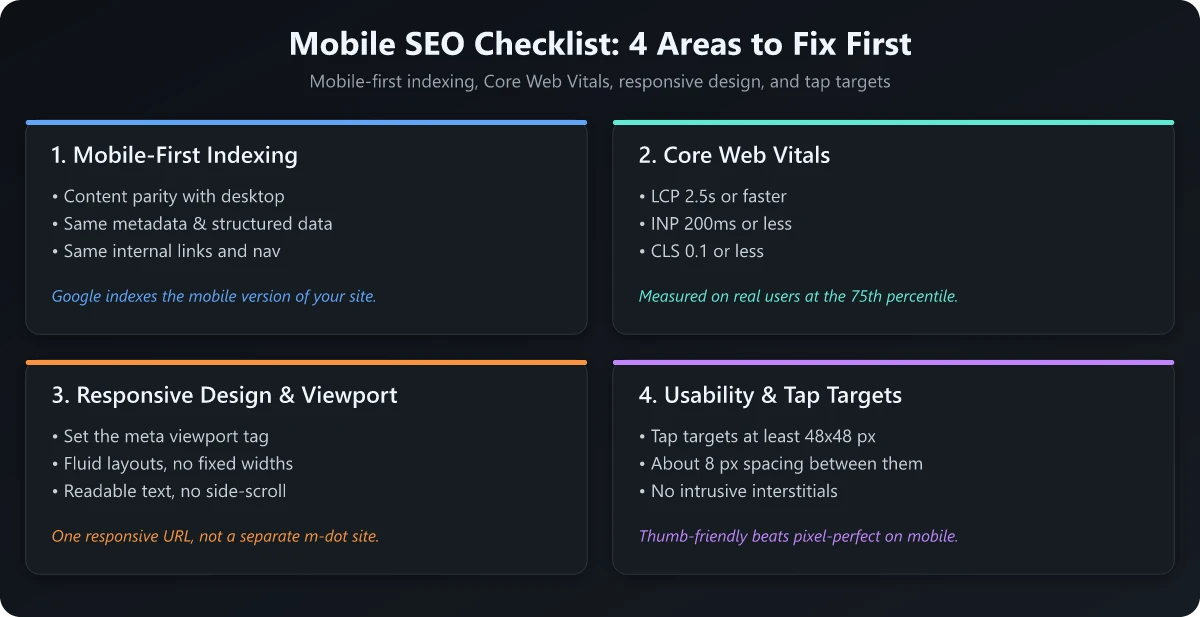
Core Web Vitals are measured at the 75th percentile of real-user page loads, split across mobile and desktop, per web.dev. Mobile is almost always the weaker of the two, so optimize for it specifically.
Here are the three metrics and the “good” thresholds you are aiming for.
| Metric | What it measures | ”Good” threshold |
|---|---|---|
| LCP (Largest Contentful Paint) | Loading - when the main content renders | Within 2.5 seconds |
| INP (Interaction to Next Paint) | Responsiveness to taps and clicks | 200 milliseconds or less |
| CLS (Cumulative Layout Shift) | Visual stability of the layout | 0.1 or less |
All three thresholds are documented on web.dev’s Web Vitals reference.
6. Fix LCP: get the main content rendering fast
Your largest above-the-fold element (usually a hero image or headline) should paint within 2.5 seconds. Compress and properly size hero images, serve modern formats like WebP, and preload the LCP resource. While you are editing those image tags, check what the alt attribute says. An audit of this site turned up 147 alt values that resolved to only 15 unique strings, a template default that gives a screen reader user on a phone nothing to work with.
7. Fix INP: stop blocking the main thread
INP replaced First Input Delay as a Core Web Vital on March 12, 2024, as web.dev announced. It measures how quickly your page responds to a tap across the whole visit, not just the first interaction. Break up long JavaScript tasks, defer non-critical scripts, and minimize third-party tags that hijack the main thread on cheaper phones. The cheaper version of this fight is not shipping the JavaScript at all - static-site generators like Astro send 0 KB of it by default, which is the whole premise behind rebuilding a plugin-heavy blog as pre-rendered HTML.
8. Fix CLS: reserve space so nothing jumps
A CLS at or below 0.1 means content doesn’t lurch as the page loads. Always set explicit width and height on images and embeds, reserve space for ads, and avoid injecting banners above existing content.
9. Test on a throttled mobile connection
Your office WiFi lies. Run Lighthouse or PageSpeed Insights in mobile mode with throttling, and use field data from the Chrome User Experience Report to see what real users on real networks experience.
Part 3: Responsive design and viewport
A page can be indexable and fast yet still feel terrible to use. This section makes the layout fit the screen.
10. Set a correct viewport meta tag
Every page needs <meta name="viewport" content="width=device-width, initial-scale=1"> in the head. Without it, mobile browsers render a zoomed-out desktop layout that no one can read.
11. Use responsive, not separate-URL, design
Responsive design serves one HTML at one URL and adapts with CSS. It is Google’s recommended pattern and removes the maintenance burden of a separate m. site.
12. Eliminate horizontal scrolling
Content wider than the viewport forces sideways scroll, a classic mobile usability failure. Cap element widths, allow long words and tables to wrap, and test at 360px wide.
13. Keep font sizes legible
Body text should sit around 16px so visitors don’t pinch-zoom to read. Tiny fonts hurt both usability and time on page.
Part 4: Mobile usability and tap targets
The final layer is about thumbs. Touch is imprecise, and small or crowded controls cause rage taps and bounces.
14. Size tap targets to at least 48 by 48 pixels
Google’s Lighthouse audit never fails tap targets that are at least 48 by 48 pixels, per Chrome’s Lighthouse documentation. That page also notes “8 px between tap targets is a good starting point.” Smaller, tightly packed links and buttons fail the audit. As of Lighthouse 12.0 this check moved out of the SEO category and is now the target-size audit under accessibility, but undersized targets still cause mis-taps and bounces that hurt mobile performance.
15. Make forms and interactions thumb-friendly
Use large input fields, the correct input types (so the right keyboard appears), and visible tap states. Confirm sticky headers or chat widgets don’t cover content or block buttons on small screens.
How to run this mobile SEO checklist
Work through it in order: indexing first, then speed, then layout, then usability. Fixing usability on a page Google can’t fully crawl is wasted effort.
Use this loop:
- Crawl your mobile site and confirm content, schema, and robots tags match desktop.
- Run PageSpeed Insights in mobile mode and record LCP, INP, and CLS field data.
- Check viewport, horizontal scroll, and font sizes on a 360px screen.
- Audit tap target size and spacing with Lighthouse.
- Re-test after each fix and track the wins in your reporting.
To see whether the work is paying off, monitor positions over time. My guides on how to check your SEO ranking and what belongs in an SEO report walk through the tools and the metrics that actually signal mobile progress. If you serve a specific area, also layer in the local SEO checklist for map pack and location page specifics.
Conclusion
A complete mobile SEO checklist is not optional maintenance - it is the foundation of how Google reads and ranks your site, because the mobile version is the version that counts. Nail indexing parity, hit the Core Web Vitals thresholds at the 75th percentile, ship a responsive layout, and size your tap targets, and you remove the most common reasons mobile pages underperform.
Start with the five indexing fixes today, then move down the list. Run the loop above once a quarter, and pair this checklist with your broader technical SEO audit so mobile never becomes the weak link in your search performance.
Frequently Asked Questions
What is a mobile SEO checklist?
A mobile SEO checklist is a structured set of fixes that make your site rank and convert well on phones. It covers mobile-first indexing, Core Web Vitals (LCP, INP, CLS), responsive design, viewport setup, and tap target sizing.
Does Google still use mobile-first indexing in 2026?
Yes. Google uses the mobile version of your content, crawled with the smartphone agent, for indexing and ranking. If your content is missing or broken on mobile, it may not get indexed at all.
What are the Core Web Vitals thresholds for mobile?
Aim for LCP within 2.5 seconds, INP of 200 milliseconds or less, and CLS of 0.1 or less, measured at the 75th percentile of real-user page loads.
How big should tap targets be on mobile?
Google's Lighthouse audit never fails tap targets that are at least 48 by 48 pixels. Around 8 pixels of spacing between them is a good starting point, though very small targets often need more to pass.
Is mobile SEO different from regular SEO?
The fundamentals overlap, but mobile SEO prioritizes page speed on slower connections, touch-friendly layouts, and the fact that Google judges your entire site by its mobile version, not its desktop version.