Google Ads Payment Methods India: UPI, Cards and Prepay
Google Ads payment methods in India depend on the payment setting: UPI, RuPay and NetBanking are listed for prepay, and postpay runs on a card with an RBI e-mandate.
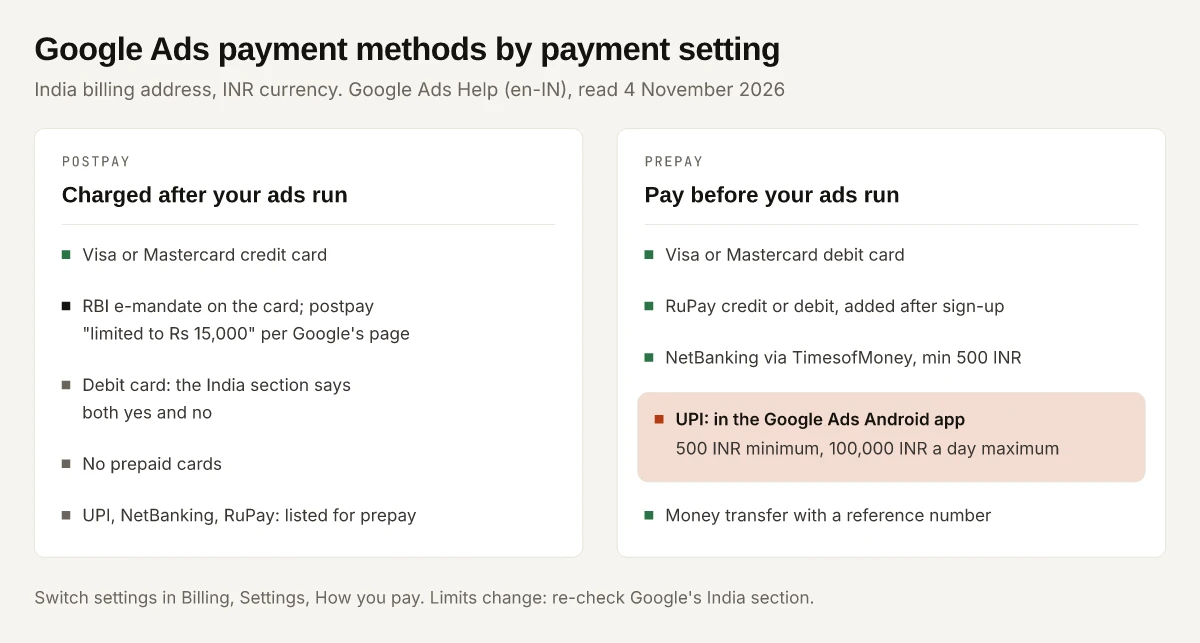
UPI pays for a Google Ads account on prepay, where you pay before ads run, and is not offered on postpay, where Google charges you after ads run. The same split runs through all the Google Ads payment methods India accounts can use: Google’s India section lists UPI, NetBanking and RuPay cards for prepay only, while postpay runs on a card that Google’s RBI page limits in India to ₹15,000 under an e-mandate. Payouts to AdSense publishers are a separate system.
So pick the payment setting first and the method second, because the setting decides which methods you are offered at all. Google’s India pages also disagree with each other in places: whether a debit card can run postpay, whether a credit card can prepay, and when a postpay card is charged. I flag each conflict below, with the safer plan for each. Every quote is from Google Ads Help in the en-IN locale, read on 4 November 2026, and payment rules change, so re-open the page before you rely on a limit. How much to spend is a separate question, covered by Google’s budget and spending-limit rules for India; this post covers only how the money reaches Google.
For an account with an India billing address and Indian Rupee currency, this is each method against postpay and prepay, as of November 2026:
| Method | Postpay (charged after ads run) | Prepay (pay before ads run) | Limits and timing Google states |
|---|---|---|---|
| Visa or Mastercard credit card | Yes | Contested: prepay is “debit cards only”, yet “Registered cards can be used for both postpay and prepay” | Postpay “limited to ₹15,000” with an e-mandate on the card |
| Visa or Mastercard debit card | Contested: “you can use either credit cards or debit cards”, then “you can’t set up postpay with a debit card” | Yes | A card prepayment is “processed immediately” but “can take up to 24 hours” to credit |
| RuPay credit or debit card | Not listed | Yes, added “after you’ve completed your Google Ads account sign-up” | Same card verification as Visa and Mastercard |
| Prepaid card | No: “Google does not accept prepaid cards for postpay” | The India section does not say | None stated |
| NetBanking (via TimesofMoney) | Not offered: it is a method “to make prepayments” | Yes | Minimum 500 INR; balance “typically” updates within 48 hours |
| UPI | Not offered: the account must be “on the prepay option” | Yes, in the Google Ads Android app | Minimum 500 INR, maximum “100,000 INR per day” |
| Money transfer with a reference number | The section names no setting | You “add money to your Google Ads account” | Two to five working days, “up to 30 days” in some cases |
Sources: the India section of About payment methods for Google Ads and Changes to the postpay payment setting in India due to RBI regulations.
What Are the Google Ads Payment Methods India Accounts Can Use?
Google’s India list has four sections: credit and debit cards, money transfer, NetBanking and UPI. That is the set shown when India is picked in the country drop-down of Google’s payment methods article (linked under the table above), which says the methods “depend on your currency and country selection, and sometimes also your payment settings (prepay, postpay or monthly invoicing)”.
- Not in the India list: PayPal and bank account direct debit. Both have sections for other countries on the same page, but neither appears when India is selected.
- Availability can lag the list: “certain payment methods may be temporarily unavailable while Google Ads reviews your account’s eligibility to use them.”
- A per-account check: the page points to Google’s payment options tool “for a precise list of what’s available for your country and currency”.
A promotion started from YouTube Studio also bills through a linked Google Ads account, so these methods apply there; the guide to YouTube ads cost in India explains what each YouTube format charges for.
Postpay vs Prepay: How Each Setting Charges You
Google’s payment settings article defines the settings this way, in the version shown for India:
| Setting | Google’s definition | What it means for the method |
|---|---|---|
| Postpay | ”You’re automatically charged after your ads run, either on the first day of each month or when you reach a preset amount (known as your threshold), whichever comes first.” | Needs a card Google can charge automatically, which in India means the RBI e-mandate |
| Prepay | ”With this setting, you can make a payment before your ads run… When your payment is used up, your ads will stop running.” | Opens UPI, NetBanking, RuPay and debit cards |
| Monthly invoicing | ”Some businesses are eligible for a Google credit line if they meet certain requirements.” You pay “with a cheque or bank transfer”. | A credit line for eligible businesses, outside the prepay and postpay choice |
India is not on that page’s list of “Countries and territories where prepay isn’t available”, so both postpay and prepay are open to an India account. To switch between them, Google’s India steps are:
- Go to Settings within the Billing menu.
- Open the How you pay section.
- “If eligible, you’ll find a ‘Switch to postpay’ or ‘Switch to prepay’ button.” Select it and confirm in the pop-up.
Only “users with ‘Admin’ or ‘Edit payments profile’ access to the profile, or users with ‘Admin’ or ‘Billing’ access to the Google Ads account” can make the change, and Google adds that with more than one Google Ads account “this feature might not be available for all your accounts”. The setting also decides where a TDS certificate goes, a Google form for monthly invoicing and an email address for prepay and postpay, as the Google Ads TDS refund guide explains.
Google Ads UPI Payment: Prepay, the Android App and Four Conditions
UPI works only for prepayments, and Google’s India section says it “is currently available on Google Ads mobile application on Android OS.” The same section lists four requirements, word for word:
- “You have a billing address and bank account in India.”
- “You’ve selected the Indian Rupee (INR) as your Google Ads currency.”
- “Your Google Ads account is on the prepay option.”
- “Your bank account is registered for UPI.”
The payment steps Google gives:
- Go to Summary within the Billing menu and select Make a payment.
- Select UPI. “If you do not have UPI in your list, select Pay with UPI and follow the onscreen instructions to add UPI as a payment option.”
- Enter the amount: “The minimum prepayment amount is 500 INR, and the maximum is 100,000 INR per day.”
- Select Submit, then verify the payment in your UPI app.
Google says the balance “will typically update within 48 hours”, that it emails you “when 30% of your funds are left”, and that a slow UPI payment is “typically two to five working days”. Each top-up is a payment you approve in your UPI app; the section has no wording on UPI AutoPay or a recurring mandate. Some subscriptions work the other way: Canva offers UPI Autopay for recurring Pro and Pro Lite payments in India, with a mandate you approve in your UPI app. Meta also takes UPI for Instagram and Facebook ads in India, but only if you choose it when the ad account is first set up, a rule covered in what Instagram ads cost in India.
Google Ads UPI Not Showing? Check These First
Work down Google’s own conditions before contacting support:
| Check | Google’s words | If it fails |
|---|---|---|
| Device | ”currently available on Google Ads mobile application on Android OS” | The section names only the Android app; on any other device, prepay with NetBanking or a card |
| Payment setting | ”Your Google Ads account is on the prepay option.” | Look for “Switch to prepay” under How you pay in Billing settings |
| Currency | ”You’ve selected the Indian Rupee (INR) as your Google Ads currency.” | An account in another currency does not meet the condition |
| Country | ”You have a billing address and bank account in India.” | The billing address must be in India |
| Bank | ”Your bank account is registered for UPI.” | Register the account in your UPI app first |
| Not added yet | ”If you do not have UPI in your list, select Pay with UPI” | Use Pay with UPI on the Make a payment screen |
| Greyed out | Unavailable methods “will be greyed out and unselectable” during “ongoing checks” | Wait for the review, or apply for quicker access |
The greyed-out case comes from Google’s unavailable payment methods article. It says such a method “will generally become available” once Google confirms a set amount of payments “with an available payment method” (the page gives no rupee figure) and “Four weeks of account activity compliant with Google Ads policies”. The same page offers an application for quicker access, and Google says “You’ll receive an email update” when the method becomes available.
Credit, Debit, RuPay and Prepaid Cards in Google Ads
Google’s India card rules, from the same India section:
- Credit cards: “Google Ads accepts Visa and Mastercard credit cards.”
- Debit cards: “debit cards with the Visa or Mastercard logo.”
- RuPay: “You can also add a RuPay credit or debit card as a payment method for your prepay after you’ve completed your Google Ads account sign-up.”
- Prepaid cards: “Google does not accept prepaid cards for postpay.”
Adding a card triggers verification. Google says the Reserve Bank of India “requires all online credit and debit card transactions to be processed using enhanced security procedures”, so the flow sends you to your bank’s site. The steps: Billing, Settings, Add a payment method under Payment methods, Credit or debit card, enter the details, Continue, then Verify credit or debit card.
On the bank’s page, “you might find a purchase amount for ₹2.00 INR. This is just a temporary authorisation, not an actual charge.” Google says verification “typically takes a few minutes” and “you only have to do it once when you first add a card”. One removal rule: you “can’t remove a credit or debit card that’s used as your primary payment method” until another method is set as primary.
Where Google’s India Pages Say Two Different Things
Google’s payment pages for India disagree with each other in three places, and the RBI page still frames its limit around a 2021 deadline:
| Question | One line says | Another line says | Safer plan |
|---|---|---|---|
| Debit card on postpay | ”If you’re on postpay… you can use either credit cards or debit cards." | "Note that you can’t set up postpay with a debit card.” (same India section) | Use a credit card for postpay |
| Credit card on prepay | ”If you’re on prepay… you can use debit cards only." | "Registered cards can be used for both postpay and prepay.” The section also has steps to “Make a prepayment with your credit or debit card”. | Expect a debit card, UPI or NetBanking to be the prepay route |
| When postpay charges | Card section: at “a predetermined amount or 30 days after your last automatic charge, whichever comes first” | Settings article: “on the first day of each month or when you reach a preset amount” | Keep the card funded for a charge at either point |
| Postpay limit date | ”Postpay in India will be limited to ₹15,000” | The same page still says the guidelines apply “by 30 September 2021” and calls the section “Threshold limits for existing customers” | Treat ₹15,000 as the current stated figure; the page gives no newer one |
Sources: payment methods, India section, payment settings, RBI postpay changes.
Google Ads Automatic Payments in India and the ₹15,000 E-Mandate
Automatic payments in Google Ads are the postpay setting, and in India that setting runs through an RBI e-mandate on your card. Google’s RBI article says: “Postpay in India will be limited to ₹15,000 and Google is required to set up an e-mandate for your card.” It adds that “The total amount that you’re charged won’t change, and you’ll be charged only for your usage.”
What Google tells you to do when automatic payments fail:
- Go to Overview within the Campaigns menu and select Fix now in the red alert, if there is one, “to verify your card on file”.
- If you see a “Payments may fail after 30 Sep” alert instead, Google says “your primary credit card isn’t compliant with RBI regulations”.
- Then either add a new primary payment method that is RBI-compliant, or keep making prepayments for the outstanding balance while you set up the e-mandate: Billing, Payment methods, the Fix it link under the primary card, check the details, Update.
Google also suggests making “prepayments in advance to keep your accounts in a credit position”, so ads do not stop on a declined automatic charge. To move from automatic to manual payments, switch the account to prepay under How you pay. The e-mandate here sits on a card; a UPI AutoPay mandate is a different instrument held in your UPI app, and revoking a UPI AutoPay mandate in Google Pay is done from the Autopay section of that app.
NetBanking and Money Transfer for Google Ads
NetBanking is a prepay money transfer run through Google’s payment partner TimesofMoney. Its requirements: an India billing address and bank account, INR as the account currency, and “Your bank is supported by our payment partner, TimesofMoney.”
- The bank list: 36 banks on Google’s page, 25 of them for retail and corporate accounts and 11 for retail only. If your bank is not on it, Google’s conditions rule NetBanking out; use UPI or a card.
- HDFC and IDBI: “If you make a payment through HDFC and IDBI bank, enable Secure Access. If Secure Access isn’t enabled you’ll get a transaction failure.”
- Amount: “The minimum prepayment amount is 500 INR.”
- Flow: Billing, Summary, Make a payment, enter the amount, Go, pick your bank on the TimesofMoney window, then pay on your bank’s site.
The general money transfer section, which also appears when India is selected, works by reference number. You generate a transfer form in Google Ads, and “You should generate a new reference number for each transfer you make.” Of the reference number, Google warns: “It’s different from your Google Ads Customer ID.”
Payment Made but Not Showing? Google’s Timelines by Method
Google’s India timings by method, and the point at which it says to contact support:
| Method | Typical time to reach the account | Contact Google after |
|---|---|---|
| Card prepayment | ”processed immediately”, “up to 24 hours” | Not stated |
| NetBanking | ”typically update within 48 hours" | "over five working days” |
| UPI | ”typically update within 48 hours”; delays “typically two to five working days for UPI" | "over five working days”, after checking the account ID and any reference number |
| Money transfer | ”two to five working days”, “In some cases, it can take up to 30 days" | "over two weeks” |
To contact Google you attach a valid proof of payment. Google’s rules for it: a scanned receipt or a screenshot of your bank’s online statement, in “an uneditable format, such as .jpg, .gif or .png”, showing the transfer date, the amount and currency, the beneficiary (Google Ads) and the remitting bank. Google asks you to black out “your entire bank account number or the middle eight digits of your credit card number.”
Changing the Payments Profile: What a Billing Transfer Resets
Moving the account to another payer or payments profile is a billing transfer that Google calls “Change who pays”. Per Google’s payments profile article, once you submit it:
- You must “complete advertiser verification even if you were previously verified.”
- “Any positive balance you may have will be refunded.”
- On postpay, “your payment threshold may differ from its current amount.”
- “Documents and taxes will be based on the details of the new payer.”
- Any open balance is paid first, and “A credit or debit card must be used to pay off your balance.” Without a card, Google says to pause campaigns and prepay with “your available local form of payment”.
Promotional credit “won’t be transferred or refunded”; the Google Ads promotional code guide explains what that does to a sign-up offer. The button sits under Payer details in Billing settings, and needs Google Ads admin or billing access, or Payment user admin or edit access.
Google Ads Payment Methods India: Choose the Setting, Then the Method
Google Ads payment methods in India follow the payment setting, so decide first whether Google charges you automatically or you pay before ads run:
- You want UPI, RuPay or NetBanking: choose prepay. UPI also needs the Google Ads Android app and a UPI-registered bank account.
- You want automatic charges: choose postpay on a Visa or Mastercard credit card, set up the e-mandate, and plan inside the ₹15,000 limit Google’s RBI page states.
- Your method is missing or greyed out: work down the UPI checks table, then wait out or apply past the account review.
Before you add a card or top up, open Billing, then Settings, and read the How you pay section first.
Frequently Asked Questions
Can I pay for Google Ads with UPI in India?
Yes, on prepay only. Google's India section says UPI is a prepayment method, currently available on the Google Ads mobile app on Android, for accounts with an India billing address and bank account, INR as the currency and a UPI-registered bank account. The minimum is 500 INR and the maximum is 100,000 INR per day.
Why is UPI not showing in my Google Ads account?
Google's conditions explain most cases: UPI needs the prepay setting, INR currency, an India billing address and bank account, and a bank account registered for UPI, and Google says it is currently available in the Google Ads Android app. A method can also be greyed out while Google reviews the account, and Google says it generally becomes available after a set amount of payments and four weeks of policy-compliant activity.
Can I use a debit card for Google Ads automatic payments in India?
Google's India card section says both things. One line says postpay can use credit or debit cards, and a later line in the same section says you can't set up postpay with a debit card. Plan on a Visa or Mastercard credit card for postpay, and use the debit card for prepayments, which the page allows.
What is the ₹2 charge when I add a card to Google Ads?
Google's India card section says the bank may show a purchase amount of ₹2.00 INR during the RBI-required card verification, and that it is a temporary authorisation, not an actual charge. You verify each card once, when you first add it.
What is the minimum payment for Google Ads prepay in India?
Google's India section states a minimum prepayment of 500 INR for NetBanking and for UPI, with UPI capped at 100,000 INR per day. The card prepayment steps on the same page state no minimum.