Google Ads Promotional Code India: The 3 Sign-Up Offers
There is usually no Google Ads promotional code to type in India. Pick one of three sign-up offers, spend the target in 60 days, then watch the 35-day credit clock.

There is usually no Google Ads promotional code India advertisers need to type. A new account in India gets Google’s sign-up credit by choosing one of three offers on Google’s India Google Ads page, and Google’s own FAQ there says the chosen offer “will automatically be applied to your new Google Ads account upon sign-up.”
A typed code still exists as a second route. Google’s About Google Ads promotional offers page says offers are applied automatically, “however, in certain instances, you may be required to enter a promotional code”, and the same page says promotions are “selectively distributed through marketing communications or the Promotions page for existing advertisers.” Nobody can request one: Google’s payment-settings Help page says promotions “can’t be added by our support team.”
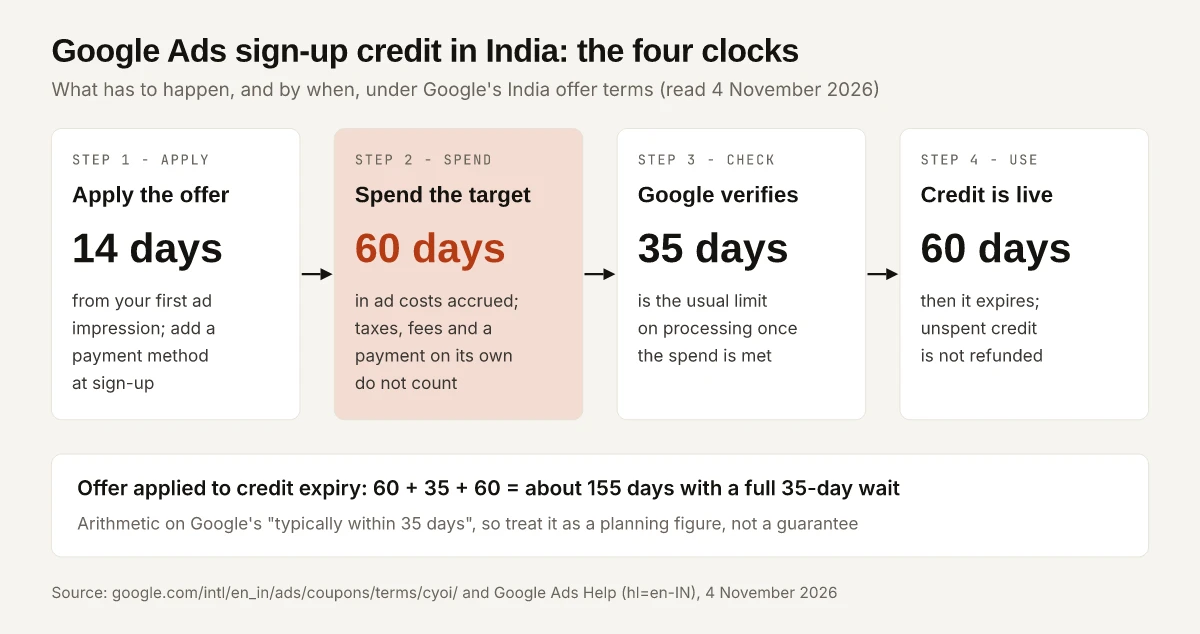
So the credit is decided by a clock, not by finding a code. The offer has to be applied within 14 days of your first ad impression, the target has to be spent within 60 days, Google takes up to 35 days to check, and the credit expires 60 days after it lands. Miss one of those dates and nothing restores it, because Google’s promotional offers policy says expired offers “can’t be reactivated or modified” and that Google “can’t provide promotional offers retroactively.”
On 4 November 2026, Google’s India page listed three sign-up offers for new advertisers, with the spend targets and Offer A the same on all 26 loads of the page that day and the credit for Offers B and C rotating between three sets:
| Offer | Spend with Google Ads in the first 60 days | Ad credit you earn (sets seen on 4 November 2026) |
|---|---|---|
| Offer A | ₹20,000 | ₹20,000 on every load |
| Offer B | ₹60,000 | ₹40,000, ₹70,000 or ₹75,000 |
| Offer C | ₹120,000 | ₹60,000, ₹150,000 or ₹175,000 |
The amounts are in INR on the India edition of the page (the old address, ads.google.com/intl/en_in/home/, now redirects there), written in the format Google uses. On those loads the page’s own code did not identify the visitor’s country as India, so an advertiser signing up from India may be shown a different set. Google’s India offer terms also open with “Offer available only while supplies last”: the figures on your own sign-up screen are the ones that bind.
Is There a Google Ads Promotional Code India Advertisers Can Use?
Only if Google or a partner sent you one; otherwise the offer is a selection you make at sign-up, with no code field involved. Google’s Help Center describes three ways a promotion reaches an account:
| Route | Who it is for | Code to type? | Where it is applied (per Google Help) |
|---|---|---|---|
| Sign-up offer on Google’s India page | Advertisers new to Google Ads with a billing address in India | No. “Select an offer”, then sign up | At sign-up; Google says “You will see the offer when you enter your billing information” |
| Coded promotion | Whoever Google or a partner sends it to | Yes | Billing menu, Promotions, the blue plus button, enter the offer, Submit (Redeem your offer) |
| Codeless promotion | Accounts shown an offer on their Promotions page | No | Promotions page, “Select the button associated with your promotional offer” |
The Redeem your offer page adds two limits worth reading before you start. Manager account users “can’t enter a promotional offer from the manager level”, and anyone planning to use monthly invoicing should set it up first, because otherwise “the offer will be invalidated and the amount lost” when the account switches.
Which Google Ads Sign-Up Offer Gives the Most Credit per Rupee?
It depends on which set of amounts the page shows you. In the lowest set seen on 4 November 2026, Offer A returned the most, ₹1 of credit for every ₹1 of required spend; in the other two sets, Offer C did. Every column after the first two is my arithmetic on Google’s numbers, with taxes excluded because the terms exclude them.
| Offer | Required spend | Average daily spend to reach it in 60 days | Credit per ₹1, low set (B ₹40,000, C ₹60,000) | Credit per ₹1, middle set (B ₹70,000, C ₹150,000) | Credit per ₹1, high set (B ₹75,000, C ₹175,000) |
|---|---|---|---|---|---|
| A | ₹20,000 | about ₹334 | ₹1.00 | ₹1.00 | ₹1.00 |
| B | ₹60,000 | ₹1,000 | ₹0.67 | ₹1.17 | ₹1.25 |
| C | ₹120,000 | ₹2,000 | ₹0.50 | ₹1.25 | about ₹1.46 |
The step-ups are where the decision sits. Moving from Offer A to Offer B adds ₹40,000 of required spend, and moving from B to C adds ₹60,000. In the low set that extra spend earns 50 paise and 33 paise of extra credit per extra rupee; in the middle set, ₹1.25 and about ₹1.33; in the high set, about ₹1.38 and about ₹1.67.
My decision rule, built from those numbers:
- Pick the largest offer whose target your planned first 60 days of spend already clears. In every set seen on 4 November 2026 the credit rose with the target, so that choice gives the most credit. Google’s page frames it the same way: “Select an offer that fits your monthly budget.”
- Before raising a campaign budget to reach the next tier, divide the extra credit by the extra spend on your own screen. Below ₹1, as in the low set, the extra credit is smaller than the extra spend; above ₹1 it is larger, but it only pays if you would use the extra ads.
- If you have not set a budget yet, work out what Google Ads costs in India and how its budget limits behave first, then pick the offer that matches it.
- Leave a margin above the target. Google’s payment-settings page tells prepay advertisers to pay “a little more than the requirement” because Google Ads “may stop serving your ads before the whole amount has been spent.” The methods Google lists for prepay in India, including UPI in the Android app, are in this guide to paying for Google Ads by UPI, card or NetBanking.
The credit is spent in the same paid search auctions any performance marketing budget buys, but it expires 60 days after it is applied, so plan the campaigns that will use it before it shows up in the account. Google’s promotional credit Help page adds that if you “don’t spend the full amount before the credit expires, the remaining balance can’t be refunded.”
The 14/60/35/60-Day Clock Behind Google Ads Credit in India
Every step of the India offer has its own deadline, and each one is written into Google’s India choose-your-offer terms, which Google’s India page links to.
| Clock | What Google’s India terms say | What it means for you |
|---|---|---|
| 14 days | The offer “must be applied to your first Google Ads account within 14 days of your first ad impression being served” | Choose the offer during sign-up, before any ad runs |
| 60 days | Campaigns “must accrue costs of at least the required amount … (excluding any taxes or applicable fees) within 60 days” | Spend counts only once the offer is applied |
| 35 days | The credit “will typically be applied within 35 days to the Billing Summary” | Costs during this wait are charged to your payment method |
| 60 days | ”The credit expires 60 days after it is applied to your account” | Have campaigns ready to spend it the week it lands |
Add the three later clocks and the window from offer applied to credit expiry is about 155 days (60 + 35 + 60) if processing takes the full 35 days. That total is my arithmetic on a “typically” figure, so treat it as a planning number. Two Help pages state the 14-day rule from a different starting point: the About promotional offers page says the account “must be less than 14 days old at the time of redemption”, and the policy page says “most offers need to be applied at sign-up.” Applying the offer at sign-up satisfies all three readings.
Inside the account, Google’s Check the progress of your promotions page says the Promotions page is “updated every few hours” and shows one of these statuses:
| Status (Google’s label) | What Google says it means |
|---|---|
| Redeemed: currently earning | Redeemed, but the spend requirement “hasn’t been met yet” |
| Processing | The spend requirement has been met and eligibility is being validated, which “may take up to 35 days” |
| Active | ”The reward associated with the promotion has been granted” |
| Expired | ”The promotion expired after redemption and before the spend requirement was met” |
| Invalidated | ”The promotion was invalid or invalidated” |
If you name the campaigns you launch in the 60-day window with a consistent campaign naming convention, the spend that counted toward the offer is easy to isolate later when you compare it against the credited period.
Do Taxes or a Prepayment Count Toward the Spend Requirement?
No. Only ad costs that accrue after the offer is applied count, and the India terms and Google’s Help pages spell out the rest:
| Counts | Does not count |
|---|---|
| Advertising costs your campaigns accrue after the offer is applied | Spend before you redeemed the offer (“that amount won’t count towards your offer”, Google Help) |
| Costs within the 60-day window | A payment into the account on its own: “Making a payment of the required amount is not sufficient” (India terms) |
| Taxes and fees: their payment “will not count towards earning any promotional credit” (India general terms) | |
| The credit itself, which “cannot cover the ‘spend requirement’ itself” (Google Help) |
Taxes also work in the other direction: the general terms say advertisers “may not use promotional credit for the payment of any taxes or other fees.” Once the credit is used up, Google’s payment-settings page says your ads “will continue to run and accrue costs”, charged to the payment method on the account. The India terms add that “You won’t receive a notification once credit in your Google Ads account is used up”, so set an end date or a budget cap on the credited campaigns.
Why a Sign-Up Offer or Promo Code Fails in India
Each condition below comes from Google’s own terms or Help pages, and each row quotes the page that sets it.
| What went wrong | Google’s wording | Fix or prevention |
|---|---|---|
| Offer applied too late | Applied “within 14 days of your first ad impression being served” (India terms) | Select the offer during sign-up |
| No payment method at sign-up | Applied only “if a payment profile and a valid payment method is added during the initial signup process” (India terms) | Add billing details in the same sign-up session |
| The business has advertised before | ”You cannot have advertised with Google Ads before using a different account for the same business” (Google Help) | A new account for an old business does not qualify; Google counts a different business, or the same business in a new country with a new billing address, as new (Types of offers) |
| Billing address outside India | ”Offer valid only for customers with billing address in India” (India general terms) | Use the India billing profile |
| A second offer on the same advertiser | ”One promotional offer per advertiser” (India terms) | Pick one tier; you cannot stack them |
| Paid but not spent | ”Making a payment of the required amount is not sufficient” (India terms) | Let campaigns run until costs reach the target |
| Billing setup changed after redeeming | Switching to invoicing later means “the offer will be invalidated” (Redeem your offer); on a billing transfer, active credits “won’t be transferred or refunded” (payment settings) | Settle billing before you redeem |
| Payment failed or account out of good standing | Google may “remove the promotional offer” and “nullify that credit” (India terms) | Keep the payment method valid through the 60-day window |
| Credit not there yet | Processing “may take up to 35 days” (Check progress) | Contact Google Ads Support only after 35 days; Google’s promotions troubleshooter asks whether “35 working days” have passed, so allow for that |
Two smaller conditions sit in the India general terms. “Use of the offer may be restricted to automatic payments billing options”, and an account opened in a currency other than the one the credit was awarded in means the spend requirement and credit “may be subject to foreign currency fluctuations.” Opening the account in INR avoids the second one.
Are Google Ads Coupon Codes on Third-Party Sites Safe to Use?
Apart from the sign-up offers on its own site, Google says promotions are “selectively distributed” through marketing communications or the Promotions page, and its promotional offers policy says promotions “aren’t available by request.” The same page lists “Selling Google Ads promotional credits” and “Using more than one promotional credit per customer” as unacceptable use, and warns that an account “may get suspended” for several violations or a serious one.
The India general terms add that the credit “is non-transferable and may not be sold or bartered”, and the India offer terms allow “One promotional offer per advertiser”. A code copied from a coupon list would take the one slot that Google’s own sign-up offer could have filled.
Offers for Existing Advertisers and Agencies
New advertisers are not the only ones who get credit. Google’s Types of offers page and the About promotional offers page describe a second category:
- Who counts as existing: “You’re considered an existing advertiser if you have had active spend on Google Ads in the last six months.”
- What the offers reward: adopting new features “(such as Performance Max campaigns)” or reactivating a dormant account, usually by spending on a specific campaign type or completing an action.
- How you get them: through the Promotions page or by email, applied “within the time frame outlined in the promotion Terms and Conditions.”
- Agencies and manager accounts: “Only manager accounts within the Google Partners programme can apply promotions from the manager account level” (Check progress). Other manager accounts apply the offer from the client account’s own Promotions page (Redeem your offer).
If a Performance Max offer is the one you take, expect its traffic in GA4 to file under the Cross Network channel rather than Paid Search, so judge the credited campaign on that row.
Google Ads Promotional Code India: Pick the Offer Before the First Ad
The search for a Google Ads promotional code India advertisers can type mostly ends at Google’s own sign-up page, where the offer is a choice rather than a code. The credit is won or lost on dates: the offer applied before the 14-day window closes, the target spent inside 60 days, up to 35 days of checks, then 60 days to use the credit.
Before you create the account, open Google’s India page and the India offer terms on the same day, note which offer and amounts they show, and choose the tier your first 60 days of planned spend already clears.
Frequently Asked Questions
Is there a Google Ads promotional code for India in 2026?
Usually there is no code to type. New advertisers with a billing address in India choose one of three offers on Google's India Google Ads page, and Google says the offer is applied automatically to the new account at sign-up. A typed code only applies when Google or a partner sends you one.
Is the Google Ads ₹20,000 credit real?
Yes. On 4 November 2026, Offer A on Google's India Google Ads page was ₹20,000 in ad credit for spending ₹20,000 within the first 60 days, and it was the one offer whose amounts did not change between loads of the page that day. The credit typically arrives within 35 days of meeting the target and expires 60 days after it is applied. Offers change and are available only while supplies last.
How long does Google Ads promotional credit take to show up?
Google's India terms say the credit is typically applied within 35 days of meeting the spend requirement, provided all eligibility checks are met. Google's Help Center says to contact Google Ads Support if it has not appeared after 35 days, and its troubleshooter counts that as 35 working days.
Do taxes count toward the Google Ads promotional spend requirement?
No. Google's India terms count ad costs excluding taxes and applicable fees, and say the credit cannot be used to pay taxes either. Paying the target amount into the account without the ads spending it also does not count.
Why is my Google Ads promotional code not working?
The usual causes in Google's own terms are applying the offer more than 14 days after your first ad impression, no payment method added at sign-up, a business that has advertised on Google Ads before, a billing address outside India, a billing setup change after redeeming, or costs that were paid but not spent within 60 days.