Google Ads TDS Refund: Form 131, Email and Deadlines
How to claim a Google Ads TDS refund in India from Google's own help page: Form 131, eps-tds@google.com or the Tax Operations form, and four quarterly deadlines.

The how-to guides on a Google Ads TDS refund, including TaxGuru’s March 2026 walkthrough and CAclubindia’s 2025 guide, tell you to download Form 16A and email it to tds.certificates@google.com before 30 July, 30 October, 30 January or 15 May. Google’s own India help page names none of those. When I read it on 4 November 2026, its TDS section asked for certificates “issued in Form 131”, set deadlines of 15 August, 15 November, 15 February and 15 June, and gave an email address only for some accounts: eps-tds@google.com.
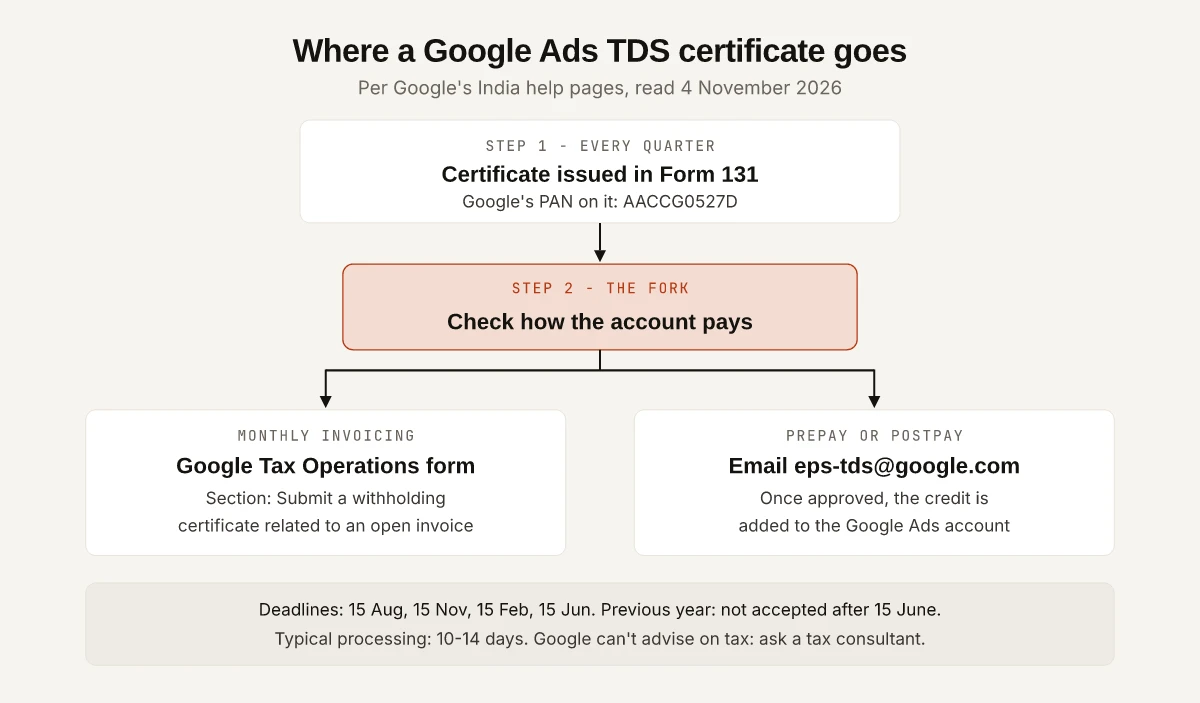
I think the guides start in the wrong place. Before any question about forms, the procedure on Google’s Taxes in your country page (India section) depends on how your Google Ads account pays: monthly-invoicing accounts upload the certificate through a Google form, prepay and postpay accounts email it, and for prepay and postpay Google’s page says that once the credit amount is approved, it is added to your account.
This is not tax advice. Google’s page says Google Ads “can’t advise on tax matters” and tells readers to check with a tax consultant. Everything below quotes or follows Google’s India help pages as they read on 4 November 2026, and Google can change them.
How to Claim a Google Ads TDS Refund
The steps below follow Google’s India TDS section and its withholding certificate page, as of November 2026:
- Find your payment setting. Google’s withholding page says some steps vary by the account’s payment setting: prepay, postpay or monthly invoicing. If you are not sure which setting the account is on, how postpay and prepay differ for India accounts explains both.
- Get the quarter’s certificate in Form 131. Google says certificates “are required every quarter” and should be issued within 15 days from the due date for filing the TDS return.
- Check Google’s details on it. PAN AACCG0527D, and the registered address of Google India Pvt. Ltd. in Bangalore (full text in the table below).
- Monthly invoicing: send a digital copy, electronically signed or a PDF scan of the signed certificate, through the Google Tax Operations form, under “Submit a withholding certificate related to an open invoice”.
- Prepay or postpay: email the same kind of digital copy to eps-tds@google.com.
- Wait for the reply. The withholding page gives a typical processing time of 10 to 14 days and says the support team contacts you if it needs more information or when the request is complete.
What Google’s India Page Says About TDS
Google’s India section on Taxes in your country covers TDS under three headings: “About Tax Deducted at the Source (TDS)”, “Sending Tax Deducted at the Source (TDS) certificate” and “The TDS rate”. Each point, with Google’s wording as it read on 4 November 2026:
| Point | Google’s wording or detail |
|---|---|
| How often | ”TDS certificates are required every quarter.” |
| Certificate | Certificates for quarters ending in June, September, December and March “need to be issued in Form 131” |
| When to issue | ”Issue these within 15 days from the due date for filing the TDS return.” |
| Google’s PAN | AACCG0527D |
| Address on the certificate | Google India Pvt. Ltd., No.3, RMZ Infinity, Tower E, Old Madras Road, 4th & 5th Floor, Bangalore 560 016 |
| Monthly invoicing | Google Tax Operations form, section “Submit a withholding certificate related to an open invoice” |
| Prepay or postpay | Email to eps-tds@google.com; “After the credit amount has been approved, it’ll be added to your account.” |
| Rate | ”2% excluding GST”, subject to change according to government regulations |
The page also links to the Income Tax Department of India’s website for more information on TDS. For other questions about TDS, Google’s page says to check with a tax consultant.
Google Ads TDS Deadlines and the 15 June Cut-Off
Google’s sentence is “Specific deadlines are 15 August, 15 November, 15 February and 15 June.” It lists them in the same order as the quarters they follow:
| Quarter ending | Deadline Google lists |
|---|---|
| June | 15 August |
| September | 15 November |
| December | 15 February |
| March | 15 June |
The second rule is a cut-off for late certificates: “No TDS certificates for the previous financial year are accepted if they’re sent after 15 June of the current financial year.” Google’s worked example still uses an old year (certificates for fiscal year 2021-2022 sent no later than 15 June 2022), so read the rule rather than the example.
As of 4 November 2026, the next date on Google’s list is 15 November 2026, for the quarter ending September.
Missed a Quarterly Deadline? What Google’s Page Covers
Google’s TDS section is short on this case, so split it by date:
- A late certificate for the current financial year. The page sets the four quarterly dates but says nothing about what happens to a certificate sent after one of them and before the year closes. Send it by the route for your payment setting anyway, and ask in the same email or form whether it can still be credited.
- A certificate for the previous financial year, after 15 June. Here the page is explicit: no such certificate is accepted. Applied the way Google’s own example works, certificates for fiscal year 2025-2026 had to be sent by 15 June 2026.
- A certificate you have not received yet. Google’s page only says when certificates should be issued, within 15 days from the due date for filing the TDS return. It does not cover a certificate that was never issued, and for tax questions it says to check with a tax consultant.
Where to Send the TDS Certificate: Form or Email
The route depends on the payment setting, and Google’s two pages agree on it.
- Monthly invoicing. The Taxes page says to send a digital copy “using the Google Tax Operations form under the ‘Submit a withholding certificate related to an open invoice’ section”. The withholding page adds that you select your country from the drop-down list on that form.
- Prepay or postpay. The withholding page’s India line reads: “To submit a TDS certificate for an account on prepay or postpay, email your scanned TDS certificate to eps-tds@google.com.”
- Either way, the copy can be electronically signed or a PDF scan of the signed certificate, per the Taxes page.
Neither of Google’s two pages mentions tds.certificates@google.com, the address in three of the four guides compared below, or Form 16A. If you have been emailing that address, send the next certificate by the route Google’s page names today.
Google Ads TDS Rate: 2% Excluding GST
Google’s rate line, in full: “The current rate of TDS for advertising-related payments to Google India Private Limited is 2% excluding GST. However, the rate of TDS is subject to change according to government regulations.”
As arithmetic on that rate only: 2% of a ₹1,00,000 advertising payment, excluding GST, is ₹2,000. For what the ads themselves cost, budgets and Google’s spending limits are covered in Google Ads cost in India.
Two things the rate line does not say:
- A section number. Google’s page names no section of the Income-tax Act. All four guides I compare below cite section 194C. Which section applies to your payments is a question for your tax consultant, and Google’s page sends you there too.
- Anything about GST. GST is a separate tax with its own part of Google’s India section, and it is outside this post. For how other marketing vendors in India word their tax lines, my checks of SEO agency prices in India and LinkedIn Premium’s rupee prices each give the tax wording a column of its own.
If Google Ads is your paid-search channel, the performance side in my comparison of growth and performance marketing, the TDS paperwork recurs with it: Google asks for a certificate every quarter.
What the Guides Say vs What Google’s Page Says
I compared four guides that walk through the claim with Google’s two help pages, all read on 4 November 2026. The guides: TaxGuru (by Deelip Kushwaha, 11 March 2026), CAclubindia (last updated 10 December 2025), e-startupindia (by Radha Dhaked, published 15 February 2023, modified 6 October 2026) and STechies (updated 11 January 2023).
| Point | What the guides say | What Google’s pages say (4 November 2026) |
|---|---|---|
| Certificate name | Form 16A (all four) | “Form 131” |
| Where to send | tds.certificates@google.com (TaxGuru, CAclubindia, e-startupindia) | Tax Operations form for monthly invoicing; eps-tds@google.com for prepay or postpay |
| Quarterly deadlines | 30 July, 30 October, 30 January, 15 May (all four) | 15 August, 15 November, 15 February, 15 June |
| Previous-year cut-off | 31 May (all four) | 15 June |
| How it comes back | ”credit the refund in the bank account” (e-startupindia) | “it’ll be added to your account” (prepay or postpay) |
| Processing time | ”5 to 15 working days” (TaxGuru) | typically 10 to 14 days (withholding page) |
The guides are not wrong on every point. STechies gives the same 2% rate excluding GST that Google states, and TaxGuru and CAclubindia both say the TDS comes back as ad credits, which matches Google’s prepay and postpay wording. The four guides say Form 16A; Google’s page asks for Form 131. I am not ruling on the law behind the two names, only reporting what each page prints.
Is the TDS Refund Paid to Your Bank Account?
Not for prepay and postpay accounts, going by Google’s TDS section: for them it says “After the credit amount has been approved, it’ll be added to your account.” For monthly invoicing, the page gives the form route and does not say how the amount is applied, beyond the form section’s name, which refers to an open invoice.
Money back to a bank is a separate process on Google’s Request a refund page, as of November 2026:
| Rule on Google’s refund page | Detail |
|---|---|
| Active account refunds | India is on the list of billing countries “not eligible for active account refunds” |
| The India route | ”you must cancel your account to trigger a refund of your remaining balance” |
| Who can cancel | Only users with admin access to the Ads account |
| Where the money goes | The original bank account or credit card used |
| What is never refunded | Promotional credits |
| Processing time | Two weeks for Google, plus time for your card company or bank |
That page does not mention TDS. So before anyone cancels an account to turn a TDS credit into cash, ask Google’s billing support in writing whether that credit counts as refundable balance.
Google Ads TDS Refund: What to Do Before 15 November
A Google Ads TDS refund starts with the account, not the certificate: find the account’s payment setting first, then send a Form 131 certificate by the route Google’s India page names for that setting, and treat any guide that still gives tds.certificates@google.com or the 30 July deadline as out of step with Google’s page.
Google can revise its page, and it still carries a 2021-2022 example, so re-open its India TDS section before each deadline. The next one on its list is 15 November 2026, for the quarter that ended in September: check the payment setting today.
Frequently Asked Questions
How do I claim a Google Ads TDS refund?
Google's India tax section says to send a digital copy of the TDS certificate, either electronically signed or a PDF scan of the signed certificate: through the Google Tax Operations form if the account uses monthly invoicing, or by email to eps-tds@google.com if it uses prepay or postpay. For prepay and postpay, Google says the credit is added to your account once approved.
What is the TDS rate on Google Ads in India?
Google's page says the current rate of TDS for advertising-related payments to Google India Private Limited is 2% excluding GST, and that the rate is subject to change according to government regulations. Google also says it can't advise on tax matters, so confirm the rate with a tax consultant.
What is the last date to send TDS certificates to Google?
Google lists four deadlines, 15 August, 15 November, 15 February and 15 June, for the quarters ending June, September, December and March. It accepts no certificate for the previous financial year sent after 15 June of the current financial year.
Is the Google Ads TDS refund paid to my bank account?
Google's TDS section describes no bank transfer. For prepay and postpay accounts it says the approved credit amount is added to your Google Ads account. A bank refund of a remaining balance in India needs the account to be cancelled, per Google's refund page, which does not mention TDS.
Does Google ask for Form 16A or Form 131?
Google's India page says the quarterly certificates need to be issued in Form 131, and the page does not mention Form 16A. Guides such as TaxGuru's and CAclubindia's say Form 16A. Which form your filing produces is a question for your tax consultant.