Campaign Naming Convention: The Four-Field System (2026)
A four-field campaign naming convention you can retrofit onto a live ad account, plus per-platform character limits and a UTM string that can never drift.
Sort your ad account by campaign name and you get an archaeology dig rather than a taxonomy. Q3_Webinar_FINAL. q3 webinar (new). Webinar_Q3_v2_USE_THIS. One campaign called test that has been serving for eleven months. Every one of them spent budget, and not one of them rolls up with the others.
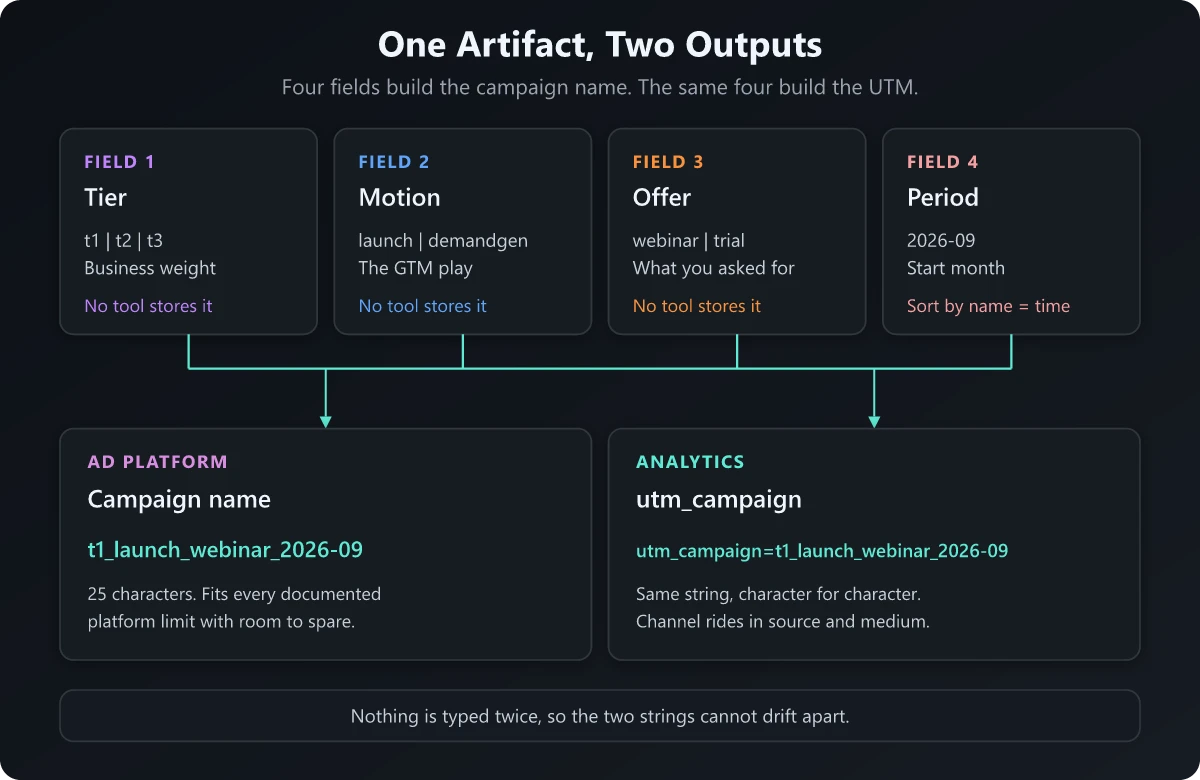
To name a marketing campaign, encode only what no other tool already stores, in a fixed order, using one delimiter. A durable campaign naming convention needs four fields: tier, motion, offer and start period, joined by underscores and written in lowercase. t1_launch_webinar_2026-09 is a complete campaign name. Everything else about that campaign is already sitting in a column you can filter on.
Most guides prescribe an eight-field template for a clean account. Yours has four hundred campaigns in it and half of them are serving right now. So here is the claim this post defends: conventions fail from being too long rather than too short, and the retrofit onto a live account is the harder half of the job. Four fields, and a rename plan that does not sever your reporting history.
How to name a marketing campaign in four fields
A field belongs in the campaign name only if no tool you already own can give you that column. That single test collapses those eight-field templates down to four.
| # | Field | What it encodes | Allowed values (yours will differ) | Why it earns a slot |
|---|---|---|---|---|
| 1 | tier | How much the business cares | t1, t2, t3 | No ad platform, analytics tool or BI table stores launch tier. Without it you can never answer how T1 launches performed against T2 this year |
| 2 | motion | The go-to-market play | launch, demandgen, brand, nurture, event, abm | Campaign objective is a bidding setting: five different motions all run on a lead-generation objective |
| 3 | offer | What you asked the person to do | demo, trial, webinar, report, pricing, waitlist | The conversion action lives in your CRM, and it never joins back to the ad row cleanly |
| 4 | period | The month it started | 2026-09 | Makes an alphabetical sort a chronological sort, and separates the same offer run twice |
Tier is the easiest field to leave out and the one I would defend hardest. If you run tiered product launches, the tier is the only thing in the string that connects spend to how much the company said the thing mattered. It is also the field that makes the convention legible to a CFO, because T1 versus T3 is a budget conversation.
The delimiter and casing rules
| Rule | Value | Why |
|---|---|---|
| Field separator | _ underscore | Hyphens are legal inside values, underscores are not. One character can only carry one meaning |
| Inside a value | - hyphen | 2026-09, paid-social, carousel-cfo |
| Case | lowercase, always | Analytics tools treat Webinar and webinar as separate rows, and Microsoft Advertising compares campaign names case-insensitively, so T1_Launch and t1_launch collide as duplicates |
| Allowed characters | a-z, 0-9, _, - | Everything else either percent-encodes or breaks the query string it ends up in |
| Separator count | exactly three underscores | A string with two or four underscores is invalid by definition, which makes validation one line of code |
That last row is the whole point of a fixed field count. A convention you cannot validate with a regular expression is not a convention, it is a suggestion.
Campaign naming convention best practices, argued as a minimum-viable taxonomy
The standard advice is to add fields until the name is self-documenting. That is exactly how you end up with EMEA_Q3_2026_MOFU_LEADGEN_WEBINAR_CFO_VIDEO_V2 and a team that quietly stops using it by week six.
Here are the fields to leave out, and where the column you actually wanted already lives.
| Field people add | Where that column already exists | What encoding it costs you |
|---|---|---|
| Geo or region | The location report in every ad platform, and Country or Region in your analytics tool | Multiplies your unique campaign names by the number of regions you run |
| Objective | A campaign setting you chose at creation and can filter on natively | Duplicates a field the platform already validates for you |
| Audience or persona | Ad set targeting, and utm_content when you need it downstream | Pushes the variable part of the campaign up into the wrong level of the hierarchy |
| Format or creative type | The ad object itself, and utm_content | The same campaign appears under four format suffixes, so campaign-level rollup dies |
| Funnel stage | Derivable from offer with a two-column lookup table | Two fields carrying one fact, which drift the first time somebody disagrees about where a webinar sits |
| Owner or requester | Change history and account permissions | People leave. The string does not |
Version (v2, final, new) | Nothing needs it | This is the field that produced final_v2_JULY_copy |
There is a hard reporting cost to each field you add. Google treats any dimension with more than 500 unique values in one day as high cardinality, and high-cardinality dimensions make it more likely a report hits its row limit. Once that happens, the least common rows are condensed into an “(other)” row and the tail of your campaign list stops being individually reportable.
Run the arithmetic. Four fields at three tiers, six motions, six offers and twelve months give you 1,296 possible strings across a full year. Add region at eight values, persona at five and format at four and the same taxonomy can generate over 200,000. You will never use all of them, but a busy account crosses 500 live values in a single day faster than the arithmetic suggests, and the campaigns that fall into “(other)” are always the small experimental ones you most wanted to read.
Short strings also survive human contact. The convention is followed at 4:50pm on a Friday by someone shipping a campaign under deadline, or it is not followed at all.
Campaign naming character limits and forbidden characters by platform
This is the failure mode that actually breaks conventions in production. The limits are all published.
| Platform | Documented campaign name limit | Other published constraints |
|---|---|---|
| Google Ads | 256 characters | Ad group names also 256, account names 255, keywords 80 |
| Microsoft Advertising | 128 characters | The name must be unique among active or paused campaigns, and the comparison is case-insensitive |
| Amazon Ads | 128 for sellers, 116 for vendors | Ad group names up to 255. Spaces are allowed inside a name but not at the start or end |
| Not published in the text ad character limits | Ad name capped at 255 characters including spaces; the field is optional | |
| Meta | Not published in the Marketing API reference | The campaign name field is documented only as “Name for this campaign”, with emoji explicitly supported |
| Campaign Manager 360 | 255 characters | Placement names up to 512, ad names up to 255 |
LinkedIn does publish limits for the ad copy itself: its single image ad specifications cap the headline at 200 characters and the introductory text at 3,000, and my page-by-page list of the limits LinkedIn states gives the shorter lengths it suggests to avoid truncation.
Two things fall out of that table. First, the binding constraint is never the ad platform. Google Analytics 4 publishes a 100-character limit on event parameter values, with named exceptions only for page title, page referrer and page location. Your ad platform will happily accept 256 characters that your analytics layer was never designed to carry, so budget against the tightest published cap in the chain rather than the loosest.
Second, the Microsoft uniqueness rule quietly kills a common workaround. When a name collides, people retype it in a different case. Microsoft compares case-insensitively, so that fails, and the person then appends _v2 to get past the error. That is the origin story of the version suffixes sitting in your account right now.
The character set, and why it is this short
Restrict campaign names to a-z, 0-9, _ and -. Nothing else. The reason is that the string does not stay in the ad platform. It ends up in a URL query string, where several characters carry structural meaning and must be percent-encoded.
- Space becomes
%20in a URL and+in form-encoded contexts, so one campaign shows up under two different strings depending on which tool wrote the link. - Ampersand ends the parameter.
utm_campaign=b2b&saasrecords the campaign asb2band creates a straysaasparameter. - Hash starts the fragment, and everything after it never reaches the server at all.
- Percent is the escape character itself, so a literal
%in a campaign name produces a malformed encoding. - Plus, equals, question mark and slash are all reserved, and encode to
%2B,%3D,%3Fand%2F.
There is also one forbidden word. The documented rule that classifies manual traffic as Cross-network is that the campaign name contains “cross-network”. Put that literal token in a campaign name and your manually tagged traffic gets reclassified into a channel meant for Performance Max and App campaigns. For the longer version of what actually lands in that bucket, I wrote it up separately in what cross-network means in Google Analytics.
Designing the campaign name and the UTM naming convention as one artifact
Most guides treat the UTM naming convention as an appendix. It is the same taxonomy expressed twice, and the two versions drift for a structural reason.
Google Ads ValueTrack can inject {campaignid}, {adgroupid} and {creative} into a tracking template automatically. There is no ValueTrack parameter that inserts the campaign name. So the ID is machine-generated and the name is hand-typed, which guarantees that after enough Fridays, the campaign name in the platform and the utm_campaign value on the landing page describe two different things.
The fix is to generate both from one field set at creation time. The campaign name is fields one through four joined. The UTM is that same string, unchanged, dropped into utm_campaign, with the channel carried by the parameters that were built to carry it.
| Parameter | Carries | Worked value |
|---|---|---|
utm_source | The specific property | linkedin |
utm_medium | The channel class | paid-social |
utm_campaign | The four-field name, unchanged | t1_launch_webinar_2026-09 |
utm_content | The one variable being tested | carousel-cfo |
utm_id | The platform campaign ID | {campaignid} |
utm_term | Keyword, paid search only | {keyword} |
Analytics documents eight manual campaign parameters and the dimension each one maps to, including utm_id, utm_source_platform and utm_creative_format alongside the five most teams know. Use utm_id and you get a durable numeric join key that survives a campaign rename, which becomes very useful in the retrofit below.
Channel never goes in the campaign name because utm_source and utm_medium already carry it. That has a benefit the standard advice misses entirely: when the same launch runs on Google, LinkedIn and email, all three share one utm_campaign value, so total launch performance is a single row you can read straight off the report. The campaign name is the join key across channels. Channel is the dimension you join on.
One constraint to respect: medium values are matched against fixed patterns. Paid Search and Paid Social both require the medium to match ^(.*cp.*|ppc|retargeting|paid.*)$, Organic Social requires one of social, social-network, social-media, sm, social network or social media, and Email matches source or medium against email|e-mail|e_mail|e mail. Invent a medium outside those lists and the traffic lands in Unassigned no matter how tidy the campaign name is. A medium of exactly ai-assistant now sends a tagged link to the AI Assistant channel when its source and campaign match no earlier channel rule, and tagging links for GA4’s AI Assistant channel covers which source and campaign values to avoid.
Campaign naming convention examples: worked strings per channel
| Channel | Campaign name (paste into the platform) | Landing page string |
|---|---|---|
| Paid search | t1_launch_demo_2026-09 | ?utm_source=google&utm_medium=cpc&utm_campaign=t1_launch_demo_2026-09&utm_id={campaignid}&utm_term={keyword} |
| Paid social | t1_launch_webinar_2026-09 | ?utm_source=linkedin&utm_medium=paid-social&utm_campaign=t1_launch_webinar_2026-09&utm_content=carousel-cfo |
| Lifecycle email | t2_nurture_report_2026-09 | ?utm_source=lifecycle&utm_medium=email&utm_campaign=t2_nurture_report_2026-09&utm_content=send-2 |
| Organic social | t3_brand_report_2026-09 | ?utm_source=linkedin&utm_medium=social&utm_campaign=t3_brand_report_2026-09 |
| Field event | t2_event_demo_2026-10 | ?utm_source=booth-qr&utm_medium=event&utm_campaign=t2_event_demo_2026-10 |
The event row is deliberately imperfect and worth calling out. event matches none of the medium patterns listed above, so that traffic sits in Unassigned, the value Analytics uses when no channel rule matches, until you build a custom channel group for it. Better to know that on day one than to discover it during a post-event readout.
Notice that the paid search and paid social rows share a tier, a motion and a period. That is what makes the launch legible: two rows, one launch, and no reconciliation work to prove it.
The organic social row tags the click from a LinkedIn post; the impressions before that click are reported in LinkedIn’s own post analytics, and LinkedIn impression benchmarks by follower count show whether that reach was typical for the account.
Ad naming convention: what belongs below the campaign
The rule that keeps the hierarchy clean is inheritance. A child level never repeats a field its parent already carries.
| Level | What it carries | Example | Rule |
|---|---|---|---|
| Campaign | The four fields, nothing else | t1_launch_webinar_2026-09 | Never changes for the life of the campaign |
| Ad set or ad group | The one variable being split at this level | cfo-enterprise-us | One dimension per ad set. Two variables means you need two ad sets |
| Ad | The creative identity | carousel-v1-proofpoint | Matches utm_content character for character |
If your ad naming convention repeats the tier or the period at the ad level, you have built a string that gets longer every time you duplicate a campaign, and duplication is how ad sets actually get created.
How to retrofit marketing campaign naming conventions onto a live account
Nobody starts clean. Retrofitting is genuinely harder than writing the convention, and the honest answer is that you rename almost nothing.
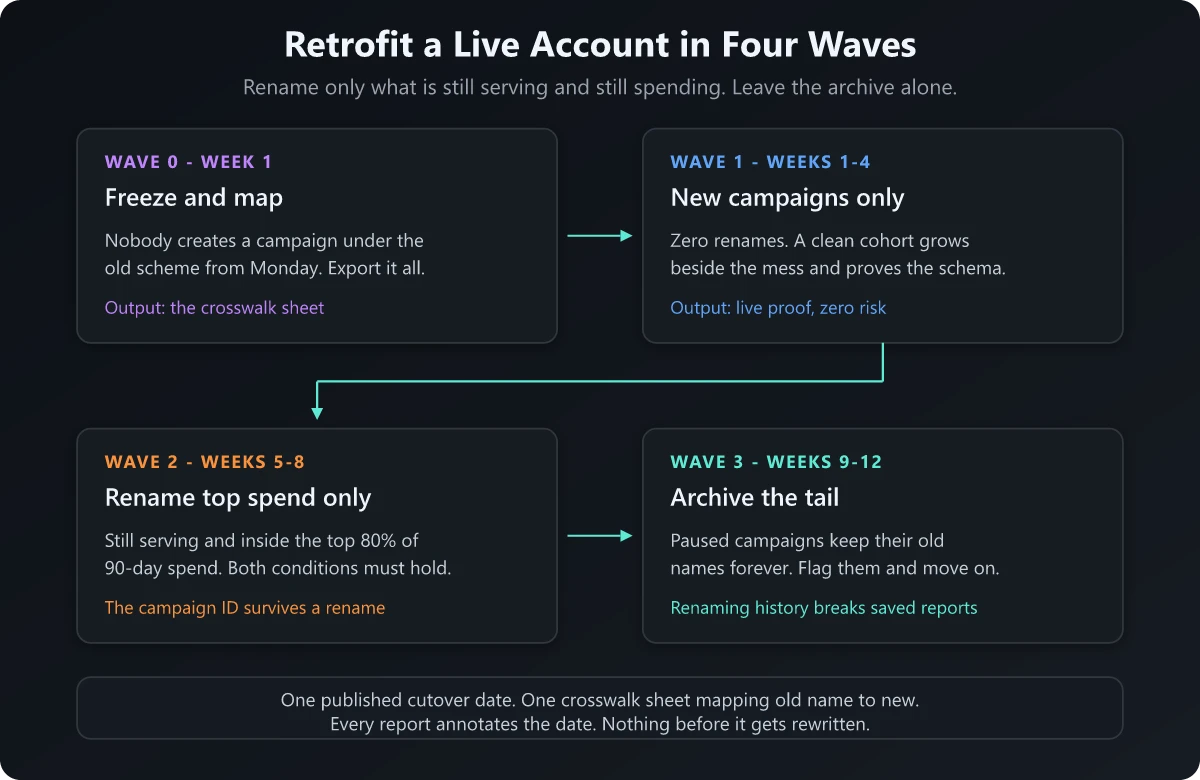
Wave 0, week one: freeze and map. Announce a date after which no new campaign gets created under the old scheme, then export every campaign with its ID, trailing 90-day spend and last-serve date. Build a crosswalk sheet. The crosswalk is what preserves continuity.
| Column | Example | Purpose |
|---|---|---|
platform | google_ads | Which account the row belongs to |
campaign_id | 21987654321 | The stable key. It survives every rename |
legacy_name | Q3_Webinar_FINAL_v2 | What your analytics tool has rows for before the cutover |
new_name | t1_launch_webinar_2026-09 | What it becomes, or blank if it stays legacy |
renamed_on | 2026-09-15 | The annotation date for every report that spans the change |
status | renamed, frozen or legacy | Tells the BI layer how to treat the row |
Wave 1, weeks one to four: new campaigns only. Every campaign created from the cutover date uses the convention. Zero renames. You get a clean cohort growing beside the mess, which proves the schema on live data before anything with history is touched. If a field turns out to be wrong, you find out here, when the fix costs nothing.
Wave 2, weeks five to eight: rename top spend only. Rename a campaign only if it is still serving and inside the top 80% of trailing 90-day spend. Both conditions have to hold, so on the four-hundred-campaign account above the rename list is whatever passes that filter, and everything else keeps its old name permanently. This is safe because every major platform identifies a campaign by its ID. Google Ads entities are addressed by a resource name built from unique numerical resource IDs, and the Microsoft campaign object says the same thing from the other direction: the ID is read-only on create and required on update, while the name is optional on update. Platform-native reporting therefore stitches across a rename on its own.
Analytics does not. utm_campaign is a string, so the old value and the new value are two permanent rows. That is exactly what utm_id and the crosswalk are for. Join on the ID in your BI layer and the two string rows collapse back into one campaign.
Wave 3, weeks nine to twelve: archive the tail. Do not rename paused campaigns with historical spend. Renaming them buys nothing and breaks every saved report, dashboard filter and spreadsheet formula that referenced the old string. Mark them legacy in the crosswalk and let them age out.
The do-not-rename list
Four categories stay exactly as they are, permanently:
- Anything paused with spend before the cutover. The history is worth more than the tidiness.
- Anything referenced by a hardcoded filter you cannot edit. Executive dashboards, scheduled exports, a partner’s reporting portal.
- Anything whose UTM is already live in a sent email. You cannot edit a link sitting in someone’s inbox, so renaming the campaign guarantees the click and the campaign never reconcile.
- Anything inside a running experiment. Wait for the readout.
Publish one cutover date, annotate every report that spans it, and never rename mid-month if your reporting cycle is monthly. Continuity comes from the annotation and the crosswalk.
The governance layer that keeps a campaign naming convention alive
A convention with no owner has no enforcement, and it decays back into free text one exception at a time. It comes down to four decisions.
- One named owner, not a team. Give it to whoever owns the reporting stack, usually a PMM or marketing ops lead, because that person feels the breakage first and therefore has the incentive to enforce it. A committee owns nothing.
- Enforce at creation, never at review. Nobody audits a 400-row campaign list twice. The gate is a builder that emits a validated string, plus platform-native naming templates or labels wherever they exist. Following the convention has to be easier than bypassing it.
- A twenty-minute monthly review with exactly one question. Which strings created this month do not parse into four fields? That question is answerable in twenty minutes precisely because there are four fields. An eight-field convention cannot be reviewed at all, which is another reason it dies.
- A break policy with two steps. First break: the owner renames it and sends the builder link. Second break: the campaign does not get budget approved. No shaming ritual, just a gate that costs something.
The agency onboarding rule
Agency onboarding is where a taxonomy drifts, because an incoming agency arrives carrying the house convention from its last client. The rule is that the locked field schema goes into the statement of work as an attachment, before the first campaign is built.
Ship it as a machine-readable file so it can be validated:
{
  "schema_version": "1.0",
  "delimiter": "_",
  "case": "lower",
  "allowed_chars": "a-z0-9_-",
  "fields": [
    { "name": "tier",   "values": ["t1", "t2", "t3"] },
    { "name": "motion", "values": ["launch", "demandgen", "brand", "nurture", "event", "abm"] },
    { "name": "offer",  "values": ["demo", "trial", "webinar", "report", "pricing", "waitlist"] },
    { "name": "period", "format": "YYYY-MM" }
  ]
}
New values get requested from the owner and added to the schema, which bumps the version. An agency that invents mofu-emea-video on its own fails a validation check, and that is a much shorter conversation than a debate about a document.
This is the same discipline that makes brand guidelines enforceable rather than aspirational: a small number of locked decisions, one owner, and a version number. It is also what makes your product marketing metrics trustworthy, because every performance number you report is a sum over campaign strings.
Build the string: a free campaign name and UTM builder
I built the Campaign Name and UTM Builder to be the creation-time gate this system needs. Pick the four fields and it emits the campaign name and the matching UTM string from the same inputs, so the two cannot diverge. It checks the result against the published per-platform character limits, flags any forbidden character before you copy, and exports the locked field schema as JSON so your team and your agency work from the same file.
It runs entirely in the browser and there is no signup.
Write the convention for the account you already have
The four-field campaign naming convention above is deliberately small, and the smallness is the argument. Tier, motion, offer and period are the only four facts about a campaign that no tool you own already stores. Everything else is a column you already have, and encoding it a second time costs you cardinality, character budget and adoption.
The retrofit matters more than the taxonomy. Freeze first, run new campaigns clean for a month, rename only the campaigns still serving that carry most of your spend, and leave the archive alone forever. Keep a crosswalk and one published cutover date, and your history stays readable straight through the change.
Then give the convention an owner, a monthly twenty-minute check and a schema file your agency signs against. A campaign naming convention usually dies for three reasons: there were too many fields, nobody owned it, and the first person working under deadline typed _final_v2 to get past an error.
Frequently Asked Questions
How do you name a campaign?
Encode only what no other tool already stores, in a fixed order, with one delimiter. Four fields do it: tier, motion, offer and start period, joined by underscores and written in lowercase, which produces a name like t1_launch_webinar_2026-09. Channel, geo, audience and format stay out of the name because every one of them already exists as a queryable column.
What is a good naming convention?
One that is short enough that people follow it under deadline and strict enough that a machine can validate it. If a string cannot be parsed into a fixed number of fields with a single delimiter, the convention is decorative. Four fields, one underscore separator, lowercase only, and no character outside a-z, 0-9, underscore and hyphen.
What are the best practices for naming campaigns?
Keep the field count low, fix the field order, lock the allowed values per field, use lowercase everywhere, and generate the campaign name and the UTM string from the same input so the two cannot drift. Enforce at creation time, because nobody audits a 400-row campaign list twice.
What are the three types of naming conventions?
Positional or delimiter-based (t1_launch_webinar_2026-09), key-value pair (tier=t1|motion=launch), and free-text descriptive (Q3 Webinar Push). Positional is the right default for campaigns because it is the shortest and the easiest to validate. Key-value survives field reordering but doubles the character count, and free text gives you nothing to validate against.