How to Cancel AutoPay in PhonePe (and the Plan Behind It)
How to cancel AutoPay in PhonePe in four taps, from PhonePe's own help pages, and why deleting the mandate stops the debit but not the plan you bought.
Deleting an AutoPay in PhonePe ends the mandate, the standing permission a merchant uses to pull money from your bank account. The subscription you bought from that merchant is a separate agreement: PhonePe’s Autopay terms describe PhonePe as “only a facilitator of payments” and “not a party to the payment transaction”. So the question of how to cancel AutoPay in PhonePe has two answers: four taps in the app for the mandate, and the merchant’s own cancel button for the plan.
My advice from reading PhonePe’s help center and terms on 24 November 2026: do both, plan first. PhonePe can stop the next debit, but it cannot refund one, and it sends refund and service questions to the merchant.
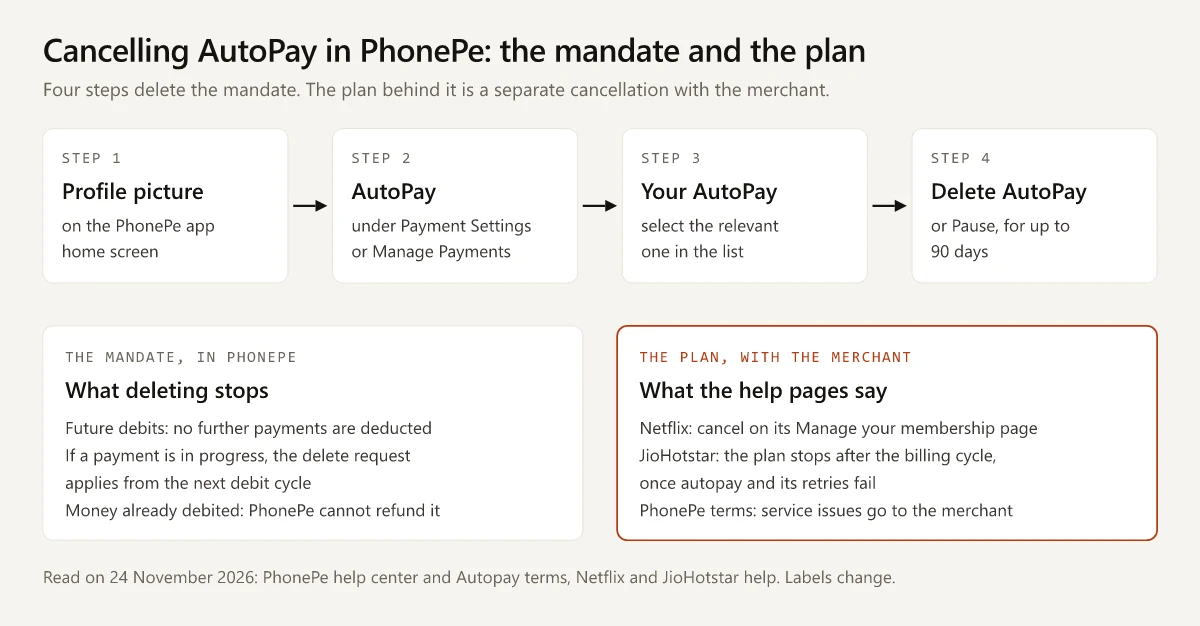
Delete an AutoPay in PhonePe (PhonePe help center, read 24 November 2026):
- Tap your profile picture on the PhonePe app home screen.
- Under Payment Settings, tap AutoPay.
- Select the relevant AutoPay.
- Tap Delete AutoPay, and enter your UPI PIN if asked; PhonePe says this is for verification and deducts nothing.
To pause instead, follow the same path and tap Pause; PhonePe allows a pause of up to 90 days.
How to Cancel AutoPay in PhonePe, Step by Step
The four steps above are from PhonePe’s help article Can I delete an AutoPay that I have set up?; its pause article uses the same path ending in Pause (see Delete or Pause below). The delete article adds three conditions:
- “You may be asked to enter your UPI PIN to confirm. This is only for verification and will not result in any deductions.”
- “You cannot delete an AutoPay for lending through PhonePe once it is set up.”
- “If your payment is currently in progress, your delete request will still be processed. However, it will be applied from the next debit cycle.”
The menu name is where PhonePe’s pages disagree. They call the section on the Profile screen by three different names, so look for the word AutoPay rather than a heading:
| PhonePe page (read 24 November 2026) | Path it gives |
|---|---|
| Can I delete an AutoPay that I have set up? | Profile picture > Payment Settings > AutoPay > Delete AutoPay |
| A second live copy of the same question | Profile picture > AutoPay “under the Payments Management section” > Delete AutoPay |
| How can I manage my AutoPay? | Profile icon > Manage Payments > AutoPay > “Pause or Delete AutoPay” |
| PhonePe’s blog post on fraudulent subscription mandates, 4 March 2026 | ”PhonePe Profile > Autopay Settings” |
The second copy also says you “will be asked” for the UPI PIN, where the first says you “may be asked”. Either way, PhonePe states that the PIN step deducts nothing.
What Happens After You Delete an AutoPay in PhonePe
Four PhonePe help articles, read 24 November 2026, cover what happens next, including a processing wait of up to 48 hours.
| Question | PhonePe’s answer | Source |
|---|---|---|
| Will money still go out? | ”No further payments will be deducted from your bank account.” | Your AutoPay is completely deleted |
| Is it instant? | Not always: “Please wait for up to 48 hours, as the request processing time can vary between the bank and the merchant.” | Why is my AutoPay cancellation or deletion taking time? |
| Can I get money back? | ”PhonePe cannot reverse or refund the transaction”; refund questions go to the merchant | Can I get a refund for an amount debited through AutoPay? |
| Is there a fee? | ”No, you will not be charged any fee for pausing or deleting your AutoPay.” | Will I be charged a fee? |
| How do I restart it? | ”Set up a new AutoPay on the merchant’s app or website.” | Your AutoPay is completely deleted |
Deleting the mandate does not close the plan for you: JioHotstar lets the plan run to the end of the current billing cycle and stops it “on failure of the autopay and retry attempts”, and Netflix ends a membership from its own Manage your membership page. That is why my order below puts the merchant first.
Cancel the Subscription Behind the Mandate Too
PhonePe’s terms say it “shall not hold any responsibility” for issues with the goods or services you paid for, and that “You can directly reach out to the Eligible Merchant(s)”. The plan lives with the merchant, and each merchant writes its own rule for what a revoked mandate does to it. Netflix, JioHotstar and ChatGPT all appeared in Google India’s autocomplete for this query on 24 November 2026. Netflix, for example, lists UPI AutoPay on its payment options page and says “UPI requires setting up a recurring mandate during sign-up to allow monthly automated renewals.”
What each of the three says about cancelling:
- Netflix. Its cancel article sends you to the Manage your membership page, then Cancel, then Finish Cancellation, and says: “This is the only way to cancel your account and end your membership.” You keep watching until the end of the billing period you paid for.
- JioHotstar. Its UPI AutoPay article says “You can revoke / cancel the Autopay mandate on your UPI app anytime”, and that the subscription “will stop with immediate effect after the current billing cycle ends, on failure of the autopay and retry attempts.” Its cancel article gives the in-app route as My Space, Help & Settings, Account Settings, Cancel, then Cancel Auto renewal, says cancelling “ensures that your subscription will not be renewed after the current billing period”, and says “All plans are non-refundable”.
- ChatGPT Go. OpenAI’s cancel steps, its 24-hour cut-off and how they line up with the mandate are in what happens when the free ChatGPT Go year ends.
LinkedIn also appeared in that autocomplete list; a Premium plan is cancelled wherever it was billed, as set out in cancelling LinkedIn Premium by billing channel.
Canva, Claude and Adobe each set their own rules for UPI and mandate billing, covered in cancelling Canva Pro paid by UPI Autopay, stopping a Claude plan in India and the Adobe cancellation guide.
My order for any of them:
- Cancel the plan in the merchant’s app or website and keep the confirmation.
- Open PhonePe, go to AutoPay and check the mandate. If it still shows as active, delete it.
- If the Delete button is greyed out or missing, contact the merchant: PhonePe says the option returns once the merchant re-enables it (next section).
PhonePe also lets you do step 2 from the other side: its article on deleting an AutoPay set up on an external merchant’s platform says “you can log into the external merchant’s app or website and select the option to delete the AutoPay you’ve set up.”
Why the Delete AutoPay Option Is Missing or Greyed Out
PhonePe’s answer is that the merchant controls the button. Its article Why am I not able to see the option to delete my Autopay? says “You might not see the Delete option if the merchant has disabled it for your AutoPay. This usually happens when a payment is in progress,” and adds: “PhonePe does not control whether the option to delete an AutoPay is enabled or disabled.”
The terms list the cases where you cannot act alone:
- Merchant-only mandates. “certain types of Mandate can only be revoked if such request to revoke the Mandate has originated from the Eligible Merchant.” A matching sentence covers pausing.
- Loans. The lending AutoPay article says you cannot pause or delete these through PhonePe, because the options “have been disabled by the lender.”
- UPI Reserve Pay on credit. In the section on Reserve Pay, where an amount is blocked up front, the terms say that for a credit card or credit line “Applicable Laws require that the Mandate remains fixed and cannot be manually revoked or deleted by the User once authorized.” The terms bar only the user, so ask the merchant.
What to do in each case:
| Why the button is missing | What to do |
|---|---|
| A debit is in progress | PhonePe says you can delete it once the merchant re-enables the option; contact the merchant |
| The merchant disabled it | Cancel the plan with the merchant, or delete the AutoPay from the merchant’s app or website |
| It is a loan AutoPay | Contact the lender or your bank. If the loan is already closed, PhonePe’s paused-AutoPay article asks you to share the lender’s No Objection Certificate and confirmation from your bank through Chat with Us |
| You cannot find the merchant’s support details | PhonePe keeps a Contact the Merchant page with support links for merchants such as Google and JioHotstar |
Delete or Pause: Which One to Pick
Pausing keeps the mandate and blocks debits for a while. PhonePe’s article Can I pause an AutoPay? uses the same path as deleting, ending in Pause, and says “You can pause an AutoPay for a maximum duration of 90 days.” The terms add that “Any transaction initiated by an Eligible Merchant on a paused Mandate will be declined automatically.”
| Your situation | Pick | Why, per PhonePe |
|---|---|---|
| You are done with the service | Delete, after cancelling the plan | Deleting ends future debits; a pause stops them only “temporarily” (PhonePe blog, 4 March 2026) |
| A break of 90 days or less | Pause | The 4 March 2026 blog post: “If you are going on vacation or just want to take a break from a service, you don’t have to cancel it fully.” |
| An insurance premium | Neither, unless you will pay by hand | The insurance article says pausing or deleting stops automatic payments and “you cannot reactivate the mandate once revoked” |
Unpausing is the same path ending in Unpause, per the paused-AutoPay article. PhonePe’s terms make a paused mandate inactive only “for a duration”, but none of the help pages I read says what happens on day 91, so check the AutoPay before then.
What You Can Cancel in PhonePe, by Mandate Type
The rows below come from PhonePe’s help center, plus its Autopay terms for Reserve Pay and one-time mandates. PhonePe’s list of what AutoPay covers includes IPOs, monthly mutual fund SIPs, wallet top-ups, payments on a merchant’s app or website, gold SIPs, insurance premiums and bill payments. The cancel route differs by type:
| Mandate type | Delete in PhonePe? | Pause? | Where else to go |
|---|---|---|---|
| Subscription on a merchant’s app or website | Yes, Delete AutoPay | Yes, up to 90 days, if the merchant allows | The merchant’s app or website, for the plan and for refunds |
| Bill payment AutoPay | Yes; PhonePe says you cannot edit the details “However, you can pause or cancel the same at any time” | Yes | The page names none |
| Loan or lending AutoPay | No | No | Your lender or bank |
| IPO bid (one-time mandate) | The page sends you to the broker | Not covered | The broker’s website you bid on; PhonePe’s IPO article says revoking works “between 12:00 p.m. and 5:00 p.m. only during the bid offer period” and the bank releases the blocked amount “within 2 to 3 days” (PhonePe’s Autopay terms say a one-time mandate’s blocked funds “shall be unblocked immediately”; the help article allows 2 to 3 days to show in your account) |
| PhonePe Wallet auto top-up | Yes, from the wallet screen | Not covered on the page | PhonePe’s wallet article: PhonePe Wallet under Money Transfers > Manage auto top-up > Delete AutoPay and Confirm |
| Reserve Pay on a credit card or credit line | No, per the terms | Not covered | The merchant (the terms bar only the user from revoking it) |
| Insurance premium | Yes, but it cannot be reactivated | Yes | Health: pay manually with Pay Now on the policy screen. Life: pay manually, or set up a new mandate on the insurer’s portal |
If You Do Not Recognise the AutoPay
PhonePe’s trust-and-safety post of 4 March 2026 says that for any recurring AutoPay “we send you a notification 24 hours before the scheduled deduction”, and that “you have 24 hours to delete the autopay.” Its test for a fake: “Real mandates typically begin within the merchant’s app (e.g., you choose PhonePe for autopay within the Netflix app). Scam mandates are usually a random SMS link or a pop-up.” It also reminds readers that “you never need to enter your UPI PIN to receive money.”
If you see a mandate you never set up, the same post says to “delete it right away.” That is the one case where the PhonePe delete comes first, because there is no plan of yours behind it to cancel.
If the Mandate Moved to Another UPI App or Phone Number
A mandate can leave PhonePe without being cancelled. The terms call this porting: a move to another UPI app “must be initiated on the Destination App”, and once it is ported out, PhonePe will “no longer provide notifications, modifications, or execution services” for it. Delete it in the app that now holds it.
- Finding it: PhonePe’s transfer article says Profile > Payment Settings > AutoPay > Explore Now shows “your active AutoPays on other UPI apps”.
- A number you gave up: mandates “may continue to be processed and debited”, and the terms say “it is Your sole responsibility to contact the respective Eligible Merchants directly to revoke or modify the Mandates.”
- A bank account you want to unlink: the terms say you “shall not be permitted to unlink the Payment Account associated with the VPA for as long as there are active Mandates registered against such Payment Account.” Delete the mandates first.
How to Cancel AutoPay in PhonePe Without Losing Track of the Plan
To cancel AutoPay in PhonePe: Profile, AutoPay, select it, Delete AutoPay, and a PIN that deducts nothing. Those taps stop the money. They do not end a Netflix membership or refund a debit already taken.
So cancel with the merchant first, keep the confirmation, then open PhonePe and check that the mandate is gone. Help pages and menu names change; these were read on 24 November 2026.
Frequently Asked Questions
Does deleting AutoPay in PhonePe cancel my subscription?
Not on its own. PhonePe's Autopay terms call PhonePe 'only a facilitator of payments' and send issues with the service to the merchant, and Netflix's cancel article says signing out or deleting the app does not cancel an account; you cancel from its Manage your membership page (or with the payment partner that bills you). Cancel the plan with the merchant, then delete the mandate in PhonePe if it still shows.
Can I pause AutoPay in PhonePe instead of cancelling it?
Yes, where the merchant allows it. PhonePe's help center says you can pause an AutoPay for a maximum of 90 days, that the Pause option may be greyed out if the merchant or lender disabled it, and that an AutoPay for lending cannot be paused through PhonePe.
Why is the delete AutoPay option not showing in PhonePe?
PhonePe says the merchant may have disabled the Delete option, which usually happens while a payment is in progress, and that PhonePe does not control whether it is enabled. AutoPays for loans cannot be deleted through PhonePe at all; contact the merchant or the lender.
Does PhonePe charge a fee to cancel AutoPay?
No. PhonePe's help center says you will not be charged any fee for pausing or deleting an AutoPay. You may be asked for your UPI PIN to confirm, which PhonePe says is only for verification and does not deduct money.
Can I get a refund after cancelling AutoPay in PhonePe?
Not from PhonePe. Its help center says that once an amount has been debited through AutoPay, PhonePe cannot reverse or refund the transaction, and refund questions go to the merchant or service provider under that merchant's own refund policy.