How to Delete X Account (Twitter) and Keep It Deleted
How to delete X account (Twitter) for good: request your archive, cancel app-store Premium, deactivate, then stay logged out for 30 days. Steps from X Help.
Deactivation is the only delete button X gives you. X’s Help Center page on deactivating an account calls it “the first step to deleting your account permanently”, says it “lasts 30 days”, and deletes the account only “If you do not access your account within the 30-day deactivation period”. One login inside that window, by you or by a third-party app you once authorized, brings the account back. Below is how to delete X account data for good, and the steps are the same if you still call the service Twitter.
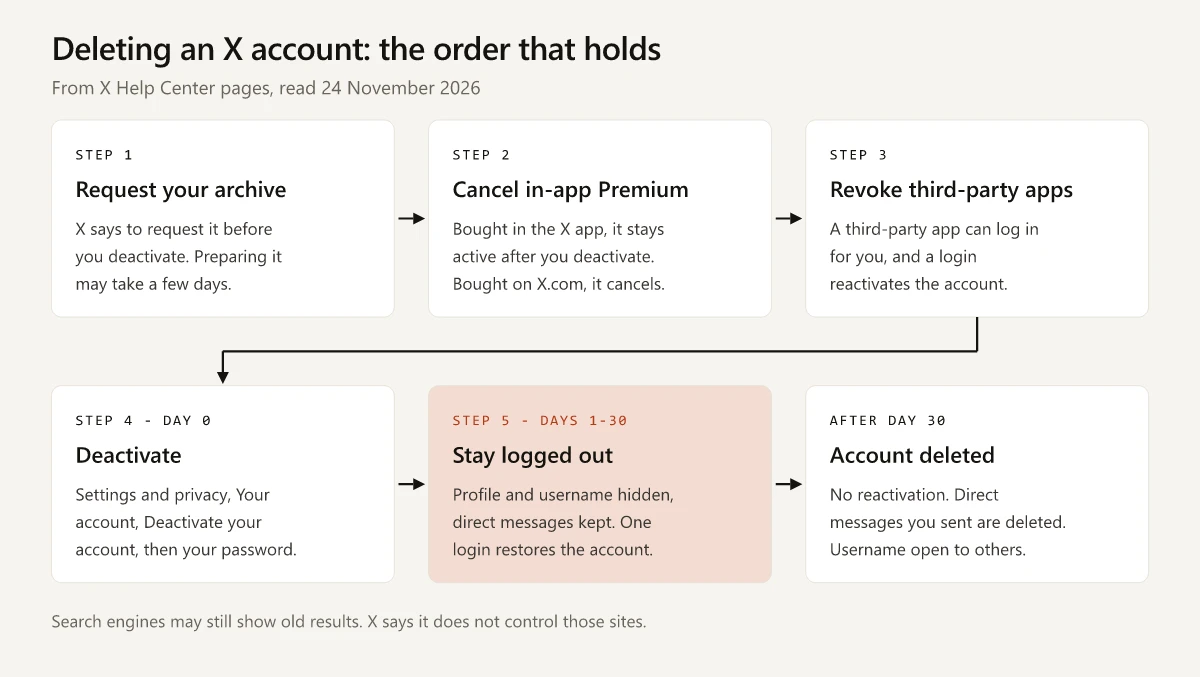
The full sequence, from X’s Help Center as I read it on 24 November 2026:
- Request your X archive and download the .zip file. X says you need to request it before you deactivate.
- Cancel any X Premium you bought inside the iPhone or Android app, in the App Store or Google Play. X says it stays active after deactivation.
- Revoke third-party apps under Apps and sessions, so none of them logs in for you.
- Open Settings and privacy, select Your account, then Deactivate your account; select Deactivate, enter your password and confirm.
- Do not log in for 30 days. After the window, X deletes the account.
My reading of those pages is that the Deactivate button is the smallest part of the job, and the order around it does the work: archive first, the app-store subscription second, third-party apps third, the button fourth, then 30 days without a login. Get the order wrong and you can be left with a deactivated account that Apple or Google Play still bills, or one that a third-party app keeps reviving.
Every label, step and quote here comes from X’s Help Center and its Privacy Policy (effective 15 January 2026), plus Apple’s and Google Play’s help pages for the store steps, all read on 24 November 2026. None of the X Help pages I read shows a last-updated date, so if your screen differs, trust the linked page.
Day 0, Days 1-30 and After Day 30: The Deactivation Timeline
X’s Privacy Policy describes the mechanism in one line: follow the deactivation instructions and “your account will be deactivated and your data will be queued for deletion.” The stages below are quoted from the deactivation page and X’s reactivation article. A dash means the pages say nothing for that stage.
| What | Day 0: you deactivate | Days 1-30: deactivated | After day 30: deleted |
|---|---|---|---|
| Public profile and username | ”will not be viewable on x.com, X for iOS or X for Android” | - | “your account is no longer available in our systems” |
| Reactivating by logging in | Deactivating starts “a 30-day window that gives you space to decide" | "easily restores your account" | "You won’t be able to reactivate your previous account” |
| Your posts | - | Come back if you log in, though “posts, followers, likes, etc., may take a while to fully restore" | "you won’t have access to any old posts” |
| Username and email address | - | ”the information remains tied to the deactivated account to allow for reactivation” | Username “will be available for registration by other X accounts” |
| Direct messages | - | ”your direct messages won’t be deleted" | "direct messages you’ve sent will also be deleted” |
| Subscription bought on X.com | ”will automatically cancel after you deactivate your account” | - | - |
| Subscription bought in the X app | ”they will remain active” | Managed “through the platform where you originally subscribed” | - |
| Your data on X’s systems | ”Deactivating your account does not remove data from X systems" | "X may retain some information on your deactivated account” | - |
X offers no way to delete the account immediately or to skip deactivation in the pages I read: the deactivation page says the account is permanently deleted “After your 30-day deactivation window”. ChatGPT has no such window: OpenAI says a deleted account cannot be reactivated, as my guide to deleting a ChatGPT account sets out.
Step 1: Download Your X Archive Before You Deactivate
The deactivation page fixes the timing: “If you want to download your X data, you’ll need to request it before you deactivate your account.” X’s archive article gives the route on each platform.
| Platform | Steps in X’s archive article |
|---|---|
| iPhone | Tap your profile icon, then Settings and privacy. Tap Account, then Your X data under Data and permissions. Tap Send code, enter the code, then tap Request data next to X under Download your data |
| Android | Tap the navigation menu icon or your profile icon, whichever your top menu shows, then follow the same path as on iPhone |
| Desktop | Click the more icon and select Your account. Click Download an archive of your data, enter your password and click Confirm. Click Send code, enter the code, then click Request data |
What the same article says about the file:
- Your email address has to be confirmed first: “Please make sure your email address is confirmed prior to requesting your X archive”.
- The wait: “It may take a few days for us to prepare the download of your X archive.” X emails you, or sends a push notification if you have the app installed, and also emails a download link.
- The contents: X says the archive comes as “a machine-readable archive of information associated with your account in HTML and JSON files”, downloaded as a .zip file. The list includes your profile information, posts, Direct Messages, media, followers, the accounts you follow, your address book, Lists, inferred interest and demographic information, and ad data.
- The download needs a login. The article says to click the Download button “while logged in to your X account”.
Signing in after you deactivate to fetch the file would, by my reading of the two pages, reactivate the account; X does not say so directly. The safe order is request, wait, download, then deactivate.
If you plan to repost your best material on Threads or elsewhere, the archive is your source file; the Threads character limit by field and how X counts characters show what will fit.
Step 2: Cancel X Premium Bought in the iPhone or Android App
X’s deactivation page splits paid subscriptions by where you bought them: “Deactivating your X account does not automatically cancel a X subscription. If you have any active paid subscriptions (e.g., X Premium, Super Follows) purchased through the X app, they will remain active. You can manage these subscriptions through the platform where you originally subscribed. Subscriptions purchased on X.com will automatically cancel after you deactivate your account.”
If you bought it in the app, cancel it in the App Store (Apple’s steps) or Google Play (Google’s steps) before you deactivate; Google Play’s page adds, “When you uninstall the app, your subscription won’t cancel.”
The cancel timing, the refund rule and X’s instruction to contact Apple or Google for app purchases are in my X Premium price breakdown by checkout, which also explains how to tell the original X Premium tiers from The X Subscription.
Step 3: Revoke Third-Party Apps That Can Log In for You
The FAQ on X’s deactivation page takes the question “I deactivated my account, but why does it keep getting reactivated?” and answers: “If you authorized any third-party apps to access your account, you may be indirectly logging in from another app. Because logging into X automatically reactivates your account, make sure to revoke third-party app access to your X account.”
The steps, from X’s article on third-party apps and log in sessions:
- Sign in to your account.
- Go to the Apps and sessions section of your account settings. X says every app connected to your account is displayed there, with its permissions listed under the app name and description.
- Click the Revoke access button next to the app, or at the bottom of the page after clicking the app’s name.
The same section lists your active login sessions, with a Log out button next to each and Log out all other sessions at the top of the list. X’s deactivation FAQ names only third-party apps, so logging out your other sessions is my addition and not X’s instruction.
If the account comes back and you did not log in, X’s deactivation troubleshooting article treats it as a security problem: “If you receive an email that your account has been reactivated, and you did not log in to reactivate, your account may have been compromised.” It says to change your password and review your account connections, after which “you can deactivate your account again.”
Step 4: How to Delete X Account on iPhone, Android and Desktop
These are the steps on X’s deactivation page, which has a tab for each platform:
| Step | iPhone | Android | Desktop |
|---|---|---|---|
| 1 | Tap the navigation menu icon, then Settings and privacy | Tap the navigation menu icon or your profile icon, whichever the top menu shows, then Settings and privacy | Click the More icon, then Settings and privacy |
| 2 | Tap Your account, then Deactivate your account | Tap Account, then Deactivate your account | From the Your account tab, click Deactivate your account |
| 3 | Read the account deactivation information, then tap Deactivate | Read the account deactivation information, then tap Deactivate | Read the account deactivation information, then click Deactivate |
| 4 | Enter your password and tap Deactivate | Enter your password and tap Deactivate | Enter your password and click the Deactivate account button |
| 5 | Tap Yes, deactivate | Tap Yes, deactivate | - |
Details from the same page that the table leaves out:
- The second label differs in X’s own steps: the deactivation article says Your account on iPhone and desktop and Account on Android, while the archive article says Account on iPhone too.
- X’s page links the words Deactivate your account to x.com/settings/deactivate, which opens the setting directly.
- No step is labelled Delete. X’s “Deactivate or close my account” contact form shows the line “Follow instructions here to deactivate your account”, and that link leads back to the deactivation page.
Step 5: Stay Logged Out for 30 Days
X’s reactivation article describes what a return looks like:
- Visit x.com/login, or open the X app on iOS or Android.
- Enter your login credentials.
- “Before you sign in, you’ll see a notice asking you to confirm if you want to reactivate your account.”
- If you choose to reactivate, X redirects you to your Home timeline.
X’s two pages do not match on that third step. The reactivation article describes a notice that asks you to confirm, while the deactivation FAQ says “logging into X automatically reactivates your account”. I would not count on the notice. Treat any login during the 30 days, on any device or through any third-party app, as a reactivation.
The Privacy Policy presents the window as a way back from a mistake: “For up to 30 days after deactivation it is still possible to restore your X account if it was accidentally or wrongfully deactivated.” After the window, the deactivation page says, “You won’t be able to reactivate your previous account and you won’t have access to any old posts.”
How to Delete X Account Without a Password or After a Suspension
The deactivation steps ask for your password, and X’s FAQ says “Deactivation is an action that must be taken by the confirmed account holder or by request of a confirmed account holder.” What X’s pages say for each case where the normal route is closed:
| Your situation | What X’s pages say | Source |
|---|---|---|
| You forgot the password | ”you may need to reset your password. Try requesting a password reset email.” | Deactivation FAQ |
| You lost the email address on the account | Contact your email provider. “If you do have access to the verified mobile number on your account, then you can request a password reset.” | Deactivation FAQ |
| No email access and no verified mobile number | ”we will be unable to deactivate the account on your behalf or free up the username”. “The account may be removed from our system when it becomes inactive per our policy.” | Help with email address access |
| The account is suspended | ”In order to deactivate your account, you’ll first need to file an appeal. If you’ve appealed your suspension, and still need to deactivate your suspended account, please submit a request here.” | About suspended accounts |
| The account is locked | ”To deactivate your locked account, please refer to our troubleshooting articles or submit a request here.” | Help with locked or limited account |
| The owner has died or is incapacitated | ”we can work with a person authorized to act on their behalf to close a X account” | X’s form for an incapacitated or deceased person |
Notes on those rows, from opening the linked pages logged out on 24 November 2026:
- The suspended-account link leads to X’s “Deactivate or close my account” form. Its second menu offered five choices: deactivate my account (a link back to the deactivation article), no access to the email address or phone number, an account reactivated without permission, a deactivated account that still shows up in search results, and an account whose owner is incapacitated or deceased. None of the five is labelled for suspended accounts. The form’s first menu has a separate entry, “Appeal a locked or suspended account”.
- The locked-account link goes to help.x.com/forms/restore, which opened the same form with “I’m trying to reactivate my account” selected.
- Both articles give a second route: requests “can also be addressed to the contacts listed under” the contact section of X’s Privacy Policy.
- The deactivation page’s FAQ sends suspended and locked accounts to the Deactivate or close my account form (the one the suspended-account article links) and also points to filing an appeal; the suspended-account article says to appeal first.
The inactivity route in the third row has no date attached. X’s inactive account policy says “Accounts may be permanently removed due to prolonged inactivity”, says inactivity “is based on logging in”, and gives no period after which removal happens.
A suspension also changes what X keeps. The Privacy Policy says: “Where you violate our Rules and your account is suspended, we may keep the identifiers you used to create the account (such as your email address or phone number) indefinitely to prevent repeat policy offenders from creating new accounts.”
What Deleting Your X Account Leaves Behind
X’s deactivation page lists what deleting does not reach:
- Search results. “Deleting your X account won’t delete your information from search engines like Google or Bing because X doesn’t control those sites.” X’s search visibility article says old links lead to X’s error page until the search engine updates, and gives a way to ask Google sooner: copy the X URL, open Google’s page for removing outdated content, paste the URL and submit the request.
- Mentions by other people. “When you deactivate your X account, mentions of your account’s username in other’s posts will still exist. However it will no longer link to your profile as your profile will no longer be available.”
- X’s own records. “X may retain some information on your deactivated account to ensure the safety and security of its platform and people using X.” The Privacy Policy adds that for payment information, “Records of transactions will be kept for longer, in accordance with applicable law.”
- Your claim on the username. “Once your account is deleted after the 30-day deactivation window, your username will be available for registration by other X accounts.” The reactivation article puts the same date on the email address: both are “available for use on another account 30 days after the account was deactivated.”
How to Delete Twitter Account or Fix It First
X’s own page argues against deleting for several of the reasons people give. Match yours to the row:
| Your reason | What X’s pages say | Try this first |
|---|---|---|
| Missing posts, wrong follower counts, suspicious Direct Messages | ”deactivating and reactivating your account will not resolve it” | X’s troubleshooting articles, or X Support |
| You want a different username or email on the account | ”You don’t have to delete your account to change the username or email associated with your X account.” | Account information in settings, which X says you can update “anytime” |
| You want less of yourself in Google | Deleting “won’t delete your information from search engines” | The search visibility article’s own list: change your name as it appears in your profile, change your username, or protect your posts |
| You think the account was hacked | Reactivation you did not trigger means the account “may have been compromised” | Change your password and review account connections, then decide |
| You only want to stop paying | Deactivation cancels subscriptions “purchased on X.com” and leaves app purchases active | Cancel the subscription where you bought it and keep the account |
| You want a long break | The inactive account policy says to “log in at least every 30 days” to keep an account active | Log in at least once every 30 days, as that policy asks; the X pages I read describe no pause longer than the 30-day deactivation window |
LinkedIn handles that last case differently. It has a hibernate setting, compared with a full close in my guide to closing or hibernating a LinkedIn account. Threads splits the two as well: Meta says a deactivated Threads profile stays hidden until you reactivate it, while a deleted one is permanently deleted 30 days after the request, as set out in how to delete a Threads account.
How to Delete X Account and Keep It Deleted
X gives you one route out, and it completes only if nothing logs in for 30 days. That is why my answer is an order of operations: get the archive file onto your own disk, cancel anything Apple or Google Play bills, revoke third-party apps, deactivate, then leave every login screen alone until the window closes.
Request the archive first, since X says preparing it may take a few days.
Frequently Asked Questions
How do I permanently delete my Twitter (X) account?
Deactivate it, then do not log in for 30 days. X's Help Center says deactivation lasts 30 days and that the account is deleted if you do not access it in that period. The setting is under Settings and privacy, then Your account (Account on Android), then Deactivate your account.
Can I delete my X account immediately, without the 30 days?
None of the X Help pages read for this guide on 24 November 2026 describes a way to skip the wait. The deactivation page says the account is permanently deleted after the 30-day deactivation window, and that logging in during the window restores it.
Does deleting my X account cancel X Premium?
Only a subscription bought on X.com. X's Help Center says subscriptions purchased on X.com cancel automatically after you deactivate, while paid subscriptions purchased through the X app remain active and are managed on the platform where you subscribed.
How do I delete an X account without the password?
Reset the password first, because the deactivation steps ask for it. X's Help Center says that unless you can contact it from the account's confirmed email address, or have access to the verified mobile number, it cannot deactivate the account on your behalf.
How do I delete a suspended X account?
X's Help Center says you first need to file an appeal. If you have appealed and still want the account deactivated, it tells you to submit a request through its account access form, or to write to the contacts listed in its Privacy Policy.