How to Delete ChatGPT Account and What It Leaves Behind
How to delete ChatGPT account on the web, iPhone or Android, what deletion leaves behind, and the smaller fixes for chats, memory and billing that may be enough.
Before you look up how to delete ChatGPT account data for good, name the thing you want gone. OpenAI’s own account deletion article opens by pointing elsewhere: “If you only want to stop paying, change your email address, change how you sign in, or remove a conversation, you may be able to do that without deleting your account.” A renewal charge, one chat, a memory ChatGPT keeps bringing up and the whole account each have their own control, and only the last one removes the account itself, with no way back.
My advice after reading OpenAI’s pages: delete the account last. Export your data, cancel any App Store or Google Play subscription and pause any ad campaigns first, and check whether deleting chats or memory was the fix you wanted all along.
The account deletion steps on the web, from the deletion article:
- Sign in to ChatGPT.
- Open your account menu and select Settings.
- Select Account.
- Next to Delete account, select Delete.
- Enter your account email or phone number and type DELETE when prompted.
- Select Permanently delete my account.
In the iPhone and Android apps, the delete option sits under Data controls in settings instead (steps below).
Every menu label and rule here comes from OpenAI’s help center and Privacy Portal as I read them on 23 November 2026. OpenAI had updated every help-center article cited here within the previous four weeks, the chats article on that same day, so if your screen shows a different label, trust the linked article over this page.
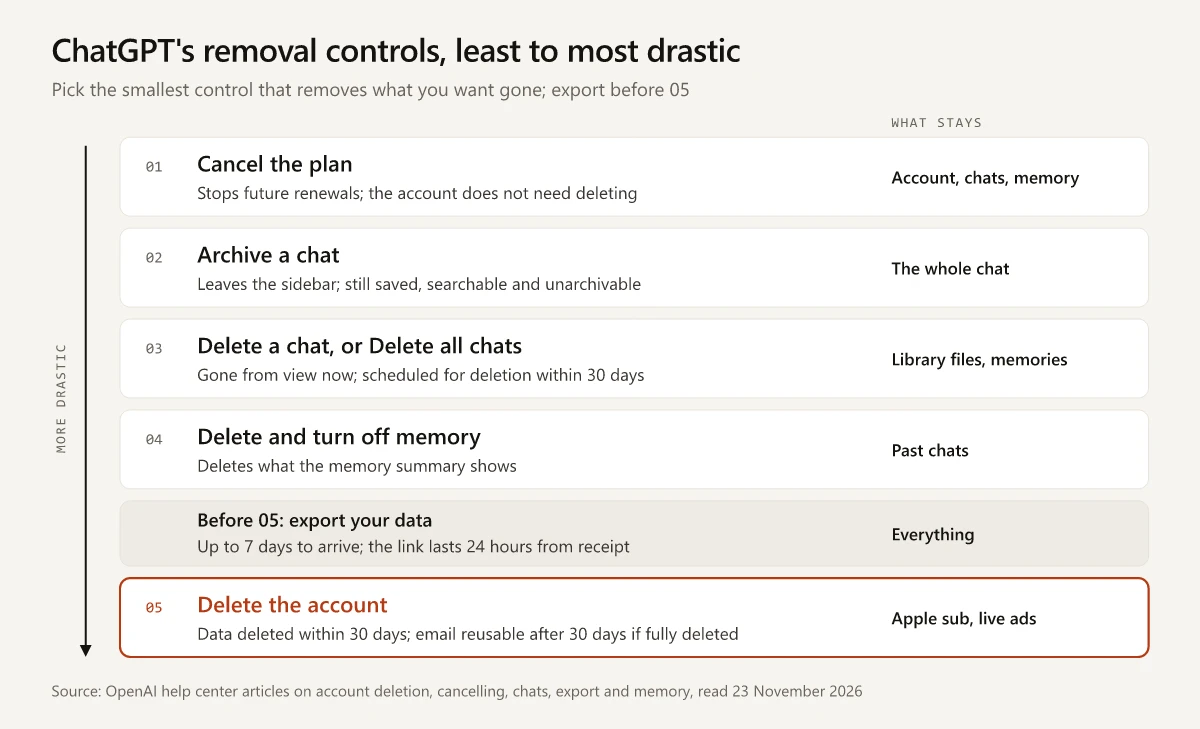
Match What You Want Removed to One ChatGPT Control
Match what you want gone to the smallest control that removes it. Each row comes from OpenAI’s articles on deleting and archiving chats, memory, Library, export, cancelling and account deletion, as of November 2026.
| What you want gone | The control | Where it is | What stays | When it is gone |
|---|---|---|---|---|
| The next renewal charge | Cancel the subscription | Wherever you bought it: ChatGPT settings, the App Store or Google Play | The account, chats and memory; paid features until the end of the billing period | Future renewals stop; cancelling “does not automatically refund previous charges” |
| A chat cluttering the sidebar | Archive, from the chat’s more options menu | Chat history; restore under Settings, Data controls, Archived chats | The whole chat, “searchable”, under the same retention rules as saved chats | Nothing is deleted |
| One chat | Delete, from the chat’s more options menu (on mobile, press and hold the title) | Chat history | Files saved in Library or Space, and saved memories made from the chat | From your view at once; scheduled for deletion from OpenAI’s systems within 30 days, with security and legal exceptions |
| Every chat | Delete all chats | Settings, then Data controls | The same as above; OpenAI says the action “cannot be undone” | The same as above |
| What ChatGPT remembers about you | Delete and turn off memory, or delete single saved memories | Settings, Personalization, then Memory | Your past chats | Logs of deleted saved memories may be kept “for up to 30 days for safety and debugging purposes” |
| A saved file or created image | Delete it in Library | The Library tab, or Space if your account has it | The chat that used the file | Within 30 days; restorable from Recently deleted until then, if your Library shows that folder |
| Nothing, you want a copy | Export | Settings, Data controls, Export | Everything: an export removes nothing | The ZIP can take up to 7 days to arrive; its link expires 24 hours after you receive it |
| Everything | Delete account | Settings, Account on the web; Data controls in the apps | An Apple subscription, ad campaigns (which may keep running) and the API phone-verification count | Within 30 days, except “a limited set of data” kept “where required or permitted by law” |
Export Your ChatGPT Data Before Anything Is Deleted
Do this first, because the export article says “An export cannot restore chats that have already been deleted.” It also says to download a settings export “while you are signed in to the same account that requested it”, and a deleted account can no longer sign in.
| Where you start | Steps in OpenAI’s export article |
|---|---|
| Web | Sign in, open your profile menu, select Settings, then Data controls; under Export data select Export, then Confirm export |
| iPhone | Open your account settings in the app, select Data controls, Export data, then Confirm export (if the app offers Open ChatGPT on web instead, finish on the web) |
| Android | Open Settings from your profile menu, select Data controls, Export Data, review the confirmation and select Export Data |
| Cannot sign in | On the Privacy Portal, select Make a Privacy Request, I have a consumer ChatGPT account, then Download my data |
What the export article says about the file:
- Who can export from settings: ChatGPT Free, Go, Plus, Pro and eligible Edu workspaces. It is “Not available while you are logged out”, and not available in Business, Enterprise or ChatGPT for Healthcare workspaces.
- Timing: ChatGPT sends an email or SMS when it is ready, and “Exports can take up to 7 days to arrive.” The download link “expires 24 hours after you receive it.”
- Contents: a ZIP with an export viewer (index.html) and “conversations in JSON format, plus other data that may use CSV or other formats”. The article says the viewer “processes files locally in your browser and does not upload them”. Older exports may contain chat.html instead.
- Library files: the Library article gives a separate route. Select one or more files in Library and click Download.
If you want another personal ChatGPT account to use your old chats, OpenAI’s article on moving exported conversations to another ChatGPT account has you upload the exported file to a new conversation, where ChatGPT can use it as reference. It says this “is not a full account migration”: it does not recreate the old conversations as separate chats or move memories, GPTs or files. If you are leaving ChatGPT for Claude, a comparison of Claude and ChatGPT by marketing job sets the two paid plans side by side. To bring what ChatGPT remembers about you along, importing ChatGPT memory into Claude works from text ChatGPT returns to Anthropic’s export prompt, so do it while the account still exists.
Cancel the Store Subscription and Pause Ads First
Account deletion handles only part of your billing. The deletion article says “Deleting your account cancels subscriptions billed directly by ChatGPT”, then:
- Apple: “Deleting your account does not cancel an Apple subscription.” The iOS deletion flow shows a subscription warning with a Manage subscriptions button.
- Google Play: neither the deletion article nor the cancel article says deletion cancels a Play subscription. The cancel article’s FAQ says “If you subscribed through Google Play, check your Google Play subscription and cancel it if it is still active.”
- Refunds: the cancel article says “Canceling stops future renewals. It does not automatically refund previous charges.”
The store-by-store cancel steps, the 24-hour cut-off and how to revoke a UPI AutoPay mandate are in my guide to cancelling ChatGPT Go where you paid.
If the email on your OpenAI account also opens an Ads account, the deletion article warns that deleting “may prevent you from accessing or managing that Ads account” and that deletion “may not pause or cancel active ad campaigns, which could continue serving and accruing charges.” Its checklist before deleting:
- Pause or end any active campaigns in Ads Manager.
- Make sure another authorized user with the right permissions can access the Ads account.
- If you are the only person with access, contact OpenAI Support before deleting.
How to Delete ChatGPT Account on iPhone and Android
In the apps, Delete account sits under Data controls, where the web puts it under Account. The steps from OpenAI’s deletion article:
| Step | iPhone (ChatGPT iOS app) | Android (ChatGPT app) |
|---|---|---|
| 1 | Open the app and open your account settings | Open Settings from your profile menu |
| 2 | Select Data controls | Select Data controls |
| 3 | Select Delete account | Select Delete OpenAI account (“Delete Account” in older app versions) |
| 4 | If you have an active Apple subscription, review the warning and select Manage subscriptions to cancel it | Review the deletion confirmation |
| 5 | Select Delete account to continue, or Cancel to keep the account | Select Delete OpenAI account or Delete Account to continue, or Cancel |
| 6 | - | Follow any sign-in or verification prompts |
Two warnings from the same article apply to both apps: “If the app returns to your chats without a deletion confirmation, or you cannot finish the mobile flow, use the Privacy Portal steps”, and “Completing a sign-in prompt by itself does not confirm that your account was deleted.”
How to Delete ChatGPT Account Without Logging In
The Privacy Portal route is for people who cannot sign in. From the deletion article:
- Go to the Privacy Portal at privacy.openai.com.
- Select Make a Privacy Request.
- Select I have a consumer ChatGPT account.
- Select Delete my ChatGPT account, then follow the verification steps.
You must be able to verify “the email address or phone number already linked to your account.” If you cannot reach either, or “a deactivated phone-only account cannot complete verification”, the article says to contact OpenAI Support for an ownership review. The portal’s own page (last updated 29 April 2026) orders the steps differently, with “Select a method to verify your account” before “Choose your request type”, so the verification step may come before you pick the request rather than after it.
The same portal also takes download, do-not-train, delete-my-GPTs and remove-my-data-from-responses requests. It “does NOT apply to OpenAI’s business offerings including ChatGPT Enterprise, ChatGPT Business, ChatGPT Edu and our API platform.”
What Deleting Your ChatGPT Account Does Not Undo
Beyond the Apple subscription and ad campaigns covered above, these are the items the deletion article says survive the account, or block it:
| Item | OpenAI’s wording | What to do first |
|---|---|---|
| The API phone limit | ”A phone number can verify the first API key for up to three accounts. Deleting an account does not reset that API verification limit” | Nothing to do; know it before you create new accounts |
| Your sign-in method | ”Deleting your account does not let you change your sign-in method.” | If you signed up with Google, Apple or Microsoft, you may be able to add a password under Settings, Security and login instead |
| Legally retained data | ”we may retain a limited set of data for longer where required or permitted by law” | Nothing; it is outside your settings |
| A work or school account | ”Self-service account deletion is not available in ChatGPT Business, Enterprise, Edu, or ChatGPT for Healthcare workspaces.” | Ask your organization |
What you lose for good: access to “OpenAI services, including ChatGPT and API” with that account, and the account itself, since “Deleted accounts cannot be reactivated”. What you can get back:
- The email address: “You can create a new account using the same email address after 30 days, provided the prior account was fully deleted (not deactivated).” OpenAI does not allow it for addresses “previously associated with an Enterprise organization” or disabled for a policy violation.
- The phone number: with some exceptions, for a consumer account you deleted yourself, OpenAI says it removes the number “from our system after 30 days”, after which you can sign up with it again.
LinkedIn works the same way: the steps to close or hibernate a LinkedIn account start from which exit you want.
X runs the opposite rule from OpenAI: logging in within its 30-day deactivation window restores the account, which is why deleting an X account means staying logged out for the whole window.
Meta runs its own pair of clocks for Threads: logging back in within 30 days of the request cancels it, and once the profile is deleted the same Instagram profile has to wait 90 days to sign up again, as set out in deleting a Threads account.
How to Delete ChatGPT History Without Deleting the Account
If the chats are the problem, delete them and keep the account. From the chats article:
- One chat on the web: open the more options (three dots) menu for the chat, select Delete, then confirm.
- One chat on iOS or Android: select the Home tab if you see one, select the menu icon (two horizontal lines), press and hold the chat’s title, then select Delete.
- All chats: Settings, then Data controls, then Delete all chats. This “can affect chats in your current account or workspace, including chats in projects.”
- Archive instead: more options menu, then Archive, with no confirmation. “Archived chats remain searchable”, and you can unarchive or delete them from Settings, Data controls, Archived chats (View archived chats on some devices).
Deleted chats are “removed from your account view immediately and scheduled for permanent deletion within 30 days”. You “cannot restore a deleted chat in ChatGPT or through OpenAI Support.” If you also want chats gone from Google’s Gemini, the steps to delete Gemini history and what Google keeps afterwards cover its renamed History menu.
What Deleting Chats Leaves in Place
- Saved files: “Deleting a chat does not delete files saved separately in Library or Space.” ChatGPT saves uploaded and created files there automatically, images included, so a deleted chat can leave its images behind. To remove one, select the file in the Library tab and click Delete or the trash icon; if Recently deleted appears, Delete forever or Delete all empties it sooner. Google Drive files shown in Library can only be deleted in Drive.
- Saved memories: “Deleting the original chat does not automatically delete a separate saved memory.”
- Project and GPT files: OpenAI’s chat and file retention article says files added to a project are kept “until the project or file is deleted”, and files uploaded as knowledge to a custom GPT “until the GPT is deleted”.
- Connected apps: “Deleting a chat does not delete the original data from the connected app.” Disconnecting the app stops future access but leaves past conversations in place.
- Temporary chats: they skip your history, but “OpenAI may keep a copy for up to 30 days for safety purposes.”
Delete ChatGPT Memory
Open Settings, select Personalization, then Memory. The memory article lists controls that vary by account: Memory, Reference saved memories, Reference chat history, Memory summary, Manage or Saved memories.
| You want to | The control | What it removes |
|---|---|---|
| Clear the memory summary and stop new memories | Delete and turn off memory, in the summary’s more options menu | The remembered information shown in the summary; “It does not delete past chats.” |
| Stop ChatGPT drawing on old chats | Turn off Reference chat history | Information remembered from past chats “is scheduled for deletion from OpenAI systems within 30 days”; the chats stay |
| Forget one fact | Delete the saved memory and the chat where you first shared it | That memory, though a deleted saved memory “does not remove mentions of that information from past conversations” |
| Stop a topic coming up without deleting it | Don’t mention this again | Nothing: it “does not delete the original source” |
Turning Memory off does not delete your past chats, and if you turn it back on, ChatGPT “may create new remembered information from chats that remain in your history.” Whether your chats train OpenAI’s models is a separate setting, and the training switch and temporary-chat rules for ChatGPT are set out in a table in another guide.
How to Delete ChatGPT Account Without Losing What You Need
The order that the help pages support, with the deletion itself last:
- Decide what you want gone, using the table above. If it is one chat, a memory or a charge, stop there.
- Request the export, wait for the email, and download the ZIP within 24 hours. Download any Library files you want separately.
- Cancel an App Store or Google Play subscription, and pause or end any ad campaigns.
- Delete the account under Settings, Account on the web, or Data controls in the app. Use the Privacy Portal if you cannot sign in.
- Wait 30 days before signing up again with the same email.
Start with the export request, since it can take up to 7 days to arrive.
Frequently Asked Questions
Can I reactivate a deleted ChatGPT account?
No. OpenAI's account deletion article says deleted accounts cannot be reactivated. You can create a new account with the same email address after 30 days, provided the old account was fully deleted rather than deactivated.
Does deleting my ChatGPT account cancel my subscription?
Only a subscription billed directly by ChatGPT. OpenAI says deleting the account does not cancel an Apple App Store subscription, and tells Google Play subscribers to check their Play subscription and cancel it if it is still active. Cancel any store subscription before you delete.
How do I delete my ChatGPT account without logging in?
Use OpenAI's Privacy Portal at privacy.openai.com: select Make a Privacy Request, then I have a consumer ChatGPT account, then Delete my ChatGPT account, and verify the email address or phone number linked to the account. If you can reach neither, OpenAI Support handles an ownership review.
How long does it take ChatGPT to delete my data?
OpenAI says it deletes your account data within 30 days, though it may keep a limited set of data for longer where the law requires or permits. Deleted chats leave your account view at once and are scheduled for permanent deletion from OpenAI's systems within 30 days, unless OpenAI must keep them longer for security or legal reasons.
How do I delete all my ChatGPT history at once?
Open Settings, select Data controls, then Delete all chats, and confirm. OpenAI says the action cannot be undone and can include chats in projects. Files saved in Library or Space and saved memories are separate and have to be deleted on their own.