X Character Limit (Twitter): How the 280 Is Weighted
The X character limit is a weighted 280: links cost 23, emoji and CJK cost 2, Hindi and Arabic cost 1. I ran X's twitter-text library on sample posts to show it.
The X character limit gets quoted as “280 characters” and counted the way a word processor counts. X counts a weighted 280: its developer docs weigh Latin letters, punctuation and common symbols at 1, each emoji and each Chinese, Japanese or Korean character at 2, every link at a flat 23, and attached media at 0.
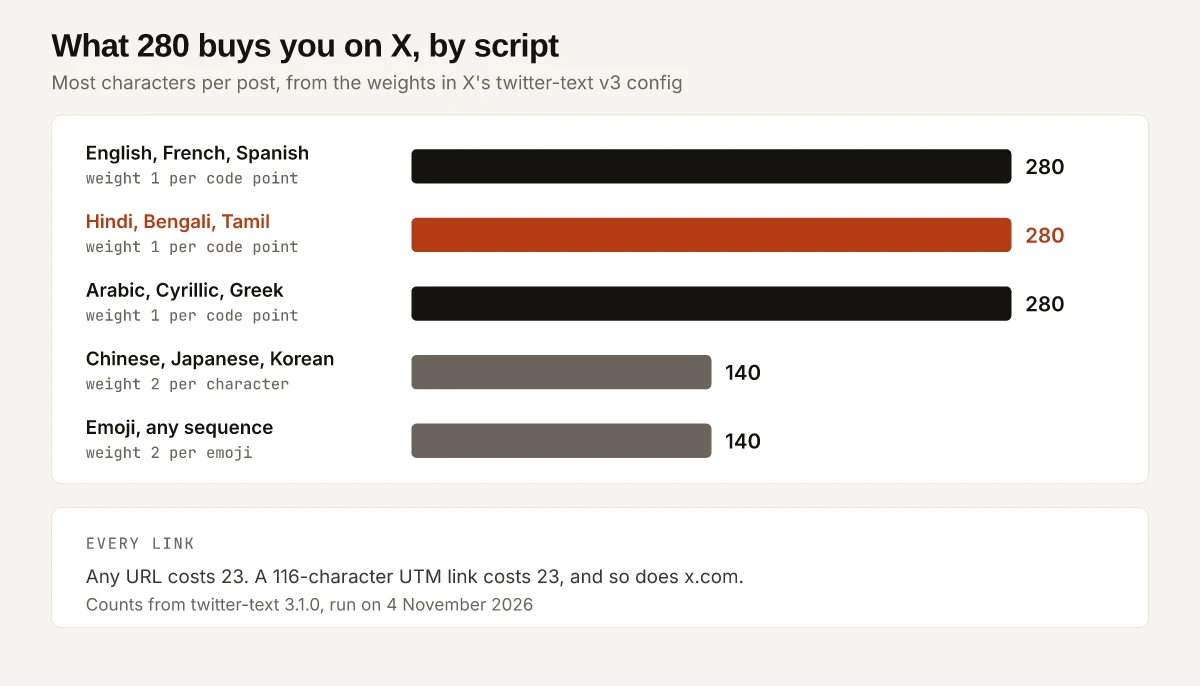
Read X’s own config file instead of a guide’s table, and the full 280 covers far more of the world’s writing than at least one 2026 explainer allows. X’s twitter-text v3 config weighs every code point from U+0000 to U+10FF at 1, and in Unicode’s block list that range runs from Basic Latin through Greek, Cyrillic, Arabic, Devanagari, Bengali, Tamil and Thai to Georgian. Dan Koe’s 21 August 2026 explainer on eden.so puts “characters from most other writing systems, including Chinese, Japanese, and Korean” at 2, which holds for Chinese, Japanese and Korean and misses Hindi, Arabic and Russian.
The second gap is that X counts code points, the numbered units Unicode assigns, rather than the letters a reader sees. The Hindi word kshatriya shows as 3 letter clusters and costs 8. Every measured X cost in this post is output from X’s open-source twitter-text library, version 3.1.0, which I ran for this post on 4 November 2026; the script is near the end.
What Is the X Character Limit?
280 weighted characters per post. X’s Counting Characters page, last modified 20 May 2026, says “Posts on X can contain up to 280 characters” and that “not all characters count equally”. Its weights, as the page showed them on 4 November 2026:
| Character type | Weight | Most per post |
|---|---|---|
| Latin, punctuation, common symbols | 1 | 280 |
| Emojis | 2 | 140 emojis |
| CJK (Chinese, Japanese, Korean) | 2 | 140 characters |
| Other Unicode | 2 (default) | Varies |
| Any URL | 23, “regardless of the original length” | |
| Attached media (via official clients) | 0 |
The same page tells developers to “Use the open-source twitter-text library to accurately count characters in your app”, and says length is calculated after Unicode Normalization Form C. Two rows of that table compress the detail: “Other Unicode” says 2 by default, but the config file behind the library weighs large parts of other Unicode at 1, and “punctuation, common symbols” is wider than the config’s weight-1 ranges.
For the LinkedIn equivalent, where LinkedIn states its limits on Help pages and in one blog post, see who states each LinkedIn character limit.
Threads counts differently again: Meta’s API docs cap a post at 500 characters and count each emoji as its UTF-8 bytes, as set out in the Threads character limit by field. For WhatsApp, where Meta’s developer docs state some limits and only guides print the 700-character status figure, see which WhatsApp character limits Meta publishes. Facebook is the opposite case to X: no Meta page I read gives a post maximum, and Meta’s developer docs give a Page’s Description 100 characters, as set out in what Meta states for each Facebook field. YouTube splits one field across two units: its Help page gives a video description 5,000 characters while its Data API counts 5,000 bytes, which the YouTube character limit by field works through for Hindi text.
How X’s Config File Weighs Each Code Point
The docs page links twitter-text’s config folder for “Character weight definitions and Unicode ranges.” Version 3 is the default in the twitter-text 3.1.0 package, and its fields read:
| Field | Value in v3.json | What it means |
|---|---|---|
| maxWeightedTweetLength | 280 | The cap, in weighted units |
| scale | 100 | Weights are stored as hundredths |
| defaultWeight | 200 | Any code point outside the ranges below costs 2 |
| transformedURLLength | 23 | Every detected URL costs 23 |
| emojiParsingEnabled | true | An emoji sequence is counted as one emoji |
| ranges | four ranges at weight 100 | These code points cost 1 |
The four weight-1 ranges, with the characters at each end taken from Unicode’s character database:
| Range in the config | Code points | What sits there |
|---|---|---|
| 0 to 4351 | U+0000 to U+10FF | Basic Latin through Georgian, including Latin-1 accents, Greek, Cyrillic, Hebrew, Arabic, the Indic scripts from Devanagari to Malayalam, and Thai |
| 8192 to 8205 | U+2000 to U+200D | En quad through zero width joiner: the typographic spaces, the zero width space, the zero width non-joiner and the zero width joiner |
| 8208 to 8223 | U+2010 to U+201F | Hyphen, en dash, em dash and the curly quotation marks |
| 8242 to 8247 | U+2032 to U+2037 | The prime marks |
Everything else costs 2. That includes Hangul Jamo, which starts at U+1100, one code point past the end of the first range, along with Chinese and Japanese characters, the currency symbols block and the arrows block.
The 280 Budget by Script, Sample by Sample
For this post I ran each sample through twitter-text’s parseTweet function. Non-Latin samples are described in ASCII here, with their code point counts:
| Script | Unicode block | Weight | Most per post | Sample | twitter-text weightedLength |
|---|---|---|---|---|---|
| Latin (English) | Basic Latin | 1 | 280 | ”New post: how X counts characters.” (34 characters) | 34 |
| Hindi | Devanagari, U+0900 to U+097F | 1 | 280 | namaste, 6 code points | 6 |
| Hindi | Devanagari | 1 | 280 | kshatriya, 8 code points | 8 |
| Bengali | Bengali, U+0980 to U+09FF | 1 | 280 | bangla, 5 code points | 5 |
| Tamil | Tamil, U+0B80 to U+0BFF | 1 | 280 | vanakkam, 7 code points | 7 |
| Arabic | Arabic, U+0600 to U+06FF | 1 | 280 | marhaba, 5 code points | 5 |
| Russian | Cyrillic, U+0400 to U+04FF | 1 | 280 | privet, 6 code points | 6 |
| Japanese | CJK Unified Ideographs | 2 | 140 | nihongo, 3 characters | 6 |
| Korean | Hangul Syllables | 2 | 140 | hangugeo, 3 syllables | 6 |
| Emoji | various | 2 | 140 | the Indian flag, 2 code points | 2 |
| URL | n/a | 23 each | n/a | a 116-character UTM-tagged link | 23 |
The edges hold too. 280 repeats of the Hindi letter ka (U+0915) came back valid at 280, and 281 came back invalid. 140 repeats of the Japanese character for “sun” (U+65E5) came back valid at 280, and 141 came back invalid at 282. 140 Indian flags, 280 code points in all, came back valid at 280.
Hindi Conjuncts: Code Points vs Visible Letters
X weighs code points, and Hindi spends several code points on one visible letter cluster. kshatriya is 8 code points: U+0915 U+094D U+0937 U+0924 U+094D U+0930 U+093F U+092F. Two of them are U+094D, the Devanagari sign virama, which joins consonants into a conjunct, and one is U+093F, the vowel sign i.
| Word | Code points | Letter clusters (Intl.Segmenter, Node 22) | X cost (twitter-text) |
|---|---|---|---|
| kshatriya | 8 | 3 | 8 |
| namaste | 6 | 3 | 6 |
| family emoji (man, woman, girl, boy) | 7 | 1 | 2 |
The clusters column comes from Node’s Intl.Segmenter with ICU 78.3, which splits each word into the units a reader takes in. Emoji go the other way: X’s emoji counting rules say “Zero-width joiners (ZWJ) combine emojis visually but don’t add to the count”, and the 7-code-point family sequence costs 2.
For Hindi copy, the practical rule is to budget by code points:
- Each consonant, vowel sign, virama and nasal sign is one code point and costs 1.
- A conjunct such as ksha (U+0915 U+094D U+0937) costs 3, though it reads as one letter.
- A Hindi post still gets the full 280 code points, against 140 characters for a post in Japanese.
Does a Link Count Toward the X Character Limit?
Yes, at 23 characters per link, whatever the URL’s length. X’s URL handling rules say “All URLs are wrapped with t.co shortener and count as 23 characters” and that this “applies to any valid URL detected in post text.” In twitter-text:
| Link as typed | Its length | X cost |
|---|---|---|
| https://swapbiswas.com/blog/x-character-limit/?utm_source=x&utm_medium=social&utm_campaign=t1_launch_webinar_2026-09 | 116 | 23 |
| https://x.com | 13 | 23 |
| swapbiswas.com, typed with no https:// | 14 | 23 |
| x.com, typed with no https:// | 5 | 23 |
For a marketer, a UTM string costs nothing extra on X: the full source, medium and campaign tags fit at no cost, and the rules for naming them are in my campaign naming convention. A domain typed as plain text, with no https://, is detected as a link too, so naming your site in the copy costs 23 even when it is 5 letters long.
A launch post with one tagged link, worked through in twitter-text:
| Part | Text | Cost |
|---|---|---|
| Copy | ”Our launch webinar is live. Save your seat: “ | 44 |
| Link | the 116-character UTM link above | 23 |
| Hashtag, with a space either side | ” #B2BSaaS “ | 10 |
| Emoji | rocket | 2 |
| Total | 79, leaving 201 of 280 |
The prompt for a 280-character tweet in my ChatGPT prompts for marketing needs the same arithmetic when the tweet carries a link: ask for 256 characters of text, since a space and the link add 24. The image X shows on that link’s card is a separate question, and my OG image size checks cover what X’s docs do and do not publish about it.
Do Spaces, Emoji, Hashtags and Mentions Count?
All four count. X’s special cases list sets out two exceptions: @mentions auto-populated at the start of a reply, and attached media.
| Item | X’s rule | twitter-text result |
|---|---|---|
| Spaces and line breaks | Weight 1, like any Basic Latin code point | ”a”, two spaces, “b”, a line break, “c” = 6 |
| Emoji | ”All emojis count as 2 characters, regardless of complexity” | Flag 2, thumbs up with skin tone 2, family 2 |
| Hashtags | ”Count normally (# + tag text)“ | #launch = 7 |
| @mentions you type | ”count normally" | "@example hello” = 14 |
| @mentions auto-filled at the start of a reply | ”don’t count” | The library counts whatever string it is given, so leave these out of the string |
| Attached media | ”counts as 0 characters” via official clients | Not part of the text |
| Accented letters | Counted after NFC normalization | cafe with a combining accent (5 code points) = 4 |
Media costing 0 means an image or video attached through X’s official clients never eats into the 280; for the same post cross-posted to LinkedIn, the image and video specs are in my LinkedIn post size reference.
Symbols That Cost 2, From the Rupee Sign to the Ellipsis
X’s docs put “punctuation, common symbols” at 1, but the config’s weight-1 ranges inside General Punctuation stop at U+201F, apart from the primes. Characters past that fall back to the default of 2, and so do currency signs outside the first range; the dollar, pound and yen signs sit inside it and cost 1:
| Character | Code point | Unicode block | twitter-text cost |
|---|---|---|---|
| Em dash | U+2014 | General Punctuation | 1 |
| Right single quotation mark (curly apostrophe) | U+2019 | General Punctuation | 1 |
| Bullet | U+2022 | General Punctuation | 2 |
| Horizontal ellipsis | U+2026 | General Punctuation | 2 (three typed dots cost 3) |
| Indian rupee sign | U+20B9 | Currency Symbols | 2 |
| Euro sign | U+20AC | Currency Symbols | 2 |
| Rightwards arrow | U+2192 | Arrows | 2 |
| e with circumflex and dot below, as in Vietnamese “Viet” | U+1EC7 | Latin Extended Additional | 2 (the word costs 5) |
For Indian pricing copy, the rupee sign followed by 1,999 cost 7, against 8 for “Rs 1,999” with its space. A list pasted with U+2022 bullets costs 2 per bullet, while a hyphen used as a bullet costs 1.
Does X Premium Increase the Character Limit?
X’s own API docs confirm long posts exist without stating their cap. X’s data dictionary describes a note_tweet object that “Contains the full text of a Post for long-form Posts (>280 characters)”, and gives None, Basic, Premium and PremiumPlus as example values of a user’s subscription_type. X’s Help Center page on X Premium, help.x.com/en/using-x/x-premium, answered a plain request made for this post on 4 November 2026 with a 403 and a “Just a moment…” browser check, so I cannot quote X on which tiers get long posts or how long they run.
The guides I read disagree:
| Guide | Date on the page | Long-post figure | Tiers it names |
|---|---|---|---|
| Dan Koe, eden.so | 21 August 2026 | 25,000 | ”on any Premium tier”; calls 4,000 “the 2023 launch number” |
| Vadym Petryshyn, Postory | Last checked 31 August 2026 | 25,000 | ”any paid X tier allows 25,000” |
| FreeQuickUtility Team | 15 May 2026 | 25,000 | Rows for “X Premium (Blue)” and “X Premium+”; no row for Basic |
| UtilHQ Team | 4 January 2026 | 4,000 | ”Premium subscribers can write up to 4,000 characters” |
twitter-text does not cover long posts: v3.json holds one maximum, 280, and the library marked a 281-letter string invalid. Treat any long-post figure as a guide’s claim until X’s Help Center can be read.
Twitter Character Limit History in X’s Old Configs
The twitter-text config folder keeps the earlier counting rules next to v3:
| Config | Cap | Weights | URLs |
|---|---|---|---|
| v1.json | 140 | Every character 1 (scale 1, default weight 1, no ranges) | 23 |
| v2.json | 280 | The same four weight-1 ranges as v3, default 2 | 23 |
| v3.json | 280 | Same as v2 | 23, plus “emojiParsingEnabled”: true |
The move from v1 to v2 is the move from a flat 140 to a weighted 280. What v3 adds is emoji parsing: run under the v2 config, twitter-text counts the family sequence as 11 and the Indian flag as 4, against 2 each under v3.
Count a Post Yourself in Node
The npm registry lists twitter-text 3.1.0 as the latest version, published on 31 March 2020, and X’s docs still name it as “the official twitter-text library” on the implementation section. Install it with npm install twitter-text in an empty folder, save this as count.cjs and run node count.cjs:
const { parseTweet } = require('twitter-text');
const cp = (...c) => String.fromCodePoint(...c);
const kshatriya = cp(0x915, 0x94D, 0x937, 0x924, 0x94D, 0x930, 0x93F, 0x92F);
const link = 'https://swapbiswas.com/blog/x-character-limit/?utm_source=x&utm_medium=social&utm_campaign=t1_launch_webinar_2026-09';
const tests = { kshatriya, nihongo: cp(0x65E5, 0x672C, 0x8A9E), flag: cp(0x1F1EE, 0x1F1F3), rupee: cp(0x20B9), link, 'x.com': 'x.com', ka281: cp(0x915).repeat(281) };
for (const [name, s] of Object.entries(tests)) { const r = parseTweet(s); console.log(name, r.weightedLength, r.valid); }
The output on Node 22, 4 November 2026:
kshatriya 8 true
nihongo 6 true
flag 2 true
rupee 2 true
link 23 true
x.com 23 true
ka281 281 false
String.fromCodePoint builds the Hindi, Japanese and flag strings from their code point numbers, so the script runs the same in any editor. Swap in your own post text and read weightedLength against 280.
Recheck the X Character Limit Each Quarter
X last modified its Counting Characters page on 20 May 2026, the latest twitter-text release on npm dates from March 2020, and the X Premium page in X’s Help Center returned a browser check to a 4 November 2026 request made for this post. Recheck all three each quarter: a new config version would change the weights, and a readable Help Center page would settle the long-post figure.
Until then, the X character limit is 280 weighted units per X’s own config, with Hindi, Bengali, Tamil, Arabic and Cyrillic at 1 per code point, Chinese, Japanese, Korean and emoji at 2, and every link at 23. Run your next Hindi or emoji-heavy post through parseTweet before you publish it.
Frequently Asked Questions
Does a link count toward the character limit on X?
Yes. X's developer docs say every URL counts as 23 characters, whatever its length. In X's twitter-text library, a 116-character UTM-tagged link and the bare domain x.com each counted as 23.
Do spaces count in an X post?
Yes. A space weighs 1, the same as a letter, and so does a line break. twitter-text counted the string a, two spaces, b, a line break and c as 6.
How many characters can you post in Hindi on X?
280. Devanagari sits inside the code point range X's twitter-text config weighs at 1, and twitter-text marked 280 Hindi code points valid and 281 invalid. Count code points, not the letters you see: the 8-code-point word kshatriya costs 8.
Do emojis count as 2 characters on X?
Yes. X's docs say all emojis count as 2 regardless of complexity, and twitter-text counted a flag, a skin-tone thumbs up and a 7-code-point family emoji at 2 each.
Does X Premium increase the character limit?
X's API data dictionary describes long-form posts of more than 280 characters, but X's Help Center page on X Premium was not readable on 4 November 2026. Guides disagree: eden.so says 25,000 on any Premium tier and Postory says 25,000 on any paid tier, while UtilHQ says 4,000.