LinkedIn Post Size: Image and Video Specs, Sourced (2026)
LinkedIn post size and dimensions, checked on LinkedIn's own Help pages: photos run 3:1 to 4:5 at 1080 px wide, videos up to 15 minutes, and Page specs differ.
LinkedIn’s Share photos on LinkedIn Help page says a photo’s aspect ratio “can range from 3:1 to 4:5 (width:height)” and recommends “1080 (w) pixels” of width. At that width the range runs from 1080 x 360 to 1080 x 1350, which makes the popular 1080 x 1350 portrait the tall end of what LinkedIn allows and 1080 x 1080 a square inside it, though the page prints neither size. Every other figure in this LinkedIn post size reference names the page it comes from.
Member photo posts take a 3:1 to 4:5 ratio, a 552 x 276 minimum, a recommended 1080 px width, a 5 MB cap and up to 20 photos; videos run 3 seconds to 15 minutes and up to 5 GB, per LinkedIn Help on 16 October 2026. Two spec pages titled for company Pages print lower file and video-length limits.
I would design only to a size I can trace to the LinkedIn page that covers the kind of post I am making, and LinkedIn spreads these figures over separate Help pages that do not always agree. So the first table below splits by who is posting: you as a member, or a company Page.
LinkedIn Post Size for Members vs Company Pages
LinkedIn’s photo and video pages both say you can share “using the share box at the top of the LinkedIn homepage, a Group, or a LinkedIn Page”, and its document page names the same three places, so their rules cover posts from a company Page too. Three further pages, listed with their stamps below, are written for Page admins, and those are where the numbers differ. LinkedIn updates these pages, so treat every figure as dated.
What LinkedIn’s Help pages say, by who is posting:
| What you upload | Posting as a member | Posting as a company Page |
|---|---|---|
| Photo ratio and dimensions | 3:1 to 4:5, at least 552 x 276, 1080 px wide recommended (photo page) | The same photo page |
| Photo file | 5 MB per upload (photo page); GIF, JPEG, PNG or WEBP, plus HEIF/HEIC on iOS, up to 36 megapixels (media file types page) | Posts: the same photo page, 5 MB. Page images such as the logo, cover and Life tab: “All images must be PNG or JPEG files and have a maximum size of 3MB” (Pages image page) |
| Photos per post | Up to 20 (photo page) | The same |
| Image on a link post | Not your own: “You can share either a URL link or an image in a post, but not both at the same time”, and the preview is “taken from the site being shared” (photo page) | Your own: 1.91:1 at 1200 x 627, “more than 200 pixels” wide, or it shows as a thumbnail (Page preview page) |
| Cropping | Photos: “If the ratio is larger, the image will be centered and cropped to fit the max ratio” (photo page) | Photos: the same photo page rule. Link-post images: “Images on mobile won’t be cropped”, with “subtle white padding” for other ratios (Page preview page) |
| Video length | 3 seconds (2 in the mobile app) to 15 minutes (member video pages); 15 minutes on desktop and 10 in the mobile app (article media page) | 15 minutes (the same member video pages). The Pages video page, written for “LinkedIn Page or Career Page videos”, gives 3 seconds to 10 minutes |
| Video formats | MP4, MOV, AVI, WEBM, MKV, WMV and more on every device (troubleshooting page). The media file types page, updated 3 weeks ago, differs: MP4 and MOV on every device, WEBM on desktop and Android only, MKV on desktop only, and no AVI or WMV | The same lists, plus “We no longer support AVI, QuickTime, or MOV files” (Pages video page) |
| Video file and frame | 75 KB to 5 GB, 256x144 to 4096x2304, 1:2.4 to 2.4:1, 10 to 60 fps, up to 30 Mbps (member video pages) | The same figures (Pages video page) |
| Documents | 100 MB and 300 pages; PPT, PPTX, DOC, DOCX or PDF (document page) | The same document page |
LinkedIn sends Page admins to both sets. Its LinkedIn Page posts FAQ answers “How are posts with multiple images displayed?” with a link to the Marketing Solutions copy of the photo page, and Troubleshoot posts on your LinkedIn Page tells an admin who sees an error to “Make sure the media specifications are correct” and links the Pages image page in the same section.
None of the LinkedIn pages I read says whether the Pages image page’s 3 MB rule or the Pages video page’s 10-minute limit covers Page posts, so when you post as a Page I would make each file pass both sets:
- Photo: a PNG or JPEG of 3 MB or less, between 3:1 and 4:5.
- Video: an MP4 of 10 minutes or less. MP4 is on every LinkedIn video format list I read, including the troubleshooting, media file types, Pages video and video ads pages, and the media file types page marks it for desktop, iOS and Android.
I read each page below logged out from an Indian connection on 16 October 2026, and the “Last updated” stamps are as each page showed them that day:
| LinkedIn Help page | What it covers | Last updated |
|---|---|---|
| Share photos on LinkedIn | Photo posts from a homepage, Group or Page | 2 years ago |
| Media file types supported on LinkedIn | Image, video and document formats by device | 3 weeks ago |
| Share videos on LinkedIn | Video posts from a homepage, Group or Page | 1 year ago |
| Video sharing troubleshooting | Video file types and file requirements | 2 years ago |
| Add and edit images or videos, cover images, and other rich media to your article | Article covers, plus video limits it calls “same as Sharebox” | 1 year ago |
| Upload and share documents on LinkedIn | Document posts from a homepage, Group or Page | 3 years ago |
| Image specifications for your LinkedIn Pages and Career Pages | Page logo, cover and Life tab images, plus custom images on a Page post with a URL | 2 months ago |
| Video specifications for your LinkedIn Pages and Career Pages | Video file types and limits for Page and Career Page videos | 4 years ago |
| Customize the image and title of a LinkedIn Page post preview | The preview image on a Page’s link post | 2 years ago |
What Is the Best LinkedIn Post Image Size?
LinkedIn names no single size: export 1080 px wide at any ratio from 3:1 to 4:5, and use 4:5, or 1080 x 1350, when you want the tallest photo the range allows. The table puts the sizes guides print, plus the 3:1 wide end, against that range and names the LinkedIn page that prints each one, if any:
| Size | Width / height | Inside 3:1 to 4:5? | Where a LinkedIn page prints it |
|---|---|---|---|
| 1080 x 360 | 3.00 | Yes, the wide end | None of the LinkedIn pages I read; it is 3:1 at 1080 px |
| 1200 x 627 | 1.91 | Yes | The Pages image and Page preview pages, for a Page’s own image on a link post; the sharing module page, as its minimum |
| 1200 x 628 | 1.91 | Yes | Single image ads, as the recommended horizontal size |
| 1080 x 1080 | 1.00 | Yes | Carousel Ads, as the recommended card; single image ads list 1200 x 1200 for square |
| 1080 x 1350 | 0.80 | Yes, the tall end | Video ads, as the maximum 4:5 size |
| 1080 x 1920 | 0.56 | No | Video ads, as the maximum 9:16 size |
| 627 x 1200 | 0.52 | No | None of the LinkedIn pages I read; single image ads still accept the 1:1.91 shape, with borders added at the sides |
For a single photo, the photo page has one crop rule: “If the ratio is larger, the image will be centered and cropped to fit the max ratio.” It does not say which end of the range it means. Written as width over height, 3:1 is the larger number, while the same page’s multi-photo rules call 4:5 the max ratio (“Images will render a max ratio of 4:5”). A photo inside 3:1 to 4:5 is clear under either reading. I read the text and ran no upload test.
The figure draws each ratio at 1080 px wide, which puts 1.91:1 at 1080 x 565.
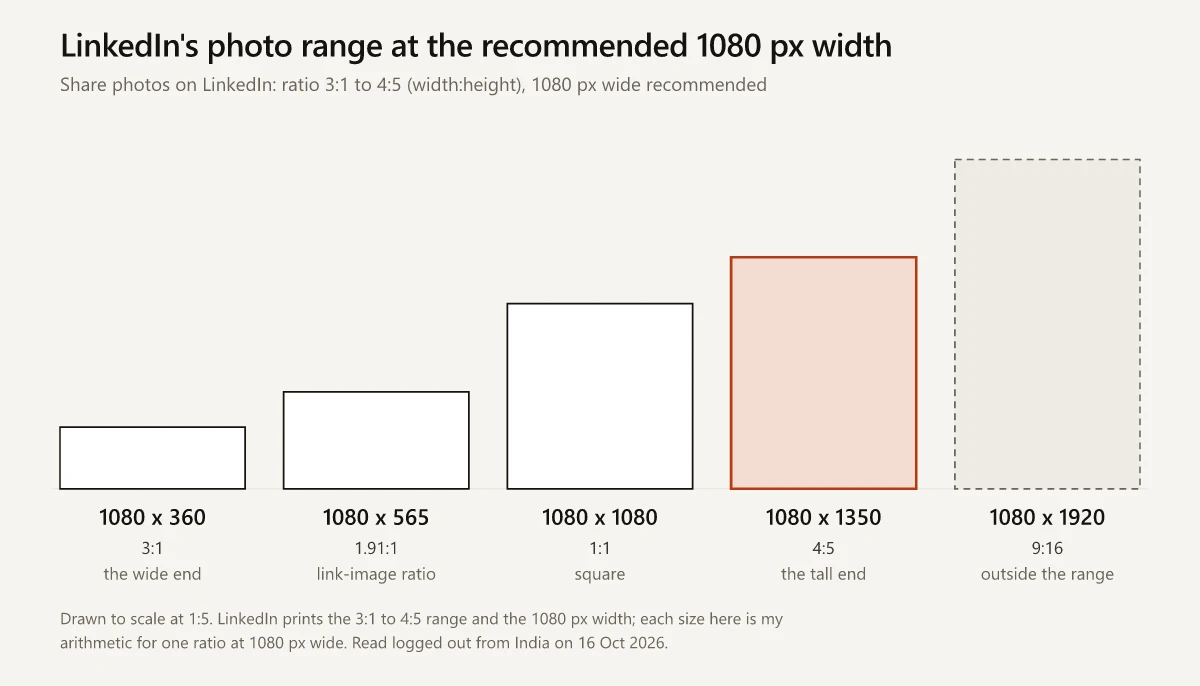
I write one image prompt for each LinkedIn post, and my current prompts share one house style, a Renaissance still life with no text in the image, at 1200x628. That is the horizontal size on LinkedIn’s single image ads page, one pixel taller than the 1200 x 627 a Page uses for its own link-post image, and inside the photo range.
How Many Images Can a LinkedIn Post Have?
A post can carry up to 20 photos. “You can upload a maximum of 20 photos in a multi-photo post,” the photo page says, and its desktop and app steps both read “you can select up to 20 images”. The Marketing Solutions copy of the same article, the one the Page posts FAQ links, carries the same line. The photo page’s multi-photo layout rules, in LinkedIn’s words:
- Images “will render a max ratio of 4:5 (e.g., 640 (w) x 800 (h) pixels)”, with “a greater visual emphasis on the first image”.
- “Posts with two images will appear side by side, retaining their aspect ratios.”
- With three or more, a first image that is “landscape or shorter than a 4:3 ratio (or 292px)” sits at the top, “with other images displayed side by side below it”.
- A first image that is “portrait, square, or lengthier than a 4:3 ratio (or 292px)” goes in the left column, “with other images stacked vertically to the right”.
- “The maximum height of the image container is 4:5”, and if the first and second rows exceed it, “the images in the bottom row will be cropped to fit”.
Put first the image whose orientation you want the layout built on, and check every image before you post, because the page says uploaded photos “can’t be edited after they have been posted”.
LinkedIn Video Size and Length Limit
A member’s video post can run from 3 seconds (2 in the mobile app) to 15 minutes and from 75 KB to 5 GB, at 256x144 to 4096x2304 and any ratio from 1:2.4 to 2.4:1, per the Share videos page. LinkedIn’s video Help pages agree on those file, resolution and ratio figures, on 10 to 60 fps and on a 30 Mbps ceiling, and differ on length: the article media page gives 10 minutes for mobile app uploads, and the Pages video page gives 10 minutes.
Other LinkedIn pages add video figures:
- The Creator Tools page repeats 15 minutes and 5 GB, lists “Max: 3 Mbps” for bit rate where the Help pages say 30 Mbps, and suggests you “Aim for 60-90 seconds of high impact content”.
- The video FAQ says “You can only add one video to a single post.”
- The video ads page sets 3 seconds to 30 minutes and 75 KB to 500 MB, in MP4. It recommends 1920 x 1080 or 1200 x 675 for 16:9 and caps 4:5 at 1080 x 1350 and 9:16 at 1080 x 1920, all inside the 1:2.4 to 2.4:1 range, while the member video pages name no recommended resolution.
Vertical Video and the Full-Screen Player
LinkedIn’s full-screen vertical video page, stamped “Last updated: 5 months ago”, says you “cannot directly add or post videos to the full-screen vertical video feed or the video tab”; any video you post “may be eligible to appear in the video feed, tab, or carousel based on relevance and performance”. Its text on size stays general: “Uploaded videos with a larger aspect ratio may be cropped on the sides as well as at the top and bottom. Videos with a wider aspect ratio may be fitted to the screen.”
The numbers sit in an illustration the page gives as an example for a viewer on an iPhone 13 or 14: a 1080 x 1920 frame marked 260 px at the top, 560 px at the bottom, 112 px on the left and 210 px on the right. Inside those margins sits a 758 x 1100 px safe zone, from x 112 to 870 and y 260 to 1360.
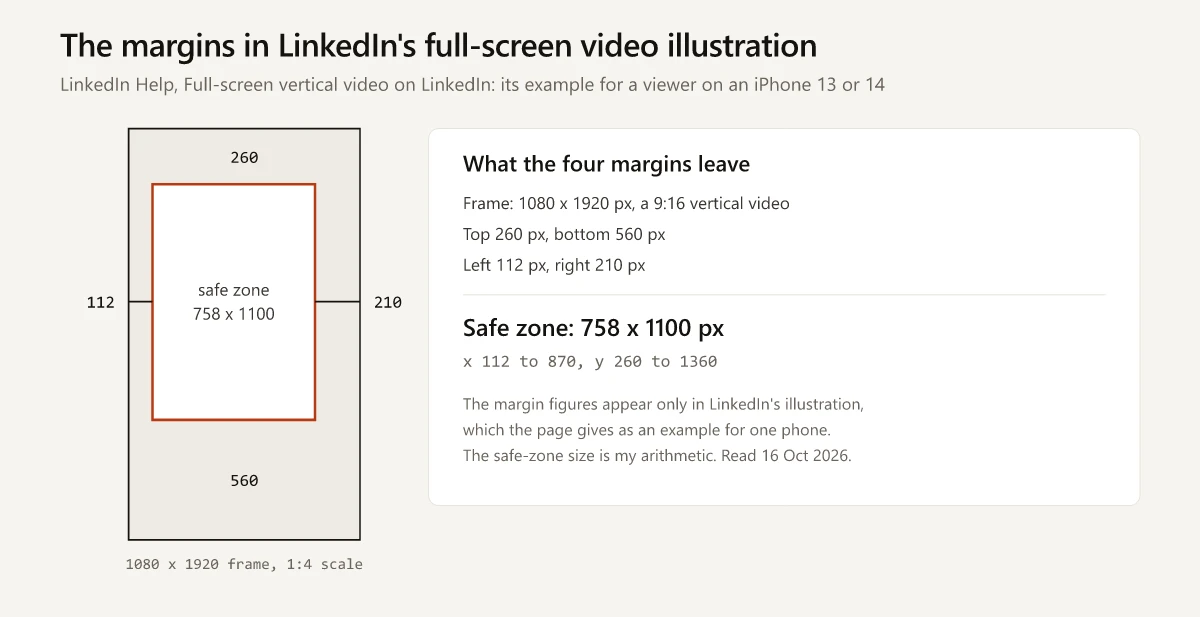
Both member video pages state the rule without numbers: keep “the edges (top, bottom, and sides) of your video free of key elements, text, and logos to ensure they are within the safe zone and aren’t overlapped by the LinkedIn user interface”. On a 1080 x 1920 export, keeping captions and logos inside x 112 to 870 and y 260 to 1360 follows the only margin figures on the LinkedIn pages I read, though the full-screen video page says the ideal size “depends on various factors, including the size of the device the viewer is using”.
LinkedIn Carousel Size: What Document Posts Allow
No LinkedIn page I read gives a slide size for a document post, which is the format guides call a carousel. The nearest LinkedIn figure is for paid Document Ads, whose spec page accepts vertical, horizontal or square pages in standard PDF layouts such as Letter (8.5 by 11 inches) and A4. For posts, the document page sets 100 MB and 300 pages, accepts PPT, PPTX, DOC, DOCX and PDF, and adds these rules:
- “Convert files to PDFs whenever possible to ensure the highest quality upload.”
- “PDFs with multiple layers must be flattened or merged.”
- “PDFs with multiple sized pages must be fit to the same page size.”
- “Videos and other animations in documents aren’t supported and will display as static images instead.”
- After posting you can edit the description or remove the post, “but you can’t change or edit the document in the post”.
- Members who can view the post “will be able to download your document as a PDF”.
- The upload takes one file: “Select the file that you want to upload (choose one).”
The 1080 x 1080 slides in several guides, and Sendible’s “10MB per slide”, match LinkedIn’s Carousel Ads specifications, a paid format of two to ten cards with “Max file size: 10 MB” and a “Recommended individual image spec: 1080 x 1080px”. A document post is a different upload. If you need a starting size, the guides’ 1080 x 1350 and 1080 x 1080 match the tall end and the square of LinkedIn’s photo-post range; pick one and use it on every page, as the document page asks. How carousels compare with other formats on impressions, in MagicPost’s medians, is in my guide to what counts as a good number of LinkedIn impressions.
LinkedIn Article Cover Image Size and Newsletter Covers
LinkedIn’s article media page sets the cover at 1920 x 1080: “The optimal image size for the cover image is 1920 (w) x 1080 (h) pixels. Cover images are cropped to a 16:9 aspect ratio.”
| Image | LinkedIn’s figure | Page, “Last updated” on 16 Oct 2026 |
|---|---|---|
| Article cover | 1920 x 1080, cropped to 16:9; JPEG, JPG, PNG or WEBP, and “GIFs can no longer be used for the cover photos” | Article media page, 1 year ago |
| Article or edition cover, as a Page | ”We recommend uploading an image that’s 1920 x 1080 pixels” | Publish articles or newsletter editions as your LinkedIn Page, 1 year ago |
| Newsletter edition cover | ”1920 (w) x1080 (h) pixels recommended” | LinkedIn Newsletters best practices, 3 years ago |
| Newsletter logo | ”300x300 pixels recommended” | The same best practices page; Creator Tools also lists 300 x 300 px |
| Newsletter cover video | ”16:9 aspect ratio and ideally 30 seconds” | Creator Tools, which shows no stamp |
In-article images can be GIF, JPEG, JPG, PNG or WEBP, with GIFs “smaller than 400 frames”. For what else separates an edition from a standalone article, see the LinkedIn newsletter vs article comparison.
Link Previews, Profile Banners and Page Covers
On a member’s link post, the preview image is “taken from the site being shared”, and LinkedIn’s sharing module page asks for at least 1200 x 627 at 1.91:1, up to 5 MB. In a note after its single image ad specs, the same page says images “less than 401 pixels wide display as a thumbnail image”, where the Page preview page draws that line at 200 px. Meta and WhatsApp publish their own link-card specs, compared side by side in the OG image size guide.
The profile banner and the Page cover are separate specs, 1584 x 396 on LinkedIn’s profile cover image page and 1512 x 256 on the Pages image page, and my LinkedIn banner safe zone guide maps what stays visible on a profile banner and checks the 1128 x 191 Page cover that guides print instead.
LinkedIn Post Size Guides Checked Against LinkedIn’s Pages
I read eight LinkedIn size guides on 16 October 2026 and matched each figure to the LinkedIn page it agrees with, if any. Seven of them link no LinkedIn Help page. PostFast links four and shows a “Last verified” date of 25 September 2026.
- Jan van Musscher’s LinkedIn Image Size Guide 2026, a LinkedIn article published 27 April 2026, which says its sizes were “pulled directly from LinkedIn’s own help docs”
- Sendible’s guide to LinkedIn sizes by Freya Laskowski, dated 19 August 2026
- SocialPilot’s LinkedIn sizes cheat sheet by Om Prakash Jakhar, dated 13 December 2025 and modified 28 September 2026 in its structured data
- PostFast’s LinkedIn post image specifications, last updated 25 September 2026
- BrandGhost’s LinkedIn post image size guide, bylined BrandGhost and modified 21 August 2026 in its structured data
- La Growth Machine’s LinkedIn photo size guide by Erwann Lefevre, modified 13 March 2026 in its structured data
- Draftly’s LinkedIn image size guide by Vibhu Dhariwal, dated 11 March 2026
- Sarah Clay’s LinkedIn size guide, a LinkedIn article published 24 June 2021
| Figure | Guides that print it | LinkedIn page it matches |
|---|---|---|
| Photos 3:1 to 4:5, 1080 px wide, up to 20 a post | Jan van Musscher, PostFast | Share photos on LinkedIn |
| Up to 9 images a post | BrandGhost, and “2-9” at La Growth Machine | None; the photo page says 20 |
| Video up to 15 minutes | Jan van Musscher | The member video pages, and the article media page for desktop |
| Video up to 10 minutes | Sendible, SocialPilot, La Growth Machine, Sarah Clay | The Pages video page, and the article media page for the mobile app |
| Video files up to 200 MB | Sendible and SocialPilot in their video sections, Sarah Clay | None I read: 5 GB on the member video pages, 500 MB for video ads |
| 1080 x 1350 portrait | Jan van Musscher, Sendible | The photo page’s 4:5 at 1080 px; as a printed size, the video ads page |
| 627 x 1200 portrait | SocialPilot | Outside the photo range |
| 1920 x 1080 labelled portrait | Sarah Clay | A 16:9 horizontal frame, inside the photo range |
| Article cover 1920 x 1080 | Jan van Musscher, PostFast | The article media, Page publishing and newsletter pages |
| Article image 1200 x 644 | Sendible, SocialPilot, Sarah Clay | None |
| Article cover 1200 x 627 | La Growth Machine, Draftly | None for covers |
| Article cover 744 x 400, newsletter cover 1456 x 816 | BrandGhost | None; LinkedIn gives 1920 x 1080 for both |
| Document slides 1080 x 1080 or 1080 x 1350 | Jan van Musscher, Sendible, BrandGhost; Draftly gives 1080 x 1080, and Sarah Clay 1080 x 1080 or 1920 x 1080 | None for document posts; 1080 x 1080 is the Carousel Ads card |
| Document pages 8.5 x 11 inches | Sendible | The Document Ads spec page’s Letter layout, a paid format |
| 1200 x 628 | Sendible’s FAQ for sponsored ads, BrandGhost for link previews | Single image ads |
Sendible’s sponsored-content section gives 1200 x 627 where its FAQ gives 1200 x 628 for sponsored ads, and its video section gives 200 MB where its FAQ gives 5 GB; SocialPilot’s video section also says 200 MB against 5 GB in its FAQ. Jan van Musscher’s post and video figures match LinkedIn’s member pages, his slide sizes aside, and his FAQ traces the 10-minute figure to “specific Page video placements”, which fits the Pages video page.
Post Specs LinkedIn Does Not Publish or Settle
Beyond a slide size for document posts and the crop rule’s direction, these questions stay open on LinkedIn’s pages:
| Question | What LinkedIn’s pages give instead |
|---|---|
| Whether the Pages image page’s 3 MB, PNG-or-JPEG rule and the Pages video page’s 10-minute, no-MOV limits cover Page posts | The image page opens “When updating your LinkedIn Page images”, and the Page troubleshooting page links it for post errors; the video page never uses the word post, and its related tasks are editing the Life tab and the Page |
| Whether animated GIFs work in posts | The video FAQ says the video platform “doesn’t accommodate for animated GIFs at this time”, while the media file types page lists GIF with a 500-frame limit |
| Specs on the main posting page | None: Get started with posting on LinkedIn, updated 7 days before my check, lists photo, video and document posts without a size |
Match the File to the Page That Covers It
Trace any LinkedIn post size you use to the page that covers your kind of post: the photo, video and document pages for anything in the feed, plus, as a precaution, the two Pages spec pages when you post as a company. Where two pages that cover your post disagree, as LinkedIn’s video pages do on length, design to the stricter figure. Recheck the stamps in the Help-page table each quarter.
Frequently Asked Questions
What is the best LinkedIn post image size?
LinkedIn names no single size. Its Share photos on LinkedIn page allows ratios from 3:1 to 4:5 (width:height), sets a 552 x 276 minimum, recommends a 1080 px width and caps uploads at 5 MB, so 1080 x 1350 is the tallest photo in that range at 1080 px and 1080 x 1080 is the square.
What aspect ratio does LinkedIn allow for posts?
Photos can run from 3:1 to 4:5 (width:height) and videos from 1:2.4 to 2.4:1, per LinkedIn's photo and video Help pages on 16 October 2026. A company Page that swaps its own image into a link post should use 1.91:1, or 1200 x 627.
How long can a LinkedIn video be?
Up to 15 minutes, per LinkedIn's Share videos and video troubleshooting pages, with a minimum of 3 seconds on desktop and 2 in the mobile app. LinkedIn's article media page gives 10 minutes for mobile app uploads, and its Pages video page, written for Page and Career Page videos, gives 10 minutes, so keep a video to 10 minutes or less when you upload from the app or post as a Page.
How many images can a LinkedIn post have?
Up to 20. LinkedIn's photo page says you can upload a maximum of 20 photos in a multi-photo post, and the height and orientation of the first image set the layout. A post takes one video, and a document post takes one file.
Does LinkedIn crop portrait images?
By the wording of LinkedIn's photo page, not when a single photo sits inside its 3:1 to 4:5 (width:height) range, which includes a 1080 x 1350 portrait at 4:5. For a larger ratio, the page says the image will be centered and cropped to fit the max ratio without saying which end of the range it means, and its multi-photo rules call 4:5 the max ratio, so keep portraits no taller than 4:5.