OG Image Size: 1200 x 630, Plus What Google Says to Avoid
OG image size: use 1200 x 630 px, which meets the Meta, LinkedIn and WhatsApp specs. Here are each platform's own pages, Google's og:image advice and my card audit.
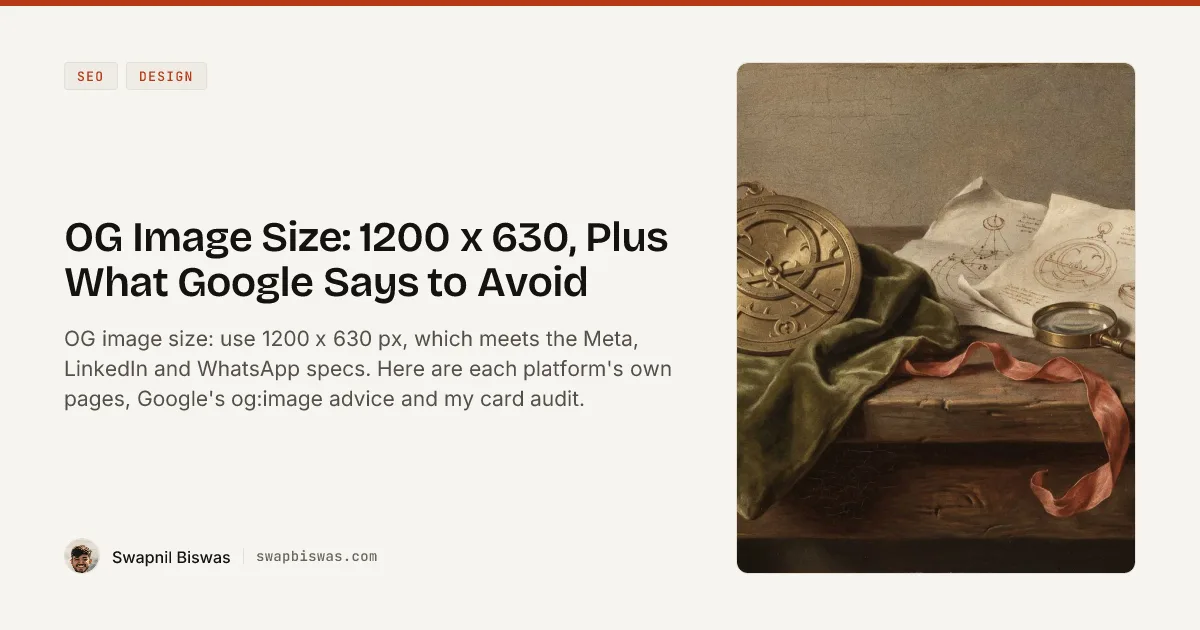
The OG image size to use is 1200 x 630 pixels. Meta recommends at least 1200 x 630 and a ratio as close to 1.91:1 as possible, LinkedIn’s sharing module sets a 1200 x 627 minimum with a 1.91:1 ratio, and the file limits are 5 MB on LinkedIn and 8 MB on Meta, while WhatsApp asks for an image under 600 KB.
Every card this site ships, one per post plus the homepage, meets that spec. Each one is also the kind of image Google’s Image SEO page tells you to avoid in the og:image tag: “an image with text”.
My view after auditing them: for feeds the size is settled, since Meta and LinkedIn, the two platforms below that publish both dimensions, differ by 3 pixels of height. What deserves a decision is which reader the image is built for, because that choice also sets the ratio. Social feeds and Google read the same tag, and each one’s documentation asks for a different image.
OG Image Size by Platform, From Each Platform’s Own Page
There is no official Open Graph image size, because the protocol sets none. Every number in the table below comes from a platform’s own documentation, fetched on 2 October 2026, and where a platform publishes nothing, the row says so instead of borrowing a number from a third-party guide.
| Platform | Size | Ratio | Minimum | Max file size | Formats named | Source |
|---|---|---|---|---|---|---|
| Facebook (Meta) | At least 1200 x 630 | As close to 1.91:1 as possible, to show the full image without cropping | 200 x 200 allowed; 600 x 315 for the larger link post | 8 MB | None | Images in Link Shares, updated 30 Jun 2026 |
| LinkedIn, sharing module | 1200 x 627 or larger | 1.91:1 | 1200 x 627 | 5 MB | None for sharing | Make your website shareable on LinkedIn, “Last updated: 2 years ago” |
| LinkedIn, single image ads | Up to 7680 x 4320 | 1.91:1 landscape | 640 x 360 | 5 MB | JPG, PNG or GIF | Same LinkedIn page |
| Google Discover | At least 1200 px wide | 16:9 | More than 300,000 total pixels | Not stated | Not stated | Google Discover docs, updated 9 Mar 2026 |
| Slack | Not published | Not published | Not published | Not published | Not published | Slack’s robots page |
| Not stated | 4:1 or less, width to height | 300 px wide | Under 600 KB | None | WhatsApp Link Previews, updated 21 May 2026 | |
| X (Twitter) | No current spec page | Not published | Not published | Not published | Not published | docs.x.com sitemap |
| Open Graph protocol | No size | No ratio | None | None | None named | ogp.me |
Notes on the Table: Ratio, Thumbnails, X, Slack and WhatsApp
- Ratio: 1200 x 630 works out to 1.905:1 and LinkedIn’s 1200 x 627 minimum to 1.914:1, either side of the 1.91:1 that Meta and LinkedIn name.
- Thumbnails: under an “Important to know” note that follows its ad specs, LinkedIn’s page says “Images less than 401 pixels wide display as a thumbnail image.”
- LinkedIn’s developer link: the page sends developers to a developer.linkedin.com page on setting display tags for shares, and that link returned a 404 when I followed it on 2 October 2026.
- LinkedIn profile banner: the cover image behind your profile photo is a separate spec from the link-preview card in this table, and its Help page asks for 1584 x 396 with no safe zone; where a banner’s text stays visible on desktop and in the phone app is mapped in another post.
- X: the old Cards pages on developer.x.com now redirect to the docs.x.com overview, and none of the 1,121 URLs in the docs.x.com sitemap is a Cards page. Three third-party guides I checked give three different answers: Moda recommends 1200 x 675 and calls 2:1 the official ratio, Screenhance gives 1200 x 628 at 1.91:1, and og-image.org gives 1200 x 630 at 1.91:1. The docs.x.com pages I checked, which show what X ships rather than a spec, declare a 1200 x 630 twitter:image on a summary_large_image card, and the file measures 1200 x 630.
- Slack: its link-expanding bot looks for “oEmbed and Twitter Card / Open Graph tags”, fetches the image “to check validity” and caches responses “for around 30 minutes”.
- WhatsApp: its page also says the head holding the tags “must appear within the first 300KB of the HTML”, and that not meeting its requirements “may risk the link to be not previewed”.
Does an OG Image Affect SEO?
Google’s documentation lists og:image as one of three metadata sources that can influence which image represents a page, and none of the four Google Search Central pages I checked on 2 October 2026 calls it a ranking factor.
The Image SEO page, last updated 2 March 2026, says Google’s “selection of an image preview is completely automated” and that the chosen image can appear as “a text result image or the preview image in Discover”. Its preferred-image section names the three sources:
| Route Google lists | Google’s example | What this site sends |
|---|---|---|
schema.org primaryImageOfPage | A WebPage with an image URL | Nothing |
| An image on the main entity | A BlogPosting with mainEntityOfPage and image | The text card |
| The og:image meta tag | A plain og:image meta tag | The text card |
For whichever route you use, the same section lists four best practices, quoted in full:
- “Choose an image that’s relevant and representative of the page.”
- “Avoid using a generic image (for example, your site logo) or an image with text in the schema.org markup or og:image meta tag.”
- “Avoid using an image with an extreme aspect ratio (such as images that are too narrow or overly wide).”
- “Use a high resolution, if possible.”
Nothing on the page describes a penalty for skipping them; they describe which image Google would rather pick. Three other Google pages add conditions and numbers:
- Discover, whose size numbers are in the table above, adds one more item to its large-image list, “Enabled by the max-image-preview:large setting, or by using AMP”, and says: “For best results, avoid using text-heavy images in the schema.org markup or og:image meta tag.”
- Google’s max-image-preview reference, updated 24 March 2026, says that without the rule “Google may show an image preview of the default size”, while the
largevalue allows “A larger image preview, up to the width of the viewport”. - The Article structured data page, updated 8 September 2026, recommends “multiple high-resolution images (minimum of 50K pixels when multiplying width and height)” in 16:9, 4:3 and 1:1.
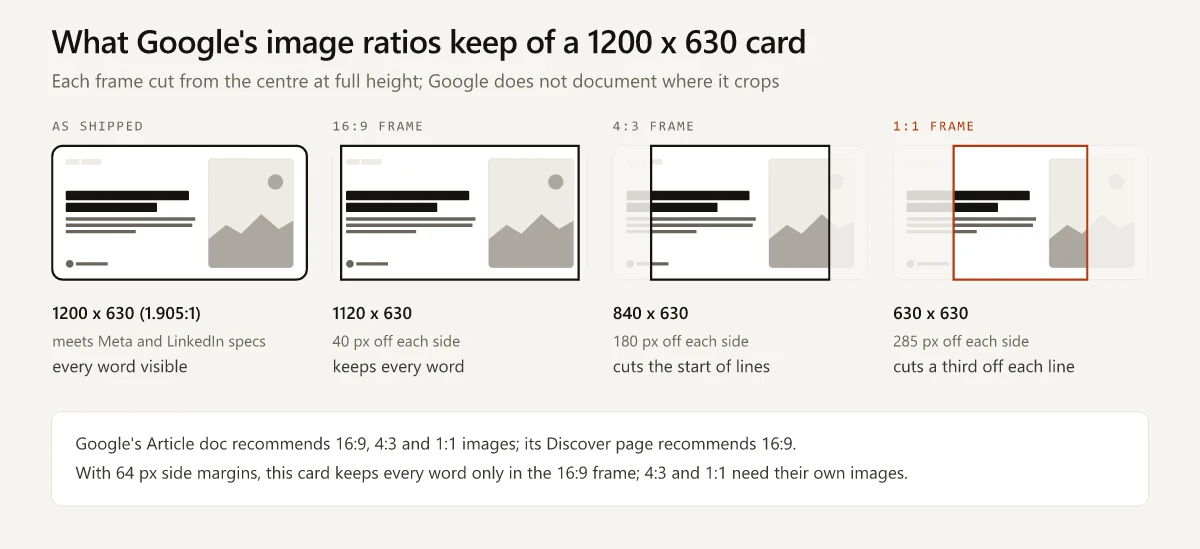
Cut from the centre at full height, this site’s card keeps every word only in the 16:9 frame, so the 4:3 and 1:1 images Google’s Article page asks for need their own files:
| Google ratio | Frame on a 1200 x 630 card | Cut from each side | What this card keeps |
|---|---|---|---|
| 16:9 | 1120 x 630 | 40 px | Every word, since the cut stays inside the 64 px margins |
| 4:3 | 840 x 630 | 180 px | Each line minus its first 116 px, and most of the painting |
| 1:1 | 630 x 630 | 285 px | Each line minus its first 221 px, about a third of the column, and under half the painting |
Discover’s page says Google “tries to automatically crop the image” and does not say where, so treat the centre cut as an illustration.
The OG Image on Google’s Own Image SEO Page
On 2 October 2026, the og:image on that Image SEO page, and on the Discover, robots meta and Article pages I checked, was the same Google Search Central logo lockup with a robot illustration: a site logo with text. Its tags declare 1200 x 675, and the file measures 960 x 540.
So the page that advises against a site logo or an image with text puts exactly that in its own og:image. I read the advice as a preference to weigh against what a feed card needs. The dimension tags carry a separate lesson: they are a claim about the file, so check og:image:width and og:image:height against the image you actually serve.
Can an OG Image Be WebP?
None of the platform pages I checked says yes or no to WebP for og:image, so for a format a platform has put in writing, use JPG or PNG. What the pages do say:
- Google’s Image SEO page lists WebP among its supported formats for images “referenced in the src attribute of img”, alongside BMP, GIF, JPEG, PNG, SVG and AVIF. That list covers images on the page, and the og:image tag is not one.
- LinkedIn’s help page names file types once, for single image ads: JPG, PNG or GIF. WebP appears nowhere on it.
- Meta’s image page, Slack’s robots page and WhatsApp’s link-preview page name no format, and the Open Graph protocol has no format list, though its own example declares
image/jpeg.
This site’s cards are WebP. A live request for one card on 2 October 2026 came back as Content-Type: image/webp, at the same 49,892 bytes as the file in the build output. If you ship WebP too, preview the URL in each platform’s own tool before a launch post goes out:
- On LinkedIn that tool is the Post Inspector, which LinkedIn describes as a way to “Get insights into how your content shows up on LinkedIn”.
- On Facebook it is the Sharing Debugger, which Meta’s image page recommends for pre-caching and for tracing errors.
- On WhatsApp, the link-preview page says to type the link into a message without sending it, then recheck the requirements if no preview appears above the composer “after 10 seconds” or the preview is not “in the expected large size”.
The Open Graph Tags That Carry Size and Alt Text
The protocol makes og:image one of four required properties and gives it optional structured properties for the URL, a secure URL, the MIME type, width, height and alt text. A typical set for a 1200 x 630 PNG card:
<meta property="og:image" content="https://example.com/og/post-slug.png" />
<meta property="og:image:type" content="image/png" />
<meta property="og:image:width" content="1200" />
<meta property="og:image:height" content="630" />
<meta property="og:image:alt" content="Text card reading OG Image Size beside a cropped oil painting of a workbench" />
What each optional line does, per the spec and Meta’s docs:
og:image:widthandog:image:height: Meta’s pre-caching section says its crawler “has to see an image at least once before it can be rendered”, so whoever shares a page before that “won’t see a rendered image” unless the image is pre-cached. The two tags let the crawler “render the image immediately without having to asynchronously download and process it”.og:image:alt: the protocol defines it as “A description of what is in the image (not a caption)” and says a page with an og:image “should specify og:image:alt”.og:image:type: “A MIME type for this image”, which is where a WebP card would declareimage/webp.
For a text card, describe the card, words included. An alt string that describes only the background art leaves out the part a screen-reader user came for.
OG Image Size Self-Audit: What swapbiswas.com Ships
The site generates one card per post at build time with Satori, resvg and sharp, and the build record of this site dates when each piece landed. The template is code, so a title edit re-renders that post’s card at the next build with no design step, which is why my Claude Design vs Claude Code routing table puts OG images in the repo lane. A build-time card generator is also one of the six image routes I compared for Claude Code, where this card counts as a composite: code sets the type, and the painting comes from an image model. I measured every card in the build output of 2 October 2026, which covers 194 posts plus the homepage.
| Check | Result |
|---|---|
| Cards built | 195: one per post plus the homepage card |
| Dimensions and format | All 1200 x 630, WebP at quality 82 |
| Post card weight | 44.6 to 56.9 KiB, median 52.6 KiB |
| Homepage card | 68.1 KiB |
| Heaviest post card against the file limits | 58,236 bytes, about 1% of LinkedIn’s 5 MB and under a tenth of WhatsApp’s 600 KB |
| On-page versions | 400 x 210 and 660 x 347 for the srcset on the hero and related-post cards; og:image always gets the 1200 px file |
| Text column, 632 px wide inside 64 px margins | Up to two category chips, the title, the full meta description (the route cuts anything past 170 characters, and no post’s description runs that long), and a footer with my headshot, name and domain |
| Image panel, 400 x 512 | A crop of the post’s cover painting |
The same file is the article hero. A comment in the route records that a desktop at 1x was downloading “about 3.3x the pixels it needed” for the article column, and says the two smaller versions in the table exist only for the page’s srcset.
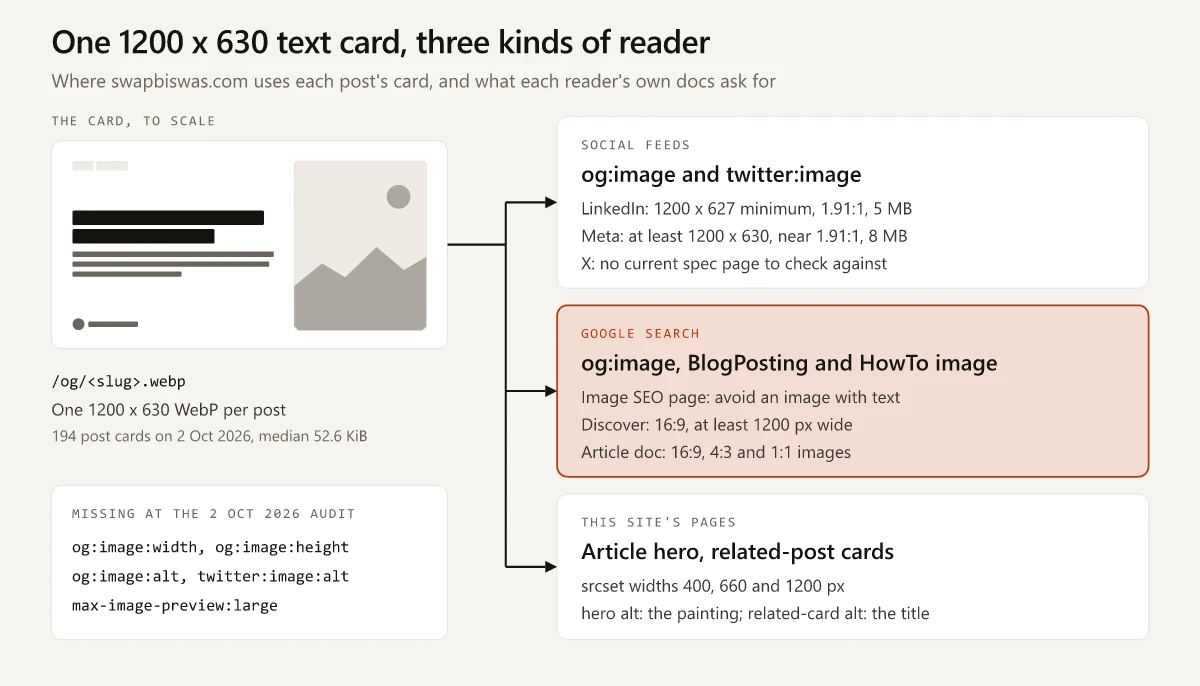
Where the card goes, read from the source on 2 October 2026:
| Slot | Set in | Reader |
|---|---|---|
og:image | MainHead.astro, line 55 | Facebook, LinkedIn, Slack, WhatsApp, and Google as one of its three preferred-image routes |
twitter:image, with twitter:card set to summary_large_image | MainHead.astro, lines 75 and 78 | X |
BlogPosting image in JSON-LD | blog post template, line 86 | |
HowTo image, on posts with steps | blog post template, line 127 | |
Article hero img element | blog post template, line 222 | People reading the post |
| Related-post cards | blog post template, line 305 | People browsing other posts |
On the article page the hero carries the post’s img_alt as its alt text, and that string describes the cover painting in the right third of the card and none of the card’s words. The same string never reaches the OG tags: the card route never reads it, and at the audit the head sent no og:image:alt at all. My alt text audit covers why that field is hard to change.
The card URL has been /og/<slug>.webp since March 2026. It stayed the same through a full template redesign on 27 August 2026 and through the title rewrites in my SEO title examples, and each rewritten post title changed the words on that post’s card. Meta caches images by URL and says that if you replace an image, “Use a new URL for the new image or the image won’t be updated”.
What the audit found missing or mismatched, with the fix for each:
| Gap on this site | Whose docs ask for it | Fix |
|---|---|---|
No og:image:width or og:image:height | Meta, as one of three ways to render the image on a page’s first share | Two lines in the shared head |
No og:image:alt | The Open Graph protocol, which says a page with an og:image “should” specify it | One line that describes the card’s text and art |
No twitter:image:alt | No live page; X’s card docs are no longer online | Optional; reuse the og:image:alt string |
| Card URL stays the same when the card changes | Meta’s rule to use a new URL for a replaced image | A version in the card path that changes with the title or template |
| Tool pages and the other non-post pages on the shared head fall back to the homepage card; the personal website examples gallery, which has its own head, sets a 1200 x 630 JPG | Google’s line against “a generic image” | A card per tool page |
On 3 October 2026 I shipped the first three fixes. The shared head now sends og:image:width 1200, og:image:height 630 and og:image:type with every card, plus an og:image:alt that reads the card’s words. On this page it reads: Text card reading “OG Image Size: 1200 x 630, Plus What Google Says to Avoid”, by Swapnil Biswas on swapbiswas.com, beside a cropped Renaissance-style painting. twitter:image:alt repeats the same string, pages that share the homepage card share its alt text, and the gallery’s own head got the same tags. The card URL and the per-tool cards are still open.
| No max-image-preview:large on any post; the head writes a robots tag only on noindexed pages, and the one page that sets it is the personal website examples gallery | Google Discover, for large images | Add it if you take the Google-first path below |
| The BlogPosting image is the text card | Google’s line against “an image with text” | Pick a path in the next section |
None of these fixes has shipped as of this post.
OG Image Best Practices: Feed-First or Google-First
Pick one path per template, based on where your links get seen. The specs in each column come from the pages quoted above.
| Feed-first og:image | Google-first og:image | |
|---|---|---|
| The image | A 1200 x 630 card; text on it is your call | A text-free image that is not a logo, at least 1200 px wide |
| Ratio | 1.905:1, next to Meta’s and LinkedIn’s 1.91:1 | 16:9, such as 1200 x 675, Discover’s ratio |
| What the other reader gets | Google gets “an image with text” | Feeds get a 16:9 image, and Meta says staying close to 1.91:1 avoids cropping |
| BlogPosting image | Separate text-free images in 16:9, 4:3 and 1:1 | The same image, plus 4:3 and 1:1 versions |
| Also set | og:image:width, og:image:height, og:image:alt | The same three, plus max-image-preview:large |
Caveats on the table:
- At 1200 px wide, a 16:9 image is about 47 px taller than a 1.91:1 frame, so keep anything that must survive a feed crop away from the top and bottom edges.
- Google lists its three routes side by side without saying which one wins when the og:image and the BlogPosting image disagree, so on the feed-first path a text-free BlogPosting image gives Google a text-free option without guaranteeing it gets picked.
Checking which path a template is on takes one view-source per template, and it belongs in the on-page step of my SEO audit checklist, next to titles and meta descriptions.
Pick the Reader, Then Set the OG Image Size
For feeds, the OG image size has a one-line answer: 1200 x 630 in a file under the 600 KB WhatsApp asks for, and a Google-first image moves to 16:9, such as 1200 x 675. The decision that comes first is which reader the image serves, since the feeds and Google ask for different images in the same tag. A single text card picks the feeds by default, and mine went without the two tags Meta names as one way to render the image on a first share until 3 October 2026. Add og:image:width and og:image:height before anything else.
Frequently Asked Questions
What is the best OG image size?
Use 1200 x 630 pixels in a file under 600 KB. Meta recommends at least 1200 x 630 with a ratio as close to 1.91:1 as possible, LinkedIn's sharing module asks for a 1200 x 627 minimum at 1.91:1 and up to 5 MB, and WhatsApp's link-preview page asks for an image under 600 KB.
Does an OG image affect SEO?
Google's Image SEO page lists og:image as one of three ways to suggest which image represents a page, for example as a text result image or a Discover preview, and advises against a logo or an image with text there. None of the four Google Search Central pages I checked calls og:image a ranking factor.
Can an OG image be WebP?
No platform page I checked documents WebP for og:image. LinkedIn's help page on shareable websites names file types only for single image ads (JPG, PNG and GIF), Meta's image page names no format, and Google lists WebP among the formats it supports in an img element's src attribute. For a documented format, use JPG or PNG, and preview any WebP card in LinkedIn's Post Inspector and Meta's Sharing Debugger.
What are the OG image dimensions for LinkedIn?
LinkedIn's help page gives a 1200 x 627 pixel minimum, a 1.91:1 recommended ratio and a 5 MB maximum for the sharing module. Under an Important to know note that follows its single image ad specs, the same page says images less than 401 pixels wide display as a thumbnail.
Do I need og:image:width and og:image:height?
The Open Graph protocol lists both as optional. Meta's docs say the two tags tell its crawler the image dimensions, so it can render the image immediately without first downloading and processing it.