LinkedIn Newsletter vs Article: Same Page, Plus Subscribers
LinkedIn newsletter vs article: every edition is an article with subscribers on top. LinkedIn Help's rules and analytics, and how links in both route via LinkedIn.
In the page LinkedIn serves, a link you put inside an article or a newsletter edition usually points at LinkedIn rather than at your site. On 3 October 2026 I fetched 12 public linkedin.com/pulse/ pages while logged out. Nine had outbound links in the body, and when I first requested each, 8 of those 9 had every body link rewritten to https://www.linkedin.com/redir/redirect?url=..., a path that LinkedIn’s robots.txt disallows for Googlebot. Editions and standalone articles got identical treatment, which is the first clue to the LinkedIn newsletter vs article question: they are the same kind of page.
LinkedIn’s Help Center says as much. It defines a newsletter as “a set of regularly published articles on LinkedIn, typically about a specific topic” (Newsletter page on LinkedIn), and in the served HTML an edition differs from a standalone article by one Subscribe card. The main thing that changes is who LinkedIn tells when you publish. I treat the choice as a delivery decision, and for anyone who owns a blog, neither format is where search traffic should land.
LinkedIn Newsletter vs Article: What Is the Difference?
A newsletter edition is a LinkedIn article that also goes to subscribers. Each edition is listed on a newsletter page, triggers push, in-app and email notifications to everyone subscribed, and reports email sends and email open rate on top of the article views a standalone article gets.
| What differs | Standalone article | Newsletter edition |
|---|---|---|
| LinkedIn’s definition | ”long form, in-depth content that may be distributed to your LinkedIn connections and beyond” | One edition of “a set of regularly published articles” |
| Who can publish | Every member, and super or content admins of a Page | Every member; Pages that pass LinkedIn’s access review |
| Where you write it | Write article (LinkedIn’s article help says the feature isn’t available on the LinkedIn mobile app) | The same editor, with the newsletter chosen in the dropdown next to your name |
| On publish | Shared with your network, with optional commentary, and listed in your profile’s Activity section | The same, plus “push, in-app, and email notifications are sent to all your subscribers” |
| Extra page | None | A newsletter page listing past editions, viewable without logging in |
| What a reader can do | Follow you from the author card | Subscribe, and “When you subscribe to a newsletter, you also start following the newsletter author.” |
| Post analytics | Article views: “The total number of times your article was seen on LinkedIn or via email” | Article views, plus Email sends and Email open rate |
| Newsletter dashboard | Not applicable | Article views, impressions, engagements, new subscribers, and subscriber demographics by job title, company, company size, seniority and location |
| Search settings | Article URL, SEO title, SEO description | The same three fields |
| Served page | A /pulse/ URL that is its own canonical | The same template, plus a Subscribe card |
Sources: LinkedIn Help on the difference between posts, articles, reposts and newsletters, writing and publishing articles, LinkedIn Newsletters, post analytics and newsletter analytics, read on 3 October 2026. The served-page row is my own check, below.
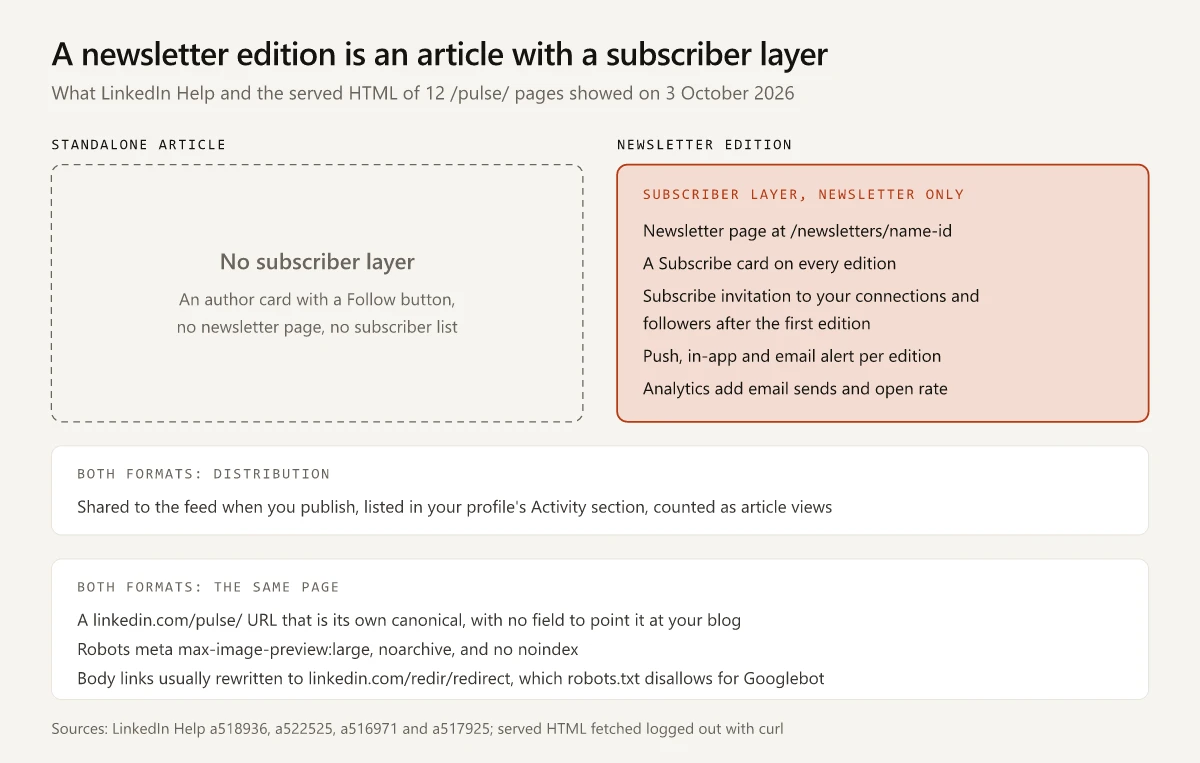
A newsletter also gets a subscribe invitation at launch. LinkedIn’s help on managing a newsletter says that by default your connections and followers “will be invited by notification to subscribe to your newsletter once the first article of your newsletter has been successfully published”. The newsletters overview adds that when someone starts following you later, “a notification inviting them to subscribe to the newsletter is automatically sent”.
Who Can Create a LinkedIn Newsletter
LinkedIn’s newsletter access criteria open with one line for members: “All LinkedIn members have access to create a newsletter on LinkedIn.” The conditions on that page apply only to LinkedIn Pages, which LinkedIn evaluates on:
- Audience: “Pages with more than 150 followers and/or connections are eligible to be evaluated for LinkedIn Newsletters access”
- Activity: “Recent shares of original content (any type)”
- Standing: “A history of abiding by our Professional Community Policies”
The page does not mention Creator Mode. LinkedIn removed the Creator Mode toggle in 2024, and in my map of where each Creator Mode feature went, the newsletter row points to this same access criteria page. BrandGhost’s comparison of the two formats still says “LinkedIn Newsletters require Creator Mode enabled on personal profiles”, citing a LinkedIn Help page (a522537) that returned HTTP 404 when I requested it on 3 October 2026. The access criteria page read “Last updated: 2 years ago” that day.
The limits are in LinkedIn’s help on managing a newsletter and on creating a Page newsletter, and the Page rule is on its newsletter page help:
| Rule | LinkedIn’s wording |
|---|---|
| Newsletters per author | ”Authors can create up to five newsletters at a time.” |
| Waiting period | ”After deleting or creating a newsletter, you must wait two weeks before creating a new one.” |
| Editions per newsletter | ”an unlimited number of editions for each newsletter” |
| Page newsletters | ”If you create a newsletter as a LinkedIn Page, your newsletter page is separate from your LinkedIn Page.” |
Newsletter Edition vs Article in the Served HTML
I fetched each page with curl on 3 October 2026, logged out, with a Chrome desktop user agent. Every response was HTTP 200 with the full article body, and none was LinkedIn’s sign-in wall. The pair below are both published by company Pages and both cover B2B segmentation: an edition of ViB’s B2B Marketing News Roundup newsletter, which the B2B customer segmentation guide on this site already cites as a source, and a standalone article by Veridata Insights.
| What I checked | Newsletter edition (ViB) | Standalone article (Veridata Insights) |
|---|---|---|
| URL path | /pulse/only-guide-you-need-b2b-customer-segmentation-muexc | /pulse/b2b-market-segmentation-veridata-insights-qp9ze |
| LinkedIn page key | d_flagship2_pulse_read | d_flagship2_pulse_read |
| Canonical | Itself | Itself |
robots meta | max-image-preview:large, noarchive | max-image-preview:large, noarchive |
bingbot meta | max-image-preview:large, archive | max-image-preview:large, archive |
| JSON-LD | Article, Organization author | Article, Organization author |
| Outbound links in the body, first request | 34, every href starting linkedin.com/redir/redirect?url= | 18, every href starting linkedin.com/redir/redirect?url= |
| The same links on five repeat requests | /redir on 5 of 5 | /redir on 4 of 5, direct links on 1 |
rel on any <a>, any request | None | None |
| Cards after the article | Author card with ”+ Follow”, Subscribe card with ”+ Subscribe” | Author card with ”+ Follow” |
The Subscribe card is the one difference I found that tracks the format. It links the edition to its newsletter page at linkedin.com/newsletters/, which answered HTTP 200 logged out with its own canonical and the same robots meta: a second URL a standalone article does not get.
To check that the pair was not a coincidence, I ran the same checks on 10 more /pulse/ pages linked from the ViB edition, then requested each of the nine pages with body links five more times:
| Across 12 pages | Editions (8) | Standalone articles (4) |
|---|---|---|
| Canonical points at itself | 8 | 4 |
robots meta max-image-preview:large, noarchive | 8 | 4 |
noindex anywhere in the HTML | 0 | 0 |
| Pages with outbound links in the body | 6 | 3 |
First request: body links routed through /redir/redirect | 5 pages | 3 pages |
| First request: body links pointing straight at the destination | 1 page | 0 |
Five repeat requests per page: responses with /redir links | 29 of 30 | 14 of 15 |
<a> elements with a rel attribute, any request | 0 | 0 |
| Subscribe card with ”+ Subscribe” | 8 | 0 |
Four of the 12, the ViB edition among them, listed hreflang alternates on country subdomains with a ?tl= language parameter. Those four were two editions and two standalone articles, so hreflang does not separate the formats either. Twelve pages, nine of them on segmentation, reached by following links from one edition and requested on one day, are a small sample. LinkedIn’s Help Center documents none of this markup.
Where a Link in a LinkedIn Article Goes
In the editor you link to your own page. On most requests, the served anchor’s href is https://www.linkedin.com/redir/redirect?url=https%3A%2F%2F...&urlhash=...&trk=article-ssr-frontend-pulse_little-text-block, and the anchor has no rel attribute.
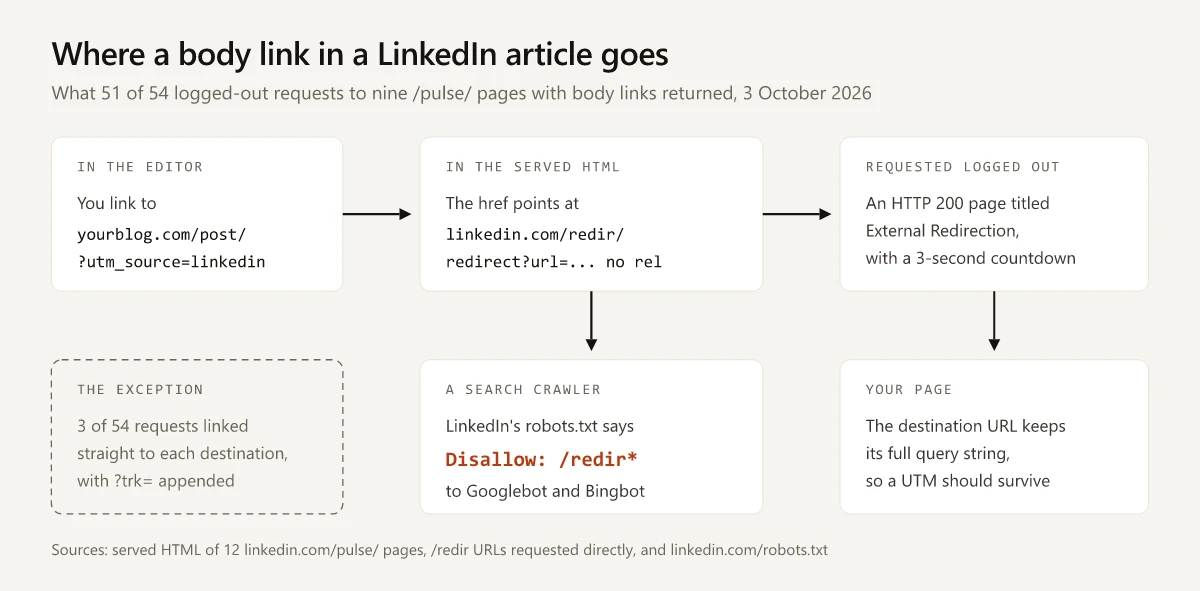
For search crawlers, the hop is off limits. The Googlebot block in LinkedIn’s robots.txt carries Disallow: /redirect* and Disallow: /redir* (lines 95 and 96 of the file I fetched), and the Bingbot block carries the same two rules. Google describes the file this way: “A robots.txt file tells search engine crawlers which URLs the crawler can access on your site” (Google’s robots.txt introduction). In a /redir response, the only URL in the markup that leads to your page is one Googlebot is asked not to request.
For readers, the hop is a page of its own. Requested logged out, a redir URL from the Veridata article answered HTTP 200 with a LinkedIn page titled “External Redirection” that reads “Redirecting you to external site in 3 seconds”, plus a “Click here” link, and there was no 3xx status or Location header. A redir URL from the ViB edition returned the same page, and the destination it named kept its full HubSpot tracking query string, so a UTM in your link should come through intact. I did not test a logged-in member’s click.
That puts LinkedIn in a different category from the platforms in my served-HTML check of four syndication platforms’ rel strings. Medium, Dev.to, HackerNoon and Hashnode stamp rel tokens on the link to your domain. LinkedIn’s markup in my sample carried no rel on any anchor; what changed was the href itself, as the tables above show.
Before you grep your own article:
ugcdoes appear in the markup, asrel="ugc"on 15divelements markeddata-test-id="publishing-image-block"across 4 of the 12 pages. MDN’s rel attribute reference lists rel as valid on the<link>,<a>,<area>and<form>elements, so a rel on a div qualifies no link.- The link form can change between two requests for the same page. One edition, published on 7 October 2024, first came back with direct links,
?trk=article-ssr-frontend-pulse_little-text-blockappended to each of its eight, then served /redir links on all five repeat requests. The Veridata article and one other edition each served direct links on one repeat request in five. Across 54 requests to the nine pages with body links, 51 came back with /redir. LinkedIn documents neither form, so run the check below several times.
The check works on any public /pulse/ URL:
curl -sL -A "Mozilla/5.0 (Windows NT 10.0; Win64; x64) AppleWebKit/537.36 (KHTML, like Gecko) Chrome/131.0.0.0 Safari/537.36" \
  https://www.linkedin.com/pulse/your-article-slug -o page.html
grep -o '<link rel="canonical"[^>]*>' page.html
grep -o '<meta name="robots"[^>]*>' page.html
grep -o 'href="https://www.linkedin.com/redir/redirect[^"]*"' page.html | wc -l
grep -o 'href="http[^"]*trk=article-ssr-frontend-pulse_little-text-block"' page.html | grep -vc 'linkedin\.com/'
The last two lines count /redir links and direct links. Run the check three or more times, since one response can differ from the next. If the canonical grep prints nothing, search page.html for authwall. If it is there, LinkedIn served its sign-in wall instead of the article.
What LinkedIn’s Robots.txt Tells Search and AI Crawlers
The same file names AI crawlers, with these rules as of 3 October 2026:
| Crawler | What it is for | /pulse/ pages | /redir links |
|---|---|---|---|
| Googlebot | Google Search | No rule against them | Disallowed |
| Bingbot | Bing search | No rule against them | Disallowed |
| OAI-SearchBot | ChatGPT search results | No rule against them | Disallowed |
| Claude-SearchBot | Claude search quality | No rule against them | Disallowed |
| PerplexityBot | Perplexity search results | Disallow: / | Disallow: / |
| GPTBot, ClaudeBot | Model training, per the OpenAI and Anthropic pages | Disallow: / | Disallow: / |
| Google-Extended | A Gemini training and grounding token, not a separate crawler | Disallow: / | Disallow: / |
| Any crawler not named | Not applicable | Disallow: / under User-agent: * | Disallow: / |
Read as written, a LinkedIn article is open to Google, Bing, ChatGPT search and Claude’s search crawler, and closed to Perplexity’s. A robots.txt file records what LinkedIn asks of each crawler; what each company’s systems then do with LinkedIn pages is outside what the file can show. For the robots.txt rules you can set for these AI crawlers on your own site, see the robots.txt rules for LLM crawlers in the LLM optimization guide.
Are LinkedIn Articles Good for SEO?
LinkedIn articles can rank in Google as pages on linkedin.com. The /pulse/ path has no robots.txt rule against Googlebot, none of the 12 pages carried noindex, and Google’s robots meta reference says that without noindex “the page, media, or resource may be indexed and shown in search results” (Google’s robots meta tag documentation). The same page says the noarchive value in LinkedIn’s tag “is no longer used by Google Search”.
What LinkedIn gives you for search, per its SEO settings help:
- An SEO title, which LinkedIn uses “in place of your article title for search engine result pages”. “If your SEO title is over 60 characters, it will be truncated.”
- An SEO description, where LinkedIn suggests “between 140-160 characters”.
- A custom Article URL, set from Settings in the editor’s Manage menu (article help).
What it does not give a blog owner:
- A canonical field. None of the Help pages I read mentions one, and every page in my sample named itself as canonical, so an article that republishes your blog post presents LinkedIn’s copy as the original.
- A crawlable link back you can count on. Most responses route the body link to your post through /redir, a URL Googlebot is asked not to request.
Whatever an article ranks for, the ranking belongs to a linkedin.com URL. For your own domain’s search traffic, the copy on LinkedIn does little.
LinkedIn Post vs Article vs Newsletter
LinkedIn’s Help Center defines all three formats on the one page linked in the sources above:
| Format | LinkedIn’s definition | Who is told when you publish | Use it for |
|---|---|---|---|
| Post | ”content shared through the LinkedIn feed”, which may contain media and “third-party content (for example, URL)“ | Whoever the feed shows it to | A short point, or a link to your own post |
| Article | Long-form content on its own /pulse/ page (defined in the first table) | Whoever the feed shows the article’s share to | A one-off long piece meant to be read on LinkedIn |
| Newsletter | Lets members “subscribe to your newsletter to be notified about new articles you publish” | Subscribers by push, in-app and email, plus the feed | A series on a cadence you can keep |
A feed post with a link is the direct route to your own domain, and how you attach the link matters: MagicPost’s link study, covered in my guide to what counts as a good number of LinkedIn impressions, found fewer impressions on posts with a link preview card than on posts without one, while posts with the URL typed into the text did not trail. MagicPost files link-preview posts under its article format, so its article figures describe link posts, not LinkedIn articles. The same guide lists how long LinkedIn keeps article and newsletter analytics.
All three formats report “Profile viewers from this post” in their analytics, a separate count from how often you appear in LinkedIn search.
LinkedIn Newsletter vs Article for Marketers Who Own a Blog
Match the LinkedIn article vs newsletter decision to the goal:
| Your goal | Publish | Why, from the evidence above |
|---|---|---|
| Search traffic and links to your site, including for a post you already published | The post on your own domain, then a feed post that summarizes it with the URL typed into the text | LinkedIn copies are their own canonical, and their body links usually route through /redir |
| A readership LinkedIn notifies each time you publish | A newsletter, on a cadence you can keep | Editions send push, in-app and email notifications to subscribers; standalone articles have no subscribers |
| One long piece people can read without leaving LinkedIn | A standalone article | No cadence to keep and no newsletter page to maintain |
Before choosing a newsletter to build a list, check what the list holds. LinkedIn’s newsletters overview says an author sees each subscriber’s “name, profile photo, job title, and headline”, and the newsletter analytics page lists new subscribers with buttons for “following, connecting, or messaging” them. Neither page mentions email addresses or an export. A newsletter also asks for regular output: LinkedIn’s newsletter best practices say to “Maintain the publishing cadence that you chose for your newsletter”.
I post on LinkedIn several times a week and keep each post’s draft, UTM and image prompt in one markdown file in this site’s repo. The UTM is what makes the first row of that table measurable: a visit from LinkedIn shows up in analytics under the post that sent it.
The LinkedIn newsletter vs article choice is about who gets told when you publish, since the page is the same /pulse/ article either way. Publish on your own domain first, then run the curl check above on your next LinkedIn article.
Frequently Asked Questions
What is the difference between a LinkedIn newsletter and an article?
A newsletter edition is a LinkedIn article that also goes to subscribers. LinkedIn defines a newsletter as a set of regularly published articles, and each edition is listed on the newsletter's page, triggers push, in-app and email notifications to subscribers, and adds email sends and email open rate to its analytics.
Can anyone create a LinkedIn newsletter?
Every member can. LinkedIn's newsletter access criteria page says all LinkedIn members have access to create one and sets conditions only for Pages: more than 150 followers and/or connections, recent original content and a good-standing record. The page does not mention Creator Mode.
Are LinkedIn articles good for SEO?
They can rank in Google, but as linkedin.com pages that do little for your own domain: none of the 12 /pulse/ pages I fetched on 3 October 2026 carried noindex, yet each was its own canonical with no field to point at your original. On 51 of 54 requests to the 9 pages with outbound links, the body links routed through a /redir URL that LinkedIn's robots.txt disallows for Googlebot.
LinkedIn newsletter or article: which should I use for a blog post?
For search traffic, keep the post on your own domain and share it in a feed post that links to it. Choose a newsletter when you want LinkedIn to notify and email a subscriber list each time you publish, and a standalone article for a one-off long piece with no cadence to keep.
How many newsletters can you have on LinkedIn?
Up to five at a time. LinkedIn's help says authors can create up to five newsletters, must wait two weeks after creating or deleting one before creating another, and can publish an unlimited number of editions in each.