Local SEO Checklist: 20 Steps to Rank in the Map Pack (2026)
A 20-step local SEO checklist for small businesses and solo marketers. Optimize your Google Business Profile, citations, and reviews to rank in the map pack.
Three out of four consumers say they “always” or “regularly” read online reviews before choosing a local business, according to BrightLocal’s Local Consumer Review Survey 2024. That single behavior shapes who gets the call and who gets ignored. The businesses that win in local search are not the biggest, they are the ones who work this local SEO checklist consistently while everyone else does the glamorous stuff.
This local SEO checklist gives you 20 concrete steps to rank in the Google map pack, the block of three business listings that sits above the normal results. It is built for small businesses and solo marketers who do not have an agency budget. Work through it in order and you will cover every signal that local search actually rewards.
Why This Local SEO Checklist Starts With the Map Pack
The map pack is the top three local listings Google shows for searches with local intent, like “plumber near me” or “coffee shop downtown.” It sits above the organic results, so it captures the most clicks for any query where the searcher wants something nearby.
Ranking here is different from ranking a blog post. Google weighs a separate set of signals: your Google Business Profile, your reviews, your citations, and proximity to the searcher. Whitespark’s annual survey of what drives local search rankings consistently puts your Google Business Profile and reviews near the top of that list.
Get those signals right and you compete for the map pack even from a low-authority site. Ignore them and no amount of generic SEO will get you there.
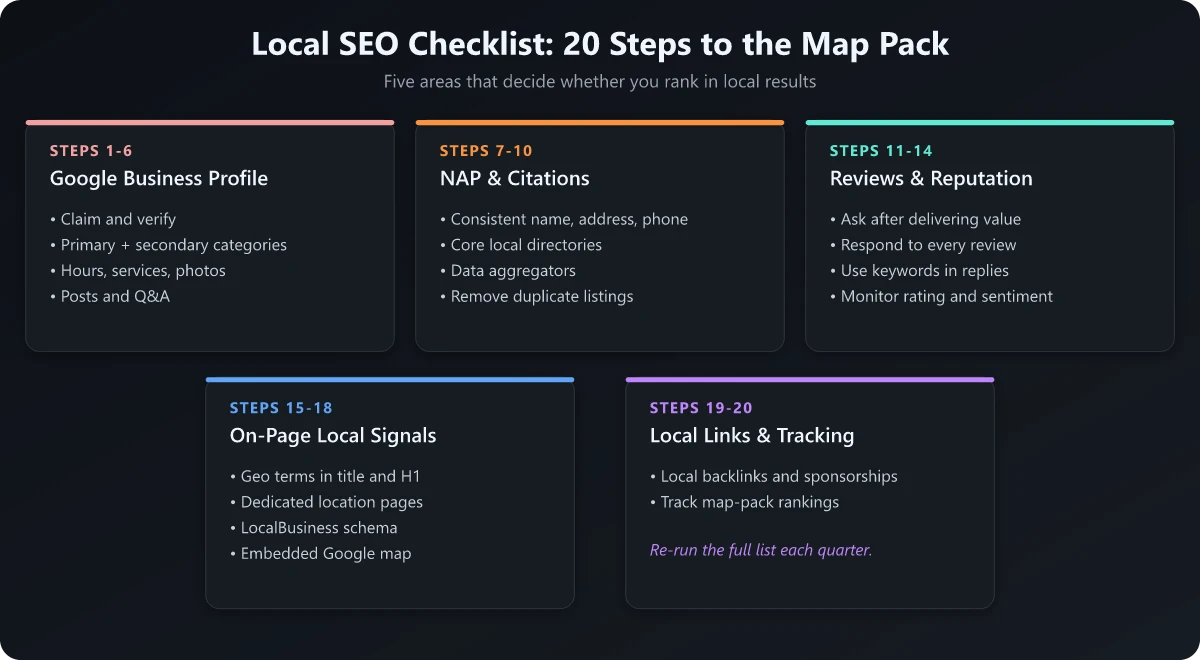
Section 1: Google Business Profile (Steps 1-6)
Your Google Business Profile (GBP) is the foundation of every local SEO checklist. It is the listing that powers your map pack appearance, so it deserves the most attention.
1. Claim and verify your profile
Search your business name on Google and claim the listing if it exists, or create one at google.com/business. Complete the verification step, usually by video or postcard. An unverified profile cannot rank.
2. Choose the most accurate primary category
Your primary category is one of the strongest ranking signals in the entire profile. Pick the single category that best describes what you do, then add secondary categories for other services. “Italian restaurant” beats the vague “restaurant” if that is what you are.
3. Fill out every field
Add your hours, service area, attributes, services, and a keyword-rich business description. A complete profile gives Google more to match against and signals an active, legitimate business.
4. Write a description with local intent
Use your primary service and city naturally in the first sentence of the description. Avoid keyword stuffing. Write for a human first, then make sure the service and location are both present.
5. Add real photos and update them monthly
Upload your storefront, interior, team, and product photos. Profiles with fresh, genuine images look more trustworthy and tend to get more engagement, which feeds back into ranking.
6. Publish Google Posts regularly
Publish a Google Post weekly with an offer, event, or update to keep the profile active in Google’s eyes. Google retired the public Q&A section on Business Profiles in late 2025, so the way to “answer” customer questions now is to make sure your profile description, services, and attributes cover them in detail, since Google’s AI features pull answers from that information.
Section 2: NAP and Citations (Steps 7-10)
Citations are mentions of your business on other websites: directories, review platforms, and local listings. The key is consistency.
7. Lock down your NAP format
NAP stands for Name, Address, and Phone number. Decide on one exact format - including how you abbreviate “Street” or “Suite” - and use it identically everywhere. Inconsistent NAP data confuses search engines and dilutes trust.
8. Build core citations first
Claim and complete your listings on the platforms that matter most: Apple Maps, Bing Places, Yelp, Facebook, and the major data aggregators (Data Axle, Foursquare, and TransUnion’s Digital Business Profile, formerly Localeze). The aggregators feed your details to dozens of smaller directories downstream, so getting them right propagates clean data across the wider ecosystem.
9. Add industry and local citations
Layer in citations specific to your industry (such as a legal directory for a law firm) and your geography (a local chamber of commerce). Relevance beats raw volume here.
10. Audit and clean up duplicate listings
Duplicate or outdated listings split your signals and can show customers the wrong phone number. Search for your business across directories, then merge or remove duplicates so every live listing carries identical NAP data.
Section 3: Reviews and Reputation (Steps 11-14)
Reviews are both a ranking factor and a conversion factor. They influence Google and they influence the human deciding whether to call you.
11. Build a simple review request system
The best time to ask is right after a positive interaction. Create a short link to your Google review form and send it by text or email. A consistent flow of recent reviews matters more than one large batch, since 27% of consumers expect to see reviews as fresh as two weeks old.
12. Respond to every review
Reply to positive and negative reviews alike. BrightLocal found that 88% of consumers would use a business that replies to all of its reviews, versus just 47% who would use one that does not respond at all. Responses also signal an active profile to Google.
13. Protect your star rating
71% of consumers would not consider using a business with an average rating below three stars, so your average is a hard filter, not a nice-to-have. Address service issues offline so they stop generating one-star reviews, then earn enough genuine positives to lift the average.
14. Diversify beyond Google
Google is the dominant platform, used by 81% of consumers reading reviews, but a single platform is a single point of failure. Build a smaller presence on Yelp, Facebook, and any industry-specific site your customers trust. If you want the full picture on how ratings tie back to rankings, see whether Google reviews help SEO.
Section 4: On-Page Local Signals (Steps 15-18)
Your website still matters. On-page local signals tell Google which city and service you want to rank for, and they back up the trust your profile earns.
15. Optimize title tags and meta descriptions
Put your primary service and city in the title tag of your most important pages, such as “Emergency Plumber in Austin, TX.” Keep titles under about 60 characters so they do not truncate in the results. My title tag examples by page type include a service-plus-city pattern for local pages, with the business name at the end.
16. Create dedicated location and service pages
If you serve multiple areas or offer several services, give each one its own page with unique content. Thin, duplicated location pages do more harm than good, so write real detail about each service or area.
17. Add LocalBusiness schema markup
Implement LocalBusiness structured data so search engines can read your NAP, hours, and geo-coordinates directly from the code. This reinforces the data on your profile and citations.
18. Fix the technical basics
Make sure your site is fast, mobile-friendly, and crawlable, since most local searches happen on phones. A quick technical SEO site audit will surface broken pages, slow load times, and indexing issues before they cost you rankings. Pair it with the mobile SEO checklist to confirm the mobile experience holds up.
Section 5: Local Links and Tracking (Steps 19-20)
The final two steps separate businesses that hold their rankings from those that slip.
19. Earn local backlinks
Links from local sources carry extra weight for local search. Sponsor a local event, join the chamber of commerce, partner with nearby businesses, or get featured in a local news story. A handful of relevant local links beats dozens of generic directory links. Regional interest guides belong on that list too, since a seasonal roundup of Kerala’s backwaters, hill stations and winter festivals names specific towns, venues and operators, and being one of the named businesses earns a contextual local link that no directory submission can imitate.
20. Track your local rankings
You cannot improve what you do not measure. Track your map pack position for your priority keywords from the locations you serve, since local rankings change with the searcher’s location. Learning how to check your SEO ranking gives you the baseline to know whether this checklist is working, and rolling those numbers into a regular SEO report keeps the progress visible over time.
Local SEO Checklist Priorities at a Glance
Not every step carries equal weight. If your time is limited, this table shows where to focus first.
| Priority | Focus area | Why it matters most |
|---|---|---|
| 1 | Google Business Profile | Powers your map pack appearance; biggest single lever |
| 2 | Reviews and responses | Ranking signal and conversion driver in one |
| 3 | NAP and citations | Builds the trust and consistency Google needs |
| 4 | On-page local signals | Reinforces which city and service you target |
| 5 | Local backlinks | Compounds authority and protects your position |
Conclusion: Work the Checklist, Then Repeat It
Local SEO is not a one-time project. The businesses that own the map pack treat this local seo checklist as a recurring routine: profile fresh, reviews flowing, citations consistent, pages optimized, and rankings tracked.
Start with your Google Business Profile and reviews, since those move the needle fastest, then work down through citations, on-page signals, and local links. Revisit the list every quarter. Consistency, not a single big push, is what keeps you in the top three where the clicks live.
If you want to go deeper on the technical foundation behind these rankings, run a full technical SEO site audit next and fix anything holding your site back.
Frequently Asked Questions
What is a local SEO checklist?
A local SEO checklist is a step-by-step list of the actions that help a business rank in local search and the Google map pack. It covers your Google Business Profile, NAP citations, reviews, on-page local signals, and local backlinks.
How long does local SEO take to work?
Most small businesses see movement in the map pack within 3 to 6 months of consistent work. A verified, fully completed Google Business Profile plus a steady flow of reviews usually shows results fastest.
Do I need a website to rank in local search?
You can appear in the map pack with just a Google Business Profile, but a website with localized on-page content and a NAP that matches your profile makes your rankings far stronger and more durable.
What is NAP consistency in local SEO?
NAP stands for Name, Address, and Phone number. NAP consistency means those three details are written identically everywhere your business is listed online, which helps search engines trust your data.
How many reviews do I need to rank locally?
There is no fixed number, but a steady stream of recent, genuine reviews matters more than a one-time burst. Replying to every review and keeping recent ones flowing signals an active, trusted business.