Page With Redirect Validation Failed: When to Ignore It
Page with redirect validation failed? On a redirect you keep, it cannot pass. Which rows to ignore, what to fix in sitemaps and links, and the one case to validate.

For a redirect you meant to keep, Google’s own Passed and Failed definitions leave Validate fix no way to pass: either the first pages it samples still redirect and validation stops with its state unchanged, or a later URL still redirects and the issue turns Failed. On a URL built to redirect, the redirect is the issue. So when Search Console reports Page with redirect validation failed for your http, www or slashless URLs, it is telling you those redirects still work.
Google’s help page never states that conclusion in one sentence; it follows from the definitions quoted below, and Google’s next step for any failed validation is still “Fix the issue and restart validation.” For redirects you are keeping, I would skip that step. The useful fixes sit on whatever still points at the redirecting URL, and one situation, a redirect you never meant to have, is where Validate fix belongs.
What Does Page With Redirect Mean in Search Console?
Page with redirect means Google found a URL that redirects to another URL, so it leaves that URL out of the index and judges the target on its own. It appears in the Page indexing report’s “Why pages aren’t indexed” table, and a redirecting URL that is itself the canonical can still be indexed.
Google’s Page indexing help defines it in full:
This is a non-canonical URL that redirects to another page. As such, this URL will not be indexed. The target URL of the redirect might or might not be indexed, depending on what Google thinks about that target URL.
A canonical URL with a redirect can be indexed.
The help page’s FAQ answers the indexing worry directly: “Redirect URLs are not indexed, only the redirect target.” The last sentence of the definition is the exception. Google’s redirects guide says it keeps track of both the source and the target of a redirect, and “One of the URLs will be the canonical; which one, depends on signals such as whether the redirect was temporary or permanent.”
- Redirects are normal. On Search Off the Record episode 112, “How to read the Indexing Report” (published 16 July 2026; transcript), Martin Splitt said the redirecting pages behind the steep rise in this row after a migration are doing “exactly what you want them to do”.
- Redirect error is a different row. Google uses it when it could not complete a redirect: “A redirect chain that was too long”, “A redirect loop”, a URL that exceeded the maximum length, or “A bad or empty URL in the redirect chain”.
On a Vercel site with trailing slashes switched on, the slashless rows are routine, which is why my notes on Vercel’s indexing defaults tell you to expect them.
Why Page With Redirect Validation Failed
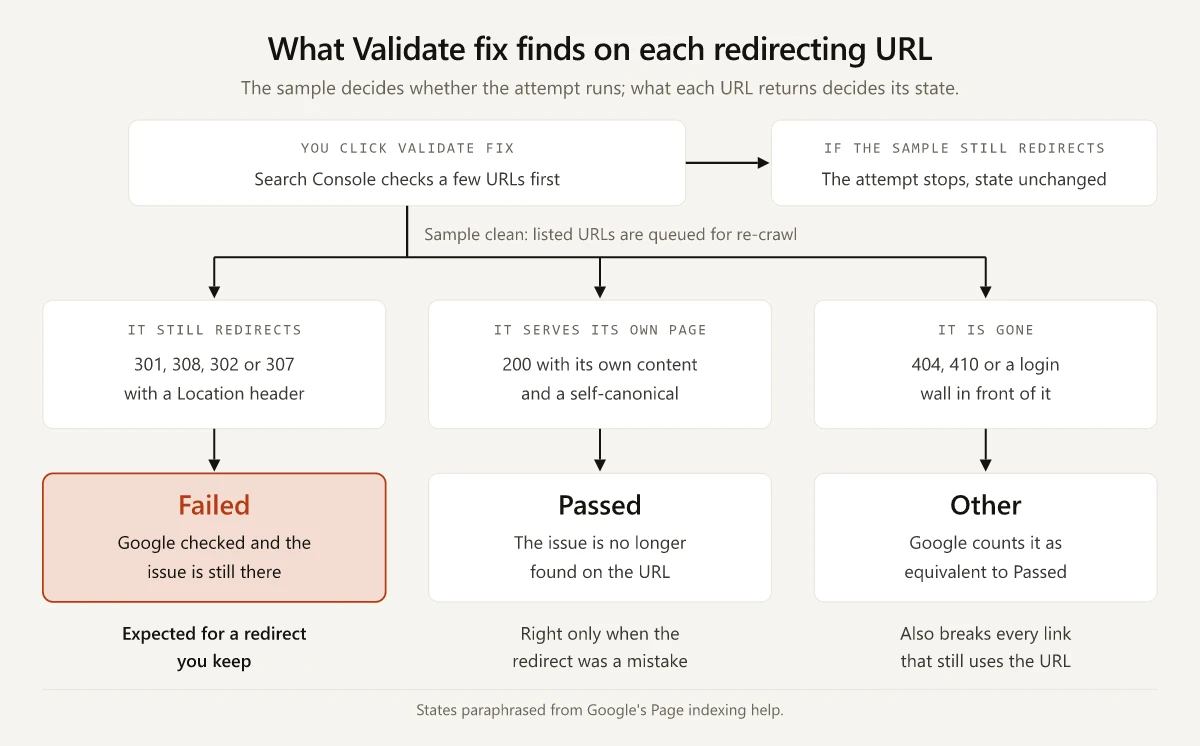
The URLs in the row still redirect. Google’s help page spells out how an attempt ends:
- “When you click Validate Fix, Search Console immediately checks a few pages,” and “If the current instance exists in any of these pages, validation ends, and the validation state remains unchanged.”
- When that sample is clean, Google queues the URLs already listed under the issue for re-crawling, not the whole site.
- “If the instance is still present, issue state changes to Failed and validation ends.”
So a row of redirects you keep has two endings. If the sampled URLs still redirect, the attempt stops at step 1 and the state does not change. If the sample comes back clean, the re-crawl meets the redirect again and the state turns Failed. Neither ending is Passed, and new redirecting URLs count against the attempt too: Google says a new page discovered by normal crawling “is considered another instance of this existing issue”.
Google’s validation states show what each ending means for a redirect:
| State | Google’s definition | For a redirect you are keeping |
|---|---|---|
| Passed | ”All known instances of the issue are gone (or the affected URL is no longer available).” | Out of reach while the redirect stays |
| Failed | ”A certain threshold of pages still contain this issue, after you clicked Validate.” | How the attempt ends once the sample clears |
| Failed, for one URL | ”Google checked for the issue instance and it’s still there.” | Each checked URL that still redirects; unchecked ones stay Pending |
| Other, for one URL | ”Google couldn’t reach the URL hosting the instance”, which is “Considered equivalent to Passed.” | What a deleted URL gets, while every link to it breaks |
| N/A | ”Google found that the issue was fixed on all URLs, even though you never started a validation attempt.” | What the row shows if the redirects stop without a request |
Google’s help gives two conditions under which an issue counts as fixed for a URL: “When the URL is crawled and the issue is no longer found on the page”, labeled Passed during an attempt, or “If the page is not available to Google for any reason (page removed, marked noindex, requires authentication, and so on)”, filed under Other. For an http, www, slashless or migrated URL, meeting either condition undoes the job the redirect was built to do.
Page With Redirect Triage by Redirect Type
Sort the row’s example URLs by what each one is for. The second column follows Google’s help page and says “not documented” where the page is silent; the last column is my reading of the state definitions above.
| Redirect | What Search Console reports | Act or ignore | Can Validate fix pass? |
|---|---|---|---|
Trailing slash, /page to /page/ | Page with redirect: “a non-canonical URL that redirects to another page” | Ignore the row; link the slashed form | No, while the redirect stays |
| http to https | Page with redirect, in a property that includes http URLs | Ignore | No, while the redirect stays |
| www to the bare domain, or the reverse | Page with redirect, in a property that includes both hosts | Ignore | No, while the redirect stays |
| Site move, old URL to new, 301 or 308 | Page with redirect for old URLs inside the property | Ignore, and keep the redirects | No, while the redirect stays |
| A redirecting URL in your sitemap, internal links or canonical tags | Page with redirect | Act: put the target URL there instead | No, the URL still redirects after the edit |
| A chain that is too long, or a loop | Redirect error, a different row | Act: send the first URL straight to the final page, and break any loop | Yes, for Redirect error |
| A 200 page with a 0-second meta refresh | Not documented: the help page never mentions meta refresh | Nothing to do in Search Console; keep it out of the sitemap | Not documented |
| A redirect you never meant to have | Page with redirect | Act: remove it so the URL serves its own page | Yes, once the URL answers 200 |
For the rows that say act:
- Start with the sitemap. Google’s canonicalization guide ranks redirects as a strong canonical signal and sitemap inclusion as “A weak signal that helps the URLs that are included in a sitemap become canonical”, and says “All pages listed in a sitemap are suggested as canonicals”. A redirecting URL in a sitemap suggests the page you redirected away from, while Google’s sitemap guide asks you to “choose the URL you prefer and include that in the sitemap instead of all URLs that lead to the same content.”
- Internal links and canonical tags follow the same logic: each one written in the redirecting form points at a URL your own redirect says is not the one to index. My curl teardown of the 308s this site sends shows why the redirect a site serves most often is its own internal link.
- Chains belong to the redirect-chain step of an eight-step technical SEO audit, and a loop takes the same fix. Once the first URL points straight at the final page, it fits the Page with redirect definition instead, which is the healthy end state for a URL you still want to forward.
The One Case Where Validate Fix Is the Right Button
Click Validate fix only when the redirect itself was the mistake: a page you want indexed answers with a redirect from a leftover rule, a plugin setting or a pattern written too broadly. Remove the redirect, and on the next crawl the issue is gone from that URL.
What Google says about the button, next to two guides that recommend it:
| Source | What it says | For a redirect you keep |
|---|---|---|
| Google’s Page indexing help | ”It might not always make sense to fix and validate a specific issue on your website”, with intentionally blocked robots.txt URLs as its example, and “Google updates your instance count whenever it crawls a page with known issues, whether or not you explicitly requested fix validation.” | Skipping the button loses nothing |
| John Mueller, on episode 112 | ”we try a sample of the pages that you’re basically telling us are fixed. And if we see that they’re actually fixed, then in most cases, we will trigger a faster recrawl of the other pages.” His case for when it “makes a lot of sense” is pages Google had canonicalized elsewhere or treated as 404s after a hosting or CDN block, although they existed all along | Nothing was broken, so the sample is not fixed |
| SEOTesting’s guide | Use the button “so that Google can re-crawl the URLs affected and verify if the issues have been resolved” | The re-crawl finds the redirect again |
| Sitechecker’s guide | Once Google confirms the fix, “the affected pages will no longer be flagged.” | Google cannot confirm a fix on a URL that still redirects |
A row can mix both kinds, and Google’s steps for starting validation warn what a single leftover does: “If you missed a fix, validation will stop when Google finds a single remaining instance of that issue.” Restarting a failed attempt re-queues the redirects you kept: Google restarts validation “for all URLs marked Pending or Failed, plus any new instances of this issue discovered through normal crawling since the last validation attempt.”
Validate only the URLs you changed:
- Remove the redirect, then confirm the URL answers 200 with its own content and a canonical pointing at itself.
curl -sIshows the status, and the page source shows the canonical. - Trust curl over a live test for that check. Google’s help says “The live URL Inspection test follows redirects and then tests the final URL, although the live test doesn’t indicate that it is following a redirect”, so a clean live test can describe the target instead of your URL.
- List the fixed URLs in a sitemap, where pages you want indexed belong anyway, and filter the report to it. Validation then “will apply only to items in the sitemap at the time you requested validation”, which keeps the intentional redirects out of the attempt. Google’s help offers the same route as a pro tip, “Validate your fixes by sitemap”, noting that a request against a subset of affected URLs “can complete faster than a request that includes all affected URLs on your site.”
- Click Validate fix once. Google says “Do not click Validate fix again until validation has succeeded or failed” and that validation “typically takes up to about two weeks”.
Cleaning redirecting URLs out of your sitemap and links is a real fix that Validate fix cannot measure. Measure it another way:
- The sitemap part: the report’s “All submitted pages” filter will “Show only URLs listed in a sitemap or sitemap index that was submitted”, so by that definition a redirecting URL you removed from the sitemap leaves that view once Google reads the new file.
- The links part: a crawl of your pages, or a search of your source files for the redirecting form of each URL.
How to Check What a Redirect URL Returns
| What you need | Where to look | What it tells you |
|---|---|---|
| The status code and target | curl -sI on the URL | 301, 308, 302 or 307, plus the Location header |
| A redirect inside a 200 page | curl -s on the URL, searched for a meta refresh | A 0-second refresh, which Google reads as a permanent redirect |
| Whether the target is indexed | URL Inspection, then INSPECT in the Page indexing > Indexing section | Google’s index status for the canonical URL |
| Which URLs sit in the row | The issue’s examples table | Up to 1,000 URLs, not guaranteed to be all of them |
| Which URLs failed the attempt | See details on the issue page | The validation log: every URL queued for checking, each marked Pending, Passed, Failed or Other |
| Whether http and www URLs appear at all | Your property type | A URL-prefix property reports only URLs under its exact prefix |
The See details row is Google’s own instruction: “If validation fails, you can see which URL caused the validation to fail by clicking See details in the issue details page.”
The first two checks as commands:
curl -sI https://example.com/old-path
curl -s https://example.com/old-path/ | grep -io '<meta[^>]*refresh[^>]*>'
The property row explains a common surprise. Google’s property help says a URL-prefix property “Includes only URLs with the specified prefix, including the protocol (http/https)”, while a Domain property “Includes all subdomains (m, www, and so on) and multiple protocols (http, https, ftp)”. If your http or www homepage shows up as Page with redirect, you are in a Domain property or a property for that exact prefix, and the URL to inspect is its target.
This Site’s 308s and Meta Refresh Stubs
The trailing-slash 308 and the meta refresh stub from the triage table both run on this site, and a header check does not see the stub as a redirect.
The 308 That Turned Duplicates Into Redirects
Commit 8b23ef5, “Canonicalize URLs to trailing-slash form”, committed on 3 September 2026, records the change that turns duplicate URLs into redirecting ones: “Every route served HTTP 200 at both /page and /page/, so Google saw two URLs for all 152 pages. The slashless form already emitted a canonical pointing at the slashed one, so this upgrades a soft signal to a hard 308.” Since that change, the slashless form of every page fits Google’s definition word for word: a non-canonical URL that redirects to another page. The commit also sits in the dated timeline of my Claude Code repo audit, next to the slashless internal links it turned into redirects.
A Redirect That Answers 200
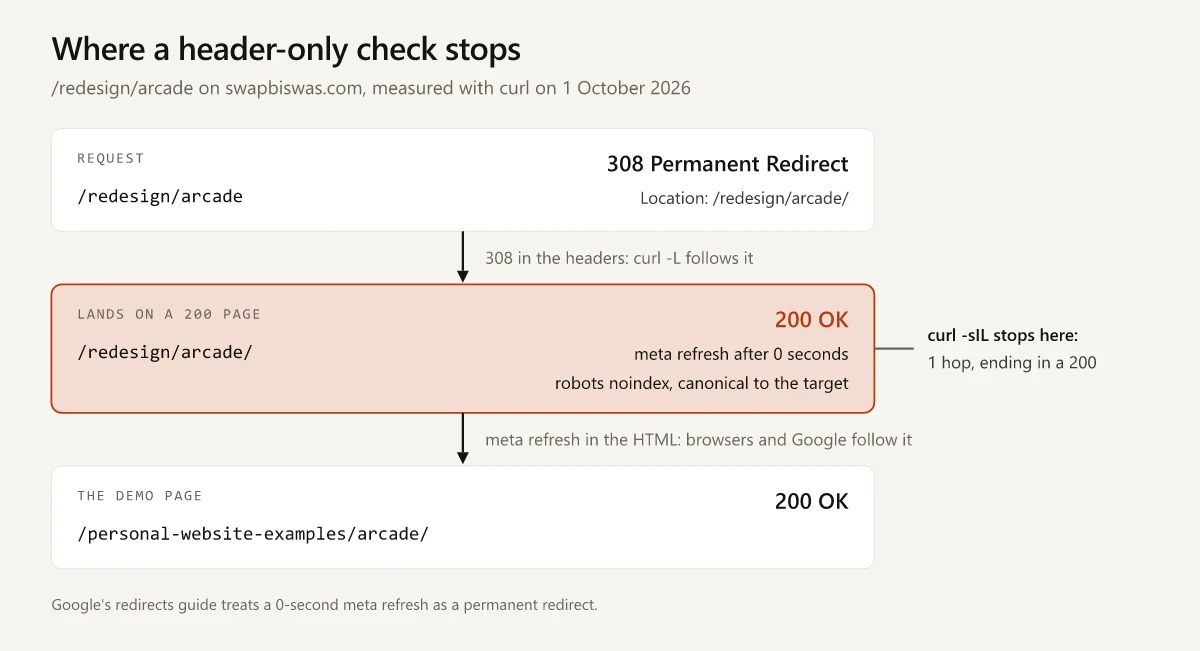
The concept demos moved from /redesign/ to /personal-website-examples/, and the old paths still resolve through a two-step chain. Measured with curl on 1 October 2026:
| Request | Response | What it carries |
|---|---|---|
/redesign/arcade | 308 Permanent Redirect | Location: /redesign/arcade/ |
/redesign/arcade/ | 200 OK | A 0-second meta refresh to /personal-website-examples/arcade/, a robots noindex and a canonical to that target |
/personal-website-examples/arcade/ | 200 OK | The demo itself |
Asked to follow redirects, curl -sIL stopped at the second row and reported one hop ending in a 200. A browser takes the next hop through the meta refresh, and so does Google: its meta refresh guidance says “Google Search interprets instant meta refresh redirects as permanent redirects.”
The stubs come from Astro’s build, and Hugo writes the same kind of page:
| Generator | What a redirect becomes | Route to a real status code |
|---|---|---|
| Astro, static build with no adapter | A client-side meta http-equiv="refresh" page that “does not support status codes”, per Astro’s configuration reference; Astro’s redirect template adds a noindex and a canonical | An adapter, which the same reference says supports status codes, or redirects in your host’s config |
| Hugo, default aliases | A page from a built-in template with a 0-second meta refresh and a canonical, since Hugo “uses client-side redirection, generating a small HTML file for every alias”, per its URL management docs | Server-side rules, with disableAliases set to true |
This site’s config builds one stub per concept demo, 49 of them as of October 2026. Google does not document which reason these stubs land under: the Page indexing help never mentions meta refresh, and each stub also carries a noindex, which the fixed-URL conditions quoted earlier count as the page not being available. They stay out of the sitemap either way: Astro’s sitemap integration lists page routes, not redirect stubs, and the live sitemap listed none of them on 1 October 2026. With that noindex and no sitemap entry, the stubs sit beside the site’s other noindexed URL families in my noindex inventory for this site, which puts them under the Unsubmitted pages only filter of the Page indexing report.
On either generator, check the body as well as the headers: a crawler that reads only status codes lists every stub as a live 200 page.
Page With Redirect Validation Failed: What to Do Next
If Page with redirect validation failed on URLs you meant to redirect, the row is doing its job, and nothing in Google’s state definitions lets it pass while the redirects stay. Leave the button alone for those URLs. Put the effort into the sitemap entries, internal links and canonical tags that still name a redirecting URL, and validate only the URLs where the redirect was the mistake.
Open See details on the failed attempt and mark each URL in its log keep or remove.
Frequently Asked Questions
Why does Page with redirect validation fail?
Google's help lists two ways an issue counts as fixed for a URL: the issue is no longer found on the page, or the page is unavailable. A URL built to redirect meets neither, so the attempt either stops at its first sample with the state unchanged or turns Failed when a checked URL still redirects. That is my reading of Google's help; its generic advice for a failed validation is to fix the issue and restart.
Should I click Validate fix on Page with redirect?
Only for URLs where the redirect was a mistake and you removed it, so they now serve their own page. For http to https, www, trailing-slash and site-move redirects you are keeping, Google's conditions for a fixed URL leave validation no way to pass while the redirect stays, and Google updates the count on its regular crawls without the button.
What does Page with redirect mean in Google Search Console?
Google defines it as a non-canonical URL that redirects to another page, so that URL will not be indexed, while the target might or might not be. It is a normal row for sites with http, www, trailing-slash or migration redirects, in any property that includes the redirecting URLs.
What is the difference between Page with redirect and Redirect error?
Page with redirect means the URL redirects to another page, so Google leaves that URL out of the index; the target might or might not be indexed. Redirect error means Google could not finish the redirect: a chain that was too long, a loop, a URL over the maximum length, or a bad or empty URL in the chain.
How do I fix Page with redirect in Search Console?
Replace the redirecting URL with the target URL in your sitemap, internal links and canonical tags, and leave the redirect itself in place. Remove a redirect only if it was never meant to exist, then validate those URLs.