Excluded by Noindex Tag: How to Fix It (and When Not To)
Excluded by noindex tag is a bug under All submitted pages and usually intended under Unsubmitted pages only. Triage it with both filters, then fix the source.
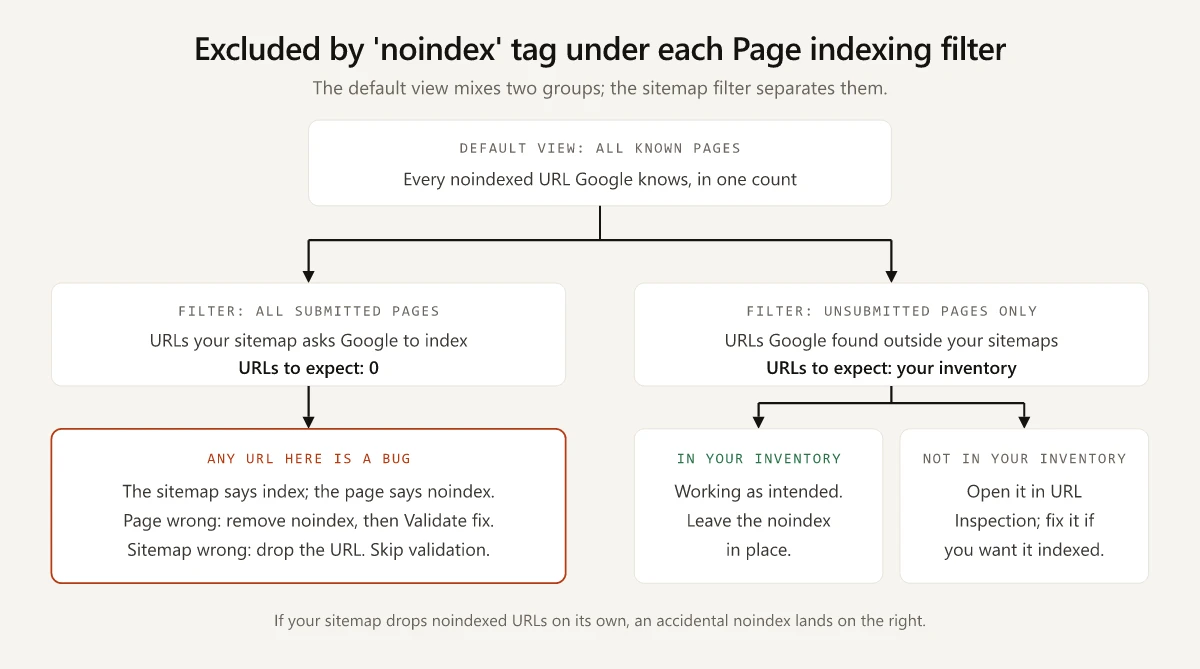
Excluded by noindex tag means one thing under Search Console’s All submitted pages filter and the opposite under Unsubmitted pages only. Under the first, every URL listed is a bug, because your sitemap asks Google to index a URL whose page says noindex; under the second, a listed URL usually means the noindex is doing its job, as long as it is a URL you meant to hide.
The Page indexing report opens on All known pages, which mixes both groups into one count, so I would not act on that number until each URL in it has been checked against two lists: the sitemap, and a written inventory of every page the site keeps out of Google by design. This is the first row my SEO audit checklist checks in its indexation step. The worked example near the end is this site’s own inventory: six URL families whose noindex comes from four kinds of source, each dated from git.
What Does Excluded by Noindex Tag Mean?
Excluded by noindex tag means Googlebot crawled the URL, found a noindex rule in a robots meta tag or an X-Robots-Tag HTTP header, and left the page out of Google’s index. It is correct for pages you hid on purpose and a bug for any page you want in search results.
Google’s Page indexing help puts a sitemap dropdown above the report’s chart, and the row means something different under each setting:
| Filter | Google’s definition | A noindex row there means | URLs to expect |
|---|---|---|---|
| All known pages, the default | ”Show all URLs known to Google, whether or not they are listed in a sitemap.” | Both groups below, mixed | No fixed number; switch filters first |
| All submitted pages | ”Show only URLs listed in a sitemap or sitemap index that was submitted using either the Sitemaps report or a robots.txt file on your site.” | Your sitemap offers the URL and the page refuses it | 0 |
| Unsubmitted pages only | ”Show only URLs that were not listed in a sitemap submitted using either the Sitemaps report or a robots.txt file on your site.” | Google reached a noindexed URL another way, such as a link | The URLs in your noindex inventory, and nothing else |
| Specific sitemap URL | ”Show only URLs listed in a specific sitemap or sitemap index” | A conflict inside one section of the site | 0 |
The same help page adds:
- A URL listed in a sitemap counts as submitted “even if it was also discovered through some other mechanism (for example, by organic crawling from another page)”.
- For a noindex you meant to set, Google’s help says “If you do not want this page indexed, congratulations!”
Triage the Row With Both Sitemap Filters
- Write the inventory first. List every URL pattern the site noindexes deliberately, where the directive lives and whether the sitemap lists it. The inventory table further down has the columns.
- Check how your sitemap is built. The answer decides which filter an accidental noindex lands in; the table after these steps covers both kinds of sitemap.
- Filter to All submitted pages. The row should read 0 or be absent. Each URL there is offered by your sitemap and refused by its page, so one of the two is wrong: Google’s sitemap guide says “When creating a sitemap, you’re telling search engines about which URLs you prefer to show in search results.”
- Filter to Unsubmitted pages only. Match every example URL to a pattern in your inventory. The examples table “is limited to 1,000 rows” and “does not necessarily show all URLs with that issue”, so compare patterns rather than totals.
- Inspect every URL that matches no pattern. In URL Inspection, the Referring page field shows “A page that Google possibly used to discover this URL”, and the Sitemaps field lists any submitted sitemap that points to it. Some of these URLs are ones you never built: in an October 2024 Shopify Community thread, a store owner found product and collection paths containing
/sandbox/modern/in the row, which the reply put down to “Shopify’s internal tracking mechanism”, adding “You likely don’t need to be concerned.”
| How the sitemap is built | An accidental noindex on a post shows up under | The check that catches it |
|---|---|---|
| It drops noindexed URLs on its own: Yoast’s sitemap specification excludes “any scenario which results in a page outputting a meta robots noindex directive via a meta tag or HTTP header” | Unsubmitted pages only, beside your deliberate URLs | Step 4, the match against your inventory |
| It lists every page unless a URL rule removes it: Astro’s sitemap integration says “All pages are included in your sitemap by default”, and its filter works “by URL” | All submitted pages | Step 3, the zero count |
On the first kind of site, a stray noindex also takes the page out of the sitemap, so the URL usually lands under Unsubmitted pages only and the All submitted pages check can read zero while the page drops out of the index.
How to Fix Excluded by Noindex Tag on a Page You Want Indexed
- Inspect the URL and read the “Indexing allowed?” field. URL Inspection’s help says “If indexing is disallowed, the reason is shown here”, and the URL Inspection API reference words the two noindex reasons as “‘noindex’ detected in ‘robots’ meta tag” and “‘noindex’ detected in ‘X-Robots-Tag’ http header”. A meta tag sends you to the HTML, a header to the server or host.
- Find what writes the directive, using the source table below.
- Remove the directive at its source and deploy. Click Test live URL and confirm that “Indexing allowed?” no longer reports the noindex.
- Read “Crawl allowed?” in the live test result before you trust that answer. URL Inspection’s help warns that when robots.txt blocks the URL, “Indexing allowed?” will always show Yes “because Google can’t see and respect any noindex directives”. With both fields clear, request indexing: Google’s Page indexing help says that once the noindex is gone, “you can click Request Indexing to ask Google to try again to index the page.”
- Add the URL to your sitemap if the triage found it under Unsubmitted pages only.
- For more than a handful of URLs, click Validate fix on the row rather than requesting indexing one URL at a time. If the row also holds pages you keep hidden, filter the report to your sitemap first, once Google has read a version that lists the fixed URLs and none of the hidden ones, because Google’s help says validation then applies “only to items in the sitemap at the time you requested validation”, and a single remaining instance stops the attempt.
Where a noindex comes from, and what to change:
| Source | Where the noindex is set | What to change |
|---|---|---|
| WordPress, whole site | Settings, Reading: “Discourage search engines from indexing this site”; since version 5.3 it writes a noindex,nofollow robots meta tag, per WordPress’s documentation | Clear the checkbox |
| Yoast SEO, one page | The Advanced tab, where “Allow search engines to show this content in search results” is set to No, per Yoast’s noindex guide | Set it back to Yes |
| Yoast SEO, a content type | The search-results toggle for that content type or taxonomy in Yoast SEO’s Settings | Switch the toggle back on |
| Rank Math | Robots Meta set to No Index in the Advanced tab, or a default under Titles & Meta, per Rank Math’s guide | Select Index in the post’s Advanced tab. A Titles & Meta default change reaches only new posts, so switch existing ones in the metabox or with the Set to Index bulk action |
| Shopify theme | A conditional <meta name="robots" content="noindex"> in the theme.liquid layout file, the method Shopify’s help center gives for hiding a page or product | Delete the condition, or the handle it matches, from theme.liquid |
| A framework layout or template | A prop or metadata field that every page on the layout inherits | Change the layout or the condition that sets it |
| An HTTP header | Server config, a host’s headers file or a CDN rule | Remove the rule, or scope it to the paths you meant |
| JavaScript | A script that adds or edits the robots tag in the browser | Ship the value you want in the HTML |
The JavaScript row has a rule of its own: Google’s JavaScript SEO guide says that when Google meets the noindex tag “it may skip rendering and JavaScript execution”, and “If you do want the page indexed, don’t use a noindex tag in the original page code.” For the layout and header rows, my notes on Vercel’s indexing controls show how a layout passes noindex to every page under it, with the two curl commands that tell a meta tag from a header.
How Long Google Takes to Clear the Row
| What you are waiting for | Google’s stated timing | Where Google says it |
|---|---|---|
| Request indexing on one URL | ”Indexing can take up to a week or two”, and “Indexing typically takes only a day or so, but can take much longer in some cases”; “There is a daily limit to how many index requests you can submit.” | URL Inspection help |
| Validate fix on the row | ”This process can take several days or even longer”, and “Validation typically takes up to about two weeks, but in some cases can take much longer” | Page indexing help |
| A recrawl you did not request | ”Depending on the importance of the page on the internet, it may take months for Googlebot to revisit a page.” | Google’s noindex documentation, last updated 10 December 2025 |
| The issue leaving the issues table | ”If ninety days pass without any recurrences, the issue is removed from the issues table.” | Page indexing help, under Issue lifetime |
RankYa’s guide tells readers that “Google may take a day, or even few days to validate your fix”. Google’s validation figures in the table run longer, so plan on up to two weeks per attempt, and do not click Validate fix again “until validation has succeeded or failed”, as Google’s Page indexing help asks.
Passed has a narrow meaning. Google defines it as “All known instances of the issue are gone (or the affected URL is no longer available)”, which says nothing about whether each page is then indexed, and URL Inspection’s help adds that “Submitting a request does not guarantee that the page will appear in the Google Index.” Inspect a few of the fixed URLs once the attempt ends.
Google’s Help Page Calls the Row URL Marked Noindex
Search Google’s Page indexing help for “Excluded by ‘noindex’ tag” and it is not there. The help page files the row as “URL marked ‘noindex’” and describes it as “When Google tried to index the page it encountered a ‘noindex’ directive and therefore did not index it.” Users and guides still describe the report with the longer label: the Shopify Community thread in the triage steps above is titled “Google Search Console - Excluded by ‘noindex’ tag”, and SEOTesting’s guide, updated in March 2026, calls Excluded by ‘noindex’ tag “a Google Search Console indexing status”.
Google’s help page as archived in June 2021 explains both names. Its Index Coverage report split noindexed URLs between two statuses:
| Status in June 2021 | Group | Google’s description then | Where it sits today |
|---|---|---|---|
| Submitted URL marked ‘noindex’ | Error | ”You submitted this page for indexing, but the page has a ‘noindex’ directive either in a meta tag or HTTP header.” | The one noindex row, under All submitted pages |
| Excluded by ‘noindex’ tag | Excluded | ”When Google tried to index the page it encountered a ‘noindex’ directive and therefore did not index it. If you do not want this page indexed, congratulations!” | The one noindex row, under Unsubmitted pages only |
The current page reuses the second description almost word for word, and its HTML keeps both old anchors, submitted_but_noindex and blocked_by_noindex_tag, on the one heading. In 2021 the report did this triage for you by filing noindexed URLs from your sitemap as errors. Today’s help lists a single reason, so the split now comes from the filter.
This Site’s Noindex Inventory, Mapped to Both Filters
swapbiswas.com is a static Astro 5 site deployed on Vercel, and I wrote up how I built this site with Claude Code separately. Every noindex on it comes from one of four places: a layout prop, a tag inside a page file, hand-written HTML in public/, or Astro’s redirect template. Checked in the repo and against the live site on 2 October 2026:
| URL family | URLs | Directive | Where it is set | Since | In the sitemap | Expected filter |
|---|---|---|---|---|---|---|
Blog category archives, /blog/category/{name}/ | 10 | noindex, follow | A noindex prop on the shared layout | 20 Apr 2026, commit ec78559, which also added the sitemap filter | No | Unsubmitted pages only |
Portfolio, /work/ and its 8 case pages | 9 | noindex, follow | The same layout prop | 12 Mar 2026, the first commit | No since 20 Apr 2026; listed from 12 Mar until ec78559 added the filter | Unsubmitted pages only |
Concept demos, /personal-website-examples/{slug}/ | 49 | noindex, follow | A robots meta tag in each page file; the gallery page itself is indexable | 30 Jun 2026 at this path (6e83b6a); the first 12 demos carried a bare noindex at /redesign/{slug}/ from 25 Jun | No; only the gallery is listed | Unsubmitted pages only |
PWA offline fallback, /offline/ | 1 | noindex | Hand-written HTML in public/, which never passes through the layout | 26 Aug 2026, commit b623785 | No | Unsubmitted pages only, if Google finds it |
Old demo paths, /redesign/{slug}/, plus the old /redesign/ gallery and a /homepage-design-concepts alias | 51 | noindex and a 0-second meta refresh | Astro’s redirect template | 28 Jun 2026 for the gallery and alias, 30 Jun for the demo paths | No | Unsubmitted pages only; which reason, Google does not say |
| Missing URLs, served by the 404 template | Any | noindex, follow | The same layout prop | 13 Mar 2026 | No | Unsubmitted pages only, under Not found (404) rather than this row |
- Missing URLs never reach this row through their noindex. They answer with a 404 status, and Google’s HTTP status code guide says “Any content Google receives from URLs that return a 4xx status code is ignored”, so they belong under Not found (404). The built file is the exception:
/404.htmlitself answered 200 with the same noindex, so if Google finds/404.html, it belongs in this row under Unsubmitted pages only. - The
/redesign/stubs answer 200 with a noindex, a canonical and a meta refresh all at once; the curl trace of those stubs is in my write-up on redirect validation.
What the report should show for this site:
- All submitted pages: 0 URLs. None of the six families is in the sitemap today, and the repo audit I ran in Claude Code found no noindexed page among the sitemap’s URLs.
- Unsubmitted pages only: URLs from these families and nothing else, though the stubs may sit under another reason. Any other path is the first one to inspect.
The Sitemap Filter Is a Second List Kept by Hand
The filter in astro.config.mjs names four of the six families by URL; the offline page and the 404 page have no line in it and stay out of the sitemap without one:
sitemap({
  // Exclude noindexed routes so they don't bloat the sitemap
  filter: (page) =>
    !page.includes('/blog/category/') &&
    !page.includes('/work/') &&
    !page.match(/\/work\/?$/) && !page.includes('/redesign') && !page.match(/\/personal-website-examples\/[^/]+\/?$/),
}),
Nothing ties those patterns to the noindex props, so the filter and the props can drift. A new noindexed route with no matching filter line would appear under All submitted pages, where the zero check flags it. A route added to the filter without a noindex would stay indexable while missing from the sitemap, which no noindex row will ever show.
Git shows that drift twice on this site. The /work/ gap in the table ran from 12 March to 20 April, while the integration had no filter at all. The first concept demos lived at /redesign/ with a bare noindex from 25 June, and the filter had no /redesign line until ef3c3e0 on 28 June, so builds in between listed those pages too: 13 at first, 17 by 27 June.
The 26 August Switch From Nofollow to Follow
Commit b623785, “SEO fixes”, changed the robots tags on 26 August 2026:
- The layout tag went from
noindex, nofollowtonoindex, follow, on the category archives, the/work/pages and the 404 template. - All 49 demo pages went from a bare
noindextonoindex, follow. - The offline page gained its bare
noindex.
Google’s robots meta tag documentation lists noindex, nofollow and none (“Equivalent to noindex, nofollow”) as rules, and no rule named follow. Of nofollow it says “If you don’t specify this rule, Google may use the links on the page to discover those linked pages.” By those definitions the demo edit changed wording only, while the layout edit let Google use the links on ten category archives that between them list every post on the blog. None of the three edits touched the sitemap, so none changed the expected filter: still zero URLs under All submitted pages, and one more URL, the offline page, expected under Unsubmitted pages only if Google finds it.
Read Excluded by Noindex Tag Against Your Sitemap and Your Inventory
The count on this row says little until you know which filter you are reading and how your sitemap is built, and the URLs under Unsubmitted pages only mean nothing until you have an inventory to match them against.
Write the inventory table before you open the report.
Frequently Asked Questions
What does excluded by noindex tag mean in Google Search Console?
It means Googlebot crawled the URL, found a noindex rule in a robots meta tag or an X-Robots-Tag HTTP header, and left the page out of Google's index. Google's Page indexing help lists the same status as URL marked 'noindex'.
Is excluded by noindex tag a problem?
Only for pages you want in search. Filter the Page indexing report to All submitted pages: any URL there is one your sitemap offers while its page says noindex. URLs under Unsubmitted pages only are fine when each one is a page you chose to keep out of Google.
How do I fix excluded by noindex tag?
Remove the noindex where it is set, such as a CMS setting, an SEO plugin field, a layout template or an HTTP header rule. Confirm with a live test in URL Inspection, then request indexing for a few URLs or click Validate fix for many; Google says validation typically takes up to about two weeks.
Why does Search Console still show the noindex status after I removed the tag?
Google has to recrawl the page before the report changes, and its noindex documentation says a revisit may take months depending on the page's importance. A live test in URL Inspection shows whether the noindex is still detected; if it is gone, request indexing or validate the fix.
What does 'noindex' detected in 'robots' meta tag mean?
It means Google read a noindex rule in the robots meta tag of the page's HTML. Google's URL Inspection API reference uses that wording when a meta tag blocks indexing, and words a noindex sent as an HTTP header as 'noindex' detected in 'X-Robots-Tag' http header. Fix the first in your template, CMS or SEO plugin, the second in your server, host or CDN rules.