GA4 AI Assistant Channel: Which Assistants Google Names
This guide compares Google's own pages on the GA4 AI Assistant channel: the values GA4 writes, which assistants each names, the history rules and a regex test.
GA4 files a visit from an AI chat assistant on Google’s list under three values that Google’s default channel group page spells out (wording checked 10 October 2026): the channel AI Assistant, the medium ai-assistant and the campaign (ai-assistant). Those three values are how the GA4 AI Assistant channel shows up in your reports, and the trigger is one sentence on the channel page:
The medium is set to “ai-assistant” and the campaign is set to “(ai-assistant)” if the referrer matches a list of AI Assistants.
The channel is a row in your traffic reports, and it has nothing to do with Ask Advisor, the chat inside Google Analytics. Google’s Help article for that feature is titled “Ask Advisor in Google Analytics (Beta)” and describes “an agentic conversational experience in Google Analytics, powered by advanced Gemini models”. Both answer to the phrase “AI assistant in GA4”, and this page covers only the channel.
The rule is exact and the assistant lists are examples. Google names assistants in four places across the three Help pages that cover the channel, no two of those lists match, and the list the rule checks is on none of them. That makes the Session source column of your own Traffic acquisition report the record of which assistants your property counts, and every published list, Google’s included, a sample.
What Is the GA4 AI Assistant Channel?
The GA4 AI Assistant channel is the row in Google Analytics’ default channel group for sessions that arrive from AI chat assistants. When the referrer matches Google’s list of AI assistants, GA4 sets the medium to ai-assistant and the campaign to (ai-assistant). Google announced it on 13 May 2026.
Each cell records what Google wrote in the place named at the top of its column when I read it on 10 October 2026:
| Assistant | What’s new, 13 May 2026 | Default channel group page | Custom channel groups, “Example: AI assistants” | What’s new, 11 June 2026 (Source Group) | Places naming it |
|---|---|---|---|---|---|
| ChatGPT | Yes | Yes | Yes | Yes, as “ChatGPT (OpenAI)“ | 4 |
| Gemini | Yes | Yes | Yes | Not named | 3 |
| Claude | Yes | Not named | Yes | Not named | 2 |
| Copilot | Not named | Yes | Yes, as “Microsoft Copilot” | Not named | 2 |
| Perplexity | Not named | Not named | Yes | Yes | 2 |
| DeepSeek | Not named | Yes, spelled “Deepseek” | Not named | Not named | 1 |
| Grok | Not named | Yes | Not named | Not named | 1 |
The three values have separate triggers in Google’s rule:
| Field in your reports | Value GA4 writes | When, per Google’s rule |
|---|---|---|
| Session default channel group | AI Assistant | The referrer matches Google’s list, or the medium is exactly ai-assistant and no earlier rule on the channel page matches |
| Session medium | ai-assistant | Assigned automatically on a referrer match, or carried by a tagged link’s utm_medium |
| Session campaign | (ai-assistant) | Set on a referrer match |
There is no setting to switch on: the 13 May What’s new entry says the medium “is automatically assigned when the referrer matches a recognized AI Assistant”. The channel page files Google’s AI Overviews and AI Mode under Organic Search, so clicks you earn by getting cited in AI Overviews land there.
Like every channel on that page, AI Assistant is fixed: “Default channel groups can’t be edited in Google Analytics.” How GA4 separates Performance Max traffic from Paid Search is covered in the Cross-network channel explainer.
Which AI Assistants Google Names, and Where
Only ChatGPT appears in all four places in the table above. Copy the list from the 13 May entry and you get three assistants; copy it from the channel page and you get five, with two in common. Perplexity, which the Source Group entry names, is on neither of those two lists.
Google’s Linked Source List Predates the Channel
None of the four places publishes the list of assistants the rule checks. The channel page links one download, labelled “Download a spreadsheet of GA4 default-channel-group sources and categories”. It arrives as a 27-page PDF of 819 sources in four categories (search, shopping, social and video), with no AI category, and none of the seven assistants above appears in it. The storage server’s Last-Modified header for the file reads 9 February 2023, more than three years before Google announced the channel. The same page offers an email address for adding “your search, social, video, or shopping site to the list” and names no route for AI assistants.
Where GA4 AI Assistant Traffic Lands, Channel by Channel
| What happened | Channel | Google’s wording |
|---|---|---|
| A click from an assistant on Google’s AI list, with a referrer | AI Assistant | ”if the referrer matches a list of AI Assistants” (default channel group) |
A link you tagged with utm_medium=ai-assistant, when no earlier rule matches its source or campaign | AI Assistant | ”The medium exactly matches “ai-assistant”.” (same page) |
| A click from Google’s AI Overviews or AI Mode | Organic Search | ”including Google’s AI Overviews and AI Mode” (same page) |
| A click whose source is on Google’s search or social list (the source list files bing as search, t.co and whatsapp as social) | Organic Search or Organic Social | ”Source matches a list of search sites” or “a regex list of social sites” (same page) |
| A click from an assistant on none of Google’s lists (AI, search, social, video or shopping), with a referrer | Referral | ”users arrive at your site via non-ad links on other sites/apps” (same page) |
| A click with no referrer and no UTM parameters | Direct | ”processed as direct traffic when no information about the referral source is available” (campaigns and traffic sources) |
| A tagged link whose values match no channel rule | Unassigned | ”the value Analytics uses when there are no other channel rules that match the event data” (default channel group) |
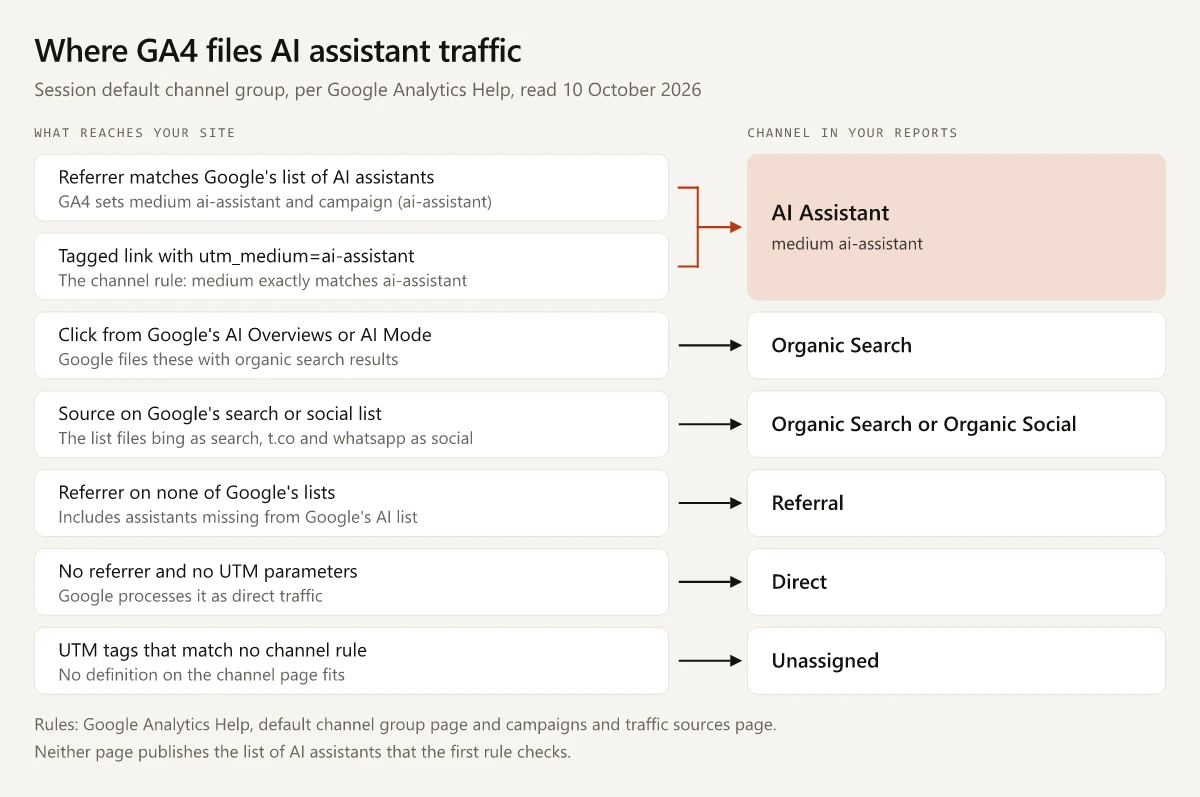
The channel counts clicks: the 13 May entry says the feature works “by tracking user clicks”. An answer that names your brand without a link never becomes an AI Assistant session, and a reader who types your URL afterwards arrives with no referrer, which Google processes as direct traffic. Read the AI Assistant row as a floor on what assistants send you. Mentions without clicks need their own visibility checks, and getting cited by ChatGPT, Perplexity and Gemini is the work that produces the clicks in the first place.
Google’s Example Regex for AI Assistants, Tested
Google’s other route for assistant traffic is a custom channel group, and its custom channel groups article carries an “Example: AI assistants” section with this pattern, copied here character for character:
^.*ai|.*\.openai.*|.*chatgpt.*|.*gemini.*|.*gpt.*|.*copilot.*|.*perplexity.*|.*google.*bard.*|.*bard.*google.*|.*bard.*|.*.*gemini.*google.*$Google’s regex page says how GA4 reads it: “By default, Google Analytics Regex is full regex and case sensitive. Partial regex requires the user to add metacharacters.” I ran the pattern both ways against eight assistant hostnames and four source values that are not assistants. All twelve are lowercase, so the case rule changes nothing.
| Source value | What it is | Full match (GA4’s default) | Partial match |
|---|---|---|---|
| chatgpt.com | ChatGPT | Match | Match |
| chat.openai.com | ChatGPT’s old host, which now redirects to chatgpt.com | Match | Match |
| gemini.google.com | Gemini | Match | Match |
| copilot.microsoft.com | Microsoft Copilot | Match | Match |
| claude.ai | Claude | Match | Match |
| www.perplexity.ai | Perplexity | Match | Match |
| chat.deepseek.com | DeepSeek’s chat app | No match | No match |
| grok.com | Grok | No match | No match |
| baidu | A search source on Google’s source list | No match | Match |
| m.baidu.com | A second Baidu entry on the same list | No match | Match |
| mail.yandex.ru | Filed under search on the same list | No match | Match |
| www.gov.ai | The Government of Anguilla’s website | Match | Match |
- DeepSeek and Grok are two of the five assistants on Google’s channel page, and Google’s example matches neither of them under either reading.
- Under full match, the first alternative
^.*aimeans “ends in ai”, so any source value that ends in ai counts as an assistant, which is why www.gov.ai matches. - Under partial match,
^.*aimeans “contains ai”. Against all 819 sources in Google’s list, the full reading matches none and the partial reading matches 18, seven of them filed under search: baidu, m.baidu.com, mail.yandex.ru, mail.rambler.ru, go.mail.ru, email.seznam.cz and incredimail.
You hit the partial reading when you take the pattern to BigQuery. Google’s custom channel groups article says “Custom Channel Groups aren’t available in the BigQuery Export Schema”, which leaves SQL as the place to rebuild the channel, and Google’s BigQuery string functions reference says REGEXP_CONTAINS “Returns TRUE if value is a partial match for the regular expression”. The same entry advises “parentheses around everything between ^ and $”, the change Google’s example needs.
My anchored version puts one group inside a single pair of anchors and escapes the dots. It matches all eight assistant hostnames above, none of the four other values and none of Google’s 819 listed sources, read either way:
^(chatgpt\.com|chat\.openai\.com|gemini\.google\.com|copilot\.microsoft\.com|claude\.ai|(www\.)?perplexity\.ai|chat\.deepseek\.com|grok\.com)$Treat those hostnames as placeholders. Google’s pages do not say what Session source value GA4 records for a matched session, so build your list from the source values your own report shows. To rerun the core of the test, paste this into a browser console:
const google = String.raw`^.*ai|.*\.openai.*|.*chatgpt.*|.*gemini.*|.*gpt.*|.*copilot.*|.*perplexity.*|.*google.*bard.*|.*bard.*google.*|.*bard.*|.*.*gemini.*google.*$`;
const full = new RegExp(`^(?:${google})$`);   // GA4's default: full match
const partial = new RegExp(google);           // BigQuery REGEXP_CONTAINS: partial match
['chat.deepseek.com', 'grok.com', 'www.gov.ai', 'm.baidu.com']
  .map(s => [s, full.test(s), partial.test(s)]);
// [["chat.deepseek.com",false,false],["grok.com",false,false],["www.gov.ai",true,true],["m.baidu.com",false,true]]
Does the GA4 AI Assistant Channel Include Historical Data?
Google does not say: neither the channel page nor the 13 May 2026 entry mentions sessions from before that date, and the words “retroactive” and “historical” do not appear anywhere on the channel page. Google does document the neighbouring objects, and their rules differ:
| Object | Google’s rule on past data | Page |
|---|---|---|
| AI Assistant in the default channel group | No statement | Default channel group and What’s new, 13 May 2026 |
| A custom channel group in reports | ”Custom channel groups can be applied to your reports retroactively.” | Custom channel groups |
| An edited custom channel group in reports | ”the new definition is immediately applied to the underlying data” | Custom channel groups |
| An edited custom channel group used in an audience | ”User eligibility changes going forward. The change isn’t applied retroactively.” | Custom channel groups |
| A custom channel group set as the primary channel group | ”Data will populate using the new criteria from that point forward.” | Custom channel groups |
| Source Group | ”As Source Group is populated retroactively, you can use dimensions to analyze your historical data to take action and optimize advertising.” | What’s new, 11 June 2026 |
I would not rely on Source Group for this yet. The 11 June Source Group entry is addressed to advertisers (“This update enables advertisers to:”) and points to “cross-channel reporting in the advertising section”. Google’s dimensions and metrics reference had no Source Group entry when I searched it, and Source Group is not among the seven fields Google lists for custom channel groups.
To see assistant referrals from before and after 13 May 2026 in one row, build a custom channel group and add it as a dimension in Traffic acquisition.
Build the Custom Channel
- Open Admin and, under Data display, click Channel groups. Google requires the Editor role or above.
- Click Create new channel group; it starts as a copy of the default group. Check that the copy lists an AI Assistant channel; the default group has had one since 13 May 2026.
- Add a new channel, for example “AI assistants (custom)”, with the condition Source matches regex and the anchored pattern above, rebuilt from your own source values.
- Use Reorder to drag your channel directly above the copied AI Assistant channel, which the channel page lists just above Referral. Google’s rule is that “Traffic is included in the first channel whose definition it matches given the current order of channels in the group.”
- Save the group, then pick it as the primary or secondary dimension in Traffic acquisition.
Leave the copied AI Assistant channel directly below yours: it keeps every session with the ai-assistant medium that your regex misses, whether Google’s list matched it or you tagged it. If your copy has no AI Assistant channel, add one in that position with the condition Medium exactly matches ai-assistant. Standard properties get two custom channel groups beside the predefined one (five on Analytics 360), with up to 50 channels in each.
How to Tag Links So They Land in AI Assistant
The manual rule needs one value: a medium of exactly ai-assistant, as in the tagged-link row of the channel-by-channel table above. Use it on links you place where an assistant will show them, such as the URLs in the instructions of a custom GPT you publish:
https://www.example.com/pricing/?utm_source=chatgpt.com&utm_medium=ai-assistant&utm_campaign=custom-gpt-pricing- Write the medium in lowercase. Channel definitions “aren’t case sensitive”, so a capitalised medium still reaches the channel, but Google’s URL builder page says values with different capitalisation “are treated as different values”, which splits your report rows. Keep ai-assistant lowercase, and add it to the approved mediums in your campaign naming convention.
- Set source, medium and campaign together. The same page says “you should always use utm_source, utm_medium, and utm_campaign” and that “Missing UTM parameters will result in (not set) values being present in reporting.”
- Pick a utm_source that is on none of Google’s search, social, shopping or video lists (chatgpt.com, not google or bing), and keep
shopandcross-networkout of utm_campaign. The channel page lists those channels’ rules above AI Assistant’s, and Google’s custom channel groups article says traffic lands in “the first channel whose definition it matches”. - Check the campaign on your first tagged sessions. Google’s campaigns and traffic sources page says custom-campaign values “map directly to the dimensions in reports”, and its AI Assistant pages do not say whether a matching referrer replaces them with (ai-assistant).
How to Check ChatGPT Traffic in GA4
Google’s Traffic acquisition report page gives the menu path for GA4 AI traffic, and the AI-specific values come from the channel page:
- In Reports, select Acquisition > Traffic acquisition. Its default dimension is Session default channel group, where AI Assistant appears as a row once your property has recorded a matching session.
- Switch the primary dimension to Session source / medium and type ai-assistant into the search bar above the table. Google’s example search is “google / organic”; this one leaves only rows with the ai-assistant medium.
- Type chatgpt instead to see each source / medium row whose source contains chatgpt, and whether any still show the referral medium.
- Add Session campaign as a secondary dimension. Google ties (ai-assistant) to a referrer match, so an ai-assistant row with any other campaign points to a tagged link.
- For first visits, open the User acquisition report, which Google says “shows where new users come from”.
- If your reports use a custom primary channel group, open Admin > Data display > Channel groups and confirm it contains an AI Assistant channel.
Questions Google’s AI Assistant Pages Leave Open
No Google page I read on 10 October 2026 answers these, so the right column is a check to run in your own property:
| Open question | How to settle it in your property |
|---|---|
| Which assistants the referrer list contains | In Traffic acquisition by Session source / medium, search ai-assistant and read the sources: they are the part of the list your property has met, not the whole list |
| Whether the channel reached sessions before 13 May 2026 | Search chatgpt and compare April with June 2026: if June rows carry ai-assistant and April rows still carry referral, it did not reach back |
| Which rule wins when an assistant’s link already carries UTM parameters | Read Session campaign on the first sessions from a tagged ai-assistant link placed in ChatGPT: your campaign name means the tags won, (ai-assistant) means the referrer did |
| What Session source value GA4 records for a matched session | The source half of any ai-assistant row |
| Whether a group copied before 13 May 2026 gained the AI Assistant row | Open the group under Admin > Data display > Channel groups and look for the channel |
The UTM question matters because the AI rule keys on the referrer, while Google’s campaigns and traffic sources page says the document referrer “may set dimensions when no other campaign or traffic source fields have been set”.
The channel page itself says its definitions “may evolve as the market changes”. I would recheck the four places once a quarter and keep the read date on any table built from them, including the ones on this page.
Keep a Dated Assistant List of Your Own
The part of the GA4 AI Assistant channel that Google wrote precisely is the rule: a matching referrer sets the medium to ai-assistant and the campaign to (ai-assistant), and a tagged medium of exactly ai-assistant joins the same row when no earlier rule on the channel page matches the link first. The lists around that rule disagree, and the one that decides your numbers is not published. Open Traffic acquisition, set Session source / medium, search ai-assistant and save the sources you see with today’s date. That dated list is the input for your custom channel’s regex.
Frequently Asked Questions
What is the AI Assistant channel in GA4?
It is a channel in GA4's default channel group for sessions that arrive from AI chat assistants. When the referrer matches Google's list of AI assistants, GA4 sets the medium to ai-assistant and the campaign to (ai-assistant). Google announced it on 13 May 2026.
Which AI assistants count as AI Assistant traffic in Google Analytics?
Google's Help pages give examples, and none of the ones I read on 10 October 2026 prints the full list. The default channel group page names ChatGPT, Gemini, Deepseek, Copilot and Grok, while the 13 May 2026 What's new entry named ChatGPT, Gemini and Claude. Google's AI Overviews and AI Mode are excluded and count as Organic Search.
How do I check ChatGPT traffic in GA4?
Open Reports > Acquisition > Traffic acquisition, switch the primary dimension to Session source / medium and type chatgpt into the search bar above the table. Each row pairs a source containing chatgpt with the medium GA4 recorded, so you can see which of those rows GA4 filed under ai-assistant.
Does the AI Assistant channel in GA4 include historical data?
Google's pages do not say. Google's custom channel groups article says custom channel groups can be applied to your reports retroactively and includes a worked AI assistants example, so a custom channel that matches assistant sources can group sessions from before 13 May 2026.
What is the AI assistant in Google Analytics?
The phrase covers two features. The AI Assistant channel is a row in your acquisition reports for sessions referred by AI chat assistants on Google's list, and Ask Advisor is the Gemini-powered chat inside Google Analytics, documented in Google's Help article Ask Advisor in Google Analytics (Beta).