Soft 404: What It Means and How to Fix It in Search Console
A soft 404 is a page that answers 200 but reads as an error or empty page. What it means, soft 404 vs 404, the fix by URL type, and where Google's guide went.
An empty internal search page that answers 200 is on Google’s own soft 404 example list, so the flag fits that URL. The fix link in Search Console’s help is the problem: it now redirects to a page that gives the topic one sentence.
What Is a Soft 404?
A soft 404 is Google’s label for a URL that returns a 200 (success) status code while its content reads as an error, an empty page or a “not found” message. Search Console lists it under Soft 404 in the Page indexing report, and Google excludes such pages from Search.
Google defines it in three places, and they agree (all checked 4 November 2026):
| Google page | What it says |
|---|---|
| Troubleshoot Google Search Crawling Errors, last updated 18 December 2025 | ”A soft 404 error is when a URL that returns a page telling the user that the page does not exist and also a 200 (success) status code. In some cases, it might be a page with no main content or empty page.” |
| How HTTP status codes affect Google’s crawlers, last updated 4 February 2026 | ”If the content suggests an error for Google Search, an empty page or an error message, Search Console will show a soft 404 error.” |
| Page indexing report help, the Soft 404 reason | ”it returns a user-friendly ‘not found’ message but not a 404 HTTP response code” |
The status codes page also says: “For Google Search, an HTTP 2xx (success) status code doesn’t guarantee indexing.” A 200 tells Google to look at the content, and the content can still say the page is gone.
The troubleshooting page gives four example causes:
- A missing server-side include file.
- A broken connection to the database.
- An empty internal search result page.
- An unloaded or otherwise missing JavaScript file.
Soft 404 vs 404: What Is the Difference?
A 404 is a status code your server sends; the soft kind is a judgment Google makes about a page that answered 200. Everything else in the table follows from that split.
| Soft 404 | 404 (Not found) | |
|---|---|---|
| Status code sent | 200 (success) | 404 |
| Who decides | Google, “based on its content”, per the troubleshooting page | Your server |
| Page indexing reason | Soft 404 | Not found (404) |
| What happens to the content | Google’s JavaScript guide says “All pages with a 200 HTTP status code are sent to the rendering queue” | Ignored: “Any content Google receives from URLs that return a 4xx status code is ignored” (status codes page); the JavaScript guide adds that for non-200 pages “rendering might be skipped” |
| Crawling | ”soft 404 pages will continue to be crawled, and waste your budget”, per Google’s crawl budget guide | ”a 404 status code is a strong signal not to crawl that URL again”, per the same guide |
| Is it a problem? | Yes for a page you want indexed; for a dead URL, the fix is a real 404 | ”404 responses are not necessarily a problem, if the page has been removed without any replacement”, per the Page indexing help |
The hard 404 side, including the 429 exception, is answered in question 48 of my SEO interview questions.
Google’s Fix Link Now Redirects Twice
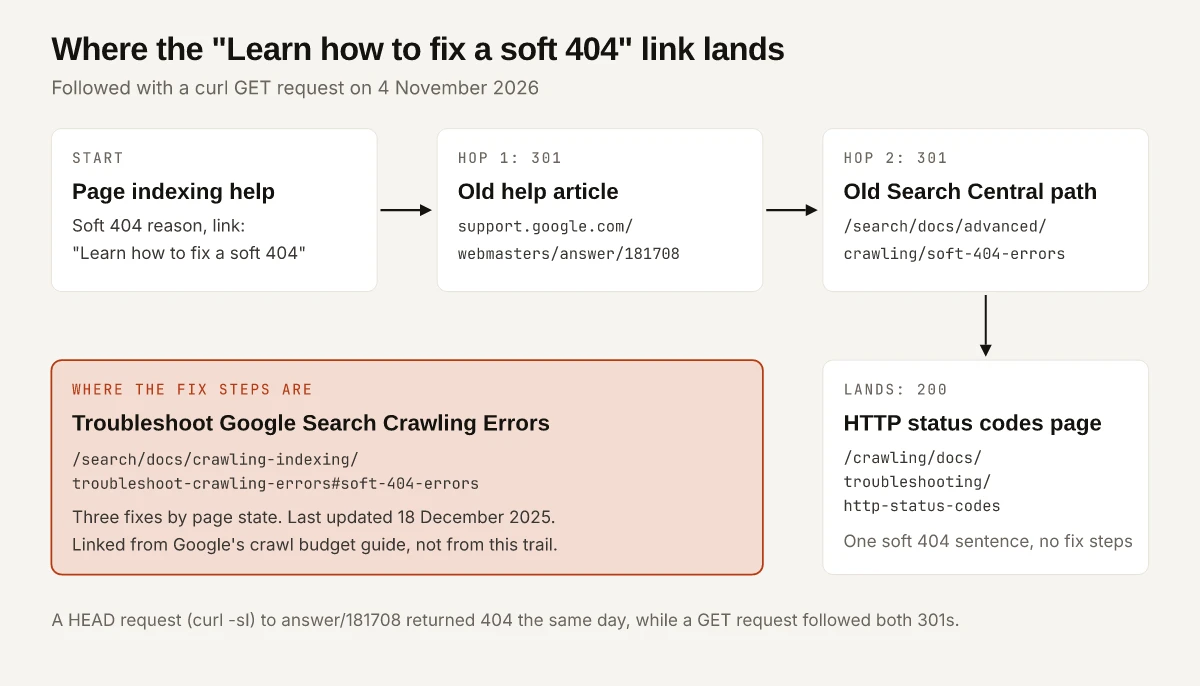
Click “Learn how to fix a soft 404” under that reason in Google’s Page indexing help, and you land on a page that has no fix steps. I followed the link with curl on 4 November 2026:
| URL | What it returned on 4 November 2026 | What is there now |
|---|---|---|
support.google.com/webmasters/answer/181708, the help page’s “Learn how to fix a soft 404” link | 301 to /search/docs/advanced/crawling/soft-404-errors, then 301 to the status codes page | One sentence on the topic, whose link points back to the Page indexing help |
developers.google.com/search/docs/crawling-indexing/http-network-errors#soft-404-errors | 301 to the same status codes page | No matching heading for the anchor to land on |
developers.google.com/crawling/docs/troubleshooting/http-status-codes | 200, last updated 4 February 2026 | The 2xx, 3xx, 4xx and 5xx tables |
developers.google.com/search/docs/crawling-indexing/troubleshoot-crawling-errors#soft-404-errors | 200, last updated 18 December 2025 | The definition, the causes and a “Fix soft 404 errors” section; the crawl budget guide’s “Eliminate soft 404 errors” link points here |
Two changelog entries date the moves:
- Google’s Search Central changelog for 4 December 2020 lists “Soft 404 errors” among guides migrated from the Search Console Help Center, “the content hasn’t changed”.
- Google’s crawling changelog for 18 December 2025 lists “How HTTP status codes affect Google’s crawlers” among pages migrated to the crawling site, adding “The functionality hasn’t changed, only the location of the documentation and some minor wording changes”.
Check redirects with GET. The same day, curl -sI (a HEAD request) on answer/181708 returned a plain 404 with no redirect, while a GET followed both 301s.
What Causes a Soft 404, by URL Type
The fix depends on what the URL is. This table pairs each common case with the response Google’s documentation asks for:
| URL type | What it should answer | Google’s line behind it |
|---|---|---|
| Deleted page, no replacement | 404 or 410 | ”If you removed the page and there’s no replacement page on your site with similar content, return a 404 (not found) or 410 (gone)” (troubleshooting page) |
| Moved page, clear replacement | 301 to the replacement | ”If your page has moved or has a clear replacement on your site, return a 301 (permanent redirect)” (same page); the status codes page treats 308 as “Equivalent to 301” |
| Many old URLs redirected to the home page | 404 or 410, or a redirect to the one page that merged their content | ”Don’t redirect many old URLs to one irrelevant single URL destination, such as the home page of the new site. This can confuse users and might be treated as a soft 404 error.” (site move guide, last updated 20 August 2026) |
| Filter combination with no results | 404 at that URL | ”Return an HTTP 404 status code when a filter combination doesn’t return results”, and “don’t redirect to a common ‘not found’ error page” (faceted navigation guide) |
| Pagination past the last page | 404 | The same guide applies the 404 rule to “nonexistent pagination URLs” |
| Empty internal search result | 404 when the result set is empty, by my reading | Google lists “An empty internal search result page” as a cause and gives no separate fix for it; I apply the faceted navigation rule |
| Thin stub you want indexed | More main content | The troubleshooting page says a flagged URL “might be a page with no main content or empty page”; the Page indexing help recommends “adding more information on the page to let us know that it is not a soft 404” |
| Good page flagged anyway | Fix rendering | ”it’s likely it didn’t load properly for Googlebot, it was missing critical resources, or it displayed a prominent error message during rendering” (troubleshooting page) |
| Single-page app error view | A JavaScript redirect to a URL that returns 404, or a noindex added by JavaScript | ”Use a JavaScript redirect to a URL for which the server responds with a 404 HTTP status code (for example /not-found)” or “Add a <meta name="robots" content="noindex"> to error pages using JavaScript” (the JavaScript guide, last updated 4 March 2026) |
| Error page during a database or include failure | Fix the failure | Both are on Google’s list of causes; the status codes page says a 5xx keeps “already indexed URLs” in the index “but eventually dropped” |
A redirected URL then shows up under a different Page indexing reason, Page with redirect, and my notes on why Page with redirect validation fails explain why Validate fix cannot pass on a redirect you keep.
For the “good page flagged anyway” row, Google names the resource problems to look for: “blocked resources (blocked by robots.txt), having too many resources on a page, various server errors, or slow loading or very large resources.”
If your error views come from a client-rendered app, my notes on what Googlebot receives from vibe-coded React sites cover the CSR vs SSR side of the same problem.
How to Fix a Soft 404 in Google Search Console
- Open the row. In the Page indexing report, click Soft 404 in the “Why pages aren’t indexed” table. Google’s help says the examples table “does not necessarily show all URLs with that issue, and is limited to 1,000 rows”, so sort by URL pattern rather than chasing a total.
- Sort each pattern into a URL type from the table above. A deleted page and a thin stub need opposite fixes.
- Read the status code with a GET request, using the curl commands in the next section. A 200 on a URL that should be gone, or a redirect that ends on the home page, settles most rows of the table.
- Inspect the pages you want indexed. Run a live test in URL Inspection and click View tested page, which shows “a screenshot of the rendered page, the raw HTML returned, the HTTP headers, JavaScript console output, and any page resources loaded”. The help adds that “A screenshot of the rendered page is available only in a live test.”
- Change the status code or the content, deploy, and confirm the new response with curl.
- Click Validate fix once. Google’s help says “Validation typically takes up to about two weeks, but in some cases can take much longer”, and asks you not to click it again “until validation has succeeded or failed”.
Check What a Not-Found URL Returns With Curl
Three commands tell you whether a missing URL risks the flag: the status code, where redirects end, and the robots tag. Here is this site’s own not-found page, on a made-up path, run on 4 November 2026 at 18:02 UTC:
curl -s -o /dev/null -w "%{http_code}\n" https://swapbiswas.com/blog/soft-404-check-xyz/
404

curl -s -o /dev/null -L -w "%{http_code} %{num_redirects} %{url_effective}\n" https://swapbiswas.com/blog/soft-404-check-xyz
404 1 https://swapbiswas.com/blog/soft-404-check-xyz/

curl -s https://swapbiswas.com/blog/soft-404-check-xyz/ | grep -o '<meta name="robots"[^>]*>'
<meta name="robots" content="noindex, follow">
The slashless request took one redirect (Vercel’s 308, which my 301 redirect teardown covers) and still ended on a 404.
That page is not thin. src/pages/404.astro renders a site search box, links to the homepage, the blog and the contact page, three popular-article cards and a newsletter form, which lines up with Google’s custom 404 tips: same look and navigation as the rest of the site, links to popular articles and the home page. Served with a 200, Google would have to judge that page from its content, which is the detection method the troubleshooting page describes. Served with a 404, its content is ignored, as Google’s status codes page says of every 4xx response. Google’s custom 404 advice ends on the same point: “make sure the server returns a 404 HTTP status code to prevent having the pages indexed.”
The template also passes noindex={true} to the layout (line 29). Why that tag is there, and how the built /404.html file behaves, are in the noindex inventory of my Excluded by noindex tag guide.
Soft 404: Decide What Each URL Should Answer
A Soft 404 row is a list of URLs whose status code and content disagree. For each one, decide which should change: a removed page gets a 404 or 410, a moved page gets a redirect to its replacement, and a page you want indexed gets its content or its rendering fixed. Use Google’s troubleshooting page for the fix steps, since the help link sends you to the status codes page.
Export the examples table and write a status code next to every pattern in it.
Frequently Asked Questions
What does soft 404 mean in Google Search Console?
It means the URL returned a 200 (success) status code, but Google's algorithms read its content as an error page, an empty page or a not-found message. Search Console lists it under the Soft 404 reason in the Page indexing report, and Google excludes such pages from Search.
What is the difference between a soft 404 and a 404?
A 404 is a status code your server sends, and Google ignores any content on a URL that returns it. A soft 404 is a verdict Google reaches about a URL that returned 200, based on what the page shows. The first sits under Not found (404) in the Page indexing report, the second under Soft 404.
Should I redirect soft 404 pages to the homepage?
No. Google's site move guide says not to redirect many old URLs to one irrelevant destination such as the home page, because it can confuse users and might be treated as a soft 404. Return 404 or 410 for pages with no replacement, and redirect only to a page with similar content.
How long does a soft 404 fix take to show in Search Console?
Google's Page indexing help says validation typically takes up to about two weeks, but in some cases can take much longer. Google states no separate timing for this reason.
Do soft 404 errors hurt SEO?
Google excludes these pages from Search, and its crawl budget guide says soft 404 pages will continue to be crawled and waste your budget. Google's troubleshooting section on them does not describe any effect on the ranking of your other pages.