SEO Interview Questions and Answers (2026): 62 by Level
SEO interview questions and answers for freshers, 3 years experience and managers, most tied to Google's own docs, plus the outdated answers that cost points.
When a candidate claims SEO experience, an interviewer can check it in two minutes: open the live site they name, ask them to explain one number in its Search Console export, and run curl on a redirect they say they set up. Every model answer to the SEO interview questions below is one you can back with that kind of evidence from a live site, and where this site holds it, the answer links to the post where I measured it.
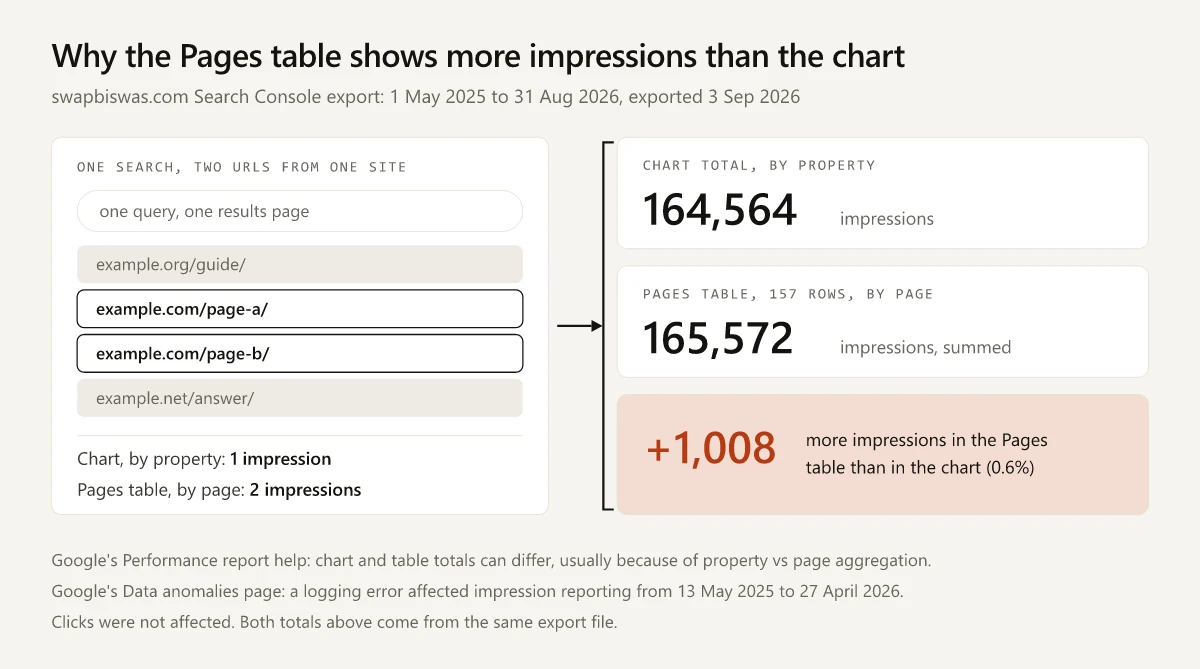
I think checkable answers are what separate candidates in 2026, because the textbook definitions are one search away and several published question banks still teach answers that Google’s own documentation contradicts. Two of the Search Console questions use this site’s own export, where the Pages table adds up to 1,008 more impressions than the chart total.
What Questions Are Asked in an SEO Interview?
An SEO interview moves from definitions to diagnosis as the level rises: freshers get how-search-works and on-page questions, candidates with 1-3 years get Search Console and redirect problems, and managers get prioritization, reporting and traffic drops. Technical and AI search questions can come up at any level.
| Question set | Questions | What the interviewer is testing | Evidence that backs the answer |
|---|---|---|---|
| Freshers and SEO executives | 1-17 | How Google crawls, indexes and serves pages; on-page basics | A page you published and its URL Inspection result |
| 1-3 years, including 3 years experience | 18-29 | Tools, keyword targeting, canonicals, redirects, local SEO, reporting | A Performance report export you can explain |
| Experienced and manager | 30-38 | Prioritizing, diagnosing drops, migrations, working with developers | A dated plan and one change you measured |
| Technical SEO | 39-49 | Crawl controls, rendering, Core Web Vitals, status codes, hreflang | curl output and Search Console reports |
| Search Console scenarios | 50-55 | Reading the Performance and Page indexing reports | The export file and its date range |
| AI search in 2026 | 56-62 | AI Overviews, AI Mode, GA4’s AI Assistant channel | The Generative AI performance report and GA4 channel data |
Red-Flag Answers That Should Cost a Candidate Points
These answers are still live on published question banks. Each row quotes the page as I read it on 16 October 2026, next to what the source behind the topic says now. If you hire, treat any of them as a cue to probe; if you are the candidate, do not repeat them.
| Answer still published | Current wording at the source | Evidence |
|---|---|---|
| ”LSI (Latent Semantic Indexing) keywords: Related keywords that help search engines understand context.” (skillfloor) | Google’s ranking systems guide does not mention LSI. It describes RankBrain as “an AI system that helps us understand how words are related to concepts” | What real LSI outputs when you run it over a blog |
| ”Ideal density: 1%-1.5%” (janardhan.digital) | SEO Starter Guide: “Excessively repeating the same words over and over (even in variations) is tiring for users, and keyword stuffing is against Google’s spam policies.” The guide gives no percentage | Things we believe you shouldn’t focus on, last updated 10 December 2025 |
| Domain authority listed among “Key ranking factors” (skillfloor) | Moz, which created the metric: “Domain Authority is not a Google ranking factor and has no effect on the SERPs.” | Moz’s Domain Authority page |
| E-A-T: “Google uses these criteria to assess the quality of content and determine rankings” (digisnare) | SEO Starter Guide, under “Thinking E-E-A-T is a ranking factor”: “No, it’s not.” Google also added an extra E for Experience in December 2022 | Google’s E-E-A-T post, 15 December 2022 |
| AMP “also has a positive effect on SEO rankings” (skillfloor) | “Google Search indexes AMP pages just like other web pages, and applies the same standard to all pages, regardless of the technology used to build the page.” | About AMP on Google Search, last updated 1 July 2026 |
| ”Google PageRank was an algorithm used by Google to rank web pages in search engine results.” (digisnare) | SEO Starter Guide: “While PageRank uses links and is one of the fundamental algorithms at Google, there’s much more to Google Search than just links. We have many ranking signals, and PageRank is just one of those.” | Same Starter Guide section as the density row (things not to focus on) |
| “optimizing for answer engines like Google’s SGE” (janardhan.digital) | Google’s AI features guide names the features “AI Overviews and AI Mode” | AI Features and Your Website, last updated 10 December 2025 |
SEO Interview Questions for Freshers
Fresher and SEO executive rounds check whether you know how search works before you open a tool.
1. What Is SEO?
SEO is the work of getting a site’s pages crawled, indexed and shown for the searches they answer, then earning the click. It covers technical access, content that matches what people search for, and signals such as links from other sites. A strong fresher answer adds one page they worked on and what its Search Console data showed.
SEO “is about helping search engines understand your content, and helping users find your site and make a decision about whether they should visit your site through a search engine.” - SEO Starter Guide, last updated 10 December 2025
2. How Does Google Search Work?
Search runs in three stages. Crawling is Googlebot downloading pages it finds through links and sitemaps; indexing is Google analyzing that content and storing it; serving is returning indexed pages for a query. A page can drop out at any stage, so the first diagnostic question for a missing page is which stage it failed.
“Google Search works in three stages, and not all pages make it through each stage” - In-Depth Guide to How Google Search Works, last updated 18 December 2025
3. What Is the Difference Between Crawling and Indexing?
Crawling is Google fetching a URL; indexing is Google deciding to store and use what it fetched. The two separate in the Page indexing report, where a URL can sit under Crawled - currently not indexed. Crawling makes indexing possible without guaranteeing it, and the URL Inspection tool shows both: when Google crawled the page and whether it is on Google.
“The page was crawled by Google but not indexed. It may or may not be indexed in the future; no need to resubmit this URL for crawling.” - Page indexing report help, read 16 October 2026
4. What Is the Difference Between SEO and Paid Search?
SEO earns a place in the organic results, which Google ranks without payment; paid search buys ad placements on the same results page. Paid clicks stop when the budget stops, while organic rankings can keep earning clicks. A strong answer adds how the two inform each other, such as testing which queries convert with ads before writing content.
“Google doesn’t accept payment to crawl a site more frequently, or rank it higher. If anyone tells you otherwise, they’re wrong.” - In-Depth Guide to How Google Search Works, linked under question 2
5. What Are On-Page, Off-Page and Technical SEO?
On-page SEO is what you change on the page itself: the title, headings, copy, internal links and images. Off-page SEO is what happens on other sites, mostly links and mentions. Technical SEO is whether search engines can crawl, render and index the site at all, through status codes, robots rules, canonicals, sitemaps and speed.
6. What Is a Keyword, and How Do You Choose One?
A keyword is the phrase a person types into a search box. Choose one by checking intent first (do the results show guides, product pages or tools), then whether your page can be the best answer for that intent, then whether you can realistically outrank the pages already there. Search volume comes after those checks.
7. What Is Search Intent?
Search intent is what the searcher wants to get done: learn something, compare options, buy, or reach a particular site. The quickest check is the results page itself, because Google already shows the format it rewards. If the top results are question-and-answer guides, a product page is unlikely to rank for that query, however well it is optimized.
8. What Is a Title Tag, and How Long Should It Be?
The title tag is the title element in a page’s head. Google builds the clickable title link from it and from other sources, such as the main heading on the page, and cuts long titles to fit the screen. Put the main keyword early and describe the page accurately; this site holds every post title to 60 characters or fewer.
“While there’s no limit on how long a
<title>element can be, the title link is truncated in Google Search results as needed, typically to fit the device width.” - Influencing Title Links in Google Search, last updated 10 December 2025
Worked examples: the before-and-after title rewrites on this site.
9. What Is a Meta Description, and Does Google Always Show It?
A meta description is the summary in a page’s head that Google may show as the snippet under the title link. Google builds most snippets from the page content and uses the meta description when it describes the page better. Write it so a searcher knows what the page answers. Every post description on this site runs 140-165 characters.
“Snippets are primarily created from the page content itself. However, Google sometimes uses the meta description HTML element if it might give users a more accurate description of the page than content taken directly from the page.” - How to Write Meta Descriptions, last updated 20 April 2026
10. Does Google Use the Meta Keywords Tag?
No. Google said in September 2009 that it does not use the keywords meta tag in web search ranking, and its Starter Guide still says so. Spend that effort on the title element and meta description, which can appear in results, and on the words in the page itself.
“Google Search doesn’t use the keywords meta tag.” - SEO Starter Guide, under Meta keywords
Google’s September 2009 post on the tag put it as: “Google doesn’t use the keywords meta tag in our web search ranking.”
11. How Many H2 Tags Should a Page Have?
As many as the page has main sections. Use one H1 that names the topic, H2s for the sections a reader scans for, and H3s beneath them. Google’s Starter Guide lists the number and order of headings among things not to focus on, so a fixed H2 quota per word count has no Google source.
“There’s also no magical, ideal amount of headings a given page should have. However, if you think it’s too much, then it probably is.” - SEO Starter Guide, on the number and order of headings
Measured here: heading counts set against ranking position on this site.
12. What Is Alt Text?
Alt text is the text alternative in an image’s alt attribute. Screen readers read it aloud, and Google uses it with the page content to work out what the image shows. Describe what the image shows and why it is on the page, skip keyword lists, and audit the strings themselves, because an attribute can exist and still say nothing.
“Google uses alt text along with computer vision algorithms and the contents of the page to understand the subject matter of the image.” - Image SEO Best Practices, last updated 2 March 2026
Measured here: what an alt text audit of this site’s posts found.
13. What Is a Backlink, and What Does Nofollow Do?
A backlink is a link from another site to yours, and links feed PageRank, one of many signals Google uses. Adding rel="nofollow" asks Google not to associate your site with the linked page or crawl it from yours. Use rel="sponsored" for paid links and rel="ugc" for links in comments and forum posts.
“Use the nofollow value when other values don’t apply, and you’d rather Google not associate your site with, or crawl the linked page from, your site.” - Qualify Outbound Links for SEO, last updated 10 December 2025
Measured here: the rel values four publishing platforms actually stamp.
14. What Is an XML Sitemap?
An XML sitemap is a file listing the URLs you want search engines to find, each with an optional last-modified date. It tells Google which URLs exist and when they changed, but a listed URL is still not guaranteed a place in the index. Google ignores the priority and changefreq fields, and trusts lastmod only when it matches real changes.
“Google ignores
<priority>and<changefreq>values. Google uses the<lastmod>value if it’s consistently and verifiably (for example by comparing to the last modification of the page) accurate.” - Build and Submit a Sitemap, last updated 8 July 2026
Google’s sitemaps overview adds that a sitemap “doesn’t guarantee that all the items in your sitemap will be crawled and indexed”. On this site, the build writes each post’s lastmod from its publish or update date, and the IndexNow hook reads those same dates.
15. What Is robots.txt?
robots.txt is a file at the root of a site that tells crawlers which URLs they may request. Google’s guide says its main use is to avoid overloading a site with requests. Rules are grouped by user agent, so one file can treat Googlebot and other crawlers differently. Blocking a URL there does not keep it out of results.
“This is used mainly to avoid overloading your site with requests; it is not a mechanism for keeping a web page out of Google.” - Robots.txt Introduction and Guide, last updated 10 December 2025
This site’s whole robots.txt, fetched on 16 October 2026:
User-agent: *
Allow: /

Sitemap: https://swapbiswas.com/sitemap-index.xml
16. What Is E-E-A-T, and Is It a Ranking Factor?
E-E-A-T stands for Experience, Expertise, Authoritativeness and Trustworthiness, the framework Google’s quality raters use to judge results; Google added the Experience E in December 2022. The Starter Guide says it is not a ranking factor, though Google’s systems use a mix of signals that line up with it and weight them more on health, money and safety topics.
“While E-E-A-T itself isn’t a specific ranking factor, using a mix of factors that can identify content with good E-E-A-T is useful.” - Creating Helpful, Reliable, People-First Content, last updated 5 October 2026
Related: which pages count as YMYL and get the stricter bar.
17. What Is Keyword Density, and What Percentage Is Ideal?
Keyword density is how often a phrase appears as a share of all the words on a page. Google’s Starter Guide gives no target percentage and lists keyword stuffing among the things not to focus on. Use the phrase where a reader expects it, in the title, the opening and a heading or two, and write naturally everywhere else.
“Keyword stuffing refers to the practice of filling a web page with keywords or numbers in an attempt to manipulate rankings in Google Search results.” - Spam Policies for Google Web Search, last updated 28 August 2026
SEO Interview Questions for 1-3 Years Experience
Around three years in, expect to explain what you would check, in what order, and what number would tell you it worked.
18. Which SEO Tools Have You Used?
Name each tool by the question it answers and one decision it changed:
- Search Console: what Google indexed and which queries your pages appear for.
- GA4: what visitors do after the click.
- A site crawler: status codes, titles and canonicals.
- A keyword tool: estimated search volume and difficulty.
- PageSpeed Insights: lab and field data for a page.
“PSI provides both lab and field data about a page.” - About PageSpeed Insights, last updated 21 October 2024
19. How Do You Do Keyword Research for a New Page?
Start from the problem the page solves and list the phrases people would type. Check each phrase in a keyword tool for volume and difficulty, then in the live results for intent and for who ranks. Group phrases that return the same results onto one page, and pick as primary the phrase whose current results you can beat.
20. How Do You Find Quick Wins in Search Console?
Filter the Performance report to queries on page two, usually positions 11 to 20 and often called striking distance keywords, sort by impressions, and improve those pages first with sharper titles, a direct answer near the top and internal links from related posts. Before promising a payoff, check the clicks page one earns on your own site.
Measured here: what promoting page-two queries to page one would have earned on this site.
21. What Is Keyword Cannibalization, and How Do You Fix It?
Cannibalization is two or more of your pages competing for the same query, splitting its clicks and links between them. Find it by filtering Search Console to the query and counting how many of your URLs earn impressions for it. Fix it by merging the weaker page into the stronger one with a 301 redirect, or by retargeting one page.
Worked example: mapping an existing site’s queries to its pages.
22. What Is a Canonical Tag, and When Do You Use It?
A canonical tag, rel="canonical" in the head, tells Google which URL you prefer when several URLs carry the same or very similar content, such as sorted and filtered views of a category page. Google treats it as a strong signal, though it lists redirects first in order of strength. The canonical page should also point to itself.
Google asks for the canonical link “on the canonical page itself (also known as a self-referential canonical)” in How to Specify a Canonical, last updated 10 July 2026.
23. What Is the Difference Between 301, 302 and 308 Redirects?
301 and 308 are permanent redirects; 302 and 307 are temporary. Google uses a permanent redirect as a signal that the target should become canonical and shows the target in results, while a temporary one keeps the source in results. A 308 also guarantees the request method and body are not changed, which matters for form posts.
Permanent redirects: “Show the new redirect target in search results.” Temporary redirects: “Show the source page in search results.” - Redirects and Google Search, last updated 14 April 2026
| Code | Permanent? | Method and body kept? | Google shows in results |
|---|---|---|---|
| 301 | Yes | No, a POST is resent as GET | The redirect target |
| 302 | No | No, a POST is resent as GET | The source page |
| 307 | No | Yes | The source page |
| 308 | Yes | Yes | The redirect target |
The method column follows MDN’s references for 301, 302, 307 and 308; the results column follows Google’s redirects page quoted above. What Google does when a host sends 308 instead of 301 is covered in its own post, and question 49 shows this site’s live check.
24. Is There a Duplicate Content Penalty?
Not for ordinary duplication. Google’s Starter Guide says content reachable at several URLs is inefficient but will not cause a manual action. Copying other sites’ content is a different matter, and scaled thin pages fall under the spam policies. Consolidate your own duplicates with redirects or canonical tags so ranking signals gather on one URL.
“If you have some content that’s accessible under multiple URLs, it’s fine; don’t fret about it. It’s inefficient, but it’s not something that will cause a manual action.” - SEO Starter Guide, under its duplicate content heading
25. How Long Should a Page Be for SEO?
As long as the question needs and no longer. Google’s Starter Guide says length alone does not matter for ranking and there is no magic word count. Read what the ranking pages cover, cover the same ground plus what they miss, and cut anything that restates. A thin page loses on coverage, which word count only approximates.
“The length of the content alone doesn’t matter for ranking purposes (there’s no magical word count target, minimum or maximum, though you probably want to have at least one word).” - SEO Starter Guide
Measured here: word count against ranking position on one domain.
26. How Do Internal Links Help SEO?
Internal links help Google discover pages and understand how they relate, and they pass link signals between your own URLs. Link from relevant pages that already get crawled, write anchor text that describes the target, and point every link at the final URL so no click passes through a redirect. Check that no important page has zero internal links.
Audit example: a repo audit that caught internal links taking a redirect detour.
27. How Do You Check Where a Page Ranks?
Use Search Console’s Performance report filtered to the page and query, which gives the average position Google recorded for the dates you pick. Treat an incognito search as a spot check only, since results vary by location and device. Rank trackers add daily positions for a fixed keyword list. Always state the date range you used.
Methods compared: free and paid ways to check a ranking.
28. What Is Local SEO, and What Decides Local Rankings?
Local SEO is the work of appearing in local results on Google Maps and Search. Google says those results are mainly based on relevance, distance and popularity; its page then explains Prominence, which counts links and reviews. You influence relevance with a complete Business Profile and prominence with reviews and links; distance depends on where the searcher is.
“Local results are mainly based on relevance, distance, and popularity.” - Tips to improve your local ranking on Google, read 16 October 2026
Step by step: a 20-step local SEO checklist for the map pack.
29. How Do You Report SEO Results to a Manager?
Lead with the business number the work was meant to move, usually clicks to pages that convert, then show what changed and why. Pair clicks with impressions and average position for the same dates, flag known data issues such as logging errors, and end with the decision you need next. A ranking screenshot alone is not a result.
Template: an SEO report example with the metrics filled in.
SEO Interview Questions for Experienced Candidates and Managers
Senior rounds test judgment: what you would leave alone, and how you would explain a number to someone outside search.
30. How Would You Prioritize an SEO Backlog?
Score each item on expected impact, effort and confidence, then sequence by dependency. Anything blocking crawling or indexing goes first, because pages that cannot be indexed cannot rank. Next come pages already close to the top of page one, then new content. Write down the metric each item should move and check it after release.
Order of work: an SEO audit checklist worked crawlability first.
31. Organic Traffic Dropped Sharply. What Do You Check First?
Confirm the drop is real before explaining it:
- Compare clicks as well as impressions.
- Check Search Console’s Data anomalies page and Google’s list of ranking updates for the dates.
- Rule out analytics changes.
- Segment by page, query, device and country to see where the drop concentrated.
- Only then look at releases, redirects or lost rankings.
Google keeps its list of Search ranking updates on the Search Status Dashboard, with start and end dates for each rollout.
32. How Do You Respond to a Google Core Update?
Wait until the rollout has finished, then compare a full week after it with a week before it started. Separate small drops from large ones: Google advises no drastic action for a small slide and a deeper assessment for a large fall. Avoid quick fixes based on hearsay, and compare lost pages with what now outranks them.
“We recommend waiting at least a full week after a core update completes before analyzing your site in Search Console.” - Google Search’s Core Updates, last updated 10 December 2025
Comparison: telling a spam update from a core update in your own data.
33. How Do You Run a Site Migration Without Losing Traffic?
Map every old URL to its new URL before launch, redirect each one with a permanent server-side redirect, and test them. Update internal links, canonicals and the sitemap to the final URLs, and file a Change of Address in Search Console if the domain changes. Keep the redirects at least a year, and monitor old and new URLs.
“Expect temporary fluctuation in site ranking during the move.” - Google’s site move guide, last updated 20 August 2026
The same guide says to keep redirects “for as long as possible, generally at least 1 year”. A platform move in practice: how this site left WordPress for Astro.
34. How Do You Measure SEO ROI?
Attribute conversions or revenue to organic landing pages in your analytics tool, subtract the cost of content, tools and people, and compare the result with what the same clicks would cost in paid search. State the attribution model and the lag between the work and the result, since Google itself says some changes take several months to show.
“Some changes might take effect in a few hours, others could take several months.” - SEO Starter Guide, on how long changes take
35. How Do You Get Developers to Ship SEO Fixes?
Write each fix as a ticket with the URL pattern, the current behavior, the expected behavior and a test anyone can run, such as a curl command and the status code it should return. Attach the traffic at stake so the ticket can be prioritized against product work, and check the fix on staging before it ships.
36. What Would You Do in Your First 90 Days?
- Month one: get access to Search Console, analytics and the CMS, crawl the site and list what blocks indexing.
- Month two: fix those blockers and improve the pages closest to page one.
- Month three: set a content plan from the query data and agree the monthly report.
Share the plan in writing early.
Crawl and audit steps: a technical SEO site audit in eight steps.
37. Do You Update an Old Page or Write a New One?
Update when the old page already targets the query and has history: links, impressions or rankings. Write a new page only when the intent differs enough that Google shows different results for it. A second page for the same query splits its signals, as in question 21, so keep one page and redirect any page you retire.
38. How Do You Grow Rankings Without a Link-Building Budget?
Target queries where the current results are thin, outdated or off-intent, publish the page that answers them better than anything ranking, and link it from your own related pages. Earn links and mentions through distribution rather than outreach. Measure progress query by query, starting with the specific long searches the page answers best.
Measured here: what sixteen months without link building produced on this site.
Technical SEO Interview Questions
Technical rounds ask how you would prove a fix, so the strongest answers name the check, such as the status code curl returns.
39. What Is the Difference Between Noindex and a robots.txt Disallow?
Noindex tells Google not to show a page in results; a robots.txt disallow tells crawlers not to fetch it. Combine them and the noindex fails, because Google cannot read a tag on a page it may not crawl, so the URL can still appear if other pages link to it. Use noindex and keep the page crawlable.
“For the noindex rule to be effective, the page or resource must not be blocked by a robots.txt file, and it has to be otherwise accessible to the crawler.” - Block Search Indexing with noindex, last updated 10 December 2025
Triage: when Excluded by noindex tag is a bug and when it is intended.
40. What Are Core Web Vitals, and What Are the Thresholds?
Core Web Vitals are three field metrics: Largest Contentful Paint for loading, good within 2.5 seconds; Interaction to Next Paint for responsiveness, good under 200 milliseconds; and Cumulative Layout Shift for visual stability, good under 0.1. INP replaced First Input Delay on 12 March 2024, so an answer that still names FID is out of date.
“Core Web Vitals are used by our ranking systems.” - Understanding Google Page Experience, last updated 22 September 2026
The thresholds come from Google’s Core Web Vitals page (last updated 10 December 2025), and the FID retirement date from web.dev’s INP announcement. The same page experience FAQ adds: “Beyond Core Web Vitals, other page experience aspects don’t directly help your website rank higher in search results.”
41. Is HTTPS a Ranking Factor?
Google announced HTTPS as a very lightweight ranking signal in 2014. Its current page experience page asks whether pages are served securely, yet says that beyond Core Web Vitals, other page experience aspects don’t directly help a site rank higher (question 40). Serve every page over HTTPS anyway, and redirect http to https permanently.
“Are your pages served in a secure fashion?” - Understanding Google Page Experience, in its self-assessment questions
The 2014 wording is from Google’s HTTPS as a ranking signal post, which called it “only a very lightweight signal” at the time.
42. How Does Google Handle JavaScript?
Google processes JavaScript pages in three phases, crawling, rendering and indexing, and pages can wait in a queue for rendering as well as for crawling. Content and links that exist only after scripts run depend on that rendering step. Server-side rendering or static HTML puts them in the first response, which Google still recommends for speed and for other bots.
“Keep in mind that server-side or pre-rendering is still a great idea because it makes your website faster for users and crawlers, and not all bots can run JavaScript.” - Understand JavaScript SEO Basics, last updated 4 March 2026
Explainer: why a vibe-coded React site can stall in search.
43. What Is Crawl Budget, and When Does It Matter?
Crawl budget is how many URLs Google can and wants to crawl on a site in a given period. Google’s guide targets sites with a million-plus pages changing weekly, 10,000-plus changing daily, or many URLs stuck in Discovered - currently not indexed. Otherwise, keeping the sitemap current and checking the Page indexing report is adequate, Google says.
“If your site doesn’t have a large number of pages that change rapidly, or if your pages seem to be crawled the same day that they are published, you don’t need to read this guide.” - Crawl Budget Management, last updated 22 July 2026
Google calls those page counts “a rough estimate to help you classify your site” and adds: “These are not exact thresholds.”
Small-site version: crawl budget analysis without server logs.
44. What Is Mobile-First Indexing?
Google indexes and ranks the mobile version of a page, fetched with its smartphone crawler. Content, links and structured data that exist only on the desktop version can be missed. Compare the mobile rendering in Search Console’s URL Inspection with the desktop page, and keep the same main content, headings and metadata on both versions.
“Google uses the mobile version of a site’s content, crawled with the smartphone agent, for indexing and ranking.” - Mobile-first Indexing Best Practices, last updated 10 December 2025
Checklist: mobile SEO fixes, from indexing to tap targets.
45. What Is Hreflang, and How Do You Implement It?
Hreflang annotations tell Google which language or regional version of a page to show which users. Add them in the HTML head, HTTP headers or the sitemap. Every version must list itself and all the others, and an x-default value can catch users who match none. Google does not use hreflang to detect a page’s language.
“Each language version must list itself as well as all other language versions.” - Localized Versions of your Pages, last updated 21 September 2026
Before you localize: reading Search Console’s country data first.
46. What Is Structured Data, and Which Format Does Google Recommend?
Structured data is markup that labels what a page contains, such as an article, a product or a recipe, usually in the schema.org vocabulary. Google uses it to understand the page and to decide eligibility for rich results. Google recommends JSON-LD where a site’s setup allows it, and the markup has to match what the visible page says.
“In general, Google recommends using JSON-LD for structured data if your site’s setup allows it, as it’s the easiest solution for website owners to implement and maintain at scale (in other words, less prone to user errors).” - Intro to How Structured Data Markup Works, last updated 10 December 2025
47. How Do You Fix “Crawled - Currently Not Indexed”?
The status means Google fetched the page and chose not to index it for now. Check whether the page duplicates another URL, whether it answers something your indexed pages do not, and whether internal links point to it. Improve the page and its links instead of resubmitting it, since Google’s help text for this status says no resubmission is needed.
48. What Happens to a Page That Returns a 404?
Google drops it. A URL that returns 404, or any 4xx code except 429, is not indexed; if it was indexed before, Google removes it and crawls it less often over time. Return 404 or 410 for content that is gone, redirect only to a close replacement, and remove internal links to the dead URL.
“In the case of Google Search, Google doesn’t index URLs that return a 4xx status code, and URLs that are already indexed and return a 4xx status code are removed from the index.” - How HTTP Status Codes Affect Google’s Crawlers, last updated 4 February 2026
49. How Do You Check What Status Code a URL Returns?
Run curl -I on the URL and read the first line and any Location header, or use the browser’s network panel with the cache disabled. Check each hop of a redirect chain, plus the http, www and slashless variants, because each can answer differently from the page itself. Test what a crawler receives, not what your browser cached.
This site, checked from India on 16 October 2026, with the output trimmed to the two lines that matter:
$ curl -sI http://swapbiswas.com/
HTTP/1.0 308 Permanent Redirect
Location: https://swapbiswas.com/
The www host and a slashless post URL answered 308 as well. Host-level checks: what Googlebot receives from a Vercel deployment.
Search Console Interview Questions and Scenarios
The data behind questions 50 and 51 is my own manual export of this site’s Performance report, taken on 3 September 2026 for 1 May 2025 to 31 August 2026. Google’s Data anomalies page says: “A logging error prevented Search Console from accurately reporting impressions from May 13, 2025 until April 27, 2026.” Every impression figure for those dates carries that caveat.
50. Why Does the Pages Table Show More Impressions Than the Chart?
Because the two count differently. The chart aggregates by property, so two of your URLs on one results page count as one impression, while the Pages table aggregates by page and counts each URL. On this site’s export the 157 page rows add up to 165,572 impressions against a chart total of 164,564: 1,008 more.
“Data on the chart is aggregated by property. For example, if two results from the same site appear for one query, they count as a single impression in the chart total.” - Performance report help, read 16 October 2026
The same help page says “Data grouped by Pages or Search appearance is aggregated by page” and that when chart and table totals differ, it is “usually due to differences in aggregation (property vs. page)”. Here the gap is 0.6% of the chart total, and with 157 rows the Pages table is far below its 1,000-row display limit, so the cap plays no part in it.
The chart total is the same one the no-link-building results under question 38 start from. The same property-versus-page split moves average position, as the five-averages table linked under question 53 shows.
51. Why Do Query Rows Add Up to Fewer Clicks Than the Total?
Google keeps anonymized queries out of the table while counting them in the chart, stores only what it calls the most important data rows, and stops the table at 1,000 rows. This site’s queries export holds exactly 1,000 rows, so rare queries below the cutoff are missing. Report what share of clicks the rows explain.
“The table can display a maximum of 1,000 rows, so some rare or long-tail rows might be omitted from the table, but included in the chart total.” - Troubleshooting data discrepancies, read 16 October 2026
Google’s dimensions page adds that “Search Console stores and shows only the most important data rows”. Measured here: how many of this export’s clicks no query row explains.
52. Impressions Fell on One Date but Clicks Held. What Happened?
Check for a reporting change before assuming a ranking loss. If clicks held while impressions moved on one date, look that date up on Search Console’s Data anomalies page before touching the site: the 13 May 2025 to 27 April 2026 logging error affected impressions, CTR and average position but left clicks alone.
“Only impressions and related metrics - CTR and average position - were affected; clicks were not affected by the error, and this issue affected data logging only.” - Data anomalies page, on the 13 May 2025 to 27 April 2026 error
Day by day: one site’s impressions drop read against the logging error.
53. What Is a Good Average Position in Search Console?
No single number is good site-wide. Average position blends every query a site appears for, so a site that starts showing for many distant queries can see its average worsen while clicks rise. Read it per query and next to clicks for the same dates, and judge a query by the clicks its position band earns on your own site.
Measured here: this site’s average position by month, and five averages from one export.
54. How Do You Separate Branded From Non-Branded Queries?
Use the branded queries filter in the Performance report where your property has it; Google introduced it on 20 November 2025 and made it available to all eligible sites on 11 March 2026. Without it, filter the query dimension with a regex that covers your brand and its misspellings. Report both segments plus the gap to the unfiltered total.
Source: Google’s branded queries filter announcement. Setup and limits: branded query filters, API and regex.
55. Should You Fix “Page With Redirect” in the Page Indexing Report?
Usually not. The status means the URL redirects, so Google will not index that URL; the target may or may not be indexed on its own merits. Act when the redirect itself is a mistake, or when the redirecting URL still sits in your sitemap or internal links, which should point at the final URL. Then recheck the target.
“This is a non-canonical URL that redirects to another page. As such, this URL will not be indexed. The target URL of the redirect might or might not be indexed, depending on what Google thinks about that target URL.” - Page indexing report help
Triage: which Page with redirect rows to ignore and which to fix.
AI Search Interview Questions for 2026
Google’s pages on these features carry dates from December 2025 to August 2026, so quote the page and its date in your answer.
56. What Are AI Overviews and AI Mode?
Both are generative AI features in Google Search. AI Overviews show an AI-generated summary with supporting links for some queries, only when Google judges it adds to classic results. AI Mode gives a fuller AI-powered response with links for questions that need exploration, reasoning or comparison. Either may run a query fan-out to build its response.
Google describes the fan-out as “issuing multiple related searches across subtopics and data sources” in how AI features work in Search. Practical version: what Google requires before it cites a page in an AI Overview.
57. How Do You Optimize a Page for AI Overviews?
The same way as for search. Google says there are no additional requirements or special optimizations for AI Overviews or AI Mode, and a page must be indexed and eligible to show with a snippet to be a supporting link. Write passages that answer on their own, keep key content in text, and keep structured data matching the visible page.
“To be eligible to be shown as a supporting link in AI Overviews or AI Mode, a page must be indexed and eligible to be shown in Google Search with a snippet, fulfilling the Search technical requirements.” - AI features guide, technical requirements
58. What Are AEO and GEO, and How Do They Differ From SEO?
AEO, answer engine optimization, and GEO, generative engine optimization, are labels for being cited inside AI answers rather than ranked in a list of links. Most of their tactics are SEO: direct answers, crawlable text, clear entities and links. What differs is measurement, because citations inside assistants need tracking that rank reports do not provide.
Comparison: AEO vs SEO vs GEO, side by side.
59. Do You Need an llms.txt File for Google?
Not for Google Search. Google’s AI features guide says you do not need new machine-readable files, AI text files or markup to appear in AI Overviews or AI Mode, and that no special schema.org structured data is required. Other AI products are a separate question with their own evidence, so answer for Google first and say so.
“You don’t need to create new machine readable files, AI text files, or markup to appear in these features. There’s also no special schema.org structured data that you need to add.” - AI features guide, SEO best practices
Beyond Google: whether anyone reads llms.txt files at all.
60. How Do You Measure AI Overviews and AI Mode in Search Console?
Traffic from both already sits inside the Performance report’s Web search type. Search Console’s Generative AI performance report, which Google says reached all websites as of 31 August 2026, reports AI Overviews and AI Mode impressions by page, country and device. Its help page describes impressions only, so pair it with analytics for outcomes.
“As of August 31, 2026, we’ve rolled out these insights to all websites worldwide.” - Generative AI performance report (Search) help, read 16 October 2026
Google’s AI features guide places both features in the Performance report under the Web search type.
61. How Do You Track ChatGPT Traffic in GA4?
GA4’s default channel group has an AI Assistant channel for sessions referred by AI chat assistants on Google’s list, with the medium set to ai-assistant and the campaign to (ai-assistant). Google’s channel page says the channel leaves out Google’s own AI Overviews and AI Mode, so measure those in Search Console’s Generative AI performance report instead.
“It excludes Google’s AI Overviews and AI Mode.” - GA4 default channel group, read 16 October 2026
Where each kind of AI visit lands: the GA4 AI Assistant channel, page by page.
62. How Do You Limit How Google Uses Your Content in AI Features?
Inside Search, use the same preview controls as for snippets: nosnippet, data-nosnippet, max-snippet or noindex. Google says robots.txt rules for Googlebot are the control for how Search crawls a site, AI features included. Google-Extended is the separate control Google names for limiting training and grounding in some of its other AI systems.
“To limit the information shown from your pages in Search, use nosnippet, data-nosnippet, max-snippet, or noindex controls.” - AI features guide, controlling your content
Strong and Weak SEO Interview Answers for Hiring Managers
If you are hiring, these questions show whether a candidate has worked on a live site or memorized a list. Listen for the check they would run.
| Question | Weak answer | Strong answer |
|---|---|---|
| What does robots.txt do? | ”It stops Google from indexing a page." | "It controls crawling. To keep a page out of results I would add noindex and leave the page crawlable, or Google never sees the tag.” |
| Impressions fell on one date but clicks held. Why? | ”We lost rankings, so we need more backlinks." | "I would check the Data anomalies page and the ranking update dates for that day first, then split the change by page and query.” |
| How do you know an SEO change worked? | ”Our rankings went up." | "I compare clicks to the changed pages for equal date ranges before and after, and check pages I did not change over the same dates.” |
Questions to Ask the Interviewer
These questions tell you whether the job lets you do the work the answers above describe:
- Which Search Console properties and analytics views will I have in my first week?
- Who owns releases to the CMS and templates, and how long does a technical fix take to ship?
- How is SEO success measured here: clicks, conversions, revenue or rankings?
- When did the site last migrate or redesign, and were the redirects mapped?
- How do you report AI Overviews and AI Mode visibility to leadership today?
Bring Evidence to Your SEO Interview
The SEO interview questions above will shift as Google’s documentation changes, so prepare the proof as well as the wording: a live URL you changed and the date you changed it, a Search Console export with its date range, one curl command with the status code it returns, and the Google page that backs each answer you plan to give. The habit carries over to marketing roles outside search; the product marketing interview questions on this site ask for a launch you owned and a number you moved.
Before your next interview, export your Performance report and pick one number you can explain.
Frequently Asked Questions
What are the most common SEO interview questions for freshers?
Fresher-level questions cover what SEO is and how it differs from paid search, how Google crawls, indexes and serves pages, what title tags, meta descriptions, headings, alt text and sitemaps do, what robots.txt controls, and whether E-E-A-T is a ranking factor. Google's SEO Starter Guide answers that last one directly: it is not.
How do I prepare for an SEO interview?
Prepare evidence as well as definitions: a live page you changed, a dated Search Console export you can explain, and one redirect or technical fix you can show with a curl command. Then read the Starter Guide section on things not to focus on, so you do not repeat answers Google's own documentation contradicts.
What technical SEO interview questions are asked?
Expect noindex versus a robots.txt disallow, canonical tags, 301 versus 302 and 308 redirects, Core Web Vitals thresholds (LCP within 2.5 seconds, INP under 200 milliseconds, CLS under 0.1), JavaScript rendering, crawl budget, mobile-first indexing, hreflang, structured data, what a 404 does to an indexed page and how to check the status code a URL returns.
What SEO interview questions are asked for 3 years experience?
At around three years the questions test diagnosis: finding quick wins in Search Console, fixing keyword cannibalization, choosing between a canonical tag and a redirect, explaining 301 versus 308, checking where a page ranks, and reporting results with clicks, impressions and position for the same dates.
What should an SEO portfolio show?
Show work someone can check: the live URLs you changed, a Search Console comparison with the date range stated, the fix itself (a redirect map, a title rewrite, a structured data block) and what you would do differently. A dated export is stronger evidence than a screenshot of a rank tracker.