What Are Gemini Gems? What Carries Over Into Skills
What are Gemini Gems? They are saved Gemini instructions and files that turn into skills on personal accounts from 17 November 2026. See what carries over and when.
When Google turns a Gem into a skill, the Gem comes across with its supported knowledge files, while GitHub files, audio, video, old .doc, .xls and .ppt files, archives, and anything past a 100 MB total (largest files first) are left behind, according to Google’s transition help page. Google’s Workspace admin page lists the kept fields for Workspace. Gemini Gems are the custom versions of Gemini being converted: you set one up once with instructions, plus optional files, and reuse it whenever the same job comes back.
Google’s Gems help page now opens with the notice: “Starting in November 2026, Gems will go away on personal Google accounts and automatically transition to skills.” My reading of those pages is that a Gem built today is a draft for a skill. I would write any new custom instructions as a skill from the start, and spend the weeks before 17 December getting knowledge files out of the Gems that matter.
Every Google page cited here was read logged out, from an Indian connection, on 25 October 2026. I have not built Gemini Gems or Gemini skills myself, so the menu paths below are quoted from Google’s help pages.
What Are Gemini Gems?
Gemini Gems are saved, reusable versions of Gemini. You give a Gem a name and instructions (its role, task, context and output format), optionally add knowledge files from your device, Google Drive or a NotebookLM notebook, and then chat with it whenever the task comes back. Google premakes some Gems; you can copy them or build your own.
Google’s getting-started guide pitches them for “repetitive tasks” and “deep expertise in new areas”. The rules around them, from the Gems help page:
| Rule | What Google’s Gems page says |
|---|---|
| Account | You must be signed in to Gemini Apps |
| Age on a personal account | 13 or over, “or the applicable age in your country” |
| Where they work | A Gem made in the web app also shows in the Gemini mobile app and the Gemini side panel in Google Workspace (the Workspace admin page adds that Gems “can’t be used in Workspace apps”, while skills can) |
| Where they do not | ”For now, Gems can’t be used with Gemini Live” |
| Knowledge sources | Upload files, add from Drive (needs Keep Activity on and Workspace connected) or add a NotebookLM notebook |
| Drive files | Gemini uses the latest version, so edits to the Drive file show up in the Gem |
| Sharing | Share with named people as Viewer or Editor, or by link; NotebookLM notebooks cannot be a source for a shared Gem, per the sharing page |
Are Gemini Gems Going Away? The Dates by Account Type
Yes. Gems are being replaced by skills, and the date depends on the account you sign in with. The personal-account dates come from Google’s Gemini transition page; the Workspace detail comes from the Workspace admin page, which showed “Last updated: September 30, 2026” in its body (the page footer reads 22 October 2026) and words its 2027 dates as “no sooner than”.
| Account type | What happens and when | Source |
|---|---|---|
| Personal Google account, 18 and over | 17 November 2026: Gems “transition to skills and become read only. You can still access your Gems, but can’t use or edit them, or create new ones.” 17 December 2026: “Gems are removed from Gemini Apps.” | Gemini transition page |
| Personal Google account, under 18 | Gems “will transition to skills at a later date. We’ll share more details soon.” | Gemini transition page |
| Workspace business, enterprise and non-profit | 17 November 2026: Gems move to Settings and stay usable. No sooner than 1 March 2027: users can no longer create, edit or use Gems, which become draft skills | Workspace admin page; the Gemini page lists non-profit with March 2027 |
| Workspace education | 17 November 2026: Gems move to Settings and stay usable. No sooner than 1 June 2027: users can no longer create, edit or use Gems, plus removal from Google Classroom and learning systems connected through Gemini LTI | Workspace admin page |
| Opal and “Gems made by Labs” | 17 November 2026: turned off. “Existing Opal workflows will not automatically migrate” | Opal FAQ |
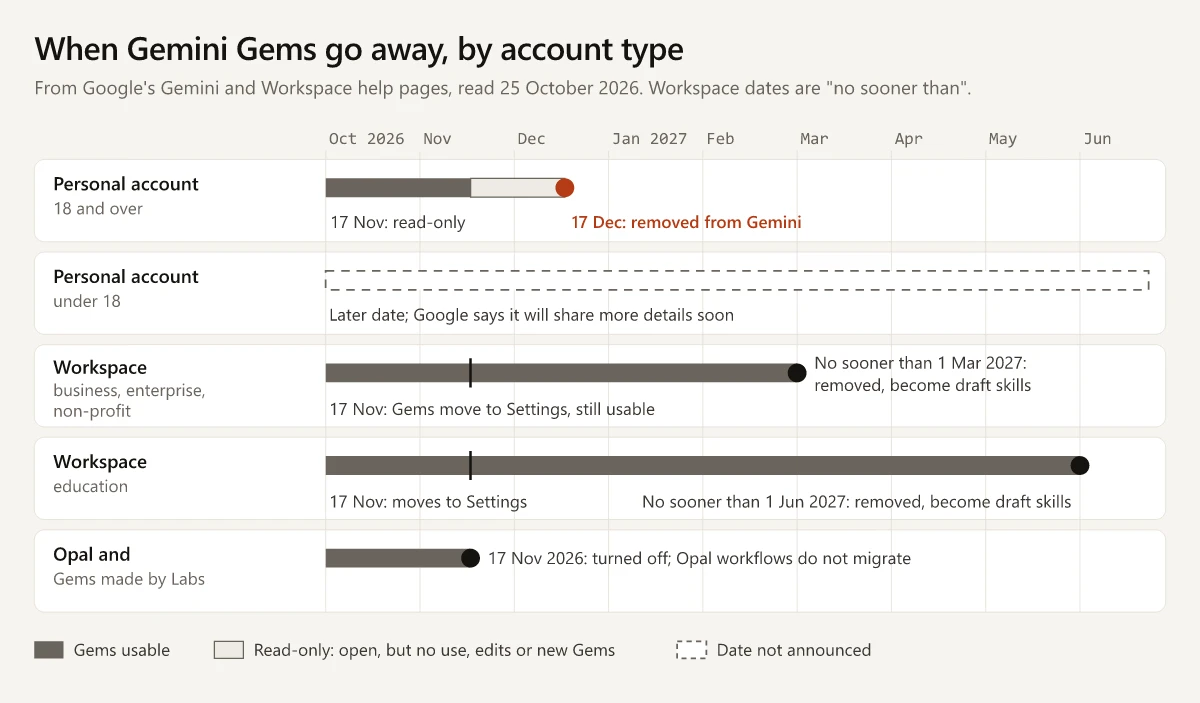
Two more Workspace details from the admin page:
- Google Workspace Studio flows can no longer add the “Ask a Gem” step, and existing flows with that step stop working on the business and education dates above.
- “Currently, skills don’t sync between the Gemini app and Workspace apps”, so a Gem used in Workspace has to be rebuilt by hand in Workspace Studio.
Google’s stated reason, from the FAQ on its Gemini transition page: skills can be used “right in your current chat without having to switch tabs”, and several can be stacked in one workflow.
Gem to Skill Conversion: Kept, Dropped and Changed
Conversion is automatic, and Google lists what it drops. The rows below are Google’s words or close paraphrase:
| Part of the Gem | After conversion | Source |
|---|---|---|
| Name, description, instructions | Kept. Workspace says converted skills “retain their original names, descriptions, custom instructions, and uploaded knowledge files” | Workspace admin page |
| Supported knowledge files | Kept: “We’ll automatically transition your Gems, along with any supported files, to skills” | Gemini transition page |
| Files over 100 MB in total | ”We automatically remove the largest files first until it’s under the limit” | Gemini transition page |
| GitHub files, audio, video | Not included | Gemini transition page |
| .doc, .xls, .ppt | Not included (“Legacy Microsoft Office file formats”) | Gemini transition page |
| .zip, .tar, .7z, .rar, .gz, .tgz | Not included | Gemini transition page |
| Sharing (Workspace) | “Drive permissions and sharing settings applied to original Gems transfer to the corresponding skills” | Workspace admin page |
| Sharing (personal) | Google says skills will gain “the ability to share them with others” in “the coming weeks” | Gemini transition page |
| Activation (Workspace) | Migrated Gems arrive as “inactive drafts”, and creators “must review and activate each skill” | Workspace admin page |
| Canvas, Deep research, Create video, Create music, Guided learning | These default tools “do not work with skills” for now | Gemini transition page |
| The Gem’s page of recent chats | Gone: “skills don’t have a dedicated page that lists your recent chats with that skill” | Gemini transition page |
One gap to check yourself. The transition page lists only the legacy .doc, .xls and .ppt formats among the files that will not carry over, but Google’s skills help page says uploads to a skill must be plain-text based and lists .docx and .xlsx as “Not supported”. If a Gem leans on a .docx or .xlsx style guide, download it, and plan to convert it to .txt, .md or PDF, which the skills page lists as supported.
The Workspace admin page also says its migration section “will be updated with full migration details at least 30 days before automated migration starts”, so recheck it before the 2027 dates.
A Checklist for Gem Owners Before 17 December
For a personal account, this is the order I would follow, built from the steps on Google’s transition page:
- List the Gems you actually use. Gems you never open can be left to the automatic conversion.
- Download every knowledge file now. In the Gems list, click Edit next to the Gem, then open each file under Knowledge and click Download. Google says files come out one at a time, though you can upload them to a skill together.
- Convert any .docx or .xlsx file to a plain-text format or PDF, because the skills page lists them as not supported, and keep each Gem’s files under 100 MB in total.
- Recreate high-value Gems by hand if you want to test them before the switch: Customize, then Skills, then Create, then Create manually, and paste the Gem’s name, description and instructions. Google says the name “will automatically update to the correct format”, which is lowercase words joined by hyphens.
- Add the files: download the new skill (More options, then Download gives a .zip with a SKILL.md file), put SKILL.md in a folder named exactly like the skill together with your files, and upload the folder with More options, then Replace skill. Uploading files to a skill works, for now, only in the Gemini web app and the Gemini app on Mac.
- After 17 November, open each Gem and its new skill side by side, as Google suggests, and download any file that did not transfer. After 17 December the Gem and its files are gone from Gemini Apps.
Workspace admins get a separate list on the admin page: tell users their edition’s date, make sure skills are turned on, have creators rebuild critical Gems early, and replace “Ask a Gem” steps in Workspace Studio flows.
Gemini Gems vs Skills
A Gem is something you open and chat with; a skill is a set of instructions that works inside any chat. The Gem column comes from Google’s Gems and sharing pages, the skill column from its skills and transition pages:
| Gem | Skill | |
|---|---|---|
| How you use it | Sidebar, Gems, then pick it under “My Gems” | Type / (or @, “if you have the updated shortcut”) in any chat, or Gemini applies an active skill when it is relevant |
| More than one at once | Each Gem opens in its own chat (Google’s Workspace page contrasts skills with “separate Gem windows”) | “Combine multiple skills in a single chat”; you can make as many as you want, “but only 100 can be active at a time” |
| Age on a personal account | 13 or over | 18 or over, with Keep Activity on |
| Where it works | Web app, mobile app, Workspace side panel | Mobile app, Mac app, web app; for eligible Workspace editions also Workspace apps, which the admin page says Gems can’t be used in |
| Files | Device, Drive or a NotebookLM notebook | Uploaded with the skill only; plain-text files, PDFs and images; 100 MB in total |
| Sharing | Named people (Viewer or Editor) or by link | Coming “in the coming weeks”, per Google |
| Getting it out | Knowledge files, downloaded one by one | The whole skill, as a .zip containing SKILL.md |
| Plan needed | Listed on the free plan (see below) | “Skills are available without a Google AI subscription” |
The skills page adds that you can create a skill with Gemini’s help, from a prefilled template, from a blank one, by uploading a SKILL.md file or folder, or by asking for one in a chat. Uploaded scripts cannot reach the internet. The FAQ on the transition page says you can bring skills made on other platforms by uploading their SKILL.md files, and the Workspace page calls the format “the open, Markdown-based SKILL.md format”. How that file is laid out is covered in my explainer on how a SKILL.md skill is built, and OpenAI is moving its custom GPTs to skills in a similar way, which my guide to ChatGPT skills by plan covers.
What Are Gemini Gems Used For? Premade Gems and Examples
Gems are used for any prompt you would otherwise retype: a role, a task, background and an output format, saved once. Google’s How to use Gems page gives three personal examples: a workout Gem that knows your physical limits and time, a recipe Gem for a set diet such as vegan or high protein, and a gardening Gem tuned to your climate and light.
Premade Gems that Google’s guide names:
| Premade Gem | Where Google names it |
|---|---|
| Brainstormer | Premade Gems guide and the Gem instructions guide, with full instructions |
| Career guide | Premade Gems guide |
| Coding partner | Gem instructions guide, with full instructions |
| Learning coach | Gems help page, which says it “doesn’t currently support language learning” |
| Writing editor | Premade Gems guide and the Gem instructions guide, with full instructions |
You can copy some premade Gems with Make a copy and edit the instructions, though Google notes that “Not all premade Gems can be customized.”
Google’s instructions guide names four areas to consider in a Gem’s instructions (Persona, Task, Context and Format) and says you do not need all four. Here is how a marketer could apply that split. These are illustrations I wrote for this post, not Gems or skills I have run, and the same text can go into a skill’s instructions:
Persona: You are the brand-voice editor for a B2B software company.
Task: Edit the draft I paste for voice only. Do not change facts, numbers or claims.
Context: Our voice is plain and specific. Banned words are in the attached style guide.
Format: Return the edited draft, then a list of every change with a one-line reason.| Illustration | What the instructions would ask for | File to attach |
|---|---|---|
| LinkedIn post drafter | A hook under 200 characters, three short paragraphs, one closing question, no hashtags in the body | Five of your past posts, as .txt |
| Competitor page summary | The pricing, plan names and headline claim from a pasted page, in a fixed table | None; paste the page text each time |
| Image-prompt writer | One image prompt per post in a fixed house style, with colours and size stated | A one-page style sheet, as .md or PDF |
How to Create a Gem in Gemini
The steps from Google’s Gems help page, for as long as your account can still create Gems:
- Go to gemini.google.com and click Open Sidebar, then Gems. If you have never made a Gem, first click Settings and help, then Gems.
- Click New Gem and enter a name and instructions. “Use Gemini to re-write instructions” can expand a short brief.
- Optionally, under “Knowledge”, click Add files to upload files, add from Drive, or add a notebook. That notebook lives in Gemini Notebook (formerly NotebookLM), which is free up to 100 notebooks of 50 sources each, and the source caps on each Google AI plan rise with AI Plus and AI Pro.
- Test it in the preview pane on the right, then click Save; Google’s guide warns that previewing does not save the Gem.
On a personal account for someone 18 or over, this stops working on 17 November 2026, so for anything you plan to keep, use Customize, then Skills, then Create instead.
Are Gemini Gems Free?
Yes. Logged out from an Indian connection on 25 October 2026, Google’s plan page listed Gems among the features of its “Free of charge” plan at ₹0 a month, and none of its plan rows mentioned skills. Google’s skills help page says “Skills are available without a Google AI subscription”. What the paid Google AI plans cost in India, and when Jio’s free Google AI Pro offer period closes (29 October 2026 under Jio’s terms, unless extended), are in my breakdown of Jio’s Google AI Pro offer. Gemini’s free tier sits beside ChatGPT’s and Claude’s in my list of free AI tools for marketing.
Gems Become Skills, So Build Skills
For anyone asking what are Gemini Gems in late 2026, the useful answer is what survives the switch. The instructions carry over; the unsupported file types, and the largest files in any Gem over 100 MB in total, do not; and Gems on personal accounts of people 18 and over are removed on 17 December 2026. Before that date, download the knowledge files from every Gem you use, and build the next set of saved instructions as a skill.
Frequently Asked Questions
What are Gemini Gems used for?
Gems save instructions, and optionally knowledge files, for a task you repeat, so you do not retype the same prompt. Google's own examples include workout plans, recipes for a set diet and gardening advice for your climate, and its premade Gems cover brainstorming, coding, career advice, learning and writing edits.
Are Gemini Gems free?
Yes. Logged out from India on 25 October 2026, Google's plan page listed Gems on the Free of charge plan at Rs 0 a month, and Google's Gems help page asks only that you sign in and meet the age rule. Skills, which replace Gems, are available without a Google AI subscription, per Google's skills help page.
Are Gemini Gems going away?
Yes. On personal Google accounts for people 18 and over, Gems turn into skills and become read-only on 17 November 2026, and are removed from Gemini Apps on 17 December 2026. Workspace business and enterprise accounts follow no sooner than 1 March 2027 (Google's Gemini page puts non-profit accounts in March 2027 too), education accounts no sooner than 1 June 2027, and under-18 accounts at a date Google has not announced.
What is the difference between Gems and skills in Gemini?
You open a Gem from the Gems list and chat with it, while a skill works inside any chat: you call it with / (or @ on the updated shortcut), or Gemini applies it when it is relevant, and you can stack several. Skills need you to be 18 or over with Keep Activity on, allow 100 MB of files and 100 active skills, and download as a .zip with a SKILL.md file.
How do I create a Gem in Gemini?
On gemini.google.com, open the sidebar, click Gems, then New Gem, enter a name and instructions, optionally add files under Knowledge, and click Save. On personal accounts for people 18 and over you can no longer create Gems from 17 November 2026, so Google's skills page (Customize, then Skills, then Create) is the place to build anything you want to keep.