Claude Projects vs Skills: When to Use Each and What Loads
Compare Claude projects vs skills by when Claude reads each: instructions in every chat, knowledge searched once it grows, skills on demand, plus the 2026 redesign.
On 17 September 2026, Anthropic published “Projects redesigned: from folder to conversation” and changed what a Claude project is for the accounts in its beta. A project in the new version is one conversation in which a coordinator hands work to parallel threads, and Anthropic’s project docs say each thread is usually a Claude Code cloud session. For accounts in that beta, the Claude projects vs skills question changes shape, because a project’s own repositories and plugins can now bring skills into every cloud thread it runs.
The beta started narrow. The announcement says it went to “select Claude Pro and Max subscribers who use cloud sessions in Claude Code and don’t have any existing projects on the web or desktop,” and that access would expand “over the coming week” to more Claude Code users on those plans. As of September 2026, Anthropic’s help center describes the new version as available to “select Pro and Max subscribers who use Claude Code,” and says existing projects in chat and Cowork “keep working as they do today.”
Cowork is Claude’s paid-plan mode for running tasks, and Anthropic’s Cowork projects article says “Claude Cowork is now just Claude” for Pro and Max accounts in a gradual rollout that removes the separate Chat and Cowork options.
Anthropic’s own skills article puts the split this way: projects provide “static background knowledge that’s always loaded when you start chats within them,” and skills provide “specialized procedures that activate dynamically when needed.” The projects half holds only while the knowledge fits: once project knowledge approaches the context window, paid plans switch to RAG (retrieval augmented generation) and search it instead. I sort a marketing asset by when Claude needs to read it rather than by whether it counts as context or procedure.
What Is the Difference Between Claude Projects and Skills?
A Claude project holds context for one body of work: instructions every chat reads, and knowledge that paid plans search instead of loading once it nears the context window. A skill holds a procedure whose steps load only when a task matches. Put must-read rules in project instructions and repeatable steps in skills.
As of September 2026, from Anthropic’s help center and Claude Code docs:
| Current projects | New projects (beta) | Skills | |
|---|---|---|---|
| What it is | A workspace with its own chats, knowledge base and instructions | One conversation that runs parallel cloud threads | A folder of instructions, scripts and resources |
| What you put in it | Instructions and uploaded files | Instructions, files, GitHub repositories and memory | Steps, rules, reference files and optional code |
| When Claude reads it | Instructions in every chat; knowledge in full until it nears the context window, then by search on paid plans | Instructions and the memory index when each cloud thread starts; files when a thread opens them | Name and description at startup; the body when a task matches |
| Where it works | That project’s chats, in chat and Cowork | claude.ai/code, the desktop Code tab and the mobile app; not the CLI or VS Code | Chat, projects, Cowork, Claude Code and the API (beta); custom skills are added per surface |
| Plans | Every plan; Free is capped at 5 projects, and RAG is paid-only | Select Pro and Max accounts; not on Team or Enterprise yet | Every plan, with code execution turned on |
| Sharing on Team and Enterprise | Can view or Can edit, per member | Not available on those plans yet | Share view-only with colleagues, or publish to the organization |
Sources: Anthropic’s What are projects? and What are skills? articles, the RAG article, the Claude Code project docs, Create and manage projects and Use skills in Claude.
What Anthropic Changed About Projects on 17 September 2026
Projects launched on 25 June 2024 as a way for Pro and Team users to “organize their chats into Projects, bringing together curated sets of knowledge and chat activity in one place.” The September 2026 redesign keeps the name and replaces the folder of chats with a conversation. From the announcement:
- “Projects have threads that do the work and a coordinator that directs them.”
- Each thread “is a Claude Code cloud session working on its own branch and copy of the repo.”
- “Every thread now adds to and draws from a shared memory.”
- A library “collects the files you add and the artifacts produced by Claude.”
A repository is optional, which matters for marketers. The Claude Code project docs say a project’s threads “can still research, write documents, and write and run code in their own sandbox” without one, and their non-code example is “a folder of contracts or a support-ticket export you keep coming back to with new questions.”
| Current projects | New projects (beta) | |
|---|---|---|
| Unit of work | Separate chats you start inside the project | One conversation; Claude starts a thread for each task |
| Where the work runs | Chats in the Claude app | Cloud sessions, each on its own branch; a thread can run on your computer through Remote Control |
| Memory | A separate memory space and summary for each project | Shared project memory, kept as files you can read and edit in Project settings > Memory |
Rollout and usage, as of September 2026:
- Who has it: Pro and Max accounts, in a gradual rollout; the docs say projects “aren’t available on Team or Enterprise plans yet.”
- How to tell: the help center says you will see “Projects” in the sidebar at claude.ai/code and in the Code tab of the Claude desktop app. If it is missing on a Pro or Max account, the same page links a waitlist.
- Existing projects: on Pro and Max, Anthropic says it will upgrade them “as the rollout expands to chat and Cowork.” Neither the announcement nor the help center gives a date for that step.
- Usage: by default a new project runs every thread on Opus at high effort, “which draws on your plan fastest,” and the enforced limit is 200 new threads per day across your projects, per the project docs.
When Claude Loads Project Knowledge vs Skills
Each row is the moment Claude reads a piece, from Anthropic’s documentation as of September 2026. The skill row extends my breakdown of how a Claude skill loads next to commands, MCP and memory, which has the full three-level diagram.
| Piece | When Claude reads it |
|---|---|
| Current project’s name and description | Never: “Claude will not have access to these details” |
| Current project instructions | In every chat in the project |
| Project knowledge that fits | In full, in every chat (“in-context processing”) |
| Project knowledge near the context window, paid plans | Searched: a project knowledge search tool retrieves the relevant parts, and capacity grows by up to 10x |
| Project knowledge at the context window, Free plan | No RAG, which is “available on paid plans”; before RAG, the RAG article says, a project that reached the context window hit a limit where “it wasn’t possible to add more content” |
| Other chats in the same project | Not in context unless the information is added to project knowledge; project memory and, on paid plans, a search of the project’s past chats can carry some over |
| Current project memory | A “dedicated project summary” in “its own separate memory space”; the memory article does not say at what point a chat reads it |
| New project instructions | Sent to each new thread and to the coordinator, up to 16,000 characters |
| New project memory | The MEMORY.md index when a cloud thread starts; other memory files when needed |
| New project repositories | Cloned by every cloud thread; CLAUDE.md and each skill’s name and description load at start, and a skill’s body loads when it is used |
| New project files | Copies a thread can read under /mnt/project-files |
| A change to instructions, repositories, plugins or environment mid-project | New threads only, not threads already running |
| A skill, anywhere | Name and description at startup; the SKILL.md body once triggered; bundled files as a step needs them |
Sources: Create and manage projects, Anthropic’s chat search and memory article, the RAG article, the Claude Code project docs and the Agent Skills overview.
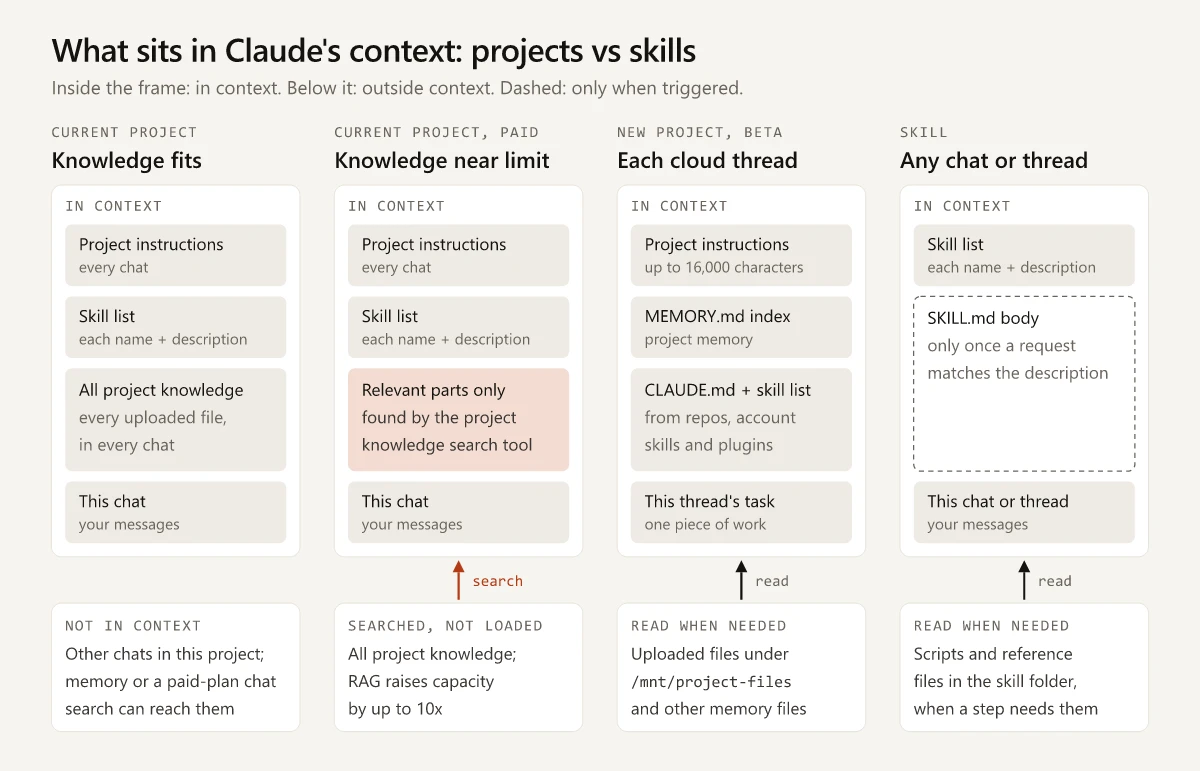
The RAG switch is automatic. Anthropic’s RAG article says projects use in-context processing “when possible,” show a visual indicator once RAG is on, and can convert back when knowledge drops below the threshold. What that timing means for the files you add:
- Name knowledge files so the search can find them. The RAG article’s best practices include “Use clear, descriptive filenames” and referencing documents by name in your question.
- Move procedures out of knowledge. A checklist in project knowledge either fills every chat’s context or, once RAG is on, has to be retrieved first, while a skill’s name and description sit in context from startup and its steps load only when a request matches.
- In a new project, write the instructions before you send a batch of work, since an edit reaches new threads only.
How to Write Claude Project Instructions (With an Example)
Anthropic’s context window article says “Keep project instructions concise” and use them “for general context around your project, key guidelines, and Claude’s role.” To set up a current project, per the Create and manage projects article:
- Open claude.ai/projects and click ”+ New Project”.
- Click “Set project instructions” and write the rules every chat must follow.
- Add files with the ”+” button in the project knowledge panel.
Here is an example of project instructions for a product marketing project, written for this post:
This project covers product marketing for [product], a [category] for [ICP].
Positioning: [one-paragraph positioning statement].
Tone: plain and specific; no claim without a source in project knowledge.
Before drafting copy, name the persona it is for and read that persona's file.
Can You Use Skills Inside a Claude Project?
Yes, in both versions. Anthropic’s skills article says skills “work everywhere across Claude,” so a skill you turn on in Customize > Skills is available in a project’s chats as well.
Where a new project’s cloud threads get skills, per the project docs as of September 2026:
- Skills committed to a repository in the project, at
.claude/skills/<skill-name>/SKILL.md. The docs say “a skill committed to one repository is available in every cloud thread.” - Skills on your account: “Cloud threads also load the skills you enable for your claude.ai account.”
- Plugins you add in Project settings > Plugins, which “load into each new cloud thread.”
What does not reach a cloud thread: skills, MCP servers, plugins and tools “installed only on your machine,” and plugins a repository declares in its own .claude/settings.json. A thread Claude runs on your computer through Remote Control uses what is installed there. Claude Code routines keep machine-only skills out the same way, because a routine clones its GitHub repositories at the start of every run and uses the skills committed to them, as I explain in my comparison of what each Claude scheduler can reach.
So in the new version, a skill can belong to a project rather than only to your account, and the decision becomes which skills a project’s threads should get. A skill committed to a project’s repository stays with that work. A skill enabled on your claude.ai account reaches that account’s chats, projects and cloud threads, and, per Anthropic’s Use skills in Claude article, Claude Code in your terminal from v2.1.273 when it signs in with the same account, but not the API. For an account skill that is missing from /skills in your terminal, I list the sign-in methods, settings and older versions that stop account skills syncing in a separate guide. If you want ready-made ones, my review of Claude marketing skills and how to vet them covers what to check before you install.
Claude Projects vs Skills for Marketing Assets
For a product marketing kit, the timing test sorts assets like this:
| Asset | Put it in | Why, by when Claude reads it |
|---|---|---|
| One-paragraph positioning statement | Project instructions | Short, and every chat about that product should start from it |
| Core tone rules, a few lines | Project instructions | Every chat about that product should follow them |
| ICP and persona documents | Project knowledge | Needed for some questions, not all (ICP vs buyer persona) |
| Messaging house or pillars | Instructions if it fits on a page, otherwise knowledge | Most copy needs it, so keep a one-page version where every chat gets it |
| Interview transcripts, win-loss notes, analyst reports | Project knowledge | Large; name the files clearly so the project knowledge search can find them |
| Full brand voice guide with examples | The references/ folder of the review skill, or project knowledge if there is no skill | Needed only when copy is written or reviewed, so Claude reads it when the review skill calls for it instead of in every chat |
| Brand-voice review of a draft | Skill | Loads only when a review is asked for, in any project |
| Launch checklist or weekly report format | Skill | Loads only when a launch or report is asked for, whichever product it serves |
| Rules for every conversation, such as spelling and banned claims | Instructions for Claude, in Settings | The account-wide layer, applied to every conversation, projects included |
My Claude vs ChatGPT comparison suggests putting the positioning doc, ICP, messaging house and brand voice rules in one project so every chat starts from them, which a paid plan guarantees only for the parts in project instructions. The brand voice rows split that advice: the core rules go in instructions, and the review that applies the full guide becomes a skill. The brand-voice check example near the end of my Claude skill breakdown follows this pattern, with its voice rules in a references/ folder and its banned-phrase check in a script.
Above both sits Instructions for Claude, the account-wide setting. Anthropic’s personalization article says what you add there “will be applied to all of your conversations with Claude,” while project instructions “only apply to chats within that project.” Tone and format presets used to sit in a separate styles menu until Anthropic moved styles into skills in 2026; my post on what replaced Claude’s styles menu explains when a tone belongs in this setting and when it belongs in a skill.
Claude Projects vs Chats and Artifacts
Claude Projects vs Chats
A chat inside a current project starts with more context than a standalone chat, but not with the other chats in that project.
| Standalone chat | Chat inside a project | |
|---|---|---|
| Instructions | Instructions for Claude, from Settings | Those, plus the project’s instructions |
| Files | What you attach to that chat | Project knowledge, available to every chat in the project |
| Memory | Claude’s memory outside projects | ”its own separate memory space and dedicated project summary” |
| Searching past chats, paid plans | All chats outside projects | Only the chats in that project |
Sources: Anthropic’s chat search and memory article and its Create and manage projects article.
Claude Projects vs Skills vs Artifacts
An artifact is the output. Anthropic’s artifacts article defines one as “anything Claude makes for you that you’d put in front of someone: a design, a deck, a document, a dashboard, or a small interactive tool,” and lists artifacts on every plan. For a launch one-pager, the positioning and research come from the project, the review steps come from a skill, and the one-pager is the artifact.
The same article lists Claude Design, Claude Slides and Claude Docs as artifact templates, in beta on paid plans as of September 2026. How a Claude Design output moves into code is covered in Claude Design vs Claude Code.
The Claude Code Version of a Project
I build and maintain this site with Claude Code in VS Code, where the repo folder does the job a project does in the Claude app. The new projects do not run there.
| Project piece | The Claude Code equivalent here |
|---|---|
| Project instructions | House rules written inline in the auto memory index, which loads every session (how Claude Code memory works) |
| Project knowledge | The repo’s own files, which Claude Code reads from the folder when a task needs them |
| Project memory | Auto memory: a MEMORY.md index plus topic files, with no CLAUDE.md |
| Skills | 20 third-party design skills at project level, plus user-level skills, listed in the Claude Code setup behind this site |
The new projects use the same memory design, and the project docs say their memory files are “separate from the auto memory Claude Code keeps on your machine, even though both use a MEMORY.md index.” Applied to this setup, a cloud thread would get what is committed to the repository and what is enabled on the claude.ai account, while my auto memory and user-level skills would stay on my machine.
Claude Projects vs Skills: Sort by When Claude Reads It
To sort your own Claude projects vs skills, take the document you paste into Claude most often and ask when Claude needs it. If every chat needs it, move it into project instructions. If only some chats need it, keep it in project knowledge under a descriptive filename. If it holds the same steps every time, turn it into a skill.
Frequently Asked Questions
What are Claude projects?
Claude projects are workspaces with their own chats, plus instructions and a knowledge base every chat inside them can use. Every plan gets them, and Free is capped at five. Since 17 September 2026, a beta for select Pro and Max accounts runs a new project as one conversation with parallel Claude Code cloud threads.
What is the difference between Claude projects and chats?
A chat inside a project starts with the project's instructions and its knowledge; once a paid project's knowledge nears the context window, Claude searches that knowledge instead of loading all of it. Other chats stay out of its context, though project memory and, on paid plans, a search of the project's past chats can carry details from them over.
What should Claude project instructions include?
Anthropic suggests using project instructions for general context about the project, key guidelines and Claude's role, and keeping them concise. They reach every chat in the project, so use them for the rules every chat must follow, such as tone or a product's positioning statement.
When should I use Claude skills vs projects?
Use a project for the context one body of work needs and a skill for steps you repeat across work. Skills you turn on in Customize > Skills work in project chats too, and in the new projects every cloud thread also loads the skills committed to the project's repositories and the plugins added in Project settings.
What is the difference between Claude projects, skills and artifacts?
A project holds the context for one body of work, a skill holds a procedure Claude runs when a task matches, and an artifact is the output. Anthropic defines an artifact as anything Claude makes for you that you would put in front of someone, such as a deck or a document.