What Is a Claude Skill? How It Works and How to Build One
What is a Claude skill? A SKILL.md folder Claude reads in full only when a task matches. See how it differs from commands, MCP and subagents, then build your own.
---
name: skill-creator
description: Create new skills, modify and improve existing skills, and measure skill performance. Use when users want to create a skill from scratch, edit, or optimize an existing skill, run evals to test a skill, benchmark skill performance with variance analysis, or optimize a skill's description for better triggering accuracy.
---
That block opens the SKILL.md file of skill-creator, Anthropic’s skill for building skills, as it sits in the user-level skills folder on my machine. Until a request matches that description, those two fields are the only part of the skill Claude reads, while the rest of its 485-line file and its bundled scripts wait on disk. That split between a tiny always-loaded header and a large on-demand body is most of the answer to “what is a Claude skill?”
A Claude skill is a folder containing a SKILL.md file: YAML frontmatter with a name and description, then markdown instructions, plus optional scripts and reference files. Claude keeps only the name and description in context, loads the instructions when a task matches or you type /skill-name, and opens bundled files only when a step needs them.
Anthropic’s help article compares skills with projects, MCP and custom instructions, and the Claude Code docs match each extension type to a goal. Documentation describes each piece in general terms, and skills make the most sense when you see them next to the pieces they get mistaken for. So this post places a skill beside custom commands, MCP servers, subagents, memory and hooks, each mapped to a real file in the Claude Code setup behind this site. I am a product marketer who moved this site off WordPress with Claude Code, so it is a marketer’s setup rather than an engineer’s, and the build walkthrough ends with a brand-voice skill you can copy.
What Is a Claude Skill?
A Claude skill is a reusable package of instructions, and optionally code and reference files, that Claude loads on demand. Anthropic launched Agent Skills on October 16, 2025 for Claude apps, Claude Code and the API, and the same announcement page records that the format was published as an open standard on December 18, 2025. The standard lives at agentskills.io, so a skill folder is meant to work in other tools that adopt the format. Several skills can also work on one task: the launch post says Claude “automatically identifies which skills are needed and coordinates their use.”
The key idea is what Anthropic calls progressive disclosure. A skill loads in three stages, per Anthropic’s Agent Skills overview:
| Level | What loads | When it loads | Context cost |
|---|---|---|---|
| 1. Metadata | name and description from the frontmatter | At startup, for every installed skill | About 100 tokens per skill |
| 2. Instructions | The markdown body of SKILL.md | When the skill is triggered | Typically under 5k tokens (Anthropic’s estimate; long bodies cost more) |
| 3. Resources and code | Reference files and scripts in the folder | Only when a step references them | None until accessed; a script’s code never enters context, only its output |
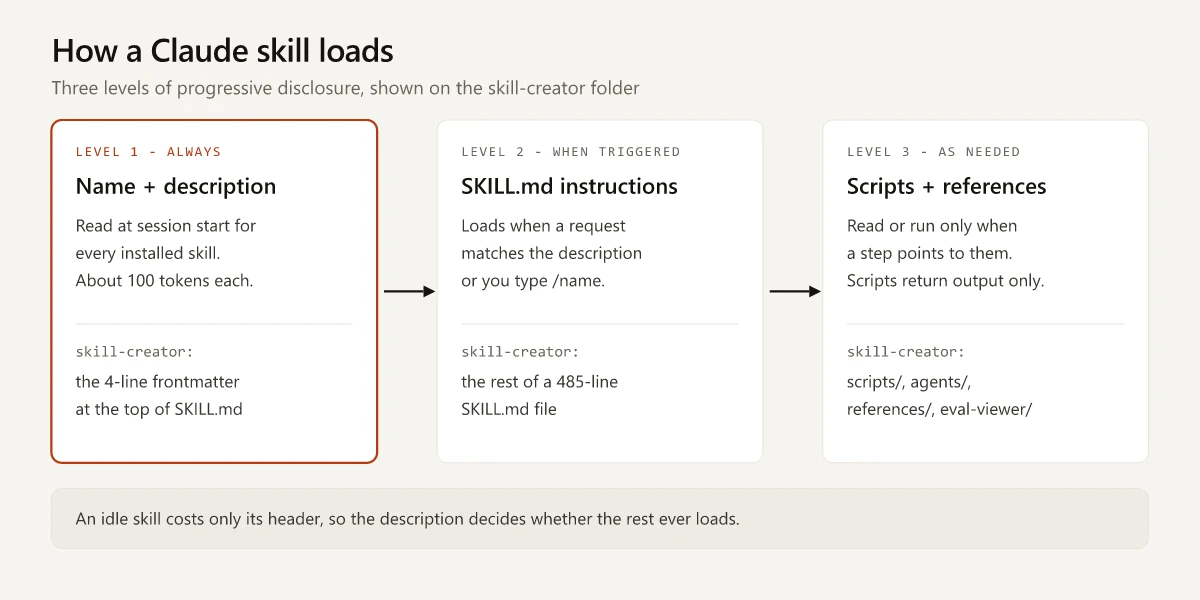
The description decides whether Claude picks a skill on its own. Anthropic’s overview says the description “is what Claude matches your request against when determining whether to trigger the Skill,” so a vague description means a skill Claude seldom reaches for.
The third level is where skills differ from a saved prompt. A skill can carry a script, and when Claude runs it, only the output lands in the conversation. Anthropic’s overview frames the split as “instructions for flexible guidance, code for reliability, resources for factual lookup.”
What Is a Claude Skill Made Of? The SKILL.md File
Every skill is a folder with one required file. The rest is optional, and the folder names below follow the layout in Anthropic’s own skill-creator:
my-skill/
  SKILL.md        required: frontmatter + instructions
  references/     optional: docs Claude reads when a step points to them
  scripts/        optional: code Claude runs; only the output enters context
  assets/         optional: templates, fonts or images used in the output
The frontmatter is where most of the decisions live. These are the fields a marketer is likely to touch, from the Claude Code skills documentation:
| Field | What it does | Works outside Claude Code? |
|---|---|---|
name | The command you type, such as /brand-voice-check. Defaults to the folder name | Yes |
description | What the skill does and when to use it. This is the trigger | Yes |
when_to_use | Extra trigger phrases, appended to the description | No |
disable-model-invocation | true means only you can run it with /name; Claude never loads it on its own | No |
user-invocable | false hides it from the / menu so only Claude can load it | No |
allowed-tools | Tools Claude may use without asking during the turn the skill runs | Yes |
context: fork | Runs the skill inside a subagent with its own context | No |
paths | Loads the skill automatically only when Claude works on matching files | No |
The portability column matters if you plan to reuse a skill. The same docs page says claude.ai uploads, the Skills API and Anthropic’s packaging script accept only six fields (name, description, license, compatibility, metadata, allowed-tools), and any other field makes the upload fail with a hard error.
Anthropic’s overview also sets naming rules: a name can be at most 64 characters of lowercase letters, numbers and hyphens, and it cannot contain the reserved words “anthropic” or “claude.” Claude Code treats every field as optional, but the open spec requires both name and description, so write both.
The description limit depends on which Anthropic page you read, as of September 2026:
- The claude.ai help article on how to create custom skills lists a 200-character maximum.
- The Agent Skills specification and Anthropic’s platform docs allow 1,024 characters.
- Claude Code truncates the combined
descriptionandwhen_to_usetext at 1,536 characters in its skill listing.
If one file has to work on every surface, the 200-character figure is the safe target.
Where Claude Skills Live Across Apps, Claude Code and the API
A skill has to be installed on each surface where you want it. Anthropic’s overview states that custom skills uploaded to claude.ai are not available through the API, and the reverse is also true.
| Surface | Where the skill lives | How you add it | Who gets it |
|---|---|---|---|
| Claude Code, personal | ~/.claude/skills/<name>/SKILL.md | Create the folder | You, in every project on that machine |
| Claude Code, project | .claude/skills/<name>/SKILL.md in a repo | Commit it | Everyone who works in the repo |
| Claude Code, plugin | <plugin>/skills/<name>/SKILL.md | Install the plugin | Wherever the plugin is enabled, as /plugin-name:skill-name |
| Claude app (claude.ai), including Cowork | Your account | Upload a ZIP, then enable it in Customize > Skills | You; Team and Enterprise owners can provision skills for everyone |
| Claude API | Your workspace | The /v1/skills endpoints, with the code execution tool | Every member of the workspace |
Availability, as of September 2026:
- Plans: Anthropic’s help article What are skills? lists skills for Free, Pro, Max, Team and Enterprise users with code execution turned on, and in beta for API users on the code execution tool. Anthropic’s platform overview still lists custom skill uploads for Pro, Max, Team and Enterprise only and says admins cannot manage them centrally. When the two disagree, the help center matches the launch post’s December 18, 2025 update, which added organization-wide management for skills.
- Sync: the same overview says custom skills do not sync across surfaces, but the Claude Code docs describe a one-way bridge. A terminal session signed in with a claude.ai account downloads that account’s enabled skills into
~/.claude/skills/synced/, from Claude Code v2.1.273 onward, and edits to those downloaded copies are never uploaded back.
On my machine the project folder holds 20 installed third-party skills, nearly all design and UI (animation vocabulary, typography, layout direction). The exception, full-output-enforcement, tells Claude not to cut code output short. Each entry is a symlink to a shared folder, which Claude Code supports by reading SKILL.md from the link target. Three more skill folders sit directly in the user-level folder: skill-creator, an SEO audit skill called seo-geo-aeo, and gemini-api-dev. I wrote none of the 23. If you are still deciding between the chat app and the terminal tool, Claude vs Claude Code covers which surface fits which job.
Claude Skills vs Commands, MCP, Subagents and Memory
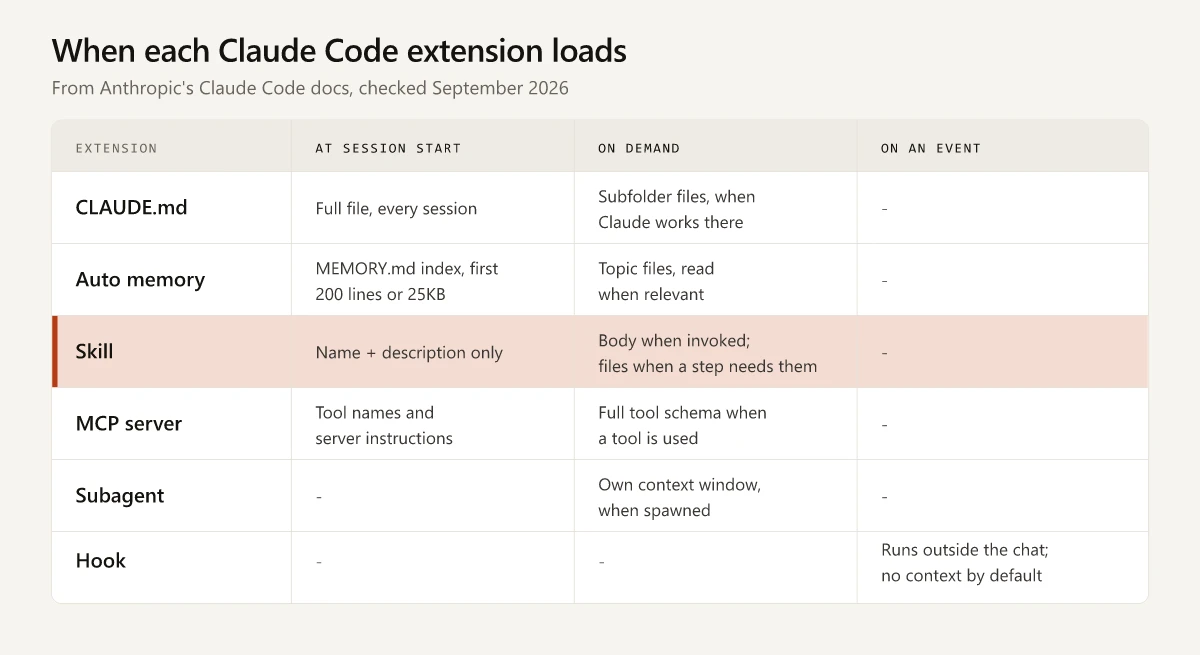
Skills get confused with the other ways of extending Claude Code because several of them also hold instructions. The cleanest way to separate them is by when each one loads. This table follows Anthropic’s Extend Claude Code page; the right-hand column is what each one looks like in the setup that runs this site.
| Extension | What it is | When it loads | Use it when | In my setup |
|---|---|---|---|---|
| Skill | Folder with SKILL.md, optional scripts and references | Description at session start; full body when invoked | You paste the same procedure or playbook into chat again and again | 20 installed third-party project skills, nearly all design and UI, and 3 more directly in the user-level folder, including skill-creator |
| Custom command | One markdown file in .claude/commands/ | Same as a skill: description at session start, full file when you or Claude invoke it | An older single-file prompt with no supporting files (the docs prefer a skill for new work) | 2 project commands and 2 user-level commands |
| MCP server | A connection to an outside tool or data source | Tool names at session start; full tool schemas on demand | You keep copying data from another tool into chat | Ahrefs and Semrush servers for keyword research |
| Subagent | A worker with its own context window | When spawned | A side task would flood the conversation with output you will not reread | - |
| CLAUDE.md | Instructions you write | The full file, every session | Rules Claude should know in every session | None, at any level |
| Auto memory | Notes Claude writes for itself | The MEMORY.md index every session (first 200 lines or 25KB) | Corrections and preferences that should carry across sessions | This site runs on one |
| Hook | A script or request fired on a lifecycle event | On the event; zero context unless it returns output | Something must happen every time, without Claude deciding | None configured |
Claude Skills vs Commands
The Claude Code docs settle this one directly: “Custom commands have been merged into skills.” A file at .claude/commands/deploy.md and a skill at .claude/skills/deploy/SKILL.md both create /deploy and behave the same way. The differences that remain:
- A skill is a folder, so it can carry scripts, reference files and templates. A command is one file.
- A command file accepts the same frontmatter except
nameandpaths. - The docs name automatic loading and control over who can invoke it as features a skill adds, though command files take the same invocation fields and show up in the same list Claude picks from.
- When a skill and a command share a name, the skill runs.
In my sessions, Claude Code lists my custom commands in the same skill list as the installed skills, which is the merge showing up in practice. A workable split: keep a command while it is a single prompt with no supporting files, and move it into a skill folder once it needs a script, a reference file or template beside it, or the name and paths fields. The docs recommend a skill for new work. For the built-in commands that ship with Claude Code, see my Claude Code commands cheat sheet.
Claude Skills vs MCP
Anthropic’s help center draws the line this way: “MCP connects Claude to external services and data sources. Skills provide procedural knowledge.” The two stack. My Ahrefs and Semrush MCP servers give Claude keyword data and document their own reports, but neither one holds my rules for what counts as a usable keyword on a small site. That judgment is skill material, and the Extend Claude Code page gives the same pairing as an example: MCP connects to your database, a skill documents your schema and query patterns.
Context cost is low for both. The MCP docs say tool search is on by default, so only tool names and server instructions load at session start and full schemas load when Claude needs a tool.
Claude Skills vs Subagents
A skill adds content to your main conversation. A subagent works in its own context window and hands back a summary, which keeps long research or file-reading out of the main thread. The two combine in both directions, per the subagents docs: a subagent’s skills: field preloads the full content of named skills at startup, and a skill with context: fork runs inside a subagent.
Claude Skills vs CLAUDE.md and Memory
Both hold instructions, but CLAUDE.md loads in full every session while a skill’s body loads only when used. Anthropic’s rule of thumb is to keep CLAUDE.md under 200 lines and move reference material into skills. How CLAUDE.md and auto memory each load, with this project’s own memory folder as the worked example, is in how Claude Code memory works.
Claude Skills vs Hooks
A hook always fires on its event; a skill is instructions Claude interprets. The Extend Claude Code page is blunt: “An instruction like ‘never edit .env’ in CLAUDE.md or a skill is a request, not a guarantee.” I have no hooks configured, but my own must-run checks include Node scripts whose last line reports PASS or FAIL, rather than rules written only as sentences in a markdown file. A skill can carry that kind of script in its scripts/ folder, which sits between a written rule and a hook: Claude still decides to run it, but the check itself behaves the same every time.
23 Installed Claude Skills, Audited: How Their Descriptions Are Written
Because the description is the trigger, I checked the frontmatter of the 23 skills that sit directly in my project and user-level skills folders on September 26, 2026: 20 in the project folder and 3 at user level, all written by other people. It is a small sample of third-party skills, not a survey, but it shows how differently real descriptions get written.
| Check | Result across the 23 skills |
|---|---|
| Frontmatter fields used | 21 use only name and description; 2 add disable-model-invocation |
| Description length | 145 to 743 characters, median 312 |
| Over the 200-character figure in the claude.ai help article | 20 of 23 |
| Over the 1,024-character spec limit | 0 of 23 |
| Contains an explicit “Use when” or “Use this skill when” clause | 7 of 23 |
SKILL.md longer than the 500-line guideline | 6 of 23 (the longest runs 1,465 lines) |
What I take from it:
- Say when, not only what. The Agent Skills specification says a description “should describe both what the skill does and when to use it.” The other 16 do not use that phrasing. The shortest, minimalist-ui, is 145 characters of style words: “Clean editorial-style interfaces. Warm monochrome palette, typographic contrast, flat bento grids, muted pastels. No gradients, no heavy shadows.” It never names a request.
- Lean toward pushy. Anthropic’s skill-creator instructions note that Claude tends to “undertrigger” skills and recommend making descriptions “a little bit ‘pushy’” by listing the contexts that should fire them.
- Expect simple requests to bypass skills. The same file says that “simple, one-step queries like ‘read this PDF’ may not trigger a skill even if the description matches perfectly,” because Claude handles them with basic tools.
- Front-load the use case. When the listing overflows its budget, which scales at 1% of the model’s context window, the Claude Code docs say it drops descriptions starting with the skills you invoke least.
- Split long skills. Both the Claude Code docs and the spec say to keep
SKILL.mdunder 500 lines and move detail into reference files that load on demand. - Use
disable-model-invocation: truefor anything with side effects, such as publishing or sending, so it only runs when you type the command.
How to Create a Claude Skill With Skill Creator
You can write SKILL.md by hand, ask skill-creator to build it with you, or, on a Mac, record yourself doing the task in Cowork inside the Claude app and let Claude propose a skill from the recording. Anthropic’s help article lists that recording option for Pro, Max and Team plans. The steps below follow skill-creator’s own SKILL.md and the Claude Code docs.
- Pick one repeatable job. One of Anthropic’s triggers for a new skill is the playbook or multi-step procedure you paste into chat for the third time. It is the tooling version of the “defined processes, templates, and guardrails” stage in the marketer’s AI maturity curve.
- Install skill-creator. In Claude Code, run
/plugin install skill-creator@claude-plugins-official. If Claude Code reports the marketplace is missing, run/plugin marketplace add anthropics/claude-plugins-officialfirst. The copy in my user-level folder matches the one in Anthropic’s public anthropics/skills repository, and its instructions include a separate section for claude.ai. - Answer the intent questions. Skill-creator starts with four: what the skill should enable Claude to do, when it should trigger, what the output format is, and whether to set up test cases.
- Let it draft
SKILL.md, then push the description. Include what the skill does and the specific requests that should fire it. Keep all “when to use” wording in the description, since the body is only read after the skill triggers. - Move detail out of the body. Deterministic steps go in
scripts/and long reference material inreferences/, so the main file stays short enough to read in one pass. - Test with and without the skill. Skill-creator’s instructions have it draft two or three realistic test prompts and save them to
evals/evals.json. Per the Claude Code docs, it then runs each test case in its own subagent, grades the output and writes a benchmark comparing pass rate, time and tokens with and without the skill. - Tune the trigger. Its description optimizer builds 20 eval queries, 8 to 10 that should trigger and 8 to 10 near-misses that should not, splits them 60% train and 40% held-out test, runs each query three times, and iterates up to five times before picking the description with the best test score.
- Share it. Commit
.claude/skills/<name>/to a repository, or zip the folder with the folder itself at the root of the ZIP, upload it to claude.ai, and enable it in Customize > Skills.
A Marketing Skill Example: Brand-Voice Check
This example was written for this post to show every part of a skill working together. It is not one of the 23 installed skills. It checks copy against a banned-phrase list with a script, then reviews the rest against written voice rules.
brand-voice-check/
  SKILL.md
  references/
    voice-rules.md        tone, reading level, product names, claims policy
    banned-phrases.txt    one phrase per line
  scripts/
    check-banned.cjs      flags banned phrases, prints PASS or FAIL
The SKILL.md, written for Claude Code:
---
name: brand-voice-check
description: Checks marketing copy against brand voice rules and a banned-phrase list. Use when asked to review or approve landing pages, emails, ads or social posts, or whether copy sounds on-brand.
allowed-tools: Bash(node ${CLAUDE_SKILL_DIR}/scripts/check-banned.cjs *)
---

# Brand voice check

1. Save the copy to a file and run:
   node ${CLAUDE_SKILL_DIR}/scripts/check-banned.cjs <file>
   Report every line it flags. If the last line starts with FAIL, the copy is not approved.
2. Read references/voice-rules.md and check the copy against each rule the
   script cannot test: tone, reading level, product names, unproven claims.
3. Return a table with three columns: line, issue, suggested rewrite.
   Do not rewrite the whole piece unless the user asks.
And the script it calls:
// Usage: node check-banned.cjs <file-with-copy>
const fs = require('fs');
const path = require('path');

const listFile = path.join(__dirname, '..', 'references', 'banned-phrases.txt');
const banned = fs.readFileSync(listFile, 'utf8')
  .split('\n').map(s => s.trim().toLowerCase()).filter(Boolean);
const lines = fs.readFileSync(process.argv[2], 'utf8').split('\n');

let hits = 0;
lines.forEach((line, i) => {
  for (const phrase of banned) {
    if (line.toLowerCase().includes(phrase)) {
      console.log(`line ${i + 1}: "${phrase}"`);
      hits++;
    }
  }
});
console.log(hits ? `FAIL (${hits} hits)` : 'PASS');
process.exit(hits ? 1 : 0);
What each part does:
- The description is 186 characters, inside the strictest limit, and names the requests that should fire it.
${CLAUDE_SKILL_DIR}is a Claude Code substitution that expands to the skill’s own folder. Using the same path inallowed-toolslets the script run without a permission prompt, a pattern the Claude Code docs show with a chart-rendering skill.- The banned-phrase check lives in code because it has one right answer. Tone and reading level stay in
voice-rules.mdbecause they need judgment. - If you already have a brand messaging framework, its pillars and proof points belong in
voice-rules.md.
A skill like this does the job of a saved prompt in a marketing prompt library, except that Claude can open it without being asked when a request such as “does this email sound like us?” matches its description.
Before You Install Someone Else’s Skill
Installing a third-party skill means running someone else’s instructions, and sometimes their code, with your permissions. Anthropic’s overview advises using skills “only from trusted sources: those you created yourself or obtained from Anthropic,” and warns that a malicious skill “can direct Claude to invoke tools or execute code in ways that don’t match the Skill’s stated purpose.” So read every file in the folder, scripts included, before you enable it, then run through the six-check vetting table for Claude marketing skills, which covers license, maintainer, what it runs and context cost.
Start With the Procedure You Paste Most
A Claude skill is the right container when the procedure is yours and Claude should decide when to use it. A rule Claude needs in every session belongs in CLAUDE.md, live data from another tool calls for an MCP server, a check that must run every time is a hook, and a side task that would flood the chat goes to a subagent. Start with the playbook you have pasted into chat three times: one folder, one SKILL.md file.
Frequently Asked Questions
What is a Claude skill used for?
A Claude skill packages a repeatable task, such as applying brand guidelines, following a reporting format or running a checklist, so Claude can load the instructions when a request matches instead of you pasting them into every chat.
What is the difference between Claude skills and slash commands?
In Claude Code, custom commands have been merged into skills: a file at .claude/commands/deploy.md and a skill at .claude/skills/deploy/SKILL.md both create /deploy and work the same way. A skill adds a folder for supporting files, and it accepts the name and paths fields that a command file does not.
What is the difference between Claude skills and MCP?
MCP connects Claude to an outside system such as a database, Slack or an SEO tool, so it supplies tools and data access. A skill supplies the procedure: the steps, rules and reference material for a task. They combine well, with MCP providing access and a skill explaining how to use it.
How do I use the Claude skill creator?
In Claude Code, install it with /plugin install skill-creator@claude-plugins-official, then ask Claude to create or evaluate a skill. It asks what the skill should do and when it should trigger, drafts the SKILL.md, runs test prompts with and without the skill, and can tune the description.
Where do I put a SKILL.md file?
In Claude Code, save it in a folder named after the skill: ~/.claude/skills/<name>/SKILL.md for every project on your machine, or .claude/skills/<name>/SKILL.md inside a repository to share it with everyone who works there. On claude.ai you upload the folder as a ZIP file instead.