ChatGPT Skills: What They Are and Which Plans Get Them
ChatGPT skills are SKILL.md folders on the open agent skills standard. See which plans OpenAI lists for them, how to make one and how they compare to Claude's.
ChatGPT skills build on “the open agent skills standard”, in the words of OpenAI’s Build skills documentation, and every skill is a folder whose SKILL.md file “must include name and description”. Claude skills use the same standard: Anthropic’s Claude Code skills docs say they “follow the Agent Skills open standard”, and the standard’s own Client Showcase lists “ChatGPT & Codex” alongside Claude and Claude Code.
Plan access is where OpenAI’s pages split: on 16 October 2026 its pricing page marked “Skills beta” as included on Free, Go, Plus and Pro, while its Skills help article named only “eligible ChatGPT Business, Enterprise, Healthcare, and Edu users”, and its Plugins help article said the same of what it calls “Personal Skills”. My reading is that the pricing page’s beta row is a promise the help articles do not back, so before you upgrade for skills, the answer to trust is the Skills tab on the account you already have.
I read every OpenAI and Anthropic page cited here logged out, from an Indian connection, on 16 October 2026, India time. The menu paths below are quoted from those pages rather than taken from a signed-in account.
What Are ChatGPT Skills?
A ChatGPT skill is a reusable workflow built on the open agent skills standard: a folder with a SKILL.md file whose name and description are required, plus optional scripts. ChatGPT can apply it when your request matches the description, or you pick it with @. Skills became generally available on 9 July 2026.
OpenAI’s Skills in ChatGPT help article calls skills “reusable, shareable workflows that help ChatGPT complete specific tasks more consistently” and says one “can include instructions, examples, and code.” Its Skills and Plugins guide names “a weekly update, a campaign brief, a meeting follow-up” as good first skills.
The Build skills doc says skills “use progressive disclosure”: ChatGPT and Codex “start with each skill’s name and description, then load the full SKILL.md instructions when they decide to use that skill.” In Codex, that initial list also carries each skill’s file path.
Which ChatGPT Plans Have Skills?
OpenAI’s pricing page includes the skills feature, labelled beta, on Free, Go, Plus and Pro, but its Skills and Plugins help articles and the launch release note name only workspace plans. Each row quotes one OpenAI page:
| OpenAI page | What it says about who gets skills | What the page covers |
|---|---|---|
| ChatGPT pricing page | ”Skills beta”: Yes on Free, Go, Plus and Pro. “Plugins”: Yes on all four | Its Individual tab (Free, Go, Plus and Pro); a Business & Enterprise tab sits beside it |
| Skills in ChatGPT help article | ”Skills are available to eligible ChatGPT Business, Enterprise, Healthcare, and Edu users, subject to workspace settings and product availability.” | Workspace plans, sharing and admin permissions |
| Plugins in ChatGPT help article | Under “Why don’t I have access to skills?”: “Personal Skills are generally available to ChatGPT Business, Enterprise, Healthcare, and Edu users. Availability also depends on workspace settings, role, and product surface.” | The Plugin Directory, which it says “is available across ChatGPT plans” |
| ChatGPT release notes, 9 July 2026 entry | ”Skills are now generally available”, then “Enterprise and Edu users can find skills under Plugins in the sidebar, on the Skills tab in the Plugin Directory.” | The launch, naming Enterprise and Edu |
| ChatGPT release notes, 6 July 2026 entry | ChatGPT for PowerPoint lets you “use Skills and apps to work with repeatable workflows and connected sources”, and “The add-in is available to Free, Go, Plus, Pro, Business, Enterprise, ChatGPT Edu, and K-12 users, subject to plan limits and workspace settings” | The PowerPoint add-in, personal plans included |
| ChatGPT release notes, 5 May 2026 entry | ChatGPT for Excel and Google Sheets “supports Skills and apps where available”, and “Free and Go include limited usage” | The Excel and Google Sheets add-ins |
| Build skills doc | ”Standalone skills are available in the ChatGPT desktop app, Codex CLI, and IDE extension. Skills bundled in plugins are also available in Chat and Work across ChatGPT on the web, desktop, and mobile.” | Apps and surfaces, with no plan named |
| Using Codex with your ChatGPT plan | ”Codex is included across ChatGPT plans, including Free and Go.” | Codex, one of the places standalone skills run |
The pricing page and the Build skills doc carry no date. The Skills help article’s header read “Updated: 2 months ago” when I opened it, and the Plugins article had been updated that same morning, so recheck these rows before you rely on them.
Where the pages disagree:
- Beta or launched: the pricing page labels the row “Skills beta”, while the release note announced skills as generally available on 9 July 2026. No release note entry after 9 July mentions skills, up to and including the 15 October 2026 entry.
- Which plans: the pricing page is the only one of these pages with a skills row per plan. The Skills and Plugins help articles name Business, Enterprise, Healthcare and Edu, the Plugins article even for what it calls “Personal Skills”; the 9 July release note names Enterprise and Edu; and the Codex article puts Codex, where standalone skills run, on every plan without listing skills by plan.
- Support for the pricing page: the 6 July and 5 May release notes describe add-ins that can use Skills, and the PowerPoint add-in lists Free, Go, Plus and Pro among its plans. Neither note mentions the Skills tab.
How I would act on the split:
- Upgrading between personal plans: the Skills beta row reads Yes on Free, Go, Plus and Pro alike, so a bigger personal plan does not change that row.
- Sharing a skill with colleagues or publishing it to a workspace library: the Skills help article is the page that applies, with the admin permissions it lists.
- Letting other people install a skill: the Build skills doc says to design the workflow as a skill, “then package it as a plugin when you want other people to install it”, and the pricing page marks “Create & share Plugins” No on Free and Yes on Go, Plus and Pro.
- Checking the tab: the Skills help article leaves the final answer with your account, since access is “subject to workspace settings and product availability” and “Availability, installation, and syncing can differ by product and surface”. Logged out, chatgpt.com/skills returns a 302 redirect to the ChatGPT homepage, so the tab can only be checked signed in.
What each plan costs, with the rest of the pricing page compared row by row, is in my ChatGPT Go vs Plus vs Pro breakdown.
How to Create and Use a ChatGPT Skill
OpenAI’s Skills help article and Build skills doc give these routes for making or adding a skill:
| Route | Where you start | What OpenAI’s docs add |
|---|---|---|
| Create with chat | Skills > Create > Create with chat, or ask ChatGPT for one in your chat | ChatGPT “will ask follow-up questions and prompt you to install the skill” |
| Create with editor | Skills > Create > Create with editor | You build and manage the skill in the Skills editor |
| Upload | Skills > Create > Upload from your computer | ChatGPT scans every upload first; a skill can be marked Needs Review, or Blocked and unusable |
| Install a shared skill | Skills > Shared with me, or Shared by {workspace name}, then the more options menu > Install | Workspace sharing depends on the permissions an admin sets |
| Record & Replay | ChatGPT desktop app with Work or Codex selected: Plugins > + > Record a skill | macOS only, with Computer Use enabled; the 18 June 2026 release note says initial availability excludes the EU, UK and Switzerland |
| By hand | A folder with a SKILL.md file | Codex “detects skill changes automatically” |
The built-in skill creator, per the same two pages:
- Included by default: the Skills help article says “Eligible accounts include one skill by default: skill-creator”, and ChatGPT uses it whenever you ask it to create or modify a skill.
- Called by name: @skill-creator in ChatGPT Work, $skill-creator in Codex.
- What it asks: “what the skill does, when it should trigger, and whether it should stay instruction-only or include scripts”; instruction-only is the default.
How to use skills in ChatGPT and Codex, per the Build skills doc:
- Pick one yourself. “In ChatGPT, type @ to select a skill. In Codex CLI or the IDE extension, run /skills or type $ to mention a skill.”
- Let ChatGPT pick. ChatGPT or Codex “can choose a skill when your task matches the skill description.”
- Keep a skill manual in Codex. An optional
agents/openai.yamlfile withallow_implicit_invocation: falseunderpolicystops Codex from choosing the skill on its own, and “explicit $skill invocation still works.” - Switch a local Codex skill off without deleting it, with a
[[skills.config]]entry set toenabled = falsein~/.codex/config.toml.
Because automatic use depends on the description, the doc asks for “concise descriptions with clear scope and boundaries” and says to “front-load the key use case and trigger words”. Its own template asks the description to “explain exactly when this skill should and should not trigger”. Here is a campaign-brief skill, an example written for this post and not tested in ChatGPT:
---
name: campaign-brief
description: Drafts a one-page campaign brief from launch notes. Use when asked for a campaign brief or launch brief. Do not use for ad copy, social posts or email.
---

1. Ask for the audience, the offer and the launch date if any are missing.
2. Fill in the template at references/brief-template.md.
3. List every claim in the brief that needs a source before it is shared.
The name keeps to the agent skills specification’s rule of lowercase letters, numbers and hyphens, and the description says what should not trigger the skill as well as what should.
Where to Find ChatGPT Skills
- In ChatGPT: Plugins in the sidebar, then the Skills tab of the Plugin Directory. The Skills help article lists four groups there: Installed, Created by me, Shared with me and Shared by {workspace name}.
- In the ChatGPT desktop app: the Build skills doc says to “open Skills in the sidebar to view and explore skills created across your projects.”
- In a workspace skills library: the Skills help article says you can share skills with teammates or “publish them to your workspace library so others can use the same workflow”; Enterprise and Edu admins control this with the Publish skills to workspace permission.
- Inside plugins: OpenAI’s Plugins help article says some plugins “include only skills and do not require an app connection.” Some carry an OpenAI Verified badge, which the article says “does not replace your organization’s privacy, security, or vendor review.”
- In Codex, on disk:
.agents/skillsin every folder from where you launch Codex up to the repository root,$HOME/.agents/skillsfor your own skills,/etc/codex/skillsfor admin skills, and system skills bundled with Codex. The Build skills doc adds that Codex “supports symlinked skill folders and follows the symlink target.” - On GitHub: the doc’s built-in Skill Installer installs “curated skills from openai/skills or other repos”, as in
$skill-installer linear. The openai/skills repository still holds 39 curated skill folders, but its README has opened with “This repository is deprecated” since a commit on 22 June 2026, and it points to openai/plugins, “a curated collection of Codex plugin examples” with 62 plugin folders when I checked.
ChatGPT Skills vs Claude Skills
Both products build on the same SKILL.md format; they differ in where you manage skills, how you call one, where the manual-only switch lives and which plans include them. The ChatGPT column comes from the OpenAI pages above. The Claude column comes from Anthropic’s Claude Code skills docs and from its help articles What are skills?, Use skills in Claude and How to create custom skills. How a Claude skill is built and loaded is covered in what a Claude skill is and how it loads, so the table keeps to the differences.
| ChatGPT and Codex (OpenAI) | Claude and Claude Code (Anthropic) | |
|---|---|---|
| Format | A folder with a SKILL.md file; “Skills build on the open agent skills standard” | A folder with a SKILL.md file; Claude Code skills “follow the Agent Skills open standard” |
| Required fields | ”The SKILL.md file must include name and description” | name and description for a skill uploaded to the Claude app; in Claude Code “All fields are optional” |
| Where you manage them | Plugins > Plugin Directory > Skills tab; Skills in the desktop app’s sidebar | Customize > Skills |
| Folders the coding agent reads | Codex: .agents/skills up to the repo root, $HOME/.agents/skills, /etc/codex/skills | Claude Code: .claude/skills/ up to the repo root, ~/.claude/skills/ |
| How a skill gets used | Automatically when the task matches the description; or @ in ChatGPT, $ or /skills in Codex | Automatically when the request matches the description; or /skill-name in Claude Code, or / in the sidebar of Claude’s Microsoft 365 add-ins |
| Skill creator | skill-creator, included by default on eligible accounts | Claude Code: the skill-creator plugin, which you install; Claude app: one of Anthropic’s example skills, switched on in Customize > Skills |
| Make one from a recording | Record & Replay on macOS, with Computer Use enabled | Record a skill, in Cowork in Claude for Mac, on Pro, Max and Team plans |
| Keep a skill manual-only | Codex: allow_implicit_invocation: false in agents/openai.yaml | Claude Code: disable-model-invocation: true in the SKILL.md frontmatter |
| Initial skill list budget in the coding agent | Codex: at most 2% of the context window, or 8,000 characters if the window is unknown; up to 10,000 tokens via skills.max_context_tokens | Claude Code: 1% of the context window, raised with skillListingBudgetFraction |
| Upload checks | Every uploaded skill is scanned before it becomes available | On the Enterprise plan, organizations “can turn on skill scanning to check uploaded skills and plugins for malicious content” |
| Plans | Pricing page: Skills beta on Free, Go, Plus and Pro. Skills and Plugins help articles: Business, Enterprise, Healthcare and Edu users | Free, Pro, Max, Team and Enterprise, with code execution turned on |
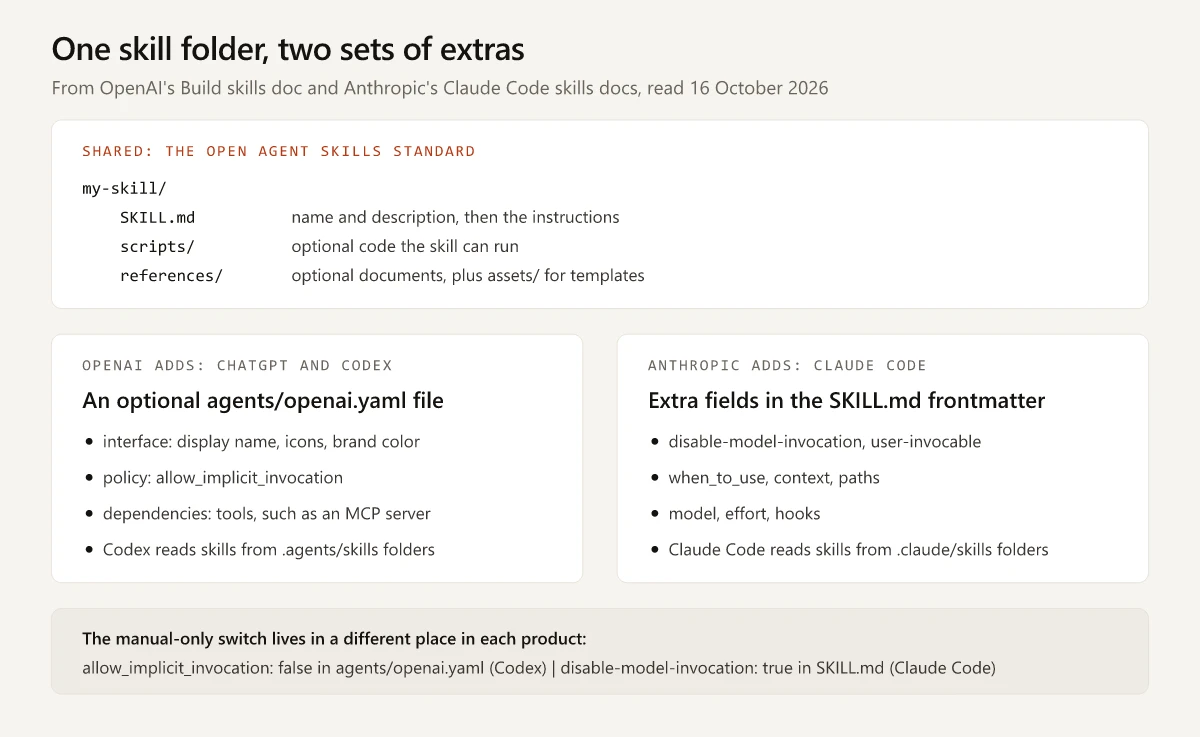
I build this site with Claude Code, so the Claude column is the side I work in; if a Claude skill goes missing from the app or the / menu, the fixes for Claude skills that do not show up cover each surface and version. For the two assistants compared beyond skills, including Claude Pro against ChatGPT Plus, see my Claude vs ChatGPT comparison.
Can You Use Claude Skills in ChatGPT?
Yes, through an import that OpenAI documents: its import guide says the ChatGPT desktop app “can import from Claude Code, Claude Cowork, or Cursor” and that “Codex CLI can import from Claude Code or Cursor”. OpenAI’s docs changelog lists “Import to Codex flows” from Claude Code and Claude Cowork in the Codex app on 9 June 2026, and its 11 August 2026 entry names Cursor as well as the Codex CLI’s /import.
- Desktop app: Settings > Import (or General > Import other agent setup, if Import is not yet a settings section), choose the agents, then choose the items. Automatic updates in the same section keep imported work in sync.
- Codex CLI: type
/importin a local session and choose Claude Code or Cursor. - What lands as a skill: OpenAI’s import table sends both Skills and Slash commands to Skills, and Plugins to Plugins.
- Your source setup is left alone: “Importing doesn’t change or delete your existing agent setup.”
OpenAI’s own checklist for after an import names “Tool restrictions or permissions in imported skills and agents” and “Prompt templates or command-style prompts that depend on arguments, shell interpolation, or file-path placeholders”. Claude Code skills that use $ARGUMENTS, ${CLAUDE_SKILL_DIR} or dynamic context injection, which runs a shell command and inlines its output before Claude reads the skill, fall under that second item. Neither OpenAI’s Build skills doc nor its import guide mentions disable-model-invocation, so test how an imported manual-only skill behaves before you rely on it.
If you are choosing skills on the Claude side first, my vetted list of Claude marketing skills gives each one’s maintainer, license and install steps.
Skills vs Custom GPTs vs Plugins in ChatGPT
A skill is the workflow and a plugin is the installable package that can carry it; custom GPTs are scheduled to retire, and OpenAI’s planned migration moves their instructions into skills inside plugins. The Skills help article puts the first two this way: “A plugin can include skills, apps, or both. Skills provide reusable instructions, while apps connect to external services.” Its Skills and Plugins guide turns that into a rule: “Use a skill when you need reusable instructions for a focused task. Use a plugin when you want an installable package that can combine instructions with connected services or other tools.”
| Skill | Plugin | Custom GPT | |
|---|---|---|---|
| What it holds | SKILL.md instructions, plus optional scripts and references | Skills, connected apps, app templates and extensions, per OpenAI’s Plugins help article | Instructions, knowledge files, connected apps and custom actions |
| How you use it | ChatGPT applies it when the description matches, or you pick it with @ | Installed from the Plugin Directory, then used when relevant or picked with @ | Usable until its retirement date |
| Status on 16 October 2026 | Generally available since 9 July 2026; “Skills beta” on the pricing page | The Plugin Directory replaced the App Directory on 9 July 2026 | ”scheduled to retire on Dec 11, 2026” |
OpenAI’s custom GPT retirement and migration FAQ says that under the planned workflow “the GPT’s instructions become a skill within the new plugin”, while knowledge files and connected apps move across and custom actions do not:
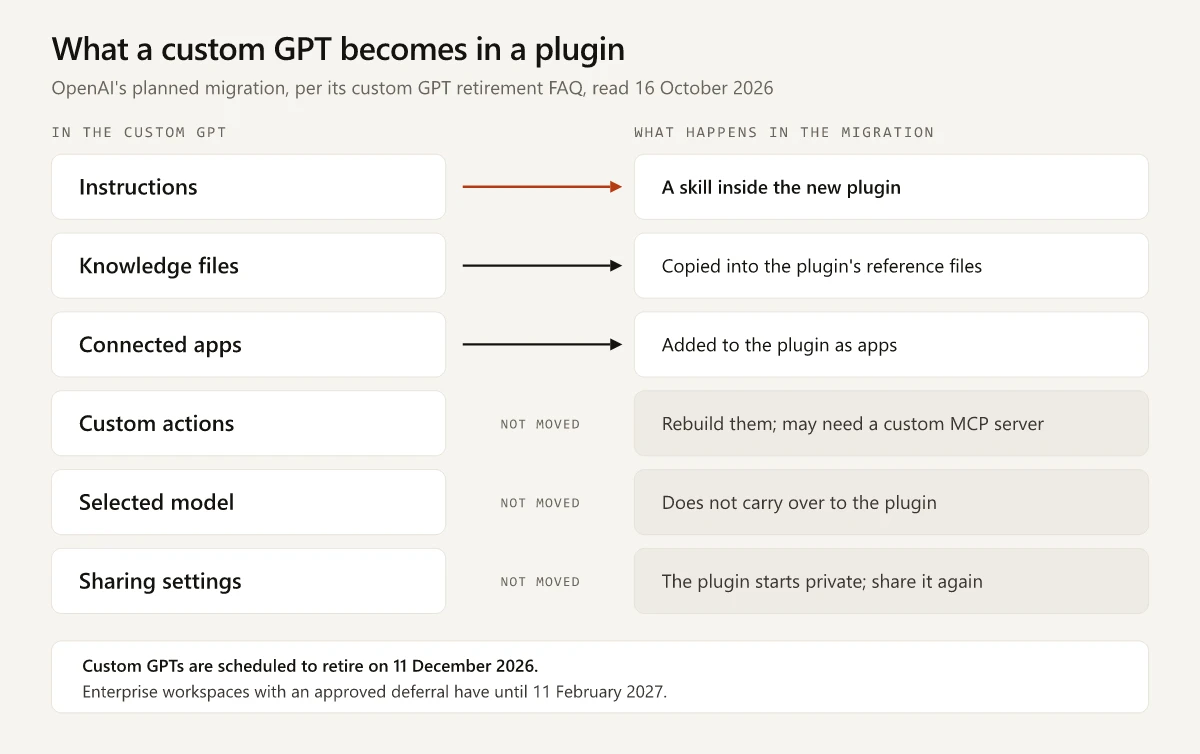
The same FAQ adds:
- Migration uses the GPT’s latest published version; drafts and unpublished edits do not transfer.
- Publishing a GPT for migration does not require sharing it publicly.
- The original GPT stays usable until retirement but becomes read-only once migrated.
- In affected Enterprise workspaces, creating new custom GPTs is planned to end on 26 October 2026.
If you built a GPT for a marketing workflow, test the migrated plugin against a few prompts you already know the answers to before the retirement date.
Check the Skills Tab Before You Pay for a Plan
The plan answer for ChatGPT skills is still split, so I would trust the pricing page only once the Skills tab on your own account matches it. If the tab is there, build one focused skill, such as the campaign brief OpenAI suggests, call it with @ at first, and tune its description until ChatGPT picks it only when it should. If the tab is missing, keep the plan you have.
Frequently Asked Questions
Is ChatGPT skills free?
OpenAI's pricing page, read on 16 October 2026, marks Skills beta as included on the Free plan, as well as on Go, Plus and Pro. OpenAI's Skills and Plugins help articles name only Business, Enterprise, Healthcare and Edu users, so confirm on the Skills tab under Plugins in your own account.
Do ChatGPT Plus users get skills?
OpenAI's pricing page says yes, listing Skills beta on Plus as of 16 October 2026, and a 6 July 2026 release note lists Plus among the plans for ChatGPT for PowerPoint, which can use Skills. The Skills and Plugins help articles and the 9 July 2026 release note name only workspace plans, so check the Skills tab under Plugins on your account before you rely on it.
Can I use Claude skills in ChatGPT?
Yes, through an import OpenAI documents: the ChatGPT desktop app imports skills from Claude Code and Claude Cowork, and Codex CLI imports from Claude Code with /import. Both products build on the open agent skills standard, and OpenAI says to review tool restrictions and permissions in imported skills afterwards.
What is the difference between a ChatGPT skill and a custom GPT?
A skill is a reusable workflow ChatGPT can apply inside a chat when your request matches its description or when you pick it with @. OpenAI plans to retire custom GPTs on 11 December 2026, and its migration turns a GPT's instructions into a skill inside a plugin.
Where are ChatGPT skills stored?
In ChatGPT, skills sit under Plugins in the sidebar, on the Skills tab of the Plugin Directory, split into Installed, Created by me, Shared with me and Shared by your workspace. Codex reads local skill folders from .agents/skills in a repository, $HOME/.agents/skills and /etc/codex/skills.