What Is Sales Enablement Software? A Buyer's Guide (2026)
Sales enablement software explained: what it does, the five tool categories, must-have features, top platforms, and how to choose without overbuying.

A pitch deck nobody can find is a pitch deck that does not exist. The Highspot State of Sales Enablement 2025 report found that companies that leverage a unified enablement platform are 42% more likely to improve win rates, and that businesses with well-integrated enablement tech stacks are 42% more likely to increase sales productivity. Sales enablement software exists to close the gap between the content marketing produces and the deals sellers actually close.
This guide explains what sales enablement software does, the five tool categories that make up a modern stack, the features that matter, and a buyer’s framework to choose without overspending.
What Is Sales Enablement Software?
Sales enablement software is the technology layer that equips a sales team with the right content, training, and insights at every stage of a deal. It usually does four things at minimum:
- Content management - one searchable home for decks, one-pagers, battlecards, and customer stories
- Training and coaching - structured onboarding, certifications, and ongoing skill development
- Conversation intelligence - call recording, transcription, and pattern analysis
- Readiness analytics - which reps are using which content, in which deals, with what outcome
The job of the platform is to compress the distance between “marketing made an asset” and “a rep used it in a winning deal.” Done well, content usage becomes a signal on the deal record, and coaching becomes data-driven instead of vibes-based.
For the deliverables that flow into one of these platforms, see the sales enablement checklist.
The Five Categories of Sales Enablement Tools
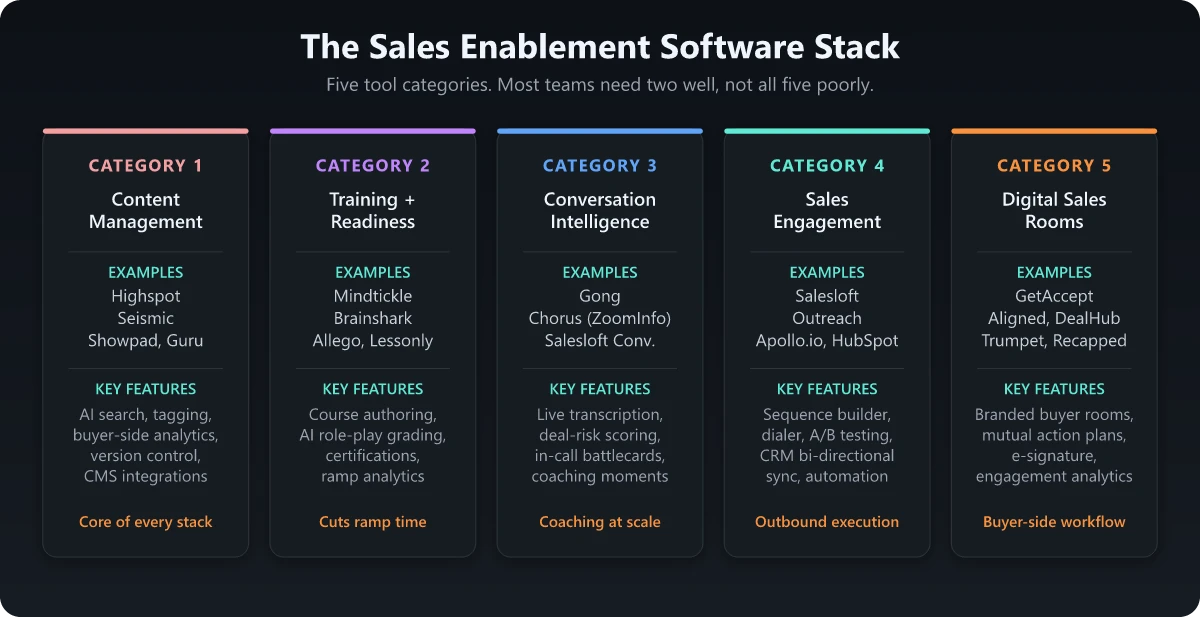
Most teams think of sales enablement as one platform, but in practice the modern stack is five categories. A unified platform like Highspot or Seismic covers most of them. Best-of-breed stacks combine 2-3 specialists.
1. Content Management and Sharing
The core of every enablement stack. Stores, organizes, and serves content to reps with permissions, tagging, and analytics on usage.
Examples: Highspot, Seismic, Showpad, Guru, GetAccept
Key features: AI-powered search, dynamic personalization, buyer-side analytics (track when prospects open shared content), CMS integrations, version control.
2. Training and Readiness
Onboarding curriculum, certifications, ongoing reinforcement, and skill assessments. Often deeply integrated with content management in unified platforms.
Examples: Mindtickle, Lessonly (now Seismic Learning), Brainshark, Allego
Key features: Course authoring, video role-play with AI grading, certification workflows, ramp-time analytics, manager dashboards.
3. Conversation Intelligence
Records sales calls, transcribes them, and extracts patterns: objections, competitor mentions, talk ratios, deal-risk signals.
Examples: Gong, Chorus (ZoomInfo), Salesloft Conversations, Mindtickle Call AI
Key features: Real-time transcription, deal-risk scoring, competitive battlecards triggered in-call, coaching moment tagging.
4. Sales Engagement
Multi-channel outreach sequencing: email, calls, LinkedIn, SMS, with cadence automation and templates.
Examples: Salesloft, Outreach, Apollo.io, HubSpot Sales Hub
Key features: Sequence builder, dialer integration, A/B testing, workflow automation, CRM bi-directional sync.
5. Digital Sales Rooms and Buyer Enablement
Shared deal spaces where buyer and seller collaborate: collateral, mutual action plans, signature, video walkthroughs.
Examples: GetAccept, DealHub, Aligned, Trumpet, Recapped
Key features: Branded buyer rooms, mutual action plans, e-signature, content engagement analytics, integrated video.
Must-Have Features Across All Categories
Regardless of which category you are buying, six features separate platforms that get adopted from platforms that become shelfware.
| Feature | Why it matters |
|---|---|
| Sub-15-second content search | Reps stop using a tool that takes 30+ seconds to find a battlecard |
| Native CRM integration | Content usage as a field on the opportunity record drives every other metric |
| Mobile parity | A large share of seller content is consumed before or during meetings on a phone |
| Buyer-side analytics | Knowing which slides a buyer dwelled on changes follow-up |
| Permissioned distribution | Pricing decks should not be world-readable |
| Content lifecycle | Auto-flag stale content; force a review cadence on every asset |
Top Sales Enablement Platforms
Vendor landscape changes every quarter; the table below describes positioning categories rather than locked feature lists. Always validate on the live pricing page and in a demo against your specific use case.
| Platform | Category fit | Best for |
|---|---|---|
| Highspot | Unified (content + training + analytics) | Mid-market to enterprise B2B |
| Seismic | Unified (content + learning) | Enterprise, regulated industries |
| Showpad | Unified (content + coaching) | Manufacturing, CPG, life sciences with content-heavy sales |
| Mindtickle | Training + readiness + call AI | Teams prioritizing skill development |
| Gong | Conversation intelligence | Any team with 20+ reps making calls |
| Guru | Knowledge management | Teams needing fast-access to scripts and answers |
| Salesloft | Sales engagement | Outbound-heavy or hybrid teams |
| GetAccept / Aligned | Digital sales rooms | Mid-market and PLG teams with collaborative deals |
How to Choose: A 5-Step Buyer’s Framework
Skip the analyst grids. Run this framework on any shortlist before signing anything.
Step 1: Map the Use Cases You Will Actually Pay For
Most teams buy for 3-4 use cases and use 1-2. Force-rank the use cases your reps will use in week one:
- Find content fast during a deal
- Onboard new reps faster
- Coach mid-tenure reps with call recordings
- Share content with buyers and track engagement
- Run certifications for product launches
Buy for the top two. Discount features for the rest.
Step 2: Audit Your Current Stack
What do your reps already use - and how often? If sales lives in HubSpot Sales Hub or Salesloft, those tools may already cover content sharing and engagement. The platform you buy needs to fill a real gap, not duplicate an existing one.
Step 3: Test Adoption, Not Capability
In every demo, ask the vendor for:
- Average time-to-first-content-find for new users
- Adoption rate at 30, 60, 90 days post-rollout for similar customer segments
- Two reference calls with customers your size
Capability is the easy part. Adoption is what determines ROI. A tool that does 90% of what you need at 40% adoption is worse than one that does 70% at 85% adoption.
Step 4: Model the Fully Loaded Cost
Platform license is rarely the largest cost. Add:
- Implementation fees
- Required integrations (CRM connector, SSO, etc.)
- Annual content migration and reorganization cost
- Internal admin headcount (usually 0.25-0.5 FTE per 100 users)
A platform that looks 30% cheaper on per-user cost can end up more expensive after implementation and admin.
Step 5: Negotiate the Renewal, Not the First Year
Vendors discount the first year heavily. The renewal is where the real cost lives. Negotiate:
- Renewal cap (e.g., max 5% increase year over year)
- True-up structure for added users
- Exit terms and data export rights
Implementation Pitfalls That Kill ROI
Six pitfalls show up in nearly every failed enablement software rollout.
| Pitfall | What it looks like | Fix |
|---|---|---|
| Migrate everything | 800 stale assets ported into the new tool | Migrate top 50 used assets. Retire the rest |
| No content owner | Assets without a last-reviewed date proliferate | Owner + review date required at upload |
| Skip the CRM integration | Content usage data lives only in the platform | CRM integration on day 1, not “phase 2” |
| Tool replaces manager coaching | Recordings reviewed by no one | Coaching cadence in the calendar before launch |
| One-time training | Onboarding session week 1, no reinforcement | 30/60/90 day reinforcement built into rollout |
| No success metric | ”Adoption” without a number | Define adoption: e.g., 80% MAU, 60% content shared per deal, 50% calls reviewed |
When You Do Not Need Sales Enablement Software
If you have fewer than 10 reps and a tight content set, a shared Drive or Notion plus Loom for video training will outperform any platform. The platform overhead exceeds the time saved. Revisit when:
- You hit 15+ reps
- Onboarding new reps takes more than 4 weeks to first deal
- Content “where do I find X” is a daily Slack question
- Sales managers cannot tell you which reps are using which assets
Until then, the right tool is discipline, not software. For the broader marketing tooling philosophy, see the marketing tools you need.
The Bottom Line
Sales enablement software is the layer that turns marketing’s content into revenue at the deal level. The 42% win-rate improvement Highspot reports does not come from buying the platform; it comes from the disciplined operating model the platform enables: ownership on every asset, search that works, coaching tied to call recordings, and content usage feeding back into the CRM.
Pick the category your team is weakest in. Buy for the top two use cases. Insist on adoption metrics in the demo. Lock down implementation and integration before signing. The platforms that win in this category are the ones that get used; the platforms that lose are the ones that did everything except the two things your reps actually needed.
For the deliverables that should sit inside whichever platform you choose, see the sales enablement checklist and for the role that owns most of this content, see what does a product marketing manager do.
Frequently Asked Questions
What is sales enablement software?
Sales enablement software is the technology layer that helps sales reps find the right content, learn the right pitch, and surface insights from buyer interactions. It typically combines a content management system, training and coaching tools, conversation intelligence, and analytics in one platform.
What is the difference between a CRM and sales enablement software?
A CRM stores customer and account data and manages the pipeline. Sales enablement software equips reps to actually sell what is in that pipeline. The CRM is the system of record; enablement is the system of activation. Most modern stacks integrate the two so that content usage and rep readiness become signals on the deal record.
Do small sales teams need sales enablement software?
If you have fewer than 10 reps, a shared Notion or Google Drive plus Loom for training works. Past 10 reps, the time lost finding content and the inconsistency in pitch quality outweigh the platform cost. Past 25 reps, a dedicated platform is almost always positive ROI.
How much does sales enablement software cost?
Pricing is rarely listed publicly and varies widely by user count, modules, and contract term. Lightweight content tools start at modest per-seat pricing; unified enterprise platforms (Highspot, Seismic, Mindtickle) are typically priced at the platform level with annual contracts. Always request a custom quote and model fully loaded cost including implementation, integrations, and the headcount needed to administer it.
Who should own sales enablement software internally?
If you have a dedicated enablement team, they own it. Otherwise, ownership splits: revenue ops owns the platform, integrations, and analytics. Product marketing owns the content layer and messaging. Sales leadership owns adoption and accountability. Without all three roles engaged, the platform becomes shelfware in 12 months.