Can ChatGPT Transcribe Audio? Yes, on Paid Plans (Oct 2026)
Can ChatGPT transcribe audio? Since 6 October 2026, paid plans take MP3, M4A or WAV uploads up to 512 MB and Free does not. Five OpenAI routes compared by plan.
On a paid ChatGPT subscription or workspace you can upload an audio file and ask for a transcript; on the Free plan you cannot; on ChatGPT Go, which OpenAI calls a paid plan, its pages leave it unstated. The file-upload answer changed on 6 October 2026, the date OpenAI’s ChatGPT release notes give for “Audio uploads in ChatGPT”. Uploading is one of five OpenAI routes that answer “can ChatGPT transcribe audio?”, and each route comes with its own plan rules.
I read OpenAI’s release notes, its pages on all five routes and its Go and Plus plan pages on 16 October 2026. The route matters as much as the plan: a recording you already hold goes through an upload or the API, and for a call still to come OpenAI documents two routes, Record mode and the Meetings plugin, both on a Mac.
Can ChatGPT Transcribe Audio Files?
Yes, on paid plans: “Audio uploads are available with paid ChatGPT subscriptions and workspaces, including Enterprise,” and “not available on the Free plan at this time.” Upload WAV, MP3, M4A, FLAC, AAC, OGG, PCM or audio-only MP4 or WebM up to 512 MB. Files “identified as video” are refused, and “speaker identification may be unreliable.”
ChatGPT Transcription Routes by Plan, Checked 16 October 2026
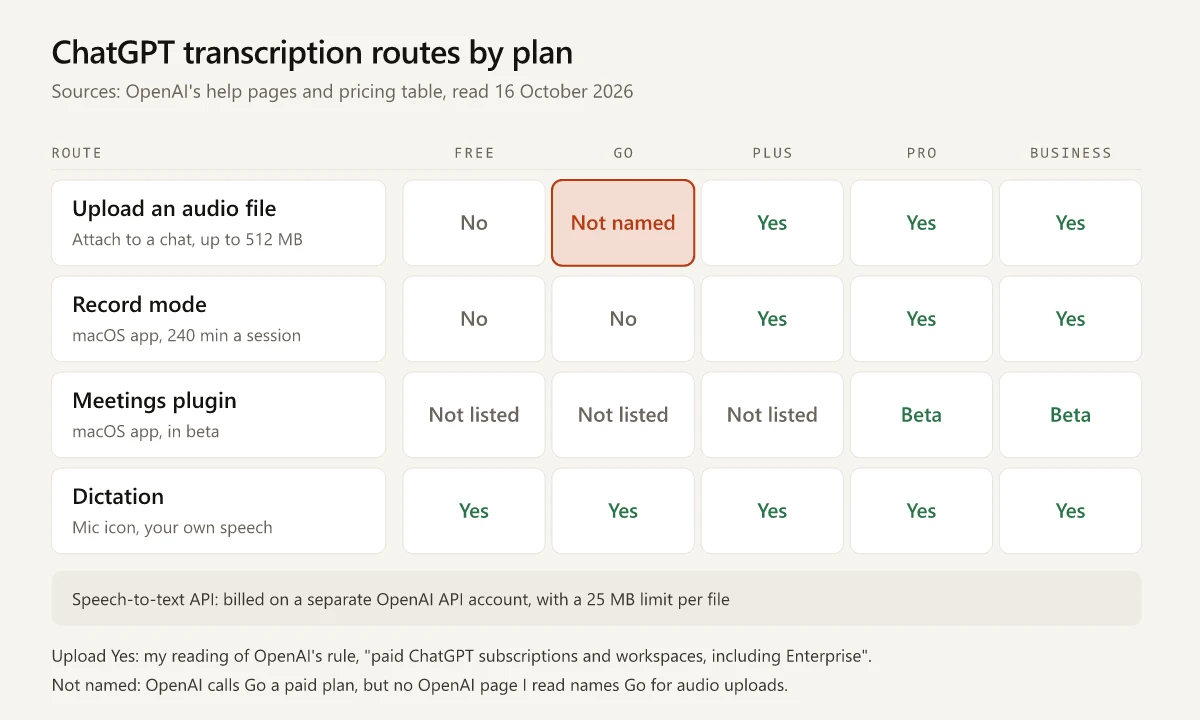
Each cell below comes from an OpenAI page named in this section, with one exception: OpenAI’s audio rule names Enterprise and no other paid plan, so the Plus, Pro and Business upload cells are my reading of its “paid ChatGPT subscriptions and workspaces”.
| Route | Free | Go | Plus | Pro | Business |
|---|---|---|---|---|---|
| Upload an audio file | No | Not named | Yes | Yes | Yes |
| Record mode | No | No | Yes | Yes | Yes |
| Meetings plugin | Not listed | Not listed | Not listed | Beta | Beta |
| Dictation | Yes | Yes | Yes | Yes | Yes |
Record mode’s Free and Go cells come from OpenAI’s pricing table, which marks ChatGPT record mode “No” for both; the Go upload cell has a section of its own below.
| Route | Where it runs | Input and limit | Speaker labels | OpenAI source |
|---|---|---|---|---|
| Upload an audio file | A chat, with the file attached | Nine audio formats, 512 MB per file | ”may be unreliable” | Uploading files and audio to ChatGPT |
| Record mode | The ChatGPT macOS desktop app only | Live recording, capped at 240 minutes per session; calendar auto-join “supports Google Meet links only" | "can distinguish multiple speakers”; a generic label such as Speaker 1 when it can’t name one, and you can rename them | ChatGPT Record |
| Meetings plugin | The ChatGPT macOS desktop app, in beta; iOS, Android and Windows “coming soon” | Microphone and system audio, “without a bot joining the call”; it stops when a session reaches four hours | Not mentioned on its page | The Meetings plugin in ChatGPT |
| Dictation | The microphone icon | Your own speech, returned as text “which you can edit before sending as a user message” | Not applicable | Voice Dictation FAQ; “across all plans” in the release note of 26 June 2026 |
| Speech-to-text API | Your own code, on an OpenAI API account | 25 MB per file; mp3, mp4, mpeg, mpga, m4a, wav and webm | gpt-4o-transcribe-diarize, “only when you need to identify who speaks” | File transcription guide |
Rules that sit outside the plan columns:
- Record mode “will be disabled by default for all Enterprise and Edu workspaces, and must be enabled by a workspace owner.” For Zoom, Microsoft Teams or Webex calls, OpenAI says to “start Record manually in the ChatGPT macOS app.”
- Meetings “is not generally available for ChatGPT Enterprise yet”, and OpenAI is testing it “through an alpha program”. On Business, ChatGPT Space and the plugin must both be enabled for the workspace.
- The API is billed apart from ChatGPT: OpenAI’s What is ChatGPT Plus? article says “API usage is separate and billed independently”.
- For the API, OpenAI says to “Start with gpt-transcribe”, its recommended model for recorded speech, and for bigger recordings to “use a compressed audio format or split the file into chunks of 25 MB or less.”
OpenAI’s release notes read “Updated: 2 hours ago” when I opened them, so recheck a row before you rely on it.
Can ChatGPT Go Transcribe Audio? What OpenAI’s Pages Say From India
OpenAI’s pages do not say. Its Go article calls Go “our paid subscription plan”, and the audio rule covers paid subscriptions, yet no OpenAI page I read names Go for audio uploads (none names Plus, Pro or Business either). Go’s own page also says “Some advanced products and higher-tier features may require Plus or another eligible plan” and gives no list. I mark Go “Not named” rather than read it in. I fetched each page below logged out from an Indian connection on 16 October 2026, after Cloudflare’s trace returned loc=IN:
| OpenAI page | What it states about Go | What it leaves unstated |
|---|---|---|
| Uploading files and audio to ChatGPT, “Updated: 7 days ago” | The paid-plan audio rule; it names Go once, in “Go and Plus: up to 25 files per project” | Whether Go counts for audio |
| What is ChatGPT Go?, “Updated: 3 days ago" | "Information about our paid subscription plan, Go”, with “Extended access to file uploads” for “documents, spreadsheets, and other files” | Audio: the words audio, transcribe and record do not appear on the page |
| ChatGPT pricing table | File uploads “Yes” for Go; ChatGPT record mode “No” for Go | No row for audio uploads, transcription or dictation |
| ChatGPT release notes | 6 October 2026: the same paid-plan rule; 3 September 2025: Go listed with Plus and Edu under “paid tiers” for project files | An entry naming Go for audio uploads: none does |
What to do while the answer is unstated:
- If you already pay for Go: attach a short M4A or MP3 to a chat and ask for a transcript; your own account answers the question.
- If you are on Free and audio uploads are the reason to pay: ask OpenAI support whether Go includes them before you pay for Go for this one feature.
ChatGPT Audio Upload Formats and Limits
OpenAI’s 6 October release note says availability “may vary by workspace settings, region, client version, and model”, and that “performance may vary across languages”. To upload audio to ChatGPT, OpenAI’s Uploading files and audio to ChatGPT article sets these rules on top of the formats and the 512 MB cap above:
| Rule | What OpenAI’s help article says |
|---|---|
| File check | ”The file must contain a valid, decodable audio stream” |
| Length | None stated in minutes; “Processing is best-effort, and very long recordings may time out” |
| Long recordings | ”may be processed in smaller sections when Data Analysis is available” |
| What you can ask for | A transcript, a summary, “structured notes, a meeting recap, or a follow-up email draft”, or answers such as “What did they say about the launch deadline?” |
OpenAI warns that “Transcripts may contain errors” and advises you to “Review important details against the original recording”.
Can ChatGPT Transcribe Video?
Only once the audio is saved as its own file. OpenAI’s help article says “WebM and MP4 files identified as video are not supported by audio uploads”, while audio-only MP4 and M4A are on its format list. One command in the open-source tool FFmpeg makes that file from a recorded call:
ffmpeg -i interview.mp4 -vn -c:a aac interview.m4aAs an output option, -vn “disables video recording”, per FFmpeg’s documentation, and aac is its “default AAC encoder”. Upload the M4A on a paid plan.
Can ChatGPT Listen to Audio?
Yes, in two ways: on a paid plan it takes a recording as a file and answers questions about it, and through Voice it listens to you live, which is a different job from transcribing a recording. OpenAI’s ChatGPT Voice article describes Voice as a way to “speak with ChatGPT and hear a spoken response”, and adds: “If you want to turn a single recording into editable text instead, use ChatGPT Dictation.” Its limits for interviews and meetings:
- Live, one of the Voice options, “is designed primarily for one-on-one conversation”, and “it is not yet optimized for conversations with multiple speakers.”
- “Voice transcripts are not verbatim records and may not exactly match what was said.”
Top 10 Results for ChatGPT Audio Transcription, Read 16 October 2026
The ten results below are Semrush’s US top 10 for “can chatgpt transcribe audio”, as pulled on 15 October 2026. I opened each one the next day and set its answer against OpenAI’s pages; dates are the ones each page prints or carries in its markup.
| Pos. | Result | Date shown | Its answer | Right after 6 October? |
|---|---|---|---|---|
| 1 | Reddit, r/ChatGPTPro thread | ”3y ago” | A Plus subscriber asks how to transcribe voice memos; replies point to the Whisper API | No: predates Record mode and uploads |
| 2 | OpenAI, ChatGPT Record | ”Updated: 14 days ago” | Covers Record mode, with a banner for the Meetings plugin | Partly: right about Record, silent on audio file uploads |
| 3 | A Facebook group post | Returned an error page logged out | Not read | Not checked |
| 4 | AudioScribe | 18 Jul 2026 on the page; modified 5 Sep 2026 in its markup | No, “not for a real recording” | No: paid plans now take audio files |
| 5 | Ditto Transcripts | 1 Nov 2024; modified 15 Jan 2026 in its markup | ”ChatGPT itself cannot transcribe audio or video files” | No: paid plans now take audio files |
| 6 | OpenAI Developer Community thread | 10 Oct 2024; newest reply 23 Jan 2026 | A reply says Plus “cannot transcribe audio files to text” and quotes the API’s 25 MB limit; the newest, from a Go subscriber, asks why an MP3 is not read | No: predates uploads |
| 7 | Quora | ”Apr 13”, no year shown | ”No. But you can use another OpenAI model to do that” | No: paid plans now take audio files |
| 8 | TicNote | 26 Jan 2026 | ”yes, ChatGPT can transcribe audio sometimes”, by Record mode, upload or Whisper | Partly: it says to look for Record “on your phone or desktop app”, and OpenAI limits Record to the macOS app |
| 9 | VoiceScriber | 4 Oct 2026 | Yes, by dictation, Record mode and the API; says the upload docs list no MP3 or WAV | Partly: wrong on uploads since 6 October; its Record, Meetings and API details match OpenAI’s pages |
| 10 | Maestra | Updated 23 Jun 2026 | ”Yes, ChatGPT can transcribe audio, but with important limitations” | Partly: it says ChatGPT “does not support speaker diarization”, while OpenAI says Record mode “can distinguish multiple speakers” |
That 25 MB limit belongs to the API, not to ChatGPT’s 512 MB audio cap. Two guides published after the launch sit outside that top 10: FindSkill.ai on 7 October 2026, which also tabulates the upload, Record, Meetings and API routes and corrects the 25 MB figure, and SmartScope on 9 October 2026. Both give OpenAI’s paid-plan rule and the 512 MB cap, and neither names the Go plan.
Can Claude Transcribe Audio?
Not from an uploaded audio file, going by Anthropic’s own pages. Its Upload files to Claude article, dated 23 July 2026, “explains how to upload documents and images to Claude”. It lists PDF, DOCX, CSV, TXT, HTML, ODT, RTF, EPUB, JSON and XLSX documents and JPEG, PNG, GIF and WebP images, and no audio format appears on the page. Anthropic’s release notes, whose newest entry on 16 October 2026 was dated 7 October, have no entry about audio.
In the Claude apps, Anthropic documents only live voice input:
| Route | Anthropic’s words | Plans |
|---|---|---|
| Dictation on Claude Mobile | ”Dictation turns your speech into text so you can send a written prompt”, in Claude for iOS or Android, in 12 languages including Hindi | ”all Claude users (Free, Pro, Max, Team, and Enterprise plans)“ |
| Quick entry with Claude Desktop on Mac | ”Press Caps Lock to dictate your message to Claude with real-time transcription”, on macOS 14 or later | ”all Claude users” on Claude Desktop for macOS |
| Voice mode | ”complete spoken conversations with Claude”, on mobile, desktop and the web | A beta “available to all plans” |
For a recording you want Claude to work on, the upload page’s formats mean a transcript made elsewhere and uploaded as TXT, DOCX or PDF. How the two assistants differ on plans, files and limits is in my Claude vs ChatGPT comparison.
Can ChatGPT Transcribe Audio From Customer Interviews?
Yes, and the route depends on your plan and on whether the interview already exists as a file. A recorded interview goes to an upload on a paid plan, or to the API; an interview you have not held yet goes to Record mode or the Meetings plugin on a Mac. Where speaker labels matter, use the API’s speaker-labelling model or check the transcript against the recording. Record with consent: OpenAI’s Record page says to “always get the right consents before recording others”, and its Meetings page says to get “everyone’s consent before you start”.
Once the transcript exists, the customer interview synthesis prompt in my guide to ChatGPT sales and marketing workflows pulls out the buyer’s exact words for the problem, the competitors they weighed, the decisive factor and one short quote for marketing copy. The interview and coding stages around it are in my six-stage win-loss analysis guide, and how a voice of the customer program works covers where those themes go next.
Check your plan against the routes table before your next interview.
Frequently Asked Questions
Can free ChatGPT transcribe audio?
Not from an uploaded file. OpenAI's help center says audio uploads are "not available on the Free plan at this time". Free accounts can still use dictation, which OpenAI's release notes say runs "across all plans", to turn their own speech into an editable prompt.
Can ChatGPT transcribe a video?
Not as a video file: OpenAI says WebM and MP4 files "identified as video are not supported by audio uploads". Save the audio track as an audio-only file such as M4A or MP3 and upload that on a paid plan; the file must contain "a valid, decodable audio stream".
How long an audio file can ChatGPT transcribe?
OpenAI caps an uploaded audio file at 512 MB and gives no limit in minutes, but warns that "very long recordings may time out". Record mode sessions stop at 240 minutes, and OpenAI's speech-to-text API takes files up to 25 MB.
Can ChatGPT identify different speakers?
Record mode "can distinguish multiple speakers"; when it can't identify a speaker by name it uses a generic label such as Speaker 1, which you can rename. For uploaded files OpenAI warns that "speaker identification may be unreliable", and its API offers a separate model, gpt-4o-transcribe-diarize, for speaker labels.
Can Claude transcribe audio?
Not from an uploaded audio file, going by Anthropic's own pages: its Upload files to Claude article lists document and image formats and no audio format, as read on 16 October 2026. Dictation in the Claude mobile apps and in quick entry on Claude Desktop for Mac turns your own speech into a typed prompt, and voice mode runs spoken conversations.