ChatGPT Usage Limits by Plan: What OpenAI Publishes
ChatGPT usage limits by plan, read on OpenAI's pages on 31 October 2026: which limits have a number, where to see your reset time and what to do at the limit.
OpenAI’s pricing docs send you to the usage dashboard “for current limits and reset times”, and to /status for your “remaining limits during an active Codex CLI session”. Of the ChatGPT usage limits, OpenAI prints allowance numbers (how much you can use before a reset) for two as of 31 October 2026, live voice hours and the Work and Codex five-hour estimates, and no count at all for text chats, Thinking messages, image generation or deep research. For chat models, its help center says only that “ChatGPT displays when an allowance resets when that information is available.”
Checked on OpenAI’s pages, 31 October 2026. Every cell quotes OpenAI’s figure or label, linked in the row label, or says “not published” or “not available”. OpenAI changed Pro’s Work and Codex allowances on 29 October, so check the date before you trust a row.
| Limit (source) | Free | Go | Plus | Pro |
|---|---|---|---|---|
| Everyday text chats | Unlimited*, no count | Unlimited*, no count | Unlimited*, no count; the Plus card adds “Limits apply” | Unlimited*, no count |
| Work and Codex, local messages per five hours on GPT-6.1 Sol | Not available (Codex on Free is GPT-6 Luna in the desktop app, no estimate published) | Not available (Codex on Go is GPT-6 Luna in the desktop app, no estimate published) | 15-160, an estimate | No five-hour limit |
| Live voice per rolling 24 hours | ”Limited access”, no number | 3 hours on GPT-Live-1.1 Quip, per the Voice article (the Go article differs) | 3 hours on GPT-Live-1.1 | Pro 100: 15 hours. Pro 200: unlimited**. Pro 500: not published |
| Image generation in chat | ”Limited”, no number | Not published | Not published | Unlimited, no count (Pro card: “Unlimited and faster image creation”, subject to abuse guardrails) |
| Deep research tasks | ”Limited”, no number | ”Limited”, no number | Not published | Not published |
* The pricing table’s footnote: “Usage must be reasonable and comply with our policies. Usage refers to Chat limits.” ** “subject to abuse guardrails”, per the Voice article.
The Codex counts OpenAI does print are ranges it calls estimates, “not fixed message limits”, so for a heavy Codex or Work week my advice is to plan around the reset time on your usage dashboard, not a message count. Plan prices, the Pro 100, 200 and 500 allowance changes and which plan to buy are in my Go vs Plus vs Pro comparison, which also sets out why OpenAI’s Go article and its Voice article disagree on Go’s voice limit.
ChatGPT Has Two Usage Meters: Chat, and Work and Codex
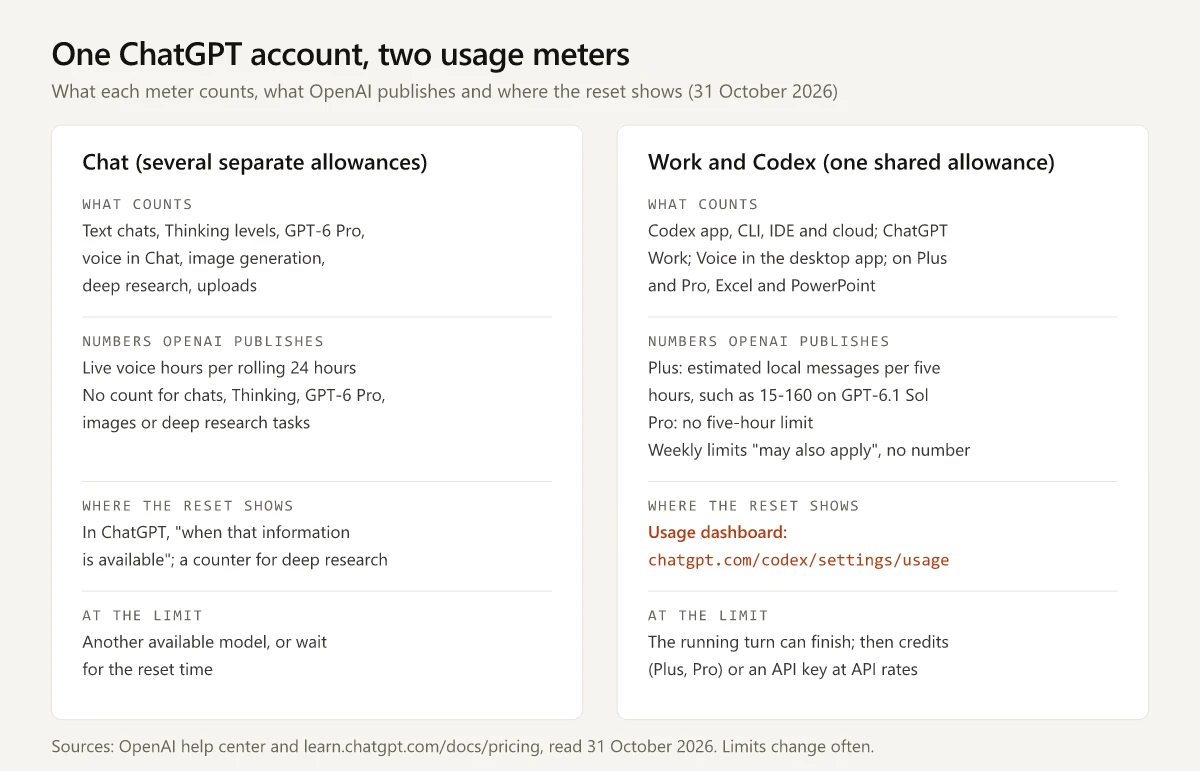
OpenAI meters chat and its agent products separately. Its GPT-6 models article says “Usage and credit rules in Work and Codex are separate from Chat”, and the Work and Codex pricing page says “ChatGPT Work and Codex share usage.” The Pro tiers article repeats it for Pro models: the weekly GPT-6 Pro message limits “are separate from your Work and Codex allowance.”
In practice, a Codex message in the CLI and a ChatGPT Work task draw on one shared allowance, while chat usage is metered separately, in several allowances of its own: Thinking, each Pro model, deep research, live voice and tools such as uploads and image generation. Voice in the desktop app sits on the Codex side: the pricing page says it “uses your existing Codex usage budget”. The two sides also differ in what OpenAI publishes and where the reset shows:
ChatGPT Usage Limits by Plan, Row by Row (Checked 31 October 2026)
Work and Codex: OpenAI’s Five-Hour Estimates
The Work and Codex pricing page gives “local messages per five-hour period for Plus and Standard Business”, the same range on both plans:
| Model in Work or Codex | Plus and Standard Business, local messages per five hours |
|---|---|
| GPT-6 Astra | 5-45 |
| GPT-6.1 Sol | 15-160 |
| GPT-6.1 Terra | 35-285 |
| GPT-6 Sol | 15-150 |
| GPT-6 Luna | 350-3,000 |
The rules around that table, from the same page:
- Pro: “Pro plans currently have no five-hour limit.”
- Weekly: “Weekly limits may also apply.” The page gives no weekly number.
- Cloud tasks: they “may use more of your allowance than local messages”, and local messages and cloud chats share one allowance.
- Free and Go: Codex is “GPT-6 Luna at Standard speed in the desktop app, subject to rollout”, with no estimate.
- Enterprise and Edu: with flexible pricing, “no fixed rate limits”; without it, “the same per-seat usage limits as Plus for most features.”
The Pro tiers article, which describes the 29 October 2026 change to Pro allowances, says “Plus usage is unchanged.”
Chat: Thinking, Pro Models, Uploads and Chat Length
| Limit | Free | Go | Plus | Pro | Source |
|---|---|---|---|---|---|
| Thinking at Medium and High (GPT-6 Sol) | Not included | Not included | Included; limit not published | Included; limit not published | GPT-6 models article |
| Thinking at Extra High | Not included | Not included | Not included | Included; limit not published | GPT-6 models article |
| GPT-6 Pro messages | No | No | No | A weekly limit; number not published | GPT-6 models article, Pro tiers article |
| File uploads and data analysis | ”Limited”; separate limits | Higher than Free; no number | Not published | Not published | Free tier FAQ, Go article, Pricing table |
| Chat length (GPT Instant context window) | 27K | 54K | 54K | 128K | Pricing table |
| Busy periods | Not stated | ”temporary restrictions during high demand" | "message caps, especially during high demand” | Not stated | Go article, Plus article |
On GPT-6 Pro, the models article is plain: “A Pro subscription does not include unlimited use of the GPT-6 Pro model.” On Free and Go, text chats are unlimited “subject to abuse-prevention safeguards”, while “file uploads, image generation, voice, data analysis, and other tools” have separate limits.
Free’s Ads-Free mode comes with lower limits than standard Free, and my guide to the free year of ChatGPT Go in India quotes what OpenAI’s ads FAQ says that mode gives up.
Where to See Your ChatGPT Usage Limits and Reset Time
| What you use | Where OpenAI says to look | What it shows |
|---|---|---|
| Codex and ChatGPT Work | The usage dashboard | ”current limits and reset times”; OpenAI suggests checking it “every week or two to understand your pace and remaining capacity” |
| Codex CLI, mid-session | /status | Your “remaining limits”, per the pricing page; the CLI slash-command reference describes it as session configuration and “current token usage” |
| Codex CLI | /usage, or /usage daily, /usage weekly, /usage cumulative | Token activity, or an option to “redeem an available earned reset” |
| Codex CLI footer | /statusline, then the rate limits item | Rate limits kept in the footer |
| Credits | Settings > Usage in ChatGPT, or Usage & Billing in the Codex app | Your balance, purchases and auto reload, per OpenAI’s credits article |
| Thinking and Pro models in chat | ChatGPT, when you reach the limit | The reset time, “when that information is available” |
| Deep research | The in-product usage counter, per the deep research article | ”your remaining tasks”; a fixed monthly allowance “resets every 30 days from the date of your first use” |
| Live voice | A notification | ”ChatGPT will notify you when you reach a limit”; usage is measured over a rolling 24 hours |
| Free plan tools | A notification | ”ChatGPT will notify you when you reach an applicable limit” |
The articles linked here name Settings > Usage for credit balances and the usage dashboard for Work and Codex. None of them names a page that lists your remaining chat-model allowance before you reach it.
Can You Reset a ChatGPT Usage Limit?
Not on request: the Pro tiers article says “Support cannot reset ChatGPT or Codex limits”, and the GPT-6 models article adds that Support can investigate “if you believe your usage was counted incorrectly.” OpenAI documents two cases where a limit does reset early:
- Upgrading from Free: the Free tier FAQ says “your usage rates will reset when you update your account to a Plus plan, a Pro plan, or a Business plan.”
- A banked Codex reset: OpenAI’s release notes for 11 June 2026 gave eligible Plus and Pro users “rate-limit reset banking, including one free reset at launch”, plus a banked reset for both people when an eligible invitee sends a first Codex message, and “Banked resets are usable for 30 days after they are granted.” In the CLI,
/usageis where you redeem one. The pricing page now says the invitation dialog “shows the current reward”, so check it before you count on a reset.
The Pro tiers article also rules out a workaround: “You cannot bypass a limit or increase it through a setting.”
What Happens When You Hit a ChatGPT Limit
| Limit you hit | What OpenAI says happens | Ways to keep going |
|---|---|---|
| Thinking (Medium to Extra High) | “ChatGPT may continue with another available model” | Another model, or wait for the displayed reset |
| GPT-6 Pro on Pro 200 | ”ChatGPT automatically switches to GPT-5.6 Thinking at Medium” | GPT-5.6 Sol Pro while its daily allowance lasts, or wait for the weekly reset |
| GPT-6 Pro on Pro 100 | GPT-6 Pro and GPT-5.6 Sol Pro “draw from one weekly allowance” | Wait for the weekly reset |
| Work or Codex, mid-task | ”the agent will be able to continue working on that turn, subject to fair use limits” | Let the turn finish |
| Work or Codex, after that | Plus and Pro users “can purchase additional credits to continue working without needing to upgrade their existing plan” | Credits; on Free and Go, credit purchases are open to “a limited group”; any plan can “run extra local chats using an API key, with usage charged at standard API rates” |
| Live voice | ChatGPT notifies you | Wait for the rolling 24-hour window |
| A Free plan tool limit | ”you will need to wait for a later time to use any of these tools” | Wait, or upgrade, which resets it |
| A full chat (context window) | “The full-chat notice doesn’t give a reset time for the original conversation” | Start a new chat; the Free tier FAQ says “You can start a new chat right away” |
Sources: the GPT-6 models article for the Thinking and GPT-6 Pro rows, the Work and Codex pricing page and the credits article for the Work and Codex rows, the Voice article, and the Free tier FAQ. The Pro tiers article adds that “A usage limit does not end your subscription or mean your account is restricted.”
Credits come with conditions, per the credits article and the Pro tiers article:
- Included usage is spent first, then the credit balance.
- They cover “Codex, ChatGPT Work, Word, Excel, and PowerPoint”, and “Credits do not provide additional usage for every ChatGPT model or feature”; Thinking and GPT-6 Pro chats are not on that list.
- “Credits are valid for 12 months from purchase” and are non-refundable apart from listed exceptions such as a verified billing error.
- “These credits are not API credits.”
For the rupee prices of each plan if the answer is an upgrade, see ChatGPT’s plans priced in rupees, with GST.
What Uses ChatGPT Limits Faster
OpenAI names these on the Work and Codex pricing page, the Pro tiers article and the credits article:
| What you do | Effect on your allowance |
|---|---|
| Generate images in Work or Codex | ”use included limits ~3-5x faster on average, depending on image quality and size”, and draw on credits once included limits run out |
| Turn on Fast mode | 2.5x the Standard rate of included usage |
| Use Ultrafast (Pro 500) on GPT-6 Astra or GPT-6.1 Sol | 8x the Standard rate of included usage |
| Run a cloud task instead of a local message | ”may use more of your allowance” |
| Work in a large project or a long session | Sessions that “require the agent to hold more context will use significantly more per message” |
| Keep many MCP servers on | ”Every MCP server adds more context to your messages and uses more of your limit” |
| Use ChatGPT for Excel, PowerPoint or Word on Plus or Pro | They can share the agentic allowance with Work and Codex; a typical Excel task “may use 5-20 credits per message” and a PowerPoint task “10-50 credits per message” |
| Talk to Voice in the desktop app | ”uses your existing Codex usage budget at $0.05 per minute” |
Auto-review safety checks run the other way: they “are free and don’t count toward your plan’s usage limits” when you are signed in with a ChatGPT account. OpenAI’s own advice for stretching the allowance is to trim prompts, limit source material, define the output length and shrink your AGENTS.md files.
OpenAI adds that “Tasks that look similar can consume different amounts of your allowance” (pricing page), and, on the doubled Pro allowances, that “A larger allowance does not guarantee twice as many completed tasks” (Pro tiers article).
How ChatGPT’s Limits Compare With Claude and Gemini
On Claude, chat and Claude Code draw on one pool rather than separate chat and agent allowances; my guide to Claude usage limits covers that pool and its ways back. Claude Pro against ChatGPT Plus puts the two $20 plans side by side, and ChatGPT Go against Google AI Plus does the same at the entry tier, with a row on how each plan’s limits reset.
ChatGPT Usage Limits: Plan Around the Reset Time
Of the ChatGPT usage limits, OpenAI publishes message and hour allowances as numbers in two places, voice hours and the Codex five-hour estimates, and calls the Codex ones estimates. For Work and Codex, the reset time is the figure you can act on.
Before a long Work or Codex session, open the usage dashboard and note when your allowance resets.
Frequently Asked Questions
What are the ChatGPT usage limits?
As of 31 October 2026, OpenAI publishes allowance numbers for two of them: live voice per rolling 24 hours (3 hours on Go and Plus, 15 hours on Pro 100, unlimited on Pro 200 subject to abuse guardrails) and estimated Work and Codex local messages per five hours on Plus, such as 15-160 on GPT-6.1 Sol. Text chats are marked unlimited subject to reasonable use, and Thinking, image generation and deep research have no published count.
How do I check my ChatGPT usage limit?
For Codex and ChatGPT Work, OpenAI points to the usage dashboard at chatgpt.com/codex/settings/usage, and to /status during an active Codex CLI session. For chat models, ChatGPT shows when an allowance resets when that information is available, and deep research has an in-product counter of remaining tasks.
When does the ChatGPT limit reset?
It depends on the limit. Work and Codex estimates are per five-hour period, with weekly limits that may also apply; live voice is measured over a rolling 24 hours; deep research on plans with a fixed monthly allowance resets every 30 days from your first use. For other chat limits, ChatGPT displays the reset time when it has one.
What is the ChatGPT Plus message limit?
OpenAI publishes no message count for Plus chats as of 31 October 2026. The pricing table marks everyday text chats Unlimited, subject to reasonable use, the Plus card says Limits apply, and the Plus article says Plus may include message caps, especially during high demand. In Work and Codex, OpenAI estimates 5-45 to 350-3,000 local messages per five hours on Plus, depending on the model.
What happens when you hit the ChatGPT limit?
In chat, ChatGPT may continue with another available model, or you wait for the displayed reset. In Work and Codex, a turn already running can finish subject to fair use, Plus and Pro users can buy credits, and any user can run extra local chats with an API key at API rates. OpenAI Support cannot reset limits.