Claude Usage Limits: The Four Ways Back When You Hit One
Claude usage limits as of October 2026: four ways back when you hit one, what draws from the shared pool, and how free limit resets and usage credits work.

- Wait for the reset. A session limit clears within five hours (Claude Code’s message names the time), a weekly limit at a fixed day and time on your account, and from v2.1.234 an interactive Claude Code session can wait and continue the task on its own.
- Use a free limit reset if one is on offer. “Reset for free” in Settings > Usage, on the web or in Claude Desktop, puts your five-hour or weekly limit back to full.
- Turn on usage credits. Pro, Max 5x and Max 20x subscribers prepay and keep working at standard API rates, up to a daily redemption limit of $2,000.
- Upgrade the plan. Anthropic suggests the next tier up if you “consistently hit limits”, and
/upgradein Claude Code opens the upgrade page.
How Do Claude Usage Limits Work?
Claude usage limits are the allowance your plan meters across Claude Code and Claude on the web, desktop and mobile: a session limit on a rolling five-hour window, plus weekly limits on paid plans. Model, effort level, features and conversation length set how fast you use it; Anthropic publishes no fixed message count.
I would read which limit the message names before changing anything, because that sets the order. For a session limit, the wait is five hours at most, and Claude Code can sit it out for you. For a weekly limit that resets days away, a free reset and then usage credits with a spend limit come first. An upgrade comes last because it raises every monthly bill after it.
Every rule, price and setting here comes from Anthropic’s help center, news page, pricing page and Claude Code docs as of 2 October 2026, and each section links its source. I build this site with Claude Code in VS Code, as my brief-to-deploy build log shows.
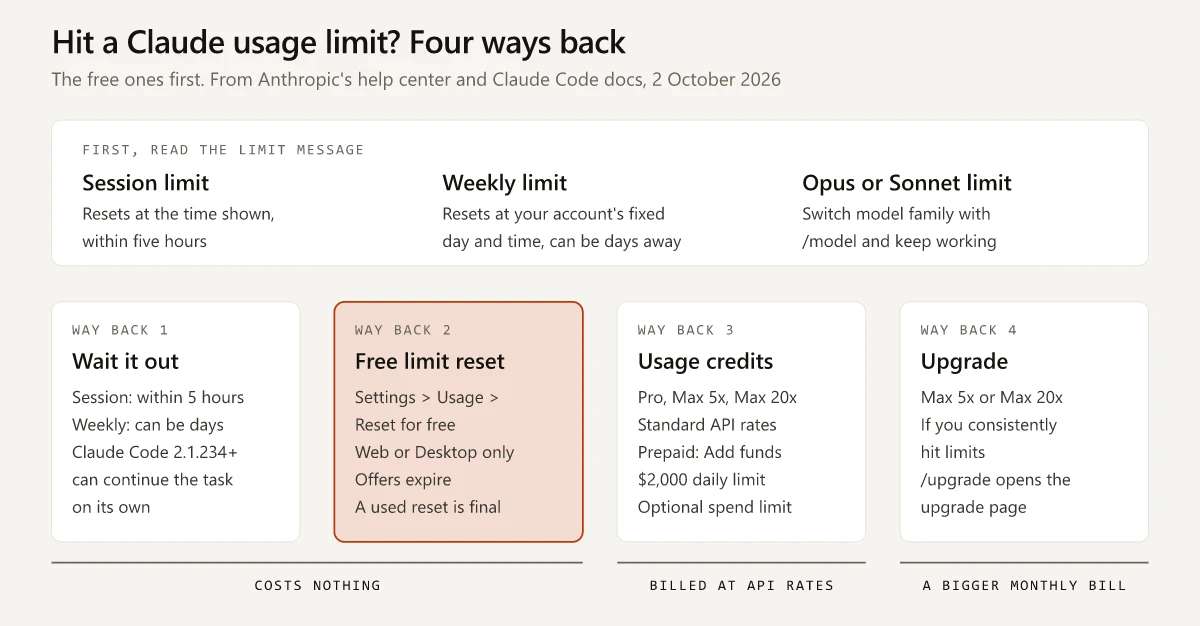 Usage, turn on usage credits at standard API rates with a $2,000 daily redemption limit, or upgrade to Max 5x or Max 20x" title="Four ways back from a Claude usage limit, the free ones first" width="1200" height="626" loading="lazy" decoding="async" />
Claude Usage Limit Reached? Read Which Limit the Message Names
Claude Code prints a different line for each limit, per Anthropic’s Claude Code error reference, and the limit it names decides which way back works:
| The message | What ran out | Free way back | Paid way back |
|---|---|---|---|
You've hit your session limit · resets 3:45pm | The five-hour session limit, shared by every model | Wait for the time shown, or use a five-hour limit reset if you have one | Usage credits, or a bigger plan |
You've hit your weekly limit · resets Mon 12:00am | The weekly limit, shared by every model | Wait for the time shown, or use a weekly limit reset if you have one | Usage credits, or a bigger plan |
You've hit your Opus limit or You've hit your Sonnet limit | Requests to that model family | /model to a model outside the family | Not needed |
You've hit your monthly spend limit · raise it at claude.ai/settings/usage | The monthly spend limit you set on usage credits | If the message adds a window reset such as · your session limit resets 3:45pm, wait for it; if not, /model to a model that doesn’t bill usage credits | Raise the spend limit in Settings > Usage, or run /usage-credits |
API Error: Server is temporarily limiting requests (not your usage limit) | A short server-side throttle | Wait briefly and retry | Not needed |
Context limit reached | One conversation’s context window, a separate limit | /compact or /clear, compared in what each one keeps | Not needed |
The same reference says the session and weekly limits “are shared across all models, so switching models doesn’t restore access.” Usage also “counts against the session and weekly allowances at the same time”, and a single heavy burst, such as “a large workflow fanout”, can use up the weekly limit before the session window resets.
In the Claude app on the web or in Desktop, Settings > Usage tells you which limit is full: on Pro, Max, Team and seat-based Enterprise plans it has progress bars for the current session and the weekly limits, for all models and for Fable where your plan includes it (usage limit best practices).
Way Back 1: Wait for the Reset, or Let Claude Code Wait
The rolling five-hour window, weekly limits and what each plan multiplies are covered in my Claude vs Claude Code guide. The waits, per Anthropic’s Pro plan article and the pages linked above:
- The session limit “will reset every five hours”. In Claude Code the limit message names the reset time; in the app, Settings > Usage shows the time left in the current session.
- The weekly limit resets “at a fixed time each week that is assigned to your account”, and the day and time “stay the same regardless of when you start using Claude or when your subscription begins”. Settings > Usage shows your next reset.
Claude Code can also do the waiting. Anthropic’s interactive mode docs describe automatic continue, on by default from v2.1.234 in interactive sessions signed in with a claude.ai subscription (my CLI reported v2.1.283 on 1 October 2026):
| When | What Claude Code does |
|---|---|
| A usage limit stops a task | Keeps the session open and shows Usage limit reached · continuing automatically at 3:45pm · esc to cancel |
| The limit resets | Prompts Claude to pick the task up where it stopped; “It doesn’t resend your last message.” |
You run /usage-credits, sign back in after /upgrade or switch with /model during the wait | Checks for usage at once and continues if it is there; “It doesn’t check after an upgrade or purchase you make in a browser on your own.” |
| A permission prompt comes up after the reset | Still asks as usual, so the task “can stop on a prompt while you’re away” |
| The limit hits again | Re-arms the wait at most twice in a row, then points you to /rate-limit-options |
| The reset is more than 24 hours away | Does not start the wait on its own (the docs note “a weekly limit can reset days out”); pick the row that starts “Wait here, then continue automatically” in /rate-limit-options |
A background session, a -p run, or an API key | Offers no wait |
| You want it to stop | Esc at an empty prompt, Ctrl+C, or “Don’t continue automatically” in /rate-limit-options |
In the Claude Desktop app’s Code tab, the session-limit card carries an “Auto-continue when limits reset” checkbox and the weekly-limit card does not, per the same error reference.
Way Back 2: The Free Claude Usage Limit Reset
“Limit resets are given occasionally to eligible plans, and set your usage limits back to full when you choose to use one,” says Anthropic’s What is a limit reset? article, updated 22 September 2026. It names no plans; Anthropic’s Pro and Max plan articles both point to it. To use one:
- Go to Settings > Usage on the web or in Claude Desktop.
- Click “Reset for free” in the Resets section.
- Confirm by clicking “Reset for free” again.
The same button appears on the message you see when you reach a limit. The rest of the article, clause by clause:
| Question | Anthropic’s answer |
|---|---|
| Which limit goes back to full? | The five-hour session limit or the weekly limit, “depending on the limit reset shown” |
| Must I be at the limit? | ”You don’t have to wait until you reach a limit to use it.” |
| Does my weekly reset move? | ”Your weekly limits still reset on their usual day and time.” |
| Can I undo it? | ”Once you use it, you can’t undo it.” |
| Does it expire? | An unused reset expires at the day and time on the offer, and Settings > Usage shows the date |
| Can I use it from Claude Code? | The button “isn’t currently available on Claude Mobile or in Claude Code in your terminal or IDE”; reset in a browser or Claude Desktop and Claude Code gets the full limit too |
| Does it touch usage credits? | It “doesn’t refund extra usage you’ve already been billed for or change your usage credit balance” |
| What if I downgrade first? | Downgrade or cancel before using it, and “it’s no longer available” |
The Claude Code extension in VS Code, where I work, falls under “IDE” there, so in that setup this way back means opening Claude in a browser or in Claude Desktop. Before spending a limit reset, check two dates in Settings > Usage: when it expires and when your weekly limit resets anyway. Using one does not move your weekly reset day, so a weekly limit reset used four days before that day saves a four-day wait, while one used the evening before saves a few hours. A limit reset that expires after your next weekly reset can be kept for a longer lockout.
Way Back 3: Claude Usage Credits and What They Cost
Usage credits let Pro, Max 5x and Max 20x subscribers keep working past their included limits at standard API rates, billed separately from the subscription, per Manage usage credits for paid Claude plans, updated 24 September 2026. To turn them on:
- In Settings > Usage, find the Usage credits section and click “Enable”.
- Add a payment method if none is set up. If you subscribed in the iOS or Android app, do this on the web.
- Click “Adjust limit” to set a monthly spend limit, or choose “Set to unlimited”.
- Prepay: click “Add funds”, enter an amount and click “Purchase”.
- Optionally turn on auto-reload, which buys more when the balance falls below a threshold you set.
The rules that set the bill, as of 2 October 2026:
| Rule | What the article says |
|---|---|
| Price | Standard API rates for the model you use; per-job costs for each Claude model show what those rates add up to |
| Daily redemption limit | ”There is a daily redemption limit of $2000.” |
| Expiry | Usually none; “in certain jurisdictions such as Japan, usage credits expire six months after purchase starting September 10, 2026”, with an email seven days before |
| Your five-hour reset | Unchanged: “Usage credits don’t affect this reset timing.” |
| Claude Code | Credits “apply to both Claude conversations and Claude Code terminal usage” |
| Turning them off | Any time, in Settings > Usage |
On Team and seat-based Enterprise plans, an Owner or Primary Owner enables credits under Organization settings > Usage and sets the spend limits (Team and Enterprise usage credits). Members can then “continue using Claude, Claude Cowork, and Claude Code” after reaching their seat’s usage limits. Usage-based Enterprise plans have no credits to turn on: “all usage is billed at API rates from the first token.”
Usage Bundles: Credits Bought at a Discount
Credits can also be bought ahead in bundles “available on Pro, Max, and Team plans”, per Buy usage bundles, updated 18 May 2026:
| Bundle | Discount | You pay |
|---|---|---|
| $50 | 10% | $45 |
| $250 | 20% | $200 |
| $1,000 | 30% | $700 |
- Turn usage credits on first, then go to Settings > Usage, click “Buy usage” and pick a size.
- Individual Pro and Max subscribers can buy up to $2,000 of discounted bundles a month, and Team Owners and Primary Owners up to $3,000; usage past that bills at standard rates.
- Bundle credits apply only after you pass your plan’s included limits, and the balance works across Claude, Claude Code, Cowork and third-party products that use your Claude account.
The two $2,000 figures are different rules: a daily redemption limit on usage credits, and a monthly purchase cap on discounted bundles.
Usage Credits Inside Claude Code
/usage-credits(Anthropic’s commands reference notes it was previously/extra-usage) opens Settings > Usage in the browser on Pro and Max. Team and Enterprise members without billing access send a request to their admins instead, and the command is unavailable with API key sign-in (Claude Code costs docs).- On credits, a break of more than five minutes means a full re-read. The prompt cache lifetime “is an hour on a subscription and drops to five minutes once you’re drawing on usage credits”, and a message sent after a longer break reprocesses your full context (why usage climbs in a long session). To keep the hour on credits, set
promptCacheTtlto1h(v2.1.242 or later); the one-hour lifetime bills cache writes at a higher rate. - Where Fable bills to credits, the
/modelpicker labels it “Requires usage credits” and interactive sessions ask before billing, except for Enterprise members with organization billing. In non-interactive-pruns, “Claude Code bills it without asking” (Fable and usage credits). - The 1M-token variant of Sonnet 4.6 needs credits on every subscription plan, and that of Opus 4.6 on Pro; Fable, Sonnet 5 and later, and Opus 4.7 and later run the 1M window on every plan (extended context). The resulting error is “an entitlement check, not a quota exhaustion” (error reference).
Way Back 4: Upgrade the Plan
Max 5x “includes five times the Pro plan’s per-session usage allowance” and Max 20x includes 20 times, per Anthropic’s Max plan article; Claude Pro and Max next to ChatGPT’s plans lists the prices. On Free, usage credits are not offered (Anthropic’s usage and length limits article lists them for Pro, Max, Team and seat-based Enterprise), so the ways back are the wait, a limit reset if one is shown, or moving to Pro.
If you are upgrading from India, the Pro and Max prices depend on where you check out, and I set the App Store, Google Play and web checkouts for both plans side by side in a separate guide. Anthropic lists no student price on either plan, and my route-by-route check for students in India covers what a student can use instead.
- In Claude Code,
/upgradeopens “the upgrade page in your browser to switch to a higher plan tier” (commands reference). - Anthropic’s Claude Code with Pro or Max article suggests Max 5x to Pro users who “consistently hit limits”, and Max 20x to Max 5x users on the same test.
- The same article lists a separate paid route “for intensive coding sprints”: a Claude Console account with API credits. An
ANTHROPIC_API_KEYenvironment variable on your machine sends Claude Code down that route, “resulting in API usage charges rather than using your subscription’s included usage”. Once you approve it, that key also turns off Remote Control and the other Claude Code features that need a claude.ai login, which my comparison of an API key with a plan login lists row by row, along with the/statuscheck that shows which credential a session is using.
For a one-off deadline, usage credits under a monthly spend limit cap the extra bill without changing the plan.
What Counts Against Claude Usage Limits
Anthropic’s usage and length limits article puts the pool in one line: “your usage of all different Claude product surfaces (claude.ai, Claude Code, Claude Desktop) counts towards the same usage limit.” What you spend depends on “the length and complexity of your conversations, the features you use, which Claude model you’re chatting with, and the effort level you’ve selected.” Surface by surface, as of 2 October 2026:
| What you use | How it counts |
|---|---|
| Claude Code in a terminal or IDE | The shared pool; the Claude Code with Pro or Max article says “IDE usage counts toward the same usage limits shared across Claude and Claude Code” |
| Cowork | Your plan’s limits: multi-step tasks “use more of your usage than a quick question”, and auto mode “consumes more of your usage limit than the other modes” (Get started with Claude Cowork) |
| Claude Design | It “counts toward the same usage limits as the rest of Claude” (Get started with Claude Design); my Claude Design vs Claude Code routing guide covers when to use each |
| Claude Code routines | ”Routines draw down subscription usage the same way interactive sessions do” (routines docs); routines vs scheduled tasks compares the scheduling options |
| Opus instead of Sonnet in Claude Code | Opus “uses meaningfully more of your quota”, and /model opusplan plans with Opus and executes with Sonnet (Claude Code models and usage) |
| A higher effort level | Responses “use more tokens, so you’ll reach your usage limits faster” (effort settings) |
| Research | ”Research sessions may consume tokens more quickly due to multiple searches and comprehensive analysis”, per the usage credits article; my map of marketing jobs to Claude modes shows which ones are worth a Research run instead of a single web search |
| A long chat that triggers automatic context management | ”Longer conversations that trigger automatic context management consume more of your usage limit” |
| A long Claude Code session | Each request resends the conversation, and cache misses, subagents and scheduled tasks add to it, per the costs page linked above |
From 1 to 15 October 2026, Anthropic’s Artifact usage promotion makes the next 10 chat messages after Claude creates or edits an artifact use 50% less of the five-hour session limit on Pro, Max and Team; weekly limits, Claude Code and usage credits are excluded.
How Fable Usage Counts
Fable 5 and Fable 5.1 count differently by plan and seat, per Claude Fable models on your plan, updated 2 September 2026:
| Plan or seat | Fable 5 and 5.1 | Your options |
|---|---|---|
| Free | Not available | Not applicable |
| Pro, Team standard seats, seat-based Enterprise standard seats | Usage credits from the first request; Enterprise standard seats need credits enabled by the organization | Keep paying credits, switch models, or (on Pro) upgrade to Max |
| Max 5x and 20x, Team premium seats, seat-based Enterprise premium seats | ”up to 50% of your weekly usage limits on Fable models at no extra cost” | Continue on credits, or switch to another model |
| Usage-based Enterprise and the Claude API | Standard API rates | Not applicable |
The 50% sits inside the weekly limit: the article says “you can never use more than your weekly limit”, and Fable uses that limit “faster than other Claude models”. On Pro and Team standard seats, Fable 5 moved to usage credits when an earlier promotion ended on 19 July 2026, and Fable 5.1 was never part of it.
How to Check Claude Usage in the App and in Claude Code
| Where | How | What it shows | Source |
|---|---|---|---|
| Claude on the web or in Desktop | Settings > Usage | Current session use and the time left in it; weekly limits for all models and for Fable where included; your next reset; the Resets and Usage credits sections | Usage limit best practices |
| Claude Code CLI | /usage, also /cost and /stats | Plan usage limits and their resets, activity stats, and on Pro, Max, Team or Enterprise a breakdown by skill, subagent, plugin and MCP server; d and w switch between 24 hours and 7 days | Commands, plan usage breakdown |
| Claude Code in VS Code | /usage opens the Account & usage dialog | Usage bars with the time until each resets, plus the breakdown with a Day and Week toggle | VS Code docs |
| Claude Desktop, Code tab | The usage ring next to the model picker | Context use for the session and plan usage for the period | Desktop docs |
| A Claude Code status line | The rate_limits fields | five_hour and seven_day percentages used and reset times, for Pro and Max subscribers | Status line docs |
| Claude Code warnings | Shown automatically | A line such as You've used 85% of your session limit · resets 3:45pm | Error reference |
Read those screens with these caveats:
/statusshows “version, model, account, and connectivity”, per the commands reference. Anthropic’s Claude Code with Pro or Max article, last updated 19 August 2026, still says “Monitor your remaining allocation using the /status command”; use/usage.- The
/usagebreakdown is local. Its figures “are approximate and computed from local session history on this machine, so usage from other devices or claude.ai is not included.” - On Pro and Max, the dollar figure in the
/usageSession block “isn’t relevant for billing purposes.”
The /usage row sits with the other session commands in my Claude Code commands reference, and the VS Code extension vs the terminal covers where the extension’s dialogs differ from the CLI.
Peak Hours and the 6 May 2026 Claude Code Limit Changes
Anthropic’s 6 May 2026 announcement made two changes to Claude Code limits, both effective that day:
| Change | Plans |
|---|---|
| ”doubling Claude Code’s five-hour rate limits” | Pro, Max, Team, seat-based Enterprise |
| ”removing the peak hours limit reduction on Claude Code” | Pro, Max |
The announcement does not say how a doubled Claude Code limit sits inside the shared pool; the Claude Code with Pro or Max article, updated in August 2026, says “all activity in both tools counts against the same usage limits”.
On peak hours, the announcement lifts the reduction only on Claude Code for Pro and Max accounts and says nothing about chat on claude.ai. None of the help center articles linked in this guide mentions peak hours as of 2 October 2026; the nearest lines are “Priority access to Claude during high-traffic periods” in the Pro plan article and “Priority access at high traffic times” on the pricing page’s Max card. For chat, Desktop, and Claude Code on Team or Enterprise, these pages leave open whether peak hours reduce your limits. The pricing FAQ also reserves the right to “limit your usage in other ways, such as weekly and monthly caps or model and feature usage, at our discretion.”
Claude Usage Limits: Match the Way Back to the Message
Claude usage limits come down to which one ran out, and for an Opus or Sonnet limit /model is the whole fix.
Before your next long session, open Settings > Usage and note your weekly reset time.
Frequently Asked Questions
What happens when you hit your Claude usage limit?
Claude stops until the limit resets, unless you use a free limit reset, turn on usage credits or upgrade. The five-hour session limit and the weekly limit reset on separate schedules, and from v2.1.234 an interactive Claude Code session can wait and continue the task on its own after the reset.
What is a Claude limit reset?
An occasional offer to eligible plans that sets your five-hour session limit or your weekly limit back to full. You use it with the 'Reset for free' button in Settings > Usage on the web or in Claude Desktop. The button is not available on Claude Mobile or in Claude Code in a terminal or IDE, though a reset used on the web or in Desktop restores your limits there too; offers expire, and a used reset cannot be undone.
How much do Claude usage credits cost?
Usage credits bill at standard API rates, separately from your subscription. You prepay with 'Add funds', can set a monthly spend limit and auto-reload, and can redeem up to $2,000 a day. Discounted bundles of $50, $250 and $1,000 cost $45, $200 and $700.
How do I check my Claude usage?
In the Claude app, open Settings > Usage for your current session, weekly limits and reset times. In Claude Code, run /usage, which also answers to /cost and /stats. The /status command shows version, model, account and connectivity instead.
Are Claude Code usage limits separate from Claude's?
No. As of October 2026, Anthropic says your activity in Claude on the web, desktop and mobile and in Claude Code draws from the same session and weekly limits, though its 6 May 2026 announcement doubled Claude Code's five-hour rate limits on Pro, Max, Team and seat-based Enterprise without saying how that fits the shared pool. Claude Code can also show an Opus or Sonnet limit that covers one model family; switching to a model outside it with /model keeps you working.