Claude Code SEO Audit: 17 Checks on a 170-Post Repo
A Claude Code SEO audit of a 170-post Astro repo: 17 checks across source files, the build and live URLs, joined to Search Console, with every count.
Audit this repo for SEO and change nothing. In the posts, count titles over 60 characters, descriptions outside 140 to 165, internal links to a missing slug or without a trailing slash, and posts with fewer than three links in from other posts. In the build, check the sitemap against the pages, every canonical, and each image’s width and height. Then curl every URL in the Search Console pages export and tell me which findings sit on pages that earn impressions.
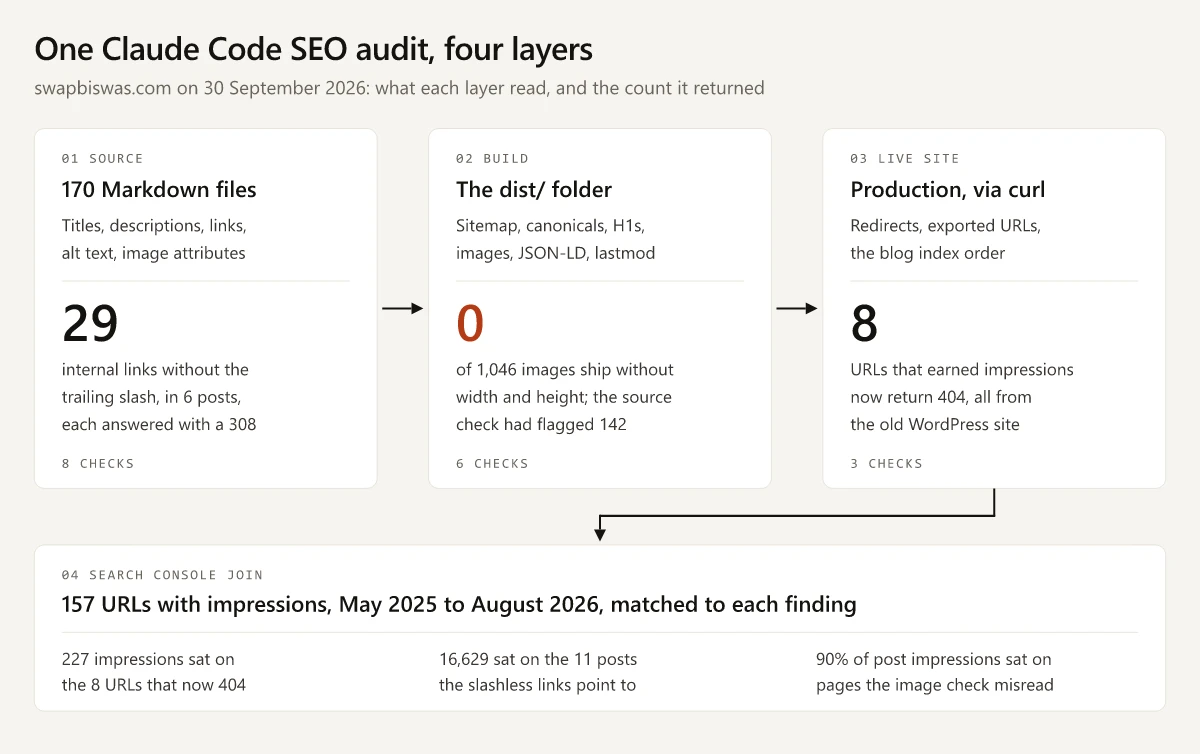
That is the short version of the brief behind the Claude Code SEO audit of this site’s repo. The full version in step 2 below adds the standard checks it implies, such as duplicates, alt text, H1s, structured data and redirects, plus one check specific to this site’s blog index, and runs to 17 checks. They covered the 170 posts published before 30 September 2026, the build, the live domain and a Search Console export of the 157 URLs that earned impressions between May 2025 and August 2026. Thirteen found nothing to fix, and four found something:
| Finding | Count | Verdict |
|---|---|---|
| Internal links without the trailing slash, each answered with a 308 redirect | 29 | Real, and a find-and-replace fixes it |
| Old WordPress URLs that earned impressions and now return 404 | 8 | Real, and two of them need a redirect |
| Content images without width and height in the source files | 142 | A false alarm, because the build adds both |
| Blog index positions that differ between two builds | 18 of 170 | Harmless live, but the same sort picks the homepage’s links |
Pointing Claude Code at the repo made those counts possible. An audit of one live URL sees one page, while the repo holds every title, link and image tag at once, so each check becomes a number you can re-run next month. The build and the Search Console export then decide which numbers deserve a fix, and here they overruled the source files once.
I built this Astro site with Claude Code (the build, step by step) and maintain it in the VS Code extension on Windows 11. My Claude Code setup is written up separately, and this audit used no SEO plugin. The clean results have a history: a crawl audit on 26 August 2026 found 95 titles over 60 characters (all 95 rewrites published beside the originals) and ended with all 20 of its checks passing after fixes.
Claude Code SEO Audit Results: 17 Checks on One Site
The checks map onto the crawl, indexation, on-page and internal-linking steps of my SEO audit checklist. My dist/ build was four days old, so on 30 September 2026 I re-ran its HTML checks on the live post pages: every per-page count matched, as did the 187 sitemap URLs, and only the blog index order differed.
Source Checks: 170 Markdown Files
| Check | Why it matters | How Claude Code ran it | Count |
|---|---|---|---|
| Titles over 60 characters | Google truncates title links “as needed, typically to fit the device width” (title links); 60 is my house rule | Parsed each file’s frontmatter, carriage returns stripped | 0 of 170, range 33 to 60 |
| Descriptions outside 140 to 165 characters | Snippets are truncated the same way (snippets); the band is my house rule | The same frontmatter pass | 0, range 141 to 165 |
| Duplicate titles or descriptions | Two posts would offer searchers the same result | Values compared across all 170 files | 0 |
| Internal links to a slug with no post | A dead end for readers and crawlers | Every /blog/ and /tools/ href tested against the file list | 0 of 1,379 |
| Internal links without the trailing slash | Every click and crawl takes a 308 hop first | The same extraction, flagging hrefs with no closing slash | 29, in 6 posts |
| Posts with fewer than 3 links in from other posts | Google: “Every page you care about should have a link from at least one other page on your site” (links); 3 is my house rule | Distinct linking posts counted per slug | 0, minimum 3, median 6 |
| Content images without alt text | A screen reader has nothing to announce | Regex over img tags and Markdown image syntax | 0 of 199 |
| Content images without width and height | The browser cannot reserve space before the image loads | The same regex | 142 of 199 |
Alt text presence is the easy half: my cover images pass it and still describe a painting unrelated to the page, which only showed up when I started counting distinct alt strings instead of missing ones.
Build Checks: 187 Indexable Pages
| Check | Why it matters | How Claude Code ran it | Count |
|---|---|---|---|
| Sitemap URLs against indexable pages | Google: “Include the URLs in your sitemap that you want to see in Google’s search results” (sitemaps) | Parsed sitemap-0.xml and the robots meta of every built page | 187 listed, 187 indexable, 0 noindex pages listed |
| Canonical missing or pointing elsewhere | It names the URL you want shown | Read the canonical link on each indexable page | 0 of 187 |
| Post pages without exactly one H1 | A template bug shows up as zero or two | Counted h1 tags per post page | 0 of 170 |
| Images on post pages without width and height | The same layout rule, measured on the build | Every img tag in the post HTML | 0 of 1,046 |
| JSON-LD that fails to parse | A broken block gives search engines nothing to read | JSON.parse on every ld+json block | 0, with BlogPosting on 170 posts and FAQPage on all 153 that carry FAQs |
| Sitemap lastmod against the post’s date | Google uses lastmod when it is consistently and verifiably accurate (XML sitemap notes) | Each lastmod compared with the post’s updatedDate or publishDate | 170 of 170 match |
Live Checks: Production and the Exported URLs
| Check | Why it matters | How Claude Code ran it | Count |
|---|---|---|---|
| A slashless path, http, www and a made-up path | One hop, with a permanent code | curl -sI on each | 308 for each of the three redirects, 404 for the made-up path |
| Search Console URLs that no longer return 200 | Google drops URLs that answer 4xx from its index (4xx client errors) | curl on each of the 157 URLs | 8 return 404, 6 return 308, 143 return 200 |
| Blog index order and neighbouring covers | The same date-only sort picks the homepage’s three latest-post links and breaks ties in each post’s related posts | Card order and cover images on the live /blog/ page, compared with the local build | 18 of 170 positions differ; cover pairs 0 live, 1 local |
Joining the Findings to Search Console Impressions
Claude Code matched each finding to the export row for its canonical URL, counting the six slashless variants on their own, in the Pages table of Search Console’s Performance report for 1 May 2025 to 31 August 2026.
| Finding | Pages or URLs | Impressions on them | Clicks |
|---|---|---|---|
| Slashless links, the posts carrying them | 6 | 5,961 | 4 |
| Slashless links, the posts they point to | 11 | 16,629 | 15 |
| Old URLs that now return 404 | 8 | 227 | 2 |
| Slashless URL variants that now return 308 | 6 | 1,406 | 3 |
| Source-level image flag, later cleared | 114 posts, 112 of them with a row | 145,959, or 90% of the impressions on post URLs | 115 |
The largest number in that table belongs to the one finding that turned out to be wrong. Treat the totals as a ranking of pages: Google’s Data anomalies page says “A logging error prevented Search Console from accurately reporting impressions from May 13, 2025 until April 27, 2026” (Data anomalies in Search Console), and most of this window falls inside that span.
How to Run a Claude Code SEO Audit on Your Own Repo
-
Open the repo and keep the first pass read-only. Start Claude Code in the site’s folder. Plan mode suits an audit: Anthropic’s docs say Claude “reads files, runs shell commands to explore, and writes a plan, but does not edit your source” (permission modes).
-
Name every check and its threshold. “Count titles over 60 characters” returns a number the next run can be compared against. The full brief behind this audit, one line per check:
Audit this repo for SEO and change nothing. Report a count for each check.

Source (the Markdown posts):
1. Titles over 60 characters, carriage returns stripped
2. Descriptions under 140 or over 165 characters
3. Duplicate titles or duplicate descriptions
4. Internal /blog/ and /tools/ links to a slug with no page
5. Internal links without a trailing slash
6. Posts with fewer than 3 links in from other posts
7. Content images without alt text
8. Markdown images without width and height in the source

Build (dist/):
9. Sitemap URLs against pages whose robots meta allows indexing
10. Canonical missing or pointing to another URL
11. Post pages without exactly one h1
12. img tags on post pages without width and height
13. ld+json blocks that fail JSON.parse
14. Sitemap lastmod that differs from the post's updatedDate or publishDate

Live (production):
15. curl -sI one slashless path, the http URL, the www URL and a made-up path
16. The status code of every URL in the Search Console pages export
17. Blog index card order against the local build, and neighbouring cards sharing a cover

Then join every finding to the pages export and rank the fixes by impressions.
Check 17 is specific to this site’s blog index, so drop it or swap in a rule of your own.
-
Audit the build as well as the source. Build the site, then have Claude Code parse the HTML for the sitemap, robots meta, canonicals, image attributes and JSON-LD.
-
Curl production. Request one URL without its trailing slash, over http and on www, plus a made-up path, then every URL in your Search Console export.
-
Join the findings to Search Console. Export the Pages table from the Performance report, whose help page notes that “Many reports provide an export button to download both the chart and table data” (Performance report), then attach impressions to each finding so the fixes on pages people see come first.
-
Fix in a separate pass, then run the same brief again. The before and after counts are comparable only when the brief is identical.
-
Save the brief as a command. Put it in
.claude/commands/seo-audit.mdand the audit becomes a one-line/seo-auditre-run; my Claude Code commands cheat sheet covers the file format and where it lives.
For step 4, this loop prints every URL in a pages export that no longer answers 200:
awk -F, 'NR>1 {print $1}' pages.csv | tr -d '\r' | while read -r url; do
  echo "$(curl -s -o /dev/null -w '%{http_code}' "$url") $url"
done | grep -v '^200'
On this site it prints 14 lines: the six 308s and the eight 404s from the live checks table.
142 Images the Source Flagged and the Build Cleared
The source check flagged every image written in Markdown syntax, which has no place for width or height. The build disagreed:
| Where the check ran | Images without width and height | Posts involved |
|---|---|---|
| Source Markdown files | 142 of 199 content images | 114 |
Local build in dist/ | 0 of 1,046 img tags on post pages | 0 |
| Live post pages | 0 of 1,046 img tags | 0 |
A rehype plugin in the build reads each diagram’s dimensions from an image manifest and writes them into the tag, so the pages in the build already follow web.dev’s advice to “Always include width and height size attributes on your images and video elements” (Optimize Cumulative Layout Shift).
The source check worth keeping asks whether every Markdown image has a manifest entry. All 142 do, and one added without an entry would ship with no dimensions. Treat any source-level finding as a hypothesis until the build confirms it.
29 Internal Links That Take a 308 Detour
The 29 links sit in 6 posts and point at 11 others, written as /blog/product-positioning where the canonical URL ends in a slash. The links are older than the redirect rule that now catches them:
| Date | Event |
|---|---|
| 12 and 15 March 2026 | The six posts enter the repo, carrying all 29 slashless links |
| 3 September 2026 | The trailing-slash rule is committed as “Canonicalize URLs to trailing-slash form” |
| 30 September 2026 | All 11 linked posts answer the slashless form with a 308 |
A 308, the code Vercel sends for this site’s trailing-slash rule, still delivers the reader to the page. Google’s guidance asks for the direct form: “When linking within your site, link to the canonical URL rather than a duplicate URL” (consolidate duplicate URLs). Fix them with a find-and-replace across 6 files, then run this search to confirm it prints nothing:
grep -oE "\]\(/blog/[a-z0-9-]+\)" src/content/blog/*.mdOn this repo it prints 29 lines today.
8 URLs With Impressions Now Return 404
Of the 157 URLs in the export, the 6 that answer 308 are slashless variants of live posts that the export also lists with the slash. The 8 that answer 404 all come from the WordPress version of this site:
| Old URL | URLs | Impressions | Clicks | Live page doing the same job | Action |
|---|---|---|---|---|---|
| A post renamed in the move | 1 | 87 | 0 | The same title at /blog/kerala-winter-experiences/ | Permanent redirect |
| The privacy policy page | 1 | 38 | 1 | /privacy/ | Permanent redirect |
Category archives under /category/ | 3 | 84 | 1 | Noindexed archives under /blog/category/ | Leave as 404 |
Tag archives under /blog/tag/ | 3 | 18 | 0 | None | Leave as 404 |
The Action column follows two lines of Google’s documentation:
| Google’s rule | Where it applies here |
|---|---|
| ”Google doesn’t index URLs that return a 4xx status code, and URLs that are already indexed and return a 4xx status code are removed from the index” (how HTTP status codes affect Google’s crawlers) | The six archive URLs, which the new site either noindexes or no longer has, so a redirect would not keep them in Google’s index either |
| ”we recommend that you use a permanent server-side redirect whenever possible” (redirects and Google Search) | The renamed post and the privacy policy: two rules, covering 125 impressions’ worth of old URLs |
A Missing Tie-Breaker Decides Which Posts the Homepage Links
The cover script is written so that no two neighbouring cards on the blog index share a painting. On 30 September 2026 production passed that check and the local build from 26 September failed it once, with seo-log-file-analysis and seo-without-link-building side by side. The pair traces back to the sort:
- The blog index sorts posts by publish date and nothing else.
- 138 of the 170 posts share a publish date with at least one other post.
- Within a date, the order is whatever the content collection returns, and the two builds disagree on 18 of the 170 positions, all inside same-date groups.
- The homepage takes its three latest-post links from the same sort. 11 posts share 26 September 2026, so which three of them get a link from the homepage comes down to collection order; both builds pick the same three today.
- Related posts at the foot of each post fall back to the same date comparison when two candidates share as many categories, with no key after it.
- The fix is a second sort key, the slug, which gives every build the same order.
- Checking the live page instead of a local build is what caught it.
Claude Code for SEO: Four Ways to Point It at a Site
The repo is one of four starting points, and the other three begin from a live URL or bring outside data into the session:
| Route | What it reads | Where it is strong | What it leaves out |
|---|---|---|---|
| A brief against the repo and build, as in this post | Source files, the build, a Search Console export | Every page at once: links, frontmatter, sitemap against pages | Field performance, Google’s index, other sites’ data |
| A browser session | One rendered page at a time, through Claude Code’s Chrome integration (Chrome docs) | Console errors and DOM state on the rendered page | Site-wide counts, unless it visits every URL |
| An installed audit plugin | A URL: Claude SEO documents /seo audit <url> as a “Full website audit with parallel sub-agent delegation” (README) | Its own checks, plus Search Console, PageSpeed Insights and CrUX data once you add Google credentials | The source and build files behind the URL |
| MCP servers for SEO data | Keyword, ranking and backlink data; my setup reaches Ahrefs this way | Third-party data in the same session as your files | Anything about your pages until you join it |
Vetted SEO audit skills, with maintainers, licenses and install steps, are in my roundup of Claude marketing skills.
What a Repo-Based SEO Audit in Claude Code Cannot See
Everything in the tables above lives in a file or answers an HTTP request. These parts of an audit do neither, so each needs a source outside the repo:
| Gap | Why a repo cannot show it | Where to look instead |
|---|---|---|
| Field Core Web Vitals | Measured on visitors’ devices | Search Console’s Core Web Vitals report, “based on real world usage data (sometimes called field data)” (Core Web Vitals report), or the CrUX API, which “gives low-latency access to aggregated real-user experience data at page and origin granularity” (CrUX API) |
| Which pages Google indexed, and why not | Google decides after crawling | The Page indexing report, where you “See which pages Google can find and index on your site” (Page indexing report) |
| Content that JavaScript builds in the browser | A static site ships finished HTML, while a client-rendered app can ship an empty shell | A rendered check, plus why a vibe-coded site can look finished and never rank |
| Backlinks and competitors’ rankings | Other sites’ data | An SEO data source connected over MCP |
| How Googlebot crawls the site | It lives in server logs | Your host’s logs; what Vercel, Netlify and Cloudflare keep instead of a raw access log |
For the speed and mobile checks a repo cannot run, the eight-step technical SEO audit lists the free tools.
Run the Claude Code SEO Audit Before You Fix Anything
The repo turned 17 questions into 17 counts, and the build, the live site and Search Console decided which of them to act on. On this site that cleared 142 image flags and left three small jobs: a trailing slash on 29 links, a redirect for 2 old URLs and a slug tie-breaker in the post sort.
Paste the full brief from step 2 into Claude Code in your own repo, swap in your own thresholds, and let the first run change nothing. Then fix the counts on pages with impressions.
Frequently Asked Questions
Can Claude Code do an SEO audit?
Yes. Claude Code reads files and runs shell commands, so it can count titles, descriptions, internal links and image attributes across a whole repo, parse the built HTML and check live status codes with curl. Field Core Web Vitals need Google's own data from Search Console or the CrUX API, and indexing decisions show in Search Console's Page indexing report.
How do I use Claude Code for SEO?
Open your site's repo in Claude Code and give it a brief that names each check and its threshold, such as titles over 60 characters or internal links without a trailing slash. Then join the findings to a Search Console pages export so the fixes on pages with impressions come first.
Do I need a plugin to run an SEO audit in Claude Code?
No. A brief that names each check and its threshold covers the source files, the build and live status codes. An audit plugin that starts from a URL reads what your server returns, not the source files behind it.
Should an SEO audit check the source files or the built site?
Both, and let the build settle any disagreement. On this site the source files held 142 Markdown images without width and height, yet all 1,046 img tags on the live post pages carry both attributes, because a build plugin adds them to the Markdown images.
What can a repo-based SEO audit in Claude Code not check?
From the repo, the build and curl alone, it cannot see field Core Web Vitals, which pages Google indexed, content that JavaScript builds in the browser, backlinks, competitors' rankings or how Googlebot crawls the site. Search Console or the CrUX API, a rendered check, an SEO data source and your host's logs cover those, and a plugin or MCP server can bring some of that data into the same session.