Claude Code Commands: Cheat Sheet and Custom Command Guide
This Claude Code commands cheat sheet lists the built-in commands a marketer needs, checked against Anthropic's docs in September 2026, and shows how to write yours.
These are the custom Claude Code commands that load when I open this site’s repository, grouped by where they live:
~/.claude/commands/              user level: loads in every project on this machine
    2 pointer commands           under 1 KB each, hand off to another repo's commands

portfolio/.claude/commands/      project level: loads only in this repo
    content command              230 lines, with a research-only mode
    page optimization command    75 lines
That split is the first thing to understand about Claude Code commands you write yourself. A file in ~/.claude/commands/ follows you into every folder you open. A file in a project’s .claude/commands/ exists only inside that repository, and anyone who clones a repository with that folder committed gets the same commands.
Page 1 for this keyword is forum threads, “commands I use” lists and developer explainers. As a marketer who builds with Claude Code, I wanted a different reference: every command below checked against Anthropic’s commands reference on 26 September 2026, starting with the ones a non-developer needs first and the marketing job each one fits, followed by a walkthrough of writing your own command with a keyword research command as the example.
What Are Claude Code Commands?
Claude Code commands are instructions you type after a slash at the start of a message, such as /clear or /model, to control a Claude Code session. Most built-in commands run fixed logic, bundled skills hand Claude a prompt, and custom commands are Markdown files you write yourself.
On 26 September 2026, the official reference table had 114 rows: 16 marked as bundled skills, one bundled workflow, and three marked removed. Not every command appears for every user, because the docs say availability depends on your platform, plan and environment. These are the ones worth learning first for marketing work:
| Command | What it does | When a marketer would use it |
|---|---|---|
/clear | Starts a new conversation with empty context (aliases /reset, /new) | Moving from one campaign or keyword set to an unrelated task |
/compact [instructions] | Summarizes the conversation so far to free up context, focused on what you name | A long research session is filling up and you are mid-task |
/context | Shows what is filling the context window as a colored grid | Checking how much room is left before a long analysis |
/rewind | Rolls the conversation and/or code back to an earlier point (aliases /checkpoint, /undo) | Claude edited the wrong file or took a wrong turn |
/resume [session] | Reopens an earlier conversation by ID or name, or from a picker | Picking up yesterday’s research where it stopped |
/plan [description] | Enters plan mode, where Claude researches and presents a plan before editing | Before Claude touches a live site, a CMS export or a shared sheet |
/model [model] | Switches the model and saves it as your default for new sessions | A lighter model for bulk tasks, a stronger one for analysis |
/effort [level] | Sets how much reasoning Claude applies: low to xhigh, max, ultracode, or auto | Raising it for a positioning analysis, lowering it for find-and-replace work |
/usage | Shows session cost, plan usage limits and activity stats (aliases /cost, /stats) | Checking spend before fanning research out to several subagents |
/btw [question] | Asks a side question without adding it to the conversation | A quick “what does this column mean?” in the middle of an analysis |
/diff | Shows the changes in your working tree, including Claude’s edits | Reviewing what changed before you publish or commit |
/export [filename] | Exports the conversation as plain text | Saving a research session to share with a teammate |
/init | Generates a starter CLAUDE.md guide for the project | Your first session in a new project folder |
/memory | Edits CLAUDE.md files, toggles auto memory and shows its entries | Correcting a convention Claude keeps getting wrong |
/mcp | Manages MCP server connections and sign-in | Connecting or re-authorizing an SEO or analytics data source |
/permissions | Manages allow, ask and deny rules for tools | Pre-approving safe read-only commands so you are not asked every time |
A command is recognized only at the start of a message, and any text after its name becomes its arguments. Type / on its own to see the list your setup has, custom commands included. How /init and /memory fit together is its own topic, covered in how Claude Code memory works. If you are still choosing a tool rather than learning one, start with Claude vs ChatGPT for marketing work, or Claude vs Claude Code if the open question is whether you need the terminal version at all.
Claude Code Commands List by Category
These tables cover the rest of the built-in and bundled commands a non-developer is likely to touch, plus a few developer-oriented ones, such as /security-review and /batch, that are worth recognizing in the menu. The complete list is in the all commands table. Rows marked (skill) are bundled skills: prompts handed to Claude rather than fixed logic.
Sessions and Context
| Command | What it does |
|---|---|
/branch [name] | Branches the conversation so you can try another direction; the original stays available in /resume |
/copy [N] | Copies the last response, or the Nth-latest, to the clipboard |
/rename [name] | Renames the session; with no name, generates one from the conversation |
/recap | Generates a one-line summary of the session on demand |
/add-dir <path> | Gives the session file access to another folder |
/cd <path> | Moves the session to a new working directory and keeps the conversation |
Models, Settings and Cost
| Command | What it does |
|---|---|
/fast | Toggles fast mode on or off |
/config | Opens settings for theme, model, output style and other preferences |
/status | Shows version, model, account and connectivity |
/insights | Generates an HTML report on your recent sessions: projects, how you use Claude Code, where things go wrong |
/doctor (skill) | Diagnoses installation and configuration issues and can fix them |
Review and Checks
| Command | What it does |
|---|---|
/code-review (skill) | Reviews the current diff or a pull request for correctness bugs; /review is an alias |
/security-review | Checks the changes on your branch for security vulnerabilities |
/simplify (skill) | Reviews changed code for cleanup opportunities and applies the fixes |
/verify (skill) | Builds and runs your project’s app to confirm a change does what it should |
/goal [condition] | Keeps Claude working across turns until the condition is met |
/verify checks that a change works in the running app. Whether Google can read the rendered pages of a site you built this way is a separate check, covered in why vibe-coded websites struggle to rank.
Parallel and Background Work
| Command | What it does |
|---|---|
/tasks | Lists background work in the session, including subagents that have finished |
/background [prompt] | Detaches the session to run as a background agent (alias /bg) |
/fork [prompt] | Copies the conversation into a new background session while you keep working |
/subtask <task> | Spawns a forked subagent that inherits the full conversation |
/batch <instruction> (skill) | Splits a large codebase change into 5 to 30 units, each run by its own subagent in its own worktree |
/loop [interval] [prompt] (skill) | Runs a prompt repeatedly while the session stays open |
/schedule [description] | Creates and manages routines that run in the cloud |
/deep-research <question> (workflow) | Fans out web searches, cross-checks sources and writes a cited report |
Extending Claude Code
| Command | What it does |
|---|---|
/skills | Lists available skills; filter by name, description or source |
/reload-skills | Re-scans skill and command folders so files added mid-session load without a restart |
/agents | From v2.1.198, reminds you to ask Claude to create subagents or to edit .claude/agents/ directly |
/hooks | Shows hook configurations for tool events |
/plugin | Manages Claude Code plugins |
/output-style [style] | Lists output styles or switches to one |
Commands That Have Been Removed
| Command | Status in the docs |
|---|---|
/pr-comments | Removed in v2.1.91; ask Claude to view pull request comments instead |
/vim | Removed in v2.1.92; switch editor mode in /config |
/ultraplan | Removed; use plan mode instead |
Claude Code Commands Cheat Sheet: Shortcuts and CLI
The keyboard shortcuts below come from the interactive mode reference:
| Shortcut | What it does |
|---|---|
/ at the start | Opens the command and skill menu |
! at the start | Shell mode: runs a command directly and adds its output to the session |
@ | Mentions a file path, with autocomplete |
Esc | Interrupts Claude or closes a dialog |
Esc then Esc | Clears the input draft, or rewinds |
Shift+Tab | Cycles permission modes |
Ctrl+R | Reverse-searches your command history |
Ctrl+G | Opens the prompt in your default text editor |
? on empty input | Toggles the shortcut help panel |
CLI commands run in your terminal before or instead of an interactive session, per the CLI reference:
| CLI command | What it does |
|---|---|
claude | Starts an interactive session |
claude "query" | Starts a session with a first prompt |
claude -p "query" | Runs one query and exits |
claude -c | Continues the most recent conversation in the current folder |
claude -r "<session>" "query" | Resumes a session by ID or name |
claude update | Updates to the latest version |
claude doctor | Prints installation and settings diagnostics without starting a session |
claude mcp | Configures MCP servers |
Claude Code Custom Commands After the Merge Into Skills
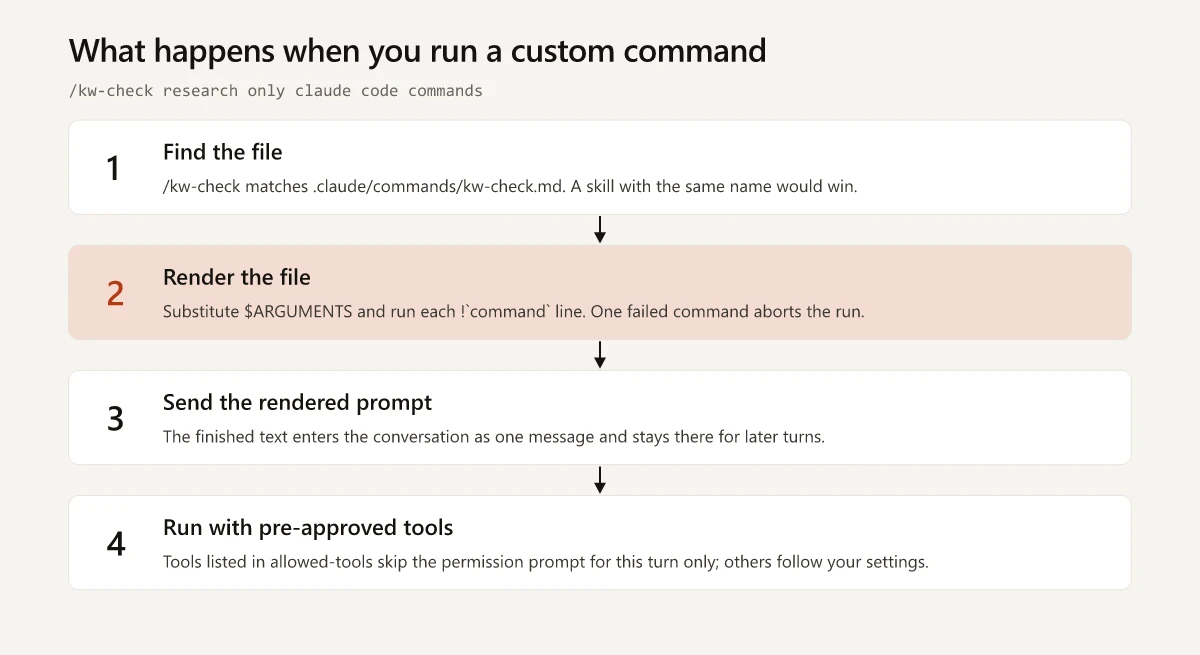
If you have read that custom commands are deprecated, the source is a note near the top of the skills documentation: “Custom commands have been merged into skills.” As of September 2026, existing .claude/commands/ files keep working, and a command file accepts the same frontmatter fields as a skill except name and paths. When a skill and a command file share a name, the skill runs.
The docs prefer a skill for new work, because a skill folder can also hold supporting files. The side-by-side comparison of the two formats is in what a Claude skill is.
How to Create a Claude Code Custom Command
- Pick the level. Use the project’s
.claude/commands/for a workflow tied to one repository; commit it and your team gets it. Use~/.claude/commands/for a personal command you want everywhere. - Create a Markdown file named after the command.
kw-check.mdbecomes/kw-check. A file in a subfolder gets a namespaced name:.claude/commands/research/kw-check.mdbecomes/research:kw-check. - Add frontmatter between
---markers on the very first line. Every field is optional and onlydescriptionis recommended. If the opening---is not the first line, Claude Code treats the whole file as prompt text. - Write the instructions in plain Markdown, with
$ARGUMENTSwhere your input should land. - Load it with
/reload-skillsif Claude Code is already running. - Run it by typing
/kw-checkfollowed by your input.
The Pointer Pattern for User-Level Commands
My two user-level files hold no workflow at all. Each is under 1 KB and points at a command file in another repository I work in, not this one. It tells Claude to open that file, read it in full, follow it, and never rely on a remembered copy. The project file stays the only copy of the workflow, so there is no second version to drift out of step with it. A generic version of the pattern:
# Keyword check (pointer - the real workflow lives in the project)

1. Read <project>/.claude/commands/kw-check.md in full and follow it.
2. Never follow a cached or remembered version. Read the file fresh.
Frontmatter Fields for Claude Code Slash Commands
Frontmatter is the settings block at the top of the file. These are the fields most useful in a command file; the full list is in the frontmatter reference:
| Field | What it does | Example |
|---|---|---|
description | What the command does and when to use it; Claude reads it to decide when to load the command on its own | description: Research-only keyword check |
argument-hint | Hint shown in autocomplete | argument-hint: [research only] <keyword> |
arguments | Names positional arguments so you can write $keyword instead of $0 | arguments: [keyword, market] |
disable-model-invocation | true means only you can run it; Claude cannot trigger it | disable-model-invocation: true |
allowed-tools | Tools Claude may use without asking during the turn that runs the command; it restricts nothing | allowed-tools: Read WebSearch Bash(grep *) |
model | Model to use for the rest of that turn | model: sonnet |
effort | Effort level while the command is active | effort: high |
context and agent | context: fork runs the command in a subagent; agent picks the subagent type | context: fork |
Both you and Claude can invoke a command by default. The .claude directory reference says a command file and a skill “both can be auto-invoked by Claude.” For anything that spends web searches or a metered API, set disable-model-invocation: true so the command runs only when you type it.
Claude Code Custom Command Arguments and Placeholders
| Placeholder | What it becomes |
|---|---|
$ARGUMENTS | Everything you typed after the command name, exactly as typed |
$ARGUMENTS[0] or $0 | The first argument; counting starts at zero |
$1 | The second argument |
$keyword | A named argument declared in the arguments field |
The rules that trip people up, from the arguments section of the docs:
- Indexed arguments split like a shell.
/kw-check "claude code commands" ukmakes$0expand toclaude code commandsand$1touk. Without the quotes,$0would beclaude. - An indexed placeholder with no matching argument, such as
$2when you passed two values, stays in the text unchanged. A named placeholder with no match expands to an empty string. - If no placeholder receives your input, Claude Code appends it to the end as
ARGUMENTS: <your input>. That is how a pointer file with no placeholder still passes your input through to the project workflow. - A dollar sign before a digit is read as a placeholder. A pricing prompt that says
$1.00needs\$1.00, or, whenever you pass a second argument, the price is replaced by it.
Claude Code Slash Command Example: A Research-Only Keyword Check
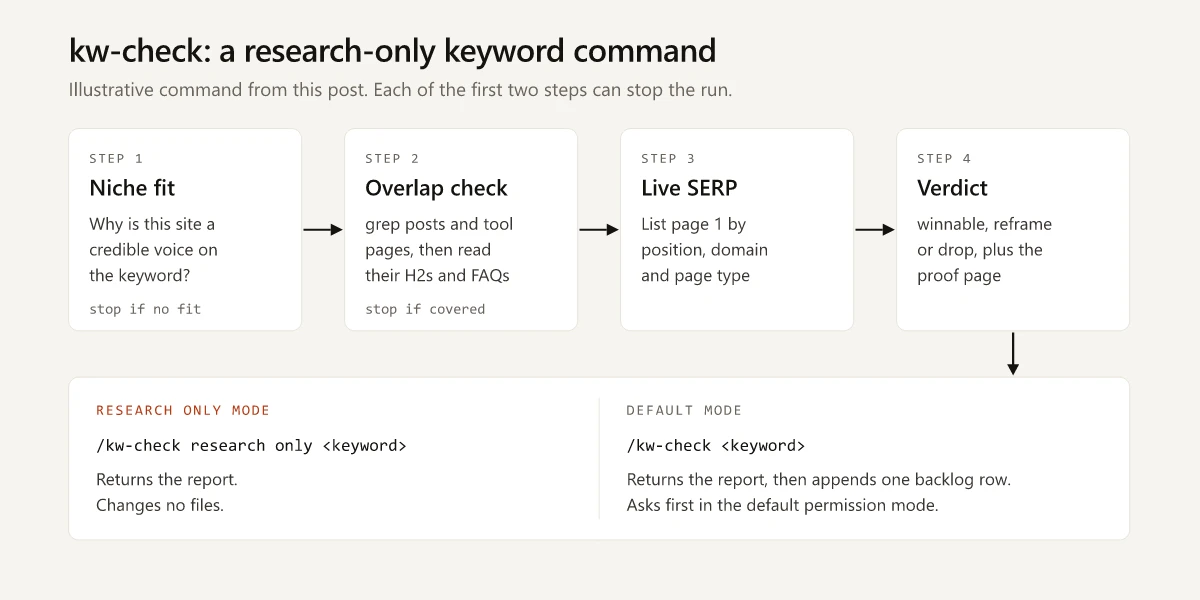
This site is an Astro blog I moved off WordPress with Claude Code, and its keyword research runs as a project command with a research-only mode. Given research only before a topic, that command checks niche fit, greps existing posts and tool pages for overlap, and returns a live-SERP verdict without changing a file.
I wrote the file below for this post. It is an illustrative, trimmed version of those research steps, with my SEO tools swapped for generic instructions. Save it as .claude/commands/kw-check.md:
---
description: Research-only keyword check for this site. Niche fit, overlap with existing posts and tool pages, then a live-SERP verdict.
argument-hint: [research only] <keyword>
disable-model-invocation: true
allowed-tools: Read WebSearch Bash(grep *) Bash(ls *)
---

The request is: $ARGUMENTS

If the request begins with "research only", change no files. Otherwise,
after the verdict, append one row to research/keyword-backlog.md.

Tool pages on this site right now:
!`ls src/pages/tools/`

## 1. Niche fit
In one sentence, say why this site is a credible voice on the keyword.
If you cannot, stop and suggest a closer-fit angle.

## 2. Overlap check
Build a hyphen-tolerant pattern from the 2-3 core words (each space
becomes [ -]?) and run grep -rilE "<pattern>" src/content/blog/ src/pages/tools/
For every file returned, list its H2s and FAQ questions. If an existing
page already answers the same question, stop and name that page.

## 3. Live SERP
Search the keyword. List page 1 as: position | domain | page type
(brand, forum, docs, small independent site).

## 4. Verdict
- winnable: at least one page-1 result is a small independent site with a real article
- reframe: page 1 is big brands, but a narrower question is open (name it)
- drop: page 1 is brands, forums and docs with no narrower opening
Name the proof page for any winnable verdict.
What each part is doing:
- The
!line runslsbefore Claude sees the prompt, so the current list of tool pages arrives already inlined. The docs call this dynamic context injection, and a failed injected command aborts the whole invocation. - The mode is parsed in plain language from
$ARGUMENTSinstead of positional arguments, because a keyword contains spaces and positional arguments split on them unless quoted. allowed-toolspre-approves reading, searching and the two shell commands for that turn only. Writing the backlog row is not on the list, so in the default permission mode that one file change still asks for approval.- The overlap check runs before any search because it is free and it kills candidates fastest. In my September 2026 research cycles, overlap with an argument the site had already published was the most common reason a keyword was rejected: 20 of 39 topics in one cycle. It enforces the same one-keyword-per-URL rule as a keyword map. When the overlap is an existing post, the check stops and names that post instead of opening a competing URL. Whether improving that post will pay is a separate question, and I measured it for this site in striking distance keywords: moving page-2 queries up to page 1 was worth single-digit extra clicks.
- The SERP step exists because keyword difficulty misleads. On one audited run, 6 of 12 keywords picked at a difficulty of 0 to 4 died at this step, because page 1 was wall-to-wall DR 80+ brands, which the difficulty score had not reflected. For a Domain Rating 14 site like this one, the verdict also demands a small-site proof page. SEO without link building shows why: the queries this site reached with no link building were long, literal and uncontested.
Run it two ways:
/kw-check research only claude code commands
/kw-check claude code commands
The first returns the report and touches nothing. The second returns the same report, then asks to append the backlog row. The version I run is longer: it pulls keyword volume and difficulty through a metered SEO API and checks each page-1 domain’s Domain Rating with a free Ahrefs endpoint.
Claude Code Subagents: Fanning Out Keyword Research
A subagent is a separate Claude worker with its own context window, system prompt, tool access and permissions. It does a side task and returns only the summary, which keeps search results out of your main conversation. Per the subagents documentation, Claude Code ships these three main built-in types, plus a few helper agents it typically invokes on its own:
| Subagent | Tools | Used for |
|---|---|---|
| Explore | Read-only; Write and Edit denied | Searching and analyzing a codebase without changing it |
| Plan | Read-only; Write and Edit denied | Gathering context during plan mode |
| general-purpose | Every tool available to subagents | Multi-step tasks that need both exploration and action |
For parallel keyword checks you do not need a custom file. The docs’ own pattern is a plain-language request to research several things “in parallel using separate subagents”, and the research version reads like this:
Check these six keywords in parallel, one subagent each. Each subagent
searches its keyword, lists page 1 as position | domain | page type, and
returns only that table plus a winnable, reframe or drop verdict.
Do not call any paid SEO tool.
The limits worth knowing before you fan out, all from the same docs page:
| Limit | Default |
|---|---|
| Subagents running at once in a session | 20, then spawning fails until one finishes (CLAUDE_CODE_MAX_CONCURRENT_SUBAGENTS changes it) |
| Nesting | Up to three layers of subagents below the main conversation |
| Context cost | Every result returns to your main conversation, so many detailed results fill it |
| Usage | Each subagent sends its own requests, which count toward the same usage limits |
The last line of that prompt comes from my own runs. When I fan keyword research out to parallel subagents, two limits bite: web search is capped per session and the cap is shared by every subagent, and a metered SEO API drains fast when several subagents re-check the same SERPs. Every research prompt I hand a subagent now names the tools it may not call.
To reuse the worker, save it as a custom subagent in .claude/agents/ (project) or ~/.claude/agents/ (personal). I have no custom subagent files, so this one is illustrative:
---
name: serp-checker
description: Checks one keyword's live page 1 and returns a winnability verdict. Use for parallel keyword checks.
tools: WebSearch, WebFetch, Read
model: sonnet
---

You check one keyword. Search it, list page 1 as position | domain | page type,
then return winnable, reframe or drop with the proof page. Return only the
table and the verdict.
Only name and description are required. The other route is to add context: fork to the kw-check frontmatter, which runs the whole command in a subagent. That subagent does not see your conversation history, so the command’s instructions have to stand on their own.
Why a Claude Code Custom Command Is Not Showing or Working
| Symptom | Likely cause | Fix |
|---|---|---|
New command missing from the / menu | File added during a running session | Run /reload-skills, or restart |
| Edits to a command in an added directory do nothing | Claude Code does not watch .claude/commands/ inside an /add-dir folder | Restart the session |
| A different prompt runs than your file | A skill with the same name exists, and the skill wins | Rename one of them |
| Frontmatter settings are ignored | The opening --- is not on line 1, or the YAML does not parse | Move the block to the top; launch with the debug flag to see the parse error |
| The command aborts with “Shell command failed” | An injected ! command exited with an error | Fix the command, or see the note below for checks that exit 1 on purpose |
$2 appears literally in the prompt | You passed fewer arguments than placeholders | Pass a value for every indexed placeholder, switch to a named argument from the arguments field (an unmatched one expands to empty), or use $ARGUMENTS |
| Claude runs the command without being asked | Its description matched your request | Add disable-model-invocation: true |
For a check script that exits 1 when it finds problems, the docs section on when an injected command fails suggests appending || true to that command so the invocation does not abort.
Start With the Claude Code Command You Retype Most
The built-in list will keep changing with releases, which is why the checks on this page are dated September 2026 and link to the docs pages they came from. Custom Claude Code commands change only when you edit them, and the research-only split is the part of mine I would copy first: one argument that tells a run to read and report without touching a file.
Take the research routine you paste into chat most often, save it as .claude/commands/<name>.md with disable-model-invocation: true and one $ARGUMENTS placeholder, and run it on your next keyword.
Frequently Asked Questions
Which Claude Code commands should I learn first?
For non-developers, start with /clear, /compact, /context, /rewind, /resume, /plan, /model and /usage. Between them they control what Claude keeps in context, what it may change, which model it uses and what a session costs. Type / on its own to see every command available in your setup.
Are Claude Code custom commands deprecated?
No. As of September 2026, Anthropic's docs call a Markdown file in .claude/commands/ the older format and say it still works. New work should usually be a skill, because a skill folder can bundle supporting files.
Where do Claude Code custom commands live?
Project commands go in .claude/commands/ inside the repository and load only there. Personal commands go in ~/.claude/commands/ and load in every project on your machine. A file in a subfolder gets a namespaced name, so .claude/commands/research/kw-check.md becomes /research:kw-check.
How do I pass arguments to a Claude Code custom command?
Put $ARGUMENTS in the file where the input should go. For single values use $ARGUMENTS[0] or its shorthand $0 for the first argument and $1 for the second, and wrap multi-word values in quotes. You can also name arguments with the arguments frontmatter field.
Why is my Claude Code custom command not showing up?
The usual causes are a file in the wrong folder, a file added during a running session (run /reload-skills), or a skill with the same name that takes precedence over the command file. Commands inside a folder added with add-dir need a session restart after each edit.